

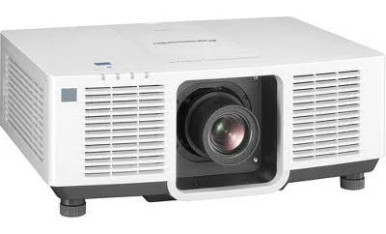
Projector installations can go wrong before the mount goes up. Room geometry, ambient light, screen size, cable routes, control requirements, and service access all shape the purchase. This Panasonic PT-MZ680WU7 Setup Guide and Buying Considerations overview helps AV buyers turn those constraints into a workable deployment brief.
The supplied catalog data does not include verified specifications for the PT-MZ680WU7 itself. That means its brightness, resolution, throw range, connections, controls, and mounting requirements should be confirmed in current model documentation before it is specified. No alternative should be treated as a direct substitute without that check.
What can be compared responsibly? Four Panasonic products in the supplied catalog have verified brightness and WUXGA resolution data. Two also have identified throw formats: the short-throw PT-VMZ6STBU8 and ultra-short-throw PT-CMZ50U. This guide explains how to assess those options alongside the PT-VMZ72BU8 and PT-VMZ51, then verify deployment fit, live commerce details, and price-to-performance before ordering.
Products at a Glance
- Option 1: Panasonic PT-VMZ6STBU8 6,200 Lumen WUXGA Short Throw Laser Projector for Golf Simulators
- For space-constrained rooms or simulator layouts that…: Panasonic PT-CMZ50 WUXGA Ultra-Short Throw Laser Projector – Professional Golf Simulator Display
- For deployments that place strong weight on listed li…: Panasonic PT-VMZ72BU8 7,300 Lumens WUXGA Laser Golf Simulator Projector – High-Brightness, Vivid Green Mode
- For projects whose approved brief calls for a 5200-lu…: Panasonic PT-VMZ51 5200-Lumen WUXGA Laser 3LCD Projector
Quick Comparison Table
| Feature | Panasonic PT-VMZ6STBU8 6,200 Lumen WUXGA Short Throw Laser Projector for Golf Simulators | Panasonic PT-CMZ50 WUXGA Ultra-Short Throw Laser Projector – Professional Golf Simulator Display | Panasonic PT-VMZ72BU8 7,300 Lumens WUXGA Laser Golf Simulator Projector – High-Brightness, Vivid Green Mode | Panasonic PT-VMZ51 5200-Lumen WUXGA Laser 3LCD Projector |
|---|---|---|---|---|
| Brightness | 6,200 Lumen | 5200 lumens | 7,300 Lumens | 5200 lumens |
| Resolution | WUXGA | WUXGA | WUXGA | WUXGA |
| Best For | Layouts that require short-throw geometry and can accommodate the exact placement defined in the model documentation. | Space-constrained rooms or simulator layouts that require an ultra-short-throw format, subject to exact surface and placement checks. | Deployments that place strong weight on listed light output and have enough planning time to confirm the complete installation requirements. | Projects whose approved brief calls for a 5200-lumen WUXGA candidate and allows full geometry and infrastructure verification. |
| Throw Type | Short throw | Ultra short throw | ||
| Recommended Buyer | Layouts that require short-throw geometry and can accommodate the exact placement defined in the model documentation. | Space-constrained rooms or simulator layouts that require an ultra-short-throw format, subject to exact surface and placement checks. | Deployments that place strong weight on listed light output and have enough planning time to confirm the complete installation requirements. | Projects whose approved brief calls for a 5200-lumen WUXGA candidate and allows full geometry and infrastructure verification. |
Product Images

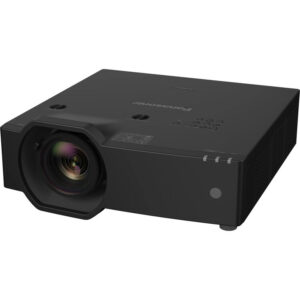
Projector Options from AudioVideoNation
1. Panasonic PT-VMZ6STBU8 6,200 Lumen WUXGA Short Throw Laser Projector for Golf Simulators
Who should compare it: Layouts that require short-throw geometry and can accommodate the exact placement defined in the model documentation.
Why it belongs here: The PT-VMZ6STBU8 adds a verified short-throw choice to the deployment shortlist. Its listed 6,200-lumen brightness and WUXGA resolution give planners three concrete facts to test against the room brief.
SKU: PT-VMZ6STBU8
Key Features
- Listed 6,200-lumen brightness
- WUXGA resolution
- Short-throw format
Things to Consider
Short throw does not establish the exact image distance. Confirm the throw chart, lens position, mounting requirements, connections, controls, and simulator or room geometry before ordering.
2. Panasonic PT-CMZ50 WUXGA Ultra-Short Throw Laser Projector – Professional Golf Simulator Display
Who should compare it: Space-constrained rooms or simulator layouts that require an ultra-short-throw format, subject to exact surface and placement checks.
Why it belongs here: The PT-CMZ50U supplies the ultra-short-throw option in this group. Its verified format helps buyers evaluate layouts where projector placement near the image surface is the central constraint.
SKU: PT-CMZ50U
Key Features
- Listed 5200-lumen brightness
- WUXGA resolution
- Ultra-short-throw format
Things to Consider
Confirm the required surface, mounting position, image dimensions, source connections, and control method. Its catalog positioning does not establish compatibility with a specific simulator system.
3. Panasonic PT-VMZ72BU8 7,300 Lumens WUXGA Laser Golf Simulator Projector – High-Brightness, Vivid Green Mode
Who should compare it: Deployments that place strong weight on listed light output and have enough planning time to confirm the complete installation requirements.
Why it belongs here: The PT-VMZ72BU8 provides a listed 7,300-lumen WUXGA option for buyers assessing a higher stated brightness point. It belongs in the comparison only after its installation geometry is verified.
SKU: PT-VMZ72BU8
Key Features
- Listed 7,300-lumen brightness
- WUXGA resolution
- Cataloged under Projectors and Golf Simulator Projectors
Things to Consider
The supplied facts do not identify its throw type. Verify image distance, lens placement, mounting, connections, controls, and any simulator-specific requirements before specifying it.
4. Panasonic PT-VMZ51 5200-Lumen WUXGA Laser 3LCD Projector
Who should compare it: Projects whose approved brief calls for a 5200-lumen WUXGA candidate and allows full geometry and infrastructure verification.
Why it belongs here: The PT-VMZ51 adds another verified 5200-lumen WUXGA candidate without assigning it an unsupported throw format. It gives buyers a reference point for projects where geometry will be confirmed from separate installation documentation.
SKU: PT-VMZ51
Key Features
- Listed 5200-lumen brightness
- WUXGA resolution
- Cataloged under Home Theater Projectors
Things to Consider
Throw type, exact placement, connection options, control capabilities, and mounting requirements are not established by the supplied facts. Confirm each item for SKU PT-VMZ51.
Panasonic PT-VMZ6STBU8 6,200 Lumen WUXGA Short Throw Laser Projector for Golf Simulators vs Panasonic PT-CMZ50 WUXGA Ultra-Short Throw Laser Projector – Professional Golf Simulator Display: Main Differences
- Choose Panasonic PT-VMZ6STBU8 6,200 Lumen WUXGA Short Throw Laser Projector for Golf Simulators if Layouts that require short-throw geometry and can accommodate the exact placement defined in the model documentation..
- Choose Panasonic PT-CMZ50 WUXGA Ultra-Short Throw Laser Projector – Professional Golf Simulator Display if Space-constrained rooms or simulator layouts that require an ultra-short-throw format, subject to exact surface and placement checks..
- Choose Panasonic PT-VMZ72BU8 7,300 Lumens WUXGA Laser Golf Simulator Projector – High-Brightness, Vivid Green Mode if Deployments that place strong weight on listed light output and have enough planning time to confirm the complete installation requirements..
- Choose Panasonic PT-VMZ51 5200-Lumen WUXGA Laser 3LCD Projector if Projects whose approved brief calls for a 5200-lumen WUXGA candidate and allows full geometry and infrastructure verification..
Build the projector deployment brief first
Start with the image, not the projector. Record the intended screen width and height, the available projector-to-screen distance, the mounting zone, and anything that could cross the light path. Note windows, house lights, stage lighting, and whether those sources can be controlled during use. A room label such as classroom or sanctuary cannot answer those questions.
Content matters too. A church may need readable lyrics while house lights remain on. A school may show small spreadsheet cells as well as video. Conference room teams may need presentation text, shared desktops, and videoconference layouts to remain clear from the farthest seat. Capture the real content and viewing distance before assigning a brightness target.
Map the signal and operating workflow. Identify every source, its location, the cable route, the person who starts the system, and how audio reaches the room. Add mounting access, power location, ventilation clearances, and maintenance access to the drawing. These requirements form the deployment brief that every candidate must satisfy. They also expose costly problems early, while the design can still change.
Projector setup guide: prove the image geometry
Do not drill from an estimated throw distance. Use installation documentation for the exact SKU to confirm the required lens position for the planned image size. Verify throw range, image offset, adjustment capability, orientation, mounting pattern, physical dimensions, weight, and required clearances. Those details are not supplied for the PT-MZ680WU7 here, so they remain pre-purchase checks.
Mark the screen edges and proposed lens location in the room. Then check the structure above the mount, the path for power and signal cabling, nearby lights, ceiling obstructions, and access for installation work. Leave a practical route for servicing the projector without dismantling unrelated room systems.
Physical placement should create the image before electronic correction is considered. Heavy correction can mask a poor mounting position without solving focus or alignment problems. Test the planned geometry against the full screen, including corners.
Short throw and ultra-short throw are separate layouts. The PT-VMZ6STBU8 is identified as short throw, while the PT-CMZ50U is identified as ultra short throw. Neither label supplies the exact mounting distance. Check the appropriate throw chart before choosing a mount or finalizing construction.
Panasonic WUXGA projector options: compare verified facts
The four alternatives provide a useful range of documented facts. The PT-VMZ6STBU8 is listed at 6,200 lumens with WUXGA resolution and a short-throw format. The PT-CMZ50U is listed at 5200 lumens with WUXGA resolution and an ultra-short-throw format. The PT-VMZ72BU8 carries a 7,300-lumen and WUXGA listing. The PT-VMZ51 is listed at 5200 lumens and WUXGA.
Those numbers create a shortlist, not a finished design. Brightness must be assessed against screen dimensions, screen surface, ambient light, viewing expectations, and the content being displayed. A higher lumen figure does not prove better deployment fit if the projector cannot produce the required image from the available position. Compare manufacturer documentation on a consistent basis when making the final selection.
WUXGA is the verified resolution for all four alternatives. That common fact makes resolution comparison straightforward, but it does not establish signal compatibility or confirm the PT-MZ680WU7 specification. Check supported input formats, source settings, and any intermediate switching or extension equipment for the complete signal path.
For the PT-VMZ72BU8 and PT-VMZ51, the supplied facts do not identify a throw type. Their exact lens and placement requirements need verification before either one reaches a purchase order.
Short throw and ultra-short throw deployment fit
Throw format can decide the project. A short-throw projector sits closer to the screen than a conventional layout, while an ultra-short-throw projector is intended for placement much closer still. That distinction affects mounting, cable routes, alignment, shadows, and the amount of open space required in front of the image.
The PT-VMZ6STBU8 brings together a verified short-throw format, WUXGA resolution, and listed 6,200-lumen brightness. It belongs on the shortlist when the room cannot accommodate a longer projection distance. The PT-CMZ50U pairs an ultra-short-throw format with WUXGA and listed 5200-lumen brightness. Consider it when the projector must remain close to the image surface.
Ultra-short-throw placement deserves careful surface and alignment checks. Small physical changes near the screen can have a visible effect on image geometry. Short-throw layouts still require a clear projection path and exact lens positioning.
Both products are associated with golf simulator use in the provided catalog data, but that classification does not confirm compatibility with a specific enclosure, screen, tracking system, or software package. Simulator buyers should verify image coverage, projector location, player clearance, source format, and protection from impact. Churches, schools, and meeting rooms should apply the same geometry discipline to their own layouts.
Plan signal, control, audio, and commissioning
A projector is one endpoint in a larger AV system. Document the entire signal path before selecting it: source devices, switchers, extension hardware, wall plates, cable lengths, and the format delivered to the projector. Confirm each required connector and supported signal in the exact product documentation. The supplied facts do not provide connection details for these candidates.
Build a separate control plan. Decide whether users will operate the system from the projector, a supplied controller, or a room-control interface. If network monitoring, scheduled operation, or centralized support is required, verify those capabilities rather than assuming they are shared across Panasonic product families.
Treat audio as its own design. The provided data does not establish audio capabilities, so confirm how sound will leave each source, where it will be processed, and which room system will reproduce it.
Commissioning should cover the full workflow:
- Check image size, alignment, focus, and edge clarity with representative content.
- Test every source and every switching path.
- Confirm startup, shutdown, source selection, and recovery after a power interruption.
- Inspect text and video from normal seating positions.
- Label cables and controls, then record the approved settings.
Short test clips are not enough. Use the presentations, lyrics, lesson material, simulator content, or shared desktops that the room will display after handoff.
Priorities for churches, schools, and conference rooms
Church installations should document the lighting scenes used during services, the distance to the farthest viewer, and the location of musicians, speakers, cameras, and suspended equipment. Lyrics and presentation text need to be tested under the lighting that will remain active. A listed lumen value alone cannot predict the result.
Schools need readable content and repeatable operation. Test lesson slides, browser text, documents, and video from student seating. Keep controls understandable for changing staff, and plan cable protection and service access around the room's daily use. Confirm every required connection before standardizing a projector across multiple spaces.
Conference room teams should assess shared desktops, spreadsheets, presentation decks, and videoconference layouts. Confirm the source-to-display format through the whole chain, including any switching or extension equipment. A reliable operating sequence matters as much as the image specification when meetings have no dedicated technician.
The PT-VMZ72BU8 offers a listed 7,300-lumen WUXGA point for deployments emphasizing stated light output. The PT-VMZ51 provides a 5200-lumen WUXGA candidate. Neither has a verified throw type in the supplied facts, so geometry and connection checks must come before use-case assumptions.
Stock, availability, and price-to-performance checks
Check each linked AudioVideoNation product page for current stock, availability, and live commerce details. Confirm the complete SKU before ordering. Similar names can still refer to products with different installation requirements, so the purchasing record should match the documentation used by the designer and installer.
Calculate price-to-performance around the installed result. Start with the brightness and resolution required by the room, then account for throw geometry, mounting, screen requirements, cabling, signal extension, control integration, electrical work, installation labor, and commissioning. A candidate that forces a mount relocation or signal-path redesign may change the project economics even if its product-page price looks attractive.
Avoid paying for a larger lumen figure without a documented need. At the same time, do not reduce the brightness target until the screen size, ambient light, and content tests support that decision. The useful comparison is the lowest complete-system cost that satisfies the approved deployment brief.
Before approval, ask the installer to sign off on geometry and infrastructure while the AV owner confirms image expectations and operating workflow. Then revisit the linked product pages for current purchasing details. This sequence ties the buying decision to room evidence instead of an isolated specification.
Related AudioVideoNation Links
- Browse Projector at AudioVideoNation
- Panasonic PT-VMZ6STBU8 product page
- Panasonic PT-CMZ50U product page
- Panasonic PT-VMZ72BU8 product page
- Panasonic PT-VMZ51 product page
Product Information Sources
- Panasonic PT-VMZ6STBU8 6,200 Lumen WUXGA Short Throw Laser Projector for Golf Simulators product information
- Panasonic PT-CMZ50 WUXGA Ultra-Short Throw Laser Projector – Professional Golf Simulator Display product information
- Panasonic PT-VMZ72BU8 7,300 Lumens WUXGA Laser Golf Simulator Projector – High-Brightness, Vivid Green Mode product information
- Panasonic PT-VMZ51 5200-Lumen WUXGA Laser 3LCD Projector product information
FAQ
Does this guide confirm the PT-MZ680WU7 brightness and throw range?
No, this guide does not confirm the PT-MZ680WU7 brightness, resolution, throw range, or connection set. Those specifications are absent from the supplied product facts and should be verified in current documentation for the exact model.
Can one of these Panasonic projectors directly replace the PT-MZ680WU7?
No direct replacement can be confirmed from the supplied facts. Compare throw geometry, image size, brightness, resolution, mounting, connections, controls, and source support before approving a substitution.
Should I choose short throw or ultra-short throw?
Choose short throw when the design allows some space between the projector and screen, and ultra-short throw when placement must be much closer. The PT-VMZ6STBU8 is identified as short throw, while the PT-CMZ50U is identified as ultra short throw, but both still require exact throw-chart checks.
How many projector lumens does my room need?
The required brightness cannot be chosen from room type alone. Base the target on screen size and surface, ambient light, viewing expectations, and representative content, then validate the choice in the planned environment.
How should I check current price, stock, and availability?
Check the linked AudioVideoNation product page for current price, stock, and availability details. Reconfirm the complete SKU and live commerce information when the installation plan is ready for purchase.
What should an installer test before projector sign-off?
The installer should test image geometry, focus, representative content, every source path, control commands, startup, shutdown, and normal user operation. Approved settings, cable labels, and the final signal path should also be documented for support teams.
Conclusion
Use this Panasonic PT-MZ680WU7 Setup Guide and Buying Considerations comparison to match documented specifications to the room and installation requirements. Review the linked product pages for current purchase details before ordering.
Products Used
| SKU | Product Name | URL |
|---|---|---|
| PT-VMZ6STBU8 | Panasonic PT-VMZ6STBU8 6,200 Lumen WUXGA Short Throw Laser Projector for Golf Simulators | View product |
| PT-CMZ50U | Panasonic PT-CMZ50 WUXGA Ultra-Short Throw Laser Projector – Professional Golf Simulator Display | View product |
| PT-VMZ72BU8 | Panasonic PT-VMZ72BU8 7,300 Lumens WUXGA Laser Golf Simulator Projector – High-Brightness, Vivid Green Mode | View product |
| PT-VMZ51 | Panasonic PT-VMZ51 5200-Lumen WUXGA Laser 3LCD Projector | View product |