

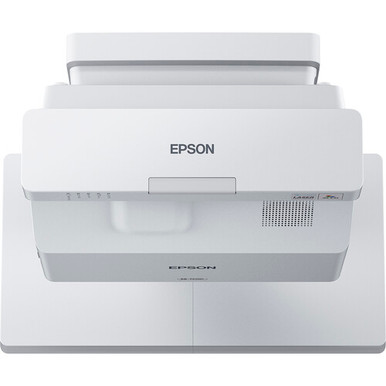
The Epson BL-725WI Setup Guide and Buying Considerations starts with a practical question: does a WXGA ultra-short-throw projector fit your room, content, and installation plan? The Epson BrightLink 725WI is the reference point, while the PowerLite 875E, BrightLink 870Ei, BrightLink 780Ei, and LightScene EV-110 provide useful comparison paths within the supplied Epson lineup.
This guide is for AV buyers, installers, churches, schools, and conference room teams that need to make a defensible purchase. It covers placement planning, source resolution, deployment fit, commissioning, availability checks, and price-to-performance. You will also see where the alternatives differ based on documented resolution, throw type, and brightness. Exact mounting dimensions, connections, accessories, and room-specific requirements should be confirmed through the linked product pages before equipment is ordered or installed.
Products at a Glance
- Option 1: Epson BrightLink 725WI WXGA 3LCD Ultra Short Throw UST Laser Projector
- For projects screening for both 4K resolution and ult…: Epson PowerLite 875E 5 Ultra Short Throw Display with 4K Enhancement (V11HC04120)
- For schools and collaboration teams comparing a 4K ul…: Epson BrightLink 870Ei Ultra Short Throw Interactive Display with 4K Enhancement (V11HC03020)
- For organizations that want to compare multiple 4K ul…: Epson BrightLink 780Ei Ultra Short Throw Interactive Display with 4K Enhancement (V11HC10020)
- For projects that begin with a 2,200-lumen WXGA requi…: Epson LightScene EV-110 2200-Lumen WXGA Laser 3LCD Projector (V11HA22020)
Quick Comparison Table
| Feature | Epson BrightLink 725WI WXGA 3LCD Ultra Short Throw UST Laser Projector | Epson PowerLite 875E 5 Ultra Short Throw Display with 4K Enhancement (V11HC04120) | Epson BrightLink 870Ei Ultra Short Throw Interactive Display with 4K Enhancement (V11HC03020) | Epson BrightLink 780Ei Ultra Short Throw Interactive Display with 4K Enhancement (V11HC10020) | Epson LightScene EV-110 2200-Lumen WXGA Laser 3LCD Projector (V11HA22020) |
|---|---|---|---|---|---|
| Brightness | 2200 lumens | ||||
| Resolution | WXGA | 4K | 4K | 4K | WXGA |
| Best For | Teams seeking a WXGA ultra-short-throw BrightLink projector and planning a model-specific installation. | Projects screening for both 4K resolution and ultra-short-throw placement within the supplied Epson options. | Schools and collaboration teams comparing a 4K ultra-short-throw BrightLink option with the WXGA BL-725WI. | Organizations that want to compare multiple 4K ultra-short-throw BrightLink choices before standardizing a room design. | Projects that begin with a 2,200-lumen WXGA requirement and will validate throw geometry for the room independently. |
| Throw Type | Ultra short throw | Ultra short throw | Ultra short throw | Ultra short throw | |
| Recommended Buyer | Teams seeking a WXGA ultra-short-throw BrightLink projector and planning a model-specific installation. | Projects screening for both 4K resolution and ultra-short-throw placement within the supplied Epson options. | Schools and collaboration teams comparing a 4K ultra-short-throw BrightLink option with the WXGA BL-725WI. | Organizations that want to compare multiple 4K ultra-short-throw BrightLink choices before standardizing a room design. | Projects that begin with a 2,200-lumen WXGA requirement and will validate throw geometry for the room independently. |
Product Images
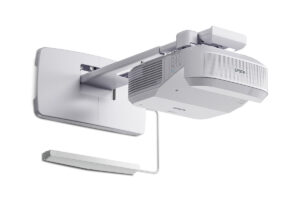
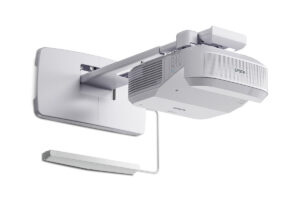
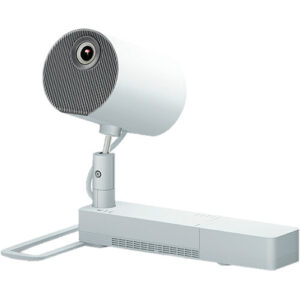
Projector Options from AudioVideoNation
1. Epson BrightLink 725WI WXGA 3LCD Ultra Short Throw UST Laser Projector
Who should compare it: Teams seeking a WXGA ultra-short-throw BrightLink projector and planning a model-specific installation.
Why it belongs here: This is the exact model addressed by the guide and the baseline for comparing resolution, throw layout, installation needs, and project fit.
SKU: BL-725WI
Key Features
- WXGA resolution
- Ultra short throw
- Epson BrightLink product family
- BL-725WI model identifier
Things to Consider
Verify official mounting dimensions, image-size guidance, source connections, audio design, required accessories, and room-light suitability before ordering.
2. Epson PowerLite 875E 5 Ultra Short Throw Display with 4K Enhancement (V11HC04120)
Who should compare it: Projects screening for both 4K resolution and ultra-short-throw placement within the supplied Epson options.
Why it belongs here: It provides a documented 4K, ultra-short-throw comparison path for buyers evaluating whether WXGA meets their content requirements.
SKU: PL-875E
Key Features
- 4K resolution
- Ultra short throw
- Epson PowerLite product family
- PL-875E model identifier
Things to Consider
Confirm placement dimensions, source-format behavior, connections, accessories, controls, and the required collaboration workflow for the exact SKU.
3. Epson BrightLink 870Ei Ultra Short Throw Interactive Display with 4K Enhancement (V11HC03020)
Who should compare it: Schools and collaboration teams comparing a 4K ultra-short-throw BrightLink option with the WXGA BL-725WI.
Why it belongs here: It keeps the comparison within the BrightLink family while adding documented 4K resolution to an ultra-short-throw layout.
SKU: BL-870Ei
Key Features
- 4K resolution
- Ultra short throw
- Epson BrightLink product family
- BL-870Ei model identifier
Things to Consider
Validate the mounting plan, connections, accessory package, control requirements, and exact interaction workflow rather than carrying assumptions over from another BrightLink model.
4. Epson BrightLink 780Ei Ultra Short Throw Interactive Display with 4K Enhancement (V11HC10020)
Who should compare it: Organizations that want to compare multiple 4K ultra-short-throw BrightLink choices before standardizing a room design.
Why it belongs here: This is another documented 4K, ultra-short-throw BrightLink candidate for buyers building a model-specific shortlist.
SKU: BL-780Ei
Key Features
- 4K resolution
- Ultra short throw
- Epson BrightLink product family
- BL-780Ei model identifier
Things to Consider
Compare its official placement, connections, accessories, controls, and workflow directly with the BL-870Ei; their shared resolution and throw labels do not settle the choice.
5. Epson LightScene EV-110 2200-Lumen WXGA Laser 3LCD Projector (V11HA22020)
Who should compare it: Projects that begin with a 2,200-lumen WXGA requirement and will validate throw geometry for the room independently.
Why it belongs here: It adds a documented 2,200-lumen WXGA option, giving buyers a useful contrast to the ultra-short-throw candidates.
SKU: EV-110
Key Features
- 2,200 lumens
- WXGA resolution
- Epson LightScene product family
- EV-110 model identifier
Things to Consider
Do not substitute it into a BL-725WI installation plan until its throw geometry, placement, image size, mounting, and connections have been verified.
Epson BrightLink 725WI WXGA 3LCD Ultra Short Throw UST Laser Projector vs Epson PowerLite 875E 5 Ultra Short Throw Display with 4K Enhancement (V11HC04120): Main Differences
- Choose Epson BrightLink 725WI WXGA 3LCD Ultra Short Throw UST Laser Projector if Teams seeking a WXGA ultra-short-throw BrightLink projector and planning a model-specific installation..
- Choose Epson PowerLite 875E 5 Ultra Short Throw Display with 4K Enhancement (V11HC04120) if Projects screening for both 4K resolution and ultra-short-throw placement within the supplied Epson options..
- Choose Epson BrightLink 870Ei Ultra Short Throw Interactive Display with 4K Enhancement (V11HC03020) if Schools and collaboration teams comparing a 4K ultra-short-throw BrightLink option with the WXGA BL-725WI..
- Choose Epson BrightLink 780Ei Ultra Short Throw Interactive Display with 4K Enhancement (V11HC10020) if Organizations that want to compare multiple 4K ultra-short-throw BrightLink choices before standardizing a room design..
- Choose Epson LightScene EV-110 2200-Lumen WXGA Laser 3LCD Projector (V11HA22020) if Projects that begin with a 2,200-lumen WXGA requirement and will validate throw geometry for the room independently..
Deployment fit for a WXGA ultra short throw projector
The BL-725WI combines WXGA resolution with an ultra-short-throw layout. Start by deciding whether those two documented traits match the room. Ultra-short-throw placement keeps the projector close to the image surface, so the wall area, mounting position, sightlines, and access for service all need to be considered together. Do not approve the location from a floor plan alone.
WXGA should also match the material people will show. Review presentation templates, teaching applications, dashboards, videos, and any small text that must remain readable from the back of the room. A source can output a different format, but that does not make format planning optional. Test representative content before standardizing the projector across several spaces.
For a classroom, confirm that the proposed image will be visible from every seating zone and that the mounting area will not conflict with boards, trim, controls, or teaching space. Churches should check lyrics, announcements, and volunteer-operated sources. Conference room teams should test shared documents and remote-meeting layouts. The same projector can face very different content demands in each setting.
Deployment fit also includes the surrounding system. Establish the audio route, control method, cable path, source locations, and shutdown procedure before installation begins. Verify those requirements against the current product documentation rather than assuming an older BrightLink installation can be copied.
Epson BrightLink 725WI setup: plan before mounting
A careful Epson BrightLink 725WI setup begins with a measured image target. Record the desired image size, usable surface area, finished wall condition, ceiling or wall structure, nearby power, and source-cable route. Then obtain the official placement dimensions and mounting instructions for the exact BL-725WI model. Ultra-short-throw geometry makes small physical changes matter, so the installer needs model-specific measurements.
Use a staged setup sequence:
1. Confirm the image surface and intended image boundaries.
2. Mark the viewing centerline and the approved mounting position from official documentation.
3. Confirm that the structure and mounting hardware suit the planned installation.
4. Route power, signal, audio, and control paths without closing access points prematurely.
5. Connect a representative source and establish the physical image position.
6. Test real content from normal viewing locations.
7. Document settings, cable labels, source behavior, and the final mounting position.
Get the physical alignment as close as possible before relying on digital image correction. A square image surface and correctly positioned mount create a better starting point for commissioning. Check focus and alignment across the whole visible area, not only at the center.
Source behavior deserves its own test. Connect the computers, presentation systems, switchers, or other sources the room will actually use. Check startup, source selection, sleep and wake behavior, and recovery after power is removed. If several rooms will share one design, commission the first room as a pilot and record any changes before repeating the installation.
WXGA content, sources, and system design
The BL-725WI has WXGA resolution in the supplied product facts. Treat that as a design input. Build test files that represent the smallest text, busiest slides, detailed spreadsheets, control interfaces, and video layouts expected in the room. View them from the closest and farthest seats under the lighting conditions used during real sessions.
Resolution is only one part of the signal path. The source, adapters, cabling, switcher, wall plates, and projector must work as one chain. Verify the required connector types and supported signal formats for the exact configuration. If users bring their own computers, define which adapters the organization will supply and who supports them.
Plan audio separately. Decide whether sound will pass through the room system, a conferencing system, or another path, then confirm the required connections. This matters in churches and multipurpose rooms, where speech and program audio may follow different routes.
Operational simplicity also affects deployment success. Use clear input names, place instructions where occasional users can find them, and document how to recover from a missing image. Schools may need a repeatable classroom standard. Conference room teams may prioritize quick source switching. Churches often need a workflow that volunteers can follow without changing installation settings.
Comparing Epson ultra short throw projector alternatives
Three supplied alternatives pair an ultra-short-throw designation with listed 4K resolution: the PowerLite 875E, BrightLink 870Ei, and BrightLink 780Ei. They create a clear decision branch for buyers comparing the WXGA BL-725WI with a 4K path. Resolution alone does not decide the purchase, though. Confirm mounting geometry, connections, image-size requirements, accessory needs, control integration, and the exact workflow for each candidate.
The BrightLink 870Ei and BrightLink 780Ei sit in the same named product family as the BL-725WI, but shared branding is not proof of identical installation requirements. Treat each SKU as a separate design. Compare official drawings and documentation before reusing a mount position, cable plan, control profile, or procurement list.
The PowerLite 875E is another listed 4K ultra-short-throw option. It gives teams a comparison outside the BrightLink family while retaining the same documented throw category. It may belong on a shortlist where ultra-short-throw placement and 4K resolution are mandatory screening criteria. Validate every other required function before selection.
The LightScene EV-110 takes a different comparison angle. Its supplied facts list WXGA resolution and 2,200 lumens, while its throw geometry should be validated for the intended room. Use it when a documented brightness figure is central to the initial shortlist, but do not insert it into a BL-725WI mounting plan without a fresh layout review.
Keep comparisons requirement-led. Separate mandatory needs from preferences, score only verified facts, and send unresolved questions to the linked product documentation or your AudioVideoNation contact.
Stock, availability, and price-to-performance checks
Availability can change during a project, so confirm live purchasing details on each linked product page before committing to an installation date. For multiroom deployments, verify the required quantity, exact SKU, expected procurement timing, and what happens if a proposed substitution appears. A substitute should return to design review. A similar product name does not guarantee matching placement, resolution, connections, accessories, or control behavior.
Price-to-performance should be measured against the room's required outcome. Start with the documented distinctions: the BL-725WI is WXGA and ultra short throw; the PowerLite 875E, BrightLink 870Ei, and BrightLink 780Ei are listed as 4K and ultra short throw; and the LightScene EV-110 is listed at 2,200 lumens with WXGA resolution. Do not assign value to an undocumented capability.
Build a project-cost worksheet that covers the projector, approved mount, image surface preparation, cabling, adapters, switching, control, audio, labor, training, and future service access. Then compare live acquisition details through the linked pages. A lower equipment cost can lose its advantage if the room needs redesign or extra infrastructure. A higher-cost option only earns its place when a verified requirement uses the difference.
For schools, churches, and organizations with several rooms, standardization has value when it reduces spare-part variation, training demands, and support confusion. That value still depends on fit. Document the reason for selecting each model so procurement staff and future technicians know which requirements drove the decision.
Commissioning and handoff checklist
Commissioning should prove that the finished room works for its intended users. Test image alignment, representative content, every approved source, source switching, audio routing, control commands, startup, shutdown, sleep recovery, and restoration after a power interruption. Repeat critical tests from the normal operator position.
Evaluate the image under the lighting scenes people will use. Check viewing from the sides and back of the room, and confirm that displayed text is practical at those distances. For classrooms and meeting rooms, run the applications used every day. For churches, test lyrics, announcements, video, and the volunteer workflow.
Record the installed SKU, mounting measurements, cable labels, settings, source configuration, and support contact. Photograph the finished cable routing and mounting position for the service file. Give operators a short guide covering startup, source choice, shutdown, and basic recovery steps.
Finish with stakeholder acceptance. The installer should demonstrate the agreed workflows, while the buyer confirms that the room meets the documented use cases. Resolve open items before copying the design to another space. This final check protects the deployment from small setup assumptions becoming repeated problems.
Related AudioVideoNation Links
- Browse Projector at AudioVideoNation
- Epson BrightLink 725WI product page
- Epson PowerLite 875E product page
- Epson BrightLink 870Ei product page
- Epson BrightLink 780Ei product page
Product Information Sources
- Epson BrightLink 725WI WXGA 3LCD Ultra Short Throw UST Laser Projector product information
- Epson PowerLite 875E 5 Ultra Short Throw Display with 4K Enhancement (V11HC04120) product information
- Epson BrightLink 870Ei Ultra Short Throw Interactive Display with 4K Enhancement (V11HC03020) product information
- Epson BrightLink 780Ei Ultra Short Throw Interactive Display with 4K Enhancement (V11HC10020) product information
- Epson LightScene EV-110 2200-Lumen WXGA Laser 3LCD Projector (V11HA22020) product information
FAQ
Is the Epson BL-725WI an ultra-short-throw projector?
Yes, the supplied product facts identify the Epson BL-725WI as an ultra-short-throw projector. Use the official model-specific mounting and placement documentation to design its position for your intended image size.
What resolution does the Epson BL-725WI use?
The Epson BL-725WI has WXGA resolution in the supplied product facts. Test the presentations, applications, video layouts, and smallest text used in the room before approving it as a standard.
Which supplied Epson alternatives combine 4K resolution with ultra-short-throw placement?
The supplied facts list the PowerLite 875E, BrightLink 870Ei, and BrightLink 780Ei with 4K resolution and ultra-short-throw designs. Compare their mounting, connections, accessories, controls, and workflows before treating any one as a replacement.
How should buyers assess BL-725WI price-to-performance?
Buyers should compare live acquisition details with the BL-725WI's documented WXGA resolution, ultra-short-throw layout, and the room's mandatory requirements. Include mounting, cabling, control, audio, labor, training, and service access in the project-cost comparison.
What should an installer verify before mounting the BL-725WI?
An installer should verify the intended image size, usable surface, structural support, official placement dimensions, approved hardware, cable route, power location, and source plan before mounting the BL-725WI. A pilot setup also lets the team test real content and operating workflows before repeating the design.
Is the Epson LightScene EV-110 a direct replacement for the BL-725WI?
The Epson LightScene EV-110 should not be treated as a direct BL-725WI replacement without a new layout review. The supplied facts identify it as a 2,200-lumen WXGA option, while the BL-725WI is explicitly identified as ultra short throw.
Conclusion
Use this Epson BL-725WI Setup Guide and Buying Considerations comparison to match documented specifications to the room and installation requirements. Review the linked product pages for current purchase details before ordering.
Products Used
| SKU | Product Name | URL |
|---|---|---|
| BL-725WI | Epson BrightLink 725WI WXGA 3LCD Ultra Short Throw UST Laser Projector | View product |
| PL-875E | Epson PowerLite 875E 5 Ultra Short Throw Display with 4K Enhancement (V11HC04120) | View product |
| BL-870Ei | Epson BrightLink 870Ei Ultra Short Throw Interactive Display with 4K Enhancement (V11HC03020) | View product |
| BL-780Ei | Epson BrightLink 780Ei Ultra Short Throw Interactive Display with 4K Enhancement (V11HC10020) | View product |
| EV-110 | Epson LightScene EV-110 2200-Lumen WXGA Laser 3LCD Projector (V11HA22020) | View product |