

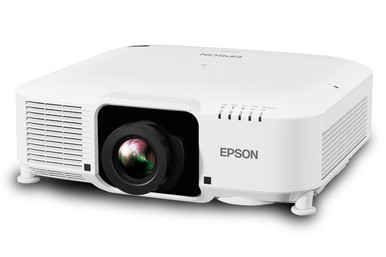
An Epson L1070WNL installation can go off course before the projector is mounted. Lens choice, image geometry, room light, cabling, and content resolution all need answers first. This Epson L1070WNL Setup Guide and Buying Considerations article starts with the two supplied facts that matter most: 7,000-lumen brightness and WXGA resolution.
The guide is built for AV buyers, installers, churches, schools, and conference room teams deciding whether the projector belongs in a real deployment. It covers room fit, lens due diligence, signal planning, a practical setup sequence, live stock and availability checks, and price-to-performance without relying on a fixed price. It also separates the L1070WNL from the lens listings and ultra-short-throw alternative in the supplied product set. By the end, you should have a cleaner shortlist and a focused list of questions to resolve before purchase or installation.
Products at a Glance
- Option 1: Epson Pro L1070WNL WXGA 1080p 3LCD Projector 7000 Lumens White
- For measured installations where approved documentati…: Epson V12H004W08 Wide Throw #3 Zoom Lens ELPLW08
- For installers comparing documented lens options for…: Epson V12H004W05 ELPLW05 Wide-Throw Zoom Lens for Select Projectors
- For short-throw layouts whose measurements and approv…: Epson V12H004U04 ELPLU04 Short-Throw Zoom Lens for Select Projectors
- For teams considering a close-to-surface installation…: Epson PowerLite 875E 5 Ultra Short Throw Display with 4K Enhancement (V11HC04120)
Quick Comparison Table
| Feature | Epson Pro L1070WNL WXGA 1080p 3LCD Projector 7000 Lumens White | Epson V12H004W08 Wide Throw #3 Zoom Lens ELPLW08 | Epson V12H004W05 ELPLW05 Wide-Throw Zoom Lens for Select Projectors | Epson V12H004U04 ELPLU04 Short-Throw Zoom Lens for Select Projectors | Epson PowerLite 875E 5 Ultra Short Throw Display with 4K Enhancement (V11HC04120) |
|---|---|---|---|---|---|
| Brightness | 7000 Lumens | 12,000 lumen | |||
| Resolution | WXGA | 4K | |||
| Best For | AV teams that have measured the room and can verify the required lens, connections, package contents, and signal behavior before purchase. | Measured installations where approved documentation confirms that this exact lens and projector combination produces the required image. | Installers comparing documented lens options for a measured screen and projector position. | Short-throw layouts whose measurements and approved compatibility documents support this exact lens. | Teams considering a close-to-surface installation instead of the L1070WNL deployment approach. |
| Throw Type | Short throw | Short throw | Ultra short throw | ||
| Recommended Buyer | AV teams that have measured the room and can verify the required lens, connections, package contents, and signal behavior before purchase. | Measured installations where approved documentation confirms that this exact lens and projector combination produces the required image. | Installers comparing documented lens options for a measured screen and projector position. | Short-throw layouts whose measurements and approved compatibility documents support this exact lens. | Teams considering a close-to-surface installation instead of the L1070WNL deployment approach. |
Product Images
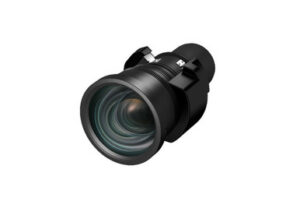


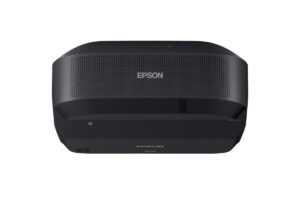
Projector Options from AudioVideoNation
1. Epson Pro L1070WNL WXGA 1080p 3LCD Projector 7000 Lumens White
Who should compare it: AV teams that have measured the room and can verify the required lens, connections, package contents, and signal behavior before purchase.
Why it belongs here: This is the projector at the center of the guide. Its supplied 7,000-lumen brightness and WXGA resolution provide the starting point for room, content, and installation planning.
SKU: L1070WNL
Key Features
- 7,000-lumen brightness
- WXGA resolution
- L1070WNL SKU for procurement matching
- Categorized as a multimedia projector
Things to Consider
The provided data does not specify lens compatibility, throw ratio, connections, audio, smart functions, or package contents. Confirm each item before design sign-off.
2. Epson V12H004W08 Wide Throw #3 Zoom Lens ELPLW08
Who should compare it: Measured installations where approved documentation confirms that this exact lens and projector combination produces the required image.
Why it belongs here: The ELPLW08 listing gives installers a concrete lens identifier to investigate when a room requires a longer projection position. It remains a candidate until the exact projector pairing and throw range are verified.
SKU: V12H004W08
Key Features
- V12H004W08 SKU
- ELPLW08 lens identifier
- Wide Throw #3 Zoom Lens wording in the product name
- Listed in the Accessories, Lenses, and Projectors categories
Things to Consider
The supplied data does not confirm L1070WNL compatibility or provide a throw ratio. Match the projector, lens, screen, and distance through approved documentation before ordering.
3. Epson V12H004W05 ELPLW05 Wide-Throw Zoom Lens for Select Projectors
Who should compare it: Installers comparing documented lens options for a measured screen and projector position.
Why it belongs here: This listing provides a second exact Epson lens SKU for the design team to evaluate. It broadens the due-diligence list without implying that it fits the L1070WNL.
SKU: V12H004W05
Key Features
- V12H004W05 SKU
- ELPLW05 lens identifier
- Zoom-lens accessory for select projectors in the product name
- Listed in the Lenses, Multimedia Projectors, Projectors, and Video categories
Things to Consider
The supplied data does not provide a dependable throw calculation or confirm L1070WNL compatibility. Verify the official lens classification, image range, and approved projector pairing.
4. Epson V12H004U04 ELPLU04 Short-Throw Zoom Lens for Select Projectors
Who should compare it: Short-throw layouts whose measurements and approved compatibility documents support this exact lens.
Why it belongs here: The ELPLU04 is the supplied short-throw lens candidate. It is relevant when room depth or mounting position pushes the design toward a shorter projection distance.
SKU: ELPLU04
Key Features
- Short-throw classification
- ELPLU04 SKU
- V12H004U04 identifier in the product name
- Zoom-lens listing for select projectors
Things to Consider
Short-throw wording does not establish compatibility or image size. Verify the L1070WNL pairing and applicable throw range before placing an order or mount.
5. Epson PowerLite 875E 5 Ultra Short Throw Display with 4K Enhancement (V11HC04120)
Who should compare it: Teams considering a close-to-surface installation instead of the L1070WNL deployment approach.
Why it belongs here: The PowerLite 875E gives buyers an alternate installation direction when an ultra-short-throw layout and 4K resolution align with the room brief.
SKU: PL-875E
Key Features
- Ultra-short-throw classification
- 4K resolution in the supplied product facts
- PL-875E SKU
- V11HC04120 identifier in the product name
Things to Consider
This is not a documented drop-in replacement for the L1070WNL. Verify brightness, connections, image sizing, installation requirements, and room fit before comparing the two systems.
Epson Pro L1070WNL WXGA 1080p 3LCD Projector 7000 Lumens White vs Epson V12H004W08 Wide Throw #3 Zoom Lens ELPLW08: Main Differences
- Choose Epson Pro L1070WNL WXGA 1080p 3LCD Projector 7000 Lumens White if AV teams that have measured the room and can verify the required lens, connections, package contents, and signal behavior before purchase..
- Choose Epson V12H004W08 Wide Throw #3 Zoom Lens ELPLW08 if Measured installations where approved documentation confirms that this exact lens and projector combination produces the required image..
- Choose Epson V12H004W05 ELPLW05 Wide-Throw Zoom Lens for Select Projectors if Installers comparing documented lens options for a measured screen and projector position..
- Choose Epson V12H004U04 ELPLU04 Short-Throw Zoom Lens for Select Projectors if Short-throw layouts whose measurements and approved compatibility documents support this exact lens..
- Choose Epson PowerLite 875E 5 Ultra Short Throw Display with 4K Enhancement (V11HC04120) if Teams considering a close-to-surface installation instead of the L1070WNL deployment approach..
Confirm the 7,000-lumen WXGA projector basics
The supplied product data identifies the L1070WNL as a 7,000-lumen projector with WXGA resolution. Those are the firm starting points. Brightness establishes the rated light-output class, while resolution frames the detail available for presentations and other content. Neither fact settles room fit on its own.
Record the planned screen dimensions, viewing distance, ambient-light conditions, and main content types. Evaluate the 7,000-lumen rating against the chosen screen and the light reaching it. Check WXGA against presentation layouts, worship lyrics, spreadsheets, video, and any fine text that viewers must read.
The product name includes 1080p wording, but the extracted resolution supplied for this guide is WXGA. Confirm accepted signals and image-output behavior on the linked product page before specifying sources, switchers, or distribution equipment. Lens compatibility, throw ratio, connections, audio, and smart functions are not supplied here. Make each one a procurement question instead of assuming an answer.
Deployment fit for churches, schools, and conference rooms
Deployment fit starts with the room, not the lumen number. A church may need legible lyrics from distant seats while stage lighting changes throughout a service. A school may alternate between slides, documents, diagrams, and video. A conference room team may care most about small text, shared spreadsheets, and repeatable operation. Test plans should reflect those differences.
For each space, identify the brightest operating condition, intended screen area, farthest viewer, mounting location, and content with the smallest critical text. Note whether lights near the screen can be controlled. These details give the 7,000-lumen and WXGA facts practical context.
Also inspect the physical route from the source equipment to the projector location. Record cable distance, required endpoints, control needs, available power, mounting constraints, and maintenance access. Verify the projector's actual connections before buying cables or adapters. If the installation is overhead, confirm the support method and service plan with a qualified installer. A sound deployment brief turns a promising projector listing into a design that can be checked before equipment reaches the site.
Epson projector lens selection and throw planning
Lens selection is the largest unresolved item in the supplied L1070WNL data. The product set includes ELPLW08, ELPLW05, and ELPLU04 lens listings, but their presence does not prove compatibility with the projector. Treat them as candidate SKUs for verification.
Start with two fixed measurements: the required image width and the usable distance between the lens position and the screen. Then consult approved documentation for the exact projector-and-lens pairing. Confirm that the calculated image range covers the room with useful adjustment margin. Do not choose a lens from wide-throw or short-throw wording alone.
Check the full identifiers during that review. V12H004W08 corresponds to the ELPLW08 listing, V12H004W05 to ELPLW05, and ELPLU04 is the supplied SKU for the V12H004U04 listing. Ask the seller or installer to document the approved pairing, applicable throw range, intended orientation, and package contents before ordering.
Finally, review obstructions. Lighting fixtures, beams, fans, speakers, and sight lines can eliminate an otherwise workable position. A measured drawing is valuable here. It lets the buyer resolve lens choice, mount location, and cable routing as one design decision.
Epson L1070WNL setup workflow
Use a staged setup process so a missing detail does not become an expensive site problem.
1. Freeze the room brief. Record screen position and dimensions, projector location, viewing area, ambient-light conditions, source equipment, and the content used most often. Photograph or draw any obstacles between the planned lens position and screen.
2. Verify the exact order. Match the L1070WNL SKU on the quote and product page. Confirm package contents and the exact approved lens separately. Repeat the identifier check for every accessory. Similar product names are not enough for sign-off.
3. Validate infrastructure. Compare verified projector connections with the source, switching, control, and distribution design. Check cable types and lengths before walls or ceilings close. Plan suitable power and maintenance access under the site's installation rules.
4. Complete physical installation safely. Follow current manufacturer documentation for the projector, lens, and mounting hardware. Use qualified personnel for overhead mounting and electrical work. Keep the final position within the verified image range rather than relying on an unconfirmed adjustment capability.
5. Configure and align. Set the source to a mode the projector is documented to accept. Fit, focus, and align the image only with controls confirmed for the installed projector-and-lens combination. Save configuration details where the support team can find them.
6. Run acceptance tests. View real slides, lyrics, spreadsheets, diagrams, and video from the nearest and farthest seats. Repeat the test under the room's normal lighting states. Check startup, shutdown, source changes, and any control workflow the staff will use.
7. Document the handoff. Record installed SKUs, cable paths, source settings, verified operating steps, and the support contact. Clear documentation helps schools, churches, and meeting-room teams reproduce a working setup without guesswork.
Plan sources around WXGA resolution
The supplied resolution fact is WXGA. Build the content test around that fact. Dense spreadsheets, small interface text, detailed diagrams, and multi-column slides deserve special attention because the room may expose readability problems that a simple video clip will not.
List every source expected in the system, such as presentation computers, fixed media players, or conferencing equipment. Then verify the projector's accepted signal formats and the behavior of any switcher, scaler, or extender in the path. Those capabilities are not provided in the product data, so they should be confirmed before equipment is ordered.
Do not treat the 1080p wording in the full product name as proof of native Full HD resolution. The supplied resolution field says WXGA. If a workflow depends on a particular input format, pixel mapping, or protected-content path, ask for written confirmation and test it during commissioning. Use the same files that presenters will display after handoff.
Check projector stock and availability at the right time
Stock and availability can change between system design and purchase. Use each linked AudioVideoNation product page for current commerce details, and confirm the exact SKU before committing the installation schedule. A similar name or lens family does not establish an interchangeable part.
Check availability twice. First, do it during design so the shortlist is realistic. Check again when the room, lens, infrastructure, and purchase approval are ready. If the projector and required lens are separate order items, confirm both on the same timeline. The installation cannot be commissioned with half of the required combination.
Allow time for receiving inspection as well. Procurement staff should compare delivered identifiers with the approved equipment list before installers travel to the site. If an item changes, send the replacement through the same compatibility and throw-planning review. Availability pressure should not override the measurements behind the design.
Judge projector price-to-performance by the deployed system
Projector price-to-performance should be judged across the complete installation, using current product-page details rather than a fixed figure in this guide. Begin with the L1070WNL, then add every item required by the verified design. That may include the approved lens, mounting solution, signal transport, switching, control, cabling, installation labor, and commissioning.
Next, connect cost to the actual job. The relevant questions are whether 7,000-lumen brightness suits the measured room, whether WXGA supports the content, and whether the lens plan produces the required image from an available mounting position. Paying for a projector that cannot meet one of those needs is poor value, even if its purchase figure looks attractive in isolation.
Compare alternatives using the same scope. Do not compare a projector-only listing with a fully planned system. Record unresolved requirements beside each option and seek current details before approval. This approach gives buyers a defensible price-to-performance comparison without relying on unsupported benchmarks or a price that may change.
When an ultra-short-throw alternative deserves a look
The Epson PowerLite 875E belongs on a separate branch of the shortlist. Its supplied facts identify 4K resolution and an ultra-short-throw design, while the L1070WNL is identified by 7,000-lumen brightness and WXGA resolution. Those differences call for a fresh room plan, not a one-for-one substitution.
Consider the 875E listing when placing the display close to the presentation surface is central to the project. Then verify its brightness, image-sizing requirements, connections, installation method, and room fit on the linked page. Run the same content and lighting tests used for the L1070WNL review. Keeping the two approaches separate prevents an architectural change from being mistaken for a simple product swap.
Related AudioVideoNation Links
- Browse Projector at AudioVideoNation
- Epson Pro L1070WNL projector
- Epson ELPLW08 lens
- Epson ELPLW05 lens
- Epson ELPLU04 short-throw lens
Product Information Sources
- Epson Pro L1070WNL WXGA 1080p 3LCD Projector 7000 Lumens White product information
- Epson V12H004W08 Wide Throw #3 Zoom Lens ELPLW08 product information
- Epson V12H004W05 ELPLW05 Wide-Throw Zoom Lens for Select Projectors product information
- Epson V12H004U04 ELPLU04 Short-Throw Zoom Lens for Select Projectors product information
- Epson PowerLite 875E 5 Ultra Short Throw Display with 4K Enhancement (V11HC04120) product information
FAQ
What brightness and resolution are listed for the Epson L1070WNL?
The supplied product data lists the Epson L1070WNL at 7,000 lumens with WXGA resolution. Use both figures as planning inputs, then test room lighting, screen size, viewing distance, and real content before approving the deployment.
Does the Epson L1070WNL include a lens?
The provided product data does not confirm whether a lens is included, so buyers should verify package contents on the linked product page before ordering. Do not assume that any lens listed in this guide is bundled or compatible.
Are the ELPLW08, ELPLW05, and ELPLU04 compatible with the L1070WNL?
Compatibility between these lenses and the L1070WNL cannot be confirmed from the supplied data. Verify the exact projector-and-lens pairing, throw range, screen dimensions, and mounting distance through approved documentation.
Is a 7,000-lumen rating enough for a church, classroom, or conference room?
A 7,000-lumen rating alone cannot determine whether the projector fits a church, classroom, or conference room. Screen size, ambient light, viewing distance, content, and the chosen lens all affect the deployment decision.
How should buyers compare the L1070WNL on price-to-performance?
Compare the L1070WNL by the cost and suitability of the complete deployed system, not the projector listing alone. Use live product-page details and include the verified lens, mounting, signal transport, control, cabling, labor, and commissioning in the review.
Where should buyers confirm current stock and availability?
Buyers should confirm current stock and availability on the linked AudioVideoNation product pages using the exact SKU. Recheck the projector and required accessories when the design is approved and the team is ready to order.
Conclusion
Use this Epson L1070WNL Setup Guide and Buying Considerations comparison to match documented specifications to the room and installation requirements. Review the linked product pages for current purchase details before ordering.
Products Used
| SKU | Product Name | URL |
|---|---|---|
| L1070WNL | Epson Pro L1070WNL WXGA 1080p 3LCD Projector 7000 Lumens White | View product |
| V12H004W08 | Epson V12H004W08 Wide Throw #3 Zoom Lens ELPLW08 | View product |
| V12H004W05 | Epson V12H004W05 ELPLW05 Wide-Throw Zoom Lens for Select Projectors | View product |
| ELPLU04 | Epson V12H004U04 ELPLU04 Short-Throw Zoom Lens for Select Projectors | View product |
| PL-875E | Epson PowerLite 875E 5 Ultra Short Throw Display with 4K Enhancement (V11HC04120) | View product |