

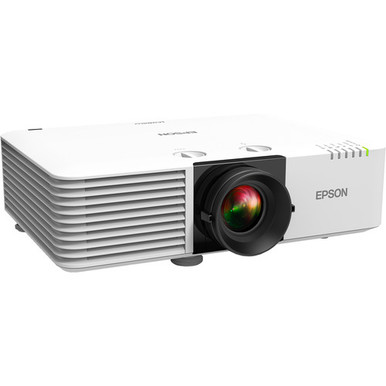
The AV PL-L610 Setup Guide and Buying Considerations brief starts with three practical questions: Does a 6000-lumen projector fit the room plan, does XGA match the content workflow, and is PL-L610 the correct SKU for the bill of materials? The supplied Epson shortlist also includes the PL-L610U with 6000 lumens and WUXGA resolution, plus the PL-L610W with WXGA resolution. Those differences deserve attention before anyone approves a mount location or purchase order.
This guide helps AV buyers, installers, churches, schools, and conference room teams compare the three projectors without assuming capabilities that have not been documented here. It covers room planning, resolution selection, installation checks, procurement, and price-to-performance. Use the linked product pages to verify current commerce details and every connection, lens, control, audio, and mounting requirement before purchase.
Products at a Glance
- Option 1: Epson PowerLite L610 XGA 3LCD Projector with Speaker
- For deployments whose approved content and source pla…: Epson PowerLite L610U WUXGA 1080p 3LCD Projector with Speaker
- For projects whose approved design specifies WXGA and…: Epson V11H904020 PowerLite L610W 6000-Lumen WXGA 3LCD Laser Projector
Quick Comparison Table
| Feature | Epson PowerLite L610 XGA 3LCD Projector with Speaker | Epson PowerLite L610U WUXGA 1080p 3LCD Projector with Speaker | Epson V11H904020 PowerLite L610W 6000-Lumen WXGA 3LCD Laser Projector |
|---|---|---|---|
| Brightness | 6000 lumens | 6000 lumens | |
| Resolution | XGA | WUXGA | WXGA |
| Best For | Projects with an approved XGA requirement and a room design based on the documented 6000-lumen brightness value. | Deployments whose approved content and source plan calls for WUXGA resolution and a documented brightness value of 6000 lumens. | Projects whose approved design specifies WXGA and whose team can verify the remaining room and installation requirements before purchase. |
| Recommended Buyer | Projects with an approved XGA requirement and a room design based on the documented 6000-lumen brightness value. | Deployments whose approved content and source plan calls for WUXGA resolution and a documented brightness value of 6000 lumens. | Projects whose approved design specifies WXGA and whose team can verify the remaining room and installation requirements before purchase. |
Product Images
Projector Options from AudioVideoNation
1. Epson PowerLite L610 XGA 3LCD Projector with Speaker
Who should compare it: Projects with an approved XGA requirement and a room design based on the documented 6000-lumen brightness value.
Why it belongs here: This is the PL-L610 at the center of the guide. Its supplied facts establish a 6000-lumen brightness specification and XGA resolution, giving buyers a clear starting point for room and content planning.
SKU: PL-L610
Key Features
- 6000 lumens
- XGA resolution
- PL-L610 SKU for quote and bill-of-material matching
Things to Consider
Confirm throw distance, lens details, connections, mounting, control, audio, power, and ventilation requirements on the linked product page and in the documentation. Do not size the installation from brightness alone.
2. Epson PowerLite L610U WUXGA 1080p 3LCD Projector with Speaker
Who should compare it: Deployments whose approved content and source plan calls for WUXGA resolution and a documented brightness value of 6000 lumens.
Why it belongs here: The PL-L610U gives buyers a WUXGA alternative within the supplied shortlist while retaining the same documented 6000-lumen brightness value as the PL-L610.
SKU: PL-L610U
Key Features
- 6000 lumens
- WUXGA resolution
- PL-L610U SKU for quote and bill-of-material matching
Things to Consider
Do not assume it shares every installation detail with the PL-L610. Verify its throw, lens, connections, mounting, control, audio, power, and ventilation requirements before treating it as an alternate.
3. Epson V11H904020 PowerLite L610W 6000-Lumen WXGA 3LCD Laser Projector
Who should compare it: Projects whose approved design specifies WXGA and whose team can verify the remaining room and installation requirements before purchase.
Why it belongs here: The PL-L610W adds a WXGA resolution path to the supplied comparison, which helps teams evaluate the shortlist against an established content or room standard.
SKU: PL-L610W
Key Features
- WXGA resolution
- PL-L610W SKU for quote and bill-of-material matching
- Listed in the multimedia projector category
Things to Consider
Use WXGA as the documented comparison point, then confirm brightness, throw and lens details, connections, mounting, control, audio, power, and ventilation requirements on the linked product page.
Epson PowerLite L610 XGA 3LCD Projector with Speaker vs Epson PowerLite L610U WUXGA 1080p 3LCD Projector with Speaker: Main Differences
- Choose Epson PowerLite L610 XGA 3LCD Projector with Speaker if Projects with an approved XGA requirement and a room design based on the documented 6000-lumen brightness value..
- Choose Epson PowerLite L610U WUXGA 1080p 3LCD Projector with Speaker if Deployments whose approved content and source plan calls for WUXGA resolution and a documented brightness value of 6000 lumens..
- Choose Epson V11H904020 PowerLite L610W 6000-Lumen WXGA 3LCD Laser Projector if Projects whose approved design specifies WXGA and whose team can verify the remaining room and installation requirements before purchase..
Epson PowerLite L610 deployment fit
Start with the two published PL-L610 facts that can shape the design: 6000 lumens and XGA resolution. The brightness value belongs in the room-light and screen calculation. The resolution belongs in the content and source plan. Neither number settles the entire design by itself.
For deployment fit, document the intended screen or image size, viewing positions, ambient-light conditions, and material the audience must read. A church may prioritize lyrics and presentation layouts. A school may need classroom slides and instructional material. A conference room may show shared desktops, documents, and meeting content. Test representative files at the intended viewing distance rather than deciding from a resolution label alone.
Keep the SKU visible throughout the process. PL-L610 should appear consistently in the quote, bill of materials, installation notes, and commissioning record. That simple control helps prevent an unapproved change to PL-L610U or PL-L610W, which carry different resolution labels.
Plan the room before the Epson PowerLite L610 setup
Complete a site survey before selecting a mount position. Record the desired image dimensions, usable projector location, audience sightlines, ceiling conditions, equipment access, power location, cable route, and expected room-light state. Then verify the required throw distance and lens information against the product documentation. The provided brightness and resolution facts do not establish either measurement.
Map the signal path from source to projector. List every source, the planned switching or distribution equipment, the required input and output formats, and the control method. Confirm each item against the linked product page and official documentation. Do the same for audio. A complete audio plan may involve the room sound system, so it should not rest on assumptions drawn from a product title.
Leave access for installation, alignment, and later service. Check the chosen mounting hardware, structural support, ventilation clearances, power requirements, cable lengths, and control wiring before ordering. These checks apply to all three supplied projectors and can expose a poor room fit long before equipment reaches the site.
Epson L610 vs L610U vs L610W: resolution and brightness
The supplied candidates separate most clearly by resolution. PL-L610 is the XGA choice and has a brightness specification of 6000 lumens. PL-L610U also has a 6000-lumen specification, paired with WUXGA resolution. PL-L610W is the WXGA choice.
Treat those resolution labels as design requirements, not interchangeable suffixes. Match the selected projector to the approved content standard, source plan, and test material. If an organization has standardized room templates or presentation files, open those files during evaluation. Look for readable text, usable layouts, and predictable source behavior at the intended image size.
The shared 6000-lumen value makes PL-L610 and PL-L610U easier to compare at the brightness-specification level, but it does not prove identical room performance or installation requirements. Verify the complete product details for each SKU. For PL-L610W, confirm the brightness value and other performance information on its linked page before including it in the same room-light calculation.
Match the projector to church, school, or conference content
Choose from the real content first. For a church, collect the lyric slides, announcement layouts, teaching presentations, and any other material that will appear on screen. For a school, test lesson slides, diagrams, documents, and the sources teachers are expected to use. Conference room teams should include spreadsheets, shared desktops, presentation decks, and meeting layouts in their review.
If the design standard calls for XGA, the PL-L610 is the candidate aligned with that requirement. If it calls for WUXGA, evaluate the PL-L610U. If WXGA is specified, review the PL-L610W. Do not substitute one resolution label for another simply because the model names look similar.
Ask the people who create and operate the content to join the approval test. Installers can validate the physical and signal design, while everyday users can flag text or layout issues. Record the approved SKU and sample files so the commissioning test uses the same criteria.
Projector setup checklist for installers
A controlled setup begins before the box is opened. Use this sequence to keep product identity, room design, and acceptance criteria connected:
1. Confirm the projector. Match the delivered SKU to the approved bill of materials. Record whether the project specifies PL-L610, PL-L610U, or PL-L610W.
2. Recheck the physical design. Validate the mount, support, projector position, image dimensions, cable route, power, access, and ventilation against the product documentation and site conditions.
3. Verify the signal and control plan. Test the actual sources, switching path, cabling, and control equipment intended for the room. Confirm supported connections and formats before declaring the system ready.
4. Configure from approved documentation. Use the controls and adjustment procedures documented for the exact SKU. Do not assume the three L610 names share every menu, connection, lens, or control detail.
5. Test with room content. Review representative presentations, documents, and meeting or worship material from normal viewing locations. Repeat the test in the room-light states users expect.
6. Document acceptance. Save the SKU, configuration record, source list, test material, and any operating notes the support team will need.
This process keeps commissioning tied to measurable project requirements. It also gives the customer a clear basis for approving the installation.
Stock and availability planning without last-minute substitutions
Check the linked product page for live availability before approving the order, and check again when the purchase is placed. Availability can change during design and procurement. A planning document should therefore identify the exact requested SKU and require approval for any alternate.
An alternate needs a fresh design review. PL-L610, PL-L610U, and PL-L610W carry different resolution labels, so replacing one with another can affect the content plan and acceptance test. The similar names are not enough to authorize a swap. Reconfirm the selected product's brightness, resolution, throw and lens requirements, connections, mounting needs, audio plan, control approach, and documentation.
For phased deployments, record the approved SKU for every room. That keeps later purchases aligned with the original design or makes any deliberate change visible to the AV team.
Price-to-performance: compare the full deployment
Assess price-to-performance against the completed room, not one product specification. Use the linked pages for current pricing, then compare each candidate with the requirements it can document. PL-L610 combines 6000 lumens with XGA. PL-L610U combines 6000 lumens with WUXGA. PL-L610W supplies the WXGA option in this shortlist.
Add the verified costs of the physical and technical design. That may include mounting, signal distribution, cabling, control, audio, labor, and any other project-specific items. Confirm what the exact product includes before building the estimate. A projector that requires a design change can alter the deployment cost even when its live product-page price looks attractive.
Use a short decision record: required resolution, approved brightness calculation, verified installation details, total planned deployment cost, and successful testing with representative content. This makes the purchase defensible without relying on unsupported rankings or broad performance claims.
Make the final PL-L610 buying decision
Select the PL-L610 when the approved design calls for its documented combination of 6000 lumens and XGA resolution, and when the remaining verified product details fit the room. Choose the PL-L610U only after the design team confirms WUXGA as the required resolution and validates its complete installation requirements. Review the PL-L610W when WXGA is the specified path, then confirm its other details before approval.
Do not sign off from the model name alone. The final review should connect a specific SKU to room measurements, source and content tests, mounting and cable plans, control requirements, audio design, and live commerce information. If any of those items remains uncertain, keep the purchase open and verify it on the linked product page or in the documentation for that exact projector.
That discipline matters across one conference room or a multi-room school and church deployment. It reduces surprises and gives installers a clear, testable definition of success.
Related AudioVideoNation Links
- Browse Projector at AudioVideoNation
- Epson PowerLite PL-L610 product page
- Epson PowerLite PL-L610U product page
- Epson PowerLite L610W product page
Product Information Sources
- Epson PowerLite L610 XGA 3LCD Projector with Speaker product information
- Epson PowerLite L610U WUXGA 1080p 3LCD Projector with Speaker product information
- Epson V11H904020 PowerLite L610W 6000-Lumen WXGA 3LCD Laser Projector product information
FAQ
What resolution and brightness does the Epson PowerLite PL-L610 have?
The Epson PowerLite PL-L610 has XGA resolution and a documented brightness of 6000 lumens. Use those values for the initial content and room-light review, then verify the remaining installation details for SKU PL-L610.
What is the main difference between PL-L610, PL-L610U, and PL-L610W?
The supplied products have different resolution labels: PL-L610 is XGA, PL-L610U is WUXGA, and PL-L610W is WXGA. PL-L610 and PL-L610U each have a documented 6000-lumen brightness value; verify the complete specifications for each exact SKU before selecting one.
Can brightness and resolution determine the projector mounting position?
No, brightness and resolution alone cannot determine the projector mounting position. Confirm the intended image size, throw and lens information, mount, structure, access, power, ventilation, and cable route against documentation for the selected SKU.
How should buyers handle PL-L610 stock and availability?
Buyers should use the linked product page to confirm live availability when the order is approved and again when it is placed. Require a design review before accepting a substitute because the supplied L610 candidates have different resolution labels.
How should a team judge PL-L610 price-to-performance?
A team should compare the live product-page price with the documented room requirements and total planned deployment cost. Include verified mounting, cabling, signal, control, audio, and labor needs rather than judging value from the projector price or one specification.
What should installers verify before commissioning an L610 projector?
Installers should verify the exact SKU, physical placement, image dimensions, mounting, power, ventilation, signal path, connections, control plan, audio design, and representative room content before commissioning. Test the completed system from normal viewing positions and document the accepted configuration.
Conclusion
Use this AV PL-L610 Setup Guide and Buying Considerations comparison to match documented specifications to the room and installation requirements. Review the linked product pages for current purchase details before ordering.
Products Used
| SKU | Product Name | URL |
|---|---|---|
| PL-L610 | Epson PowerLite L610 XGA 3LCD Projector with Speaker | View product |
| PL-L610U | Epson PowerLite L610U WUXGA 1080p 3LCD Projector with Speaker | View product |
| PL-L610W | Epson V11H904020 PowerLite L610W 6000-Lumen WXGA 3LCD Laser Projector | View product |