

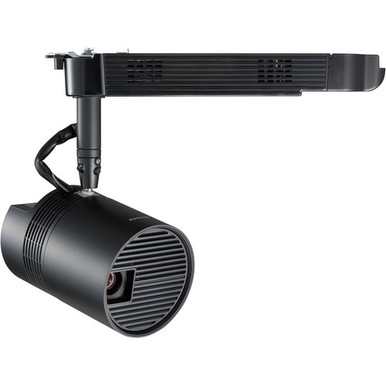
This Panasonic PT-JW130HBU Setup Guide and Buying Considerations article helps AV teams decide whether the focused model belongs in their project plan. The buyer problem is practical: a projector must fit the mounting location, signal path, content format, room conditions, and procurement schedule. A matching model number alone doesn't settle those questions.
The PT-JW130HBU is identified as a WXGA Space Player track-mount type projector. That mounting concept deserves close attention before purchase. Buyers can also compare three Panasonic WUXGA alternatives from the supplied catalog: the 5,200-lumen ultra-short-throw PT-CMZ50U, the 7,300-lumen PT-VMZ72BU8, and the 5,200-lumen PT-VMZ51. These aren't automatic substitutes. Their documented resolution, brightness, placement descriptions, and product categories point toward different project briefs.
Use this guide to build a deployment checklist, identify facts that require confirmation, and create a fair price-to-performance review. Visit each linked product page for current commerce details before approving an order.
Products at a Glance
- Option 1: Panasonic PT-JW130HBU WXGA 1000-Lumen Space Player DLP Track-Mount Type Projector
- For projects that need WUXGA and are evaluating ultra…: Panasonic PT-CMZ50 WUXGA Ultra-Short Throw Laser Projector – Professional Golf Simulator Display
- For teams whose written brief calls for WUXGA and a 7…: Panasonic PT-VMZ72BU8 7,300 Lumens WUXGA Laser Golf Simulator Projector – High-Brightness, Vivid Green Mode
- For buyers building a WUXGA shortlist around a 5,200-…: Panasonic PT-VMZ51 5200-Lumen WUXGA Laser 3LCD Projector
Quick Comparison Table
| Feature | Panasonic PT-JW130HBU WXGA 1000-Lumen Space Player DLP Track-Mount Type Projector | Panasonic PT-CMZ50 WUXGA Ultra-Short Throw Laser Projector – Professional Golf Simulator Display | Panasonic PT-VMZ72BU8 7,300 Lumens WUXGA Laser Golf Simulator Projector – High-Brightness, Vivid Green Mode | Panasonic PT-VMZ51 5200-Lumen WUXGA Laser 3LCD Projector |
|---|---|---|---|---|
| Brightness | 5200 lumens | 7,300 Lumens | 5200 lumens | |
| Resolution | WXGA | WUXGA | WUXGA | WUXGA |
| Best For | Teams specifically planning around the PT-JW130HBU and a track-based installation concept. | Projects that need WUXGA and are evaluating ultra-short-throw placement, including golf simulator briefs. | Teams whose written brief calls for WUXGA and a 7,300-lumen rating, including golf simulator projects. | Buyers building a WUXGA shortlist around a 5,200-lumen requirement. |
| Throw Type | Ultra short throw | |||
| Recommended Buyer | Teams specifically planning around the PT-JW130HBU and a track-based installation concept. | Projects that need WUXGA and are evaluating ultra-short-throw placement, including golf simulator briefs. | Teams whose written brief calls for WUXGA and a 7,300-lumen rating, including golf simulator projects. | Buyers building a WUXGA shortlist around a 5,200-lumen requirement. |
Product Images

Projector Options from AudioVideoNation
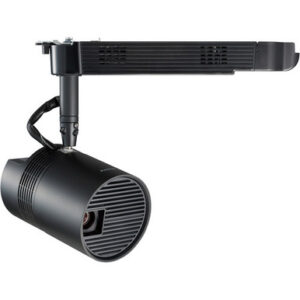
1. Panasonic PT-JW130HBU WXGA 1000-Lumen Space Player DLP Track-Mount Type Projector
Who should compare it: Teams specifically planning around the PT-JW130HBU and a track-based installation concept.
Why it belongs here: It is the exact model behind this guide. The supplied facts identify WXGA resolution, while the product listing names a Space Player track-mount design.
SKU: PT-JW130HBU
Key Features
- WXGA resolution
- PT-JW130HBU exact SKU for procurement and documentation
- Space Player track-mount type identified in the product listing
Things to Consider
Confirm verified brightness, throw geometry, required inputs, control method, track compatibility, electrical requirements, and approved mounting hardware before finalizing the design.
2. Panasonic PT-CMZ50 WUXGA Ultra-Short Throw Laser Projector – Professional Golf Simulator Display
Who should compare it: Projects that need WUXGA and are evaluating ultra-short-throw placement, including golf simulator briefs.
Why it belongs here: It provides a documented WUXGA, 5,200-lumen, ultra-short-throw route. That combination gives buyers a distinct placement option to evaluate.
SKU: PT-CMZ50U
Key Features
- 5,200-lumen brightness rating
- WUXGA resolution
- Ultra-short-throw placement type
Things to Consider
Validate the required image size, exact projection distance, surface, inputs, controls, mounting method, and room conditions against current documentation.
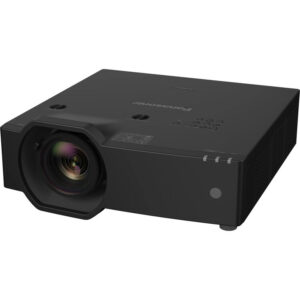
3. Panasonic PT-VMZ72BU8 7,300 Lumens WUXGA Laser Golf Simulator Projector – High-Brightness, Vivid Green Mode
Who should compare it: Teams whose written brief calls for WUXGA and a 7,300-lumen rating, including golf simulator projects.
Why it belongs here: It pairs WUXGA resolution with a documented 7,300-lumen rating, the highest supplied brightness figure among the compared products.
SKU: PT-VMZ72BU8
Key Features
- 7,300-lumen brightness rating
- WUXGA resolution
- Listed in Golf Simulator Projectors and Projectors categories
Things to Consider
Confirm throw geometry, lens and placement requirements, inputs, controls, mounting hardware, and the room's documented brightness target.
4. Panasonic PT-VMZ51 5200-Lumen WUXGA Laser 3LCD Projector
Who should compare it: Buyers building a WUXGA shortlist around a 5,200-lumen requirement.
Why it belongs here: It is another documented 5,200-lumen WUXGA Panasonic option, giving buyers a useful comparison against their resolution and brightness requirements.
SKU: PT-VMZ51
Key Features
- 5,200-lumen brightness rating
- WUXGA resolution
- Listed in the Home Theater Projectors category
Things to Consider
Verify placement, throw geometry, mounting method, source connections, controls, and image sizing for the proposed room before ordering.
Panasonic PT-JW130HBU WXGA 1000-Lumen Space Player DLP Track-Mount Type Projector vs Panasonic PT-CMZ50 WUXGA Ultra-Short Throw Laser Projector – Professional Golf Simulator Display: Main Differences
- Choose Panasonic PT-JW130HBU WXGA 1000-Lumen Space Player DLP Track-Mount Type Projector if Teams specifically planning around the PT-JW130HBU and a track-based installation concept..
- Choose Panasonic PT-CMZ50 WUXGA Ultra-Short Throw Laser Projector – Professional Golf Simulator Display if Projects that need WUXGA and are evaluating ultra-short-throw placement, including golf simulator briefs..
- Choose Panasonic PT-VMZ72BU8 7,300 Lumens WUXGA Laser Golf Simulator Projector – High-Brightness, Vivid Green Mode if Teams whose written brief calls for WUXGA and a 7,300-lumen rating, including golf simulator projects..
- Choose Panasonic PT-VMZ51 5200-Lumen WUXGA Laser 3LCD Projector if Buyers building a WUXGA shortlist around a 5,200-lumen requirement..
Start with projector deployment fit
Write the deployment brief before comparing Panasonic projectors. Record the intended image surface, room-light conditions, audience distance, content sources, planned mounting location, cable route, and service access. Add the resolution required by your content workflow. These details turn a broad product search into a defensible shortlist.
The PT-JW130HBU listing identifies a WXGA Space Player track-mount type projector. That makes the track system part of the buying decision, not an accessory to handle later. Confirm the exact track specification, electrical arrangement, approved mounting components, available load capacity, and physical clearances with current product documentation and the installer. Don't assume that an existing lighting track accepts the projector.
Deployment priorities will vary. A church may need the projector to fit around lighting and sightlines. A school may care about secure placement and repeatable operation. A conference room team may start with computer content, room controls, and support access. Put each requirement in writing, then test every candidate against the same list.
Panasonic PT-JW130HBU setup and signal planning
Draw a one-page signal diagram before ordering the PT-JW130HBU. Start with each content source. Follow the route through any required distribution equipment, adapters, or control system, and end at the projector. Note cable distances and connection points. This catches infrastructure gaps while changes are still inexpensive.
Confirm that the projector has every input and control connection required by the design. Check the actual source-output format as well. A computer, media player, signage source, or room system should be evaluated against the projector's verified input requirements rather than an assumed connector list. Plan audio separately unless the approved design documentation establishes how it will be handled.
Next, place the proposed track and image surface on a scaled drawing. Obtain verified throw and image-sizing information for the exact PT-JW130HBU configuration. Mark structural obstacles, lighting fixtures, vents, doors, and access panels. A temporary site mockup can reveal blocked sightlines or awkward service access before mounting locations are fixed.
WXGA resolution and content requirements
The PT-JW130HBU has WXGA resolution. The PT-CMZ50U, PT-VMZ72BU8, and PT-VMZ51 are identified as WUXGA projectors. Treat that difference as a workflow decision. Match the projector to the resolution, aspect ratio, and layout used by the real content sources.
Use representative material during planning. Test presentation slides, signage layouts, spreadsheets, video, worship media, or simulator graphics as applicable. Small text and detailed interfaces deserve special attention. A resolution label doesn't establish readability at the planned image size and viewing distance.
If an organization has standardized on WUXGA, document that as a firm requirement. If the project specifically calls for the PT-JW130HBU and WXGA content, keep the focus on placement, integration, and image sizing rather than changing resolution without a stated need.
Brightness and ultra-short-throw placement choices
Three alternatives have documented brightness figures in the supplied facts. The PT-CMZ50U is rated at 5,200 lumens, the PT-VMZ72BU8 at 7,300 lumens, and the PT-VMZ51 at 5,200 lumens. Obtain a verified PT-JW130HBU brightness figure before creating a numeric comparison for the focused model.
Don't rank projectors by lumens alone. Review the planned image size, ambient light, surface, placement, and content. Then ask the installer or system designer to document the brightness target used for the room. That process keeps a larger number from becoming an unsupported promise of better real-world results.
The PT-CMZ50U is the only supplied option identified as ultra short throw. It deserves consideration where available projection depth is a defining constraint, but its exact geometry still needs validation. Neither resolution nor brightness confirms that a projector will create the required image from the available position. Use current throw data and a scaled plan for every candidate.
WXGA track-mount projector installation checklist
A track-mounted design needs a coordinated electrical and mechanical review. Confirm the precise track type, approved adapter or mounting hardware, track load limits, power arrangement, allowable orientation, and required service clearances. Have the responsible trades review the plan before equipment is ordered or the track is modified.
Lock the final mounting position only after the image geometry has been checked. The plan should show the projected image boundaries, track position, cable path, adjacent fixtures, and access needed to remove or service the projector. Protect connections from strain and keep ventilation clear according to current installation documentation.
Operational access matters too. Schools and churches may need controls protected from casual changes. Conference room teams may need a documented startup and shutdown routine that support staff can repeat. Define who can adjust the projector, where configuration records will be stored, and how the installation will be returned to its approved settings after service.
Stock and availability checks for project purchasing
Treat availability as a live purchasing check. Open the linked AudioVideoNation product page near the ordering date and confirm commerce details for the exact SKU. For scheduled deployments, ask about expected fulfillment timing, the required quantity, and any accessories that must arrive with the projector.
Record the date of the check and keep the exact SKU on the purchase request. Similar Panasonic model names or suffixes shouldn't be substituted without technical review. A substitution can change the resolution, placement plan, brightness figure, or required installation work. Revalidate the design whenever the ordered SKU changes.
Projector price-to-performance without guesswork
Build the price-to-performance review around the installed job. Get live commerce details from each linked product page, then compare the project requirements each option satisfies. Use only documented facts: WXGA for the PT-JW130HBU, WUXGA for the three alternatives, the supplied lumen figures, and ultra-short-throw identification for the PT-CMZ50U.
Add project-specific costs that sit outside the projector listing. These may include approved mounting hardware, track work, cabling, signal distribution, adapters, control integration, labor, and access equipment. Include an item only if the design actually requires it. A lower equipment cost can lose its advantage if the room needs extensive changes, while a higher lumen figure adds little value when the written brief doesn't call for it.
Score every candidate against the same must-have list. Separate confirmed requirements from preferences and unresolved questions. This produces a useful value comparison without treating price, brightness, or resolution as a stand-alone verdict.
How the Panasonic projector options fit the shortlist
Choose the PT-JW130HBU when the project specifically calls for that SKU, WXGA resolution, and the listed Space Player track-mount concept. It is the direct subject of this guide. Before purchase, validate track compatibility, throw geometry, brightness, connections, controls, and every required mounting component.
Evaluate the PT-CMZ50U when the brief calls for WUXGA, 5,200 lumens, and ultra-short-throw placement. Its supplied categories include golf simulator and installation projects. Confirm the exact image geometry and integration requirements before treating that category fit as proof for a particular room.
The PT-VMZ72BU8 belongs on a shortlist that specifies WUXGA and a 7,300-lumen rating. It is also categorized for golf simulator projects. The higher supplied lumen figure should be tied to a documented room requirement rather than used as an automatic reason to buy.
Consider the PT-VMZ51 when a 5,200-lumen WUXGA Panasonic projector matches the initial brief. It is listed in the Home Theater Projectors category. Its throw, mounting, connection, and control requirements still need to be checked against the planned installation.
Finish with a written approval record. Name the selected SKU, confirmed facts, verified accessories, mounting plan, source path, and open responsibilities. That handoff gives purchasing, installation, and support teams the same version of the project.
Related AudioVideoNation Links
- Browse Projector at AudioVideoNation
- View the Panasonic PT-JW130HBU product page
- View the Panasonic PT-CMZ50U product page
- View the Panasonic PT-VMZ72BU8 product page
- View the Panasonic PT-VMZ51 product page
Product Information Sources
- Panasonic PT-JW130HBU WXGA 1000-Lumen Space Player DLP Track-Mount Type Projector product information
- Panasonic PT-CMZ50 WUXGA Ultra-Short Throw Laser Projector – Professional Golf Simulator Display product information
- Panasonic PT-VMZ72BU8 7,300 Lumens WUXGA Laser Golf Simulator Projector – High-Brightness, Vivid Green Mode product information
- Panasonic PT-VMZ51 5200-Lumen WUXGA Laser 3LCD Projector product information
FAQ
What resolution does the Panasonic PT-JW130HBU use?
The Panasonic PT-JW130HBU has WXGA resolution. Match that resolution to the source devices, content layouts, planned image size, and organizational standards before approving the design.
Will the PT-JW130HBU work with every ceiling track?
Compatibility with every ceiling track isn't established by the supplied product facts. Confirm the exact track type, approved adapter, load limits, electrical arrangement, orientation, and mounting hardware with current documentation and the installer.
Which provided Panasonic option is ultra short throw?
The PT-CMZ50U is the only provided Panasonic option identified as ultra short throw. It also has WUXGA resolution and a documented brightness rating of 5,200 lumens, but its exact image geometry still needs verification.
Which compared projector has the highest documented brightness?
The PT-VMZ72BU8 has the highest documented brightness among the supplied options at 7,300 lumens. Use that figure only within a room-specific review that also covers image size, ambient light, surface, placement, and content.
How should buyers compare WXGA and WUXGA models?
Buyers should compare WXGA and WUXGA models against the required source format, content layout, viewing conditions, and organizational standard. The PT-JW130HBU is WXGA, while the PT-CMZ50U, PT-VMZ72BU8, and PT-VMZ51 are WUXGA.
How can buyers confirm current pricing and availability?
Buyers should use the linked AudioVideoNation product page to confirm current commerce details for the exact SKU. Recheck near the ordering date and ask about project quantities, fulfillment timing, and required accessories when the deployment has a fixed schedule.
Conclusion
Use this Panasonic PT-JW130HBU Setup Guide and Buying Considerations comparison to match documented specifications to the room and installation requirements. Review the linked product pages for current purchase details before ordering.
Products Used
| SKU | Product Name | URL |
|---|---|---|
| PT-JW130HBU | Panasonic PT-JW130HBU WXGA 1000-Lumen Space Player DLP Track-Mount Type Projector | View product |
| PT-CMZ50U | Panasonic PT-CMZ50 WUXGA Ultra-Short Throw Laser Projector – Professional Golf Simulator Display | View product |
| PT-VMZ72BU8 | Panasonic PT-VMZ72BU8 7,300 Lumens WUXGA Laser Golf Simulator Projector – High-Brightness, Vivid Green Mode | View product |
| PT-VMZ51 | Panasonic PT-VMZ51 5200-Lumen WUXGA Laser 3LCD Projector | View product |