

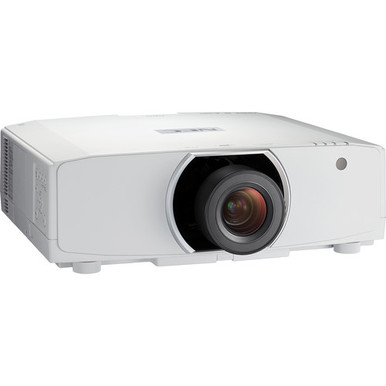
Planning a projector installation can go wrong long before anyone powers up the display. Throw geometry, screen dimensions, sightlines, cabling, service access, ambient light, and package contents all affect whether the order works in the room. This NEC NP-PA803U Setup Guide and Buying Considerations resource starts with the confirmed WUXGA resolution, then turns that fact into a practical pre-purchase and commissioning plan.
The guide also places the NP-PA803U beside four related listed choices: the WUXGA NP-PA803UL, the 8,500-lumen WXGA NP-PA853W-41ZL projector-and-lens bundle, and the NP41ZL and NP40ZL lens listings. Each choice answers a different design question.
Churches may care about readable lyrics from the back rows. Schools need repeatable room standards. Conference technology teams have to account for source formats, cable routing, and support access. Installers need measurements they can approve before mounting hardware is ordered.
Use this guide as a preflight. Confirm exact package contents, lens compatibility, connections, control options, clearances, power needs, and live commerce details on the linked pages and current manufacturer documentation before approving the bill of materials.
Products at a Glance
- Option 1: NEC NP-PA803U 3D WUXGA 1080p LCD Projector with Speaker
- For rooms whose documented brightness requirement and…: NEC NP-PA853W-41ZL 8500-Lumen HDR WXGA Projector and Lens Bundle
- For buyers comparing WUXGA NEC projectors who can ver…: NEC NP-PA803UL 3D WUXGA LCD Projector
- For pA Series lens research where exact projector com…: NEC NP41ZL 1.30 – 3.08:1 Zoom Lens for NEC PA Series Projectors
- For installers evaluating the NP40ZL as a lens option…: NEC NP40ZL Short-throw Zoom Lens – 13.3mm-18.6mm – F/2.0-2.43
Quick Comparison Table
| Feature | NEC NP-PA803U 3D WUXGA 1080p LCD Projector with Speaker | NEC NP-PA853W-41ZL 8500-Lumen HDR WXGA Projector and Lens Bundle | NEC NP-PA803UL 3D WUXGA LCD Projector | NEC NP41ZL 1.30 – 3.08:1 Zoom Lens for NEC PA Series Projectors | NEC NP40ZL Short-throw Zoom Lens – 13.3mm-18.6mm – F/2.0-2.43 |
|---|---|---|---|---|---|
| Brightness | 8500 lumens | ||||
| Resolution | WUXGA | WXGA | WUXGA | ||
| Best For | Projects already scoped around the NP-PA803U model and WUXGA content, pending verification of lens, connections, mounting, and package details. | Rooms whose documented brightness requirement and content plan align with 8,500 lumens and WXGA, and where a bundled configuration is preferred after its contents are checked. | Buyers comparing WUXGA NEC projectors who can verify how the NP-PA803UL differs from the NP-PA803U across every design-critical requirement. | PA Series lens research where exact projector compatibility and calculated image geometry will be confirmed before purchase. | Installers evaluating the NP40ZL as a lens option and prepared to validate geometry and compatibility against the exact NEC projector SKU. |
| Recommended Buyer | Projects already scoped around the NP-PA803U model and WUXGA content, pending verification of lens, connections, mounting, and package details. | Rooms whose documented brightness requirement and content plan align with 8,500 lumens and WXGA, and where a bundled configuration is preferred after its contents are checked. | Buyers comparing WUXGA NEC projectors who can verify how the NP-PA803UL differs from the NP-PA803U across every design-critical requirement. | PA Series lens research where exact projector compatibility and calculated image geometry will be confirmed before purchase. | Installers evaluating the NP40ZL as a lens option and prepared to validate geometry and compatibility against the exact NEC projector SKU. |
Product Images
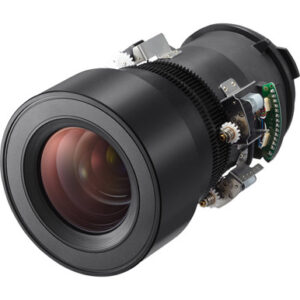
Projector Options from AudioVideoNation
1. NEC NP-PA803U 3D WUXGA 1080p LCD Projector with Speaker
Who should compare it: Projects already scoped around the NP-PA803U model and WUXGA content, pending verification of lens, connections, mounting, and package details.
Why it belongs here: It is the exact SKU at the center of this guide. Its WUXGA resolution makes it the baseline for room, source, and procurement checks.
SKU: NP-PA803U
Key Features
- WUXGA resolution
- Exact NP-PA803U ordering SKU
- Listed in Multimedia Projectors, Projectors, and Video categories
- Dedicated product page for current commerce details
Things to Consider
Confirm the lens and package contents, brightness, terminals, controls, audio plan, mounting requirements, and physical clearances for this exact SKU before purchase.
2. NEC NP-PA853W-41ZL 8500-Lumen HDR WXGA Projector and Lens Bundle
Who should compare it: Rooms whose documented brightness requirement and content plan align with 8,500 lumens and WXGA, and where a bundled configuration is preferred after its contents are checked.
Why it belongs here: It provides a different NEC deployment path with two confirmed anchors: 8,500-lumen brightness and WXGA resolution. The product name also identifies a projector-and-lens bundle, which merits a careful package review.
SKU: NP-PA853W-41ZL
Key Features
- 8,500-lumen brightness
- WXGA resolution
- Projector-and-lens bundle configuration identified in the product name
- Full NP-PA853W-41ZL SKU for procurement accuracy
Things to Consider
WXGA is a different resolution class from WUXGA. Confirm bundle contents, lens geometry, source requirements, connections, controls, mounting details, and room fit before treating it as an alternative.
3. NEC NP-PA803UL 3D WUXGA LCD Projector
Who should compare it: Buyers comparing WUXGA NEC projectors who can verify how the NP-PA803UL differs from the NP-PA803U across every design-critical requirement.
Why it belongs here: It keeps WUXGA in the comparison while giving teams a separate NEC SKU to investigate. Treat it as its own product, not as an interchangeable suffix variation.
SKU: NP-PA803UL
Key Features
- WUXGA resolution
- Exact NP-PA803UL ordering SKU
- Listed in Multimedia Projectors, Projectors, and Video categories
- Dedicated product page for current commerce details
Things to Consider
Do not infer brightness, lens requirements, light source, ports, controls, or compatibility from the NP-PA803U. Verify each requirement for the NP-PA803UL itself.
4. NEC NP41ZL 1.30 – 3.08:1 Zoom Lens for NEC PA Series Projectors
Who should compare it: PA Series lens research where exact projector compatibility and calculated image geometry will be confirmed before purchase.
Why it belongs here: Lens choice determines whether the planned screen width and mounting distance can coexist. The NP41ZL gives PA Series buyers a concrete accessory SKU to validate against the projector and room geometry.
SKU: NP41ZL
Key Features
- NEC NP41ZL accessory SKU
- Lens product named for NEC PA Series projectors
- Listed within projector-related categories
- Separate product page for live commerce details
Things to Consider
PA Series wording alone does not prove NP-PA803U compatibility. Verify the exact combination, throw calculations, shift needs, package contents, and installation orientation.
5. NEC NP40ZL Short-throw Zoom Lens – 13.3mm-18.6mm – F/2.0-2.43
Who should compare it: Installers evaluating the NP40ZL as a lens option and prepared to validate geometry and compatibility against the exact NEC projector SKU.
Why it belongs here: It broadens the lens research set for rooms where projector placement is constrained. Keep it on the design shortlist only after its optical fit and exact projector compatibility are confirmed.
SKU: NP40ZL
Key Features
- NEC NP40ZL accessory SKU
- Classified in Lenses and Projectors categories
- Distinct lens listing for bill-of-material review
- Dedicated product page for current commerce details
Things to Consider
Confirm exact projector support, the required image width at the measured throw distance, mounting clearances, and all package details before ordering.
NEC NP-PA803U 3D WUXGA 1080p LCD Projector with Speaker vs NEC NP-PA853W-41ZL 8500-Lumen HDR WXGA Projector and Lens Bundle: Main Differences
- Choose NEC NP-PA803U 3D WUXGA 1080p LCD Projector with Speaker if Projects already scoped around the NP-PA803U model and WUXGA content, pending verification of lens, connections, mounting, and package details..
- Choose NEC NP-PA853W-41ZL 8500-Lumen HDR WXGA Projector and Lens Bundle if Rooms whose documented brightness requirement and content plan align with 8,500 lumens and WXGA, and where a bundled configuration is preferred after its contents are checked..
- Choose NEC NP-PA803UL 3D WUXGA LCD Projector if Buyers comparing WUXGA NEC projectors who can verify how the NP-PA803UL differs from the NP-PA803U across every design-critical requirement..
- Choose NEC NP41ZL 1.30 – 3.08:1 Zoom Lens for NEC PA Series Projectors if PA Series lens research where exact projector compatibility and calculated image geometry will be confirmed before purchase..
- Choose NEC NP40ZL Short-throw Zoom Lens – 13.3mm-18.6mm – F/2.0-2.43 if Installers evaluating the NP40ZL as a lens option and prepared to validate geometry and compatibility against the exact NEC projector SKU..
Projector deployment fit starts with the room brief
Begin with the room, audience, and content. Record the screen’s intended image width, mounting location, lens-to-screen distance, ceiling height, obstructions, seating extremes, ambient-light conditions, and the smallest text viewers must read. Note whether the room shows presentations, camera feeds, video, signage, or a mix. That brief defines deployment fit.
WUXGA is confirmed for the NP-PA803U, but resolution alone cannot approve an installation. Brightness, lens geometry, input requirements, control method, and physical clearances must match the room. Get those values for the exact NP-PA803U SKU from current product documentation before sign-off. Do not borrow a value from the NP-PA803UL or another PA Series projector.
For a church, test lyrics and confidence-monitor content from the farthest useful seat. For a classroom, test slides, spreadsheets, and annotation text. For a conference room, test the real laptops and conferencing sources the team supports. A successful mockup answers the viewing question before ceiling work begins.
WUXGA projector setup starts with lens geometry
Calculate screen width and measured throw distance before choosing a lens. The basic planning relationship is throw distance = image width × throw ratio. Use the manufacturer’s measurement reference and the exact compatible lens data for final calculations. A rough tape-measure estimate is not an approval drawing.
Mark the proposed lens position in the room. Check beams, lights, sprinklers, ceiling clouds, fans, chandeliers, camera sightlines, and service access. Then confirm whether the chosen geometry keeps the projected image on the intended screen without depending on unverified shift or zoom range. If a design needs lens shift, portrait orientation, unusual tilt, or rear projection, validate that requirement explicitly.
The NP41ZL is named for NEC PA Series projectors, while the NP40ZL is a separate NEC lens listing. Those names create useful research paths, not proof of exact NP-PA803U compatibility. Match the projector SKU, lens SKU, throw calculations, screen dimensions, and installation orientation in one approved document. If any one changes, run the geometry again. Small changes at the screen or mount can alter the needed optical plan.
Plan sources and content around WUXGA
Build the signal plan around the content standard, not a familiar cable alone. The NP-PA803U and NP-PA803UL are identified as WUXGA. The NP-PA853W-41ZL is identified as WXGA, so it belongs to a different resolution class. Test the actual presentation templates, video playback, camera feeds, and conferencing layouts at the intended endpoint instead of assuming every source will map the same way.
Trace the full path: source, dock or adapter, switcher, extender, wall plate, cable run, and projector. Confirm that every component accepts the chosen format and distance. If a scaler or control processor is involved, document its required output and switching behavior.
Text is the fastest reality check. Open the smallest fonts, detailed spreadsheets, lower thirds, and shared-screen layouts that users depend on. Check crop, scaling, edge visibility, and legibility from the farthest seat. Resolution labels guide the shortlist. End-to-end testing approves the room.
A commissioning sequence for projector deployment planning
Use a fixed sequence so the team catches package or geometry problems while changes are still easy.
1. Freeze the bill of materials. Record the exact projector SKU, proposed lens SKU, mount, screen, signal hardware, cables, adapters, control parts, and any audio components. Mark every item that still needs compatibility confirmation.
2. Verify the order on arrival. Match labels and package contents to the approved bill before equipment goes to the site. Keep NP-PA803U, NP-PA803UL, and NP-PA853W-41ZL separate in receiving records.
3. Bench-test the signal chain. Use the planned source devices and content. Confirm stable image delivery, switching, scaling, and control behavior with the actual supporting hardware.
4. Recheck the room. Measure lens position to screen, confirm image width, and compare the result with the approved lens calculation. Check ventilation and service clearances against current instructions.
5. Mount and cable safely. Follow the mount, projector, building, and electrical requirements that apply to the site. Protect connectors from strain and leave a serviceable route.
6. Commission real use cases. Test startup, shutdown, each source, content transitions, readable text, edge placement, and the room’s audio path. Record the final settings instead of relying on memory.
7. Hand off the room. Give operators a short source-selection and shutdown guide, plus the exact model and SKU information support staff will need.
Stop if the lens, mount point, package, or source path differs from the approved plan. Recalculate first.
Compare the NP-PA803U with the related NEC choices
Start with confirmed distinctions. The NP-PA803U is the focus product and is identified as WUXGA. It fits a shortlist that has already committed to that resolution class, but the rest of the installation still needs SKU-specific verification.
The NP-PA803UL is also identified as WUXGA. Its similar name does not make it interchangeable with the NP-PA803U. Compare package contents, optical requirements, physical details, connections, controls, and every other design-critical point on current documentation before substituting one for the other.
The NP-PA853W-41ZL changes two known variables. It is identified as an 8,500-lumen WXGA projector and lens bundle. That makes it relevant when the room brief calls for that brightness and the content plan accepts WXGA. Verify exactly what the bundle contains and whether its lens geometry fits the room.
The NP41ZL and NP40ZL listings belong in the optical planning conversation. Keep them as separate accessory SKUs in the bill of materials, then confirm exact projector support and calculate the image geometry. A lens choice should follow measurements. It should never be selected by a similar product name alone.
Projector stock and availability require a final check
A product choice is not ready for purchase until the exact orderable package is confirmed. Use each linked AudioVideoNation page for current stock and availability, live commerce details, and the precise SKU being sold. Recheck close to approval because project timing can change the purchasing decision.
Carry full SKUs through the quote, purchase order, receiving record, and installer handoff. NP-PA803U and NP-PA803UL differ by a trailing letter and must remain separate line items. NP-PA853W-41ZL is named as a projector-and-lens bundle, so confirm its current contents rather than assuming every required component is included.
If the preferred SKU cannot meet the schedule, do not authorize a substitute on name similarity. Send the replacement through resolution, lens, geometry, connections, controls, mounting, and content tests again.
Projector price-to-performance means total installed value
Judge price-to-performance at the installed-system level. The live product price is one line. A usable budget may also need a verified lens, mount, screen, cable infrastructure, adapters, switching, control, installation labor, access equipment, commissioning, and staff handoff. Include only the lines that apply to the project, then compare complete designs on the same scope.
Pay for requirements the room can prove. An 8,500-lumen specification matters when the documented screen and ambient-light plan calls for it. WUXGA matters when content and viewing needs call for that resolution class. A bundle matters only after its contents and optical fit are confirmed.
Also price the cost of uncertainty. A projector ordered before lens verification can trigger a remount, screen change, or product exchange. A near-match SKU can send the team back through testing. The strongest value choice is the one that meets the written brief with the fewest unresolved assumptions, supported by a clear commissioning and service plan. Check the linked pages for current commerce details before making the final comparison.
Final approval gate for churches, schools, and conference rooms
Approve the design only when the team can answer yes to six questions: Is the exact projector SKU documented? Does its confirmed resolution fit the content? Is the lens verified for that projector, image width, and throw distance? Are the source, control, mounting, power, ventilation, and service requirements confirmed? Has current availability been checked against the project date? Does the full installed cost fit the approved scope?
Churches, schools, and conference technology teams may weight those answers differently. The approval gate stays the same. Resolve every open item, preserve the measurements and SKUs in the handoff package, and retest whenever a projector or lens changes. That discipline turns the NP-PA803U from a catalog choice into an installation plan.
Related AudioVideoNation Links
- Browse Projector at AudioVideoNation
- NEC NP-PA803U projector
- NEC NP-PA853W-41ZL projector and lens bundle
- NEC NP-PA803UL projector
- NEC NP41ZL lens
Product Information Sources
- NEC NP-PA803U 3D WUXGA 1080p LCD Projector with Speaker product information
- NEC NP-PA853W-41ZL 8500-Lumen HDR WXGA Projector and Lens Bundle product information
- NEC NP-PA803UL 3D WUXGA LCD Projector product information
- NEC NP41ZL 1.30 – 3.08:1 Zoom Lens for NEC PA Series Projectors product information
- NEC NP40ZL Short-throw Zoom Lens – 13.3mm-18.6mm – F/2.0-2.43 product information
FAQ
What resolution does the NEC NP-PA803U use?
The NEC NP-PA803U is identified as a WUXGA projector. Use WUXGA as the source and content-planning baseline, then confirm every other installation requirement for the exact SKU.
How should I choose a lens for the NEC NP-PA803U?
Choose a lens only after confirming exact NP-PA803U compatibility and calculating it against the measured image width and throw distance. Document the projector SKU, lens SKU, screen dimensions, mounting position, and approved geometry together.
Is the NEC NP41ZL compatible with the NP-PA803U?
Exact NP41ZL compatibility with the NP-PA803U must be confirmed on current product or manufacturer documentation before purchase. Its product name places it within NEC PA Series lens research, but series-level wording does not approve a specific projector-and-lens combination.
How does the NP-PA853W-41ZL differ from the NP-PA803U?
The known difference is that the NP-PA803U is WUXGA, while the NP-PA853W-41ZL is an 8,500-lumen WXGA projector-and-lens bundle. That changes the resolution class and package plan, so verify the remaining installation details for each exact SKU.
What should an AV team test before projector sign-off?
An AV team should test the complete source path, real content, image geometry, text legibility, control behavior, and room audio before sign-off. Repeat those tests from the intended viewing positions and record the final settings for support staff.
Where can buyers confirm current price and availability?
Use the linked AudioVideoNation product page for the current price, availability, and package details of each exact SKU. Recheck at purchase approval and avoid carrying live commerce details from an older quote or a similar model.
Conclusion
Use this NEC NP-PA803U Setup Guide and Buying Considerations comparison to match documented specifications to the room and installation requirements. Review the linked product pages for current purchase details before ordering.
Products Used
| SKU | Product Name | URL |
|---|---|---|
| NP-PA803U | NEC NP-PA803U 3D WUXGA 1080p LCD Projector with Speaker | View product |
| NP-PA853W-41ZL | NEC NP-PA853W-41ZL 8500-Lumen HDR WXGA Projector and Lens Bundle | View product |
| NP-PA803UL | NEC NP-PA803UL 3D WUXGA LCD Projector | View product |
| NP41ZL | NEC NP41ZL 1.30 – 3.08:1 Zoom Lens for NEC PA Series Projectors | View product |
| NP40ZL | NEC NP40ZL Short-throw Zoom Lens – 13.3mm-18.6mm – F/2.0-2.43 | View product |