

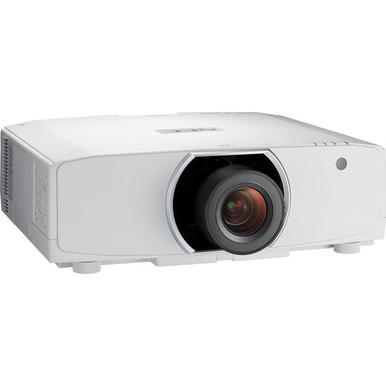
The NEC NP-PA853W Setup Guide and Buying Considerations below tackles a common installation problem: the projector specification is only one part of a workable system. Buyers also need a confirmed lens plan, measured placement, suitable content resolution, and a procurement scope that matches the site.
The NEC NP-PA853W and NP-PA853W-41ZL bundle are both listed with 8,500-lumen brightness and WXGA resolution. Those facts create a useful starting point, but they do not establish screen size, throw distance, lens compatibility, connection requirements, or visibility in a specific room. Each must be checked during design.
This guide helps churches, schools, conference room teams, and AV installers assess deployment fit, compare the projector listing with the projector-and-lens bundle, and organize commissioning. It also covers the separate NEC NP41ZL lens listing, including the compatibility checks that should happen before purchase. Use the linked product pages for current commerce details once the technical plan is approved.
Products at a Glance
- Option 1: NEC NP-PA853W WXGA 720p LCD Projector
- For projects seeking a coordinated projector-and-lens…: NEC NP-PA853W-41ZL 8500-Lumen HDR WXGA Projector and Lens Bundle
- For teams evaluating a separately sourced NEC PA Seri…: NEC NP41ZL 1.30 – 3.08:1 Zoom Lens for NEC PA Series Projectors
Quick Comparison Table
| Feature | NEC NP-PA853W WXGA 720p LCD Projector | NEC NP-PA853W-41ZL 8500-Lumen HDR WXGA Projector and Lens Bundle | NEC NP41ZL 1.30 – 3.08:1 Zoom Lens for NEC PA Series Projectors |
|---|---|---|---|
| Brightness | 8500 lumens | 8500 lumens | |
| Resolution | WXGA | WXGA | |
| Best For | Teams building a design around the NP-PA853W and prepared to confirm the lens, package contents, connections, mounting, and room geometry before purchase. | Projects seeking a coordinated projector-and-lens line item after an installer confirms the exact included lens and its fit for the room. | Teams evaluating a separately sourced NEC PA Series zoom lens and prepared to validate exact projector pairing and room geometry before ordering. |
| Recommended Buyer | Teams building a design around the NP-PA853W and prepared to confirm the lens, package contents, connections, mounting, and room geometry before purchase. | Projects seeking a coordinated projector-and-lens line item after an installer confirms the exact included lens and its fit for the room. | Teams evaluating a separately sourced NEC PA Series zoom lens and prepared to validate exact projector pairing and room geometry before ordering. |
Product Images
Projector Options from AudioVideoNation
1. NEC NP-PA853W WXGA 720p LCD Projector
Who should compare it: Teams building a design around the NP-PA853W and prepared to confirm the lens, package contents, connections, mounting, and room geometry before purchase.
Why it belongs here: This is the core projector in the guide. Its supplied 8,500-lumen brightness and WXGA resolution give design teams the main output facts needed for an initial room and content review.
SKU: NP-PA853W
Key Features
- 8,500-lumen brightness rating
- WXGA resolution
- Exact NP-PA853W procurement SKU
Things to Consider
Complete the lens, throw, signal, control, and mounting plan before approval. Check the linked page for current package and commerce details.
2. NEC NP-PA853W-41ZL 8500-Lumen HDR WXGA Projector and Lens Bundle
Who should compare it: Projects seeking a coordinated projector-and-lens line item after an installer confirms the exact included lens and its fit for the room.
Why it belongs here: This listing packages an NP-PA853W projector with a lens and retains the supplied 8,500-lumen and WXGA specifications. It gives purchasing teams a bundle path to compare with separately planned components.
SKU: NP-PA853W-41ZL
Key Features
- 8,500-lumen brightness rating
- WXGA resolution
- Projector-and-lens bundle format
- Exact NP-PA853W-41ZL procurement SKU
Things to Consider
Confirm the included lens, exact compatibility, throw coverage, and package contents. The bundle name does not replace a measured placement calculation.
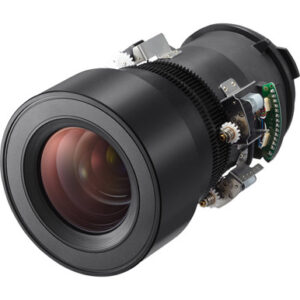
3. NEC NP41ZL 1.30 – 3.08:1 Zoom Lens for NEC PA Series Projectors
Who should compare it: Teams evaluating a separately sourced NEC PA Series zoom lens and prepared to validate exact projector pairing and room geometry before ordering.
Why it belongs here: Lens planning controls whether the intended image fits the available mounting geometry. The NP41ZL is a separate NEC PA Series zoom-lens listing that buyers may need to evaluate alongside the projector.
SKU: NP41ZL
Key Features
- NEC NP41ZL procurement SKU
- Zoom-lens accessory format
- Listed for NEC PA Series projectors
Things to Consider
Confirm exact NP-PA853W compatibility, required image dimensions, measured lens-to-screen distance, mounting position, and current documentation before selection.
NEC NP-PA853W WXGA 720p LCD Projector vs NEC NP-PA853W-41ZL 8500-Lumen HDR WXGA Projector and Lens Bundle: Main Differences
- Choose NEC NP-PA853W WXGA 720p LCD Projector if Teams building a design around the NP-PA853W and prepared to confirm the lens, package contents, connections, mounting, and room geometry before purchase..
- Choose NEC NP-PA853W-41ZL 8500-Lumen HDR WXGA Projector and Lens Bundle if Projects seeking a coordinated projector-and-lens line item after an installer confirms the exact included lens and its fit for the room..
- Choose NEC NP41ZL 1.30 – 3.08:1 Zoom Lens for NEC PA Series Projectors if Teams evaluating a separately sourced NEC PA Series zoom lens and prepared to validate exact projector pairing and room geometry before ordering..
Deployment fit for an 8,500-lumen WXGA projector
Start with the room, not the product page. The supplied 8,500-lumen rating gives your AV team a concrete brightness figure for design review. It cannot decide screen size or daylight tolerance on its own. Image dimensions, projection surface, ambient light, viewing distance, and the material being shown all affect the result.
Churches should review both service lighting and any daylight that reaches the screen. Schools need to test instructional slides, diagrams, and text from the farthest student position. Conference room teams should include spreadsheets, dashboards, and video calls in the review. A bright image can still be hard to use if text is too small or room light washes out the projection surface.
WXGA resolution also shapes deployment fit. Build sample content at the intended display size, then inspect fine labels, charts, and interface elements from normal seats. Do not approve the design from a logo screen or a single presentation slide.
Write an acceptance target before selecting equipment. Record the intended image dimensions, viewing positions, lighting conditions, and core content. The NP-PA853W is a sound candidate for further design review when its 8,500-lumen and WXGA specifications align with that written brief. Final approval should follow a site-specific lens and placement calculation.
NEC projector lens selection: projector, bundle, or separate lens
The NP-PA853W listing and the NP-PA853W-41ZL projector-and-lens bundle share the two supplied output facts: 8,500 lumens and WXGA resolution. The buying difference is package scope. One listing centers on the NP-PA853W projector, while the other is explicitly sold as a projector-and-lens bundle.
Use the NP-PA853W listing as the comparison point if your installer already has a documented lens plan. Confirm package contents before ordering. If the project needs the projector and lens coordinated under one line item, the NP-PA853W-41ZL bundle deserves review. The bundle name alone does not prove that its included lens will produce the required image from your mounting position. Verify the exact lens, compatibility, and throw geometry.
The separate NP41ZL listing identifies a zoom lens for NEC PA Series projectors. Family-level wording is not enough for final approval. Match the exact projector and lens using current manufacturer planning information, then confirm that the lens covers the measured image width and lens-to-screen distance.
Keep the calculation tied to the real mount point. Allow for the screen location, optical axis, structural attachment, and required service access. If the mount moves or the image size changes, repeat the lens check. Model naming should support procurement accuracy, not replace an optical plan.
AV projector installation checklist before mounting
A short site survey prevents expensive changes after hardware arrives. Capture measurements and constraints in one shared document so the installer, buyer, and room owner approve the same design.
- Record the required image width and height, normal viewing positions, and the smallest text users must read.
- Measure from the planned lens position to the projection surface. Note any ceiling structures, lighting fixtures, or architectural elements in that path.
- Document daylight and electric lighting during the room's real operating hours.
- Map power, source, signal transport, and control routes without assuming a connection type that has not been verified.
- Confirm the mounting structure, hardware rating, working access, and clearances against current installation documentation.
- Identify the exact projector SKU, lens SKU or bundle SKU, and every package-content assumption.
Treat every measurement as a design input. A rough room length cannot substitute for lens-to-screen distance, and a desired screen diagonal cannot substitute for exact image dimensions. Record units beside every value.
Finish the survey with a hold point. No projector, lens, or mount should be approved until the responsible installer has checked the geometry and current compatibility information. That discipline matters for a base NP-PA853W purchase, the NP-PA853W-41ZL bundle, and any separately sourced NP41ZL lens.
NEC NP-PA853W setup and commissioning sequence
Commission the system in a controlled order. This makes faults easier to isolate and gives the room owner a repeatable acceptance record.
1. Verify the order. Match the received SKUs and package contents to the approved design. Confirm the planned lens before lifting or mounting the projector.
2. Recheck placement. Compare the physical mount point, projection surface, and lens position with the approved measurements. Use appropriately rated mounting hardware and a site-approved structural attachment.
3. Complete verified connections. Install power, source, signal transport, and control paths from the final system drawing. This guide does not assume a port or control protocol, so confirm those details from current product documentation.
4. Establish a test image. Use an alignment pattern to check focus, image boundaries, and basic geometry. Follow the manufacturer's lens installation and setup procedures.
5. Correct physical alignment first. Review mount position, level, lens position, and screen alignment before applying electronic image correction. Mechanical accuracy preserves a cleaner starting point for commissioning.
6. Test real content. Run the presentations, text, charts, video, and user interfaces the room will display. Check them from front, middle, and rear viewing positions under normal lighting.
7. Document acceptance. Record the approved image size, source settings, control behavior, startup procedure, and any operator instructions. Save the final projector and lens SKUs with the project file.
Do not judge the installation from brightness alone. The NP-PA853W's 8,500-lumen rating and WXGA resolution are important, but the finished system also depends on lens fit, physical alignment, signal handling, content design, and room conditions.
WXGA content and signal checks
Both NP-PA853W projector listings in this guide specify WXGA resolution. Test source material with that display resolution in mind. Small interface labels, dense spreadsheets, detailed maps, and multi-window layouts deserve close inspection at the intended image size.
Use each room's real source equipment during commissioning. Confirm supported output settings with current product documentation, then check scaling, cropping, text sharpness, motion, and source switching. A temporary test source can miss problems that appear in the installed workflow.
Schools should test lesson slides and browser-based material. Conference rooms need representative dashboards and shared-screen content. Churches can test lyrics, presentation graphics, and any planned video feed. View every sample from normal seats. If critical text cannot be read, adjust the content design, image size, viewing plan, or equipment selection before handoff.
Price-to-performance: compare the complete deployment
Price-to-performance starts with a defined result. For this project, that result might be a readable image of a specified size under documented lighting, supported by a lens that works from the available mounting point. The supplied 8,500-lumen and WXGA facts help frame that result, but they do not capture the entire installation.
Compare the NP-PA853W listing and NP-PA853W-41ZL bundle by total project scope. Account for lens procurement, mounting, structural work, signal transport, control, installation labor, access equipment, and commissioning. A bundle can reduce purchasing coordination if its lens matches the approved geometry. It adds little value if the lens is wrong for the room.
Apply the same test to a separate NP41ZL purchase. Confirm exact compatibility and optical fit before treating it as part of the solution. A precise lens plan protects the project budget from reordering, mount relocation, or image-size compromises.
Once the technical scopes match, use the linked product pages for live commerce details. Capture comparisons on the same date and identify what each listing includes. That gives purchasing teams a fair basis for evaluating value without relying on stale article data.
Stock and availability: verify live commerce details
Availability can change between design approval and installation. Check the linked AudioVideoNation product pages at three points: before budget approval, when the purchase order is prepared, and before labor or access equipment is scheduled.
Match the productId, SKU, display name, and package scope during every check. Similar model names can refer to a projector, a bundle, or a lens, and those are not interchangeable line items.
If the planned item cannot be secured for the project schedule, return to the written requirements. Any alternative must be reviewed against brightness, resolution, lens geometry, mounting, content, and system connections. A similar name is not evidence of equivalent deployment fit.
Final procurement checklist
Before approving the NEC NP-PA853W deployment, confirm these points:
- The base NP-PA853W listing or NP-PA853W-41ZL bundle matches the intended purchasing scope.
- The 8,500-lumen brightness and WXGA resolution have been reviewed against room conditions and real content.
- The exact lens pairing, compatibility, image dimensions, and measured throw geometry are approved.
- Mounting, power, signal transport, control, access, and commissioning responsibilities are documented.
- Package contents and live commerce details have been checked on the linked product pages.
- The acceptance test includes normal lighting, actual sources, representative content, and every main viewing area.
A signed design record keeps buyers, installers, and room owners aligned. It also gives the commissioning team clear criteria for handoff.
Related AudioVideoNation Links
- Browse Projector at AudioVideoNation
- NEC NP-PA853W WXGA 720p LCD Projector
- NEC NP-PA853W-41ZL Projector and Lens Bundle
- NEC NP41ZL Zoom Lens for NEC PA Series Projectors
Product Information Sources
- NEC NP-PA853W WXGA 720p LCD Projector product information
- NEC NP-PA853W-41ZL 8500-Lumen HDR WXGA Projector and Lens Bundle product information
- NEC NP41ZL 1.30 – 3.08:1 Zoom Lens for NEC PA Series Projectors product information
FAQ
Is 8,500 lumens enough for a bright church, classroom, or conference room?
The 8,500-lumen rating alone cannot confirm that the NP-PA853W will meet a room's visibility target. Image size, projection surface, ambient light, viewing distance, lens choice, and content all affect the result, so review the projector through a site-specific design.
What is the buying difference between the NP-PA853W and NP-PA853W-41ZL?
The NP-PA853W-41ZL is listed as a projector-and-lens bundle, while the NP-PA853W listing centers on the projector model. Both carry supplied specifications of 8,500 lumens and WXGA resolution, but buyers should verify exact package contents and lens fit.
Is the NEC NP41ZL confirmed to work with the NP-PA853W?
Exact NP41ZL compatibility with the NP-PA853W must be confirmed from current manufacturer and product documentation before purchase. Its listing identifies it for NEC PA Series projectors, but family-level wording does not establish a specific projector-and-lens pairing.
What resolution is listed for the NEC NP-PA853W?
The NP-PA853W and NP-PA853W-41ZL bundle are both listed with WXGA resolution. Test real presentations, charts, text, and user interfaces at the planned image size to confirm that the resolution suits the audience.
What should installers verify before mounting the projector?
Installers should verify the exact projector and lens SKUs, image dimensions, lens-to-screen distance, mounting position, structural attachment, cable routes, and package contents before mounting. They should also confirm connections and setup requirements using current product documentation.
Where should buyers check current price, stock, and availability?
Buyers should use the linked AudioVideoNation product page for live commerce details before approval and again before scheduling installation. Match the SKU and package scope during each check so a projector, bundle, and separate lens are not confused.
Conclusion
Use this NEC NP-PA853W Setup Guide and Buying Considerations comparison to match documented specifications to the room and installation requirements. Review the linked product pages for current purchase details before ordering.
Products Used
| SKU | Product Name | URL |
|---|---|---|
| NP-PA853W | NEC NP-PA853W WXGA 720p LCD Projector | View product |
| NP-PA853W-41ZL | NEC NP-PA853W-41ZL 8500-Lumen HDR WXGA Projector and Lens Bundle | View product |
| NP41ZL | NEC NP41ZL 1.30 – 3.08:1 Zoom Lens for NEC PA Series Projectors | View product |