

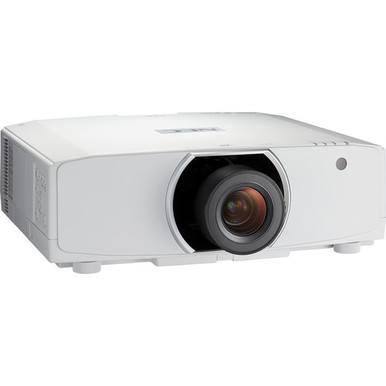
Planning a projector around its SKU alone is risky. Brightness and resolution matter, but the finished installation also depends on screen geometry, lens choice, mounting coordinates, signal infrastructure, service access, and procurement timing. The NEC NP-PA853W-41ZL Setup Guide and Buying Considerations below starts with the confirmed facts: 8,500-lumen brightness, WXGA resolution, and a listing that identifies this configuration as a projector-and-lens bundle. It also places the NP-PA853W projector and two NEC lens listings into a practical buying framework.
This guide is built for AV buyers, installers, churches, schools, and conference room technology teams. It doesn't guess at connections, throw distances, package contents, or projector-to-lens compatibility. Instead, it shows what your team should calculate, document, and verify before approving the purchase. Use the linked product pages for current commercial details. The goal is simple: tie the chosen configuration to an approved room drawing, screen target, infrastructure plan, and acceptance checklist before installation begins.
Products at a Glance
- Option 1: NEC NP-PA853W-41ZL 8500-Lumen HDR WXGA Projector and Lens Bundle
- For project teams comparing the base NP-PA853W listin…: NEC NP-PA853W WXGA 720p LCD Projector
- For installers evaluating NP40ZL as a lens candidate…: NEC NP40ZL Short-throw Zoom Lens – 13.3mm-18.6mm – F/2.0-2.43
- For teams investigating an NP41ZL lens path for a PA…: NEC NP41ZL 1.30 – 3.08:1 Zoom Lens for NEC PA Series Projectors
Quick Comparison Table
| Feature | NEC NP-PA853W-41ZL 8500-Lumen HDR WXGA Projector and Lens Bundle | NEC NP-PA853W WXGA 720p LCD Projector | NEC NP40ZL Short-throw Zoom Lens – 13.3mm-18.6mm – F/2.0-2.43 | NEC NP41ZL 1.30 – 3.08:1 Zoom Lens for NEC PA Series Projectors |
|---|---|---|---|---|
| Brightness | 8500 lumens | 8500 lumens | ||
| Resolution | WXGA | WXGA | ||
| Best For | Teams seeking the NP-PA853W projector and a lens through one listing after confirming the included lens and full package contents. | Project teams comparing the base NP-PA853W listing with the bundle and planning to verify package and lens contents separately. | Installers evaluating NP40ZL as a lens candidate and prepared to verify projector compatibility and room geometry before specifying it. | Teams investigating an NP41ZL lens path for a PA Series deployment after confirming compatibility with the exact projector and planned image geometry. |
| Recommended Buyer | Teams seeking the NP-PA853W projector and a lens through one listing after confirming the included lens and full package contents. | Project teams comparing the base NP-PA853W listing with the bundle and planning to verify package and lens contents separately. | Installers evaluating NP40ZL as a lens candidate and prepared to verify projector compatibility and room geometry before specifying it. | Teams investigating an NP41ZL lens path for a PA Series deployment after confirming compatibility with the exact projector and planned image geometry. |
Product Images
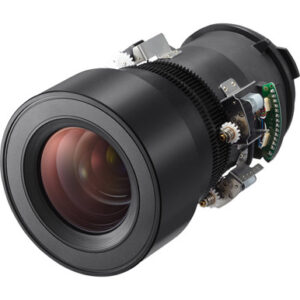
Projector Options from AudioVideoNation
1. NEC NP-PA853W-41ZL 8500-Lumen HDR WXGA Projector and Lens Bundle
Who should compare it: Teams seeking the NP-PA853W projector and a lens through one listing after confirming the included lens and full package contents.
Why it belongs here: This is the direct configuration covered by the guide. The supplied facts confirm 8,500-lumen brightness and WXGA resolution, while the product name identifies a projector-and-lens bundle.
SKU: NP-PA853W-41ZL
Key Features
- 8,500-lumen brightness
- WXGA resolution
- Projector-and-lens bundle listing
- NP-PA853W-41ZL configuration SKU
Things to Consider
Confirm the included lens, throw geometry, mounting requirements, signal connections, control needs, and current commercial details before purchase. The supplied facts do not define those installation points.
2. NEC NP-PA853W WXGA 720p LCD Projector
Who should compare it: Project teams comparing the base NP-PA853W listing with the bundle and planning to verify package and lens contents separately.
Why it belongs here: This listing provides a direct comparison path for buyers evaluating the NP-PA853W projector outside the named 41ZL bundle. Its supplied facts also confirm 8,500-lumen brightness and WXGA resolution.
SKU: NP-PA853W
Key Features
- 8,500-lumen brightness
- WXGA resolution
- Separate NP-PA853W product listing for configuration comparison
Things to Consider
Do not assume what is included or excluded based on the shorter SKU. Check the product page, then confirm the approved lens, geometry, mounting plan, and infrastructure requirements.
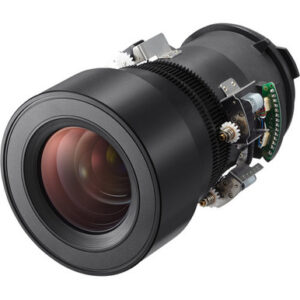
3. NEC NP40ZL Short-throw Zoom Lens – 13.3mm-18.6mm – F/2.0-2.43
Who should compare it: Installers evaluating NP40ZL as a lens candidate and prepared to verify projector compatibility and room geometry before specifying it.
Why it belongs here: The NP40ZL gives installers a separate NEC lens listing to investigate during placement planning. It is useful when the bundle lens or planned projector location has not yet been approved.
SKU: NP40ZL
Key Features
- Separate NEC lens accessory listing
- NP40ZL SKU for procurement records
- Dedicated product page for current commercial checks
- Comparison point beside the NP41ZL during lens research
Things to Consider
The supplied facts do not establish NP-PA853W compatibility, usable throw geometry, or image coverage. Verify each item from an authoritative project source before approving the lens.
4. NEC NP41ZL 1.30 – 3.08:1 Zoom Lens for NEC PA Series Projectors
Who should compare it: Teams investigating an NP41ZL lens path for a PA Series deployment after confirming compatibility with the exact projector and planned image geometry.
Why it belongs here: The NP41ZL is relevant to the named bundle configuration and provides a separate lens page for technical and procurement checks. Its presence also helps buyers keep projector and lens approvals distinct.
SKU: NP41ZL
Key Features
- Separate NEC PA Series lens listing
- NP41ZL SKU for procurement records
- Component-level lens purchase path
- Dedicated page for technical and commercial confirmation
Things to Consider
Do not treat the PA Series description as proof of compatibility with every PA projector. Confirm the exact projector pairing, required image size, placement range, clearances, and package contents.
NEC NP-PA853W-41ZL 8500-Lumen HDR WXGA Projector and Lens Bundle vs NEC NP-PA853W WXGA 720p LCD Projector: Main Differences
- Choose NEC NP-PA853W-41ZL 8500-Lumen HDR WXGA Projector and Lens Bundle if Teams seeking the NP-PA853W projector and a lens through one listing after confirming the included lens and full package contents..
- Choose NEC NP-PA853W WXGA 720p LCD Projector if Project teams comparing the base NP-PA853W listing with the bundle and planning to verify package and lens contents separately..
- Choose NEC NP40ZL Short-throw Zoom Lens – 13.3mm-18.6mm – F/2.0-2.43 if Installers evaluating NP40ZL as a lens candidate and prepared to verify projector compatibility and room geometry before specifying it..
- Choose NEC NP41ZL 1.30 – 3.08:1 Zoom Lens for NEC PA Series Projectors if Teams investigating an NP41ZL lens path for a PA Series deployment after confirming compatibility with the exact projector and planned image geometry..
What the NEC NP-PA853W product data confirms
The supplied data confirms two core specifications for both NEC projector listings: 8,500-lumen brightness and WXGA resolution. Those facts create a useful starting point, but they don't settle the entire design.
Brightness must be evaluated against the intended image size, screen surface, ambient light, content, and the contrast your audience needs. An 8,500-lumen rating alone doesn't prove how the image will look in a specific sanctuary, classroom, or meeting space. Conduct the evaluation under the room's planned operating conditions.
WXGA also deserves an early review. Compare it with the native output of presentation computers, media players, conferencing systems, and other sources. Then inspect representative material at the intended viewing distance. Spreadsheets, small interface text, detailed diagrams, worship lyrics, and video place different demands on the image.
The NP-PA853W-41ZL listing is identified as a projector-and-lens bundle. The NP-PA853W has its own projector listing. Treat these as separate purchase paths until the current package contents have been confirmed on the linked pages.
Assess deployment fit before selecting a lens
Begin with the audience and image requirement. Record the planned image width and height, closest and farthest viewing positions, available projector-to-screen distance, mounting height, ceiling structure, obstructions, and service-access area. A scaled drawing is far safer than an estimate taken from the center of the room.
Church teams should test the actual mix of lyrics, presentation slides, camera feeds, and video they plan to show. Schools should include small instructional text, diagrams, and any classroom software used each day. Conference room teams need to review presentation material and conferencing layouts from every regular seat. The question isn't whether WXGA works in the abstract. It is whether WXGA satisfies the approved content and viewing requirements in that room.
Ambient light must be recorded under normal use. Note windows, fixtures, lighting scenes, and any light that falls directly on the screen. The 8,500-lumen specification gives the designer a concrete input, but the screen and room still shape the result.
Capture operational needs as well. Identify who starts the system, which sources they use, how control should work, and how maintenance staff will reach the projector. These details turn a product choice into a supportable deployment.
NEC projector lens selection and throw planning
The lens decision fixes the practical mounting zone. For initial planning, throw ratio relates lens-to-screen distance to image width. The final calculation must use verified lens data, the required image dimensions, and the exact measurement reference defined by the applicable documentation.
The supplied product set includes the NP40ZL and NP41ZL as separate lens listings. Their inclusion does not establish compatibility with the NP-PA853W. Get written confirmation for the exact projector and lens SKU before approving either one. You should also verify image coverage, usable zoom range, focus range, supported orientation, required clearances, and whether the planned placement can achieve the needed image position.
Run the calculation at both ends of any documented zoom range. Avoid a design that works only at an extreme with no tolerance for field conditions. Ceiling structure, mount adjustment, screen construction, and measurement error can move the real installation away from the drawing.
Create a lens sign-off sheet showing the projector SKU, lens SKU, target image dimensions, calculated distance range, proposed lens location, screen location, and the source used for compatibility confirmation. Have the designer and installer approve it before mounts, cabling, or ceiling work are finalized.
NEC NP-PA853W setup workflow
A disciplined setup sequence catches expensive conflicts early.
1. Freeze the image target. Approve the screen dimensions, image position, viewing area, content types, ambient-light conditions, and resolution requirement.
2. Confirm the purchase configuration. Match the full SKU to the product page and verify package contents. For the NP-PA853W-41ZL bundle, confirm the included lens rather than inferring it from the configuration name.
3. Approve the optical geometry. Use verified compatibility and lens data to calculate placement. Mark the proposed lens centerline on the room drawing and check it against structure, lighting, ducts, speakers, sprinklers, and service clearance.
4. Define the infrastructure. Confirm the required source interfaces, cable distance, signal distribution, conversion equipment, power, control method, and network needs. These capabilities aren't established in the supplied data, so each one needs project-specific verification.
5. Bench-test the system. Before overhead installation, connect the planned source chain and display representative content. Confirm that every required signal format and operating step works as documented.
6. Mount and align. Start with mechanical and optical alignment. Do not assume electronic correction is available or can rescue an incorrect mounting position.
7. Complete acceptance testing. Evaluate the image with normal room lighting and real content. Record the final placement, settings, signal path, control procedure, and maintenance access plan for the support team.
Choosing the bundle, projector listing, or separate lens path
The NEC NP-PA853W-41ZL is the direct subject of this guide. Its product name identifies a projector-and-lens bundle, making it the first listing to review when your approved design calls for that configuration. Confirm the included lens and every other package component before issuing a purchase order.
The NEC NP-PA853W listing gives buyers a second way to examine the 8,500-lumen WXGA projector. Use it to compare current package contents with the bundle. Do not assume the two listings differ only by a lens, since the supplied facts don't define everything included with either purchase.
The NP40ZL and NP41ZL listings support component-level lens research. They are candidates for investigation, not automatically approved accessories. Compatibility, geometry, and image coverage must all be confirmed for the exact installation.
Choose the path that matches the signed design and contains no unwanted assumptions. A bundle can reduce the number of procurement line items if its lens and package contents match the project. A separate lens path can support a different placement requirement, but only after its fit has been documented.
Projector price-to-performance beyond the product line
Price-to-performance is a project calculation. Compare each option at the same installed scope, using current commercial details from the linked product pages or a project quote.
Include the projector, confirmed lens, mount, structural hardware, cabling, signal equipment, control components, electrical work, installation labor, access equipment, commissioning, and any required spares. Some projects won't need every item. The point is to expose differences before a low initial figure leads to added work later.
Measure performance against the approved brief: usable image size under operating lights, content legibility from required seats, feasible mounting geometry, compatibility with the source plan, and an operator workflow the site can support. An 8,500-lumen specification has value only when the resolution, lens, screen, and room conditions also meet the requirement.
For each purchase path, document assumptions beside the project total. If the bundle contents are uncertain, resolve them first. If a separate lens changes placement or installation labor, include that effect. This produces an accountable comparison without relying on a headline number.
Stock and availability planning without guesswork
Availability and other commercial details can change, so check the linked product page when the project is ready to proceed. For scheduled deployments, confirm quote validity, expected fulfillment timing, package contents, and whether the projector and approved lens can be obtained within the same installation window.
Keep the full SKU on every request, approval, and purchase document. NP-PA853W-41ZL and NP-PA853W identify different listings, while NP40ZL and NP41ZL identify separate lens products. Shortened descriptions can cause the wrong configuration to move through procurement.
Do not schedule ceiling closure, lift access, or installer travel around an unconfirmed shipment. If substitutions are allowed, define the approval process before ordering. A different lens or projector configuration must return to the geometry, compatibility, infrastructure, and acceptance checks. Similar naming is not enough.
Visit the product pages again before purchase for live commerce information. That final check keeps the article useful as guidance without turning a changing store detail into a design assumption.
Final deployment sign-off checklist
The final deployment sheet should connect the purchase directly to the room design. Record the full projector and lens SKUs, confirmed package contents, 8,500-lumen and WXGA requirements, screen dimensions, verified throw calculation, mounting coordinates, infrastructure, source formats, control plan, service access, and acceptance procedure.
Hold a go/no-go review. Does WXGA meet the approved content requirement? Has projector-to-lens compatibility been confirmed? Does the calculated image fit the available mounting zone with reasonable field tolerance? Are power, signal, and control requirements documented? Does the bill of materials reflect the bundle's verified contents? Have current commercial details been checked?
If any answer is missing, pause that part of the purchase. Resolve it on paper first. The best buying decision is the configuration that meets the documented AV requirement and arrives with a clear installation plan.
Related AudioVideoNation Links
- Browse Projector at AudioVideoNation
- NEC NP-PA853W-41ZL projector and lens bundle
- NEC NP-PA853W projector
- NEC NP40ZL lens
- NEC NP41ZL PA Series lens
Product Information Sources
- NEC NP-PA853W-41ZL 8500-Lumen HDR WXGA Projector and Lens Bundle product information
- NEC NP-PA853W WXGA 720p LCD Projector product information
- NEC NP40ZL Short-throw Zoom Lens – 13.3mm-18.6mm – F/2.0-2.43 product information
- NEC NP41ZL 1.30 – 3.08:1 Zoom Lens for NEC PA Series Projectors product information
FAQ
What brightness and resolution are confirmed for the NEC NP-PA853W-41ZL?
The supplied product data confirms 8,500-lumen brightness and WXGA resolution for the NEC NP-PA853W-41ZL. Screen size, ambient light, content, viewing distance, and the selected lens still need project-specific evaluation.
Does the NP-PA853W-41ZL listing include a lens?
The supplied product name identifies NP-PA853W-41ZL as a projector-and-lens bundle. Confirm the exact included lens and all package contents on the linked product page before ordering.
Is the NP-PA853W listing the same purchase configuration as NP-PA853W-41ZL?
The supplied data presents NP-PA853W and NP-PA853W-41ZL as separate product listings with different names and SKUs. Compare their current package contents directly rather than assuming the only difference is a lens.
Does the supplied data prove that NP40ZL or NP41ZL works with NP-PA853W?
No, the supplied facts do not establish exact NP40ZL or NP41ZL compatibility with the NP-PA853W. Get compatibility confirmation and complete the throw calculation before approving either lens.
Should buyers choose this projector based on 8,500-lumen brightness alone?
No, 8,500-lumen brightness alone is not enough to approve the projector for a room. Evaluate it with the required screen size, ambient light, WXGA content needs, viewing distance, lens geometry, and operating conditions.
Where should buyers check current price and availability details?
Buyers should use the linked AudioVideoNation product pages for current commercial details. Recheck them when procurement is ready, then confirm fulfillment timing and package contents against the approved project schedule.
Conclusion
Use this NEC NP-PA853W-41ZL Setup Guide and Buying Considerations comparison to match documented specifications to the room and installation requirements. Review the linked product pages for current purchase details before ordering.
Products Used
| SKU | Product Name | URL |
|---|---|---|
| NP-PA853W-41ZL | NEC NP-PA853W-41ZL 8500-Lumen HDR WXGA Projector and Lens Bundle | View product |
| NP-PA853W | NEC NP-PA853W WXGA 720p LCD Projector | View product |
| NP40ZL | NEC NP40ZL Short-throw Zoom Lens – 13.3mm-18.6mm – F/2.0-2.43 | View product |
| NP41ZL | NEC NP41ZL 1.30 – 3.08:1 Zoom Lens for NEC PA Series Projectors | View product |