


Buyers searching for “NEC NP-UM351WI-WK vs NP-UM352W: Which Projector Should You Choose?” face a practical installation decision. Both NEC projectors have WXGA resolution, but the available product details emphasize different strengths. The NP-UM351WI-WK has a documented brightness of 3,500 lumens. The NP-UM352W is identified as an ultra short throw projector, making image geometry and placement central to its case.
Those differences matter in classrooms, conference rooms, houses of worship, and other shared AV spaces. A projector can meet the resolution requirement yet still be wrong for the mounting position, ambient light, source equipment, or procurement plan. This comparison separates confirmed facts from details that need verification. It also shows how to evaluate deployment fit, current availability, and price-to-performance without assuming that either NEC projector is the universal winner.
Products at a Glance
- Option 1: NEC NP-UM351WI-WK WXGA 720p LCD Projector
- For installations that require a WXGA projector posit…: NEC NP-UM352W WXGA LCD Projector with Speaker
- For buyers comparing additional NEC ultra short throw…: NEC NP-UM351Wi-TM WXGA 720p LCD Projector with Speaker
- For projects that specify Full HD resolution and want…: Epson Powerlite L270F 5200-Lumen Full HD Laser 3LCD Projector (V11HC68020)
- For buyers whose written requirements include Full HD…: Epson PowerLite 992F 4000-Lumen Full HD Projector with Wi-Fi (V11H988020)
Quick Comparison Table
| Feature | NEC NP-UM351WI-WK WXGA 720p LCD Projector | NEC NP-UM352W WXGA LCD Projector with Speaker | NEC NP-UM351Wi-TM WXGA 720p LCD Projector with Speaker | Epson Powerlite L270F 5200-Lumen Full HD Laser 3LCD Projector (V11HC68020) | Epson PowerLite 992F 4000-Lumen Full HD Projector with Wi-Fi (V11H988020) |
|---|---|---|---|---|---|
| Brightness | 3500 lumens | 5200 lumens | 4000 lumens | ||
| Resolution | WXGA | WXGA | WXGA | Full HD | Full HD |
| Best For | Buyers who need WXGA resolution and a documented 3,500-lumen figure in the initial projector review. | Installations that require a WXGA projector positioned close to the presentation surface. | Buyers comparing additional NEC ultra short throw choices for a WXGA installation. | Projects that specify Full HD resolution and want a documented 5,200-lumen figure for room planning. | Buyers whose written requirements include Full HD resolution or Wi-Fi alongside a documented brightness figure. |
| Throw Type | Ultra short throw | Ultra short throw | |||
| Smart Features | Wi-Fi | ||||
| Recommended Buyer | Buyers who need WXGA resolution and a documented 3,500-lumen figure in the initial projector review. | Installations that require a WXGA projector positioned close to the presentation surface. | Buyers comparing additional NEC ultra short throw choices for a WXGA installation. | Projects that specify Full HD resolution and want a documented 5,200-lumen figure for room planning. | Buyers whose written requirements include Full HD resolution or Wi-Fi alongside a documented brightness figure. |
Product Images

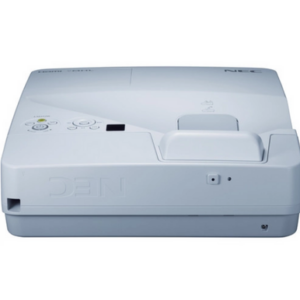

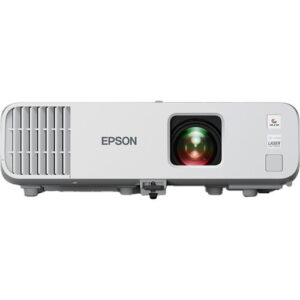
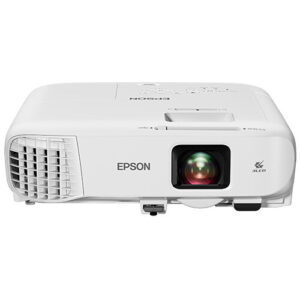
Projector Options from AudioVideoNation
1. NEC NP-UM351WI-WK WXGA 720p LCD Projector
Who should compare it: Buyers who need WXGA resolution and a documented 3,500-lumen figure in the initial projector review.
Why it belongs here: This is one of the two comparison models and supplies two concrete planning facts: WXGA resolution and 3,500-lumen brightness.
SKU: NP-UM351WI-WK
Key Features
- 3,500-lumen documented brightness
- WXGA resolution
- Listed in the multimedia projector category
- Exact procurement SKU: NP-UM351WI-WK
Things to Consider
Confirm its throw geometry, required connections, mounting details, audio plan, and included accessories before specifying it for a room.
2. NEC NP-UM352W WXGA LCD Projector with Speaker
Who should compare it: Installations that require a WXGA projector positioned close to the presentation surface.
Why it belongs here: This is the second comparison model. Its confirmed ultra short throw type creates a distinct placement case alongside its WXGA resolution.
SKU: NP-UM352W
Key Features
- Ultra short throw type
- WXGA resolution
- Listed in the multimedia projector category
- Exact procurement SKU: NP-UM352W
Things to Consider
Confirm brightness, exact throw distance, image offset, connections, mounting requirements, and accessories for the intended screen size.
3. NEC NP-UM351Wi-TM WXGA 720p LCD Projector with Speaker
Who should compare it: Buyers comparing additional NEC ultra short throw choices for a WXGA installation.
Why it belongs here: This related NEC option adds another documented combination of WXGA resolution and ultra short throw placement to the buying set.
SKU: NP-UM351Wi
Key Features
- Ultra short throw type
- WXGA resolution
- Listed in the multimedia projector category
- Distinct procurement SKU: NP-UM351Wi
Things to Consider
Do not confuse this variant with NP-UM351WI-WK. Confirm brightness, exact geometry, connections, mounting needs, and accessories on its product page.
4. Epson Powerlite L270F 5200-Lumen Full HD Laser 3LCD Projector (V11HC68020)
Who should compare it: Projects that specify Full HD resolution and want a documented 5,200-lumen figure for room planning.
Why it belongs here: This Epson projector provides a documented Full HD alternative with 5,200-lumen brightness when the NEC models’ WXGA resolution does not meet the brief.
SKU: PL-L270F
Key Features
- 5,200-lumen documented brightness
- Full HD resolution
- Listed in the projector category
- Exact procurement SKU: PL-L270F
Things to Consider
Confirm throw geometry, mounting, connections, accessories, and workflow requirements before replacing either NEC option in a design.
5. Epson PowerLite 992F 4000-Lumen Full HD Projector with Wi-Fi (V11H988020)
Who should compare it: Buyers whose written requirements include Full HD resolution or Wi-Fi alongside a documented brightness figure.
Why it belongs here: This alternative combines documented Full HD resolution, 4,000-lumen brightness, and Wi-Fi for briefs that extend beyond the confirmed NEC specifications.
SKU: PL-992F
Key Features
- 4,000-lumen documented brightness
- Full HD resolution
- Wi-Fi
- Exact procurement SKU: PL-992F
Things to Consider
Confirm that its wireless workflow, throw geometry, connections, mounting plan, and accessories match the room and source equipment.
NEC NP-UM351WI-WK WXGA 720p LCD Projector vs NEC NP-UM352W WXGA LCD Projector with Speaker: Main Differences
- Choose NEC NP-UM351WI-WK WXGA 720p LCD Projector if Buyers who need WXGA resolution and a documented 3,500-lumen figure in the initial projector review..
- Choose NEC NP-UM352W WXGA LCD Projector with Speaker if Installations that require a WXGA projector positioned close to the presentation surface..
- Choose NEC NP-UM351Wi-TM WXGA 720p LCD Projector with Speaker if Buyers comparing additional NEC ultra short throw choices for a WXGA installation..
- Choose Epson Powerlite L270F 5200-Lumen Full HD Laser 3LCD Projector (V11HC68020) if Projects that specify Full HD resolution and want a documented 5,200-lumen figure for room planning..
- Choose Epson PowerLite 992F 4000-Lumen Full HD Projector with Wi-Fi (V11H988020) if Buyers whose written requirements include Full HD resolution or Wi-Fi alongside a documented brightness figure..
NEC NP-UM351WI-WK vs NP-UM352W: The Short Answer
Choose the NEC NP-UM351WI-WK when your specification calls for WXGA resolution and a documented 3,500-lumen brightness figure. That combination gives buyers a concrete starting point for reviewing ambient light, image size, and expected content. Its listed information does not settle every installation question, so confirm the required throw distance, connections, mounting details, and accessories before approving the design.
Choose the NEC NP-UM352W when ultra short throw placement is the defining requirement. Its listed WXGA resolution keeps it in the same resolution class as the NP-UM351WI-WK, while the stated throw type makes it the clearer candidate for a close-to-screen installation. You still need the exact throw-distance calculation and brightness figure for the planned image size and room.
Neither choice should be based on the model number alone. Start with mounting geometry. Then review ambient light, resolution, source connections, audio design, and current commercial details on the linked product pages.
WXGA Resolution and Documented Brightness
Both NEC projectors are listed with WXGA resolution. That makes resolution a point of similarity, not the deciding difference. Review the actual source material your room will display. Slides, spreadsheets, video, camera feeds, and small interface text can place different demands on the image. If the project requires Full HD, the two Epson alternatives below provide that documented resolution and should enter the comparison.
Brightness creates a clearer distinction in the available information. The NEC NP-UM351WI-WK has a stated output of 3,500 lumens. The provided details do not give a brightness figure for the NP-UM352W, so no responsible brightness comparison can declare one brighter than the other. Ask for the NP-UM352W figure before sizing a screen or approving it for a room with significant ambient light.
A lumen number also needs context. Screen size, screen surface, room lighting, viewing distance, and the type of content all affect the result. Treat 3,500 lumens as a planning input for the NP-UM351WI-WK, not a promise that it will suit every room.
Ultra Short Throw Projector Placement and Installation
The NEC NP-UM352W is specifically identified as ultra short throw. That makes it relevant where the projector must sit close to the screen or presentation surface. Shorter placement can also help keep the projector out of the main occupied area, but the exact result depends on the required image size and approved mounting position.
Do not estimate placement from the ultra short throw label alone. Confirm the precise throw distance, image offset, mounting orientation, screen dimensions, and adjustment limits for the intended installation. A small measurement error can affect image alignment or force changes to the mount and furniture layout.
The supplied product facts do not identify a throw type for the NP-UM351WI-WK. That omission is not evidence that it has or lacks a particular geometry. Installers should verify its throw requirements directly before treating the two models as interchangeable. For retrofit work, measure the existing screen, mounting points, cable path, and nearby obstructions before selecting either projector.
Projector Deployment Fit for Schools, Churches, and Meeting Rooms
Schools should begin with room layout and teaching position. If close-to-screen placement is required, the NP-UM352W has the documented ultra short throw designation. If the purchasing specification instead needs a confirmed brightness figure, the NP-UM351WI-WK supplies 3,500 lumens. In either case, verify source connections, mounting hardware, control needs, and the audio plan for the classroom.
Churches and other houses of worship should compare the planned image size with ambient light and viewing distance. The NP-UM351WI-WK provides a known brightness value, while the NP-UM352W requires that detail to be confirmed. WXGA is documented for both. Review whether that resolution matches presentation slides, lyrics, video, and any camera-based content used in the room.
Conference room teams should map the projector to the table layout, screen position, and content sources. Ultra short throw placement may fit rooms where a conventional mounting position is difficult, but exact geometry still controls the decision. If Full HD or Wi-Fi is a written requirement, consider the documented Epson alternatives rather than assuming either NEC model supplies it.
How to Judge Projector Price-to-Performance
Price-to-performance starts with required outcomes, not the longest specification list. For the NP-UM351WI-WK, the confirmed performance inputs are WXGA resolution and 3,500-lumen brightness. For the NP-UM352W, they are WXGA resolution and ultra short throw placement. Compare current product-page pricing only after deciding which of those traits solves the room’s main constraint.
Include the wider installation cost. A mount, screen, cabling, signal distribution, control equipment, and audio system can change the project total. A projector with a suitable purchase price can become the weaker value if its placement forces room changes or if it misses a required resolution.
Use a simple pass-or-fail list: required resolution, calculated brightness, verified throw distance, source connections, mounting plan, and support for the intended workflow. A model that fails a required line item does not become a better value because its live price is lower.
How to Check Stock and Availability
Use each linked AudioVideoNation product page for current availability and other live purchasing details. Do this again when the quote is approved, since commerce information can change between initial research and ordering.
Match the complete SKU on the quote, purchase order, and product page. NP-UM351WI-WK and NP-UM352W are distinct identifiers, and similar NEC names should not be treated as substitutes without a fresh technical review. The alternative NP-UM351Wi also has a different SKU and product page.
For a scheduled installation, confirm the exact projector, required accessories, and delivery timing before booking labor. Product availability alone does not establish that mounts, cables, or other project components will be ready at the same time.
Alternatives When the Two NEC Projectors Do Not Fit
The NEC NP-UM351Wi-TM is another WXGA, ultra short throw option in the provided selection. Its SKU is NP-UM351Wi, so buyers should verify the exact variant and required specifications instead of treating it as the NP-UM351WI-WK under a shortened name.
For projects that require Full HD, the Epson Powerlite L270F has a documented brightness of 5,200 lumens and Full HD resolution. The Epson PowerLite 992F also has Full HD resolution, along with a stated 4,000-lumen brightness figure and Wi-Fi. Those facts make the Epson projectors relevant when resolution, brightness, or wireless operation changes the brief.
These alternatives are not automatic upgrades. Their mounting geometry, connections, accessories, and workflow fit still need review. Changing brands or resolution classes can affect the rest of the design, so compare each projector against the same room measurements and pass-or-fail requirements.
Final AV Buying Checklist
Write down the room requirements before comparing current commercial details. Record the screen size, mounting position, available distance, ambient-light conditions, viewing distance, source equipment, desired resolution, audio approach, network needs, and installation date.
For the NEC NP-UM351WI-WK, validate that WXGA and 3,500 lumens meet the brief, then confirm its placement geometry and remaining connections. For the NEC NP-UM352W, validate that its ultra short throw layout works at the required image size, then confirm brightness and the rest of the signal plan. Do not fill gaps with assumptions based on similar model names.
The practical choice follows the room’s hardest constraint. The NP-UM351WI-WK gives planners a documented brightness figure. The NP-UM352W gives them a documented ultra short throw type. If the project instead requires Full HD, greater documented brightness, or Wi-Fi, review the listed Epson alternatives and verify every installation detail on the linked product page.
Related AudioVideoNation Links
- Browse Projector at AudioVideoNation
- NEC NP-UM351WI-WK product page
- NEC NP-UM352W product page
- NEC NP-UM351Wi-TM product page
- Epson Powerlite L270F product page
Product Information Sources
- NEC NP-UM351WI-WK WXGA 720p LCD Projector product information
- NEC NP-UM352W WXGA LCD Projector with Speaker product information
- NEC NP-UM351Wi-TM WXGA 720p LCD Projector with Speaker product information
- Epson Powerlite L270F 5200-Lumen Full HD Laser 3LCD Projector (V11HC68020) product information
- Epson PowerLite 992F 4000-Lumen Full HD Projector with Wi-Fi (V11H988020) product information
FAQ
Do the NEC NP-UM351WI-WK and NP-UM352W have the same resolution?
Yes, both NEC projectors have documented WXGA resolution. Resolution therefore does not separate them, so buyers should focus on brightness evidence, throw geometry, connections, and deployment needs.
Which model has a documented brightness figure?
The NEC NP-UM351WI-WK has a documented brightness of 3,500 lumens. Confirm the NP-UM352W brightness before comparing the two for a specific screen size or ambient-light condition.
Which NEC projector is identified as ultra short throw?
The NEC NP-UM352W is identified as an ultra short throw projector. The supplied details do not establish a throw type for the NP-UM351WI-WK, so verify its exact placement requirements separately.
How should buyers compare price-to-performance without fixed pricing in the article?
Buyers should compare live product-page pricing against the specifications their room actually requires. Include mounting, screens, cabling, control, audio, and installation work when evaluating total project value.
Where should buyers check current stock and availability?
Buyers should check the linked AudioVideoNation product page for current availability and purchasing details. Reconfirm the exact SKU and project timing before issuing a purchase order or scheduling installation.
What should an installer verify before ordering either NEC projector?
An installer should verify screen size, exact throw distance, mounting position, brightness needs, source connections, audio design, accessories, and delivery timing before ordering. These checks prevent a shared WXGA resolution or similar model name from hiding a deployment mismatch.
Conclusion
Use this NEC NP-UM351WI-WK vs NP-UM352W: Which Projector Should You Choose? comparison to match documented specifications to the room and installation requirements. Review the linked product pages for current purchase details before ordering.
Products Used
| SKU | Product Name | URL |
|---|---|---|
| NP-UM351WI-WK | NEC NP-UM351WI-WK WXGA 720p LCD Projector | View product |
| NP-UM352W | NEC NP-UM352W WXGA LCD Projector with Speaker | View product |
| NP-UM351Wi | NEC NP-UM351Wi-TM WXGA 720p LCD Projector with Speaker | View product |
| PL-L270F | Epson Powerlite L270F 5200-Lumen Full HD Laser 3LCD Projector (V11HC68020) | View product |
| PL-992F | Epson PowerLite 992F 4000-Lumen Full HD Projector with Wi-Fi (V11H988020) | View product |