

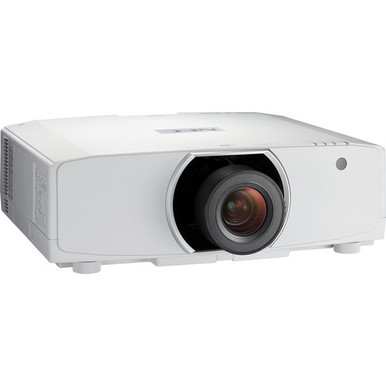
NEC NP-PA653U-41ZL vs NP-PA703UL: Which Projector Should You Choose? The answer starts with the requirements your AV team can document. Both products have WUXGA resolution and come in configurations that include a lens, but the supplied facts give the NP-PA703UL a clear 7,000-lumen rating while the NP-PA653U-41ZL needs further brightness verification.
That distinction matters for churches, schools, conference rooms, and other installed AV spaces. Buyers need enough information to size the projector for the room, confirm that the lens fits the planned image geometry, and compare the complete package against the current quote. A model name alone cannot settle those questions.
This guide separates confirmed facts from details that require checking. It also covers three related NEC projectors from the supplied catalog, including WUXGA, WXGA, lens-bundled, and no-lens configurations. Use it to build a focused shortlist, then visit each linked product page for current commerce details before ordering.
Products at a Glance
- Option 1: NEC NP-PA653U-41ZL Projector and Lens Bundle
- For installations that call for a 7,000-lumen WUXGA p…: NEC NP-PA703UL 7000-Lumen WUXGA LCD Professional Installation Laser Projector with NP41ZL Lens
- For projects that require WUXGA resolution and intent…: NEC NP-PA653U 3D WUXGA 1080p LCD Projector (No Lens)
- For projects that need an 8,500-lumen rating, accept…: NEC NP-PA853W-41ZL 8500-Lumen HDR WXGA Projector and Lens Bundle
- For aV teams that need a 6,500-lumen WUXGA candidate…: NEC NP-PA653UL-41ZL 3D WUXGA 1080p LCD Projector
Quick Comparison Table
| Feature | NEC NP-PA653U-41ZL Projector and Lens Bundle | NEC NP-PA703UL 7000-Lumen WUXGA LCD Professional Installation Laser Projector with NP41ZL Lens | NEC NP-PA653U 3D WUXGA 1080p LCD Projector (No Lens) | NEC NP-PA853W-41ZL 8500-Lumen HDR WXGA Projector and Lens Bundle | NEC NP-PA653UL-41ZL 3D WUXGA 1080p LCD Projector |
|---|---|---|---|---|---|
| Brightness | 7000 lumens | 8500 lumens | 6500 Lumens | ||
| Resolution | WUXGA | WUXGA | WUXGA | WXGA | WUXGA |
| Best For | Teams seeking a WUXGA bundled configuration that can be approved after brightness and lens details are confirmed for the room. | Installations that call for a 7,000-lumen WUXGA projector and can validate the named NP41ZL lens against the site geometry. | Projects that require WUXGA resolution and intentionally place projector and lens procurement on separate line items. | Projects that need an 8,500-lumen rating, accept WXGA, and can validate the bundled lens for the installation. | AV teams that need a 6,500-lumen WUXGA candidate and will verify its complete package against the room design. |
| Recommended Buyer | Teams seeking a WUXGA bundled configuration that can be approved after brightness and lens details are confirmed for the room. | Installations that call for a 7,000-lumen WUXGA projector and can validate the named NP41ZL lens against the site geometry. | Projects that require WUXGA resolution and intentionally place projector and lens procurement on separate line items. | Projects that need an 8,500-lumen rating, accept WXGA, and can validate the bundled lens for the installation. | AV teams that need a 6,500-lumen WUXGA candidate and will verify its complete package against the room design. |
Product Images
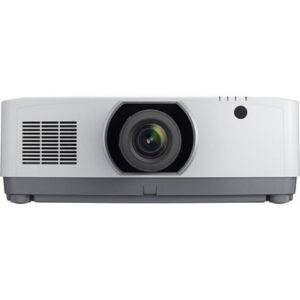
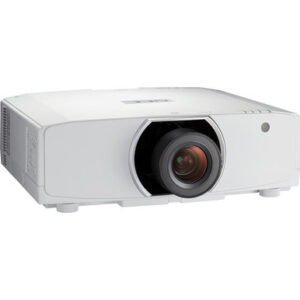
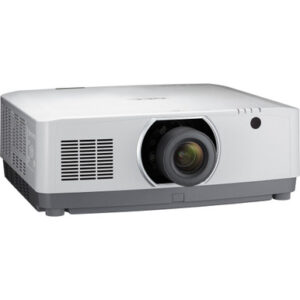
Projector Options from AudioVideoNation
1. NEC NP-PA653U-41ZL Projector and Lens Bundle
Who should compare it: Teams seeking a WUXGA bundled configuration that can be approved after brightness and lens details are confirmed for the room.
Why it belongs here: This is one of the two primary comparison products. It combines confirmed WUXGA resolution with a projector-and-lens bundle format.
SKU: NP-PA653U-41ZL
Key Features
- WUXGA resolution
- Projector-and-lens bundle configuration
- NP-PA653U-41ZL ordering identity
Things to Consider
Confirm rated brightness, the exact bundled lens, throw suitability, connections, and all required installation accessories before ordering.
2. NEC NP-PA703UL 7000-Lumen WUXGA LCD Professional Installation Laser Projector with NP41ZL Lens
Who should compare it: Installations that call for a 7,000-lumen WUXGA projector and can validate the named NP41ZL lens against the site geometry.
Why it belongs here: This is the second primary comparison product and provides a documented brightness figure alongside WUXGA resolution.
SKU: NP-PA703UL
Key Features
- 7,000-lumen brightness
- WUXGA resolution
- NP41ZL lens named in the package
- Professional installation product configuration
Things to Consider
Validate lens throw, image size, mounting, signal, control, and package requirements. Check the product page for current commerce details.
3. NEC NP-PA653U 3D WUXGA 1080p LCD Projector (No Lens)
Who should compare it: Projects that require WUXGA resolution and intentionally place projector and lens procurement on separate line items.
Why it belongs here: This related NP-PA653U configuration provides a no-lens purchasing path for teams that plan to specify the lens separately.
SKU: NP-PA653U
Key Features
- WUXGA resolution
- No-lens configuration
- NP-PA653U family identity
Things to Consider
A lens must be selected separately. Confirm compatibility, throw geometry, rated brightness, and the complete installation bill of materials.
4. NEC NP-PA853W-41ZL 8500-Lumen HDR WXGA Projector and Lens Bundle
Who should compare it: Projects that need an 8,500-lumen rating, accept WXGA, and can validate the bundled lens for the installation.
Why it belongs here: This alternative adds a documented 8,500-lumen option and a bundled format for buyers whose plans can accommodate WXGA resolution.
SKU: NP-PA853W-41ZL
Key Features
- 8,500-lumen brightness
- WXGA resolution
- Projector-and-lens bundle configuration
- NP-PA853W-41ZL ordering identity
Things to Consider
WXGA differs from the WUXGA resolution of the primary comparison products. Confirm source requirements, lens details, and throw geometry.
5. NEC NP-PA653UL-41ZL 3D WUXGA 1080p LCD Projector
Who should compare it: AV teams that need a 6,500-lumen WUXGA candidate and will verify its complete package against the room design.
Why it belongs here: This related NEC projector offers a documented 6,500-lumen WUXGA configuration for buyers comparing nearby brightness options.
SKU: NP-PA653UL-41ZL
Key Features
- 6,500-lumen brightness
- WUXGA resolution
- NP-PA653UL-41ZL ordering identity
Things to Consider
Do not assume it is interchangeable with the NP-PA653U-41ZL. Confirm package contents, lens requirements, connections, and installation details.
NEC NP-PA653U-41ZL Projector and Lens Bundle vs NEC NP-PA703UL 7000-Lumen WUXGA LCD Professional Installation Laser Projector with NP41ZL Lens: Main Differences
- Choose NEC NP-PA653U-41ZL Projector and Lens Bundle if Teams seeking a WUXGA bundled configuration that can be approved after brightness and lens details are confirmed for the room..
- Choose NEC NP-PA703UL 7000-Lumen WUXGA LCD Professional Installation Laser Projector with NP41ZL Lens if Installations that call for a 7,000-lumen WUXGA projector and can validate the named NP41ZL lens against the site geometry..
- Choose NEC NP-PA653U 3D WUXGA 1080p LCD Projector (No Lens) if Projects that require WUXGA resolution and intentionally place projector and lens procurement on separate line items..
- Choose NEC NP-PA853W-41ZL 8500-Lumen HDR WXGA Projector and Lens Bundle if Projects that need an 8,500-lumen rating, accept WXGA, and can validate the bundled lens for the installation..
- Choose NEC NP-PA653UL-41ZL 3D WUXGA 1080p LCD Projector if AV teams that need a 6,500-lumen WUXGA candidate and will verify its complete package against the room design..
NEC WUXGA projector comparison: the confirmed differences
The NP-PA653U-41ZL and NP-PA703UL share WUXGA resolution. That gives buyers a common starting point and keeps the decision centered on brightness documentation, package contents, installation requirements, and the current commercial offer.
The NP-PA703UL has a supplied brightness figure of 7,000 lumens. Its full product name also identifies it as a professional installation package with an NP41ZL lens. This makes the listing easier to evaluate when a written brightness target and a named lens are required for a project plan.
The NP-PA653U-41ZL is identified as a projector-and-lens bundle, and WUXGA is confirmed. Before specifying it, confirm its rated brightness and the exact bundled lens details. Those checks are essential if the bid document, room design, or approval process calls for exact figures.
Neither product should be chosen from resolution alone. Ask the installer to verify the required image size, mounting position, throw distance, ambient-light conditions, signal connections, control needs, and electrical provisions. Then match those requirements against the current product documentation. This process prevents a familiar procurement problem: ordering the correct projector family in a configuration that does not fit the actual room.
Brightness and resolution in the NP-PA653U-41ZL vs NP-PA703UL decision
The NP-PA703UL is the more straightforward candidate when your specification explicitly calls for 7,000 lumens. That number is present in the supplied product facts, so it can become part of a documented shortlist. It does not guarantee suitability by itself. Screen size, room light, screen characteristics, and the intended content still shape the result.
For the NP-PA653U-41ZL, obtain the rated brightness before comparing it against a room requirement or against the NP-PA703UL. Do not estimate the figure from the family name or a neighboring product. NEC products with similar identifiers can have different configurations, and the provided catalog includes both 6,500- and 8,500-lumen alternatives.
Both compared products are WUXGA. This shared resolution can simplify the first stage of comparison because neither has a documented resolution advantage here. Your team should still confirm the source devices, presentation format, image-processing needs, and cabling plan for the installed system.
If brightness is a pass-or-fail requirement, document the minimum first. If it is one factor among several, weigh it alongside lens fit, mounting constraints, package contents, and current cost. A larger lumen number should answer a real room requirement, not substitute for one.
Deployment fit for churches, schools, and conference rooms
Deployment fit starts with the room, not the projector label. A church may need a large image that remains usable during services. A school may prioritize repeatable operation across several rooms. A conference room team may care most about fitting an existing screen and mounting location. These are planning requirements, not performance claims about either NEC projector.
The NP-PA703UL gives design teams one useful fixed point: 7,000 lumens. It is easier to place on an initial equipment schedule when that brightness level aligns with the project brief. The named NP41ZL lens also gives the installer a specific item to validate against the planned throw distance and image size.
The NP-PA653U-41ZL can suit a team that wants a WUXGA projector-and-lens bundle, but it requires more verification before approval. Confirm brightness, identify the lens in the offered package, and validate that lens for the mounting geometry. The bundle format can reduce separate purchasing steps only if its contents match the design.
For either product, collect the same site information before requesting approval:
- Target image width and aspect ratio
- Available throw distance and mounting location
- Expected light conditions during use
- Source, cabling, and control requirements
- Power, physical clearance, and service access
- Required delivery date and installation schedule
This checklist gives installers and buyers a shared basis for comparison. It also makes substitutions easier to assess because every alternative must answer the same room-specific questions.
Lens bundles and installation planning
Package naming deserves close attention. The NP-PA653U-41ZL is sold under a name that identifies a projector-and-lens bundle. The NP-PA703UL product name explicitly says it comes with an NP41ZL lens. Confirm the current package contents on the linked pages or with the seller before treating either listing as installation-ready.
A bundled lens is useful only after its fit is validated. Ask the installer to compare the lens documentation with the required image size, throw distance, mounting offset, and available adjustment. The supplied data does not establish those values, so they should remain approval items rather than assumptions.
Also confirm whether the quotation contains every item needed for the planned mounting and signal path. A projector-and-lens package does not automatically establish that brackets, cables, control accessories, or other installation materials are included. Keeping those line items separate in the project checklist makes price comparisons more accurate.
If the room already has a fixed mounting point or screen, lens validation should happen early. If the room design is still flexible, the AV team may have more freedom to adjust projector placement. Either way, get written confirmation before purchase.
Price-to-performance, stock, and availability checks
Price-to-performance should be measured against the project requirements. Start with a current quote for each complete configuration, then compare what that quote includes. Do not assign value from a projector name, lumen figure, or bundle label alone.
The NP-PA703UL supplies a documented 7,000-lumen figure and names the NP41ZL lens in its product title. Those facts may reduce specification uncertainty for a project that needs them. The NP-PA653U-41ZL confirms WUXGA and a bundled format, but its brightness and precise lens details should be established before its offer can be compared on equal terms.
Price and inventory can change. Use the linked AudioVideoNation product pages for live commerce details, and confirm the required quantity against your deployment schedule. For a multi-room school, church campus, or conference facility, check whether the same configuration can support the entire rollout. Mixing configurations can complicate installation documentation and future support.
Build the commercial comparison around four questions:
- Does the quoted configuration meet the documented room requirements?
- Is the required lens included and validated for the site?
- Are any additional installation items needed?
- Can the required quantity arrive within the project timeline?
The stronger value is the configuration that satisfies those conditions with the fewest unresolved line items. That conclusion may differ from room to room.
Related NEC projectors worth comparing
Three supplied NEC products can help refine the shortlist. Each answers a different procurement need, and none should be treated as an automatic substitute without checking the full installation requirements.
The NEC NP-PA653U is a WUXGA no-lens configuration. Consider it when the project intentionally calls for the projector and lens to be sourced as separate line items. The selected lens still needs compatibility and geometry confirmation. Its no-lens format is a purchasing distinction, not evidence that an existing lens will work.
The NEC NP-PA653UL-41ZL has WUXGA resolution and a supplied 6,500-lumen rating. It gives buyers another documented brightness point near the two primary candidates. Its identifier differs from the NP-PA653U-41ZL, so do not assume the products are interchangeable. Confirm package contents and every required installation detail.
The NEC NP-PA853W-41ZL is an 8,500-lumen projector-and-lens bundle with WXGA resolution. It may enter the discussion when a higher documented lumen figure is required and WXGA fits the content plan. Its resolution differs from the WUXGA products in this guide, making source and presentation requirements an early decision gate.
These alternatives show why model numbers need careful reading. A change from WUXGA to WXGA, a 6,500- to 8,500-lumen rating, or a move from bundled to no-lens ordering can reshape the project. Compare exact SKUs and product names on every quote.
How to make the final projector choice
Choose the NP-PA703UL when 7,000 lumens is part of the documented requirement and the included NP41ZL lens is validated for the room. It is the easier of the two main products to place on a specification sheet because the supplied facts include both WUXGA and a brightness figure.
Choose the NP-PA653U-41ZL when you want its WUXGA projector-and-lens bundle configuration and can confirm the remaining technical details before approval. It may fit the project, but the decision should wait until brightness and lens information are tied to the exact SKU.
If neither offer resolves every requirement, compare the related options. The NP-PA653UL-41ZL supplies a 6,500-lumen WUXGA alternative. The NP-PA853W-41ZL supplies 8,500 lumens with WXGA. The NP-PA653U supplies a WUXGA no-lens purchasing path.
Before issuing a purchase order, have the buyer and installer sign off on the exact SKU, resolution, brightness requirement, lens, throw geometry, package contents, connectivity plan, mounting needs, quantity, and schedule. Check the linked product page for current price and availability at the same time.
No single specification settles this comparison. The sound choice is the exact NEC configuration that matches the room design and arrives with every required detail verified.
Related AudioVideoNation Links
- Browse Projector at AudioVideoNation
- NEC NP-PA653U-41ZL projector and lens bundle
- NEC NP-PA703UL 7,000-lumen WUXGA projector
- NEC NP-PA653U WUXGA projector without a lens
- NEC NP-PA853W-41ZL 8,500-lumen WXGA bundle
Product Information Sources
- NEC NP-PA653U-41ZL Projector and Lens Bundle product information
- NEC NP-PA703UL 7000-Lumen WUXGA LCD Professional Installation Laser Projector with NP41ZL Lens product information
- NEC NP-PA653U 3D WUXGA 1080p LCD Projector (No Lens) product information
- NEC NP-PA853W-41ZL 8500-Lumen HDR WXGA Projector and Lens Bundle product information
- NEC NP-PA653UL-41ZL 3D WUXGA 1080p LCD Projector product information
FAQ
What is the main confirmed difference between the NEC NP-PA653U-41ZL and NP-PA703UL?
The NP-PA703UL has a supplied 7,000-lumen rating, while the NP-PA653U-41ZL requires brightness confirmation. Both are identified as WUXGA products, and both product names describe configurations that include a lens.
Which projector is easier to specify for a church, school, or conference room?
The NP-PA703UL is easier to specify when the project requires 7,000 lumens because that figure is included in the supplied facts. Either projector still requires lens, throw, image-size, connectivity, mounting, and room-light validation.
Do the NP-PA653U-41ZL and NP-PA703UL have the same resolution?
Yes, the supplied product facts identify both projectors as WUXGA. Resolution therefore does not separate them in this comparison, so buyers should focus on brightness documentation, lens fit, package contents, and deployment requirements.
Does each NEC projector come with a lens?
Both product names describe lens-included configurations: the NP-PA653U-41ZL is a projector-and-lens bundle, and the NP-PA703UL is named with an NP41ZL lens. Confirm the current package contents and validate the lens for the required throw geometry before purchase.
How should buyers compare price-to-performance without relying on price alone?
Buyers should compare each current quote against the same room requirements and complete installation bill of materials. Include the lens, mounting needs, cabling, controls, required quantity, and unresolved specification checks in that evaluation.
How can I check current stock and availability?
Check the linked AudioVideoNation product page for live commerce details and confirm the required quantity against the installation schedule. Availability can change, so verify the exact SKU again before issuing the purchase order.
Conclusion
Use this NEC NP-PA653U-41ZL vs NP-PA703UL: Which Projector Should You Choose? comparison to match documented specifications to the room and installation requirements. Review the linked product pages for current purchase details before ordering.
Products Used
| SKU | Product Name | URL |
|---|---|---|
| NP-PA653U-41ZL | NEC NP-PA653U-41ZL Projector and Lens Bundle | View product |
| NP-PA703UL | NEC NP-PA703UL 7000-Lumen WUXGA LCD Professional Installation Laser Projector with NP41ZL Lens | View product |
| NP-PA653U | NEC NP-PA653U 3D WUXGA 1080p LCD Projector (No Lens) | View product |
| NP-PA853W-41ZL | NEC NP-PA853W-41ZL 8500-Lumen HDR WXGA Projector and Lens Bundle | View product |
| NP-PA653UL-41ZL | NEC NP-PA653UL-41ZL 3D WUXGA 1080p LCD Projector | View product |