

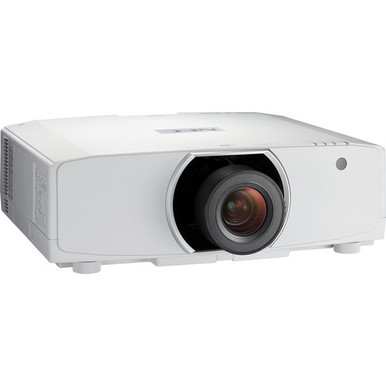
Choosing a projector gets complicated once lens geometry, room light, signal paths, mounting, and procurement enter the discussion. This NEC NP-PA653U-41ZL Setup Guide and Buying Considerations article turns those variables into a practical buying process. The exact NEC NP-PA653U-41ZL listing is a projector-and-lens bundle with WUXGA resolution. Related listings offer other paths, including a WUXGA NP-PA653U configuration identified without a lens, a 6500-lumen WUXGA NP-PA653UL-41ZL, an 8500-lumen WXGA NP-PA853W-41ZL bundle, and the NP40ZL short-throw zoom lens. None is an automatic fit. Churches, schools, conference room teams, and installers still need to match the selected SKU to the room, content, lens calculation, and infrastructure. Use this guide to build that shortlist, then check each linked product page for current commerce details and confirm all technical requirements before ordering.
Products at a Glance
- Option 1: NEC NP-PA653U-41ZL Projector and Lens Bundle
- For projects whose approved design calls for 8500 lum…: NEC NP-PA853W-41ZL 8500-Lumen HDR WXGA Projector and Lens Bundle
- For teams keeping WUXGA while specifying the lens as…: NEC NP-PA653U 3D WUXGA 1080p LCD Projector (No Lens)
- For projects whose completed room calculation calls f…: NEC NP-PA653UL-41ZL 3D WUXGA 1080p LCD Projector
- For layouts that require a short-throw zoom lens and…: NEC NP40ZL Short-throw Zoom Lens – 13.3mm-18.6mm – F/2.0-2.43
Quick Comparison Table
| Feature | NEC NP-PA653U-41ZL Projector and Lens Bundle | NEC NP-PA853W-41ZL 8500-Lumen HDR WXGA Projector and Lens Bundle | NEC NP-PA653U 3D WUXGA 1080p LCD Projector (No Lens) | NEC NP-PA653UL-41ZL 3D WUXGA 1080p LCD Projector | NEC NP40ZL Short-throw Zoom Lens – 13.3mm-18.6mm – F/2.0-2.43 |
|---|---|---|---|---|---|
| Brightness | 8500 lumens | 6500 Lumens | |||
| Resolution | WUXGA | WXGA | WUXGA | WUXGA | |
| Best For | Teams procuring the exact NP-PA653U-41ZL and evaluating a WUXGA projector-and-lens bundle after the included lens is verified for the room. | Projects whose approved design calls for 8500 lumens and WXGA resolution, subject to lens and system verification. | Teams keeping WUXGA while specifying the lens as a separate, compatibility-checked line item. | Projects whose completed room calculation calls for 6500 lumens and whose content plan requires WUXGA. | Layouts that require a short-throw zoom lens and have documented compatibility with the exact selected projector. |
| Recommended Buyer | Teams procuring the exact NP-PA653U-41ZL and evaluating a WUXGA projector-and-lens bundle after the included lens is verified for the room. | Projects whose approved design calls for 8500 lumens and WXGA resolution, subject to lens and system verification. | Teams keeping WUXGA while specifying the lens as a separate, compatibility-checked line item. | Projects whose completed room calculation calls for 6500 lumens and whose content plan requires WUXGA. | Layouts that require a short-throw zoom lens and have documented compatibility with the exact selected projector. |
Product Images
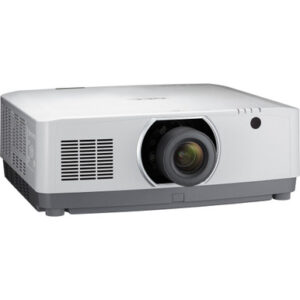
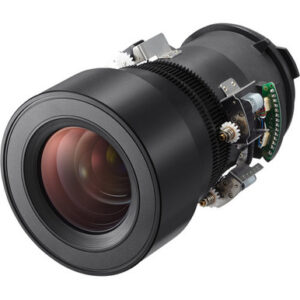
Projector Options from AudioVideoNation
1. NEC NP-PA653U-41ZL Projector and Lens Bundle
Who should compare it: Teams procuring the exact NP-PA653U-41ZL and evaluating a WUXGA projector-and-lens bundle after the included lens is verified for the room.
Why it belongs here: This is the exact projector configuration addressed by the guide. Its WUXGA resolution and bundle format make lens verification, room geometry, and package confirmation central to the buying process.
SKU: NP-PA653U-41ZL
Key Features
- WUXGA resolution
- Projector-and-lens bundle configuration identified in the listing name
- Exact NP-PA653U-41ZL SKU for procurement control
Things to Consider
Confirm the included lens model, brightness, throw coverage, connections, mounting requirements, and package contents through current documentation before approval.
2. NEC NP-PA853W-41ZL 8500-Lumen HDR WXGA Projector and Lens Bundle
Who should compare it: Projects whose approved design calls for 8500 lumens and WXGA resolution, subject to lens and system verification.
Why it belongs here: This related bundle supplies a documented comparison point of 8500 lumens and WXGA resolution. It lets buyers examine a different brightness and resolution brief without assuming equivalence to the NP-PA653U-41ZL.
SKU: NP-PA853W-41ZL
Key Features
- 8500-lumen published brightness
- WXGA resolution
- Projector-and-lens bundle configuration identified in the listing name
- Exact NP-PA853W-41ZL SKU
Things to Consider
WXGA differs from the WUXGA options. Confirm source handling, content detail, included lens, throw geometry, connections, and mounting requirements.
3. NEC NP-PA653U 3D WUXGA 1080p LCD Projector (No Lens)
Who should compare it: Teams keeping WUXGA while specifying the lens as a separate, compatibility-checked line item.
Why it belongs here: It provides a WUXGA NP-PA653U procurement path identified without a lens. That distinction helps installers compare a separately designed lens package with the NP-PA653U-41ZL bundle.
SKU: NP-PA653U
Key Features
- WUXGA resolution
- Projector configuration identified as No Lens
- Exact NP-PA653U SKU for quote and package checks
Things to Consider
A compatible lens must be selected through verified documentation. Calculate throw coverage and include the lens in the full installed-cost comparison.
4. NEC NP-PA653UL-41ZL 3D WUXGA 1080p LCD Projector
Who should compare it: Projects whose completed room calculation calls for 6500 lumens and whose content plan requires WUXGA.
Why it belongs here: This related NEC projector adds two clear planning facts: WUXGA resolution and a published brightness of 6500 lumens. It is a useful conditional alternative when those values match the approved design.
SKU: NP-PA653UL-41ZL
Key Features
- 6500-lumen published brightness
- WUXGA resolution
- Exact NP-PA653UL-41ZL SKU for specification control
Things to Consider
Verify the lens and package contents, throw coverage, connections, mounting requirements, and all commercial details for this exact SKU.
5. NEC NP40ZL Short-throw Zoom Lens – 13.3mm-18.6mm – F/2.0-2.43
Who should compare it: Layouts that require a short-throw zoom lens and have documented compatibility with the exact selected projector.
Why it belongs here: Lens geometry is a core setup decision, and this listing identifies the NP40ZL as a short-throw zoom lens. It belongs in the planning conversation when the room limits projector distance.
SKU: NP40ZL
Key Features
- Short-throw zoom lens product type identified in the listing name
- Exact NP40ZL SKU for compatibility checks
- Listed in the Lenses and Projectors categories
Things to Consider
Verify projector compatibility, throw coverage, image-size range, offset requirements, mounting position, and room geometry before ordering.
NEC NP-PA653U-41ZL Projector and Lens Bundle vs NEC NP-PA853W-41ZL 8500-Lumen HDR WXGA Projector and Lens Bundle: Main Differences
- Choose NEC NP-PA653U-41ZL Projector and Lens Bundle if Teams procuring the exact NP-PA653U-41ZL and evaluating a WUXGA projector-and-lens bundle after the included lens is verified for the room..
- Choose NEC NP-PA853W-41ZL 8500-Lumen HDR WXGA Projector and Lens Bundle if Projects whose approved design calls for 8500 lumens and WXGA resolution, subject to lens and system verification..
- Choose NEC NP-PA653U 3D WUXGA 1080p LCD Projector (No Lens) if Teams keeping WUXGA while specifying the lens as a separate, compatibility-checked line item..
- Choose NEC NP-PA653UL-41ZL 3D WUXGA 1080p LCD Projector if Projects whose completed room calculation calls for 6500 lumens and whose content plan requires WUXGA..
- Choose NEC NP40ZL Short-throw Zoom Lens – 13.3mm-18.6mm – F/2.0-2.43 if Layouts that require a short-throw zoom lens and have documented compatibility with the exact selected projector..
Start with projector deployment fit
Freeze the room requirements before approving hardware. Record the desired image width and height, screen aspect ratio, available lens-to-screen distance, ceiling height, mounting position, audience sightlines, and service access. Document ambient-light conditions at the times the room will be used. A sanctuary with stage lighting, a classroom with open shades, and a conference room used for detailed documents can present very different design constraints.
The main NP-PA653U-41ZL listing confirms WUXGA resolution. Before specifying it, obtain verified documentation for brightness, the included lens, throw coverage, image offset, physical dimensions, weight, power needs, connections, and operating clearances. Match each item to the written room plan. A model number alone cannot complete that work.
Define the content as well. Note whether users will show worship lyrics, live camera feeds, instructional diagrams, spreadsheets, presentations, or video. List the source resolutions and the smallest text that viewers must read. Then have the installer calculate the required light output from the image size, screen properties, ambient conditions, and viewing target. This creates an accountable deployment standard instead of relying on room labels or assumptions.
NEC projector lens selection and throw planning
Lens choice controls whether the planned image can be produced from the available mounting position. Start with the actual image width and the permitted distance from the lens to the screen. Required throw ratio is calculated from throw distance divided by image width. Compare that result with the verified lens chart for the exact projector and lens combination. Allow for installation tolerances rather than designing against a coverage limit.
The NP-PA653U-41ZL product title identifies it as a projector-and-lens bundle, but procurement documents should state the exact included lens. Confirm its throw range, zoom coverage, focus range, image-size limits, offset or shift provisions, and supported mounting orientation from current documentation. Do not decode the 41ZL suffix as a substitute for that confirmation.
The NEC NP40ZL is separately identified as a short-throw zoom lens. It is relevant when a design calls for a shorter projection distance, but its listing does not establish compatibility with every projector shown here. Verify mechanical and optical compatibility against the exact projector SKU. Then check the planned image size, distance, position, and screen coverage. A shorter throw can also change mounting access, obstruction risks, and the path between the projector and screen, so review the complete room drawing before purchase.
WUXGA projector setup: compare the listed alternatives
Resolution and brightness provide a useful first filter. The NP-PA653U-41ZL and NP-PA653U are listed as WUXGA. The NP-PA653UL-41ZL combines WUXGA with a published brightness of 6500 lumens. The NP-PA853W-41ZL is listed at 8500 lumens with WXGA resolution. Those facts narrow the field, but they do not establish lens fit, connection support, image quality, or total deployment value.
Keep WUXGA options on the shortlist when the approved content workflow calls for WUXGA. If the team is considering the WXGA NP-PA853W-41ZL, confirm how every important source and document will be handled at that resolution. Test representative material before final acceptance when possible. Small text, detailed drawings, and interface screens deserve close review.
The 8500-lumen and 6500-lumen figures should be compared against a room calculation, not against each other in isolation. They also belong to products with different listed resolutions. Verify the NP-PA653U-41ZL brightness through current product documentation before placing it in the same numeric comparison. This keeps the decision tied to measured needs rather than an incomplete specification list.
NEC NP-PA653U-41ZL installation sequence
Begin with receiving inspection. Match the delivered SKU and package contents to the purchase order, and identify the included lens before moving equipment to the installation location. Inspect the projector, lens, mounting hardware, and ordered accessories under the seller's applicable procedures. Resolve a mismatch before rigging begins.
Bench testing comes next. Connect the real source equipment, switching path, adapters, and representative cable run whenever the project schedule allows. Confirm that the intended signal reaches the projector and that WUXGA content is handled as the system design requires. Test each operational source, not one convenient laptop.
Install the mount and lens under the applicable manufacturer instructions and approved structural plan. Establish the projector position from the throw calculation. Complete physical alignment before applying any documented electronic geometry correction. Set image size, position, and focus through the controls supported by the verified lens, then review test patterns and real content across the screen.
Commission the entire room. Check text legibility from the farthest assigned seat, inspect image boundaries, exercise every source, and test the planned control workflow. Record final settings, cable routes, source behavior, lens identification, and the exact projector SKU. That record gives support teams a reliable baseline after the installer leaves.
Signal, control, and infrastructure checks
Build a connection schedule before ordering. For every source, list its output resolution, connection type, cable distance, switching equipment, adapters, and content-protection requirements. Then verify the NP-PA653U-41ZL connections, accepted signal formats, and control options in current documentation. Do the same for any alternative SKU. Similar product names do not prove identical system interfaces.
Long cable paths may require an engineered transport method, so test the complete path at its planned resolution. Document how users will turn the system on, select a source, blank the image, and shut it down. If network or serial control is required, confirm that the selected projector supports the exact commands and monitoring workflow the team expects.
Plan audio independently unless verified documentation supports the intended projector-based audio path. Churches and conference rooms often have existing sound systems, while classrooms may use a separate audio design. Define that handoff before installation so image selection does not leave an unresolved sound requirement.
Projector price-to-performance, stock, and availability
Price-to-performance should measure the complete installed result against the written requirements. Include the projector, correct lens, mount, structural work, cabling, signal extension, switching, control, labor, access equipment, commissioning, and operational support. A lower projector line item can still produce a higher deployment cost if essential components or labor were excluded from the comparison.
For the NP-PA653U-41ZL bundle, confirm the included lens and every packaged component before comparing it with the NP-PA653U configuration identified without a lens. The no-lens option may suit a project that has a separately specified, verified-compatible lens, but that decision needs a complete cost worksheet. The 6500-lumen WUXGA and 8500-lumen WXGA alternatives should also be judged against the approved brightness and resolution requirements. Extra lumens do not compensate for a mismatched workflow or lens.
Use the linked AudioVideoNation pages for live price, stock, and availability details. Ask whether the quote covers the exact SKU, lens, and expected shipment timing. Record the quote date, package contents, substitution rules, and applicable purchase terms. This prevents a similarly named configuration from silently replacing the approved design.
Choose a configuration by deployment scenario
Keep the NEC NP-PA653U-41ZL on the shortlist when procurement calls for that exact SKU, WUXGA matches the content plan, and the verified bundled lens covers the room geometry. Approval still depends on confirmed brightness, connections, mounting requirements, and package contents.
Consider the NP-PA653U configuration identified without a lens when the design intentionally separates projector and lens procurement. This path needs written compatibility confirmation and a lens calculation before either component is ordered. It should not be treated as interchangeable with the bundle based on the shared NP-PA653U name.
The NP-PA653UL-41ZL is a conditional option for a design that calls for WUXGA and whose brightness calculation supports its published 6500-lumen figure. The NP-PA853W-41ZL fits a different starting brief: 8500 lumens and WXGA. Confirm that WXGA matches the source and content plan before treating its higher published lumen figure as useful.
Evaluate the NP40ZL only when a short-throw zoom lens addresses the room layout and compatibility is documented for the chosen projector. Each path solves a different procurement problem. The room drawing, brightness target, source plan, and verified product documentation should decide which one moves forward.
Final procurement and commissioning checklist
Require design signoff before issuing the purchase order. The approval record should identify the exact projector SKU, exact lens, package contents, resolution, verified brightness, planned image size, throw distance, mounting position, structural support, power, ventilation clearances, signal path, control method, and audio handoff. Include the product-page or manufacturer documents used to validate the design.
Confirm current commercial details on the linked product page and align the quote with the approved configuration. Check delivery timing, applicable return terms, support arrangements, and warranty documentation without assuming that related SKUs share the same terms. If a substitution is proposed, repeat the lens, brightness, resolution, connection, and mounting review.
At handover, save the final settings, cable map, control notes, lens identification, and installation photos. Train the people who will operate and support the room. Test every source with representative content, then document acceptance. Short setup notes pay off quickly when a classroom changes laptops, a church updates its presentation system, or a conference room team troubleshoots a signal path.
Related AudioVideoNation Links
- Browse Projector at AudioVideoNation
- NEC NP-PA653U-41ZL Projector and Lens Bundle
- NEC NP-PA853W-41ZL 8500-Lumen HDR WXGA Projector and Lens Bundle
- NEC NP-PA653U 3D WUXGA 1080p LCD Projector (No Lens)
- NEC NP-PA653UL-41ZL 3D WUXGA 1080p LCD Projector
Product Information Sources
- NEC NP-PA653U-41ZL Projector and Lens Bundle product information
- NEC NP-PA853W-41ZL 8500-Lumen HDR WXGA Projector and Lens Bundle product information
- NEC NP-PA653U 3D WUXGA 1080p LCD Projector (No Lens) product information
- NEC NP-PA653UL-41ZL 3D WUXGA 1080p LCD Projector product information
- NEC NP40ZL Short-throw Zoom Lens – 13.3mm-18.6mm – F/2.0-2.43 product information
FAQ
What resolution is the NEC NP-PA653U-41ZL?
The NEC NP-PA653U-41ZL is listed with WUXGA resolution. Confirm that WUXGA matches the source equipment and content plan, then verify the remaining installation specifications through current product documentation.
Does the NP-PA653U-41ZL bundle include the right lens for my room?
You must verify the bundle's exact lens and throw coverage against your room measurements before treating it as a fit. Compare the planned image width and lens-to-screen distance with an approved lens chart, including installation tolerances.
How does the NP-PA653U-41ZL differ from the NP-PA653U listing?
The NP-PA653U-41ZL is identified as a projector-and-lens bundle, while the NP-PA653U listing is identified as a no-lens configuration, and both are listed as WUXGA. Confirm exact package contents and lens compatibility because the shared NP-PA653U name does not make the configurations interchangeable.
Should I choose the 6500-lumen WUXGA or 8500-lumen WXGA alternative?
Choose between the 6500-lumen WUXGA NP-PA653UL-41ZL and 8500-lumen WXGA NP-PA853W-41ZL by matching both the room's calculated light requirement and the source-resolution plan. Lumens alone cannot decide because the two listings also use different resolution classes.
Is the NEC NP40ZL compatible with these projectors?
Compatibility between the NP40ZL and a selected projector must be confirmed through current documentation before purchase. Verify the exact projector SKU, throw coverage, image size, mounting position, and required offset rather than assuming compatibility from the NEC brand name.
Where should I check current price, stock, and availability?
Check the linked AudioVideoNation product page for live price, stock, and availability details. Match any quote to the exact SKU and confirm the lens, package contents, expected timing, and applicable purchase terms.
Conclusion
Use this NEC NP-PA653U-41ZL Setup Guide and Buying Considerations comparison to match documented specifications to the room and installation requirements. Review the linked product pages for current purchase details before ordering.
Products Used
| SKU | Product Name | URL |
|---|---|---|
| NP-PA653U-41ZL | NEC NP-PA653U-41ZL Projector and Lens Bundle | View product |
| NP-PA853W-41ZL | NEC NP-PA853W-41ZL 8500-Lumen HDR WXGA Projector and Lens Bundle | View product |
| NP-PA653U | NEC NP-PA653U 3D WUXGA 1080p LCD Projector (No Lens) | View product |
| NP-PA653UL-41ZL | NEC NP-PA653UL-41ZL 3D WUXGA 1080p LCD Projector | View product |
| NP40ZL | NEC NP40ZL Short-throw Zoom Lens – 13.3mm-18.6mm – F/2.0-2.43 | View product |