

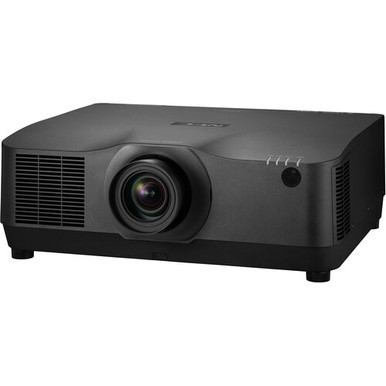
An installation projector purchase can go wrong before power-on. A lens may miss the required image geometry, a mount point may rest on an unverified assumption, or a bundle may duplicate a line item already in the project scope. This NEC NP-PA1004UL-BL Setup Guide and Buying Considerations article keeps the decision tied to three supplied NEC listings: the NP-PA1004UL-BL product page, a black NP41ZL lens bundle, and a white NP41ZL lens bundle. It shows you how to document the room, compare package names, plan infrastructure, and verify every open decision before purchase. Churches, schools, installers, and conference room teams can follow the same rule. Lock the deployment requirements first, then select the SKU that fits the lens plan, finish, purchasing schedule, and complete installed cost.
Products at a Glance
- Option 1: NEC NP-PA1004UL-B Professional Installation Projector
- For projects calling for a black finish and a package…: NEC NP-PA1004UL-B-41 10,000-Lumen Pixel-Shift 4K UHD Projector with NP41ZL Lens Bundle (Black)
- For projects calling for a white finish and a package…: NEC NP-PA1004UL-W-41 with NP41ZL Lens Bundle (White)
Quick Comparison Table
| Feature | NEC NP-PA1004UL-B Professional Installation Projector | NEC NP-PA1004UL-B-41 10,000-Lumen Pixel-Shift 4K UHD Projector with NP41ZL Lens Bundle (Black) | NEC NP-PA1004UL-W-41 with NP41ZL Lens Bundle (White) |
|---|---|---|---|
| Resolution | 4K UHD | ||
| Best For | Teams purchasing against SKU NP-PA1004UL-BL and installers who want to document the lens and accessory scope before approval. | Projects calling for a black finish and a package whose name explicitly includes NP41ZL, after an installer validates the room geometry. | Projects calling for a white finish and a package whose name explicitly includes NP41ZL, subject to installer-approved lens calculations. |
| Recommended Buyer | Teams purchasing against SKU NP-PA1004UL-BL and installers who want to document the lens and accessory scope before approval. | Projects calling for a black finish and a package whose name explicitly includes NP41ZL, after an installer validates the room geometry. | Projects calling for a white finish and a package whose name explicitly includes NP41ZL, subject to installer-approved lens calculations. |
Product Images
Projector Options from AudioVideoNation
1. NEC NP-PA1004UL-B Professional Installation Projector
Who should compare it: Teams purchasing against SKU NP-PA1004UL-BL and installers who want to document the lens and accessory scope before approval.
Why it belongs here: Its SKU is NP-PA1004UL-BL, making this the direct product page for the configuration named in the guide. It gives procurement teams a clear starting point for confirming the lens, package scope, and installation requirements.
SKU: NP-PA1004UL-BL
Key Features
- SKU NP-PA1004UL-BL supports precise procurement records.
- The supplied product name identifies an NEC NP-PA1004UL-B professional installation projector.
- Its catalog categories are Multimedia Projectors, Projectors, and Video.
Things to Consider
The product name does not identify an NP41ZL lens bundle. Confirm lens inclusion, resolution, light output, inputs, control options, mounting requirements, and package contents on the linked page before ordering.
2. NEC NP-PA1004UL-B-41 10,000-Lumen Pixel-Shift 4K UHD Projector with NP41ZL Lens Bundle (Black)
Who should compare it: Projects calling for a black finish and a package whose name explicitly includes NP41ZL, after an installer validates the room geometry.
Why it belongs here: This configuration has a named NP41ZL lens bundle and black finish. The supplied extracted facts also identify 4K UHD resolution, giving buyers one confirmed display specification to carry into the project record.
SKU: NP-PA1004UL-B-41
Key Features
- 4K UHD resolution is recorded in the supplied extracted facts.
- The product name includes an NP41ZL lens bundle.
- The product name identifies a black finish.
- SKU NP-PA1004UL-B-41 distinguishes this package in purchase records.
Things to Consider
Confirm NP41ZL throw coverage for the actual screen and mount position. Verify light output, signal formats, inputs, control options, orientation limits, clearances, and full package contents before purchase.
3. NEC NP-PA1004UL-W-41 with NP41ZL Lens Bundle (White)
Who should compare it: Projects calling for a white finish and a package whose name explicitly includes NP41ZL, subject to installer-approved lens calculations.
Why it belongs here: This supplied configuration explicitly pairs the NEC projector with NP41ZL and identifies a white finish. It gives teams another finish option without requiring them to infer the lens from a family name.
SKU: NP-PA1004UL-W-41
Key Features
- The product name includes an NP41ZL lens bundle.
- The product name identifies a white finish.
- SKU NP-PA1004UL-W-41 distinguishes this package in purchase records.
- Its catalog categories are Multimedia Projectors, Projectors, and Video.
Things to Consider
Do not assume its specifications are identical to the B-41 package. Confirm resolution, light output, NP41ZL throw coverage, signal support, control options, mounting requirements, and package contents for this exact SKU.
NEC NP-PA1004UL-B Professional Installation Projector vs NEC NP-PA1004UL-B-41 10,000-Lumen Pixel-Shift 4K UHD Projector with NP41ZL Lens Bundle (Black): Main Differences
- Choose NEC NP-PA1004UL-B Professional Installation Projector if Teams purchasing against SKU NP-PA1004UL-BL and installers who want to document the lens and accessory scope before approval..
- Choose NEC NP-PA1004UL-B-41 10,000-Lumen Pixel-Shift 4K UHD Projector with NP41ZL Lens Bundle (Black) if Projects calling for a black finish and a package whose name explicitly includes NP41ZL, after an installer validates the room geometry..
- Choose NEC NP-PA1004UL-W-41 with NP41ZL Lens Bundle (White) if Projects calling for a white finish and a package whose name explicitly includes NP41ZL, subject to installer-approved lens calculations..
Start the NEC NP-PA1004UL installation with a room brief
Start with a one-page deployment brief. Record room dimensions, screen location, target image width and height, proposed lens-to-screen distance, mounting height, viewing positions, ambient-light conditions, and the hours available for installation. Name the source systems and the person who will approve the final image. That sheet turns a broad product search into a defined scope.
Treat SKU-level facts carefully. The supplied facts identify 4K UHD resolution for NP-PA1004UL-B-41. Keep that fact attached to that SKU. For NP-PA1004UL-BL and NP-PA1004UL-W-41, confirm resolution, accepted signal formats, light output, and operating limits through their linked product pages and current product documentation. A shared family name is not enough for a purchase specification.
Set measurable acceptance criteria before ordering. State the required image size and position, the content types that must display, the source-to-projector route, control expectations, audio route, finish preference, and access needed for service. Flag any requirement that lacks a verified product fact. This keeps assumed functions out of the quote and gives the installer, buyer, and end user one approval checklist.
Compare the NP-PA1004UL-BL listing and NP41ZL lens bundles
The three supplied listings answer different procurement questions. The NP-PA1004UL-BL page is tied to the SKU named in this guide, while its product name does not identify an NP41ZL lens bundle. The NP-PA1004UL-B-41 name explicitly combines the projector with an NP41ZL lens and identifies a black finish. Its extracted facts also identify 4K UHD resolution. The NP-PA1004UL-W-41 name explicitly identifies an NP41ZL bundle and a white finish. Do not transfer the B-41 resolution fact to the other SKUs.
Choose from the bill of materials, not the suffix alone. If you are considering either bundle, verify that NP41ZL covers the planned image size and lens-to-screen distance. If you are considering NP-PA1004UL-BL, confirm whether the required lens is included or must appear as a separate line item. A bundle name identifies the catalog package. It does not prove the lens fits a particular room.
Finish choice belongs in the design brief. Record whether the installation calls for black or white, then preserve the complete SKU on the purchase order, installation drawings, delivery check, and asset record. Similar family names are easy to confuse. Confirm the projector, lens, finish, quantity, and package contents against the linked page before approval.
Plan projector throw distance, mounting, and service access
Measure from the planned lens position to the screen surface. Do not use the back wall or the center of a ceiling tile as a substitute. Record the minimum and maximum distance available, desired image width, image height, aspect ratio, screen elevation, and the image position relative to the lens. Use verified NP41ZL throw data to test a lens bundle against those measurements.
Check the full geometry, not one distance. A throw calculation can appear workable while the required image position conflicts with the mount height or room structure. Confirm any zoom, lens-shift, orientation, and geometric-correction functions before relying on them. Leave practical adjustment room instead of designing at an unverified limit. The installer should approve the calculation and proposed lens before the purchase order is released.
The mounting survey must cover structure, hardware, clearance, airflow, cable entry, and service access. Confirm the projector's permitted orientation and required clearances through current documentation. Check sprinkler locations, lighting, ceiling obstructions, doors, and sightlines. Plan how an installer will reach the projector after the room is furnished.
Put the approved screen size, lens-to-screen distance, mount coordinates, lens selection, and finish on the same drawing. That drawing becomes the reference for ordering, installation, and final acceptance.
Map signal, control, power, and audio before setup
Create a signal matrix before buying cables. For every source, record its output connection, required resolution and refresh rate, content-protection needs, cable distance, intermediate switchers or extenders, and the projector input you expect to use. Verify every format and connector against current documentation for the selected SKU. Connector shape alone does not establish signal compatibility.
Long cable paths may need active or fiber-based transport, but that choice follows the verified signal bandwidth and site route. Count wall plates, patch points, adapters, and equipment-rack connections. Label both ends of every permanent cable. If the room uses a control system, confirm the available control interface and commands before programming begins. Do the same for monitoring or network functions rather than assuming them from the product family.
Build the power plan from verified electrical requirements and local code. A qualified installer should confirm the circuit, outlet position, grounding, surge strategy, cable restraint, and safe disconnect access. Keep power and signal routing coordinated with the mount drawing.
Decide the audio route separately. Sound may leave the source, a switcher, a conferencing system, or another processor. Do not assume the projector supplies the audio connection or speaker function your room needs. Document the chosen path and test lip synchronization, level, and source switching during commissioning.
Match deployment fit to churches, schools, and conference rooms
A church team should document sightlines, lighting conditions for each service format, presentation sources, finish preference, service access, and the time window available for maintenance. Include the volunteer workflow. The finished system needs clear source-selection and shutdown instructions, plus a named person to handle faults before an event.
Schools should define a repeatable room standard. Record approved source connections, control method, mount position, cable labeling, startup and shutdown steps, and support ownership. If multiple rooms are involved, verify each room's dimensions instead of copying the first lens calculation across the project. Small changes in throw distance or screen location can change the lens decision.
Conference room teams should test legibility from the farthest seat, the conferencing-system signal path, local source switching, control handoff, and the audio route. List every expected presentation device. If adapters are part of the room standard, include their exact role in the signal matrix and acceptance test.
Setup starts before the projector is lifted. Verify the delivered SKU and lens markings against the purchase order, inspect the package, and connect an approved source in a controlled staging area when the project process allows it. After mounting, validate image size and position with real presentation content. Test every approved source, control path, and audio route. Record final settings, cable labels, asset details, and the person who accepted the room.
Judge price-to-performance and check live availability
Price-to-performance should use the complete installed project ledger. Include the current projector package cost, required lens, mounting hardware, cabling, signal transport, control work, electrical work, installation labor, access equipment, commissioning, and any approved contingency items. A low line-item total can grow if critical parts were omitted. A bundle can reduce separate sourcing steps, but it only helps when the named lens fits the approved room geometry.
Check package contents carefully. For NP-PA1004UL-BL, confirm the lens plan and whether each required component is included. For the B-41 and W-41 bundles, count NP41ZL once and verify that no duplicate lens remains elsewhere in the quote. Keep black and white configurations separate in purchasing records.
For stock and availability, use the linked AudioVideoNation product page at the time of the buying decision. Review live commerce details for each exact SKU and recheck them before purchase approval. If timing is critical, document the date of the check and the required installation milestone. Do not base the schedule on an older product-page capture or a different family SKU.
Finish with a one-page decision sheet. Compare verified resolution facts, approved lens fit, finish, package contents, current product-page details, complete installed cost, schedule risk, and any facts still awaiting confirmation. Pause approval if a required capability remains unverified. The chosen configuration should trace cleanly from room measurements to the purchase order and final acceptance test.
Related AudioVideoNation Links
- Browse Projector at AudioVideoNation
- NEC NP-PA1004UL-B professional installation projector
- NEC NP-PA1004UL-B-41 NP41ZL lens bundle
- NEC NP-PA1004UL-W-41 NP41ZL lens bundle
Product Information Sources
- NEC NP-PA1004UL-B Professional Installation Projector product information
- NEC NP-PA1004UL-B-41 10,000-Lumen Pixel-Shift 4K UHD Projector with NP41ZL Lens Bundle (Black) product information
- NEC NP-PA1004UL-W-41 with NP41ZL Lens Bundle (White) product information
FAQ
Does the NP-PA1004UL-BL listing include the NP41ZL lens?
The supplied name for SKU NP-PA1004UL-BL does not identify an NP41ZL lens bundle, so confirm package contents on its linked product page before ordering. The NP-PA1004UL-B-41 and NP-PA1004UL-W-41 product names explicitly identify NP41ZL bundles.
Which supplied configuration identifies 4K UHD resolution?
Only SKU NP-PA1004UL-B-41 has 4K UHD resolution in the supplied extracted facts. Verify resolution and accepted signal formats for every final SKU rather than applying that fact across the product family.
How do I determine whether NP41ZL fits the room?
Determine NP41ZL room fit by checking verified lens geometry against the desired image size and actual lens-to-screen distance. Include mounting elevation and required image position, then have the installer approve the calculation before purchase.
What should be checked before mounting the projector?
Verify structure, mounting hardware, projector orientation, clearance, power, cable paths, lens coverage, and service access before mounting. Confirm each item against current product documents and actual site conditions.
Should I choose the black or white NP41ZL bundle?
Choose black or white according to the room design standard after confirming the package has the lens and capabilities the project requires. The supplied names identify black for NP-PA1004UL-B-41 and white for NP-PA1004UL-W-41, but buyers should not assume every other specification is identical.
How should I compare current value and availability?
Compare live product-page details, package contents, project timing, and the complete installed bill of materials at the time of purchase. Recheck each exact SKU before approval because this guide does not freeze commerce details.
Conclusion
Use this NEC NP-PA1004UL-BL Setup Guide and Buying Considerations comparison to match documented specifications to the room and installation requirements. Review the linked product pages for current purchase details before ordering.
Products Used
| SKU | Product Name | URL |
|---|---|---|
| NP-PA1004UL-BL | NEC NP-PA1004UL-B Professional Installation Projector | View product |
| NP-PA1004UL-B-41 | NEC NP-PA1004UL-B-41 10,000-Lumen Pixel-Shift 4K UHD Projector with NP41ZL Lens Bundle (Black) | View product |
| NP-PA1004UL-W-41 | NEC NP-PA1004UL-W-41 with NP41ZL Lens Bundle (White) | View product |