

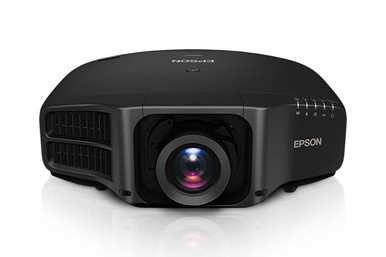
Use this AV PL-G7805NL Setup Guide and Buying Considerations resource when a projector choice has to survive the site survey, purchasing review, and installation handoff. The Epson PowerLite Pro G7805NL XGA 3LCD Projector is the deployment anchor. The two supplied lens products, the Epson V12H004W05 ELPLW05 Wide-Throw Zoom Lens for Select Projectors and Epson V12H004U04 ELPLU04 Short-Throw Zoom Lens for Select Projectors, are options to investigate, not confirmed matches for the projector. That distinction matters. XGA is the only confirmed projector specification in the supplied facts, so brightness, lens support, image geometry, inputs, controls, and mounting details still need document-level verification. This guide shows how to turn those gaps into a clean buying process, compare the lens choices without assuming compatibility, and assess deployment fit, scheduling, and total installed value for churches, schools, and conference rooms.
Products at a Glance
- Option 1: Epson PowerLite Pro G7805NL XGA 3LCD Projector
- For procurement and installation teams comparing lens…: Epson V12H004W05 ELPLW05 Wide-Throw Zoom Lens for Select Projectors
- For install teams exploring a short-throw layout, sub…: Epson V12H004U04 ELPLU04 Short-Throw Zoom Lens for Select Projectors
Quick Comparison Table
| Feature | Epson PowerLite Pro G7805NL XGA 3LCD Projector | Epson V12H004W05 ELPLW05 Wide-Throw Zoom Lens for Select Projectors | Epson V12H004U04 ELPLU04 Short-Throw Zoom Lens for Select Projectors |
|---|---|---|---|
| Resolution | XGA | ||
| Best For | AV teams that have approved XGA through a real-content test and will verify every remaining design requirement before purchase. | Procurement and installation teams comparing lens accessories after an AV designer confirms the exact supported pairing and optical range. | Install teams exploring a short-throw layout, subject to verified PL-G7805NL compatibility and a room-specific throw calculation. |
| Throw Type | Short throw | Short throw | |
| Recommended Buyer | AV teams that have approved XGA through a real-content test and will verify every remaining design requirement before purchase. | Procurement and installation teams comparing lens accessories after an AV designer confirms the exact supported pairing and optical range. | Install teams exploring a short-throw layout, subject to verified PL-G7805NL compatibility and a room-specific throw calculation. |
Product Images


Projector Options from AudioVideoNation
1. Epson PowerLite Pro G7805NL XGA 3LCD Projector
Who should compare it: AV teams that have approved XGA through a real-content test and will verify every remaining design requirement before purchase.
Why it belongs here: This is the exact projector addressed by the guide and the anchor for the room, content, lens, and purchasing checks.
SKU: PL-G7805NL
Key Features
- XGA resolution for a defined content-testing baseline
- Exact PL-G7805NL identifier for purchase orders and install records
- Epson PowerLite Pro G7805NL naming for model-specific document searches
Things to Consider
Brightness, lens compatibility, image geometry, connectivity, mounting, and control details are not supplied here. Confirm each requirement against current documentation and the measured room design.
2. Epson V12H004W05 ELPLW05 Wide-Throw Zoom Lens for Select Projectors
Who should compare it: Procurement and installation teams comparing lens accessories after an AV designer confirms the exact supported pairing and optical range.
Why it belongs here: It gives buyers a distinct Epson lens candidate to evaluate while planning the projector's optical layout.
SKU: V12H004W05
Key Features
- V12H004W05 SKU for purchase-order matching
- ELPLW05 identifier for focused compatibility and documentation searches
- Separate lens accessory listed for select projectors
Things to Consider
Confirm its current throw classification, supported-projector list, and complete optical data before layout. Do not approve image geometry from the listing title alone.
3. Epson V12H004U04 ELPLU04 Short-Throw Zoom Lens for Select Projectors
Who should compare it: Install teams exploring a short-throw layout, subject to verified PL-G7805NL compatibility and a room-specific throw calculation.
Why it belongs here: It provides a short-throw lens path to investigate where the room design calls for closer projector placement.
SKU: ELPLU04
Key Features
- Short-throw classification in the supplied product facts
- Exact ELPLU04 SKU for procurement matching
- V12H004U04 identifier included in the supplied product name
- Zoom-lens accessory listed for select projectors
Things to Consider
A short-throw label does not establish image size, mounting distance, or projector compatibility. Verify current technical documentation and approve the optical calculation before ordering.
Epson PowerLite Pro G7805NL XGA 3LCD Projector vs Epson V12H004W05 ELPLW05 Wide-Throw Zoom Lens for Select Projectors: Main Differences
- Choose Epson PowerLite Pro G7805NL XGA 3LCD Projector if AV teams that have approved XGA through a real-content test and will verify every remaining design requirement before purchase..
- Choose Epson V12H004W05 ELPLW05 Wide-Throw Zoom Lens for Select Projectors if Procurement and installation teams comparing lens accessories after an AV designer confirms the exact supported pairing and optical range..
- Choose Epson V12H004U04 ELPLU04 Short-Throw Zoom Lens for Select Projectors if Install teams exploring a short-throw layout, subject to verified PL-G7805NL compatibility and a room-specific throw calculation..
Start with an Epson PL-G7805NL projector brief
Write a one-page deployment brief before requesting a quote. Record the audience size, target image size, screen position, proposed mounting location, viewing distance, ambient-light conditions, content mix, source devices, signal route, control needs, and service access. Separate firm requirements from preferences. This prevents a familiar procurement problem: selecting a projector by model name, then discovering that the room, content, or lens plan was never defined.
Each organization should shape the brief around its daily work. A church may prioritize readable lyrics, presentation slides, and a workflow volunteers can follow. A school may need consistent classroom operation and a clear support handoff. A conference room team may focus on legible shared content, predictable startup, and reliable source switching. These are planning criteria, not performance claims about the G7805NL.
Map the known fact next. The projector is listed with XGA resolution. Ask content owners to open representative slides, documents, spreadsheets, captions, and videos using an XGA test path. View them from the intended seats at the proposed image size. Record what passes, what needs larger type, and what fails. That written result gives the buyer, installer, and approver the same baseline.
Test the XGA projector setup with real content
Resolution affects how much visual detail the projected image can preserve, but the label alone cannot decide whether the Epson G7805NL fits your application. Content design, image size, viewing distance, source configuration, and scaling all affect the result. Test the files people will actually present.
Pay close attention to dense spreadsheets, fine diagrams, small captions, detailed dashboards, and interfaces with compact text. If those materials drive the room, require a witnessed XGA content test before approval. Large type and simple presentation layouts should still be checked at the farthest planned seat. A successful desktop preview does not prove that distant viewers can read the projected image.
Keep the test disciplined. Use a defined set of sample files, the expected source devices, and written pass-or-fail criteria. Check whether source scaling changes text or line clarity. Save the approved source settings with the installation record. Resolution is also separate from brightness, contrast, optics, and screen conditions. Since those details are not supplied here, obtain current documentation and evaluate them independently instead of treating XGA as a substitute for the full design review.
Verify Epson projector lens compatibility and throw
Optical geometry determines whether the planned image can be produced from the available mounting position. The supplied data does not confirm that either listed lens works with the PL-G7805NL, so neither accessory should enter a purchase order or drawing until the pairing is verified in current Epson documentation.
Treat V12H004W05/ELPLW05 and ELPLU04 as separate investigation paths. The ELPLU04 has a short-throw classification in the supplied facts. For V12H004W05/ELPLW05, confirm the current throw classification and technical data before using it in a layout. A product title is not a throw calculation.
For each candidate, verify the supported-projector list, exact lens identifiers, throw-ratio range, permitted image-size range, zoom and focus provisions, lens-shift limits, orientation rules, and installation clearances. Use the measured lens-to-screen distance rather than total room depth. Finished surfaces, ceiling obstructions, mount depth, and the projector's lens position can all affect that measurement.
Document the required image width and height, mounting coordinates, and acceptable adjustment range. Leave room for construction tolerance, then have the responsible AV designer or installer approve the calculation. Never substitute a lens because its name sounds similar. A different optical range can invalidate the mounting position even when the accessory appears physically related.
Use a projector installation checklist at the site
A site survey turns the buying guide into an installable plan. Measure from finished surfaces and mark the screen, lens, and mount coordinates. Check the mounting structure, available power, signal pathways, control location, rack or source position, ventilation clearance, and service approach. Record beams, lights, sprinklers, fans, soffits, and other obstructions that could block the image path or complicate access.
Trace the entire signal chain. Identify each source device, its intended output setting, the required cable run, any transport equipment, and the connection presented to users. Confirm those choices against the projector's current input and control documentation. The provided facts do not establish connectivity, control protocols, dimensions, weight, power consumption, operating limits, or included accessories. Request those details before approving the mount, power circuit, control design, or cabling.
Assign ownership as well. State who supplies and installs the mount, who installs the confirmed lens, who configures sources, and who conducts acceptance testing. During commissioning, inspect alignment and focus, test every planned source, open the approved content files, exercise the control workflow, and check shutdown and restart behavior. Repeat the test from normal user positions.
Finish with a short operator handoff. Give staff the approved startup sequence, source-selection steps, shutdown process, and support contact. Schools and churches should include the people who will use the room after hours, while conference teams should test the instructions with an occasional presenter rather than only the AV specialist.
Plan around stock and availability
Stock and availability can change between design, approval, and purchasing, so use each linked AudioVideoNation product page as a live commerce checkpoint. Recheck details when requesting a quote, when issuing the purchase order, and before scheduling installation. Do not build the project calendar around an earlier page view.
Match every transaction to the exact product identifier. The projector is PL-G7805NL. The lens candidates use V12H004W05 and ELPLU04, with ELPLW05 and V12H004U04 also appearing in their supplied product names. Put the approved identifiers on the quote, purchase order, design drawing, receiving checklist, and install record. This reduces the risk of a similarly named accessory reaching the site.
Ask the seller to confirm current lead time, included components, shipping timing, and applicable transaction terms. Coordinate those dates with mount, cabling, labor, access windows, and commissioning. Define substitution rules in writing. A proposed lens substitution requires a new compatibility check and optical calculation before approval; schedule pressure does not remove that design step.
Judge projector price-to-performance by installed value
Projector price-to-performance should reflect the complete working system, not a projector line item viewed alone. No prices are supplied here, so collect current commerce details from the linked pages and compare every option on the same project scope.
Build one cost worksheet that includes the projector, confirmed lens, mount, signal transport, cabling, control equipment, installation labor, access equipment, commissioning, training, and any project-specific service items. Some categories may not apply, but leaving them visible prevents an incomplete quote from appearing artificially attractive. Record taxes, shipping, and scheduling costs according to your organization's purchasing process.
Put verified outcomes beside those costs. Does the XGA content test pass? Is the lens pairing documented? Does the calculated image fit the measured room? Can the projector be mounted and serviced safely under the approved plan? Does the user workflow pass acceptance testing? Credit only documented capabilities. Do not assign value to unverified brightness, connectivity, controls, smart functions, or lens compatibility.
This approach helps buyers compare total installed value without inventing performance. A low equipment quote can lose its advantage if it requires layout changes, extra signal hardware, or repeated labor. A complete quote earns consideration because its scope is clear and its design assumptions have been checked.
Make the final deployment decision
Use four approval gates. First, accept or reject XGA after the real-content test. Second, confirm a compatible lens and approve its throw calculation. Third, close the site survey, signal plan, mount details, and commissioning checklist. Fourth, verify current commerce details and align delivery with the installation schedule. Stop the purchase if any required gate remains open.
Proceed with the PL-G7805NL only when current documentation and testing show that it meets the written room requirements. Add V12H004W05/ELPLW05 or ELPLU04 only after exact projector compatibility is confirmed. If both lenses prove supported, choose between them using verified image geometry and mounting constraints. If one or neither is supported, follow the documented compatibility result rather than the listing language.
Create a final purchase packet containing the exact projector and lens identifiers, approved optical calculation, room drawing, source list, current quote, delivery plan, installation responsibilities, and acceptance criteria. That packet gives procurement, facilities, the installer, and the room owner one controlled reference. It also makes future support easier because the installed configuration and the reasoning behind it are recorded.
Related AudioVideoNation Links
- Browse Projector at AudioVideoNation
- View the Epson PowerLite Pro G7805NL projector
- Check the Epson V12H004W05 ELPLW05 lens
- Check the Epson V12H004U04 ELPLU04 lens
Product Information Sources
- Epson PowerLite Pro G7805NL XGA 3LCD Projector product information
- Epson V12H004W05 ELPLW05 Wide-Throw Zoom Lens for Select Projectors product information
- Epson V12H004U04 ELPLU04 Short-Throw Zoom Lens for Select Projectors product information
FAQ
What resolution does the Epson PL-G7805NL use?
The Epson PL-G7805NL is listed with XGA resolution. Test representative content at the planned image size and viewing distance before deciding whether that resolution meets the room's needs.
Is the V12H004W05 ELPLW05 lens compatible with the PL-G7805NL?
Compatibility between the V12H004W05 ELPLW05 and PL-G7805NL is not established by the supplied product data. Confirm the exact pairing and optical range in current Epson documentation before specifying or ordering the lens.
Is the ELPLU04 short-throw lens compatible with the PL-G7805NL?
Compatibility between the ELPLU04 and PL-G7805NL is not confirmed by the supplied product data. The lens has a short-throw classification, but that does not prove projector support or establish the correct mounting distance.
Can I select a projector lens from the wide-throw or short-throw label alone?
No, a lens must be selected through confirmed projector compatibility and a room-specific optical calculation. Verify the exact lens code, supported-projector list, throw range, image size, mounting distance, and adjustment limits.
Where should I check current price, stock, and availability?
Check the linked AudioVideoNation product page for current commerce details, then confirm them again when requesting a quote or placing an order. Use the exact SKU on every document and align delivery timing with the installation schedule.
How should buyers compare the PL-G7805NL on price-to-performance?
Compare the PL-G7805NL by total installed value after its resolution, lens plan, room fit, and workflow have passed verification. Use a consistent scope that includes required accessories, infrastructure, labor, commissioning, and training, and do not credit unverified capabilities.
Conclusion
Use this AV PL-G7805NL Setup Guide and Buying Considerations comparison to match documented specifications to the room and installation requirements. Review the linked product pages for current purchase details before ordering.
Products Used
| SKU | Product Name | URL |
|---|---|---|
| PL-G7805NL | Epson PowerLite Pro G7805NL XGA 3LCD Projector | View product |
| V12H004W05 | Epson V12H004W05 ELPLW05 Wide-Throw Zoom Lens for Select Projectors | View product |
| ELPLU04 | Epson V12H004U04 ELPLU04 Short-Throw Zoom Lens for Select Projectors | View product |