

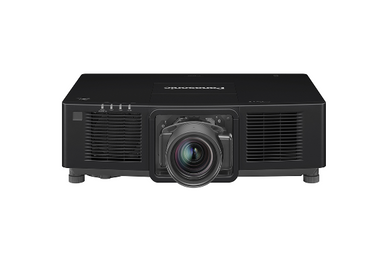
This Panasonic PT-MZ11KLBU7 Setup Guide and Buying Considerations article is for teams that need a defensible projector choice before mounting hardware or approving a purchase. The core buyer problem is simple: WUXGA is confirmed for SKU PT-MZ11KLBU7, but resolution alone does not settle brightness, throw geometry, lens configuration, signal routing, mounting, or operating requirements.
The provided comparison set adds three useful reference points. The Panasonic PT-CMZ50U is a 5,200-lumen WUXGA ultra-short-throw option. The PT-VMZ72BU8 has a documented 7,300-lumen WUXGA specification, while the PT-VMZ51 is listed at 5,200 lumens and WUXGA. These facts help narrow the field without turning an incomplete specification set into unsupported claims.
This guide separates confirmed details from items that need verification through the linked product page, current quote, and exact installation documentation. You’ll get a practical method for checking room fit, planning setup, comparing alternatives, and reviewing live commerce details before issuing a purchase order. That process works for churches, schools, conference rooms, and other managed AV environments where the exact SKU matters.
Products at a Glance
- Option 1: Panasonic PT-MZ11KLBU7 WUXGA 3LCD Laser Projector
- For projects whose design brief calls for a 5,200-lum…: Panasonic PT-CMZ50 WUXGA Ultra-Short Throw Laser Projector – Professional Golf Simulator Display
- For buyers comparing a listed 7,300-lumen WUXGA optio…: Panasonic PT-VMZ72BU8 7,300 Lumens WUXGA Laser Golf Simulator Projector – High-Brightness, Vivid Green Mode
- For buyers whose initial requirement includes 5,200 l…: Panasonic PT-VMZ51 5200-Lumen WUXGA Laser 3LCD Projector
Quick Comparison Table
| Feature | Panasonic PT-MZ11KLBU7 WUXGA 3LCD Laser Projector | Panasonic PT-CMZ50 WUXGA Ultra-Short Throw Laser Projector – Professional Golf Simulator Display | Panasonic PT-VMZ72BU8 7,300 Lumens WUXGA Laser Golf Simulator Projector – High-Brightness, Vivid Green Mode | Panasonic PT-VMZ51 5200-Lumen WUXGA Laser 3LCD Projector |
|---|---|---|---|---|
| Brightness | 5200 lumens | 7,300 Lumens | 5200 lumens | |
| Resolution | WUXGA | WUXGA | WUXGA | WUXGA |
| Best For | Teams whose specification names PT-MZ11KLBU7 and requires WUXGA resolution, provided they verify the remaining room and installation details before approval. | Projects whose design brief calls for a 5,200-lumen WUXGA ultra-short-throw projector, including planned golf simulator installations. | Buyers comparing a listed 7,300-lumen WUXGA option for a planned golf simulator or another installation with matching verified requirements. | Buyers whose initial requirement includes 5,200 lumens and WUXGA and who are shopping within the listed Home Theater Projectors category. |
| Throw Type | Ultra short throw | |||
| Recommended Buyer | Teams whose specification names PT-MZ11KLBU7 and requires WUXGA resolution, provided they verify the remaining room and installation details before approval. | Projects whose design brief calls for a 5,200-lumen WUXGA ultra-short-throw projector, including planned golf simulator installations. | Buyers comparing a listed 7,300-lumen WUXGA option for a planned golf simulator or another installation with matching verified requirements. | Buyers whose initial requirement includes 5,200 lumens and WUXGA and who are shopping within the listed Home Theater Projectors category. |
Product Images

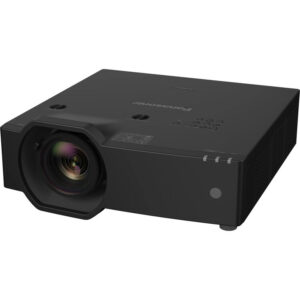
Projector Options from AudioVideoNation
1. Panasonic PT-MZ11KLBU7 WUXGA 3LCD Laser Projector
Who should compare it: Teams whose specification names PT-MZ11KLBU7 and requires WUXGA resolution, provided they verify the remaining room and installation details before approval.
Why it belongs here: This is the exact Panasonic product addressed by the guide. Its supplied facts confirm WUXGA resolution, making it the starting point for the installation and purchasing checklist.
SKU: PT-MZ11KLBU7
Key Features
- WUXGA resolution in the supplied product facts
- Exact Panasonic SKU PT-MZ11KLBU7
- Cataloged in the Projectors category
- Dedicated AudioVideoNation product page for current commerce details
Things to Consider
Confirm rated brightness, throw and lens configuration, connections, dimensions, weight, power, mounting requirements, included items, and control options. Check the linked page for current price and availability.
2. Panasonic PT-CMZ50 WUXGA Ultra-Short Throw Laser Projector – Professional Golf Simulator Display
Who should compare it: Projects whose design brief calls for a 5,200-lumen WUXGA ultra-short-throw projector, including planned golf simulator installations.
Why it belongs here: It adds a documented ultra-short-throw layout to the comparison while retaining WUXGA resolution. Its 5,200-lumen figure gives buyers a concrete brightness reference.
SKU: PT-CMZ50U
Key Features
- 5,200-lumen brightness
- WUXGA resolution
- Ultra-short-throw designation
- Listed in Golf Simulator Projectors and Install Projectors 5000 Lumen+
Things to Consider
Verify the exact image geometry, mounting position, connections, physical clearances, control needs, and package contents for the room. Review live price and availability on the linked page.
3. Panasonic PT-VMZ72BU8 7,300 Lumens WUXGA Laser Golf Simulator Projector – High-Brightness, Vivid Green Mode
Who should compare it: Buyers comparing a listed 7,300-lumen WUXGA option for a planned golf simulator or another installation with matching verified requirements.
Why it belongs here: Its supplied 7,300-lumen and WUXGA facts create a clear reference for buyers working from a documented brightness requirement.
SKU: PT-VMZ72BU8
Key Features
- 7,300-lumen brightness
- WUXGA resolution
- Listed in Golf Simulator Projectors
- Exact SKU PT-VMZ72BU8 for document and quote matching
Things to Consider
Verify throw geometry, lens configuration, connections, mounting, power, control, and included items. A lumen figure alone does not establish room fit or value.
4. Panasonic PT-VMZ51 5200-Lumen WUXGA Laser 3LCD Projector
Who should compare it: Buyers whose initial requirement includes 5,200 lumens and WUXGA and who are shopping within the listed Home Theater Projectors category.
Why it belongs here: It supplies another documented 5,200-lumen WUXGA comparison point and appears in a different catalog use category from the provided installation and golf simulator options.
SKU: PT-VMZ51
Key Features
- 5,200-lumen brightness
- WUXGA resolution
- Listed in Home Theater Projectors
- Exact Panasonic SKU PT-VMZ51
Things to Consider
Confirm throw, placement, connections, mounting requirements, package contents, and control needs for the proposed room. Use the linked page for current price and availability.
Panasonic PT-MZ11KLBU7 WUXGA 3LCD Laser Projector vs Panasonic PT-CMZ50 WUXGA Ultra-Short Throw Laser Projector – Professional Golf Simulator Display: Main Differences
- Choose Panasonic PT-MZ11KLBU7 WUXGA 3LCD Laser Projector if Teams whose specification names PT-MZ11KLBU7 and requires WUXGA resolution, provided they verify the remaining room and installation details before approval..
- Choose Panasonic PT-CMZ50 WUXGA Ultra-Short Throw Laser Projector – Professional Golf Simulator Display if Projects whose design brief calls for a 5,200-lumen WUXGA ultra-short-throw projector, including planned golf simulator installations..
- Choose Panasonic PT-VMZ72BU8 7,300 Lumens WUXGA Laser Golf Simulator Projector – High-Brightness, Vivid Green Mode if Buyers comparing a listed 7,300-lumen WUXGA option for a planned golf simulator or another installation with matching verified requirements..
- Choose Panasonic PT-VMZ51 5200-Lumen WUXGA Laser 3LCD Projector if Buyers whose initial requirement includes 5,200 lumens and WUXGA and who are shopping within the listed Home Theater Projectors category..
Start with the confirmed PT-MZ11KLBU7 facts
Begin with product identity. The exact SKU is PT-MZ11KLBU7, and the supplied product facts identify its resolution as WUXGA. Keep that full SKU on quotes, drawings, approval documents, and purchase orders. A shortened or neighboring model number could lead a team to review documentation for a different configuration.
Treat WUXGA as one confirmed decision field. Hold the other installation fields open until they are verified for this exact SKU. Those checks should cover rated brightness, throw range, lens configuration, supported image sizes, physical dimensions, weight, mounting requirements, connection options, power needs, control methods, and service clearances. Confirm what is included with the ordered product as well.
This discipline matters. A resolution label cannot establish room brightness suitability, source compatibility, cable requirements, or mounting geometry. Product family assumptions are risky too. Even closely named projectors can have different installation details.
Create a short decision log for the project. Record each requirement, the confirmed value, its source, and the date it was checked. Mark unresolved items for follow-up before design approval. That gives buyers and installers a shared record instead of relying on model-name familiarity or memory.
Panasonic PT-MZ11KLBU7 setup: pre-installation checks
Plan the installation before ceiling work, cabling, or furniture placement begins. Document the screen location, intended image size, available projector positions, seating area, ambient-light patterns, and any physical obstructions. Then compare those conditions with verified throw and lens information for the exact PT-MZ11KLBU7 package.
Map the real signal path. List every source that users expect to connect, where each source will be located, and how the signal must travel to the projector. Confirm the projector’s connections and supported signals before choosing cables, extenders, switchers, or adapters. WUXGA resolution by itself does not confirm that a source-and-cable combination will work.
The mounting plan needs the verified physical dimensions, weight, mounting points, approved orientation, ventilation clearances, power location, and service access. If the installation depends on a particular lens or accessory, place its exact identifier on the bill of materials and quote. Don’t assume it is included.
Set acceptance criteria before installation. Define the target image size, alignment, focus, text readability, source-switching behavior, and operating workflow. If a control system is required, document how users should start the room, select a source, and shut it down. These requirements give the installer a clear finish line and expose missing information while changes are still inexpensive.
Deployment fit for churches, schools, and conference rooms
Deployment fit starts with the work the room must support. A church may prioritize readable lyrics, presentation graphics, camera sightlines, volunteer-friendly operation, and performance under the sanctuary’s actual lighting. Confirm brightness and image geometry against those conditions. WUXGA alone cannot answer whether the PT-MZ11KLBU7 meets them.
Schools should document the source mix, teaching positions, screen visibility, mounting access, and staff support process. Standardization also matters. If several rooms will share one design, verify that the exact projector, lens or accessories, cabling, mounts, and control workflow can be specified consistently. Test the planned configuration before repeating it across classrooms.
Conference room teams need clear text at the intended viewing distance, predictable source handoff, and an operating process that doesn’t depend on an installer. Confirm the required connections and control method for the PT-MZ11KLBU7 rather than inferring them from another Panasonic projector. Check mounting and service access against ceiling fixtures, cameras, speakers, and lighting positions.
The provided PT-CMZ50U and PT-VMZ72BU8 listings are positioned for golf simulator use, while the PT-VMZ51 appears in the home theater projector category. Those categories are useful discovery clues. They do not prove suitability for a sanctuary, classroom, boardroom, or simulator. Approve a projector only after the room requirements have been matched to documented specifications for its exact SKU.
Compare the provided WUXGA projector options
All four selected products carry a WUXGA resolution fact, but their other supplied details differ.
The Panasonic PT-CMZ50U is documented at 5,200 lumens and identified as ultra short throw. It is the clearest option in this set when an ultra-short-throw layout is a firm design requirement. The installer still needs to confirm image size, placement geometry, mounting, connections, and surrounding clearances for the planned room.
The Panasonic PT-VMZ72BU8 has a documented brightness of 7,300 lumens and WUXGA resolution. That makes it a useful comparison for projects with a defined lumen requirement. The number does not establish the final image result in a particular room, and it does not answer throw, lens, connection, mounting, or control questions.
The Panasonic PT-VMZ51 is another WUXGA option with a documented 5,200-lumen figure. It is listed in the Home Theater Projectors category. Use those supplied facts to decide whether it belongs on the initial shortlist, then verify the remaining installation requirements.
For the PT-MZ11KLBU7, the confirmed comparison field here is WUXGA. Obtain its rated brightness, throw information, and lens details before placing it in a lumen or placement comparison. Do not borrow those values from the other Panasonic models.
Let the project’s gating requirement drive the shortlist. Ultra-short-throw placement points toward the PT-CMZ50U for closer study. A documented 7,300-lumen requirement brings the PT-VMZ72BU8 into focus. A 5,200-lumen WUXGA brief may include the PT-CMZ50U or PT-VMZ51, with throw type and room design separating them. If the exact PT-MZ11KLBU7 is specified, resolve every open field before approval.
Projector installation and commissioning checklist
Stage the selected projector before permanent mounting when the project allows it. Verify the received SKU against the purchase order and installation documents. Confirm all required lenses, mounts, cables, adapters, and control components are present. This is also the right point to catch a package assumption before installers are working at the final location.
Test with the actual source types and planned signal path. Check each required presentation workflow rather than relying on a single test screen. Confirm image size, alignment, focus, readable text, source switching, and startup and shutdown behavior against the project’s acceptance criteria. If remote control or room-system control is required, verify the selected method with the exact projector configuration.
Complete mechanical placement according to the approved throw and mounting documentation. Keep power, ventilation, cable access, and future service access in the inspection. Avoid concealing cable connections or closing difficult-to-reach construction until the signal path has passed testing.
Finish with a commissioning record. Capture the exact SKU, installed accessories, cable routes, approved configuration, tested sources, unresolved exceptions, and the person responsible for each follow-up. Give operators a short workflow based on the confirmed installation. A clean handoff helps the church volunteer, teacher, or meeting host use the room as designed.
Stock and availability, then price-to-performance
Check the linked AudioVideoNation product page for current stock and availability when the shortlist is created and again before purchase. Commerce details can change. Ask the seller to confirm the exact SKU, package contents, expected fulfillment timing, and any proposed substitution in writing. A nearby model number should trigger a fresh technical review, not an automatic approval.
Price-to-performance begins after deployment fit. Capture the current projector price from its linked page or quote, then add every required installation component. Depending on the verified design, that budget may include a lens, mount, cabling, signal transport, switching, control equipment, power work, installation labor, and commissioning. Include only items the project actually needs.
Compare total installed cost against confirmed requirements. The PT-CMZ50U contributes three documented comparison points: WUXGA, 5,200 lumens, and ultra-short throw. The PT-VMZ72BU8 contributes WUXGA and 7,300 lumens. The PT-VMZ51 contributes WUXGA and 5,200 lumens. For the PT-MZ11KLBU7, confirm brightness, throw, and required accessories before making the same calculation.
Use pass-or-fail gates first. Does the candidate meet the verified resolution, brightness, placement, source, mounting, and operating requirements? Compare cost only among candidates that pass. This prevents a low equipment price or a larger lumen number from masking an installation mismatch.
Final projector buying decision
Give each unresolved item an owner before approving the PT-MZ11KLBU7 or an alternative. The final purchase file should confirm:
- The exact product SKU and quoted package contents.
- Acceptance of WUXGA for the intended content and workflow.
- Verified brightness, throw geometry, lens configuration, and target image size.
- Confirmed source connections, signal path, cables, switching, and control method.
- Mounting dimensions, weight, orientation, power, ventilation, and service access.
- Current price, stock and availability, fulfillment timing, and required accessories.
- Written installation and commissioning acceptance criteria.
Stop the approval process if a required field remains unresolved. That pause is cheaper than redesigning a mount, replacing signal hardware, or discovering that the planned image geometry cannot be achieved. Once the checklist is complete, the team can compare total installed cost and deployment fit using documented facts. The result is a purchase decision tied to the room, the exact SKU, and the people who will operate it.
Related AudioVideoNation Links
- Browse Projector at AudioVideoNation
- Panasonic PT-MZ11KLBU7 WUXGA projector
- Panasonic PT-CMZ50 WUXGA ultra-short-throw projector
- Panasonic PT-VMZ72BU8 7,300-lumen WUXGA projector
- Panasonic PT-VMZ51 5,200-lumen WUXGA projector
Product Information Sources
- Panasonic PT-MZ11KLBU7 WUXGA 3LCD Laser Projector product information
- Panasonic PT-CMZ50 WUXGA Ultra-Short Throw Laser Projector – Professional Golf Simulator Display product information
- Panasonic PT-VMZ72BU8 7,300 Lumens WUXGA Laser Golf Simulator Projector – High-Brightness, Vivid Green Mode product information
- Panasonic PT-VMZ51 5200-Lumen WUXGA Laser 3LCD Projector product information
FAQ
Is the Panasonic PT-MZ11KLBU7 a WUXGA projector?
Yes, the supplied product facts identify the Panasonic PT-MZ11KLBU7 as WUXGA. Confirm that resolution fits the planned content and signal workflow before completing the design.
Can I finalize PT-MZ11KLBU7 mounting from the supplied facts alone?
No, the supplied facts are not enough to finalize PT-MZ11KLBU7 mounting. Verify throw geometry, lens configuration, dimensions, weight, mounting points, orientation, ventilation, power, and service access for the exact SKU.
Which provided Panasonic alternative is ultra short throw?
The Panasonic PT-CMZ50U is the provided alternative identified as ultra short throw. Its supplied facts also specify WUXGA resolution and 5,200-lumen brightness.
Which comparison product has the highest documented brightness figure?
The Panasonic PT-VMZ72BU8 has the highest documented brightness figure among the provided comparison products at 7,300 lumens. That figure does not establish throw suitability, source compatibility, or final room performance.
How should buyers check stock and availability?
Buyers should check each linked AudioVideoNation product page when shortlisting and again before placing the order. Confirm the exact SKU, package contents, fulfillment timing, and any proposed substitution with the seller.
How should price-to-performance be compared for these projectors?
Compare total installed cost only after each projector passes the room’s verified technical requirements. Use confirmed resolution, brightness, throw, connections, accessories, mounting, and labor needs instead of judging value from purchase price or lumens alone.
Conclusion
Use this Panasonic PT-MZ11KLBU7 Setup Guide and Buying Considerations comparison to match documented specifications to the room and installation requirements. Review the linked product pages for current purchase details before ordering.
Products Used
| SKU | Product Name | URL |
|---|---|---|
| PT-MZ11KLBU7 | Panasonic PT-MZ11KLBU7 WUXGA 3LCD Laser Projector | View product |
| PT-CMZ50U | Panasonic PT-CMZ50 WUXGA Ultra-Short Throw Laser Projector – Professional Golf Simulator Display | View product |
| PT-VMZ72BU8 | Panasonic PT-VMZ72BU8 7,300 Lumens WUXGA Laser Golf Simulator Projector – High-Brightness, Vivid Green Mode | View product |
| PT-VMZ51 | Panasonic PT-VMZ51 5200-Lumen WUXGA Laser 3LCD Projector | View product |