

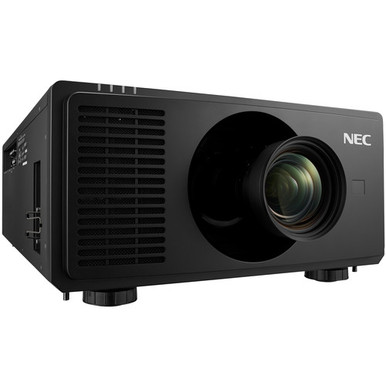
The NEC NP-PX2000UL Setup Guide and Buying Considerations below address a common procurement problem: a projector can look suitable on a specification sheet yet create costly complications once room geometry, mounting, signal transport, control, and service access enter the plan. The confirmed headline facts are substantial. The NEC NP-PX2000UL is specified at 20,000 lumens with WUXGA resolution.
Those two facts start the conversation. They do not settle it. AV buyers and installers still need to verify projection distance, optics, mounting requirements, electrical needs, interfaces, control options, ventilation, and the screen environment from current technical documentation. This guide builds that verification process into the buying decision. It also compares the NEC projector with the 5,200-lumen Full HD Epson Powerlite L270F and explains why the Optoma SI07B should be treated as a separate IFPD accessory unless compatibility is documented.
Products at a Glance
- Option 1: NEC NP-PX2000UL Display DLP Projector 16:10
- For projects whose completed room and source analysis…: Epson Powerlite L270F 5200-Lumen Full HD Laser 3LCD Projector (V11HC68020)
- For teams evaluating Wi-Fi and Bluetooth for a suppor…: Optoma Technology SI07B IFPD Wi-Fi and Bluetooth Module
Quick Comparison Table
| Feature | NEC NP-PX2000UL Display DLP Projector 16:10 | Epson Powerlite L270F 5200-Lumen Full HD Laser 3LCD Projector (V11HC68020) | Optoma Technology SI07B IFPD Wi-Fi and Bluetooth Module |
|---|---|---|---|
| Brightness | 20,000 lumens | 5200 lumens | |
| Resolution | WUXGA | Full HD | |
| Best For | Projects whose documented room analysis calls for a 20,000-lumen WUXGA projector and whose installation details have been verified before purchase. | Projects whose completed room and source analysis supports 5,200 lumens and Full HD rather than the NEC projector's 20,000-lumen WUXGA specification. | Teams evaluating Wi-Fi and Bluetooth for a supported IFPD host after confirming exact compatibility with the host manufacturer. |
| Smart Features | Wi-Fi, Bluetooth | ||
| Recommended Buyer | Projects whose documented room analysis calls for a 20,000-lumen WUXGA projector and whose installation details have been verified before purchase. | Projects whose completed room and source analysis supports 5,200 lumens and Full HD rather than the NEC projector's 20,000-lumen WUXGA specification. | Teams evaluating Wi-Fi and Bluetooth for a supported IFPD host after confirming exact compatibility with the host manufacturer. |
Product Images
Projector Options from AudioVideoNation
1. NEC NP-PX2000UL Display DLP Projector 16:10
Who should compare it: Projects whose documented room analysis calls for a 20,000-lumen WUXGA projector and whose installation details have been verified before purchase.
Why it belongs here: This is the subject of the guide and the reference point for the room survey, infrastructure plan, and commissioning process. Its supplied facts confirm 20,000 lumens and WUXGA resolution.
SKU: NP-PX2000UL
Key Features
- 20,000 lumens in the supplied product facts
- WUXGA resolution in the supplied product facts
- Listed in Multimedia Projectors, Projectors, and Video
- Exact ordering SKU NP-PX2000UL
Things to Consider
Throw type, optics, mounting data, power requirements, connections, control capabilities, airflow clearances, and physical specifications are not supplied here. Verify them in current NEC documentation and the final system design.
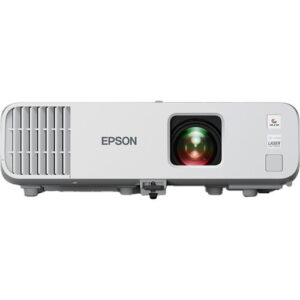
2. Epson Powerlite L270F 5200-Lumen Full HD Laser 3LCD Projector (V11HC68020)
Who should compare it: Projects whose completed room and source analysis supports 5,200 lumens and Full HD rather than the NEC projector's 20,000-lumen WUXGA specification.
Why it belongs here: The Epson projector supplies a useful alternative specification point: 5,200 lumens and Full HD resolution. It helps buyers test whether the room truly requires the NEC projector's different brightness and resolution profile.
SKU: PL-L270F
Key Features
- 5,200 lumens in the supplied product facts
- Full HD resolution in the supplied product facts
- Listed in the Projectors category
Things to Consider
Do not treat it as a direct substitute without recalculating image requirements and reviewing mounting, projection geometry, interfaces, control, and infrastructure. Those installation details are not supplied here.
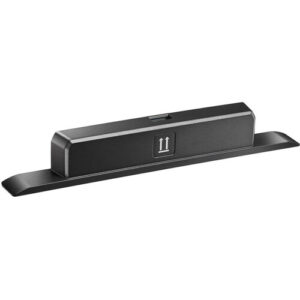
3. Optoma Technology SI07B IFPD Wi-Fi and Bluetooth Module
Who should compare it: Teams evaluating Wi-Fi and Bluetooth for a supported IFPD host after confirming exact compatibility with the host manufacturer.
Why it belongs here: This accessory is included as a compatibility checkpoint for mixed-display projects. Its Wi-Fi and Bluetooth facts may be relevant to a separate IFPD deployment, but they do not establish any connection to the NEC projector.
SKU: SI07B
Key Features
- Wi-Fi listed in the supplied product facts
- Bluetooth listed in the supplied product facts
- Listed in the Accessories category
- Exact ordering SKU SI07B
Things to Consider
No provided fact establishes compatibility with the NEC NP-PX2000UL or Epson Powerlite L270F. Do not purchase it as a projector connectivity upgrade without documented host support.
NEC NP-PX2000UL Display DLP Projector 16:10 vs Epson Powerlite L270F 5200-Lumen Full HD Laser 3LCD Projector (V11HC68020): Main Differences
- Choose NEC NP-PX2000UL Display DLP Projector 16:10 if Projects whose documented room analysis calls for a 20,000-lumen WUXGA projector and whose installation details have been verified before purchase..
- Choose Epson Powerlite L270F 5200-Lumen Full HD Laser 3LCD Projector (V11HC68020) if Projects whose completed room and source analysis supports 5,200 lumens and Full HD rather than the NEC projector's 20,000-lumen WUXGA specification..
- Choose Optoma Technology SI07B IFPD Wi-Fi and Bluetooth Module if Teams evaluating Wi-Fi and Bluetooth for a supported IFPD host after confirming exact compatibility with the host manufacturer..
Start the NEC NP-PX2000UL installation with confirmed facts
Two supplied specifications can anchor the project: 20,000 lumens and WUXGA resolution. Use them to establish the first round of requirements with the room owner. Does the application need this brightness class? Does WUXGA match the planned content, switching system, and screen format? Write those answers down before equipment is approved.
Brightness alone cannot predict the finished image. Screen size and material, ambient light, projection distance, content, and viewing expectations all affect the result. A room with windows, stage lighting, or lights that must remain on needs an on-site assessment. Do not translate the lumen figure into a promised screen size without that work.
The supplied data does not identify a throw type or other optical details. Confirm the required optics and supported installation geometry through current NEC documentation before ordering a mount or fixing a projector location. That check protects the design from a basic but expensive mismatch: choosing a bright projector that cannot form the required image from the available position.
Evaluate projector deployment fit by room and audience
Deployment fit changes with the space. Churches should map viewing positions, stage lighting, screen placement, and any interaction between the projected image and camera workflows. Schools need clear operating procedures, protected controls, predictable source switching, and installation timing that fits the academic calendar. Conference room teams should define expected source formats, connection points, control behavior, and the time users can reasonably spend starting a session.
The same projector should not be approved for each environment on lumens alone. Build a short acceptance statement for the actual room. It might specify the content that must remain readable, the seating areas that need an unobstructed view, the lighting scenes used during presentations, and the sources that must display correctly. Keep the wording measurable.
Then test the design against that statement. The NEC projector's 20,000-lumen specification may place it on a shortlist where substantial brightness is required, but the room survey must establish whether that output is appropriate. If a smaller brightness requirement is confirmed, the 5,200-lumen Epson projector provides a distinct comparison point rather than an assumed substitute.
Complete a pre-install room and projection survey
Measure first. Record the screen dimensions, intended image area, available projection distance, possible mounting positions, ceiling structure, lens centerline, sightline obstacles, and the path technicians will use for future access. Check ambient light during the actual operating scenes, not only in an empty room with the lights off.
The survey should also identify information absent from the supplied product data. Verify the compatible optical configuration, throw calculations, image-positioning range, mounting orientation, projector dimensions, operating weight, and mounting-hole requirements from current manufacturer resources. If an optical component must be selected separately, include its exact identifier in the bill of materials.
Ask the installer to mark the proposed image and projector positions on a scaled drawing. A field measurement should confirm the drawing before holes are drilled or structural work begins. If construction has not finished, assign responsibility for rechecking dimensions after ceilings, screens, millwork, and lighting are installed. Small building changes can move a viable projection position outside the approved geometry.
Plan mounting, power, airflow, and service access
Treat the projector, mount, supporting structure, safety provisions, and installation hardware as one mechanical system. The mount and attachment point must be rated for the final installed load. That load should come from verified technical documents and the complete configured assembly, not an estimate based on appearance.
Electrical planning deserves its own sign-off. Have a qualified professional confirm the required supply, circuit design, receptacle location, disconnect method, and applicable local electrical rules using current NEC documentation and the product nameplate. Avoid placing power connections where routine access would require unsafe work.
Air must move as the manufacturer directs. Confirm intake and exhaust clearances, acceptable environmental conditions, and any restrictions imposed by an enclosure or tight ceiling space. Leave a practical service path to connections and adjustment points. A projector that fits on paper can still be difficult to commission if a wall, beam, lift mechanism, or cable bundle blocks technician access.
Design the signal, control, and network path before purchase
List every source and destination in the AV chain. For each source, document its output format, physical connection, location, cable distance, switching route, and any conversion or extension required. Then confirm that the planned projector configuration and every intermediate component support the complete path. Test representative equipment before installation when the design depends on long runs or conversion stages.
The supplied NEC data does not list input, control, audio, smart, or network capabilities. Do not promise a particular connector or protocol from this brief. Check current technical documentation and record the exact interfaces the design will use. The same rule applies to monitoring and automation. Define the required commands and feedback, then validate them before the control program is considered finished.
The Optoma SI07B has Wi-Fi and Bluetooth in its supplied facts, but no provided information connects it to the NEC projector. It is an IFPD module by name. Treat it as a separate accessory evaluation for a supported host display, not as a way to add wireless functions to the NP-PX2000UL.
Use a documented projector setup checklist
Commissioning should prove the design, not merely show that an image appears. Use a planned source and the room's real lighting scenes. Keep a record of results so another technician can restore the approved state later.
1. Confirm the installed product, SKU, mounting hardware, safety provisions, cable labels, and electrical work against the approved documents.
2. Check alignment and image geometry with a suitable test source. Correct mechanical position before relying on electronic adjustments.
3. Send each required source through its complete signal path. Verify image framing, displayed content, switching, and recovery after a controlled power cycle.
4. Adjust only documented settings needed for the approved application. Record the final values and restrict casual changes where the operating plan allows it.
5. Test every agreed control function from the user's actual interface. Include startup, shutdown, source selection, and fault reporting only where the verified system supports them.
6. Run the system through a representative session under normal room conditions. Note any heat, noise, access, or usability concern for correction.
7. Hand over the configuration record, drawings, cable schedule, operating instructions, and support contacts to the system owner.
Finish with user acceptance. A named stakeholder should confirm that the agreed content is readable from the required seats and that routine operation matches the documented workflow.
Compare projector price-to-performance without chasing one spec
Price-to-performance should measure the complete installed outcome. Start with the required image, room conditions, resolution, operating workflow, and support plan. Then compare the full system needed to meet them, including any required optics, mounting, structural work, power, signal transport, control, installation labor, access equipment, and commissioning.
The NEC NP-PX2000UL and Epson Powerlite L270F define two clearly different specification points. The NEC projector is listed at 20,000 lumens with WUXGA resolution. The Epson projector is listed at 5,200 lumens with Full HD resolution. Those differences require a fresh room and source assessment. They are not interchangeable labels.
A lower commercial cost does not create value if the selected projector misses the room's documented brightness or resolution requirement. Extra brightness also does not justify extra system expense when the room does not need it. Score each option against the same acceptance criteria and attach current commercial terms separately. This keeps the technical decision stable even as quotes change.
Use the linked product pages to review live commerce details. For a fair comparison, request matching scopes that identify the exact SKU and every component needed for a working installation.
Check stock and availability before scheduling labor
Availability can change between design approval and purchase. Open the linked product page for current commerce details, then obtain confirmation for the exact SKU and required quantity before scheduling installers, access equipment, electricians, or room closures. An online listing by itself should not carry the project schedule.
Confirm whether every required supporting item follows the same timeline. A projector cannot be commissioned if a necessary mount, optical component, cable, or infrastructure part arrives later. Keep each identifier on the purchase order and compare the delivered labels with the approved bill of materials before installation begins.
Set a substitution rule in advance. Any proposed replacement should return to the room survey, projection calculations, signal plan, mounting review, electrical review, and acceptance criteria. A similar product name or lumen figure is not enough. This review protects both the installer and the owner from a rushed change that shifts cost into redesign or field labor.
Set a final purchase approval gate
Approve the NEC projector only after the technical owner, installer, and buyer can answer the same core questions. Does the room analysis support the 20,000-lumen requirement? Does WUXGA fit the content and signal plan? Has the installation geometry been calculated with verified optical information? Are the mount, structure, power, airflow, cable paths, control design, and service clearances documented?
The commercial file should identify NP-PX2000UL exactly and separate current purchasing details from technical assumptions. The deployment file should contain drawings, calculations, verified product documentation, a complete bill of materials, an installation schedule, and measurable acceptance tests.
Stop the order if an answer depends on an unconfirmed connector, lens, throw range, control protocol, physical dimension, or compatibility claim. Resolve it in documentation or a pre-install test. That short pause costs less than moving a mount, replacing infrastructure, or explaining why the finished room cannot meet its approved use case.
Related AudioVideoNation Links
- Browse Projector at AudioVideoNation
- View the NEC NP-PX2000UL product page
- Review the Epson Powerlite L270F
- Check the Optoma Technology SI07B module
Product Information Sources
- NEC NP-PX2000UL Display DLP Projector 16:10 product information
- Epson Powerlite L270F 5200-Lumen Full HD Laser 3LCD Projector (V11HC68020) product information
- Optoma Technology SI07B IFPD Wi-Fi and Bluetooth Module product information
FAQ
What NEC NP-PX2000UL specifications are confirmed in this guide?
The provided data confirms 20,000 lumens and WUXGA resolution for the NEC NP-PX2000UL. Installation details such as throw type, optics, connections, power, dimensions, and control support require verification from current NEC documentation.
Is the NEC NP-PX2000UL suitable for a church, school, or conference room?
The NEC NP-PX2000UL is a candidate only when the specific room analysis supports its 20,000-lumen WUXGA specification. Screen conditions, ambient light, geometry, sources, mounting, infrastructure, and operating workflow must be assessed for each church, school, or conference room.
How should buyers compare the NEC NP-PX2000UL with the Epson Powerlite L270F?
Buyers should compare the NEC's 20,000-lumen WUXGA specification with the Epson's 5,200-lumen Full HD specification against one documented room requirement. Recalculate the projection design and verify all installation details instead of treating one projector as an automatic substitute for the other.
What should an installer verify before mounting the NEC NP-PX2000UL?
An installer should verify optics, projection geometry, mounting requirements, structural support, electrical needs, airflow, service access, signal interfaces, and control capabilities before mounting the projector. None of those details should be assumed from brightness and resolution alone.
Can the Optoma SI07B add Wi-Fi and Bluetooth to the NEC NP-PX2000UL?
The provided data does not establish compatibility between the Optoma SI07B and NEC NP-PX2000UL. The SI07B is identified as an IFPD Wi-Fi and Bluetooth module, so documented support for the intended host must be confirmed before purchase.
How should a buyer handle pricing, stock, and availability?
A buyer should use the linked product pages for live commerce details and obtain confirmation for the exact SKU and quantity before scheduling installation. Compare complete system scopes and require any substitute to pass the original technical review.
Conclusion
Use this NEC NP-PX2000UL Setup Guide and Buying Considerations comparison to match documented specifications to the room and installation requirements. Review the linked product pages for current purchase details before ordering.
Products Used
| SKU | Product Name | URL |
|---|---|---|
| NP-PX2000UL | NEC NP-PX2000UL Display DLP Projector 16:10 | View product |
| PL-L270F | Epson Powerlite L270F 5200-Lumen Full HD Laser 3LCD Projector (V11HC68020) | View product |
| SI07B | Optoma Technology SI07B IFPD Wi-Fi and Bluetooth Module | View product |