

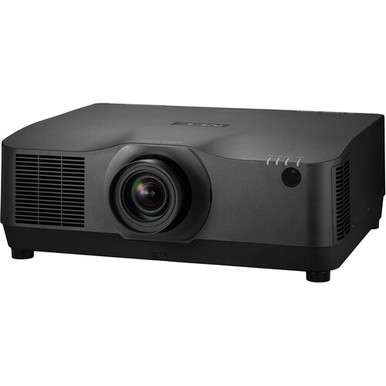
Projector purchases for churches, schools, and conference rooms can go wrong before anyone powers up the system. The selected lens may not suit the measured geometry, the mount location may block service, or the purchasing record may point to a different package. This NEC NP-PA1004UL-B-41 Setup Guide and Buying Considerations article gives AV buyers and installers a disciplined way to close those gaps. It centers on the NEC NP-PA1004UL-B-41, whose supplied product facts identify 4K UHD resolution, then places the NP-PA1004UL-BL and white NP-PA1004UL-W-41 listings in context.
The goal is a defensible purchase and a cleaner installation. The supplied data does not support a full technical design, so confirm current manufacturer documentation, package contents, and site requirements before ordering. Use the steps below to measure the room, validate the NP41ZL lens bundle, plan signal and control paths, compare live commerce details, and commission the finished system. Keep every decision tied to the exact SKU.
Products at a Glance
- Option 1: NEC NP-PA1004UL-B-41 10,000-Lumen Pixel-Shift 4K UHD Projector with NP41ZL Lens Bundle (Black)
- For teams comparing the NP-PA1004UL-BL purchasing rec…: NEC NP-PA1004UL-B Professional Installation Projector
- For projects whose architectural plan calls for the c…: NEC NP-PA1004UL-W-41 with NP41ZL Lens Bundle (White)
Quick Comparison Table
| Feature | NEC NP-PA1004UL-B-41 10,000-Lumen Pixel-Shift 4K UHD Projector with NP41ZL Lens Bundle (Black) | NEC NP-PA1004UL-B Professional Installation Projector | NEC NP-PA1004UL-W-41 with NP41ZL Lens Bundle (White) |
|---|---|---|---|
| Resolution | 4K UHD | ||
| Best For | Teams whose approved purchasing record calls for NP-PA1004UL-B-41, the cataloged black finish, and the named NP41ZL bundle. | Teams comparing the NP-PA1004UL-BL purchasing record and prepared to verify its exact configuration before approval. | Projects whose architectural plan calls for the cataloged white finish, subject to a separate technical and package validation. |
| Recommended Buyer | Teams whose approved purchasing record calls for NP-PA1004UL-B-41, the cataloged black finish, and the named NP41ZL bundle. | Teams comparing the NP-PA1004UL-BL purchasing record and prepared to verify its exact configuration before approval. | Projects whose architectural plan calls for the cataloged white finish, subject to a separate technical and package validation. |
Product Images
Projector Options from AudioVideoNation
1. NEC NP-PA1004UL-B-41 10,000-Lumen Pixel-Shift 4K UHD Projector with NP41ZL Lens Bundle (Black)
Who should compare it: Teams whose approved purchasing record calls for NP-PA1004UL-B-41, the cataloged black finish, and the named NP41ZL bundle.
Why it belongs here: This is the exact SKU covered by the guide. Its supplied facts identify 4K UHD resolution, while its catalog name identifies a black finish and NP41ZL lens bundle.
SKU: NP-PA1004UL-B-41
Key Features
- 4K UHD resolution in the supplied product facts
- Exact subject SKU: NP-PA1004UL-B-41
- Black finish identified in the catalog name
- NP41ZL lens bundle identified in the catalog name
- Listed in the Multimedia Projectors, Projectors, and Video categories
Things to Consider
Confirm current throw data, complete package contents, connections, physical requirements, power needs, and live commerce details before approving the installation.
2. NEC NP-PA1004UL-B Professional Installation Projector
Who should compare it: Teams comparing the NP-PA1004UL-BL purchasing record and prepared to verify its exact configuration before approval.
Why it belongs here: Buyers may encounter this separate NP-PA1004UL-B professional installation listing while sourcing the same projector family. It needs its own package and technical review.
SKU: NP-PA1004UL-BL
Key Features
- Exact SKU: NP-PA1004UL-BL
- Catalog name identifies NEC NP-PA1004UL-B
- Cataloged as a professional installation projector
- Listed in the Multimedia Projectors, Projectors, and Video categories
Things to Consider
Verify its lens configuration, package contents, resolution, connections, and installation requirements independently. Do not transfer the B-41 facts to this SKU.
3. NEC NP-PA1004UL-W-41 with NP41ZL Lens Bundle (White)
Who should compare it: Projects whose architectural plan calls for the cataloged white finish, subject to a separate technical and package validation.
Why it belongs here: This listing provides the cataloged white-finish option among the supplied NEC records. Its name also identifies an NP41ZL lens bundle.
SKU: NP-PA1004UL-W-41
Key Features
- Exact SKU: NP-PA1004UL-W-41
- White finish identified in the catalog name
- NP41ZL lens bundle identified in the catalog name
- Listed in the Multimedia Projectors, Projectors, and Video categories
Things to Consider
Confirm its technical specifications and package contents separately. The white finish and shared family name do not establish equivalence with NP-PA1004UL-B-41.
NEC NP-PA1004UL-B-41 10,000-Lumen Pixel-Shift 4K UHD Projector with NP41ZL Lens Bundle (Black) vs NEC NP-PA1004UL-B Professional Installation Projector: Main Differences
- Choose NEC NP-PA1004UL-B-41 10,000-Lumen Pixel-Shift 4K UHD Projector with NP41ZL Lens Bundle (Black) if Teams whose approved purchasing record calls for NP-PA1004UL-B-41, the cataloged black finish, and the named NP41ZL bundle..
- Choose NEC NP-PA1004UL-B Professional Installation Projector if Teams comparing the NP-PA1004UL-BL purchasing record and prepared to verify its exact configuration before approval..
- Choose NEC NP-PA1004UL-W-41 with NP41ZL Lens Bundle (White) if Projects whose architectural plan calls for the cataloged white finish, subject to a separate technical and package validation..
NEC NP-PA1004UL setup guide: start with the exact SKU
Three catalog records share much of the NP-PA1004UL family name, but that does not prove their packages or documented specifications are identical. Treat the SKU as the primary purchasing identifier.
The NP-PA1004UL-B-41 catalog name identifies a black projector with an NP41ZL lens bundle. Its supplied product facts also identify 4K UHD resolution. The NP-PA1004UL-W-41 catalog name identifies a white finish and an NP41ZL lens bundle. NP-PA1004UL-BL is a separate professional installation projector listing. Its catalog name does not define the same bundle.
Record the complete SKU on the design scope, quote request, purchase order, receiving sheet, and installation documentation. Ask the seller to confirm the manufacturer part number and package contents in writing. Match the shipping label to that record when the order arrives. Do not transfer the B-41 resolution fact or bundle assumptions to another SKU without current documentation for that exact product.
Projector deployment fit starts with the site survey
Start with a scaled room drawing. Record the intended image dimensions, available projection distance, screen centerline, possible projector locations, ceiling height, obstructions, and audience sight lines. Measure the real space. Plans can miss soffits, lighting fixtures, ducts, structural beams, and other conflicts.
Use the current throw chart for the exact projector-and-lens pairing. The provided product data cannot support a placement calculation. Check that the measured geometry falls inside the documented range, then leave practical adjustment room instead of designing against an optical limit. Confirm the official mounting orientation, adjustment range, dimensions, weight, ventilation clearance, and service-access requirements before approving the location.
Room conditions matter too. Document the lighting used during presentations, window exposure, screen characteristics, viewing distance, and content type. A worship lyric display, classroom diagram, spreadsheet, and full-motion video place different demands on the finished system. Confirm published brightness data from current documentation and judge it against the planned screen and operating light.
Churches should map sight lines and volunteer workflows. Schools need staff access, cable protection, and predictable daily operation. Conference room teams should document every source and the expected meeting flow. These operational details decide deployment fit alongside the projector specifications.
Verify the NP41ZL lens bundle and package
The catalog names for NP-PA1004UL-B-41 and NP-PA1004UL-W-41 identify an NP41ZL lens bundle. That naming helps distinguish the listings, but it does not define the lens throw range, adjustment limits, or every item inside the shipment.
Match current NP41ZL documentation to the measured screen size and projection distance. Ask the seller to confirm that the lens is part of the current package for the exact SKU and document every included item that the installation depends on. This check belongs before purchasing approval, not after installers reach the site.
Finish is another clear distinction. The B-41 catalog name identifies black, while the W-41 catalog name identifies white. Choose the finish from the architectural plan, sight-line requirements, and room appearance. Then validate technical specifications independently. A shared family name and a different finish do not establish equivalent packages or performance.
Plan the 4K UHD projector installation path
Draw a one-line AV diagram before ordering. List every source, its required output format, the switching or extension path, cable route, projector endpoint, control path, and room-audio connection. Cross-check the projector connections and accepted signal formats against current documentation for the exact SKU.
The supplied product facts identify 4K UHD resolution for NP-PA1004UL-B-41. That resolution label does not prove that every input, switcher, extender, cable path, or source format will support the intended signal. Validate the complete chain. If the system must display several source types, test each planned format during commissioning rather than relying on a single laptop.
Confirm official power requirements, connector placement, ventilation clearances, and startup or shutdown guidance. Have the electrical design reviewed by qualified personnel. For control, define the desired user experience first, then confirm that the exact projector documentation supports the planned method. Assign network details or write control programming only after that check.
Keep operation simple. A church volunteer, substitute teacher, or visiting presenter should be able to select the intended source and recover from a routine power cycle without entering the installation menu.
Use a controlled installation and commissioning sequence
A repeatable sequence catches purchasing and design errors while they are still manageable.
1. Approve the geometry. Freeze the screen dimensions, projection distance, projector position, exact lens documentation, sight lines, and service clearances.
2. Lock the purchasing record. Put the full SKU, finish, confirmed package contents, and required documentation on the approved bill of materials.
3. Inspect before mounting. Match received labels and contents to the purchase record. Complete permitted bench checks under the manufacturer instructions before equipment is moved into a difficult location.
4. Install the supporting work. Use qualified personnel, appropriately rated mounting hardware, and an approved structure. Protect signal, control, and power routes from strain and interference.
5. Align the image. Follow the documented installation and lens procedures. Keep the projector within its approved adjustment range rather than expecting an unverified correction setting to repair poor placement.
6. Commission the system. Test every planned source at its intended operating format. Check normal startup, shutdown, source selection, control behavior, image framing, text readability, and signal stability across the installed route.
7. Complete the handoff. Save the exact part numbers, diagrams, settings record, seller documentation, and escalation contacts. Give operators a short guide for daily use and basic fault reporting.
Compare the three NEC projector listings carefully
Shortlist NP-PA1004UL-B-41 when the approved purchasing record calls for that exact black SKU, the cataloged NP41ZL bundle, and the 4K UHD resolution identified in its supplied facts. Deployment approval still depends on current lens, connection, physical, power, and installation documentation.
NP-PA1004UL-W-41 gives buyers a cataloged white-finish route with an NP41ZL lens bundle. Validate its technical specifications separately. The supplied facts do not establish that every B-41 characteristic carries over to the W-41 listing.
NP-PA1004UL-BL is another catalog record for the NEC NP-PA1004UL-B professional installation projector. Treat it as a separate purchasing option. Confirm its lens configuration, package contents, resolution, connections, and site requirements instead of assuming it matches either bundled listing.
Send the seller a written clarification sheet covering the exact manufacturer part number, included lens, finish, documented resolution, throw data, connections, physical requirements, and package contents. That response creates a clean comparison and gives receiving staff something concrete to check.
Review projector price-to-performance, stock, and availability
Open the linked product page or request a current seller quote for live price and availability. This guide does not repeat dynamic commerce details or make an inventory claim. Record the quote date, exact SKU, requested quantity, package description, delivery estimate, and validity period before seeking approval.
Calculate projector price-to-performance from the installed scope. Normalize each option across the projector, confirmed lens, mounting hardware, signal transport, control equipment, cabling, electrical work, labor, training, and planned support. Count an item as included only after it has been confirmed for the exact SKU.
Tie value to requirements the room will use. A documented capability that the project does not need adds little practical value. A missing lens, connection path, or installation component can erase an apparent saving. Compare each validated system total against the same image, operation, control, service, and schedule criteria.
Set substitution rules before ordering. Do not replace B-41, W-41, or BL solely because the family names look similar. A different finish can affect the architectural plan, and a different package can alter the installation scope. Route any substitute through the installer or system designer for a fresh technical review.
Related AudioVideoNation Links
- Browse Projector at AudioVideoNation
- NEC NP-PA1004UL-B-41 with NP41ZL Lens Bundle
- NEC NP-PA1004UL-B Professional Installation Projector
- NEC NP-PA1004UL-W-41 White Lens Bundle
Product Information Sources
- NEC NP-PA1004UL-B-41 10,000-Lumen Pixel-Shift 4K UHD Projector with NP41ZL Lens Bundle (Black) product information
- NEC NP-PA1004UL-B Professional Installation Projector product information
- NEC NP-PA1004UL-W-41 with NP41ZL Lens Bundle (White) product information
FAQ
What resolution is documented for the NEC NP-PA1004UL-B-41?
The supplied product facts identify the NEC NP-PA1004UL-B-41 resolution as 4K UHD. Confirm accepted source formats and connections separately because display resolution alone does not define end-to-end signal compatibility.
Does the NEC NP-PA1004UL-B-41 include an NP41ZL lens?
The supplied catalog name identifies the NEC NP-PA1004UL-B-41 as a bundle with an NP41ZL lens. Confirm the current package contents for the exact SKU before ordering and match them against the receiving documents.
What is the difference between NP-PA1004UL-B-41 and NP-PA1004UL-BL?
They are separate catalog records with different SKUs, and the supplied data does not document a complete package-level comparison. B-41 is named as a black NP41ZL lens bundle with 4K UHD resolution in its facts, while BL is named as an NP-PA1004UL-B professional installation projector.
Can NP-PA1004UL-W-41 replace NP-PA1004UL-B-41?
The supplied data does not establish NP-PA1004UL-W-41 as a technical substitute for NP-PA1004UL-B-41. Its catalog name identifies a white finish and NP41ZL lens bundle, but resolution, connections, physical requirements, and other installation details need separate confirmation.
How should buyers check the current price and availability?
Buyers should use the linked product page or a current seller quote to check live price and availability for the exact SKU. Record the quote date, package description, requested quantity, delivery estimate, and validity period before approving the purchase.
What should an installer verify before mounting this projector?
The installer should verify screen dimensions, projection distance, exact lens data, mounting structure, service clearance, power, ventilation, signal formats, connections, control path, and package contents. Complete the geometry and documentation review before drilling, cabling, or programming.
Conclusion
Use this NEC NP-PA1004UL-B-41 Setup Guide and Buying Considerations comparison to match documented specifications to the room and installation requirements. Review the linked product pages for current purchase details before ordering.
Products Used
| SKU | Product Name | URL |
|---|---|---|
| NP-PA1004UL-B-41 | NEC NP-PA1004UL-B-41 10,000-Lumen Pixel-Shift 4K UHD Projector with NP41ZL Lens Bundle (Black) | View product |
| NP-PA1004UL-BL | NEC NP-PA1004UL-B Professional Installation Projector | View product |
| NP-PA1004UL-W-41 | NEC NP-PA1004UL-W-41 with NP41ZL Lens Bundle (White) | View product |