

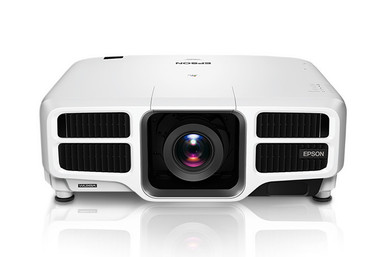
Planning a fixed projector installation can go wrong before anyone powers the system. A lens that misses the required image geometry, a mount placed too early, or an unverified signal path can force expensive rework. This AV PL-L1200UNL Setup Guide and Buying Considerations article centers on the Epson Power Lite Pro L1200UNL WUXGA 1080p 3LCD Projector. It also examines two cataloged Epson lens candidates: the ELPLW08 Wide Throw #3 Zoom Lens and the ELPLU04 Short-Throw Zoom Lens. The supplied data identifies WUXGA resolution and a 3LCD design for the projector. It does not confirm that either lens fits the PL-L1200UNL, so compatibility remains a pre-purchase checkpoint.
Use this guide to connect room needs, throw geometry, source planning, installation order, and purchasing decisions. Churches, schools, and conference room teams can follow the same discipline, even though their operating priorities differ. The goal is a defensible bill of materials and a setup plan built from measurements, documented compatibility, and live product-page details.
Products at a Glance
- Option 1: Epson Power Lite Pro L1200UNL WUXGA 1080p 3LCD Projector
- For projects whose measured geometry calls for a wide…: Epson V12H004W08 Wide Throw #3 Zoom Lens ELPLW08
- For spaces whose verified geometry requires a short-t…: Epson V12H004U04 ELPLU04 Short-Throw Zoom Lens for Select Projectors
Quick Comparison Table
| Feature | Epson Power Lite Pro L1200UNL WUXGA 1080p 3LCD Projector | Epson V12H004W08 Wide Throw #3 Zoom Lens ELPLW08 | Epson V12H004U04 ELPLU04 Short-Throw Zoom Lens for Select Projectors |
|---|---|---|---|
| Brightness | 12,000 lumen | ||
| Resolution | WUXGA | ||
| Best For | Teams evaluating a fixed WUXGA 3LCD installation and prepared to validate brightness, lens compatibility, geometry, inputs, mounting, and room conditions before purchase. | Projects whose measured geometry calls for a wide-throw zoom lens and whose exact projector-and-lens pairing has been confirmed in current documentation. | Spaces whose verified geometry requires a short-throw zoom approach and where the ELPLU04 has been confirmed for the chosen projector. |
| Throw Type | Short throw | ||
| Recommended Buyer | Teams evaluating a fixed WUXGA 3LCD installation and prepared to validate brightness, lens compatibility, geometry, inputs, mounting, and room conditions before purchase. | Projects whose measured geometry calls for a wide-throw zoom lens and whose exact projector-and-lens pairing has been confirmed in current documentation. | Spaces whose verified geometry requires a short-throw zoom approach and where the ELPLU04 has been confirmed for the chosen projector. |
Product Images
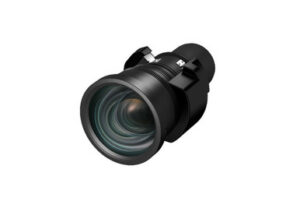

Projector Options from AudioVideoNation
1. Epson Power Lite Pro L1200UNL WUXGA 1080p 3LCD Projector
Who should compare it: Teams evaluating a fixed WUXGA 3LCD installation and prepared to validate brightness, lens compatibility, geometry, inputs, mounting, and room conditions before purchase.
Why it belongs here: This projector is the focus of the installation plan. The supplied product data identifies WUXGA resolution, 1080p wording, and a 3LCD design, giving buyers a factual starting point for room and signal-path verification.
SKU: PL-L1200UNL
Key Features
- The exact supplied SKU is PL-L1200UNL.
- WUXGA is the listed resolution.
- The supplied product name includes 1080p.
- The supplied product name identifies a 3LCD design.
- It is cataloged under Multimedia Projectors, Projectors, and Video.
Things to Consider
Confirm required brightness, exact lens compatibility, throw calculations, accepted signals, mounting needs, and the scope of supply before ordering. Use the linked product page for current commerce details.
2. Epson V12H004W08 Wide Throw #3 Zoom Lens ELPLW08
Who should compare it: Projects whose measured geometry calls for a wide-throw zoom lens and whose exact projector-and-lens pairing has been confirmed in current documentation.
Why it belongs here: The ELPLW08 gives installers a named wide-throw zoom lens candidate to evaluate when the measured mounting position calls for that optical approach. It belongs on the shortlist only after compatibility is verified.
SKU: V12H004W08
Key Features
- The exact supplied SKU is V12H004W08.
- The product name identifies Epson's ELPLW08 designation.
- It is labeled Wide Throw #3.
- It is identified as a zoom lens.
- It is cataloged under Accessories, Lenses, and Projectors.
Things to Consider
The supplied data does not confirm compatibility with the PL-L1200UNL. Verify the pairing, throw range, image-size limits, lens shift, orientation, and installation requirements before purchase.
3. Epson V12H004U04 ELPLU04 Short-Throw Zoom Lens for Select Projectors
Who should compare it: Spaces whose verified geometry requires a short-throw zoom approach and where the ELPLU04 has been confirmed for the chosen projector.
Why it belongs here: The ELPLU04 supplies a short-throw zoom lens candidate for rooms where measured placement puts the projector closer to the screen. The product name limits it to select projectors, so model-level confirmation is essential.
SKU: ELPLU04
Key Features
- The exact supplied SKU is ELPLU04.
- The product name identifies Epson's ELPLU04 designation.
- It is identified as a short-throw lens.
- It is identified as a zoom lens.
- The supplied name states that it is for select projectors.
Things to Consider
Do not infer PL-L1200UNL compatibility from the Epson brand or lens category. Confirm the exact pairing, throw calculations, image limits, lens shift, orientation, and installation steps first.
Epson Power Lite Pro L1200UNL WUXGA 1080p 3LCD Projector vs Epson V12H004W08 Wide Throw #3 Zoom Lens ELPLW08: Main Differences
- Choose Epson Power Lite Pro L1200UNL WUXGA 1080p 3LCD Projector if Teams evaluating a fixed WUXGA 3LCD installation and prepared to validate brightness, lens compatibility, geometry, inputs, mounting, and room conditions before purchase..
- Choose Epson V12H004W08 Wide Throw #3 Zoom Lens ELPLW08 if Projects whose measured geometry calls for a wide-throw zoom lens and whose exact projector-and-lens pairing has been confirmed in current documentation..
- Choose Epson V12H004U04 ELPLU04 Short-Throw Zoom Lens for Select Projectors if Spaces whose verified geometry requires a short-throw zoom approach and where the ELPLU04 has been confirmed for the chosen projector..
Epson PL-L1200UNL setup starts with deployment fit
Start with the intended image size, screen aspect ratio, viewing distance, ambient light, source content, daily operating pattern, and the people who will run the room. WUXGA is the supplied resolution fact for the PL-L1200UNL. Use it as the content-planning anchor, then confirm that the smallest required text remains readable from the farthest seat. Lecture slides, worship lyrics, and multi-window conference layouts ask different things of a projected image.
Document the physical constraints next. Mark the screen plane, possible lens locations, ceiling height, structural attachment points, service access, cable routes, and obstructions. Record whether the mounting position is fixed or can move. Confirm the required brightness from measured room conditions and published projector documentation before purchase. This planning sheet turns deployment fit into measurable pass-or-fail criteria instead of a preference based on the model name.
Measure before making PL-L1200UNL lens decisions
Lens selection begins with geometry. Measure from the planned lens position to the image surface, then record the required image width and height. Calculate the required throw relationship using throw distance divided by image width. Compare that result with official documentation for the exact projector-and-lens pairing. A lens family name alone cannot confirm that the image will fill the screen from the available position.
Check every likely mounting point. A beam, lighting fixture, low ceiling, rear wall, or existing conduit may narrow the workable range. Measure from the intended lens location, not an arbitrary point on the projector housing. Allow space for installation, ventilation, cabling, adjustment, and future service without assigning dimensions that have not been verified.
Confirm zoom range, lens shift, focus controls, permitted orientation, image-size limits, and mounting restrictions in current documentation. Keep two plans if the room permits it: a preferred location and a workable alternate. Each plan should name the exact projector SKU, lens SKU, screen dimensions, measured distance, and source used for the calculation.
Compare the supplied Epson projector lens candidates
The Epson V12H004W08 Wide Throw #3 Zoom Lens ELPLW08 is identified as a wide-throw zoom lens. The Epson V12H004U04 ELPLU04 Short-Throw Zoom Lens for Select Projectors is identified as a short-throw zoom lens. Those descriptions help organize a shortlist. They do not establish mechanical or optical compatibility with the PL-L1200UNL.
If the calculated mounting position is relatively far from the screen, evaluate the ELPLW08 against the required throw relationship. If the room forces the lens closer to the screen, evaluate the ELPLU04. Short throw and wide throw describe different placement needs, but neither label supplies the usable range for this installation. Zoom also does not make a lens universally adaptable.
Before adding either lens to the bill of materials, match the projector model and lens SKU in an authoritative compatibility source and obtain vendor confirmation. Then run the exact screen-size and throw-distance calculation. Verify lens shift, orientation, image limits, and any required installation steps. Save the documentation with the project record so installers are working from the same approved pairing.
Plan the WUXGA 3LCD projector signal path
Build the signal plan from the content sources toward the projector. List computers, media players, cameras, conferencing systems, switchers, scalers, and signal extenders that the room will use. The supplied projector data includes WUXGA resolution, while 1080p appears in the product name. Those labels do not confirm every accepted input timing, connector, scaling behavior, or protected-content requirement.
For each source, record its intended output format and aspect ratio. Confirm that every device in the chain can carry that signal across the installed distance. If switching or extension hardware is involved, test the complete chain at the planned cable length before closing ceilings or walls. A short bench cable cannot validate a long installed route.
Create a source-by-source acceptance test. Check framing, readable text, motion content, switching behavior, and recovery after equipment restarts. Also document a fallback source and the operator steps needed to select it. That work makes the WUXGA specification useful in the room instead of leaving it as a catalog label.
Follow a controlled projector installation guide
Use a deliberate installation order. Approve the screen position first. Complete the lens calculation and compatibility check next. Then confirm the projector location, structural support, power, signal routes, control wiring, and service access. Cutting or drilling before those decisions are signed off can lock the room into the wrong geometry.
Mounting hardware must suit both the projector and the building structure. Follow current manufacturer instructions and applicable safety requirements. Keep temporary access to the projector and lens during initial alignment. Final cable dressing and ceiling closure should wait until the projected image has passed the room's acceptance checks.
Commission the complete system with every planned source. Verify image size, focus, framing, alignment, and the documented image controls available for the approved configuration. Run startup and shutdown several times using the workflow that operators will follow. Record the projector SKU, lens SKU, mounting position, source settings, and approved image dimensions in the closeout file. Clear labeling and a short operator guide matter in shared rooms where teachers, volunteers, or meeting hosts may need to recover from a changed source setting.
Adapt the plan for churches, schools, and conference rooms
Church installations should begin with the content the congregation must see: lyrics, presentation text, video, and service prompts. Check sightlines from side seating and the back row. Measure ambient light during the hours when services occur. If a booth or existing mount fixes the projector position, lens geometry becomes an early decision. The operating plan should also be clear enough for trained volunteers to follow consistently.
Schools need a setup that supports the classroom's actual sources and viewing distances. Test lesson text from the farthest student position, and confirm how staff will switch between assigned computers and other approved inputs. Protect cable paths, preserve maintenance access, and document a repeatable startup process. A model name cannot answer those room-level questions.
Conference room teams should test spreadsheets, presentation text, remote participants, and any multi-window layouts used in meetings. Confirm integration with the room's switching and control workflow rather than assuming it from the projector category. Fast operator recovery is part of deployment fit. The same PL-L1200UNL product facts apply in every setting, but the acceptance test should mirror the audience, content, lighting, and operating staff of that specific room.
Check stock, availability, and price-to-performance
Check stock and availability on each linked product page when the design is approved and again before placing the order. Project schedules can outlast a commerce snapshot. Verify the exact SKU for every required component, especially the lens, and confirm that the complete approved package can meet the installation timeline. Do not substitute a similarly named lens without repeating compatibility and throw calculations.
Judge price-to-performance at the installed-system level. Use current product-page pricing to build a worksheet that includes the verified lens, suitable mounting hardware, signal transport, cabling, integration labor, and any project contingency. The projector's supplied facts establish WUXGA resolution and a 3LCD designation. The final value decision also depends on documented brightness, throw geometry, inputs, operating requirements, and service expectations for the site.
Use a simple decision gate before purchase. Every required capability should pass with a measurement, current product document, or written confirmation. Any unresolved compatibility item remains open. This approach keeps an attractive component price from masking relocation or replacement costs, and it prevents undocumented capabilities from influencing the buying decision. Once every line passes, preserve the approved SKUs and linked product pages with the purchase record.
Related AudioVideoNation Links
- Browse Projector at AudioVideoNation
- Epson PL-L1200U Setup Guide: WUXGA Deployment Planning
- Epson Power Lite Pro L1200UNL WUXGA 1080p 3LCD Projector
- Epson ELPLW08 Wide Throw #3 Zoom Lens
- Epson ELPLU04 Short-Throw Zoom Lens
Product Information Sources
- Epson Power Lite Pro L1200UNL WUXGA 1080p 3LCD Projector product information
- Epson V12H004W08 Wide Throw #3 Zoom Lens ELPLW08 product information
- Epson V12H004U04 ELPLU04 Short-Throw Zoom Lens for Select Projectors product information
FAQ
What resolution is listed for the Epson PL-L1200UNL?
The supplied product data lists WUXGA resolution for the Epson PL-L1200UNL. Its product name also includes 1080p, so buyers should confirm accepted signal formats and image handling in current documentation.
Are the ELPLW08 and ELPLU04 confirmed to work with the PL-L1200UNL?
The provided data does not confirm that either the ELPLW08 or ELPLU04 works with the PL-L1200UNL. Match the exact projector and lens SKUs in current compatibility documentation before ordering or finalizing mount placement.
How should I choose between a wide-throw and short-throw lens?
Choose between wide throw and short throw by comparing the measured projector-to-screen distance and required image width with the verified lens range. The lens label narrows the search, but the exact calculation and confirmed projector compatibility decide whether it fits.
What should be verified before mounting the PL-L1200UNL?
Verify the screen position, lens compatibility, throw calculation, structural support, service access, power, cable routes, and complete signal path before mounting the PL-L1200UNL. Test the approved source chain before closing walls or ceilings.
Where should buyers check current price and availability?
Buyers should use the linked AudioVideoNation product pages for current price and availability. Recheck every required SKU before ordering because the projector, lens, and installation schedule must align.
Does WUXGA resolution guarantee readable text in every room?
No, WUXGA resolution alone does not guarantee readable text in every room. Screen size, viewing distance, source layout, focus, room lighting, and content design must be tested against the site's acceptance criteria.
Conclusion
Use this AV PL-L1200UNL Setup Guide and Buying Considerations comparison to match documented specifications to the room and installation requirements. Review the linked product pages for current purchase details before ordering.
Products Used
| SKU | Product Name | URL |
|---|---|---|
| PL-L1200UNL | Epson Power Lite Pro L1200UNL WUXGA 1080p 3LCD Projector | View product |
| V12H004W08 | Epson V12H004W08 Wide Throw #3 Zoom Lens ELPLW08 | View product |
| ELPLU04 | Epson V12H004U04 ELPLU04 Short-Throw Zoom Lens for Select Projectors | View product |