


Choosing among closely named Epson projectors can derail an installation before the mount goes up. This AV PL-L1200U Setup Guide and Buying Considerations resource separates SKU PL-L1200U from L1200U and PL-L1200UNL, then explains how to assess two listed Epson lenses without assuming compatibility. The supplied facts identify PL-L1200U and PL-L1200UNL as WUXGA projectors. They identify L1200U separately at 7,000 lumens with a 4K resolution designation.
That distinction matters. Churches, schools, conference room teams, and installers need the exact projector, optical plan, signal path, and purchasing details to agree. This guide gives you a practical route from site survey to commissioning while flagging the specifications that must be confirmed on each linked product page.
Products at a Glance
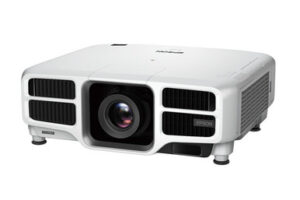
- Option 1: Epson Power Lite Pro L1200U WUXGA 1080p 3LCD Projector
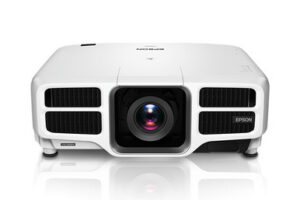
- For deployments evaluating a 7,000-lumen Epson projec…: Epson L1200U Laser Golf Simulator Projector – 7,000 Lumens, 4K Enhanced
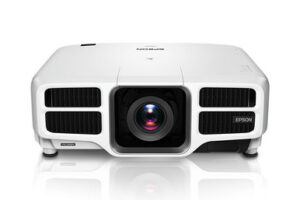
- For a WUXGA shortlist that can accommodate the exact…: Epson Power Lite Pro L1200UNL WUXGA 1080p 3LCD Projector
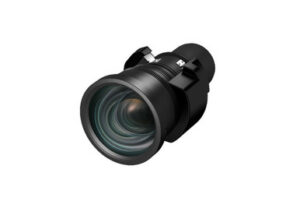
- For installations whose measured geometry points towa…: Epson V12H004M01 ELP-LM01 Medium-throw Zoom Lens 70.3mm-105.8mm F/2.0-2.7
- For rooms whose measured mounting position calls for…: Epson V12H004W08 Wide Throw #3 Zoom Lens ELPLW08
Quick Comparison Table
| Feature | Epson Power Lite Pro L1200U WUXGA 1080p 3LCD Projector | Epson L1200U Laser Golf Simulator Projector – 7,000 Lumens, 4K Enhanced | Epson Power Lite Pro L1200UNL WUXGA 1080p 3LCD Projector | Epson V12H004M01 ELP-LM01 Medium-throw Zoom Lens 70.3mm-105.8mm F/2.0-2.7 | Epson V12H004W08 Wide Throw #3 Zoom Lens ELPLW08 |
|---|---|---|---|---|---|
| Brightness | 7,000 Lumens | 12,000 lumen | |||
| Resolution | WUXGA | 4K | WUXGA | ||
| Best For | Projects that specify SKU PL-L1200U and require a WUXGA projector listing. | Deployments evaluating a 7,000-lumen Epson projector with a 4K resolution designation, including golf simulator planning. | A WUXGA shortlist that can accommodate the exact PL-L1200UNL SKU after its configuration is confirmed. | Installations whose measured geometry points toward medium-throw coverage after projector compatibility is confirmed. | Rooms whose measured mounting position calls for a wide-throw lens, subject to confirmation for the selected projector. |
| Recommended Buyer | Projects that specify SKU PL-L1200U and require a WUXGA projector listing. | Deployments evaluating a 7,000-lumen Epson projector with a 4K resolution designation, including golf simulator planning. | A WUXGA shortlist that can accommodate the exact PL-L1200UNL SKU after its configuration is confirmed. | Installations whose measured geometry points toward medium-throw coverage after projector compatibility is confirmed. | Rooms whose measured mounting position calls for a wide-throw lens, subject to confirmation for the selected projector. |
Product Images

Projector Options from AudioVideoNation
1. Epson Power Lite Pro L1200U WUXGA 1080p 3LCD Projector
Who should compare it: Projects that specify SKU PL-L1200U and require a WUXGA projector listing.
Why it belongs here: This is the exact PL-L1200U SKU named in the guide. Its supplied WUXGA resolution makes it the clearest starting point when drawings or purchase requests already specify PL-L1200U.
SKU: PL-L1200U
Key Features
- SKU PL-L1200U
- WUXGA resolution
- Epson Power Lite Pro L1200U product listing
- Listed in Multimedia Projectors, Projectors, and Video categories
Things to Consider
Before committing, verify brightness, lens package, throw coverage, connections, mounting details, condition, and current purchase terms on the linked page.
2. Epson L1200U Laser Golf Simulator Projector – 7,000 Lumens, 4K Enhanced
Who should compare it: Deployments evaluating a 7,000-lumen Epson projector with a 4K resolution designation, including golf simulator planning.
Why it belongs here: This separate L1200U listing supplies a quantified brightness and a 4K resolution designation. It gives buyers another Epson option to assess when those requirements drive the room design, while remaining distinct from PL-L1200U.
SKU: L1200U
Key Features
- SKU L1200U
- 7,000-lumen brightness
- 4K resolution designation
- Listed in the Projectors category
Things to Consider
Do not treat L1200U and PL-L1200U as identical because their names are similar. Confirm the exact SKU, lens arrangement, mounting requirements, connections, and content workflow.
3. Epson Power Lite Pro L1200UNL WUXGA 1080p 3LCD Projector
Who should compare it: A WUXGA shortlist that can accommodate the exact PL-L1200UNL SKU after its configuration is confirmed.
Why it belongs here: PL-L1200UNL is another supplied WUXGA projector listing with a closely related name. It belongs on a controlled comparison when buyers are willing to verify the meaning of its distinct suffix and product configuration.
SKU: PL-L1200UNL
Key Features
- SKU PL-L1200UNL
- WUXGA resolution
- Epson Power Lite Pro L1200UNL product listing
- Listed in Multimedia Projectors, Projectors, and Video categories
Things to Consider
The SKU differs from PL-L1200U. Verify brightness, included optical components, connections, mounting details, and every required accessory before treating it as a substitute.
4. Epson V12H004M01 ELP-LM01 Medium-throw Zoom Lens 70.3mm-105.8mm F/2.0-2.7
Who should compare it: Installations whose measured geometry points toward medium-throw coverage after projector compatibility is confirmed.
Why it belongs here: Lens choice can decide whether a projector lands in the usable mounting zone. This listing provides a named medium-throw zoom option to investigate without assuming that it fits any projector in the guide.
SKU: V12H004M01
Key Features
- SKU V12H004M01
- Epson ELP-LM01 model designation
- Medium-throw positioning
- Zoom-lens format
- Listed in Accessories, Lenses, and Projectors categories
Things to Consider
Confirm written compatibility with the exact projector SKU and use official throw data for the required image size and measured lens-to-screen distance.
5. Epson V12H004W08 Wide Throw #3 Zoom Lens ELPLW08
Who should compare it: Rooms whose measured mounting position calls for a wide-throw lens, subject to confirmation for the selected projector.
Why it belongs here: This lens listing gives installers a wide-throw option to research when the projector must sit farther from the screen. It should enter the design only after coverage and compatibility are documented.
SKU: V12H004W08
Key Features
- SKU V12H004W08
- Epson ELPLW08 model designation
- Wide Throw #3 positioning
- Zoom-lens format
- Listed in Accessories, Lenses, and Projectors categories
Things to Consider
The supplied data does not establish compatibility with L1200U, PL-L1200U, or PL-L1200UNL. Check the exact projector-lens pairing and throw calculations before ordering.
Epson Power Lite Pro L1200U WUXGA 1080p 3LCD Projector vs Epson L1200U Laser Golf Simulator Projector – 7,000 Lumens, 4K Enhanced: Main Differences
- Choose Epson Power Lite Pro L1200U WUXGA 1080p 3LCD Projector if Projects that specify SKU PL-L1200U and require a WUXGA projector listing..
- Choose Epson L1200U Laser Golf Simulator Projector – 7,000 Lumens, 4K Enhanced if Deployments evaluating a 7,000-lumen Epson projector with a 4K resolution designation, including golf simulator planning..
- Choose Epson Power Lite Pro L1200UNL WUXGA 1080p 3LCD Projector if A WUXGA shortlist that can accommodate the exact PL-L1200UNL SKU after its configuration is confirmed..
- Choose Epson V12H004M01 ELP-LM01 Medium-throw Zoom Lens 70.3mm-105.8mm F/2.0-2.7 if Installations whose measured geometry points toward medium-throw coverage after projector compatibility is confirmed..
- Choose Epson V12H004W08 Wide Throw #3 Zoom Lens ELPLW08 if Rooms whose measured mounting position calls for a wide-throw lens, subject to confirmation for the selected projector..
Confirm the exact Epson L1200U projector listing
Start with the SKU. PL-L1200U is the direct subject of this guide, and its supplied resolution is WUXGA. PL-L1200UNL is also listed as WUXGA, but it has a different SKU. L1200U is another distinct listing with 7,000-lumen brightness and a 4K resolution designation.
Similar names do not prove that the projectors share a chassis, lens package, mounting pattern, connections, or control options. Keep each listing separate in quotations, drawings, purchase orders, and asset records. Never copy the L1200U brightness figure into a PL-L1200U specification.
Before approving a purchase or substitution, match the full SKU on the product page to the project documents. Confirm what arrives with the projector, which installation accessories it accepts, and whether its documented operating requirements suit the site. Treat the UNL suffix as meaningful until the seller or Epson documentation explains the exact product configuration.
Projector deployment fit for churches, schools, and conference rooms
Deployment fit begins with the room, screen, content, and audience. A church may need readable lyrics from rear seats and video that remains clear under service lighting. A school may prioritize legible instructional material, predictable operation, and safe service access. Conference room teams should test spreadsheets, presentation text, remote-meeting layouts, and every planned source.
The 7,000-lumen figure applies only to SKU L1200U in the supplied data. Use it when evaluating that listing, then compare it with the room's ambient light, image size, screen, and viewing distance. For PL-L1200U and PL-L1200UNL, establish the required brightness target and confirm the applicable specification before making a room-fit judgment.
Golf simulator planners can include L1200U because that use appears in its product name. They should still verify image geometry, mounting clearance, screen dimensions, lens coverage, and source requirements for the planned bay.
Epson PL-L1200U setup starts with a measured site survey
Measure first. Record the intended image width and height, lens-to-screen distance, projector centerline, ceiling height, obstructions, audience sightlines, and usable mounting area. Note windows, house lights, reflective surfaces, and any lighting state that will remain active during presentations.
Map the full signal path from each source to the projector location. Include switchers, extenders, wall plates, control equipment, and the room's audio route where applicable. Confirm the required connections and control method against documentation for the exact SKU before ordering cables or electronics. A family name is not enough.
Create a dimensioned sketch that installers and purchasing staff can read. Mark power, cable pathways, structural attachment points, service clearance, and operator access. Have qualified trades assess structural and electrical work. The survey should end with a short list of unresolved facts, each assigned to a product page, manufacturer document, seller confirmation, or on-site measurement.
Projector lens selection: medium throw or wide throw
The two lens products in this guide are research candidates, not confirmed pairings. V12H004M01 is identified as the Epson ELP-LM01 Medium-throw Zoom Lens. V12H004W08 is identified as the Epson Wide Throw #3 Zoom Lens ELPLW08. Their names place them in different throw categories, but the supplied data does not establish compatibility with any projector listed here.
Use the actual lens-to-screen distance and required image width when checking an official throw chart. Avoid measuring from the rear wall or projector body because those reference points can distort the calculation. Confirm that the desired image size falls inside the documented range with practical adjustment room.
Then verify the lens part number against the exact projector SKU. Check whether a lens is included with the projector and what installation hardware or procedures apply. Do not order a lens because its brand or family name looks related. Written compatibility and calculated coverage should settle the choice.
Plan content for a PL-L1200U WUXGA projector
PL-L1200U and PL-L1200UNL carry WUXGA resolution in the supplied facts. L1200U carries a 4K designation. Keep those labels attached to their exact SKUs when comparing projectors or writing a system specification.
Build a content test around the material people will actually view. Churches should include lyrics, presentation slides, and video. Schools can test small text, diagrams, and common lesson sources. Conference room teams should check spreadsheets, screen sharing, presentation templates, and remote participants at the intended viewing distance.
Confirm how the selected projector handles every planned source format. A resolution label alone does not establish accepted signal formats, scaling behavior, aspect-ratio handling, or connection support. Verify those details before the signal system is finalized.
AV projector installation guide: alignment and commissioning
Install only after the projector, lens, mount, and room geometry have been verified as a set. Position the optics as squarely as the site permits and follow the applicable mounting instructions. Physical alignment should carry the image before any verified correction controls are applied.
Run a test image before closing ceilings or finishing cable pathways. Check a grid, small text, grayscale steps, saturated colors, and representative video. Inspect the center and corners from the audience area. Test every source route and every operating mode the room team plans to use.
Set up the room under realistic lighting rather than darkness alone. Confirm that operators can start the system, select a source, and shut it down using the documented workflow. Decide how audio will reach the room system and verify that path independently.
Record the final projector SKU, lens SKU, mounting measurements, cable labels, verified settings, and source results. Photos of the installed position and connector labeling can make later service calls faster and less ambiguous.
Stock, availability, and price-to-performance
Commerce details can change. Open the linked AudioVideoNation page for each shortlisted product before approval and confirm the live purchase details, exact SKU, product condition, included components, fulfillment timing, and applicable commercial terms. Repeat that check when a quote becomes a purchase order.
Judge price-to-performance against the complete installed result. The comparison should account for the projector, confirmed lens, mount, signal transport, control equipment, electrical work, labor, screen requirements, and any site changes. Use the same cost template for every candidate so omitted installation items do not make one option look artificially attractive.
For L1200U, the supplied 7,000-lumen and 4K facts can support the evaluation once they match a documented room requirement. For PL-L1200U and PL-L1200UNL, confirm installation-critical specifications before assigning value to either listing. If availability requires a substitution, approve it against written performance, optical, physical, and signal requirements rather than a similar model name.
Build the final projector purchase decision
If project documents already specify PL-L1200U, begin with that exact listing. Compare L1200U or PL-L1200UNL only after documenting how each differs and why the change still meets the room requirements. Resolve the lens separately through compatibility confirmation and a measured throw calculation.
Use four approval gates: exact identity, room fit, system fit, and live commercial review. Exact identity protects the SKU. Room fit covers image size, light, sightlines, and mounting geometry. System fit covers content, signal paths, control, audio routing, and installation access. The commercial review confirms current purchase details on the linked page.
Do not release the order while a critical answer remains inferred. A short verification step now can prevent a mismatched projector, unusable lens, or costly mounting revision later.
Related AudioVideoNation Links
- Browse Projector at AudioVideoNation
- Epson Power Lite Pro L1200U projector
- Epson L1200U 7,000-lumen projector
- Epson Power Lite Pro L1200UNL projector
- Epson ELP-LM01 medium-throw zoom lens
Product Information Sources
- Epson Power Lite Pro L1200U WUXGA 1080p 3LCD Projector product information
- Epson L1200U Laser Golf Simulator Projector – 7,000 Lumens, 4K Enhanced product information
- Epson Power Lite Pro L1200UNL WUXGA 1080p 3LCD Projector product information
- Epson V12H004M01 ELP-LM01 Medium-throw Zoom Lens 70.3mm-105.8mm F/2.0-2.7 product information
- Epson V12H004W08 Wide Throw #3 Zoom Lens ELPLW08 product information
FAQ
What resolution is the Epson PL-L1200U?
The supplied product facts list WUXGA resolution for SKU PL-L1200U. Confirm accepted source formats, scaling behavior, aspect-ratio options, and connections in the documentation for the exact projector before finalizing the signal system.
Are L1200U and PL-L1200U the same projector?
No, the provided catalog data does not establish that L1200U and PL-L1200U are the same projector. They have separate SKUs and different supplied resolution details, while the 7,000-lumen figure belongs only to L1200U.
Does the PL-L1200U have 7,000 lumens?
No brightness figure is established for SKU PL-L1200U in the supplied facts. The 7,000-lumen specification applies to SKU L1200U, so verify PL-L1200U brightness independently before judging its room fit.
Which lens should I use with an Epson L1200U-family projector?
Choose a lens only after confirming written compatibility with the exact projector SKU and matching official throw data to the measured room geometry. V12H004M01 is identified as a medium-throw zoom lens, while V12H004W08 is identified as a wide-throw zoom lens, but compatibility is not established by the supplied data.
How should I check stock, availability, and current price?
Open the linked AudioVideoNation product page and verify the live commerce details immediately before requesting a quote or placing an order. Confirm the exact SKU, condition, included components, fulfillment timing, and applicable purchase terms without relying on an earlier page visit.
What should be confirmed before installing a PL-L1200U?
Confirm the exact SKU, projector specifications, lens compatibility, throw coverage, mounting geometry, power, connections, signal formats, control plan, audio route, and included components before installation. Test representative content and every source path before closing the ceiling or finishing the cable pathways.
Conclusion
Use this AV PL-L1200U Setup Guide and Buying Considerations comparison to match documented specifications to the room and installation requirements. Review the linked product pages for current purchase details before ordering.
Products Used
| SKU | Product Name | URL |
|---|---|---|
| PL-L1200U | Epson Power Lite Pro L1200U WUXGA 1080p 3LCD Projector | View product |
| L1200U | Epson L1200U Laser Golf Simulator Projector – 7,000 Lumens, 4K Enhanced | View product |
| PL-L1200UNL | Epson Power Lite Pro L1200UNL WUXGA 1080p 3LCD Projector | View product |
| V12H004M01 | Epson V12H004M01 ELP-LM01 Medium-throw Zoom Lens 70.3mm-105.8mm F/2.0-2.7 | View product |
| V12H004W08 | Epson V12H004W08 Wide Throw #3 Zoom Lens ELPLW08 | View product |