

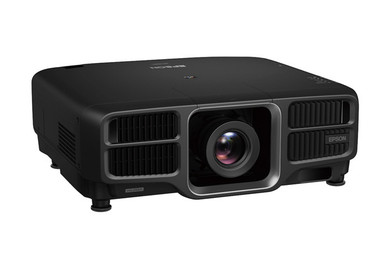
A projector purchase can meet the headline requirements and still cause installation trouble if lens selection, mounting geometry, signal routing, or procurement timing is handled too late. This Epson L1495UNL Setup Guide and Buying Considerations article starts with the two confirmed display facts: the L1495UNL is listed at 9,000 lumens with WUXGA resolution. Those specifications make it a clear candidate for buyers who have documented brightness and resolution targets, but they do not settle the complete system design.
The optical path needs equal attention. The provided product set includes the ELPLW08, ELPLW05, and ELPLU04 lenses, each of which requires compatibility and throw-geometry verification before purchase. It also includes the PowerLite 875E, an ultra-short-throw display with 4K Enhancement, as a different deployment path rather than a direct substitute.
This guide helps churches, schools, conference room teams, AV buyers, and installers turn those choices into a workable bill of materials. Use it to assess deployment fit, prepare the room, compare installed value, and confirm live purchasing details before labor is scheduled.
Products at a Glance
- Option 1: Epson Pro L1495UNL WUXGA 1080p 3LCD Projector 9000 lumens
- For installers evaluating a Wide Throw #3 zoom-lens c…: Epson V12H004W08 Wide Throw #3 Zoom Lens ELPLW08
- For buyers comparing zoom-lens options for a measured…: Epson V12H004W05 ELPLW05 Wide-Throw Zoom Lens for Select Projectors
- For projects investigating short-throw placement with…: Epson V12H004U04 ELPLU04 Short-Throw Zoom Lens for Select Projectors
- For teams whose documented design calls for an ultra-…: Epson PowerLite 875E 5 Ultra Short Throw Display with 4K Enhancement (V11HC04120)
Quick Comparison Table
| Feature | Epson Pro L1495UNL WUXGA 1080p 3LCD Projector 9000 lumens | Epson V12H004W08 Wide Throw #3 Zoom Lens ELPLW08 | Epson V12H004W05 ELPLW05 Wide-Throw Zoom Lens for Select Projectors | Epson V12H004U04 ELPLU04 Short-Throw Zoom Lens for Select Projectors | Epson PowerLite 875E 5 Ultra Short Throw Display with 4K Enhancement (V11HC04120) |
|---|---|---|---|---|---|
| Brightness | 9000 lumens | 12,000 lumen | |||
| Resolution | WUXGA | 4K | |||
| Best For | Teams that require a 9,000-lumen WUXGA projector and can complete the necessary lens, placement, mounting, power, and signal checks. | Installers evaluating a Wide Throw #3 zoom-lens configuration after receiving written projector-compatibility and throw-coverage confirmation. | Buyers comparing zoom-lens options for a measured room after the approved projector list and optical data have been confirmed. | Projects investigating short-throw placement with a select compatible projector and a fully measured screen-to-lens layout. | Teams whose documented design calls for an ultra-short-throw display with 4K Enhancement rather than the L1495UNL deployment approach. |
| Throw Type | Short throw | Short throw | Ultra short throw | ||
| Recommended Buyer | Teams that require a 9,000-lumen WUXGA projector and can complete the necessary lens, placement, mounting, power, and signal checks. | Installers evaluating a Wide Throw #3 zoom-lens configuration after receiving written projector-compatibility and throw-coverage confirmation. | Buyers comparing zoom-lens options for a measured room after the approved projector list and optical data have been confirmed. | Projects investigating short-throw placement with a select compatible projector and a fully measured screen-to-lens layout. | Teams whose documented design calls for an ultra-short-throw display with 4K Enhancement rather than the L1495UNL deployment approach. |
Product Images


Projector Options from AudioVideoNation
1. Epson Pro L1495UNL WUXGA 1080p 3LCD Projector 9000 lumens
Who should compare it: Teams that require a 9,000-lumen WUXGA projector and can complete the necessary lens, placement, mounting, power, and signal checks.
Why it belongs here: This is the central projector in the installation plan. Its confirmed 9,000-lumen brightness and WUXGA resolution give buyers concrete requirements to test against the room, content, and signal design.
SKU: L1495UNL
Key Features
- 9,000-lumen brightness in the supplied product facts
- WUXGA resolution
- Exact L1495UNL model and SKU for bill-of-material validation
Things to Consider
Confirm lens inclusion and compatibility, calculated throw coverage, mounting hardware, electrical requirements, input support, environmental limits, and installation clearances before issuing the purchase order.
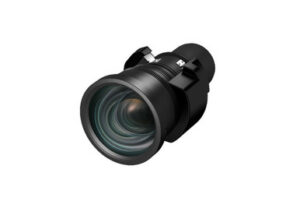
2. Epson V12H004W08 Wide Throw #3 Zoom Lens ELPLW08
Who should compare it: Installers evaluating a Wide Throw #3 zoom-lens configuration after receiving written projector-compatibility and throw-coverage confirmation.
Why it belongs here: The ELPLW08 gives designers a named wide-throw zoom-lens candidate to evaluate when the projector must sit farther from the image plane. It belongs in the optical review, not as an assumed match.
SKU: V12H004W08
Key Features
- Wide Throw #3 designation in the product listing
- Zoom-lens format
- V12H004W08 SKU and ELPLW08 model identifiers
Things to Consider
Verify compatibility with the exact projector, then confirm the documented throw range, required image size, mounting distance, positioning limits, and installation orientation.
3. Epson V12H004W05 ELPLW05 Wide-Throw Zoom Lens for Select Projectors
Who should compare it: Buyers comparing zoom-lens options for a measured room after the approved projector list and optical data have been confirmed.
Why it belongs here: The ELPLW05 expands the lens candidates available for project review. Its listing limits it to select projectors, so it prompts the compatibility and geometry checks that should happen before procurement.
SKU: V12H004W05
Key Features
- ELPLW05 model designation
- Zoom-lens format
- Listing identifies intended use with select projectors
Things to Consider
Confirm the approved projector list and required throw geometry from current documentation. Do not substitute it for another lens based on a similar name or general lens category.
4. Epson V12H004U04 ELPLU04 Short-Throw Zoom Lens for Select Projectors
Who should compare it: Projects investigating short-throw placement with a select compatible projector and a fully measured screen-to-lens layout.
Why it belongs here: The ELPLU04 is the supplied short-throw zoom-lens option. It is relevant where the planned mounting position is closer to the image plane, subject to exact compatibility and throw calculations.
SKU: ELPLU04
Key Features
- Short-throw classification in the supplied product facts
- Zoom-lens format
- V12H004U04 and ELPLU04 identifiers in the product listing
Things to Consider
Short throw does not establish fit by itself. Verify projector compatibility, image-size coverage, mounting distance, positioning limits, and clearance requirements before purchase.
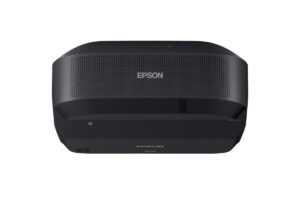
5. Epson PowerLite 875E 5 Ultra Short Throw Display with 4K Enhancement (V11HC04120)
Who should compare it: Teams whose documented design calls for an ultra-short-throw display with 4K Enhancement rather than the L1495UNL deployment approach.
Why it belongs here: The PowerLite 875E provides a separate ultra-short-throw path for rooms where placement geometry and 4K Enhancement are central requirements. It broadens the design comparison without treating unlike products as direct equivalents.
SKU: PL-875E
Key Features
- Ultra-short-throw classification
- 4K Enhancement identified in the product name
- PL-875E SKU and V11HC04120 identifier
Things to Consider
Rebuild the room plan around this product rather than treating it as a drop-in replacement. Confirm published brightness, image-size range, mounting method, signal support, power, and environmental requirements.
Epson Pro L1495UNL WUXGA 1080p 3LCD Projector 9000 lumens vs Epson V12H004W08 Wide Throw #3 Zoom Lens ELPLW08: Main Differences
- Choose Epson Pro L1495UNL WUXGA 1080p 3LCD Projector 9000 lumens if Teams that require a 9,000-lumen WUXGA projector and can complete the necessary lens, placement, mounting, power, and signal checks..
- Choose Epson V12H004W08 Wide Throw #3 Zoom Lens ELPLW08 if Installers evaluating a Wide Throw #3 zoom-lens configuration after receiving written projector-compatibility and throw-coverage confirmation..
- Choose Epson V12H004W05 ELPLW05 Wide-Throw Zoom Lens for Select Projectors if Buyers comparing zoom-lens options for a measured room after the approved projector list and optical data have been confirmed..
- Choose Epson V12H004U04 ELPLU04 Short-Throw Zoom Lens for Select Projectors if Projects investigating short-throw placement with a select compatible projector and a fully measured screen-to-lens layout..
- Choose Epson PowerLite 875E 5 Ultra Short Throw Display with 4K Enhancement (V11HC04120) if Teams whose documented design calls for an ultra-short-throw display with 4K Enhancement rather than the L1495UNL deployment approach..
Start with deployment fit, not the projector alone
Anchor the design in the confirmed requirements. The Epson L1495UNL is listed with 9,000-lumen brightness and WUXGA resolution. Treat those numbers as screening criteria, not proof that it will suit every room. Screen size, ambient light, viewing distance, content, and operating schedule still shape the result.
Write down the intended image dimensions and the material people will view. A church may prioritize readable lyrics and presentation content. A school may need text and diagrams to remain clear from varied seats. A conference room team may care about spreadsheets, remote participants, and presentation layouts. WUXGA establishes the projector’s listed resolution, but the complete signal chain must support the formats your sources use.
Record the mounting zone next. Include the permitted distance from the screen, available height, sightlines, structural attachment points, and any obstructions. This information determines whether a compatible lens can create the specified image from the available position. It also exposes a bad fit before equipment arrives.
If the project requires ultra-short-throw geometry or specifically calls for 4K Enhancement, assess the PowerLite 875E separately. Its installation approach differs from a planned L1495UNL system, so rebuild the placement and performance checklist around that product rather than treating it as an automatic swap.
Projector lens selection for the L1495UNL plan
Lens selection converts a projector specification into real room geometry. The lens must produce the required image size from an allowed mounting position while staying within the manufacturer’s documented operating limits. A label such as wide throw or short throw narrows the search, but it cannot replace a throw calculation.
The supplied products offer three lens candidates to investigate. The ELPLW08 is identified as a Wide Throw #3 zoom lens. The ELPLW05 listing identifies a zoom lens for select projectors. The ELPLU04 is listed as a short-throw zoom lens. None should be assigned to the L1495UNL from its name alone. Confirm compatibility using current manufacturer documentation or written guidance from the seller, then use the approved lens data to calculate placement.
Start with the desired image width, not a rough diagonal estimate. Measure the possible lens position relative to the image plane and account for the actual mounting structure. Ask the installer to document the selected lens, calculated throw range, planned mounting distance, image size, and any permitted positioning adjustments. Confirm that the final position leaves practical access for installation and service.
Do not use digital correction as a substitute for unresolved mechanical placement. Follow the approved installation procedure and establish the physical geometry first. If none of the confirmed compatible lenses covers the room, revise the mounting position, image size, or projector choice before ordering.
Complete the AV deployment planning survey
A useful site survey produces measurements and decisions that another technician can verify. Capture the screen or image-surface dimensions, finished ceiling height, proposed lens location, audience sightlines, and the shortest and longest acceptable mounting distances. Photograph obstructions for the project record. Note where doors, lights, beams, speakers, sprinklers, and architectural details restrict placement.
Check the mounting structure with a qualified installer. The mount, attachment method, and supporting structure must suit the exact equipment and installation orientation. Confirm service access as well. A position that works geometrically can still create avoidable labor if technicians cannot reach the projector, lens, filters, connections, or mounting adjustments safely.
Document the room’s normal lighting conditions instead of relying on the 9,000-lumen listing by itself. Test decisions against the content people will actually use and the lighting they expect to keep on. The screen or projection surface also belongs in this review because image size, surface choice, room light, and projector output work as one system.
Finish with cable routes, equipment-rack locations, pathway capacity, and access restrictions. In schools and churches, also record the times when installation and testing can occur without disrupting scheduled use.
Plan power, sources, audio, and control before setup
Build a source-to-display diagram before finalizing the order. List each source, its intended output format, every transport or switching stage, and the connection required at the projector. Then verify those needs against current L1495UNL documentation. The WUXGA listing does not establish which connectors, signal formats, cable distances, or copy-protection requirements the complete path supports.
Treat audio as a separate design item. Decide where program sound should be routed and controlled rather than assuming the projection system will cover that need. The same discipline applies to room control. Define how users will turn the system on, select a source, blank an image, and shut everything down, then confirm which supported control method satisfies that workflow.
Have the installer verify electrical requirements, circuit placement, cable separation, environmental limits, and clearance instructions from current product documentation. Avoid locating power, signal termination, or control hardware from a preliminary sketch alone. Final placement should follow the approved projector, lens, mount, and room layout.
Keep a known-good test source and cable available for commissioning. That simple reference makes it easier to separate a projector issue from a switcher, extender, source, or cabling problem.
Epson L1495UNL installation and commissioning sequence
A written commissioning sequence keeps the installation measurable. Use the following order and adapt it to the approved manufacturer instructions and site safety plan.
1. Freeze the design. Record the exact projector SKU, confirmed lens, image dimensions, calculated throw position, mounting method, screen details, signal path, control plan, and power requirements.
2. Check received components against the purchase order before site work begins. Match model labels and SKUs. Verify that the lens, mount, cabling, signal hardware, and required accessories correspond to the approved bill of materials.
3. Establish the mounting position from the verified optical calculation. Follow the projector, lens, and mounting-hardware instructions. Recheck the image plane and lens location before drilling or completing permanent attachment work.
4. Connect a known-good source through the intended signal path. Confirm that the projected image appears reliably in the required operating format. Test every planned source and switching route rather than validating a single convenient input.
5. Align the image through the documented mechanical and optical procedure. Review focus and geometry across the whole image. Use representative text, graphics, video, and presentation layouts so defects are easier to spot.
6. Test under the room’s expected lighting and operating conditions. Include normal startup, source changes, blanking, shutdown, and recovery after power is restored according to the approved workflow.
7. Document the result. Save the final equipment list, mounting measurements, lens identification, cable labels, settings, control instructions, and acceptance results. Give operators a short startup and shutdown guide that matches the installed system.
Judge projector price-to-performance by installed value
Price-to-performance should reflect the completed AV system, not one line on a quote. For the L1495UNL, the confirmed performance anchors are 9,000-lumen brightness and WUXGA resolution. Compare those facts with the room’s written requirements. Paying for output that the deployment does not need adds little value, while choosing equipment that misses a documented requirement creates redesign risk.
Build the comparison around the live equipment quote plus the required lens, mounting hardware, structural work, cabling, signal transport, control components, installation access, labor, and commissioning. Use the same scope for every option. A projector with a different placement method may change several of those costs even when its individual commerce-page terms look attractive.
The PowerLite 875E illustrates that distinction. It is listed as an ultra-short-throw display with 4K Enhancement, while the L1495UNL is listed at 9,000 lumens and WUXGA. Those are different design starting points. Compare each against required geometry, image specifications, room conditions, and total installation scope. Do not treat one listed attribute as a complete performance comparison.
Ask for an itemized proposal tied to exact SKUs. That makes optical, installation, and infrastructure assumptions visible before approval.
Make stock and availability a procurement checkpoint
Stock and availability need verification at the time of purchase. Use each linked AudioVideoNation product page for current commerce details, then confirm the exact SKU, required quantity, expected fulfillment timing, and whether related components will arrive separately. Do this before assigning installation dates or promising a room handoff.
Lens timing matters as much as projector timing. A delivered projector cannot complete the planned installation if its confirmed lens or essential mounting components are still pending. Require the procurement record to connect every component to the approved bill of materials. Similar product names are not enough.
Ask how long a quote remains valid and how any proposed substitution will be handled. A replacement projector or lens should return to technical review because geometry, mounting, signal support, and performance requirements may change. Do not approve substitutions through purchasing alone.
Schedule labor after the complete installation set has a credible delivery plan. Leave time for receiving checks and bench validation before site access begins. This sequence protects the project calendar without making assumptions about live inventory.
Choose the product path and document the decision
Choose the Epson L1495UNL when the project calls for its listed 9,000-lumen brightness and WUXGA resolution and the team can document a compatible lens, valid placement, supported signal path, and safe installation plan. The projector specification starts the decision. The completed design finishes it.
Treat the ELPLW08, ELPLW05, and ELPLU04 as lens candidates until compatibility and calculated throw coverage are confirmed. The ELPLU04 is the supplied short-throw option, while the ELPLW08 carries a Wide Throw #3 designation. The ELPLW05 listing identifies it for select projectors, so its approved applications and geometry need direct verification too.
Consider the PowerLite 875E when the deployment specifically points toward ultra-short-throw placement and 4K Enhancement. Recheck its complete published brightness, image-size, mounting, signal, and environmental requirements before choosing it instead of the L1495UNL.
Close the selection with a one-page decision record. Include required brightness and resolution, chosen image size, approved lens, mounting distance, source formats, installation scope, exact SKUs, procurement timing, and acceptance tests. That record gives buyers, installers, and room owners the same definition of success.
Related AudioVideoNation Links
- Browse Projector at AudioVideoNation
- View the Epson Pro L1495UNL projector
- Review the Epson ELPLW08 zoom lens
- Review the Epson ELPLW05 zoom lens
- Review the Epson ELPLU04 short-throw zoom lens
Product Information Sources
- Epson Pro L1495UNL WUXGA 1080p 3LCD Projector 9000 lumens product information
- Epson V12H004W08 Wide Throw #3 Zoom Lens ELPLW08 product information
- Epson V12H004W05 ELPLW05 Wide-Throw Zoom Lens for Select Projectors product information
- Epson V12H004U04 ELPLU04 Short-Throw Zoom Lens for Select Projectors product information
- Epson PowerLite 875E 5 Ultra Short Throw Display with 4K Enhancement (V11HC04120) product information
FAQ
What brightness and resolution are listed for the Epson L1495UNL?
The Epson L1495UNL is listed at 9,000 lumens with WUXGA resolution. Use those facts as design inputs, then validate image size, room light, content, and the complete signal path for the proposed installation.
Does the Epson L1495UNL include a lens?
You should confirm lens inclusion on the linked L1495UNL product page or with the seller before ordering. The purchase record should identify the exact projector and approved lens as separate bill-of-material items whenever applicable.
Can the ELPLW08, ELPLW05, or ELPLU04 be used with the L1495UNL?
Compatibility between the L1495UNL and any listed lens must be confirmed through current manufacturer documentation or written seller guidance before purchase. After compatibility is established, calculate throw coverage using the required image size and measured mounting position.
How should buyers assess Epson L1495UNL price-to-performance?
Assess L1495UNL price-to-performance against the complete installed cost and the project’s documented need for 9,000-lumen brightness and WUXGA resolution. Include the confirmed lens, mount, infrastructure, signal transport, control, labor, access, and commissioning in every comparison.
When should installation labor be scheduled?
Installation labor should be scheduled after fulfillment timing has been confirmed for the exact projector, approved lens, mount, and essential system components. Allow time to check received SKUs and bench-test the planned signal path before technicians begin permanent site work.
Is the PowerLite 875E a direct replacement for the L1495UNL?
The PowerLite 875E should not be treated as a direct L1495UNL replacement without a new design review. It is listed as an ultra-short-throw display with 4K Enhancement, while the L1495UNL is listed at 9,000 lumens and WUXGA, so placement and specification requirements must be reassessed.
Conclusion
Use this Epson L1495UNL Setup Guide and Buying Considerations comparison to match documented specifications to the room and installation requirements. Review the linked product pages for current purchase details before ordering.
Products Used
| SKU | Product Name | URL |
|---|---|---|
| L1495UNL | Epson Pro L1495UNL WUXGA 1080p 3LCD Projector 9000 lumens | View product |
| V12H004W08 | Epson V12H004W08 Wide Throw #3 Zoom Lens ELPLW08 | View product |
| V12H004W05 | Epson V12H004W05 ELPLW05 Wide-Throw Zoom Lens for Select Projectors | View product |
| ELPLU04 | Epson V12H004U04 ELPLU04 Short-Throw Zoom Lens for Select Projectors | View product |
| PL-875E | Epson PowerLite 875E 5 Ultra Short Throw Display with 4K Enhancement (V11HC04120) | View product |