

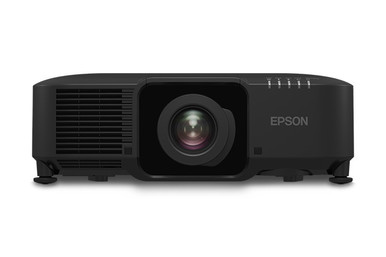
Use this Epson L1075U Setup Guide and Buying Considerations resource to resolve the questions that matter before a projector reaches the site. The hard part is matching a WUXGA projector, lens approach, room geometry, content workflow, and installation plan without assuming unconfirmed details. The Epson Pro L1075U is the focal product. The L1075UNL and ELPLU04 lens provide useful comparison and planning checkpoints.
For AV buyers, installers, churches, schools, and conference room teams, the decision starts with deployment fit. Measure the room. Define the required image and viewing positions. Then confirm the exact lens, connections, mounting method, control needs, and live commerce details through the linked product pages and approved documentation. This guide lays out that sequence, explains what the confirmed WUXGA resolution establishes, and identifies the details that need project-specific verification. It also shows how to review stock and availability and price-to-performance without turning incomplete information into a promise.
Products at a Glance
- Option 1: Epson Pro L1075U WUXGA 3LCD Laser Projector With 4K Enhancement
- For teams evaluating the L1075UNL as a separate WUXGA…: Epson Pro L1075UNL WUXGA 3LCD Laser Projector
- For installations investigating a short-throw lens af…: Epson V12H004U04 ELPLU04 Short-Throw Zoom Lens for Select Projectors
Quick Comparison Table
| Feature | Epson Pro L1075U WUXGA 3LCD Laser Projector With 4K Enhancement | Epson Pro L1075UNL WUXGA 3LCD Laser Projector | Epson V12H004U04 ELPLU04 Short-Throw Zoom Lens for Select Projectors |
|---|---|---|---|
| Resolution | WUXGA | WUXGA | |
| Best For | Buyers whose approved project specification calls for the L1075U SKU and WUXGA resolution. | Teams evaluating the L1075UNL as a separate WUXGA candidate after checking every project requirement. | Installations investigating a short-throw lens after measuring the room and identifying the exact projector SKU. |
| Throw Type | Short throw | ||
| Recommended Buyer | Buyers whose approved project specification calls for the L1075U SKU and WUXGA resolution. | Teams evaluating the L1075UNL as a separate WUXGA candidate after checking every project requirement. | Installations investigating a short-throw lens after measuring the room and identifying the exact projector SKU. |
Product Images

Projector Options from AudioVideoNation
1. Epson Pro L1075U WUXGA 3LCD Laser Projector With 4K Enhancement
Who should compare it: Buyers whose approved project specification calls for the L1075U SKU and WUXGA resolution.
Why it belongs here: This is the exact projector at the center of the guide. Its confirmed WUXGA resolution gives buyers a firm starting point for content, source, and image-planning discussions.
SKU: L1075U
Key Features
- WUXGA resolution
- Exact L1075U SKU
- Cataloged under Multimedia Projectors, Projectors, and Video
- Dedicated AudioVideoNation product page for live commerce details
Things to Consider
Confirm lens compatibility and inclusion, connections, controls, mounting requirements, power, physical requirements, and the complete signal path before purchase. Use the linked page for current commerce details.
2. Epson Pro L1075UNL WUXGA 3LCD Laser Projector
Who should compare it: Teams evaluating the L1075UNL as a separate WUXGA candidate after checking every project requirement.
Why it belongs here: The separate L1075UNL listing gives procurement teams a relevant WUXGA comparison point when an adjacent Epson Pro SKU appears in a quote or project discussion.
SKU: L1075UNL
Key Features
- WUXGA resolution
- Distinct L1075UNL SKU
- Cataloged under Multimedia Projectors, Projectors, and Video
- Separate AudioVideoNation product page
Things to Consider
Do not infer package contents, compatibility, or equivalence from the similar name. Verify its lens arrangement, project-critical specifications, and live commerce details before approving it or using it as a substitute.
3. Epson V12H004U04 ELPLU04 Short-Throw Zoom Lens for Select Projectors
Who should compare it: Installations investigating a short-throw lens after measuring the room and identifying the exact projector SKU.
Why it belongs here: Room geometry makes lens selection central to projector planning, and the provided information classifies the ELPLU04 as a short-throw option. It belongs on the evaluation list for constrained distances, subject to written compatibility confirmation.
SKU: ELPLU04
Key Features
- Short-throw classification
- ELPLU04 SKU
- Cataloged under Lenses, Multimedia Projectors, Projectors, and Video
- Dedicated product page for purchasing checks
Things to Consider
Compatibility with the L1075U or L1075UNL is not confirmed by the supplied information. Obtain an approved projector-and-lens pairing and a documented throw calculation before ordering.
Epson Pro L1075U WUXGA 3LCD Laser Projector With 4K Enhancement vs Epson Pro L1075UNL WUXGA 3LCD Laser Projector: Main Differences
- Choose Epson Pro L1075U WUXGA 3LCD Laser Projector With 4K Enhancement if Buyers whose approved project specification calls for the L1075U SKU and WUXGA resolution..
- Choose Epson Pro L1075UNL WUXGA 3LCD Laser Projector if Teams evaluating the L1075UNL as a separate WUXGA candidate after checking every project requirement..
- Choose Epson V12H004U04 ELPLU04 Short-Throw Zoom Lens for Select Projectors if Installations investigating a short-throw lens after measuring the room and identifying the exact projector SKU..
Define deployment fit before selecting the projector
Build the room brief before approving the L1075U. Record the audience size, image location, usable projection distance, planned mounting position, ambient-light conditions, operating schedule, and content types. These inputs shape the purchase. A church may prioritize readable lyrics and presentation content across several seating zones. A school may need a repeatable start-of-class workflow. A conference room team may focus on source switching, controls, and predictable handoffs between presenters.
The confirmed resolution for both the L1075U and L1075UNL is WUXGA. Use that fact as one requirement within the wider design. Decide whether WUXGA fits the sources, applications, and content standards used at the site. Then document every product detail that must be checked: lens support and inclusion, throw calculation, connections, control options, mounting hardware, power requirements, clearances, service access, and the audio path.
Keep it explicit. A short requirements sheet gives the buyer, installer, and site owner the same target. It also prevents a nearby SKU or accessory from being accepted merely because its name looks similar.
Epson L1075U setup starts with room measurements
Measure first. Record the intended image width and height, the planned image surface, ceiling height, available mounting area, and the distance between the possible lens position and the image plane. Note beams, lighting fixtures, fans, speakers, sprinklers, windows, and other objects that could affect placement or the light path. Photographs help the installer interpret the measurements, but they should support dimensioned notes rather than replace them.
Next, mark every acceptable mounting position. Include the route for power, signal, control, and any required support hardware. If the projector will replace an existing system, document the current mount, cable path, image dimensions, and source equipment. Do not assume existing infrastructure suits the new installation. Have the installer confirm load, attachment, electrical, and access requirements.
Send the geometry package to the seller or project designer for a documented lens calculation. The calculation should identify the exact projector SKU, exact lens SKU, target image size, and usable distance range. Leave room for field tolerances. Do not rely on an unverified adjustment capability to rescue a marginal layout. Finalize the mounting point only after the optical pairing and physical requirements have been confirmed.
WUXGA projector planning for real presentation content
WUXGA is the confirmed resolution for the L1075U and L1075UNL. It does not, by itself, confirm accepted source formats, available connections, signal processing, or the behavior of every application in the room. Inventory each source before purchase. That list may include presentation computers, media players, switchers, conferencing systems, or other equipment already specified for the site. Record the output and connection required from each source, then verify the complete signal path against approved projector documentation.
Prepare acceptance content that reflects daily use. For a classroom, that could include slides, documents, spreadsheets, diagrams, and captions. A church can test lyrics, logos, video, and announcements. Conference room teams should include shared desktops, detailed charts, and remote-participant layouts. Establish readable type sizes and image targets with the people who use the room.
This work creates a measurable definition of success. It also keeps a familiar product label from standing in for source compatibility or on-site validation.
Epson projector lens selection needs written confirmation
Lens choice can determine whether the planned image fits the available room geometry. The provided information classifies the ELPLU04 as short throw. That makes it a candidate to investigate for a constrained projection distance. It does not confirm that the lens works with the L1075U or L1075UNL. Shared branding and category placement are not compatibility evidence.
Confirm three items in writing before ordering: the exact projector-and-lens pairing, the calculated image size across the available distance, and the package contents of every SKU. Do not interpret a product suffix as proof that a lens is included or excluded. Use the linked product page and approved documentation, then ask the seller to resolve any ambiguity.
A useful lens request contains the room dimensions, image dimensions, mounting range, image-surface location, and exact projector SKU. If the ELPLU04 is confirmed for the chosen projector and geometry, retain the calculation with the project documents. If it is not confirmed, request the correct lens instead of changing the room design around an assumption.
Lens verification also belongs in the installation schedule. A projector can arrive on time while an unconfirmed optical choice still blocks commissioning.
L1075U vs L1075UNL: compare requirements, not suffixes
The supplied product information confirms WUXGA resolution for both the L1075U and L1075UNL. They have separate SKUs and separate product listings. The available facts do not establish their full functional differences, package contents, or interchangeability, so neither should be substituted for the other without a requirements review.
Create a two-column procurement worksheet. Ask the seller or installer to confirm the exact lens arrangement, supported connections, control options, mounting needs, physical requirements, power requirements, included accessories, and every other item named in the project brief. Attach the supporting product documentation or written response to each answer. A blank cell remains an open purchasing issue.
Choose the L1075U when the project documents explicitly require that SKU and its confirmed WUXGA resolution fits the deployment. Evaluate the L1075UNL as a separate candidate when the alternate listing is under consideration. Matching resolution alone does not approve a substitution. The full installed design must still match.
Projector installation checklist for signals and commissioning
Turn the approved design into a pre-installation checklist. Assign an owner and verification source to each item. The installer should have these answers before arriving on site:
- Exact projector and lens SKUs, with compatibility and package contents confirmed
- Final image dimensions, mounting position, and documented lens calculation
- Source list, required signal formats, connection path, cable lengths, and transport method
- Control plan, including the user interface and required operating states
- Approved mount, attachment method, power route, access space, and site-safety requirements
- Acceptance content, test procedure, and sign-off owner
Commission with the content and workflows the site will use. Check each source through its full signal path. Review the image from important seating positions, exercise the agreed control sequence, and confirm that staff can start, switch, and shut down the system according to the operating plan. Record approved settings, cable labels, equipment identifiers, and unresolved issues.
Finish with handoff. Give the site owner the confirmed product documents, lens calculation, connection diagram, control notes, and acceptance results. Schedule project-specific training for the people who will operate or support the room. Good documentation protects later service work from guesswork.
Stock, availability, and projector price-to-performance
Stock and availability can change. Check each linked AudioVideoNation product page when the purchase is ready, and use the normal sales channel to confirm the exact SKU, package contents, current availability, lead time, and substitution policy. Do not treat this guide as a live inventory record. If the project has a fixed installation date, align procurement confirmation with the installer before committing to site work.
Assess price-to-performance against the installed requirement. Start with a current product-page price or quote, then account for the confirmed lens, mount, cabling, signal transport, controls, programming, installation, testing, and training required by the design. A projector-only figure cannot describe the cost of a working room.
Define performance through acceptance criteria. Does the confirmed WUXGA resolution fit the content standard? Does the documented lens calculation produce the required image from an approved mounting position? Can every specified source follow a verified signal path? Can the operating team run the agreed workflow? Compare candidates only after those questions have documented answers. This approach gives churches, schools, and conference room teams a defensible value decision without relying on invented benchmarks.
A practical L1075U purchase decision
Proceed when five gates are closed: the exact SKU is approved, WUXGA meets the content requirement, the lens pairing and package contents are documented, the site infrastructure has been checked, and live commerce details have been reviewed. The installation and acceptance plan should also have named owners.
Pause the order if any project-critical answer remains unresolved. One clear question sent before purchase costs less time than redesigning a mounting point, changing a lens, or rebuilding a signal path during commissioning. For the L1075U, disciplined verification is the shortest route from product selection to a supportable room.
Related AudioVideoNation Links
- Browse Projector at AudioVideoNation
- Epson Pro L1075U product page
- Epson Pro L1075UNL product page
- Epson ELPLU04 short-throw lens
Product Information Sources
- Epson Pro L1075U WUXGA 3LCD Laser Projector With 4K Enhancement product information
- Epson Pro L1075UNL WUXGA 3LCD Laser Projector product information
- Epson V12H004U04 ELPLU04 Short-Throw Zoom Lens for Select Projectors product information
FAQ
What resolution is the Epson Pro L1075U?
The provided product data identifies the Epson Pro L1075U as a WUXGA projector. Resolution alone does not confirm accepted source formats, connections, lens requirements, or the complete installation design, so verify those details separately.
Is the ELPLU04 lens confirmed to work with the L1075U?
No, the supplied product information does not confirm compatibility between the ELPLU04 and L1075U. The lens is classified as short throw, but buyers should obtain written pairing confirmation and a project-specific throw calculation before ordering.
What is the difference between the L1075U and L1075UNL?
The supplied information confirms that both projectors are WUXGA but does not establish their complete differences. Treat them as separate SKUs and verify package contents, lens requirements, connections, controls, mounting needs, and other project-critical specifications.
Does the Epson L1075U include a lens?
The supplied product information does not confirm whether a lens is included with the L1075U. Check the linked product page and approved documentation, then have the seller identify the exact lens requirement and package contents in writing.
How should buyers check stock, availability, and price-to-performance?
Buyers should check the linked product pages for live commerce details and compare the total installed cost against written deployment requirements. Include the confirmed lens, mount, signal path, controls, labor, testing, and training when assessing value.
What should be ready before an L1075U installation begins?
The room measurements, image target, mounting location, confirmed lens pairing, source path, control plan, power plan, and acceptance procedure should all be documented before installation. The installer should also have the exact approved SKUs and product documentation.
Conclusion
Use this Epson L1075U Setup Guide and Buying Considerations comparison to match documented specifications to the room and installation requirements. Review the linked product pages for current purchase details before ordering.
Products Used
| SKU | Product Name | URL |
|---|---|---|
| L1075U | Epson Pro L1075U WUXGA 3LCD Laser Projector With 4K Enhancement | View product |
| L1075UNL | Epson Pro L1075UNL WUXGA 3LCD Laser Projector | View product |
| ELPLU04 | Epson V12H004U04 ELPLU04 Short-Throw Zoom Lens for Select Projectors | View product |