

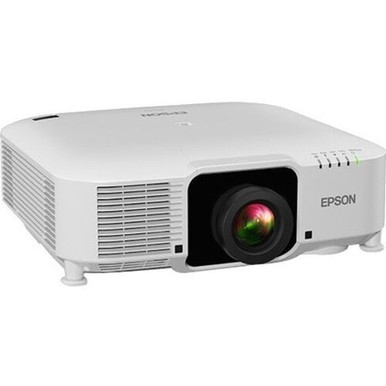
Use this Epson EB-PU1006W Setup Guide and Buying Considerations checklist to decide whether the projector belongs in your room and what must be resolved before installation. The projector is listed with WUXGA resolution, but resolution alone cannot settle an AV purchase. Screen size, throw distance, lens choice, ambient light, mounting, source signals, control needs, and service access shape the result.
This guide turns those variables into a buying and setup workflow for installers, churches, schools, and conference-room teams. It also places the Epson V12H004W08 lens and three Epson ultra-short-throw displays in context. You will see what each product contributes, which details need confirmation, and how to judge deployment fit, price-to-performance, and live availability without relying on unsupported claims.
Products at a Glance
- Option 1: Epson EB-PU1006W V11HA35920 6,000-Lumen WUXGA Laser 3LCD Projector (White)
- For installers evaluating the listed Epson lens as pa…: Epson V12H004W08 Wide Throw #3 Zoom Lens ELPLW08
- For rooms planned around an ultra-short-throw display…: Epson PowerLite 875E 5 Ultra Short Throw Display with 4K Enhancement (V11HC04120)
- For schools and meeting spaces evaluating an interact…: Epson BrightLink 870Ei Ultra Short Throw Interactive Display with 4K Enhancement (V11HC03020)
- For teams evaluating the BrightLink 780Ei for a room…: Epson BrightLink 780Ei Ultra Short Throw Interactive Display with 4K Enhancement (V11HC10020)
Quick Comparison Table
| Feature | Epson EB-PU1006W V11HA35920 6,000-Lumen WUXGA Laser 3LCD Projector (White) | Epson V12H004W08 Wide Throw #3 Zoom Lens ELPLW08 | Epson PowerLite 875E 5 Ultra Short Throw Display with 4K Enhancement (V11HC04120) | Epson BrightLink 870Ei Ultra Short Throw Interactive Display with 4K Enhancement (V11HC03020) | Epson BrightLink 780Ei Ultra Short Throw Interactive Display with 4K Enhancement (V11HC10020) |
|---|---|---|---|---|---|
| Brightness | 12,000 lumen | ||||
| Resolution | WUXGA | 4K | 4K | 4K | |
| Best For | Teams planning a WUXGA Epson projector deployment and prepared to verify the lens, throw calculation, connections, mounting, and current commerce details. | Installers evaluating the listed Epson lens as part of a documented, compatibility-checked projection plan. | Rooms planned around an ultra-short-throw display and the listed 4K format, subject to a full specification and installation review. | Schools and meeting spaces evaluating an interactive, ultra-short-throw Epson display with a listed 4K format. | Teams evaluating the BrightLink 780Ei for a room that requires verified interaction and ultra-short-throw placement. |
| Throw Type | Ultra short throw | Ultra short throw | Ultra short throw | ||
| Recommended Buyer | Teams planning a WUXGA Epson projector deployment and prepared to verify the lens, throw calculation, connections, mounting, and current commerce details. | Installers evaluating the listed Epson lens as part of a documented, compatibility-checked projection plan. | Rooms planned around an ultra-short-throw display and the listed 4K format, subject to a full specification and installation review. | Schools and meeting spaces evaluating an interactive, ultra-short-throw Epson display with a listed 4K format. | Teams evaluating the BrightLink 780Ei for a room that requires verified interaction and ultra-short-throw placement. |
Product Images
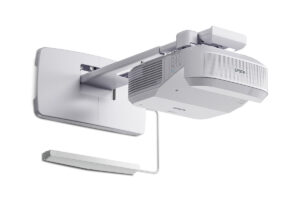
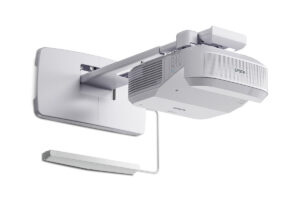
Projector Options from AudioVideoNation
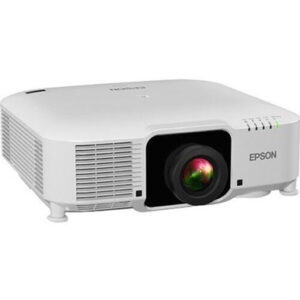
1. Epson EB-PU1006W V11HA35920 6,000-Lumen WUXGA Laser 3LCD Projector (White)
Who should compare it: Teams planning a WUXGA Epson projector deployment and prepared to verify the lens, throw calculation, connections, mounting, and current commerce details.
Why it belongs here: This projector is the subject of the setup guide, and its listed WUXGA resolution anchors the content and signal-planning discussion.
SKU: EB-PU1006W
Key Features
- WUXGA resolution
- EB-PU1006W product designation
- V11HA35920 product identifier
Things to Consider
Confirm lens inclusion, compatible lens choices, calculated throw, mounting requirements, source connections, and live price and availability on the linked page.
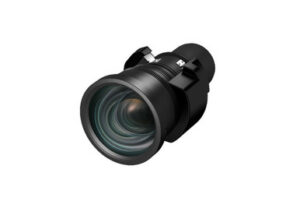
2. Epson V12H004W08 Wide Throw #3 Zoom Lens ELPLW08
Who should compare it: Installers evaluating the listed Epson lens as part of a documented, compatibility-checked projection plan.
Why it belongs here: It is the lens accessory in the product set, giving installers a specific Epson SKU to validate during optics planning.
SKU: V12H004W08
Key Features
- Lens accessory category
- V12H004W08 SKU
- ELPLW08 product designation
- Listed under Accessories, Lenses, and Projectors
Things to Consider
Do not assume compatibility with the EB-PU1006W from the Epson brand alone. Verify the exact pairing and image geometry before ordering.
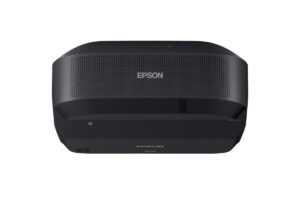
3. Epson PowerLite 875E 5 Ultra Short Throw Display with 4K Enhancement (V11HC04120)
Who should compare it: Rooms planned around an ultra-short-throw display and the listed 4K format, subject to a full specification and installation review.
Why it belongs here: It gives teams an Epson ultra-short-throw path to compare when close-to-display placement is part of the room plan.
SKU: PL-875E
Key Features
- Ultra short throw
- 4K resolution listing
- PowerLite 875E product designation
- V11HC04120 identifier
Things to Consider
Confirm native resolution, accepted signals, mounting geometry, connections, surface requirements, and any interaction needs on the linked page.
4. Epson BrightLink 870Ei Ultra Short Throw Interactive Display with 4K Enhancement (V11HC03020)
Who should compare it: Schools and meeting spaces evaluating an interactive, ultra-short-throw Epson display with a listed 4K format.
Why it belongs here: It adds an explicitly named interactive display to the ultra-short-throw comparison for rooms with a documented collaboration requirement.
SKU: BL-870Ei
Key Features
- Ultra short throw
- 4K resolution listing
- BrightLink 870Ei product designation
- V11HC03020 identifier
Things to Consider
Verify the interaction method, included components, supported source workflow, mounting geometry, and exact differences from the 780Ei.
5. Epson BrightLink 780Ei Ultra Short Throw Interactive Display with 4K Enhancement (V11HC10020)
Who should compare it: Teams evaluating the BrightLink 780Ei for a room that requires verified interaction and ultra-short-throw placement.
Why it belongs here: It supplies a second named BrightLink option for teams comparing interactive ultra-short-throw deployments without assuming the 780Ei and 870Ei are equivalent.
SKU: BL-780Ei
Key Features
- Ultra short throw
- 4K resolution listing
- BrightLink 780Ei product designation
- V11HC10020 identifier
Things to Consider
Compare its documented interaction functions, included components, connections, mounting needs, and operating workflow with the 870Ei before choosing.
Epson EB-PU1006W V11HA35920 6,000-Lumen WUXGA Laser 3LCD Projector (White) vs Epson V12H004W08 Wide Throw #3 Zoom Lens ELPLW08: Main Differences
- Choose Epson EB-PU1006W V11HA35920 6,000-Lumen WUXGA Laser 3LCD Projector (White) if Teams planning a WUXGA Epson projector deployment and prepared to verify the lens, throw calculation, connections, mounting, and current commerce details..
- Choose Epson V12H004W08 Wide Throw #3 Zoom Lens ELPLW08 if Installers evaluating the listed Epson lens as part of a documented, compatibility-checked projection plan..
- Choose Epson PowerLite 875E 5 Ultra Short Throw Display with 4K Enhancement (V11HC04120) if Rooms planned around an ultra-short-throw display and the listed 4K format, subject to a full specification and installation review..
- Choose Epson BrightLink 870Ei Ultra Short Throw Interactive Display with 4K Enhancement (V11HC03020) if Schools and meeting spaces evaluating an interactive, ultra-short-throw Epson display with a listed 4K format..
- Choose Epson BrightLink 780Ei Ultra Short Throw Interactive Display with 4K Enhancement (V11HC10020) if Teams evaluating the BrightLink 780Ei for a room that requires verified interaction and ultra-short-throw placement..
Deployment fit for the Epson EB-PU1006W setup
Start with a measured room drawing. Record the intended image width and height, viewer locations, ceiling height, proposed projector position, and usable lens-to-screen distance. Mark beams, lights, fans, sprinklers, speakers, windows, doors, and cable routes. A model number cannot resolve those physical constraints.
Next, write the room brief in plain language. Identify the source content, smallest text viewers must read, operating schedule, ambient-light conditions, and who controls the system. The EB-PU1006W is listed at WUXGA, so map each source and processor to that display requirement. Do not infer accepted inputs, scaling behavior, or connection types. Verify them on the product page and in the project documentation.
Deployment fit is a go-or-no-go decision. Keep the projector on the shortlist only after a verified lens plan creates the required image from an approved mounting point, the signal chain meets the content brief, and installers can access the projector for setup and service. If any item remains uncertain, pause the purchase and close the gap.
WUXGA projector installation checklist
Turn the site survey into a setup plan before issuing a purchase order. Tie each decision to a drawing, calculation, or documented product detail.
1. Image geometry: Fix the intended image dimensions and projection surface. Measure from the proposed lens position, not the rear wall or projector body. Use verified lens data for the exact projector-and-lens pairing.
2. Mounting: Confirm the structure, mount, orientation, safety requirements, airflow clearance, and service path with the installer. Do not infer weight or mounting points from another Epson projector.
3. Signal path: List every source, switcher, extender, cable run, and endpoint. Record the resolutions, frame rates, connections, and content-protection requirements that must pass, then verify support for the complete path.
4. Power and control: Place power, control, and any required network connection where the final layout needs them. Define startup, shutdown, source selection, and support procedures.
5. Commissioning: Prepare real content before installation. Churches can test lyrics, camera feeds, and video. Schools can test worksheets and diagrams. Conference teams can test spreadsheets, shared screens, and meeting layouts.
Have the installer sign off before ceiling or wall work begins. Small drawing errors become expensive after finishes and cabling are complete.
Epson EB-PU1006W lens planning and ELPLW08 checks
The lens needs its own approval line. The Epson V12H004W08 ELPLW08 is the lens accessory in this product set, giving installers a concrete SKU to evaluate. That does not establish compatibility with the EB-PU1006W. A shared brand does not prove that two parts form an approved pairing.
Start the lens review with the exact image width and measured lens-to-screen distance. Confirm the supported throw range, image-size limits, zoom position, lens-shift allowances, mounting orientation, and physical clearance using documentation for the exact pairing. Avoid calculations based on a similar projector or a different lens. Even a small substitution can invalidate the planned mounting position.
Confirm whether the EB-PU1006W package includes a lens and whether the chosen lens must be ordered separately. On the bill of materials, keep projector EB-PU1006W with identifier V11HA35920 and lens SKU V12H004W08 as separate lines until compatibility is documented. Coordinate their availability together. The installation should not be scheduled around a projector that lacks a validated optics plan.
WUXGA resolution and source-system checks
WUXGA is the confirmed resolution fact for the EB-PU1006W. Use it as the starting point for content planning, but do not infer accepted input formats, scaling behavior, aspect handling, or connection support. Create a source matrix covering presentation computers, media players, cameras, conferencing systems, switchers, and extenders that the room will use. For each one, record its required output and connection.
Qualify the full signal path during staging. A source may behave differently after switching, extension, or conversion, so test the actual equipment and planned cable lengths together. Display representative content at the intended image size. Check the smallest spreadsheet text, diagram labels, subtitles, lyrics, and multi-window meeting layouts from the farthest planned viewing position.
The three ultra-short-throw alternatives are listed with 4K, and their product names specify 4K Enhancement. Keep that wording intact. Verify native panel resolution, accepted signals, and processing behavior before comparing them with the WUXGA EB-PU1006W.
Epson ultra short throw projector alternatives
The alternative Epson displays create different room plans. The PowerLite 875E is listed as ultra short throw with 4K. The BrightLink 870Ei and BrightLink 780Ei are also listed as ultra short throw with 4K, and their names identify them as interactive displays.
Consider these products when the room plan calls for close-to-display placement. Run a fresh site survey rather than adapting the EB-PU1006W drawing. Confirm the required wall or screen surface, mounting location, furniture clearance, user paths, cable entry, power location, and service access for the exact display.
If interaction is a requirement, document how people need to work. Identify the computers and applications involved, the expected annotation or control workflow, and the number and location of users. Then verify the supported interaction method, included components, software requirements, and calibration process on the linked product page. The product name alone cannot answer those questions.
Do not choose between the BrightLink 870Ei and 780Ei by sequence number. Their supplied facts establish the same resolution and throw-type categories but do not document their functional differences. Compare the exact product pages against the written room brief.
Price-to-performance, stock, and availability
Assess price-to-performance at the complete deployment level. Build a budget that includes the projector or display, any required lens, mounting hardware, projection surface, signal distribution, cabling, control, installation labor, commissioning, and training as applicable. A product-page price cannot show the full project cost by itself.
Tie value to documented requirements. For the EB-PU1006W, that means confirming that WUXGA, the selected lens, and the calculated geometry satisfy the room brief. For the PowerLite 875E, evaluate the listed ultra-short-throw format and 4K information. For either BrightLink display, count interaction as valuable only if the exact functions support the intended workflow.
Prices, stock, and availability can change. Use the linked AudioVideoNation pages for current commerce details, and match each selection by product ID and SKU. If the schedule is firm, confirm the projector, lens, mount, and other dependent components together. Avoid setting installation dates around one available line item while another remains unresolved.
Final procurement and commissioning gate
Before purchase approval, create a one-page sign-off sheet. Include the room drawing, target image dimensions, viewing positions, proposed projector location, verified lens pairing, throw calculation, mounting plan, power location, signal diagram, control workflow, exact product identifiers, and product links. Mark every assumption that still needs confirmation.
Stage the system before permanent installation whenever the project allows it. Check product labels against the approved bill of materials. Connect the intended sources and signal-path equipment, load representative content, and confirm that the planned image geometry and operating workflow can be completed. Record source settings, control steps, and any configuration decisions for the support team.
The final choice should follow the written brief. Keep the EB-PU1006W in the plan when its verified lens geometry and WUXGA resolution meet the deployment requirements. Compare the ultra-short-throw products when close-to-display placement is central to the design. Focus on the BrightLink products when verified interactive functions are required. Finish by checking each linked page for current buying details.
Related AudioVideoNation Links
- Browse Projector at AudioVideoNation
- View the Epson EB-PU1006W projector
- View the Epson V12H004W08 ELPLW08 lens
- View the Epson PowerLite 875E
- View the Epson BrightLink 870Ei
Product Information Sources
- Epson EB-PU1006W V11HA35920 6,000-Lumen WUXGA Laser 3LCD Projector (White) product information
- Epson V12H004W08 Wide Throw #3 Zoom Lens ELPLW08 product information
- Epson PowerLite 875E 5 Ultra Short Throw Display with 4K Enhancement (V11HC04120) product information
- Epson BrightLink 870Ei Ultra Short Throw Interactive Display with 4K Enhancement (V11HC03020) product information
- Epson BrightLink 780Ei Ultra Short Throw Interactive Display with 4K Enhancement (V11HC10020) product information
FAQ
What resolution is the Epson EB-PU1006W?
The Epson EB-PU1006W is listed with WUXGA resolution. Verify accepted source formats, scaling behavior, and connection types separately before finalizing the signal chain.
Does the Epson EB-PU1006W include a lens?
Confirm lens inclusion on the linked Epson EB-PU1006W product page before purchase. Keep the projector and any required lens as separate bill-of-materials lines until the exact package is verified.
Is the Epson V12H004W08 ELPLW08 confirmed for the EB-PU1006W?
Compatibility between the V12H004W08 ELPLW08 and the EB-PU1006W is not confirmed by these product details. Match the exact SKUs against compatibility documentation and a verified throw calculation before ordering.
Which listed Epson products offer an ultra-short-throw alternative?
The PowerLite 875E, BrightLink 870Ei, and BrightLink 780Ei are the listed ultra-short-throw alternatives. All three are listed with 4K, while the two BrightLink names identify interactive displays.
How should buyers assess price-to-performance?
Judge price-to-performance by the complete installed system and the written room requirements it meets. Include the lens, mounting, screen or surface, signal transport, control, labor, and commissioning as applicable, then check live product-page prices.
Where can buyers check current stock and availability?
Check each linked AudioVideoNation product page for current stock and availability. Confirm the exact SKU and any dependent lens or installation components together before setting the project schedule.
Conclusion
Use this Epson EB-PU1006W Setup Guide and Buying Considerations comparison to match documented specifications to the room and installation requirements. Review the linked product pages for current purchase details before ordering.
Products Used
| SKU | Product Name | URL |
|---|---|---|
| EB-PU1006W | Epson EB-PU1006W V11HA35920 6,000-Lumen WUXGA Laser 3LCD Projector (White) | View product |
| V12H004W08 | Epson V12H004W08 Wide Throw #3 Zoom Lens ELPLW08 | View product |
| PL-875E | Epson PowerLite 875E 5 Ultra Short Throw Display with 4K Enhancement (V11HC04120) | View product |
| BL-870Ei | Epson BrightLink 870Ei Ultra Short Throw Interactive Display with 4K Enhancement (V11HC03020) | View product |
| BL-780Ei | Epson BrightLink 780Ei Ultra Short Throw Interactive Display with 4K Enhancement (V11HC10020) | View product |