

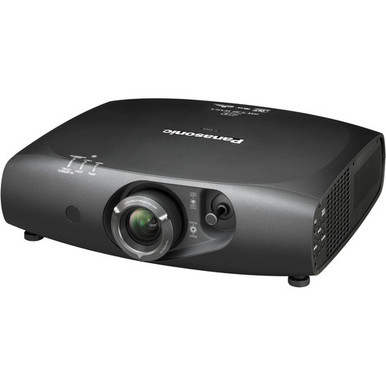
Use this Panasonic PT-RW430UK setup guide and buying considerations checklist if you need to turn a model request into a workable AV plan. The supplied facts establish a clear starting point: the PT-RW430UK has 3,500-lumen brightness and WXGA resolution. Those facts matter, but they cannot determine placement, screen size, signal routing, mounting, or room suitability by themselves.
This guide helps AV buyers, installers, churches, schools, and conference room technology teams close those gaps before purchase. It covers the room survey, installation sequence, content needs, infrastructure planning, acceptance checks, and live commerce details that belong in a responsible decision. It also compares four Panasonic WUXGA alternatives from the supplied product set, including a 5,200-lumen ultra-short-throw option and choices rated at 5,200 or 7,300 lumens.
No projector wins every room. Start with the required image, available mounting location, ambient light, source content, and exact SKU. Then use the linked product pages and approved documentation to verify every detail that is not included here.
Products at a Glance
- Option 1: Panasonic PT-RW430UK 3D WXGA 720p DLP Projector
- For teams whose approved design calls for an ultra-sh…: Panasonic PT-CMZ50 WUXGA Ultra-Short Throw Laser Projector – Professional Golf Simulator Display
- For teams evaluating a 7,300-lumen WUXGA Panasonic ca…: Panasonic PT-VMZ72BU8 7,300 Lumens WUXGA Laser Golf Simulator Projector – High-Brightness, Vivid Green Mode
- For teams seeking a 5,200-lumen WUXGA candidate and p…: Panasonic PT-VMZ51 5200-Lumen WUXGA Laser 3LCD Projector
- For teams whose purchasing documents call for PT-VMZ5…: Panasonic PT-VMZ51S 5200-Lumen WUXGA Laser 3LCD Projector
Quick Comparison Table
| Feature | Panasonic PT-RW430UK 3D WXGA 720p DLP Projector | Panasonic PT-CMZ50 WUXGA Ultra-Short Throw Laser Projector – Professional Golf Simulator Display | Panasonic PT-VMZ72BU8 7,300 Lumens WUXGA Laser Golf Simulator Projector – High-Brightness, Vivid Green Mode | Panasonic PT-VMZ51 5200-Lumen WUXGA Laser 3LCD Projector | Panasonic PT-VMZ51S 5200-Lumen WUXGA Laser 3LCD Projector |
|---|---|---|---|---|---|
| Brightness | 3500 lumens | 5200 lumens | 7,300 Lumens | 5200 lumens | 5200 lumens |
| Resolution | WXGA | WUXGA | WUXGA | WUXGA | WUXGA |
| Best For | Teams sourcing the exact PT-RW430UK after confirming that a 3,500-lumen WXGA projector fits the measured room and intended content. | Teams whose approved design calls for an ultra-short-throw projector with a 5,200-lumen WUXGA specification. | Teams evaluating a 7,300-lumen WUXGA Panasonic candidate after completing room, screen, placement, and content checks. | Teams seeking a 5,200-lumen WUXGA candidate and prepared to validate its geometry, connections, mounting, and room fit. | Teams whose purchasing documents call for PT-VMZ51S and whose verified room design supports a 5,200-lumen WUXGA option. |
| Throw Type | Ultra short throw | ||||
| Recommended Buyer | Teams sourcing the exact PT-RW430UK after confirming that a 3,500-lumen WXGA projector fits the measured room and intended content. | Teams whose approved design calls for an ultra-short-throw projector with a 5,200-lumen WUXGA specification. | Teams evaluating a 7,300-lumen WUXGA Panasonic candidate after completing room, screen, placement, and content checks. | Teams seeking a 5,200-lumen WUXGA candidate and prepared to validate its geometry, connections, mounting, and room fit. | Teams whose purchasing documents call for PT-VMZ51S and whose verified room design supports a 5,200-lumen WUXGA option. |
Product Images

Projector Options from AudioVideoNation
1. Panasonic PT-RW430UK 3D WXGA 720p DLP Projector
Who should compare it: Teams sourcing the exact PT-RW430UK after confirming that a 3,500-lumen WXGA projector fits the measured room and intended content.
Why it belongs here: The PT-RW430UK is the reference product for this setup guide. Its supplied facts establish a 3,500-lumen WXGA baseline that buyers can test against their room, content, and installation requirements.
SKU: PT-RW430UK
Key Features
- 3,500-lumen brightness
- WXGA resolution
- Exact procurement SKU PT-RW430UK
Things to Consider
Verify throw geometry, lens behavior, image-size support, connections, control, mounting, dimensions, clearances, and the audio plan for this exact SKU before approval.
2. Panasonic PT-CMZ50 WUXGA Ultra-Short Throw Laser Projector – Professional Golf Simulator Display
Who should compare it: Teams whose approved design calls for an ultra-short-throw projector with a 5,200-lumen WUXGA specification.
Why it belongs here: The PT-CMZ50U is the only supplied alternative identified as ultra short throw. Its 5,200-lumen brightness and WUXGA resolution make it a distinct option for layouts built around close projector placement.
SKU: PT-CMZ50U
Key Features
- 5,200-lumen brightness
- WUXGA resolution
- Ultra-short-throw placement
- Exact procurement SKU PT-CMZ50U
Things to Consider
Confirm supported image dimensions, exact offset, mounting tolerances, surface requirements, connections, control, and physical access before treating it as a room fit.
3. Panasonic PT-VMZ72BU8 7,300 Lumens WUXGA Laser Golf Simulator Projector – High-Brightness, Vivid Green Mode
Who should compare it: Teams evaluating a 7,300-lumen WUXGA Panasonic candidate after completing room, screen, placement, and content checks.
Why it belongs here: The PT-VMZ72BU8 supplies the highest stated brightness figure in this product set while retaining WUXGA resolution. It gives design teams a clearly differentiated lumen target to evaluate.
SKU: PT-VMZ72BU8
Key Features
- 7,300-lumen brightness
- WUXGA resolution
- Exact procurement SKU PT-VMZ72BU8
Things to Consider
The lumen rating does not establish room fit alone. Verify throw geometry, screen plan, ambient light, connections, mounting, dimensions, clearances, and operating requirements.
4. Panasonic PT-VMZ51 5200-Lumen WUXGA Laser 3LCD Projector
Who should compare it: Teams seeking a 5,200-lumen WUXGA candidate and prepared to validate its geometry, connections, mounting, and room fit.
Why it belongs here: The PT-VMZ51 provides a 5,200-lumen WUXGA comparison point without assuming a throw category. It is useful for buyers who will verify placement and infrastructure from exact-model documentation.
SKU: PT-VMZ51
Key Features
- 5,200-lumen brightness
- WUXGA resolution
- Exact procurement SKU PT-VMZ51
Things to Consider
Confirm throw information and every installation detail for PT-VMZ51. Do not infer how it differs from PT-VMZ51S based on the related name.
5. Panasonic PT-VMZ51S 5200-Lumen WUXGA Laser 3LCD Projector
Who should compare it: Teams whose purchasing documents call for PT-VMZ51S and whose verified room design supports a 5,200-lumen WUXGA option.
Why it belongs here: The PT-VMZ51S shares the supplied 5,200-lumen and WUXGA facts of the PT-VMZ51 but has its own SKU and product page. Including it helps procurement teams avoid an unsupported variant substitution.
SKU: PT-VMZ51S
Key Features
- 5,200-lumen brightness
- WUXGA resolution
- Exact procurement SKU PT-VMZ51S
Things to Consider
Verify the exact variant, throw geometry, connections, mounting, dimensions, clearances, and any required accessories. The supplied facts do not establish its differences from PT-VMZ51.
Panasonic PT-RW430UK 3D WXGA 720p DLP Projector vs Panasonic PT-CMZ50 WUXGA Ultra-Short Throw Laser Projector – Professional Golf Simulator Display: Main Differences
- Choose Panasonic PT-RW430UK 3D WXGA 720p DLP Projector if Teams sourcing the exact PT-RW430UK after confirming that a 3,500-lumen WXGA projector fits the measured room and intended content..
- Choose Panasonic PT-CMZ50 WUXGA Ultra-Short Throw Laser Projector – Professional Golf Simulator Display if Teams whose approved design calls for an ultra-short-throw projector with a 5,200-lumen WUXGA specification..
- Choose Panasonic PT-VMZ72BU8 7,300 Lumens WUXGA Laser Golf Simulator Projector – High-Brightness, Vivid Green Mode if Teams evaluating a 7,300-lumen WUXGA Panasonic candidate after completing room, screen, placement, and content checks..
- Choose Panasonic PT-VMZ51 5200-Lumen WUXGA Laser 3LCD Projector if Teams seeking a 5,200-lumen WUXGA candidate and prepared to validate its geometry, connections, mounting, and room fit..
- Choose Panasonic PT-VMZ51S 5200-Lumen WUXGA Laser 3LCD Projector if Teams whose purchasing documents call for PT-VMZ51S and whose verified room design supports a 5,200-lumen WUXGA option..
Start with the PT-RW430UK’s 3,500-Lumen WXGA Baseline
The PT-RW430UK gives you two confirmed planning anchors: 3,500 lumens and WXGA resolution. Treat them as the beginning of the design. A lumen rating does not show what the image will look like at your chosen size, on your screen, under the room’s actual lighting. Screen characteristics, ambient light, image dimensions, and content all affect the result.
WXGA also needs context. Identify every source that will feed the projector, including presentation computers, media players, switchers, and conferencing systems. Record their intended output formats and inspect the content users care about most. Small spreadsheet text, detailed diagrams, worship lyrics, classroom slides, and video do not place the same demands on an image. Test representative material whenever possible.
If PT-RW430UK appears in a replacement specification, do not assume the matching model request makes installation automatic. Confirm the exact SKU, image geometry, mount, power, cabling, signal connections, control plan, and physical clearances. A model name alone does not prove that an existing lens position, mount plate, or cable path will work.
Run a Room Survey Before the Panasonic PT-RW430UK Setup
Deployment fit starts in the room. Measure the required image width and height, the available projector position, the distance to the image surface, ceiling height, sightlines, and any obstruction between the mounting area and screen. Photograph the route for power, signal, and control cabling. Note where an installer can safely reach the projector for alignment and future service.
Map the lighting as it operates during real use. A church may have daylight, house lighting, or stage lighting near the screen. A classroom may switch between lights-on instruction and video playback. A conference room may need readable documents while participants remain visible on camera. Record those conditions instead of describing the room with a loose label such as bright or dark.
Next, document the screen or projection surface. Capture its dimensions, location, condition, and any available identification. Do not select an image size from the lumen figure alone. Match the room measurements to verified model-specific throw and lens information before approving a mounting point.
Finish with operational constraints. Identify who turns the system on, changes sources, controls audio, and reports faults. The setup should fit the people running it as well as the space housing it.
Build a Projector Installation Checklist
A disciplined projector installation checklist prevents a late discovery from becoming an expensive change. Start by locking the exact product ID and SKU on the quote, purchase request, installation drawing, and acceptance sheet. Similar names and suffixes are not interchangeable unless their documentation confirms the required configuration.
Then complete the setup in a controlled sequence:
1. Define the target image dimensions, viewing positions, source formats, lighting conditions, and content priorities.
2. Confirm throw geometry, image offset, mounting orientation, physical dimensions, clearances, and the correct mounting method from approved information for the exact SKU.
3. Create a connection schedule covering every source, switcher or extender, audio route, control path, cable run, and endpoint. Verify each connection against the projector before buying supporting hardware.
4. Plan power and cable routing with the qualified trades responsible for the site. Keep access for alignment, inspection, and service.
5. Install and align the projector according to its approved instructions. Avoid using unverified adjustment ranges to rescue a mounting position that was never proven.
6. Test the system with the room’s real sources and representative content. Check image framing, focus across the intended image area, text readability, signal stability, control operation, and the separate audio path.
Record the accepted settings and final cable labels. Take photographs of the completed installation and keep the exact product documentation with the room’s AV records. Short handover notes save time when another technician services the system later.
Compare WXGA and Panasonic WUXGA Projector Options
The PT-RW430UK is the supplied 3,500-lumen WXGA reference. Four alternatives carry WUXGA resolution in the provided facts. The PT-CMZ50U is rated at 5,200 lumens and is identified as ultra short throw. The PT-VMZ72BU8 has the highest stated brightness in this set at 7,300 lumens. The PT-VMZ51 and PT-VMZ51S are each rated at 5,200 lumens.
That comparison narrows the field, but it does not finish the design. Select a WUXGA option when WUXGA is part of the approved content and system requirement, then verify that the specific projector fits the room geometry and signal chain. Do the same with brightness. A larger number does not replace calculations and room validation.
Placement separates the PT-CMZ50U from the other supplied choices because it is the only one identified here as ultra short throw. Throw type is not given for the PT-RW430UK, PT-VMZ72BU8, PT-VMZ51, or PT-VMZ51S, so their positions must come from verified model documentation.
The PT-VMZ51 and PT-VMZ51S share the same supplied brightness and resolution facts. Their suffixes do not establish the practical differences between them. If either appears on a purchasing request, compare the exact linked pages and approved documents before choosing. Never substitute one based only on the similar name.
Treat Ultra-Short-Throw Placement as a Different Design
An ultra-short-throw projector changes the physical setup. The PT-CMZ50U combines a supplied 5,200-lumen rating, WUXGA resolution, and ultra-short-throw placement. It belongs on the shortlist when the room design specifically calls for the projector to sit close to the image surface.
Close placement does not remove the need for geometry checks. Confirm the supported image dimensions, exact projector position, offset, mounting method, and surface requirements. Small alignment changes can have a visible effect in an ultra-short-throw layout, so the mounting structure and projection surface need careful evaluation.
Do not treat the PT-CMZ50U as a direct PT-RW430UK replacement based on brightness and resolution labels. Prove the full layout first. Check sightlines, access, cable routes, user contact risk, and the relationship between the projector and any screen frame or surrounding construction. Its placement category solves a different design problem, which may require a different mount and installation approach.
Plan Signals, Control, Audio, and Service Access
Create the signal plan before approving a projector. List each source, its required output, the switching equipment, any extension method, the cable path, and the destination connection. Then verify those choices against documentation for the exact projector SKU. Do not infer ports or supported signal formats from another Panasonic model with a similar name.
Handle control the same way. Decide whether users need local operation, a wall control, a room control system, or another workflow. Confirm the necessary control connections and commands before specifying supporting hardware. A conference room technology team may also need clear startup, shutdown, and source-selection behavior for nontechnical users.
Keep audio as its own design line until the exact projector capabilities and room requirements are verified. Churches, classrooms, and meeting rooms often have different loudspeaker placement and coverage needs. Document the intended audio source, processing, amplification, loudspeakers, and user controls instead of assuming the projector completes that path.
Finally, reserve physical access for alignment, cable inspection, and service. Verify required clearances and mounting instructions rather than estimating them from a product image.
Check Live Stock, Availability, and Price-to-Performance
Stock and availability must be checked on the linked product page when the system is quoted and again before purchase approval. Keep the exact product ID and SKU on every procurement document. If a requested model changes, send the proposed replacement back through the room, geometry, signal, mounting, and content checks. A similar specification does not make a substitute automatic.
Assess price-to-performance with the live product-page price and the complete installed scope. Compare only confirmed product facts at first: the PT-RW430UK’s 3,500-lumen WXGA baseline, the supplied WUXGA alternatives, their stated lumen ratings, and the PT-CMZ50U’s ultra-short-throw placement. Then add verified costs tied to mounts, screens, cable extension, switching, control, electrical work, installation labor, and any room changes.
This prevents a low equipment figure from hiding a costly installation constraint. It also prevents a higher lumen or resolution label from receiving value it does not provide to the actual use case. A defensible comparison connects every cost to a requirement. If the room does not need a capability, do not count it as a benefit. If a projector requires extra infrastructure, include that work in the decision.
Make the Final Deployment Decision
Keep the PT-RW430UK on the shortlist when the exact model is required and the verified design supports its 3,500-lumen WXGA baseline. Move to the PT-CMZ50U shortlist when the approved layout calls for WUXGA, 5,200 lumens, and ultra-short-throw placement. Evaluate the PT-VMZ72BU8 when the design team wants to assess the supplied 7,300-lumen WUXGA option. Consider PT-VMZ51 or PT-VMZ51S when a 5,200-lumen WUXGA candidate fits the requirement, but confirm the exact variant and geometry first.
Use a simple go or no-go record for each candidate. It should cover image size, measured placement, ambient light, content resolution, source connections, control, audio, mount, power, cable path, service access, exact SKU, live commerce details, and total installed cost. Mark a requirement complete only when a reliable product source or site measurement supports it.
Finish with an acceptance test written before installation begins. Define the sources, content, lighting states, user controls, and image checks the team will use for approval. That gives installers a clear finish line and gives the buyer evidence that the selected projector fits the intended deployment.
Related AudioVideoNation Links
- Browse Projector at AudioVideoNation
- View the Panasonic PT-RW430UK product page
- View the Panasonic PT-CMZ50U product page
- View the Panasonic PT-VMZ72BU8 product page
- View the Panasonic PT-VMZ51 product page
Product Information Sources
- Panasonic PT-RW430UK 3D WXGA 720p DLP Projector product information
- Panasonic PT-CMZ50 WUXGA Ultra-Short Throw Laser Projector – Professional Golf Simulator Display product information
- Panasonic PT-VMZ72BU8 7,300 Lumens WUXGA Laser Golf Simulator Projector – High-Brightness, Vivid Green Mode product information
- Panasonic PT-VMZ51 5200-Lumen WUXGA Laser 3LCD Projector product information
- Panasonic PT-VMZ51S 5200-Lumen WUXGA Laser 3LCD Projector product information
FAQ
What brightness and resolution are listed for the Panasonic PT-RW430UK?
The Panasonic PT-RW430UK is listed at 3,500 lumens with WXGA resolution. Use those figures as planning inputs, then validate image size, ambient light, screen conditions, placement, and content before approving the design.
Can I calculate the exact PT-RW430UK throw distance from this product data?
No, the provided product data does not contain the throw and lens information needed to calculate an exact PT-RW430UK distance. Confirm image size, throw geometry, offset, and mounting position with approved documentation for SKU PT-RW430UK.
Which supplied Panasonic projector is identified as ultra short throw?
The PT-CMZ50U is the only supplied projector identified as ultra short throw. It is also listed at 5,200 lumens with WUXGA resolution, but its exact image geometry and mounting requirements still need verification.
Which supplied alternatives have WUXGA resolution?
The PT-CMZ50U, PT-VMZ72BU8, PT-VMZ51, and PT-VMZ51S are all identified as WUXGA projectors. Their supplied brightness figures and placement information differ, so compare each against the measured room and installation plan.
How should buyers evaluate projector price-to-performance?
Evaluate price-to-performance by comparing the live product-page price and total installation cost against confirmed brightness, resolution, placement, and deployment requirements. Include verified mounting, cabling, switching, control, screen, electrical, and labor needs rather than comparing projector prices alone.
How should I confirm stock and availability?
Confirm stock and availability on the linked product page when quoting and again immediately before purchase. Keep the product ID and exact SKU on the procurement request, and recheck the full design if a different model is proposed.
Conclusion
Use this Panasonic PT-RW430UK Setup Guide and Buying Considerations comparison to match documented specifications to the room and installation requirements. Review the linked product pages for current purchase details before ordering.
Products Used
| SKU | Product Name | URL |
|---|---|---|
| PT-RW430UK | Panasonic PT-RW430UK 3D WXGA 720p DLP Projector | View product |
| PT-CMZ50U | Panasonic PT-CMZ50 WUXGA Ultra-Short Throw Laser Projector – Professional Golf Simulator Display | View product |
| PT-VMZ72BU8 | Panasonic PT-VMZ72BU8 7,300 Lumens WUXGA Laser Golf Simulator Projector – High-Brightness, Vivid Green Mode | View product |
| PT-VMZ51 | Panasonic PT-VMZ51 5200-Lumen WUXGA Laser 3LCD Projector | View product |
| PT-VMZ51S | Panasonic PT-VMZ51S 5200-Lumen WUXGA Laser 3LCD Projector | View product |