

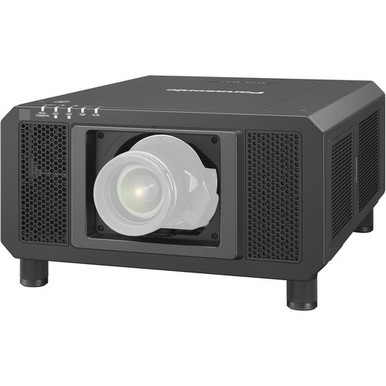
Panasonic PT-RS11KU vs PT-RZ31KU: Which Projector Should You Choose? The answer starts with the room, screen, and operating conditions. The supplied facts put the PT-RS11KU at 12,000 lumens and the PT-RZ31KU at 31,000 lumens, while both are listed with WUXGA resolution. That gap is large. It still doesn't make the higher-output projector the automatic choice for every church, school, conference room, or installed AV system.
A responsible choice connects stated brightness to image size, ambient light, screen characteristics, and the target set by the system designer. It also checks lens geometry, signal requirements, exact SKU, and current commercial details before a purchase order. This comparison turns the verified specifications into a practical shortlist. You'll see where each projector fits, which details remain to be confirmed, how to judge price-to-performance without invented pricing, and when the short-throw alternatives in the supplied catalog deserve a look.
Products at a Glance
- Option 1: Panasonic PT-RS11KU DLP SXGA+ Projector
- For large-image or higher-ambient-light plans whose d…: Panasonic PT-RZ31KU WUXGA 1080p DLP Projector
- For space-constrained designs that require ultra-shor…: Panasonic PT-CMZ50 WUXGA Ultra-Short Throw Laser Projector – Professional Golf Simulator Display
- For constrained-distance projects whose engineered pl…: Panasonic PT-VMZ6STBU8 8,000 Lumens WUXGA Laser Golf Simulator Projector – Short Throw, 4K Input, Black
Quick Comparison Table
| Feature | Panasonic PT-RS11KU DLP SXGA+ Projector | Panasonic PT-RZ31KU WUXGA 1080p DLP Projector | Panasonic PT-CMZ50 WUXGA Ultra-Short Throw Laser Projector – Professional Golf Simulator Display | Panasonic PT-VMZ6STBU8 8,000 Lumens WUXGA Laser Golf Simulator Projector – Short Throw, 4K Input, Black |
|---|---|---|---|---|
| Brightness | 12000 lumens | 31,000 lumens | 5200 lumens | 8,000 Lumens |
| Resolution | WUXGA | WUXGA | WUXGA | WUXGA |
| Best For | Projects whose documented screen, ambient-light, and target-brightness calculations support a 12,000-lumen WUXGA projector. | Large-image or higher-ambient-light plans whose documented calculation calls for a 31,000-lumen WUXGA projector. | Space-constrained designs that require ultra-short-throw geometry and can meet their engineered brightness target with 5,200 lumens. | Constrained-distance projects whose engineered plan supports an 8,000-lumen WUXGA short-throw projector. |
| Throw Type | Ultra short throw | Short throw | ||
| Recommended Buyer | Projects whose documented screen, ambient-light, and target-brightness calculations support a 12,000-lumen WUXGA projector. | Large-image or higher-ambient-light plans whose documented calculation calls for a 31,000-lumen WUXGA projector. | Space-constrained designs that require ultra-short-throw geometry and can meet their engineered brightness target with 5,200 lumens. | Constrained-distance projects whose engineered plan supports an 8,000-lumen WUXGA short-throw projector. |
Product Images

Projector Options from AudioVideoNation
1. Panasonic PT-RS11KU DLP SXGA+ Projector
Who should compare it: Projects whose documented screen, ambient-light, and target-brightness calculations support a 12,000-lumen WUXGA projector.
Why it belongs here: It is one of the two projectors in the direct comparison. Its supplied facts pair a 12,000-lumen brightness rating with WUXGA resolution, giving AV teams a defined starting point for room calculations.
SKU: PT-RS11KU
Key Features
- 12,000-lumen stated brightness
- WUXGA resolution
- Exact PT-RS11KU SKU for procurement checks
Things to Consider
Confirm native resolution, throw geometry, compatible lens options, inputs, physical requirements, and control details for the exact SKU. Use the linked page for current commercial information.
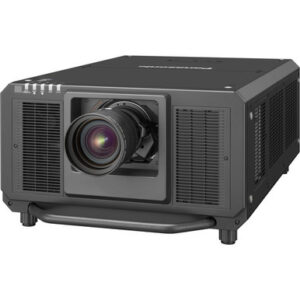
2. Panasonic PT-RZ31KU WUXGA 1080p DLP Projector
Who should compare it: Large-image or higher-ambient-light plans whose documented calculation calls for a 31,000-lumen WUXGA projector.
Why it belongs here: It is the higher-brightness projector in the direct comparison. The supplied 31,000-lumen rating gives designers a distinct option for projects with a substantially higher calculated light-output requirement.
SKU: PT-RZ31KU
Key Features
- 31,000-lumen stated brightness
- WUXGA resolution
- Exact PT-RZ31KU SKU for procurement checks
Things to Consider
The higher lumen figure does not establish lens fit, signal support, physical suitability, or total project value. Verify those details and current commerce information before approval.
3. Panasonic PT-CMZ50 WUXGA Ultra-Short Throw Laser Projector – Professional Golf Simulator Display
Who should compare it: Space-constrained designs that require ultra-short-throw geometry and can meet their engineered brightness target with 5,200 lumens.
Why it belongs here: It provides a different installation route from the two primary projectors. Its supplied facts combine 5,200 lumens, WUXGA resolution, and an ultra-short-throw classification.
SKU: PT-CMZ50U
Key Features
- 5,200-lumen stated brightness
- WUXGA resolution
- Ultra-short-throw classification
Things to Consider
Its stated brightness is below both primary projectors, so it should not be treated as a direct substitute on resolution alone. Confirm exact geometry, system requirements, and configuration.
4. Panasonic PT-VMZ6STBU8 8,000 Lumens WUXGA Laser Golf Simulator Projector – Short Throw, 4K Input, Black
Who should compare it: Constrained-distance projects whose engineered plan supports an 8,000-lumen WUXGA short-throw projector.
Why it belongs here: It adds a supplied short-throw option for buyers whose mounting distance rules out a conventional layout. Its verified comparison facts are 8,000 lumens, WUXGA resolution, and short throw.
SKU: PT-VMZ82BU8
Key Features
- 8,000-lumen stated brightness
- WUXGA resolution
- Short-throw classification
Things to Consider
Match SKU PT-VMZ82BU8 against the exact configuration on the linked page before quoting. Its supplied brightness is lower than either primary comparison projector.
Panasonic PT-RS11KU DLP SXGA+ Projector vs Panasonic PT-RZ31KU WUXGA 1080p DLP Projector: Main Differences
- Choose Panasonic PT-RS11KU DLP SXGA+ Projector if Projects whose documented screen, ambient-light, and target-brightness calculations support a 12,000-lumen WUXGA projector..
- Choose Panasonic PT-RZ31KU WUXGA 1080p DLP Projector if Large-image or higher-ambient-light plans whose documented calculation calls for a 31,000-lumen WUXGA projector..
- Choose Panasonic PT-CMZ50 WUXGA Ultra-Short Throw Laser Projector – Professional Golf Simulator Display if Space-constrained designs that require ultra-short-throw geometry and can meet their engineered brightness target with 5,200 lumens..
- Choose Panasonic PT-VMZ6STBU8 8,000 Lumens WUXGA Laser Golf Simulator Projector – Short Throw, 4K Input, Black if Constrained-distance projects whose engineered plan supports an 8,000-lumen WUXGA short-throw projector..
PT-RS11KU vs PT-RZ31KU brightness and WUXGA resolution
Start with what can be compared cleanly. The PT-RS11KU has a supplied brightness figure of 12,000 lumens. The PT-RZ31KU is listed at 31,000 lumens. The stated gap is 19,000 lumens, and both extracted records list WUXGA resolution. Resolution therefore does not separate them on the available facts.
Treat those numbers as the opening inputs to a projection study. Screen width and height determine image area. Ambient light, screen characteristics, content, and the design target then shape how much output the room calls for. The PT-RZ31KU gives the designer a much higher stated brightness figure to work with. The PT-RS11KU may be the tighter fit where the calculated target sits within its stated output.
Do not turn the lumen difference into a claim about color, contrast, sharpness, reliability, or measured on-screen light. None of those comparisons is established here. Ask for an engineered brightness calculation and verify the measurement basis used in each product's documentation. That keeps a clean catalog comparison from becoming an unsupported field-performance promise.
Deployment fit for churches, schools, and conference rooms
Deployment fit starts with use conditions, not a venue label. A sanctuary that keeps house lights up during services can have a different target from a darkened worship space. A school auditorium and a classroom aren't the same job. Conference rooms vary just as sharply by screen size, window exposure, and whether the display must support lights-on collaboration.
For a church, map the largest service format, screen position, lighting scenes, presentation workflow, and viewing area. For a school, separate daily instruction from auditorium events and shared-space use. For a conference room, document daylight control, seating distance, content type, and the longest expected session. These questions do not add product specs. They reveal which specs the design must verify.
On the supplied facts, shortlist the PT-RS11KU when a 12,000-lumen WUXGA projector fits the calculation. Move the PT-RZ31KU forward when the plan calls for the much higher 31,000-lumen rating. If both clear the brightness requirement, use installation, system, support, and commercial checks to break the tie. The larger lumen figure does not settle the purchase by itself.
Installation geometry and lens planning
Neither primary product has a throw type in the supplied facts, so no responsible mounting recommendation can be made from this dataset alone. Confirm the exact lens options and throw calculations before choosing a projector. Start with finished image dimensions, proposed mounting point, projection distance, ceiling or rigging constraints, screen position, and any obstruction in the light path.
Then verify lens compatibility, image-placement adjustment, physical dimensions, weight, power needs, thermal clearance, operating noise, signal inputs, control method, and supported formats for the exact SKU. These details can change whether a promising brightness match works in the real room. They should be settled before the mount location, cabling, or electrical work is approved.
This is also where the two supplied alternatives may enter the discussion. The PT-CMZ50U has an ultra-short-throw classification, while SKU PT-VMZ82BU8 has a short-throw classification. Those facts address geometry, not suitability by themselves. Their stated brightness is 5,200 and 8,000 lumens, respectively, so each still needs its own screen and ambient-light calculation.
Price-to-performance without guessing at price
No price was supplied, so a clean price-to-performance comparison begins on the linked product pages. Capture current commerce details for the exact SKUs on the same day. Then build an installed-cost worksheet that covers the projector plus any required lens, mount or rigging, signal transport, control, electrical work, labor, commissioning, and service provisions. Include an item only when the design requires it.
Next, test cost against the pass-or-fail requirements. If the PT-RS11KU's 12,000-lumen figure satisfies the approved brightness calculation and its verified installation details work, compare its total against the PT-RZ31KU on the remaining requirements. If the room needs the PT-RZ31KU's 31,000-lumen class, a lower total for a projector that misses the target offers poor value.
Avoid using dollars per lumen as the whole answer. That ratio says nothing about throw geometry, exact system compatibility, physical fit, control, or support needs. Define value as the lowest verified total project cost that meets the room, content, installation, and operational brief. Keep the assumptions beside the quote so another reviewer can audit the decision.
Stock and availability checks before procurement
Stock and availability should be checked live, not frozen into an article. Open each linked product page, confirm the exact SKU, and request current lead-time information before committing the project schedule. Recheck those details when the design is approved and again when the purchase order is ready.
For a multi-room rollout, confirm that the required quantity can follow the planned delivery sequence. For either primary projector, check every required installation component at the same time. A projector date alone does not protect the schedule if a necessary lens, mount, or control component arrives later. Record the source and date of each commercial check so purchasing and installation teams work from the same snapshot.
Short-throw Panasonic projector alternatives
The PT-CMZ50U and the listing with SKU PT-VMZ82BU8 are useful alternatives only when their verified geometry and lower supplied brightness figures match the job. The PT-CMZ50U is listed at 5,200 lumens, WUXGA, and ultra short throw. That makes it a candidate for a design that calls for that throw type and can meet its target with 5,200 lumens.
SKU PT-VMZ82BU8 is listed at 8,000 lumens, WUXGA, and short throw. It can enter a constrained-distance shortlist where 8,000 lumens meets the engineered requirement. Match the SKU and exact configuration on the linked page before quoting.
Neither alternative is a direct replacement for the 12,000-lumen PT-RS11KU or 31,000-lumen PT-RZ31KU based on the supplied figures. Their value lies in a different combination of throw classification and brightness. Compare them after deciding whether room geometry or light-output demand is the binding constraint. Then verify the same installation and system details required for the main two projectors.
A practical path to the right projector
A sound decision can be made in five gates. First, confirm that WUXGA is right for the content and system. The supplied facts list it for both projectors, but they do not establish every accepted signal or workflow detail. Second, calculate the brightness target. Use 12,000 lumens for the PT-RS11KU and 31,000 lumens for the PT-RZ31KU as the supplied planning figures, then verify them against the exact product documentation.
Third, prove the projection geometry with an exact compatible lens and an approved mounting location. Fourth, validate inputs, control, physical, electrical, environmental, service, and operational requirements for the exact SKU. Fifth, compare current installed cost and schedule using live product-page details and dated supplier information.
The practical conclusion is conditional. The PT-RS11KU belongs on the shortlist when the project needs WUXGA and the 12,000-lumen rating supports the engineered design. The PT-RZ31KU belongs there when WUXGA is required and the room plan calls for its far higher 31,000-lumen rating. If the brightness calculation does not distinguish them, do not guess. Let verified lensing, system fit, total project cost, and availability decide. That approach gives churches, schools, conference teams, and installers a defensible choice without inventing a winner.
Related AudioVideoNation Links
- Browse Projector at AudioVideoNation
- Panasonic PT-RS11KU product page
- Panasonic PT-RZ31KU product page
- Panasonic PT-CMZ50U product page
- Panasonic PT-VMZ82BU8 product page
Product Information Sources
- Panasonic PT-RS11KU DLP SXGA+ Projector product information
- Panasonic PT-RZ31KU WUXGA 1080p DLP Projector product information
- Panasonic PT-CMZ50 WUXGA Ultra-Short Throw Laser Projector – Professional Golf Simulator Display product information
- Panasonic PT-VMZ6STBU8 8,000 Lumens WUXGA Laser Golf Simulator Projector – Short Throw, 4K Input, Black product information
FAQ
What is the main difference between the Panasonic PT-RS11KU and PT-RZ31KU?
The main supplied difference is brightness: the PT-RS11KU is listed at 12,000 lumens, while the PT-RZ31KU is listed at 31,000 lumens. Both extracted records list WUXGA resolution, so the room's calculated light-output requirement is the clearest starting point.
Do the PT-RS11KU and PT-RZ31KU have the same resolution?
Yes, both projectors are listed with WUXGA resolution in the supplied facts. Confirm native resolution, accepted signal formats, and workflow requirements for the exact SKU before final system approval.
Which projector is better for a church, school, or conference room?
Choose the projector whose verified brightness and lens configuration meets the engineered plan for the specific venue. Shortlist the PT-RS11KU when 12,000 lumens meets that plan and the PT-RZ31KU when the design calls for its 31,000-lumen rating.
Are there short-throw alternatives to these Panasonic projectors?
Yes, the supplied alternatives include the 5,200-lumen WUXGA PT-CMZ50U with ultra-short-throw classification and SKU PT-VMZ82BU8 at 8,000 lumens with short-throw classification. Each needs its own geometry and brightness calculation because neither matches the stated output of the primary projectors.
What installation details should be verified before ordering?
Verify throw geometry, compatible lens options, physical fit, power, thermal clearance, inputs, control, supported formats, and service requirements for the exact SKU. Complete those checks before approving mounting locations, cabling, electrical work, or rigging.
How should buyers compare price, stock, and availability?
Use the linked product pages and dated supplier quotes for current price, stock, availability, and lead-time details. Compare exact SKUs on the same day, then evaluate total installed cost rather than the projector listing alone.
Conclusion
Use this Panasonic PT-RS11KU vs PT-RZ31KU: Which Projector Should You Choose? comparison to match documented specifications to the room and installation requirements. Review the linked product pages for current purchase details before ordering.
Products Used
| SKU | Product Name | URL |
|---|---|---|
| PT-RS11KU | Panasonic PT-RS11KU DLP SXGA+ Projector | View product |
| PT-RZ31KU | Panasonic PT-RZ31KU WUXGA 1080p DLP Projector | View product |
| PT-CMZ50U | Panasonic PT-CMZ50 WUXGA Ultra-Short Throw Laser Projector – Professional Golf Simulator Display | View product |
| PT-VMZ82BU8 | Panasonic PT-VMZ6STBU8 8,000 Lumens WUXGA Laser Golf Simulator Projector – Short Throw, 4K Input, Black | View product |