

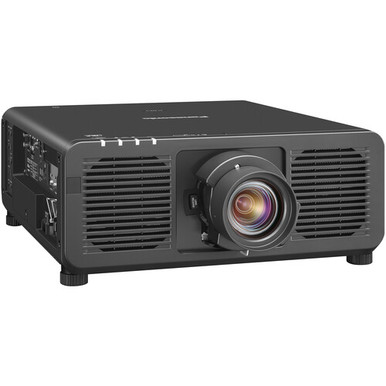
For teams asking “Panasonic PT-REZ10BU7 vs PT-REZ10LWU7: Which Projector Should You Choose?”, the immediate problem is separating a real deployment decision from two similar catalog names. The confirmed common specification is WUXGA resolution. That alone cannot establish brightness, throw fit, optical configuration, connections, control, or installation requirements.
This comparison keeps the decision accountable. It shows AV buyers, installers, churches, schools, and conference room technology teams how to validate Panasonic PT-REZ10BU7 and Panasonic PT-REZ10LWU7 against a room brief, compare price-to-performance using live commerce details, and avoid assuming that similar identifiers mean identical hardware. It also identifies two Panasonic alternatives with documented short-throw or ultra-short-throw facts. The goal is simple: choose only after the exact SKU clears the project checklist.
Products at a Glance
- Option 1: Panasonic PT-REZ10BU7 – DLP projector – standard lens – LAN – black
- For teams whose exact-SKU documentation confirms that…: Panasonic PT-REZ10LWU7 10,000-Lumen WUXGA DLP Laser Projector
- For buyers whose room brief requires an ultra-short-t…: Panasonic PT-CMZ50 WUXGA Ultra-Short Throw Laser Projector – Professional Golf Simulator Display
- For projects needing a documented short-throw option…: Panasonic PT-VMZ6STBU8 8,000 Lumens WUXGA Laser Golf Simulator Projector – Short Throw, 4K Input, Black
Quick Comparison Table
| Feature | Panasonic PT-REZ10BU7 – DLP projector – standard lens – LAN – black | Panasonic PT-REZ10LWU7 10,000-Lumen WUXGA DLP Laser Projector | Panasonic PT-CMZ50 WUXGA Ultra-Short Throw Laser Projector – Professional Golf Simulator Display | Panasonic PT-VMZ6STBU8 8,000 Lumens WUXGA Laser Golf Simulator Projector – Short Throw, 4K Input, Black |
|---|---|---|---|---|
| Brightness | 5200 lumens | 8,000 Lumens | ||
| Resolution | WUXGA | WUXGA | WUXGA | WUXGA |
| Best For | Teams whose exact-SKU checks confirm that PT-REZ10BU7 meets their brightness, throw, optical, connection, control, and mounting requirements. | Teams whose exact-SKU documentation confirms that PT-REZ10LWU7 fits the planned room, optical design, signal system, controls, mounting, and installation scope. | Buyers whose room brief requires an ultra-short-throw projector and confirms that WUXGA resolution and 5,200 lumens meet the project requirements. | Projects needing a documented short-throw option with WUXGA resolution and an 8,000-lumen requirement, subject to exact-model confirmation. |
| Throw Type | Ultra short throw | Short throw | ||
| Recommended Buyer | Teams whose exact-SKU checks confirm that PT-REZ10BU7 meets their brightness, throw, optical, connection, control, and mounting requirements. | Teams whose exact-SKU documentation confirms that PT-REZ10LWU7 fits the planned room, optical design, signal system, controls, mounting, and installation scope. | Buyers whose room brief requires an ultra-short-throw projector and confirms that WUXGA resolution and 5,200 lumens meet the project requirements. | Projects needing a documented short-throw option with WUXGA resolution and an 8,000-lumen requirement, subject to exact-model confirmation. |
Product Images
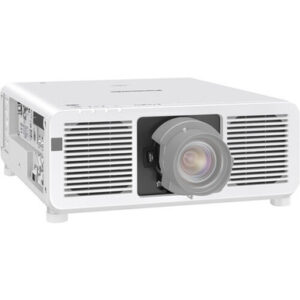

Projector Options from AudioVideoNation
1. Panasonic PT-REZ10BU7 – DLP projector – standard lens – LAN – black
Who should compare it: Teams whose exact-SKU checks confirm that PT-REZ10BU7 meets their brightness, throw, optical, connection, control, and mounting requirements.
Why it belongs here: PT-REZ10BU7 is one of the two exact comparison SKUs, and WUXGA is its confirmed resolution fact. Including it lets buyers validate the remaining installation requirements against the precise product listing.
SKU: PT-REZ10BU7
Key Features
- WUXGA resolution
- Cataloged under Projectors
- Exact purchasing identifier: PT-REZ10BU7
Things to Consider
Confirm brightness, throw range, optical configuration, connections, control options, physical requirements, and required accessories through the linked page or approved exact-SKU documentation.
2. Panasonic PT-REZ10LWU7 10,000-Lumen WUXGA DLP Laser Projector
Who should compare it: Teams whose exact-SKU documentation confirms that PT-REZ10LWU7 fits the planned room, optical design, signal system, controls, mounting, and installation scope.
Why it belongs here: PT-REZ10LWU7 is the second exact comparison SKU. Its confirmed WUXGA resolution creates a direct resolution match with PT-REZ10BU7 while leaving other deployment criteria for verification.
SKU: PT-REZ10LWU7
Key Features
- WUXGA resolution
- Cataloged under Projectors
- Exact purchasing identifier: PT-REZ10LWU7
Things to Consider
Verify rated brightness, light source, throw range, lens arrangement, connections, controls, physical requirements, and required accessories for this exact SKU before purchase.
3. Panasonic PT-CMZ50 WUXGA Ultra-Short Throw Laser Projector – Professional Golf Simulator Display
Who should compare it: Buyers whose room brief requires an ultra-short-throw projector and confirms that WUXGA resolution and 5,200 lumens meet the project requirements.
Why it belongs here: PT-CMZ50U provides a documented Panasonic alternative for projects driven by ultra-short-throw placement. Its available facts specify WUXGA resolution and 5,200-lumen brightness.
SKU: PT-CMZ50U
Key Features
- 5,200-lumen brightness
- WUXGA resolution
- Ultra-short-throw design
- Cataloged under Projectors
Things to Consider
This is an alternative projector, not evidence about either REZ model. Confirm exact throw geometry, mounting, connections, controls, and screen fit for the intended room.
4. Panasonic PT-VMZ6STBU8 8,000 Lumens WUXGA Laser Golf Simulator Projector – Short Throw, 4K Input, Black
Who should compare it: Projects needing a documented short-throw option with WUXGA resolution and an 8,000-lumen requirement, subject to exact-model confirmation.
Why it belongs here: SKU PT-VMZ82BU8 adds a documented short-throw comparison point with WUXGA resolution and 8,000 Lumens. It helps buyers evaluate a different placement approach when room geometry drives the decision.
SKU: PT-VMZ82BU8
Key Features
- 8,000 Lumens brightness
- WUXGA resolution
- Short-throw design
- Cataloged under Projectors
Things to Consider
The supplied SKU is PT-VMZ82BU8, while the supplied display name begins with PT-VMZ6STBU8. Resolve that naming mismatch with AudioVideoNation before quoting or ordering.
Panasonic PT-REZ10BU7 – DLP projector – standard lens – LAN – black vs Panasonic PT-REZ10LWU7 10,000-Lumen WUXGA DLP Laser Projector: Main Differences
- Choose Panasonic PT-REZ10BU7 – DLP projector – standard lens – LAN – black if Teams whose exact-SKU checks confirm that PT-REZ10BU7 meets their brightness, throw, optical, connection, control, and mounting requirements..
- Choose Panasonic PT-REZ10LWU7 10,000-Lumen WUXGA DLP Laser Projector if Teams whose exact-SKU documentation confirms that PT-REZ10LWU7 fits the planned room, optical design, signal system, controls, mounting, and installation scope..
- Choose Panasonic PT-CMZ50 WUXGA Ultra-Short Throw Laser Projector – Professional Golf Simulator Display if Buyers whose room brief requires an ultra-short-throw projector and confirms that WUXGA resolution and 5,200 lumens meet the project requirements..
- Choose Panasonic PT-VMZ6STBU8 8,000 Lumens WUXGA Laser Golf Simulator Projector – Short Throw, 4K Input, Black if Projects needing a documented short-throw option with WUXGA resolution and an 8,000-lumen requirement, subject to exact-model confirmation..
Panasonic PT-REZ10BU7 vs PT-REZ10LWU7 at a glance
Both Panasonic projector listings have confirmed WUXGA resolution. That is the tie. The available product facts do not establish the other differences an installer would need before approving one as a substitute for the other, so keep the two SKUs separate throughout design, quoting, and purchasing.
Build an exact-SKU comparison sheet. Put PT-REZ10BU7 in one column and PT-REZ10LWU7 in the other. Ask AudioVideoNation or consult approved documentation to confirm rated brightness, throw range, optical configuration, supported connections, control methods, mounting limits, dimensions, weight, power needs, operating noise, and required accessories for each. Record the source and date beside every answer. This prevents a specification from one version drifting into the other.
For a replacement project, capture the existing screen size, projector-to-screen distance, mount position, signal route, control system, and power location before requesting a quote. For a new room, lock those design constraints first. Similar names are not permission to swap SKUs. The selected projector must clear the room brief under its exact purchasing identifier.
WUXGA projector comparison: what resolution settles
This WUXGA projector comparison has one firm result: resolution does not separate PT-REZ10BU7 from PT-REZ10LWU7. Both can remain under consideration when WUXGA is part of the project brief.
That shared label does not establish equal brightness, optics, image output, accepted signal formats, connections, control capabilities, or physical requirements. It also does not confirm that accessories can move between the two products. Each of those points needs exact-SKU documentation.
Ask content owners which source devices and formats the room will use. Then have the installer verify that the proposed signal path and projector connections support that workflow. This matters in conference rooms with centralized switching, schools with standardized classroom systems, and churches with separate presentation and production sources.
Resolution is the first gate. It is not final approval. Once WUXGA is confirmed, the comparison should move immediately to room geometry, brightness requirements, installation details, and integration needs.
Projector deployment fit for churches, schools, and conference rooms
Projector deployment fit begins with geometry and infrastructure. Measure first. A product should not reach the purchase order because its model name resembles equipment already in the room.
Churches should document the screen, mounting point, projector-to-screen path, room-light conditions during services, source equipment, control workflow, and any restrictions created by the building. The technical team can then test both exact SKUs against the same requirements. If volunteers operate the system, include the planned control method in that review instead of assuming either projector will fit the existing workflow.
Schools should record the room standard for mounting, source connections, control, monitoring, and service access. Standardization can simplify support, but only when the exact projector meets the approved design. Confirm whether any existing mount, cabling, or control programming can remain. Shared WUXGA resolution alone does not answer those questions.
Conference room teams should map every source, switcher, signal extension path, control point, screen, and mounting location. Include room-specific limits such as available power and the accepted noise target. An installer can turn these requirements into a pass-or-fail matrix for PT-REZ10BU7 and PT-REZ10LWU7.
Use the same written matrix for both. That makes the choice traceable and exposes missing information before equipment arrives.
Projector price-to-performance without guesswork
Calculate projector price-to-performance against the completed system, using current product-page or quoted pricing. A projector-only number can hide the cost of optical components, mounts, adapters, signal extension, cabling, control work, installation labor, and commissioning.
Start with a complete bill of materials for each exact SKU. Include only parts confirmed as required and compatible. Then compare the totals against documented project outcomes. WUXGA resolution is confirmed for both comparison products. Brightness, throw fit, optics, connections, control, mounting, and other requirements still need verification before they can contribute to the value decision.
If both projectors pass the technical brief, compare total installed cost, purchasing timeline, and the amount of integration work each approved design requires. If only one passes a mandatory requirement, a lower price on the other does not repair that technical mismatch. If neither has enough documented information, request it before assigning value to an unconfirmed capability.
Keep assumptions out of the calculation. Use the exact SKU, a dated quote, a confirmed accessory list, and the installer’s written scope. That produces a price-to-performance comparison a buyer can defend after the project is complete.
Live price, stock and availability checks
Use each linked AudioVideoNation product page for live commerce details, then request a dated quote when the project schedule or purchasing process demands firmer information. Stock and availability can change, so treat every check as a snapshot rather than a permanent product characteristic.
The quote should identify PT-REZ10BU7 or PT-REZ10LWU7 exactly. Ask for the current product price, expected fulfillment timing, included components, required accessories, and the process for handling any proposed substitution. Do not approve a substitute because it shares the Panasonic name or WUXGA resolution. Run it through the same deployment checklist.
Coordinate the purchasing check with the installer’s schedule. A product that passes the technical review still needs to align with installation, commissioning, and room-opening dates. Save the quote date and confirmed SKU with the project file so the technology team, buyer, and installer are working from the same information.
Panasonic short-throw projector alternatives
Two other projectors in the provided Panasonic lineup have documented throw and brightness facts. They are useful comparison points when room geometry rules out a standard installation plan.
The Panasonic PT-CMZ50U has WUXGA resolution, 5,200-lumen brightness, and an ultra-short-throw designation. Consider it when the room brief specifically calls for an ultra-short-throw layout and those documented facts meet the design target. Confirm its precise geometry, mounting, connections, control, and screen fit before specifying it.
The product data for SKU PT-VMZ82BU8 identifies WUXGA resolution, 8,000 Lumens, and a short-throw design. It provides another path for projects with a documented short-throw requirement. There is a purchasing detail to resolve: the supplied display name begins with PT-VMZ6STBU8 rather than the supplied SKU PT-VMZ82BU8. Confirm the exact model identity with AudioVideoNation before quoting or ordering it.
These alternatives are not automatic replacements for PT-REZ10BU7 or PT-REZ10LWU7. They show why throw geometry deserves an early place in the room brief. A separate Panasonic lens also appears in the available lineup, but no confirmed compatibility fact connects it to either comparison projector. Never infer lens compatibility from the shared brand.
Final choice: verify the exact projector before ordering
Choose PT-REZ10BU7 or PT-REZ10LWU7 only after exact-SKU documentation confirms every mandatory requirement. WUXGA resolution keeps both in the initial comparison. It does not produce a defensible winner by itself.
If only one SKU passes the required brightness, throw, optical, connection, control, mounting, and physical checks, choose that validated configuration. If both pass, compare total installed cost, dated availability information, integration scope, and schedule fit. If the documentation remains incomplete, pause the order and obtain the missing confirmation.
A project that specifically needs short-throw or ultra-short-throw placement should also evaluate PT-VMZ82BU8 and PT-CMZ50U against the same room brief. Keep their model identities and specifications separate from the REZ products.
The final purchase order should state the exact SKU and the confirmed accessory list. Attach the installer’s approved design and the dated commercial details. That small discipline protects churches, schools, conference room teams, and integrators from a costly model-name assumption.
Related AudioVideoNation Links
- Browse Projector at AudioVideoNation
- View Panasonic PT-REZ10BU7
- View Panasonic PT-REZ10LWU7
- Explore Panasonic PT-CMZ50U
- Review SKU PT-VMZ82BU8
Product Information Sources
- Panasonic PT-REZ10BU7 – DLP projector – standard lens – LAN – black product information
- Panasonic PT-REZ10LWU7 10,000-Lumen WUXGA DLP Laser Projector product information
- Panasonic PT-CMZ50 WUXGA Ultra-Short Throw Laser Projector – Professional Golf Simulator Display product information
- Panasonic PT-VMZ6STBU8 8,000 Lumens WUXGA Laser Golf Simulator Projector – Short Throw, 4K Input, Black product information
FAQ
Are Panasonic PT-REZ10BU7 and PT-REZ10LWU7 the same projector?
Available confirmed specifications do not establish that Panasonic PT-REZ10BU7 and PT-REZ10LWU7 are the same projector. Both have WUXGA resolution, but buyers should verify every other installation requirement under the exact SKU.
Which projector has higher brightness?
A directly comparable brightness specification is not confirmed for both exact SKUs here, so this article cannot identify one as brighter. Obtain rated-brightness documentation for PT-REZ10BU7 and PT-REZ10LWU7 before comparing their room fit.
Do PT-REZ10BU7 and PT-REZ10LWU7 both have WUXGA resolution?
Yes, the confirmed product facts identify both PT-REZ10BU7 and PT-REZ10LWU7 as WUXGA projectors. That resolution match does not confirm equal throw, optics, brightness, connections, controls, or installation requirements.
Which model is better for a church, school, or conference room?
Neither model can be declared better for those spaces from the confirmed specifications available here. Measure the room and compare each exact SKU against its brightness, throw, optical, connection, control, mounting, and purchasing requirements.
How should buyers compare price, stock, and availability?
Buyers should check the linked product pages and request dated, exact-SKU quotes before making a commercial comparison. Compare the complete installed cost and purchasing timeline without treating a prior price or availability check as permanent.
Can the Panasonic ET-D75LE95 lens be used with either REZ projector?
Compatibility between ET-D75LE95 and either REZ projector is not confirmed by the available product facts. Do not specify the lens with PT-REZ10BU7 or PT-REZ10LWU7 until approved documentation confirms exact compatibility.
Conclusion
Use this Panasonic PT-REZ10BU7 vs PT-REZ10LWU7: Which Projector Should You Choose? comparison to match documented specifications to the room and installation requirements. Review the linked product pages for current purchase details before ordering.
Products Used
| SKU | Product Name | URL |
|---|---|---|
| PT-REZ10BU7 | Panasonic PT-REZ10BU7 – DLP projector – standard lens – LAN – black | View product |
| PT-REZ10LWU7 | Panasonic PT-REZ10LWU7 10,000-Lumen WUXGA DLP Laser Projector | View product |
| PT-CMZ50U | Panasonic PT-CMZ50 WUXGA Ultra-Short Throw Laser Projector – Professional Golf Simulator Display | View product |
| PT-VMZ82BU8 | Panasonic PT-VMZ6STBU8 8,000 Lumens WUXGA Laser Golf Simulator Projector – Short Throw, 4K Input, Black | View product |