

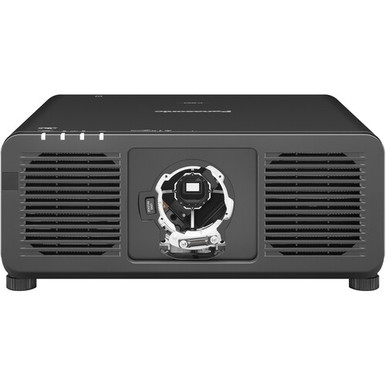
The Panasonic PT-REQ10LBU Setup Guide and Buying Considerations process starts with a basic gap: the supplied product facts confirm 4K resolution, while the room design still depends on verified brightness, image geometry, connections, mounting, power, and control details. A model can look right on a shortlist and still require substantial validation before anyone approves a screen, ceiling position, or cable plan.
This guide gives AV buyers, installers, churches, schools, and conference-room technology teams a practical route from shortlist to commissioning. It centers on the Panasonic PT-REQ10LBU 4K 1-Chip DLP™ Laser Projector and compares it with three supplied Panasonic alternatives where the facts support a useful contrast: the 5,200-lumen WUXGA ultra-short-throw PT-CMZ50U, the 7,300-lumen WUXGA PT-VMZ72BU8, and the 5,200-lumen WUXGA PT-VMZ51. You will see what can be decided now, what must be verified, and how to weigh deployment fit, procurement timing, and price-to-performance without guessing at missing specifications.
Products at a Glance
- Option 1: Panasonic PT-REQ10LBU 4K 1-Chip DLP™ Laser Projector
- For projects that need an ultra-short-throw layout an…: Panasonic PT-CMZ50 WUXGA Ultra-Short Throw Laser Projector – Professional Golf Simulator Display
- For buyers whose room calculation supports a 7,300-lu…: Panasonic PT-VMZ72BU8 7,300 Lumens WUXGA Laser Golf Simulator Projector – High-Brightness, Vivid Green Mode
- For teams whose calculations support 5,200 lumens and…: Panasonic PT-VMZ51 5200-Lumen WUXGA Laser 3LCD Projector
Quick Comparison Table
| Feature | Panasonic PT-REQ10LBU 4K 1-Chip DLP™ Laser Projector | Panasonic PT-CMZ50 WUXGA Ultra-Short Throw Laser Projector – Professional Golf Simulator Display | Panasonic PT-VMZ72BU8 7,300 Lumens WUXGA Laser Golf Simulator Projector – High-Brightness, Vivid Green Mode | Panasonic PT-VMZ51 5200-Lumen WUXGA Laser 3LCD Projector |
|---|---|---|---|---|
| Brightness | 5200 lumens | 7,300 Lumens | 5200 lumens | |
| Resolution | 4K | WUXGA | WUXGA | WUXGA |
| Best For | Teams that require 4K resolution and can verify the complete installation plan before purchase. | Projects that need an ultra-short-throw layout and support WUXGA resolution in the design brief. | Buyers whose room calculation supports a 7,300-lumen rating and WUXGA resolution. | Teams whose calculations support 5,200 lumens and WUXGA resolution. |
| Throw Type | Ultra short throw | |||
| Recommended Buyer | Teams that require 4K resolution and can verify the complete installation plan before purchase. | Projects that need an ultra-short-throw layout and support WUXGA resolution in the design brief. | Buyers whose room calculation supports a 7,300-lumen rating and WUXGA resolution. | Teams whose calculations support 5,200 lumens and WUXGA resolution. |
Product Images

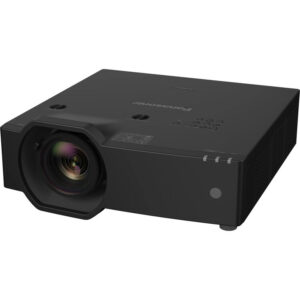
Projector Options from AudioVideoNation
1. Panasonic PT-REQ10LBU 4K 1-Chip DLP™ Laser Projector
Who should compare it: Teams that require 4K resolution and can verify the complete installation plan before purchase.
Why it belongs here: It is the focus of this guide and the only recommended option with confirmed 4K resolution. Keep it on the shortlist when 4K is a firm requirement, then complete the room and signal-path checks before approval.
SKU: PT-REQ10LBU
Key Features
- 4K resolution confirmed in the supplied product facts
- PT-REQ10LBU SKU for exact quote and document matching
- Dedicated AudioVideoNation product page for current commerce details
Things to Consider
Verify brightness, throw data, projection optics, supported inputs, dimensions, power, control, mounting requirements, and included items before finalizing the screen, cable plan, installation schedule, or purchase.
2. Panasonic PT-CMZ50 WUXGA Ultra-Short Throw Laser Projector – Professional Golf Simulator Display
Who should compare it: Projects that need an ultra-short-throw layout and support WUXGA resolution in the design brief.
Why it belongs here: It provides the clearest placement contrast in the supplied selection. Its confirmed ultra-short-throw format, 5,200-lumen rating, and WUXGA resolution give buyers three concrete facts for early room planning.
SKU: PT-CMZ50U
Key Features
- 5,200-lumen stated brightness
- WUXGA resolution
- Ultra-short-throw format
Things to Consider
It uses WUXGA rather than the PT-REQ10LBU’s confirmed 4K resolution. Verify exact image distance, surface requirements, mounting, connections, power, control, and included items for the proposed room.
3. Panasonic PT-VMZ72BU8 7,300 Lumens WUXGA Laser Golf Simulator Projector – High-Brightness, Vivid Green Mode
Who should compare it: Buyers whose room calculation supports a 7,300-lumen rating and WUXGA resolution.
Why it belongs here: Its supplied facts provide a 7,300-lumen WUXGA reference for teams evaluating brightness needs. That makes it useful when the room calculation calls for comparison beyond the two 5,200-lumen alternatives.
SKU: PT-VMZ72BU8
Key Features
- 7,300-lumen stated brightness
- WUXGA resolution
- PT-VMZ72BU8 SKU for procurement matching
Things to Consider
Confirm throw geometry, projection optics, supported inputs, mounting, dimensions, power, control, and included equipment. Its WUXGA resolution should also be checked against any requirement for 4K content.
4. Panasonic PT-VMZ51 5200-Lumen WUXGA Laser 3LCD Projector
Who should compare it: Teams whose calculations support 5,200 lumens and WUXGA resolution.
Why it belongs here: It adds another Panasonic option with confirmed 5,200-lumen brightness and WUXGA resolution. Use it as a same-brand comparison point while evaluating the installation details that determine actual room fit.
SKU: PT-VMZ51
Key Features
- 5,200-lumen stated brightness
- WUXGA resolution
- PT-VMZ51 SKU for exact product identification
Things to Consider
Verify throw geometry, projection optics, connections, mounting, dimensions, power, control, and included equipment. Do not assume it shares the PT-CMZ50U’s ultra-short-throw placement characteristics.
Panasonic PT-REQ10LBU 4K 1-Chip DLP™ Laser Projector vs Panasonic PT-CMZ50 WUXGA Ultra-Short Throw Laser Projector – Professional Golf Simulator Display: Main Differences
- Choose Panasonic PT-REQ10LBU 4K 1-Chip DLP™ Laser Projector if Teams that require 4K resolution and can verify the complete installation plan before purchase..
- Choose Panasonic PT-CMZ50 WUXGA Ultra-Short Throw Laser Projector – Professional Golf Simulator Display if Projects that need an ultra-short-throw layout and support WUXGA resolution in the design brief..
- Choose Panasonic PT-VMZ72BU8 7,300 Lumens WUXGA Laser Golf Simulator Projector – High-Brightness, Vivid Green Mode if Buyers whose room calculation supports a 7,300-lumen rating and WUXGA resolution..
- Choose Panasonic PT-VMZ51 5200-Lumen WUXGA Laser 3LCD Projector if Teams whose calculations support 5,200 lumens and WUXGA resolution..
Deployment fit comes before projector approval
Start with the room’s job. Record the intended image size, screen aspect ratio, viewing distance, normal ambient-light conditions, primary content, operating schedule, and operator skill level. Note whether the screen, mount, cabling, and control system already exist. A church may need readable lyrics under stage lighting. A school may care most about clear instructional content across a wide seating area. A conference-room team may need dependable operation with several employee laptops. Those requirements shape the engineering review.
The confirmed PT-REQ10LBU fact is 4K resolution. That can matter when the source material contains fine text or detailed images, but resolution alone cannot establish room fit. Brightness, projection geometry, screen characteristics, and ambient light affect the result. Confirm those variables before approving the screen or mounting location.
Turn the room brief into pass-or-fail acceptance criteria. Include the target image dimensions, planned source formats, required inputs, cable distance, audio destination, control workflow, service access, and acceptable operation under the room’s normal lighting. Attach a source to every product fact, such as approved documentation or the linked product page. This keeps a familiar model number from replacing an actual design check.
Panasonic PT-REQ10LBU installation and image geometry
Measure first. Mark the screen plane, intended image width and height, possible projector position, ceiling height, structural attachment points, audience sightlines, and nearby lights or obstructions. Add clearance for installation and future service. A qualified installer should validate the supporting structure, mounting hardware, electrical work, and any local safety requirements.
Before drawing the final PT-REQ10LBU mounting point, confirm the applicable throw data, projection optics, permitted offsets, image-size range, orientation limits, and adjustment provisions in approved product documentation. Confirm whether any required lens, mount, or other installation item is included with the quoted configuration. Do not infer included equipment from the SKU suffix or product name.
The PT-CMZ50U provides a clear geometry contrast because its supplied facts identify it as ultra-short throw. That designation can make it relevant where projection distance is restricted, but it does not guarantee fit. Exact image distance, mounting position, screen or surface requirements, and obstruction clearances still need verification.
If possible, test the intended source and signal chain before permanent installation. During alignment, establish the physical projector position before relying on image correction. Use a test grid, check focus across the image, and record the final position and settings for the handoff package.
4K projector setup starts at the signal source
The PT-REQ10LBU’s confirmed 4K resolution describes the image format, not the full signal contract. Verify supported input formats, connector types, refresh rates, content-protection requirements, control interfaces, and cable-distance guidance in approved documentation. A source labeled 4K still needs to match the projector and every switcher, extender, adapter, or wall plate between them.
Build a source schedule for the real room. List each laptop, presentation computer, media player, document camera, conferencing system, or other planned source. For every item, record its intended output resolution, connection path, adapter requirements, and audio destination. Churches should test the presentation and playback systems used during services. Schools should include teacher laptops and classroom sources. Conference teams should test the laptop types their users bring into meetings.
Do not assume that audio playback, wireless functions, applications, or control options are present. Confirm them first. Plan the audio path separately until the documentation establishes how sound should be routed.
Commission the complete signal chain at the installed cable distance. Test every source, input route, adapter, and operating mode the staff will use. Then verify startup, shutdown, source selection, and recovery after a disconnected cable or changed laptop.
WUXGA projector alternatives: brightness and throw
The supplied alternatives create three factual comparison points. The PT-CMZ50U is rated at 5,200 lumens, uses WUXGA resolution, and is identified as ultra-short throw. The PT-VMZ72BU8 is rated at 7,300 lumens with WUXGA resolution. The PT-VMZ51 is rated at 5,200 lumens with WUXGA resolution. The confirmed PT-REQ10LBU fact is 4K resolution, so obtain its brightness and throw documentation before treating this list as a complete room-fit comparison.
A higher lumen figure does not settle the decision. Brightness planning also needs the screen size and gain, ambient-light conditions, presentation content, and the viewing goal established by the project team. Use the same assumptions when evaluating each candidate. Otherwise, the numbers look comparable while the proposed installations are not.
Resolution creates another fork. Keep the PT-REQ10LBU on the shortlist when 4K is an actual content or design requirement. Consider the WUXGA alternatives when that resolution meets the project brief and their confirmed brightness facts align with the room calculation.
Throw type affects placement rather than image resolution. The PT-CMZ50U is the only supplied alternative explicitly identified as ultra-short throw. Verify throw geometry for every other candidate instead of assuming that the same mounting plan will work.
Installation, commissioning, and handoff
A clean commissioning process catches mismatches while the installer can still correct them. Use the same checklist for a sanctuary, classroom, or meeting space, then add site-specific tests.
1. Confirm site readiness. Match the delivered SKU to the approved quote and documentation. Verify required projection optics, mounting parts, cables, adapters, power, ventilation clearances, access equipment, and screen preparation before installation begins.
2. Validate the signal chain. Connect the planned sources through the actual switchers, extenders, adapters, and cable runs. Confirm that each source produces the intended image and that audio reaches its assigned system.
3. Mount and align safely. Have qualified personnel approve the supporting structure and hardware. Establish physical position, image size, focus, and geometry using appropriate test material. Check for blocked sightlines, direct light on the screen, and service obstructions.
4. Test real content. Use the presentations, spreadsheets, videos, conferencing screens, lyrics, or instructional material the room will display. Evaluate from the closest and farthest occupied seats under normal lighting. Record any source or room condition that changes the result.
5. Prepare the handoff. Document the exact SKU, source routes, operating steps, approved settings, shutdown procedure, and support contact. Give staff a short operating guide and test it with the people who will run the room. Save the acceptance results with photographs and the final signal-flow drawing.
Price-to-performance, stock, and availability checks
Build a total deployed-cost worksheet before comparing quotes. Include the projector, required projection optics, mount, screen changes, cabling, signal extension, switching or scaling, control work, electrical work, access equipment, installation labor, commissioning, and staff training. Add an item only when the design calls for it, and use verified quotes rather than estimated commerce details.
Judge price-to-performance against the project’s acceptance criteria. The PT-REQ10LBU’s 4K resolution has value when the content and viewing plan call for 4K. The PT-VMZ72BU8’s 7,300-lumen rating matters when the room calculation supports that brightness requirement. The PT-CMZ50U’s ultra-short-throw format matters when limited projection distance shapes the design. A specification that does not solve a documented need should not carry the decision by itself.
For current price, stock, and availability details, visit the linked AudioVideoNation product page and reconfirm the exact SKU when requesting a quote. Ask for written confirmation of the lead time, included items, shipping schedule, return terms, and warranty terms before booking installation labor. Commerce details can change, so an older quote or cached listing should not control the schedule.
Record an approved alternate if timing is critical. Any substitution still needs a fresh review of resolution, brightness, throw geometry, connections, mounting, power, control, and included equipment.
A practical approval decision
Approve the PT-REQ10LBU only after its 4K resolution and verified installation details satisfy the room brief. The approval packet should contain the applicable product documentation, exact-SKU quote, screen and mounting drawing, signal-flow plan, brightness calculation, structural review, commissioning checklist, and current purchasing confirmation.
Use the PT-CMZ50U as a conditional alternative when an ultra-short-throw layout, 5,200-lumen rating, and WUXGA resolution align with the design. Use the PT-VMZ72BU8 as a comparison when its 7,300-lumen rating and WUXGA resolution suit the calculated need. The PT-VMZ51 adds another 5,200-lumen WUXGA option, but its geometry and remaining installation details still require verification. None should be treated as a drop-in replacement without engineering review.
Finish with a one-page decision record. State which candidate passed, which facts were verified, which documents support the choice, and who approved the room design. Add the current quote and expected procurement timing. That short record gives buyers, installers, administrators, and operators the same reference point when purchasing and installation move forward.
Related AudioVideoNation Links
- Browse Projector at AudioVideoNation
- Panasonic PT-REQ10LBU product page
- Panasonic PT-CMZ50 ultra-short-throw projector
- Panasonic PT-VMZ72BU8 product page
- Panasonic PT-VMZ51 product page
Product Information Sources
- Panasonic PT-REQ10LBU 4K 1-Chip DLP™ Laser Projector product information
- Panasonic PT-CMZ50 WUXGA Ultra-Short Throw Laser Projector – Professional Golf Simulator Display product information
- Panasonic PT-VMZ72BU8 7,300 Lumens WUXGA Laser Golf Simulator Projector – High-Brightness, Vivid Green Mode product information
- Panasonic PT-VMZ51 5200-Lumen WUXGA Laser 3LCD Projector product information
FAQ
What specification is confirmed for the Panasonic PT-REQ10LBU?
The supplied product facts confirm 4K resolution for the Panasonic PT-REQ10LBU. Verify brightness, throw geometry, projection optics, inputs, power, mounting, control, and included items through the linked product page and approved documentation.
Can I choose a screen and mount from this guide alone?
No, this guide does not contain enough verified geometry to select the PT-REQ10LBU screen and mount by itself. Confirm image size, throw data, projection optics, permitted placement, structural requirements, and screen characteristics before approving hardware.
Which provided alternative is ultra-short throw?
The Panasonic PT-CMZ50U is the only provided alternative explicitly identified as ultra-short throw. Its supplied facts also list 5,200 lumens and WUXGA resolution, but exact room geometry still requires verification.
How does the PT-REQ10LBU compare with the alternatives in resolution?
The PT-REQ10LBU has confirmed 4K resolution, while the three recommended alternatives have WUXGA resolution. Choose between them according to the room’s documented content and viewing requirements, then verify the remaining installation facts.
Does the PT-VMZ72BU8’s 7,300-lumen rating make it the right choice?
No, a 7,300-lumen rating alone does not establish that the PT-VMZ72BU8 fits a room. Evaluate screen size and gain, ambient light, content, viewing conditions, resolution requirements, and verified throw geometry before approval.
Where should I check current price, stock, and availability?
Check the linked AudioVideoNation product page and confirm the exact SKU with the seller for current price, stock, and availability details. Request written confirmation of lead time, included items, shipping timing, return terms, and warranty terms before scheduling installation.
Conclusion
Use this Panasonic PT-REQ10LBU Setup Guide and Buying Considerations comparison to match documented specifications to the room and installation requirements. Review the linked product pages for current purchase details before ordering.
Products Used
| SKU | Product Name | URL |
|---|---|---|
| PT-REQ10LBU | Panasonic PT-REQ10LBU 4K 1-Chip DLP™ Laser Projector | View product |
| PT-CMZ50U | Panasonic PT-CMZ50 WUXGA Ultra-Short Throw Laser Projector – Professional Golf Simulator Display | View product |
| PT-VMZ72BU8 | Panasonic PT-VMZ72BU8 7,300 Lumens WUXGA Laser Golf Simulator Projector – High-Brightness, Vivid Green Mode | View product |
| PT-VMZ51 | Panasonic PT-VMZ51 5200-Lumen WUXGA Laser 3LCD Projector | View product |