

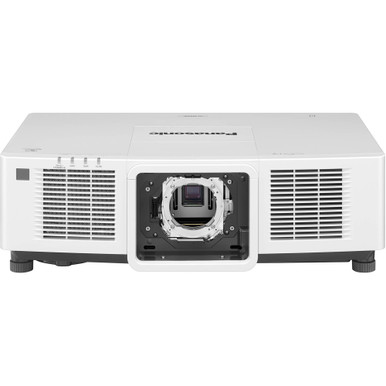
“Panasonic PT-MZ14KLBU7 vs PT-REZ80LBU7: Which Projector Should You Choose?” is a reasonable search, but the answer depends on verified specifications and the room receiving the projector. Churches, schools, conference rooms, and other installed AV spaces bring different screen sizes, lighting conditions, mounting limits, source systems, and control requirements. A close model name cannot settle those questions.
The supplied product facts give one firm starting point: the Panasonic PT-MZ14KLBU7 has WUXGA resolution. They do not provide a matching technical record for the PT-REZ80LBU7, so declaring a universal winner would require unsupported assumptions. This guide explains how to compare the two responsibly, where the documented PT-MZ14KLBU7 fact matters, and what to verify before approving either projector. It also covers price-to-performance, current availability checks, and documented short-throw alternatives for rooms where projection geometry drives the decision.
Products at a Glance
- Option 1: Panasonic PT-MZ14KLBU7 – 3LCD projector
- For golf simulator and installed AV projects that cal…: Panasonic PT-CMZ50 WUXGA Ultra-Short Throw Laser Projector – Professional Golf Simulator Display
- For buyers evaluating an 8,000-lumen WUXGA short-thro…: Panasonic PT-VMZ6STBU8 8,000 Lumens WUXGA Laser Golf Simulator Projector – Short Throw, 4K Input, Black
- For buyers evaluating a 7,000-lumen short-throw Panas…: Panasonic PT-VMZ7STBU8 7,000 Lumens Short Throw Laser Golf Simulator Projector – 0.8:1 Ratio, 4K Input, Black
Quick Comparison Table
| Feature | Panasonic PT-MZ14KLBU7 – 3LCD projector | Panasonic PT-CMZ50 WUXGA Ultra-Short Throw Laser Projector – Professional Golf Simulator Display | Panasonic PT-VMZ6STBU8 8,000 Lumens WUXGA Laser Golf Simulator Projector – Short Throw, 4K Input, Black | Panasonic PT-VMZ7STBU8 7,000 Lumens Short Throw Laser Golf Simulator Projector – 0.8:1 Ratio, 4K Input, Black |
|---|---|---|---|---|
| Brightness | 5200 lumens | 8,000 Lumens | 7,000 Lumens | |
| Resolution | WUXGA | WUXGA | WUXGA | 4K |
| Best For | Teams requiring a WUXGA Panasonic projector that will verify the remaining installation details before purchase. | Golf simulator and installed AV projects that call for ultra-short-throw placement, 5,200-lumen brightness, and WUXGA resolution. | Buyers evaluating an 8,000-lumen WUXGA short-throw Panasonic projector for an installed AV project. | Buyers evaluating a 7,000-lumen short-throw Panasonic projector and prepared to confirm native resolution and signal handling. |
| Throw Type | Ultra short throw | Short throw | Short throw | |
| Recommended Buyer | Teams requiring a WUXGA Panasonic projector that will verify the remaining installation details before purchase. | Golf simulator and installed AV projects that call for ultra-short-throw placement, 5,200-lumen brightness, and WUXGA resolution. | Buyers evaluating an 8,000-lumen WUXGA short-throw Panasonic projector for an installed AV project. | Buyers evaluating a 7,000-lumen short-throw Panasonic projector and prepared to confirm native resolution and signal handling. |
Product Images

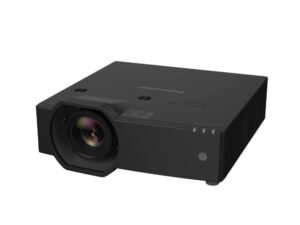
Projector Options from AudioVideoNation
1. Panasonic PT-MZ14KLBU7 – 3LCD projector
Who should compare it: Teams requiring a WUXGA Panasonic projector that will verify the remaining installation details before purchase.
Why it belongs here: It is one of the two projectors in the comparison and has a supplied AudioVideoNation page plus a documented WUXGA resolution.
SKU: PT-MZ14KLBU7
Key Features
- WUXGA resolution
- Panasonic projector listed under SKU PT-MZ14KLBU7
- Dedicated AudioVideoNation product page for the supplied SKU
Things to Consider
Confirm brightness, lens and throw configuration, inputs, control connections, mounting needs, included components, and current commerce details on the linked page.
2. Panasonic PT-CMZ50 WUXGA Ultra-Short Throw Laser Projector – Professional Golf Simulator Display
Who should compare it: Golf simulator and installed AV projects that call for ultra-short-throw placement, 5,200-lumen brightness, and WUXGA resolution.
Why it belongs here: Its documented ultra-short-throw format provides a distinct option for rooms where projector placement is the first constraint.
SKU: PT-CMZ50U
Key Features
- 5,200-lumen brightness
- WUXGA resolution
- Ultra-short-throw format
- Listed in golf simulator and install projector categories
Things to Consider
Confirm image-size coverage, exact placement, mounting, inputs, and control requirements before treating it as a substitute for either compared projector.
3. Panasonic PT-VMZ6STBU8 8,000 Lumens WUXGA Laser Golf Simulator Projector – Short Throw, 4K Input, Black
Who should compare it: Buyers evaluating an 8,000-lumen WUXGA short-throw Panasonic projector for an installed AV project.
Why it belongs here: It supplies a documented 8,000-lumen, WUXGA, short-throw alternative for installations that need those three attributes.
SKU: PT-VMZ82BU8
Key Features
- 8,000-lumen brightness
- WUXGA resolution
- Short-throw format
- Supplied SKU PT-VMZ82BU8
Things to Consider
The supplied SKU is PT-VMZ82BU8 while the provided display name says PT-VMZ6STBU8. Verify the exact orderable model and all technical details on the linked page.
4. Panasonic PT-VMZ7STBU8 7,000 Lumens Short Throw Laser Golf Simulator Projector – 0.8:1 Ratio, 4K Input, Black
Who should compare it: Buyers evaluating a 7,000-lumen short-throw Panasonic projector and prepared to confirm native resolution and signal handling.
Why it belongs here: It adds a documented 7,000-lumen short-throw option for buyers whose room geometry rules out a standard placement plan.
SKU: PT-VMZ7STBU8
Key Features
- 7,000-lumen brightness
- Short-throw format
- 4K resolution designation in the supplied product facts
- Supplied SKU PT-VMZ7STBU8
Things to Consider
The product name references WUXGA and 4K input while the supplied resolution fact says 4K. Confirm native resolution and accepted signal formats before specifying it.
Panasonic PT-MZ14KLBU7 – 3LCD projector vs Panasonic PT-CMZ50 WUXGA Ultra-Short Throw Laser Projector – Professional Golf Simulator Display: Main Differences
- Choose Panasonic PT-MZ14KLBU7 – 3LCD projector if Teams requiring a WUXGA Panasonic projector that will verify the remaining installation details before purchase..
- Choose Panasonic PT-CMZ50 WUXGA Ultra-Short Throw Laser Projector – Professional Golf Simulator Display if Golf simulator and installed AV projects that call for ultra-short-throw placement, 5,200-lumen brightness, and WUXGA resolution..
- Choose Panasonic PT-VMZ6STBU8 8,000 Lumens WUXGA Laser Golf Simulator Projector – Short Throw, 4K Input, Black if Buyers evaluating an 8,000-lumen WUXGA short-throw Panasonic projector for an installed AV project..
- Choose Panasonic PT-VMZ7STBU8 7,000 Lumens Short Throw Laser Golf Simulator Projector – 0.8:1 Ratio, 4K Input, Black if Buyers evaluating a 7,000-lumen short-throw Panasonic projector and prepared to confirm native resolution and signal handling..
Panasonic projector comparison: start with matched evidence
A useful Panasonic projector comparison puts the same verified fields beside each other. Begin with brightness, native resolution, throw or lens configuration, supported sources, control connections, physical installation needs, and included components. The supplied facts confirm WUXGA resolution for the PT-MZ14KLBU7. That is the only documented head-to-head specification here.
Obtain a current technical sheet for the PT-REZ80LBU7 and complete the same worksheet before comparing the models. Verify the PT-MZ14KLBU7’s remaining installation details at the same time. This keeps the decision balanced. One projector should not win because its documentation is more complete in an early purchasing brief.
Treat the model names as identifiers, not evidence of shared capabilities. If a required field cannot be confirmed, leave the selection open and ask AudioVideoNation or the manufacturer for clarification. That short pause can prevent a projector, lens, mount, or signal-path choice that does not fit the finished room.
Projector deployment planning for churches, schools, and meeting rooms
Deployment fit starts with the room. A church may need to account for a large screen, ambient light, long operating sessions, and controls that volunteers can follow. A school may place greater weight on standardized sources, repeatable room layouts, service access, and simple support across several installations. Conference room teams often need predictable presentation handling, control-system coordination, and a clean mounting plan.
Document the screen dimensions, projector location, available mounting points, viewing distance, room lighting, source equipment, cabling, and control method. Then test each candidate against that survey. Do not begin with the product and force the room around it.
For the PT-MZ14KLBU7, WUXGA can satisfy a project that explicitly calls for that resolution, but resolution alone does not establish room fit. Apply the same deployment checklist to the PT-REZ80LBU7 once its specifications are verified. The better choice is the projector that clears every required installation condition without relying on assumptions.
What the WUXGA Panasonic PT-MZ14KLBU7 fact tells you
The supplied catalog facts identify the PT-MZ14KLBU7 as a WUXGA projector. That gives buyers a concrete resolution checkpoint for presentation computers, media systems, and other planned sources. If WUXGA is written into the project requirements, the PT-MZ14KLBU7 can move forward to the next stage of review.
WUXGA does not answer questions about brightness, throw, lens coverage, input handling, mounting, or control. Confirm those details on the linked product page or through a current technical document. For the PT-REZ80LBU7, verify native resolution directly before comparing image formats. Do not infer it from the series name.
Also review the actual content. Spreadsheets, worship lyrics, lesson material, video, and conference presentations can place different demands on the display system. Match the verified projector resolution to the source plan and the content workflow used in the room.
Lens and throw planning can decide the comparison early
Projection geometry can remove a candidate before price or resolution becomes decisive. Confirm the required image size, lens-to-screen distance, mounting height, possible obstructions, and acceptable projector location. Then check whether each projector’s verified lens arrangement covers that layout.
Validate the lens and throw information for both the PT-MZ14KLBU7 and PT-REZ80LBU7. Find out whether the required lens is included, selected separately, or fixed. A shared Panasonic brand name does not establish lens compatibility. The Panasonic ET-D75LE95 appears in the supplied selection as a short-throw lens product, but the provided facts do not connect it to either compared projector. Compatibility needs written confirmation.
If the room requires short placement, the supplied alternatives provide documented starting points. The PT-CMZ50U is ultra short throw, while the PT-VMZ82BU8 and PT-VMZ7STBU8 are short throw. These are separate projector choices, not automatic substitutes. Recheck resolution, brightness, sources, mounting, and control before changing the specification.
How to judge price-to-performance without guessing
Price-to-performance begins with a current quote and a verified installation plan. Compare the full deployed cost against the requirements each projector actually satisfies. Include any required lens, mount, screen changes, cabling, signal equipment, control work, installation labor, and commissioning. A lower product-page figure can lead to a costlier project if the room needs major changes around it.
Build a simple pass-or-fail list before considering commercial details. Include required brightness, native resolution, lens coverage, source support, control connections, mounting limits, and any purchasing terms your organization must review. Score only documented capabilities. An unverified specification has no value in that calculation.
Ask for comparable live quotes for the PT-MZ14KLBU7 and PT-REZ80LBU7 after both configurations are defined. The useful comparison is between complete, installable solutions. This approach also helps churches, schools, and corporate teams explain the purchase to finance staff without leaning on vague performance language.
Stock and availability: verify at decision time
Use the linked product pages and a current seller quote for live commerce details. This article does not confirm inventory. Before issuing a purchase order, verify the orderable SKU, expected fulfillment timing, included components, and any separately required installation items.
The supplied information includes an AudioVideoNation page for the PT-MZ14KLBU7 but no PT-REZ80LBU7 product link. Ask for the current PT-REZ80LBU7 listing and ordering code rather than substituting a similarly named product. If availability changes the shortlist, run the replacement through the same room survey and specification checklist.
Schedule risk matters in installed AV. Coordinate projector delivery with the screen, mount, cabling, construction access, and commissioning date so one delayed or incorrect component does not disrupt the installation plan.
Documented short throw projector alternatives
The supplied products include three Panasonic projectors worth reviewing when throw distance changes the brief. The PT-CMZ50U combines 5,200-lumen brightness, WUXGA resolution, and an ultra-short-throw format. It is the clearest documented option here for projects that specifically require ultra-short-throw placement.
The PT-VMZ82BU8 has 8,000-lumen brightness, WUXGA resolution, and a short-throw format. Its supplied SKU and display name use different model strings, so confirm the exact orderable product before specification. The PT-VMZ7STBU8 has 7,000-lumen brightness and a short-throw format. Its supplied resolution field and product name describe 4K differently, making native resolution and accepted signal formats essential verification points.
These alternatives broaden the search without resolving the original comparison by themselves. Use them if a site survey shows that the PT-MZ14KLBU7 or PT-REZ80LBU7 cannot meet the room geometry. Each alternative still needs a complete review of lens coverage, sources, control, mounting, and current commercial details.
Final choice: set a verification gate before purchase
Choose the PT-MZ14KLBU7 when WUXGA is a confirmed project requirement and its verified brightness, lens plan, connectivity, control, and mounting details clear the room survey. The supplied facts support that conditional path. They do not support calling it the universal winner.
Keep the PT-REZ80LBU7 under consideration only after obtaining an equivalent technical record. Compare the same fields, using the same room and content requirements. If it clears the project requirements and produces the stronger complete-system proposal, it may be the appropriate choice. The current inputs cannot establish that outcome.
Before approval, confirm five items: the exact orderable SKU, matched technical specifications, projection geometry, a complete installed quote, and current availability. Record those findings in the project file. If short or ultra-short throw becomes mandatory, review the documented alternatives instead of forcing either original candidate into an unsuitable mounting position. That creates a defensible buying decision for installers, technology teams, and budget owners.
Related AudioVideoNation Links
- Browse Projector at AudioVideoNation
- View the Panasonic PT-MZ14KLBU7 projector
- Explore the Panasonic PT-CMZ50U ultra-short-throw projector
- Review the Panasonic PT-VMZ82BU8 projector listing
- Review the Panasonic PT-VMZ7STBU8 short-throw projector
Product Information Sources
- Panasonic PT-MZ14KLBU7 – 3LCD projector product information
- Panasonic PT-CMZ50 WUXGA Ultra-Short Throw Laser Projector – Professional Golf Simulator Display product information
- Panasonic PT-VMZ6STBU8 8,000 Lumens WUXGA Laser Golf Simulator Projector – Short Throw, 4K Input, Black product information
- Panasonic PT-VMZ7STBU8 7,000 Lumens Short Throw Laser Golf Simulator Projector – 0.8:1 Ratio, 4K Input, Black product information
FAQ
Can the supplied facts identify a clear winner between the PT-MZ14KLBU7 and PT-REZ80LBU7?
No, the supplied facts do not support a complete winner between the PT-MZ14KLBU7 and PT-REZ80LBU7. They document WUXGA resolution for the PT-MZ14KLBU7 but do not provide a matched technical record for the PT-REZ80LBU7.
What resolution is documented for the Panasonic PT-MZ14KLBU7?
The Panasonic PT-MZ14KLBU7 has WUXGA resolution in the supplied catalog facts. Buyers should still confirm brightness, lens configuration, sources, control, and mounting details before approving it.
Which provided Panasonic projector has an ultra-short-throw format?
The PT-CMZ50U is the provided Panasonic ultra-short-throw projector option. Its documented facts also include 5,200-lumen brightness and WUXGA resolution.
How should buyers compare price-to-performance for these projectors?
Buyers should compare current total installed cost with verified brightness, resolution, throw, lens, and integration requirements. Use live quotes and include required mounting, cabling, control, installation, and commissioning rather than comparing projector figures alone.
How can buyers confirm stock and availability?
Buyers should check the linked product page or obtain a current quote immediately before purchasing. Confirm the exact SKU, expected fulfillment timing, and included components because this article does not make an inventory claim.
Can the ET-D75LE95 lens be assumed compatible with either compared projector?
No, the ET-D75LE95 should not be assumed compatible with either compared projector from the supplied information. Ask for written lens compatibility and image-coverage confirmation before adding it to a system design.
Conclusion
Use this Panasonic PT-MZ14KLBU7 vs PT-REZ80LBU7: Which Projector Should You Choose? comparison to match documented specifications to the room and installation requirements. Review the linked product pages for current purchase details before ordering.
Products Used
| SKU | Product Name | URL |
|---|---|---|
| PT-MZ14KLBU7 | Panasonic PT-MZ14KLBU7 – 3LCD projector | View product |
| PT-CMZ50U | Panasonic PT-CMZ50 WUXGA Ultra-Short Throw Laser Projector – Professional Golf Simulator Display | View product |
| PT-VMZ82BU8 | Panasonic PT-VMZ6STBU8 8,000 Lumens WUXGA Laser Golf Simulator Projector – Short Throw, 4K Input, Black | View product |
| PT-VMZ7STBU8 | Panasonic PT-VMZ7STBU8 7,000 Lumens Short Throw Laser Golf Simulator Projector – 0.8:1 Ratio, 4K Input, Black | View product |