

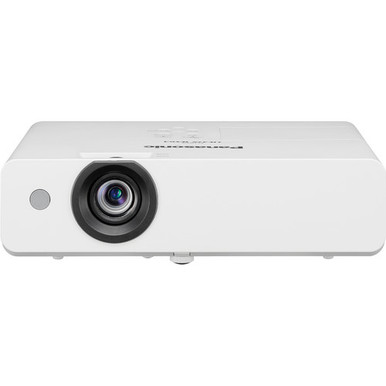
Buying a projector from two headline specifications can leave an installer with the wrong image size, mounting position, or signal plan. This Panasonic PT-LW375U Setup Guide and Buying Considerations resource turns the confirmed facts—3600 lumens and WXGA resolution—into a practical pre-purchase and deployment process.
The PT-LW375U is the baseline. The PT-CMZ50U, PT-VMZ72BU8, PT-VMZ51, and PT-VMZ51S provide comparison paths for WUXGA resolution, higher listed lumen figures, or ultra-short-throw placement. This guide helps AV buyers, installers, churches, schools, and conference room teams decide which path fits their project.
Start with the room and content. Then validate geometry, infrastructure, operating workflow, and the exact SKU. Brightness alone cannot settle deployment fit, and a resolution label cannot confirm connection, control, audio, lens, mounting, or service requirements. Use the linked product pages for current price and availability near the purchase date. For every technical point beyond the supplied facts, confirm the current manufacturer documentation and seller listing before specifying equipment.
Products at a Glance
- Option 1: Panasonic PT-LW375U 3600-Lumen WXGA 3LCD Projector
- For projects where ultra-short-throw placement is a d…: Panasonic PT-CMZ50 WUXGA Ultra-Short Throw Laser Projector – Professional Golf Simulator Display
- For buyers evaluating the supplied shortlist's highes…: Panasonic PT-VMZ72BU8 7,300 Lumens WUXGA Laser Golf Simulator Projector – High-Brightness, Vivid Green Mode
- For teams comparing a 5200-lumen WUXGA Panasonic opti…: Panasonic PT-VMZ51 5200-Lumen WUXGA Laser 3LCD Projector
- For procurement teams asked to evaluate the exact PT-…: Panasonic PT-VMZ51S 5200-Lumen WUXGA Laser 3LCD Projector
Quick Comparison Table
| Feature | Panasonic PT-LW375U 3600-Lumen WXGA 3LCD Projector | Panasonic PT-CMZ50 WUXGA Ultra-Short Throw Laser Projector – Professional Golf Simulator Display | Panasonic PT-VMZ72BU8 7,300 Lumens WUXGA Laser Golf Simulator Projector – High-Brightness, Vivid Green Mode | Panasonic PT-VMZ51 5200-Lumen WUXGA Laser 3LCD Projector | Panasonic PT-VMZ51S 5200-Lumen WUXGA Laser 3LCD Projector |
|---|---|---|---|---|---|
| Brightness | 3600 lumens | 5200 lumens | 7,300 Lumens | 5200 lumens | 5200 lumens |
| Resolution | WXGA | WUXGA | WUXGA | WUXGA | WUXGA |
| Best For | Teams evaluating a Panasonic 3600-lumen WXGA projector and prepared to verify the remaining design requirements before purchase. | Projects where ultra-short-throw placement is a documented requirement and a 5200-lumen WUXGA specification fits the design brief. | Buyers evaluating the supplied shortlist's highest lumen figure alongside WUXGA resolution. | Teams comparing a 5200-lumen WUXGA Panasonic option and prepared to complete a SKU-specific design review. | Procurement teams asked to evaluate the exact PT-VMZ51S SKU within a 5200-lumen WUXGA design path. |
| Throw Type | Ultra short throw | ||||
| Recommended Buyer | Teams evaluating a Panasonic 3600-lumen WXGA projector and prepared to verify the remaining design requirements before purchase. | Projects where ultra-short-throw placement is a documented requirement and a 5200-lumen WUXGA specification fits the design brief. | Buyers evaluating the supplied shortlist's highest lumen figure alongside WUXGA resolution. | Teams comparing a 5200-lumen WUXGA Panasonic option and prepared to complete a SKU-specific design review. | Procurement teams asked to evaluate the exact PT-VMZ51S SKU within a 5200-lumen WUXGA design path. |
Product Images

Projector Options from AudioVideoNation
1. Panasonic PT-LW375U 3600-Lumen WXGA 3LCD Projector
Who should compare it: Teams evaluating a Panasonic 3600-lumen WXGA projector and prepared to verify the remaining design requirements before purchase.
Why it belongs here: It is the subject of this setup guide and the exact PT-LW375U listing in the supplied products. Its confirmed 3600-lumen brightness and WXGA resolution establish the baseline for room, content, and installation checks.
SKU: PT-LW375U
Key Features
- 3600-lumen listed brightness
- WXGA resolution
- Listed in the Multimedia Projectors category
Things to Consider
Verify throw geometry, connections, supported signals, audio, control, mounting, and service requirements for this exact SKU. Model brightness against the planned screen and actual room lighting.
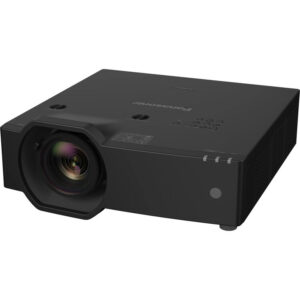
2. Panasonic PT-CMZ50 WUXGA Ultra-Short Throw Laser Projector – Professional Golf Simulator Display
Who should compare it: Projects where ultra-short-throw placement is a documented requirement and a 5200-lumen WUXGA specification fits the design brief.
Why it belongs here: It adds the shortlist's confirmed ultra-short-throw option while changing the listed brightness to 5200 lumens and the resolution to WUXGA. That combination creates a distinct placement path to evaluate.
SKU: PT-CMZ50U
Key Features
- 5200-lumen listed brightness
- WUXGA resolution
- Ultra-short-throw classification
Things to Consider
Do not treat it as a drop-in PT-LW375U substitute. Recalculate placement and verify every connection, signal, mounting, audio, control, and service requirement.
3. Panasonic PT-VMZ72BU8 7,300 Lumens WUXGA Laser Golf Simulator Projector – High-Brightness, Vivid Green Mode
Who should compare it: Buyers evaluating the supplied shortlist's highest lumen figure alongside WUXGA resolution.
Why it belongs here: Its confirmed 7,300-lumen figure is the highest in the supplied group, and it uses WUXGA resolution. It gives teams a clear branch for projects whose brightness study calls for a higher listed output.
SKU: PT-VMZ72BU8
Key Features
- 7,300-lumen listed brightness
- WUXGA resolution
- Listed in the Golf Simulator Projectors category
Things to Consider
A higher lumen figure does not prove fit for a particular room or screen. Verify throw geometry, inputs, supported formats, controls, mounting, and operating requirements before specification.
4. Panasonic PT-VMZ51 5200-Lumen WUXGA Laser 3LCD Projector
Who should compare it: Teams comparing a 5200-lumen WUXGA Panasonic option and prepared to complete a SKU-specific design review.
Why it belongs here: It supplies a 5200-lumen WUXGA comparison point without adding an unverified throw classification. Buyers can assess its confirmed headline facts and then validate the installation details separately.
SKU: PT-VMZ51
Key Features
- 5200-lumen listed brightness
- WUXGA resolution
- Listed in the Home Theater Projectors category
Things to Consider
The supplied data does not establish throw geometry, connectivity, audio, control, or mounting details. Compare the exact PT-VMZ51 documentation with the project requirements and with PT-VMZ51S.
5. Panasonic PT-VMZ51S 5200-Lumen WUXGA Laser 3LCD Projector
Who should compare it: Procurement teams asked to evaluate the exact PT-VMZ51S SKU within a 5200-lumen WUXGA design path.
Why it belongs here: It gives procurement teams an exact PT-VMZ51S listing to validate. Its supplied brightness and resolution match PT-VMZ51, making an SKU-level comparison necessary before either listing is approved.
SKU: PT-VMZ51S
Key Features
- 5200-lumen listed brightness
- WUXGA resolution
- Listed in the Home Theater Projectors category
Things to Consider
The supplied facts do not define differences between PT-VMZ51S and PT-VMZ51 beyond their listing identities. Compare current product pages and official documentation field by field before choosing.
Panasonic PT-LW375U 3600-Lumen WXGA 3LCD Projector vs Panasonic PT-CMZ50 WUXGA Ultra-Short Throw Laser Projector – Professional Golf Simulator Display: Main Differences
- Choose Panasonic PT-LW375U 3600-Lumen WXGA 3LCD Projector if Teams evaluating a Panasonic 3600-lumen WXGA projector and prepared to verify the remaining design requirements before purchase..
- Choose Panasonic PT-CMZ50 WUXGA Ultra-Short Throw Laser Projector – Professional Golf Simulator Display if Projects where ultra-short-throw placement is a documented requirement and a 5200-lumen WUXGA specification fits the design brief..
- Choose Panasonic PT-VMZ72BU8 7,300 Lumens WUXGA Laser Golf Simulator Projector – High-Brightness, Vivid Green Mode if Buyers evaluating the supplied shortlist's highest lumen figure alongside WUXGA resolution..
- Choose Panasonic PT-VMZ51 5200-Lumen WUXGA Laser 3LCD Projector if Teams comparing a 5200-lumen WUXGA Panasonic option and prepared to complete a SKU-specific design review..
- Choose Panasonic PT-VMZ51S 5200-Lumen WUXGA Laser 3LCD Projector if Procurement teams asked to evaluate the exact PT-VMZ51S SKU within a 5200-lumen WUXGA design path..
Deployment fit for churches, schools, and conference rooms
Define an acceptance target before settling on a model number. Write down the intended image width, viewing distance, room-lighting conditions, source content, operating schedule, and mounting restrictions. Those details turn a catalog shortlist into a defensible design.
Content matters. A church may need lyrics and camera feeds to remain readable from the back row. A school may prioritize slides, diagrams, and small interface text. A conference room team may need spreadsheets and remote-participant layouts. Recreate the hardest material during evaluation instead of relying on a generic demo image.
Document room lighting in its actual operating states. Include daylight, task lighting, presentation lighting, and any light that falls directly on the screen. Treat the PT-LW375U's 3600-lumen figure as one design input. Screen size, screen surface, ambient light, and content all affect the result.
Set pass-or-fail criteria before comparing alternatives. The PT-LW375U remains a candidate when its WXGA resolution and 3600-lumen brightness fit those criteria and the remaining installation requirements can be verified.
Panasonic PT-LW375U setup: solve geometry first
Start with a dimensioned room drawing. Mark the screen edges and centerline, seating positions, sight lines, ceiling obstructions, and every permitted projector location. Then obtain the PT-LW375U's exact throw-distance range, image-position behavior, supported installation orientations, physical dimensions, and required clearances from current official documentation.
Do not copy placement measurements from another Panasonic projector. A shared brand does not establish matching optics or mounting geometry. Before hardware is ordered, the installer should document:
- The target image size and any acceptable size range.
- The permitted mounting zone and structural attachment point.
- A code-compliant power location.
- Airflow and service clearances taken from the current manual.
- The complete signal path from each source to the projector.
Check mount selection against verified dimensions and weight. Confirm that the planned location leaves access for connections and maintenance. Do not budget around zoom, lens shift, or electronic geometry correction until each required capability is documented for this exact SKU.
During installation, display real source content before final alignment. Confirm the measured image fits the planned screen without forcing the mount outside its approved location. Measure twice. Drilling comes later.
3600-lumen WXGA projector: assess brightness and content
The 3600-lumen rating does not describe the whole image system. Record the image size, screen surface, ambient-light level, and operating mode expected in the room. If daylight or presentation lighting creates a difficult environment, use a qualified AV design calculation or an on-site mock-up before committing to the design.
WXGA is the confirmed PT-LW375U resolution class. Evaluate it with the smallest fonts, densest diagrams, lyrics, spreadsheets, and interface elements the audience must read. Test from the farthest planned seat. Also confirm how every source's output format will be handled, since the supplied facts do not establish supported signal formats or scaling behavior.
The four supplied alternatives carry WUXGA resolution, creating a separate resolution path for comparison. Select that path when the content test or an organizational standard calls for it. A change in resolution does not settle brightness, placement, connectivity, or control.
Before purchase, verify the exact native pixel dimensions, accepted input formats, aspect-ratio handling, and any required source settings in current documentation.
Signal, audio, and control checks before purchase
Build a source-to-screen diagram before ordering. For every computer, media player, camera system, or conferencing source, record its connector, output resolution, frame rate, content-protection needs, and cable distance. Cross-check that matrix against the exact projector documentation. Do not infer an input or supported format from the product category.
Long cable runs need their own design review. Choose cable type, signal extension, conversion, and pathway only after the endpoints and required format are confirmed. Include wall plates, floor boxes, racks, and any shared switching equipment in the drawing.
Define audio separately. If the room depends on projector audio, verify the needed input, output, speaker, and control capabilities. If sound moves through a house system, classroom amplifier, or conference room audio chain, document the handoff point and test synchronization with the actual content.
Control deserves the same treatment. Decide how users will start and stop the system, select sources, adjust permitted settings, and report problems. Verify every required remote, wired, or network function for the exact SKU. Finally, plan physical access and all maintenance tasks described in the current manual.
Panasonic projector alternatives from the supplied shortlist
The alternatives change specific, confirmed selection variables. Compare those variables first, then run the full design check again.
- PT-CMZ50U: This option is listed at 5200 lumens with WUXGA resolution and ultra-short-throw placement. It belongs on the shortlist when limited projection distance is a core design constraint.
- PT-VMZ72BU8: This option is listed at 7,300 lumens with WUXGA resolution. It has the highest supplied lumen figure in this group, but the room, screen, content, and placement still determine deployment fit.
- PT-VMZ51: This option is listed at 5200 lumens with WUXGA resolution. Verify its throw geometry, connections, controls, and installation requirements before comparing complete system cost.
- PT-VMZ51S: This separate SKU also has a supplied 5200-lumen figure and WUXGA resolution. The supplied facts do not document an operational difference from PT-VMZ51, so compare the two current product pages and official documents field by field.
None of these projectors is an automatic replacement for the PT-LW375U. Changing brightness, resolution, or throw type can affect the wider design. Repeat the geometry, signal, audio, control, mounting, and commissioning checks for every candidate.
Price-to-performance, stock, and availability
Build price-to-performance from the complete installed system. Include the projector plus every applicable screen, mount, cable, signal extender, control component, audio component, installation task, and commissioning task. First remove candidates that fail a required design criterion. Then compare the current cost of the compliant options.
A higher lumen figure earns its place when the room design needs it. WUXGA earns its place when the content test or project standard calls for that resolution. Ultra-short throw has value when it solves a documented placement constraint. Buying an unused capability can consume budget without fixing the room's actual problem.
Check stock and availability on each linked product page at ordering time. For a schedule-sensitive project, confirm the exact SKU, required quantity, lead time, and included contents before releasing the purchase order. Record the date of that confirmation because live commerce details can change.
SKU discipline matters with PT-VMZ51 and PT-VMZ51S. Their supplied brightness and resolution are the same, but that does not establish that the listings are interchangeable. Validate the ordered identifier against the approved design.
Final installation and handoff checklist
Release the order only after the project file answers six questions:
- Has the image size and viewing-distance target been approved?
- Does verified throw geometry place the projector in an allowed mounting zone?
- Have all source formats, connections, cable runs, and signal extensions been checked?
- Are audio and control responsibilities documented?
- Are mounting, power, airflow, access, and service requirements covered?
- Does the quote use the exact approved SKU with current commerce details?
When the projector arrives, confirm the SKU and included contents against the order before installation. Commission it with production content under the lighting states users will encounter. Check image size, alignment, focus, and the smallest required text from the farthest seat. Test every intended source and cable route. Then verify the chosen audio path, control workflow, startup, and shutdown process.
Record approved settings, label cables, and retain the current documentation with the room file. Give operators a short workflow that matches the installed system. Any failed acceptance criterion should be resolved before handoff. That final check turns the PT-LW375U's 3600-lumen and WXGA baseline into a deployment decision the team can support.
Related AudioVideoNation Links
- Browse Projector at AudioVideoNation
- Panasonic PT-LW375U product page
- Panasonic PT-CMZ50 product page
- Panasonic PT-VMZ72BU8 product page
- Panasonic PT-VMZ51 product page
Product Information Sources
- Panasonic PT-LW375U 3600-Lumen WXGA 3LCD Projector product information
- Panasonic PT-CMZ50 WUXGA Ultra-Short Throw Laser Projector – Professional Golf Simulator Display product information
- Panasonic PT-VMZ72BU8 7,300 Lumens WUXGA Laser Golf Simulator Projector – High-Brightness, Vivid Green Mode product information
- Panasonic PT-VMZ51 5200-Lumen WUXGA Laser 3LCD Projector product information
- Panasonic PT-VMZ51S 5200-Lumen WUXGA Laser 3LCD Projector product information
FAQ
What PT-LW375U specifications are confirmed in this guide?
The confirmed PT-LW375U specifications supplied for this guide are 3600 lumens and WXGA resolution. Verify its throw geometry, connections, supported formats, audio, control, dimensions, and mounting requirements in current official documentation.
Is the Panasonic PT-LW375U suitable for a bright room?
The supplied 3600-lumen figure alone cannot establish whether the PT-LW375U will meet a bright room's requirements. Evaluate the planned screen size and surface, ambient light, content, and viewing distance through an AV design calculation or representative test.
How should an installer determine PT-LW375U throw distance?
Use current official installation documentation and measured room dimensions to determine the PT-LW375U's exact throw distance before mounting. Confirm the target image size, permitted projector zone, image-position behavior, and required clearances before drilling.
When should a buyer consider a WUXGA alternative?
Consider a WUXGA alternative when the content test or project standard calls for that resolution and the alternative passes every other design check. The supplied WUXGA options have listed brightness figures of 5200 or 7,300 lumens, while only PT-CMZ50U has a confirmed ultra-short-throw classification.
Where should buyers check PT-LW375U price and availability?
Check the linked PT-LW375U product page for current price and availability immediately before ordering. For schedule-sensitive purchases, confirm the exact SKU, quantity, lead time, and included contents near the purchase date.
Are the supplied Panasonic projectors interchangeable?
No, none of the supplied Panasonic projectors should be treated as a drop-in replacement for another without a new design check. Brightness, resolution, and throw type differ across the shortlist, while other installation requirements still need verification.
Conclusion
Use this Panasonic PT-LW375U Setup Guide and Buying Considerations comparison to match documented specifications to the room and installation requirements. Review the linked product pages for current purchase details before ordering.
Products Used
| SKU | Product Name | URL |
|---|---|---|
| PT-LW375U | Panasonic PT-LW375U 3600-Lumen WXGA 3LCD Projector | View product |
| PT-CMZ50U | Panasonic PT-CMZ50 WUXGA Ultra-Short Throw Laser Projector – Professional Golf Simulator Display | View product |
| PT-VMZ72BU8 | Panasonic PT-VMZ72BU8 7,300 Lumens WUXGA Laser Golf Simulator Projector – High-Brightness, Vivid Green Mode | View product |
| PT-VMZ51 | Panasonic PT-VMZ51 5200-Lumen WUXGA Laser 3LCD Projector | View product |
| PT-VMZ51S | Panasonic PT-VMZ51S 5200-Lumen WUXGA Laser 3LCD Projector | View product |