

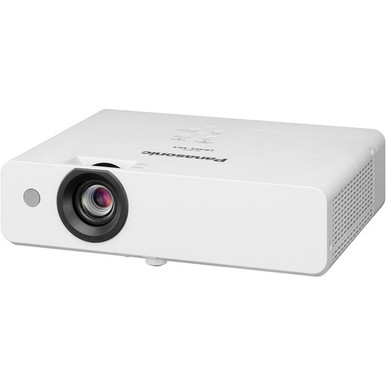
This Panasonic PT-LB355U Setup Guide and Buying Considerations resource is for teams that need to solve two decisions at once: whether the projector fits the room and how to prepare a defensible installation plan. The confirmed anchors are 3,300 lumens and XGA resolution. Those facts narrow the field, but they do not settle throw distance, source connections, control, mounting, audio, or screen fit.
The PT-LB355U is the focus. Three Panasonic alternatives provide useful checkpoints: the 5,200-lumen WUXGA PT-CMZ50U with ultra-short-throw placement, the 7,300-lumen WUXGA PT-VMZ72BU8, and the 5,200-lumen WUXGA PT-VMZ51. This guide shows how to evaluate deployment fit, stage setup, compare resolution and brightness, and review live price and availability without treating one specification as the whole decision. Use the linked product pages and model documentation to confirm every installation-critical detail before ordering.
Products at a Glance
- Option 1: Panasonic PT-LB355U 3300-Lumen XGA 3LCD Projector
- For projects whose written design calls for an ultra-…: Panasonic PT-CMZ50 WUXGA Ultra-Short Throw Laser Projector – Professional Golf Simulator Display
- For buyers evaluating a 7,300-lumen WUXGA projector a…: Panasonic PT-VMZ72BU8 7,300 Lumens WUXGA Laser Golf Simulator Projector – High-Brightness, Vivid Green Mode
- For aV teams comparing 5,200-lumen WUXGA requirements…: Panasonic PT-VMZ51 5200-Lumen WUXGA Laser 3LCD Projector
Quick Comparison Table
| Feature | Panasonic PT-LB355U 3300-Lumen XGA 3LCD Projector | Panasonic PT-CMZ50 WUXGA Ultra-Short Throw Laser Projector – Professional Golf Simulator Display | Panasonic PT-VMZ72BU8 7,300 Lumens WUXGA Laser Golf Simulator Projector – High-Brightness, Vivid Green Mode | Panasonic PT-VMZ51 5200-Lumen WUXGA Laser 3LCD Projector |
|---|---|---|---|---|
| Brightness | 3300 lumens | 5200 lumens | 7,300 Lumens | 5200 lumens |
| Resolution | XGA | WUXGA | WUXGA | WUXGA |
| Best For | Teams whose approved content and room plan call for a 3,300-lumen XGA projector and who can verify installation details before purchase. | Projects whose written design calls for an ultra-short-throw layout, WUXGA resolution, and a 5,200-lumen brightness class. | Buyers evaluating a 7,300-lumen WUXGA projector against measured room, screen, image-size, and content requirements. | AV teams comparing 5,200-lumen WUXGA requirements with the PT-LB355U’s 3,300-lumen XGA specification. |
| Throw Type | Ultra short throw | |||
| Recommended Buyer | Teams whose approved content and room plan call for a 3,300-lumen XGA projector and who can verify installation details before purchase. | Projects whose written design calls for an ultra-short-throw layout, WUXGA resolution, and a 5,200-lumen brightness class. | Buyers evaluating a 7,300-lumen WUXGA projector against measured room, screen, image-size, and content requirements. | AV teams comparing 5,200-lumen WUXGA requirements with the PT-LB355U’s 3,300-lumen XGA specification. |
Product Images

Projector Options from AudioVideoNation
1. Panasonic PT-LB355U 3300-Lumen XGA 3LCD Projector
Who should compare it: Teams whose approved content and room plan call for a 3,300-lumen XGA projector and who can verify installation details before purchase.
Why it belongs here: The PT-LB355U is the reference product for this setup guide. Its confirmed 3,300-lumen brightness and XGA resolution give buyers a clear starting point for room, screen, and content testing.
SKU: PT-LB355U
Key Features
- 3,300-lumen brightness
- XGA resolution
- Exact SKU PT-LB355U for procurement matching
Things to Consider
Confirm throw distance, supported source signals, connections, mounting requirements, control, audio planning, and ventilation against the intended room before ordering.
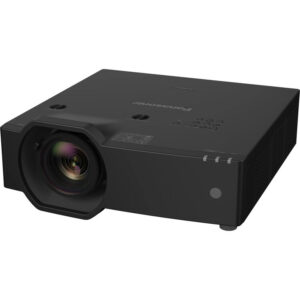
2. Panasonic PT-CMZ50 WUXGA Ultra-Short Throw Laser Projector – Professional Golf Simulator Display
Who should compare it: Projects whose written design calls for an ultra-short-throw layout, WUXGA resolution, and a 5,200-lumen brightness class.
Why it belongs here: The PT-CMZ50U provides a distinct placement alternative with ultra-short-throw classification, 5,200-lumen brightness, and WUXGA resolution.
SKU: PT-CMZ50U
Key Features
- 5,200-lumen brightness
- WUXGA resolution
- Ultra-short-throw classification
- Exact SKU PT-CMZ50U for procurement matching
Things to Consider
Do not reuse a PT-LB355U mounting plan. Verify image geometry, surface requirements, mounting, source connections, control, and audio for the exact installation.
3. Panasonic PT-VMZ72BU8 7,300 Lumens WUXGA Laser Golf Simulator Projector – High-Brightness, Vivid Green Mode
Who should compare it: Buyers evaluating a 7,300-lumen WUXGA projector against measured room, screen, image-size, and content requirements.
Why it belongs here: The PT-VMZ72BU8 supplies the highest stated brightness in the provided set at 7,300 lumens, paired with WUXGA resolution. It creates a useful comparison for briefs that require both specifications.
SKU: PT-VMZ72BU8
Key Features
- 7,300-lumen brightness
- WUXGA resolution
- Highest stated brightness among the listed options
- Exact SKU PT-VMZ72BU8 for procurement matching
Things to Consider
Confirm throw geometry, mounting, inputs, accepted source signals, control, audio path, power, and ventilation. Higher stated brightness should answer a documented requirement.
4. Panasonic PT-VMZ51 5200-Lumen WUXGA Laser 3LCD Projector
Who should compare it: AV teams comparing 5,200-lumen WUXGA requirements with the PT-LB355U’s 3,300-lumen XGA specification.
Why it belongs here: The PT-VMZ51 is a 5,200-lumen WUXGA comparison for buyers who want to evaluate a higher resolution class and brightness figure without assuming an ultra-short-throw layout.
SKU: PT-VMZ51
Key Features
- 5,200-lumen brightness
- WUXGA resolution
- Exact SKU PT-VMZ51 for procurement matching
Things to Consider
Treat placement as an independent design task. Verify throw distance, mounting, supported signals, connections, control, audio, power, and clearance requirements.
Panasonic PT-LB355U 3300-Lumen XGA 3LCD Projector vs Panasonic PT-CMZ50 WUXGA Ultra-Short Throw Laser Projector – Professional Golf Simulator Display: Main Differences
- Choose Panasonic PT-LB355U 3300-Lumen XGA 3LCD Projector if Teams whose approved content and room plan call for a 3,300-lumen XGA projector and who can verify installation details before purchase..
- Choose Panasonic PT-CMZ50 WUXGA Ultra-Short Throw Laser Projector – Professional Golf Simulator Display if Projects whose written design calls for an ultra-short-throw layout, WUXGA resolution, and a 5,200-lumen brightness class..
- Choose Panasonic PT-VMZ72BU8 7,300 Lumens WUXGA Laser Golf Simulator Projector – High-Brightness, Vivid Green Mode if Buyers evaluating a 7,300-lumen WUXGA projector against measured room, screen, image-size, and content requirements..
- Choose Panasonic PT-VMZ51 5200-Lumen WUXGA Laser 3LCD Projector if AV teams comparing 5,200-lumen WUXGA requirements with the PT-LB355U’s 3,300-lumen XGA specification..
PT-LB355U setup starts with deployment fit
Write the room brief before choosing a mounting point. Record the intended image size, viewing distances, ambient-light conditions, screen or wall surface, primary content, source locations, and operating schedule. Then document how people will turn the system on, select a source, control volume, and get help. Short brief. Big payoff.
Schools should test the lesson material teachers use, including small text and diagrams. Churches can check lyrics, presentation slides, and video from the actual positions occupied by the congregation and production team. Conference room teams should include spreadsheets, dashboards, and remote-meeting layouts. Installers also need an approved cable route, power location, ventilation plan, mounting method, and service access.
Deployment fit exists only when these constraints agree. A projector can meet the stated brightness and resolution requirements yet still be wrong for a planned image size or source system. Freeze the brief, assign an owner to each unresolved item, and obtain signoff before hardware placement begins.
How to judge a 3,300-lumen XGA projector
The PT-LB355U has a stated brightness of 3,300 lumens and XGA resolution. Treat both as screening specifications. The lumen figure should be evaluated against the actual room, screen, image size, and lighting plan. Don’t label the room suitable from the number alone. Test representative content under the lighting conditions people will use.
XGA also needs a content check. Ask whether presentations, signage layouts, spreadsheets, diagrams, and video remain clear at the intended viewing distance. If the organization has standardized on XGA material, the PT-LB355U may align with that workflow. If fine detail or WUXGA content is central to the brief, compare the provided WUXGA options before committing.
Resolution labels do not confirm signal compatibility. Verify the output formats of every source and the accepted signals for the exact projector. Check how any required scaling affects real content. This step prevents a procurement team from choosing XGA based on slide use alone, only to discover that its detailed layouts demand a different resolution class.
Measure first: placement, screen, and mounting
Measure the proposed image area and every plausible projector position. Next, consult the exact model’s throw-distance guidance for the target image size. Do this before ordering a mount or opening a ceiling. The PT-LB355U should not inherit placement assumptions from another projector merely because both products share a brand.
The PT-CMZ50U is the only option in this set with a confirmed ultra-short-throw classification. That makes it a relevant comparison when the room brief calls for placement close to the image surface. Its exact distance and mounting geometry still require model-specific confirmation. The other projectors need the same disciplined check against their own documentation.
Confirm the mount is rated for the chosen model and its installed weight. Check attachment points, ceiling structure, power access, ventilation clearances, cable bend space, and future service access. Use qualified personnel where the installation involves structural or electrical work. A temporary layout or measured mock-up can expose conflicts while changes are still inexpensive.
Plan sources, cabling, control, and audio
Brightness and resolution do not tell you which connectors, control methods, or audio paths are available. Build a source inventory instead. List every computer, media player, presentation switcher, document source, or conferencing system that must feed the projector. Record its output type, planned cable length, resolution setting, and required adapters.
Then verify those requirements against documentation for SKU PT-LB355U. Check the complete connection path, including wall plates, extenders, switchers, converters, and any control system between the source and projector. If centralized monitoring or scheduled operation matters, confirm the exact control capabilities before purchase. For audio, decide whether sound will travel through a separate room system and document how volume will be controlled.
Test with the real source devices and intended cable path whenever possible. A short bench cable does not represent a long installed run with intermediate hardware. Churches should include the presentation computer and production feed. Schools should include teacher devices. Conference rooms should include every supported meeting-room source. Record the working configuration so the installer and support team share one reference.
Commission the projector with repeatable tests
Start with physical placement. Center and square the projector as closely as the documented installation method allows before applying any available electronic correction. Use a known test pattern from a source to check image position, edges, focus, and visible geometry. Adjust only with controls documented for the selected model.
Test real material next. Include the smallest text users expect to read, detailed diagrams, video, dark and light slides, and any content placed near the image edges. Repeat the review under each planned room-lighting condition and from the closest and farthest seats. If the result misses the brief, change the room, screen, image size, placement, or projector choice rather than accepting an undocumented assumption.
Finish by labeling sources and cables, recording confirmed settings, saving support contacts, and giving users a short operating guide. Keep the approved test files. They create a useful baseline when someone later reports that the picture looks different.
Compare WUXGA and ultra-short-throw Panasonic options
The PT-CMZ50U combines 5,200 lumens, WUXGA resolution, and an ultra-short-throw classification. Compare it when the project calls for that placement type or when both WUXGA and a higher stated lumen figure are requirements. Confirm its exact image geometry, mounting method, sources, and controls as a separate design. It is not a drop-in substitute based on specifications alone.
The PT-VMZ72BU8 is rated at 7,300 lumens with WUXGA resolution, the highest stated brightness in this product set. It belongs on the shortlist when the written brief calls for a higher brightness class and WUXGA. Screen size, room light, placement, and content still determine whether that added brightness addresses the actual problem.
The PT-VMZ51 is a 5,200-lumen WUXGA option. It matches the PT-CMZ50U on the two stated brightness and resolution figures, while placement must be evaluated independently. Compare its exact installation requirements with the room plan.
The PT-LB355U remains the reference for a 3,300-lumen XGA deployment. Choose among these products by tracing each specification back to an approved requirement. Raw numbers without a room brief do not make a sound buying decision.
Stock, availability, and price-to-performance
Check the linked product page for live price and availability immediately before requesting approval or placing an order. Use the exact SKU on quotes, purchase requests, and installer documentation. For multi-room projects, confirm the required quantity, requested delivery window, and whether accessories are quoted separately. If a substitution is proposed, reopen the technical review instead of approving it by brand alone.
Judge price-to-performance against the deployment brief. Create a simple matrix covering resolution, brightness, placement, source connections, control, mounting, audio path, and service access. Mark each item as confirmed, unresolved, or unsuitable. A higher lumen figure or WUXGA resolution creates value only when it satisfies a real requirement.
Include the complete installed system in the commercial review: screen work, mounting hardware, cabling, signal conversion, control equipment, installation labor, commissioning, and user training. Count only confirmed costs and capabilities. This approach reveals whether a lower hardware cost would shift expense into adapters, room changes, or labor, and it keeps the decision tied to usable results.
Final projector buying guide checklist
Approve the PT-LB355U only after the project team can answer each point:
- Does XGA satisfy the tested content and viewing-distance requirements?
- Has the 3,300-lumen rating been assessed against the planned image size, screen, and room lighting?
- Is the intended image size possible from the approved projector position?
- Are every source format, connection path, cable length, control need, and audio route confirmed?
- Are mounting, power, ventilation, structural support, and service access resolved?
- Does the quote use SKU PT-LB355U, with live commerce details checked on the linked page?
- Have the WUXGA and higher-brightness alternatives been compared against documented needs?
Resolve uncertain answers before ordering. The result should be a room design tied to one exact SKU, not a projector selected in isolation. That gives installers a clear scope and helps technology teams support the finished system.
Related AudioVideoNation Links
- Browse Projector at AudioVideoNation
- View the Panasonic PT-LB355U product page
- Compare the Panasonic PT-CMZ50U
- Review the Panasonic PT-VMZ72BU8
- Explore the Panasonic PT-VMZ51
Product Information Sources
- Panasonic PT-LB355U 3300-Lumen XGA 3LCD Projector product information
- Panasonic PT-CMZ50 WUXGA Ultra-Short Throw Laser Projector – Professional Golf Simulator Display product information
- Panasonic PT-VMZ72BU8 7,300 Lumens WUXGA Laser Golf Simulator Projector – High-Brightness, Vivid Green Mode product information
- Panasonic PT-VMZ51 5200-Lumen WUXGA Laser 3LCD Projector product information
FAQ
Is the Panasonic PT-LB355U a 3,300-lumen XGA projector?
The Panasonic PT-LB355U is specified at 3,300 lumens with XGA resolution. Evaluate those figures against the planned screen, image size, room lighting, viewing distance, and real content before approving the deployment.
Is 3,300 lumens enough for a classroom, church, or conference room?
A 3,300-lumen rating alone cannot confirm room fit because ambient light, screen behavior, image size, and content all affect the result. Test representative material under the lighting conditions and from the seating positions the room will use.
Is the PT-LB355U an ultra-short-throw projector?
The supplied PT-LB355U facts do not confirm an ultra-short-throw design, so placement must be checked in its model-specific throw documentation. The PT-CMZ50U is the provided alternative with a confirmed ultra-short-throw classification.
Which provided Panasonic alternatives have WUXGA resolution?
The PT-CMZ50U, PT-VMZ72BU8, and PT-VMZ51 are the provided WUXGA alternatives. Their stated brightness figures are 5,200 lumens, 7,300 lumens, and 5,200 lumens, respectively, while the PT-CMZ50U also has an ultra-short-throw classification.
How should buyers check PT-LB355U price and availability?
Buyers should check the linked PT-LB355U product page immediately before requesting a quote or placing an order. Confirm the exact SKU, required quantity, delivery needs, and separately quoted installation items without relying on an earlier commerce snapshot.
What should an installer verify before mounting the PT-LB355U?
An installer should verify image size, throw distance, mounting, structure, power, ventilation, source connections, cable paths, control, audio, and service access before mounting the PT-LB355U. Test the actual content and sources, then document the approved configuration for commissioning and support.
Conclusion
Use this Panasonic PT-LB355U Setup Guide and Buying Considerations comparison to match documented specifications to the room and installation requirements. Review the linked product pages for current purchase details before ordering.
Products Used
| SKU | Product Name | URL |
|---|---|---|
| PT-LB355U | Panasonic PT-LB355U 3300-Lumen XGA 3LCD Projector | View product |
| PT-CMZ50U | Panasonic PT-CMZ50 WUXGA Ultra-Short Throw Laser Projector – Professional Golf Simulator Display | View product |
| PT-VMZ72BU8 | Panasonic PT-VMZ72BU8 7,300 Lumens WUXGA Laser Golf Simulator Projector – High-Brightness, Vivid Green Mode | View product |
| PT-VMZ51 | Panasonic PT-VMZ51 5200-Lumen WUXGA Laser 3LCD Projector | View product |