

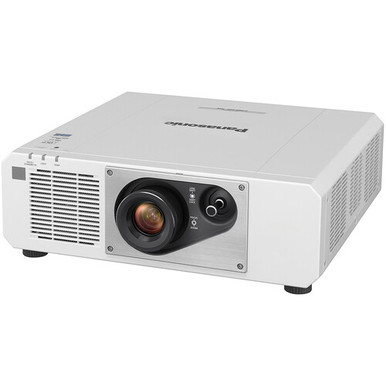
The Panasonic PT-FRQ50WU7 Setup Guide and Buying Considerations below addresses a practical buyer problem: a projector can look suitable by model name and resolution, yet still miss the room’s geometry, light, signal, or procurement requirements. The PT-FRQ50WU7 is identified here with 4K UHD resolution and conference-room positioning. That makes it the reference point, but it isn’t enough information to approve an installation on its own.
This guide turns the available facts into a disciplined selection process for AV buyers, installers, churches, schools, and conference room technology teams. It also compares three Panasonic alternatives from the supplied catalog: the 5,200-lumen WUXGA PT-CMZ50U with ultra-short-throw placement, the 7,300-lumen WUXGA PT-VMZ72BU8, and the 5,200-lumen WUXGA PT-VMZ51. You’ll see how to judge deployment fit, plan setup, test the signal chain, and weigh stock and availability against price-to-performance without assuming an undocumented capability. Use the linked product pages for current commerce details, then confirm installation specifications before purchasing mounts, cabling, or related hardware.
Products at a Glance
- Option 1: Panasonic PT-FRQ50WU7 5200-Lumen 4K UHD Conference Room Laser DLP Projector (White)
- For golf simulator or other installation plans that c…: Panasonic PT-CMZ50 WUXGA Ultra-Short Throw Laser Projector – Professional Golf Simulator Display
- For buyers whose brief prioritizes a stated 7,300-lum…: Panasonic PT-VMZ72BU8 7,300 Lumens WUXGA Laser Golf Simulator Projector – High-Brightness, Vivid Green Mode
- For teams comparing WUXGA choices at a stated 5,200-l…: Panasonic PT-VMZ51 5200-Lumen WUXGA Laser 3LCD Projector
Quick Comparison Table
| Feature | Panasonic PT-FRQ50WU7 5200-Lumen 4K UHD Conference Room Laser DLP Projector (White) | Panasonic PT-CMZ50 WUXGA Ultra-Short Throw Laser Projector – Professional Golf Simulator Display | Panasonic PT-VMZ72BU8 7,300 Lumens WUXGA Laser Golf Simulator Projector – High-Brightness, Vivid Green Mode | Panasonic PT-VMZ51 5200-Lumen WUXGA Laser 3LCD Projector |
|---|---|---|---|---|
| Brightness | 5200 lumens | 7,300 Lumens | 5200 lumens | |
| Resolution | 4K UHD | WUXGA | WUXGA | WUXGA |
| Best For | Teams requiring 4K UHD resolution and evaluating a Panasonic projector identified for conference-room use. | Golf simulator or other installation plans that call for WUXGA, 5,200 lumens, and ultra-short-throw placement. | Buyers whose brief prioritizes a stated 7,300-lumen output and WUXGA resolution, including simulator-oriented product searches. | Teams comparing WUXGA choices at a stated 5,200-lumen brightness and prepared to validate the complete installation design. |
| Throw Type | Ultra short throw | |||
| Recommended Buyer | Teams requiring 4K UHD resolution and evaluating a Panasonic projector identified for conference-room use. | Golf simulator or other installation plans that call for WUXGA, 5,200 lumens, and ultra-short-throw placement. | Buyers whose brief prioritizes a stated 7,300-lumen output and WUXGA resolution, including simulator-oriented product searches. | Teams comparing WUXGA choices at a stated 5,200-lumen brightness and prepared to validate the complete installation design. |
Product Images

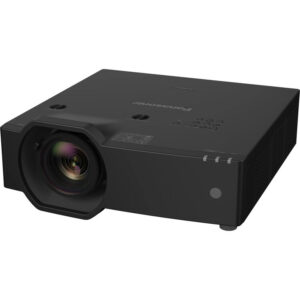
Projector Options from AudioVideoNation
1. Panasonic PT-FRQ50WU7 5200-Lumen 4K UHD Conference Room Laser DLP Projector (White)
Who should compare it: Teams requiring 4K UHD resolution and evaluating a Panasonic projector identified for conference-room use.
Why it belongs here: It is the subject of this guide and the only supplied option identified with 4K UHD resolution. Buyers can evaluate it first when 4K UHD is written into the room brief.
SKU: PT-FRQ50WU7
Key Features
- 4K UHD resolution
- PT-FRQ50WU7 SKU for matching quotes, purchase orders, and project documents
- Conference-room positioning in the supplied product listing
- Cataloged within Multimedia Projectors, Projectors, and Video
Things to Consider
Confirm rated brightness, throw geometry, mounting requirements, connections, control options, clearances, and accessory needs before approving the design. Check the linked page for current commerce details.
2. Panasonic PT-CMZ50 WUXGA Ultra-Short Throw Laser Projector – Professional Golf Simulator Display
Who should compare it: Golf simulator or other installation plans that call for WUXGA, 5,200 lumens, and ultra-short-throw placement.
Why it belongs here: Its WUXGA resolution, 5,200-lumen stated brightness, and ultra-short-throw designation create a clear placement-focused alternative to the PT-FRQ50WU7.
SKU: PT-CMZ50U
Key Features
- 5,200-lumen stated brightness
- WUXGA resolution
- Ultra-short-throw design
- Cataloged for golf simulator and 5,000-lumen-plus installation searches
Things to Consider
Its WUXGA resolution differs from the PT-FRQ50WU7’s 4K UHD resolution. Calculate image geometry and confirm mounting, signal, control, and clearance requirements for the actual room.
3. Panasonic PT-VMZ72BU8 7,300 Lumens WUXGA Laser Golf Simulator Projector – High-Brightness, Vivid Green Mode
Who should compare it: Buyers whose brief prioritizes a stated 7,300-lumen output and WUXGA resolution, including simulator-oriented product searches.
Why it belongs here: It supplies the largest stated brightness figure among the provided alternatives while retaining WUXGA resolution. That gives buyers a distinct candidate for a room study that supports greater light output.
SKU: PT-VMZ72BU8
Key Features
- 7,300-lumen stated brightness
- WUXGA resolution
- PT-VMZ72BU8 SKU for procurement matching
- Cataloged within Golf Simulator Projectors and Projectors
Things to Consider
Verify throw geometry, image dimensions, installation clearances, connections, and control requirements before treating brightness as decisive. WUXGA also differs from the PT-FRQ50WU7’s 4K UHD resolution.
4. Panasonic PT-VMZ51 5200-Lumen WUXGA Laser 3LCD Projector
Who should compare it: Teams comparing WUXGA choices at a stated 5,200-lumen brightness and prepared to validate the complete installation design.
Why it belongs here: It adds a second 5,200-lumen WUXGA choice for buyers building an installed-cost comparison around confirmed room requirements.
SKU: PT-VMZ51
Key Features
- 5,200-lumen stated brightness
- WUXGA resolution
- PT-VMZ51 SKU for quote and order matching
- Cataloged within Home Theater Projectors
Things to Consider
Confirm throw geometry, mounting, signal connections, control, clearances, and accessory requirements. Its WUXGA resolution should be checked against any 4K UHD content requirement.
Panasonic PT-FRQ50WU7 5200-Lumen 4K UHD Conference Room Laser DLP Projector (White) vs Panasonic PT-CMZ50 WUXGA Ultra-Short Throw Laser Projector – Professional Golf Simulator Display: Main Differences
- Choose Panasonic PT-FRQ50WU7 5200-Lumen 4K UHD Conference Room Laser DLP Projector (White) if Teams requiring 4K UHD resolution and evaluating a Panasonic projector identified for conference-room use..
- Choose Panasonic PT-CMZ50 WUXGA Ultra-Short Throw Laser Projector – Professional Golf Simulator Display if Golf simulator or other installation plans that call for WUXGA, 5,200 lumens, and ultra-short-throw placement..
- Choose Panasonic PT-VMZ72BU8 7,300 Lumens WUXGA Laser Golf Simulator Projector – High-Brightness, Vivid Green Mode if Buyers whose brief prioritizes a stated 7,300-lumen output and WUXGA resolution, including simulator-oriented product searches..
- Choose Panasonic PT-VMZ51 5200-Lumen WUXGA Laser 3LCD Projector if Teams comparing WUXGA choices at a stated 5,200-lumen brightness and prepared to validate the complete installation design..
Define projector deployment fit before choosing
Deployment fit begins with the content. If users need to display 4K UHD material, the PT-FRQ50WU7 deserves the first review because 4K UHD is its confirmed resolution. Don’t turn that fact into an assumption about the rest of the signal path. List every source, switcher, receiver, extender, and cable in the design, then confirm that each component supports the required format.
Room use changes the checklist. Conference room teams should document source count, seating distance, screen location, control needs, and the kinds of spreadsheets, video, or shared content users will show. Churches should map sightlines, projection-booth cable runs, service access, and the image size needed across the seating area. Schools should account for daylight, mixed teacher devices, restricted controls, and maintenance schedules. Installers need structural, power, pathway, ventilation, and clearance information.
Turn those needs into written acceptance criteria: target image dimensions, ambient-light conditions, content resolution, source count, control method, operating schedule, and responsibility for audio. A product advances only after its current documentation and the site survey satisfy those criteria. This process also exposes requirements that may favor a WUXGA or ultra-short-throw alternative.
Panasonic PT-FRQ50WU7 setup starts with a room survey
Measure first. A useful site survey gives the installer enough information to test the proposed design before mounting hardware or cabling is ordered.
1. Record the image target. Measure the intended visible width, height, and position. Note nearby doors, lights, speakers, signs, and architectural elements that could block the image or restrict placement.
2. Mark candidate projector locations. Use current Panasonic throw documentation to test each location against the required image size. Don’t infer the PT-FRQ50WU7’s throw geometry from its conference-room description. Confirm throw data and adjustment ranges before approving the mounting point.
3. Document room light. Observe the room during the hours when it will be used. Confirm the projector’s rated brightness from current documentation, then assess it alongside image size, screen surface, and controllable or uncontrolled light.
4. Map the signal chain. Write down every planned source and the path from source to projector. Include switching, distribution, extension, adapters, and wall plates. Check each item for the intended 4K UHD workflow instead of assuming the projector’s resolution guarantees end-to-end operation.
5. Plan infrastructure. Confirm power location, cable routes, mounting support, service access, ventilation, and required clearances against site rules and official installation instructions.
6. Plan commissioning access. The installer needs a safe way to perform physical alignment, focus checks, source testing, and later service. Verify mounting and control options before buying accessories.
Attach measurements, photos, and a simple signal diagram to the project record. That small packet prevents room assumptions from becoming expensive installation-day changes.
Plan image geometry and the 4K UHD signal path
The PT-FRQ50WU7’s 4K UHD resolution does not establish image size, throw distance, lens adjustment, allowable orientation, connection type, or control method. Obtain the current installation documentation and validate each of those items against the survey. Calculate placement only from documented throw information. If the preferred location falls outside the supported geometry, revise the location or investigate another projector.
Build a signal worksheet next. Give each source its intended output format, cable path, switching or extension stage, and destination connection. Every stage must be checked independently. A source described as 4K does not prove that the switcher, extender, adapter, cable run, and projector connection will carry the planned format together.
A temporary test before permanent installation can expose design problems early. Use representative sources and the same signal-path components planned for the room. Display small text, presentation slides, video, and an edge-to-edge alignment grid. Confirm stable source acquisition, readable content, correct image boundaries, and reliable switching. Record the tested configuration. This is a project acceptance test, not a substitute for the manufacturer’s specifications.
Compare 4K UHD with Panasonic WUXGA projector options
Resolution and placement create the clearest differences in this supplied set. The PT-FRQ50WU7 is the 4K UHD choice. The three alternatives below are WUXGA projectors with stated brightness figures, and one has an ultra-short-throw designation.
The PT-CMZ50U combines WUXGA resolution, 5,200-lumen brightness, and ultra-short-throw placement. Investigate it when the design calls for a projector positioned close to the image surface. Its geometry still needs to be calculated for the exact image dimensions and mounting location.
The PT-VMZ72BU8 has WUXGA resolution and a stated 7,300-lumen output, the largest brightness figure among these supplied alternatives. That makes it relevant when the room study establishes a higher brightness requirement. It does not settle the decision by itself. Throw geometry, screen size, light, connections, and control still matter.
The PT-VMZ51 is another WUXGA option with 5,200-lumen stated brightness. Treat it as a separate candidate and verify its placement, signal, control, and installation requirements before comparing total project cost.
Choose resolution from the actual content and acceptance criteria. If 4K UHD is mandatory, keep the PT-FRQ50WU7 at the center of the evaluation. If WUXGA meets the brief, the alternatives let you weigh documented brightness and, for the PT-CMZ50U, ultra-short-throw placement. Lumen figures are useful comparison inputs, but they do not predict the finished image without room and screen context.
Check stock and availability against price-to-performance
Commerce details change, so check the exact product permalink near the quote and purchase dates. Confirm current stock and availability, fulfillment timing, and the exact SKU before committing the installation schedule. Use the linked AudioVideoNation product pages for live pricing and inventory information rather than carrying an earlier page view into a purchase order.
Price-to-performance is specific to the project. Create a comparison sheet with each projector in a row and required outcomes in columns. Use only confirmed product facts: 4K UHD for the PT-FRQ50WU7, WUXGA and 5,200 lumens for the PT-CMZ50U and PT-VMZ51, WUXGA and 7,300 lumens for the PT-VMZ72BU8, and ultra-short throw for the PT-CMZ50U. Add verified room criteria beside them.
Compare total installed cost, not the projector line alone. Account for mounting hardware, the screen or image surface, cabling, signal distribution, extension equipment, control, labor, access equipment, training, and any planned spares. Confirm what is included instead of assuming accessories or coverage. A specification adds value only when the project needs it: 4K UHD for a defined content workflow, extra stated brightness for a documented viewing condition, or ultra-short throw for a constrained placement plan.
Use an installation and commissioning checklist
Before equipment arrives, approve the room drawing, mounting position, image dimensions, cable schedule, source list, and control plan. Match every SKU on the purchase order to the design documents. Confirm hardware ratings, electrical work, ventilation, and clearances through the applicable product instructions and site requirements.
On installation day, verify the mounting surface and proposed location before drilling. Route signal and power as designed, leaving appropriate access for testing and service. Position the projector from documented geometry, align it physically, and then use only documented image controls for final adjustment. Avoid treating digital correction as a replacement for correct placement.
Test every real source through the installed path. Include the intended presentation computers, media sources, switchers, extenders, and adapters. Check the required resolution, switching behavior, image boundaries, readable text, motion content, and recovery after sources are disconnected and reconnected. If audio uses a separate system, test it as part of the same user workflow.
Finish with a handoff record. Save the final source map, settings, cable labels, product identifiers, and support contacts in the room file. Show the technology team how to select sources, start and shut down the system, recognize a signal problem, and request service. For schools, churches, and shared conference rooms, clear operating instructions protect the installation from avoidable setup changes.
Make the final Panasonic projector decision
Start with the PT-FRQ50WU7 if 4K UHD is a written requirement and its verified geometry, brightness, signal connections, mounting needs, and control options fit the room. Investigate the PT-CMZ50U when WUXGA, 5,200 lumens, and ultra-short-throw placement match the design. Review the PT-VMZ72BU8 when the room study supports a 7,300-lumen WUXGA candidate. Consider the PT-VMZ51 when a 5,200-lumen WUXGA option fits the documented installation plan.
No model should be approved from its name alone. Before issuing a purchase order, require a completed site survey, verified installation specifications, signal diagram, accessory list, commissioning plan, live commerce check, and total installed-cost comparison. That evidence gives buyers and installers a defensible choice while keeping scheduling, deployment fit, and price-to-performance in the same decision.
Related AudioVideoNation Links
- Browse Projector at AudioVideoNation
- Panasonic PT-FRQ50WU7 product page
- Panasonic PT-CMZ50U ultra-short-throw projector
- Panasonic PT-VMZ72BU8 WUXGA projector
- Panasonic PT-VMZ51 WUXGA projector
Product Information Sources
- Panasonic PT-FRQ50WU7 5200-Lumen 4K UHD Conference Room Laser DLP Projector (White) product information
- Panasonic PT-CMZ50 WUXGA Ultra-Short Throw Laser Projector – Professional Golf Simulator Display product information
- Panasonic PT-VMZ72BU8 7,300 Lumens WUXGA Laser Golf Simulator Projector – High-Brightness, Vivid Green Mode product information
- Panasonic PT-VMZ51 5200-Lumen WUXGA Laser 3LCD Projector product information
FAQ
What resolution does the Panasonic PT-FRQ50WU7 use?
The provided product data identifies the Panasonic PT-FRQ50WU7 with 4K UHD resolution. Confirm that every source, switcher, extender, adapter, and cable in the planned signal path supports the required format.
Is the Panasonic PT-FRQ50WU7 suitable for a bright room?
The Panasonic PT-FRQ50WU7 should be specified for a bright room only after its current rated brightness, image size, screen surface, and ambient light are evaluated together. Resolution alone cannot determine room-light fit, so use a site survey and current product documentation.
How does the PT-CMZ50U differ from the PT-FRQ50WU7?
The PT-CMZ50U is a 5,200-lumen WUXGA ultra-short-throw projector, while the PT-FRQ50WU7 is identified with 4K UHD resolution. Compare their documented geometry and resolution against the room rather than treating either difference as an automatic advantage.
Which provided Panasonic alternative has the highest stated brightness?
The PT-VMZ72BU8 has the highest stated brightness among the provided alternatives at 7,300 lumens. It has WUXGA resolution, and its throw geometry, connections, mounting, and control requirements still need project-specific verification.
How should buyers check projector stock, availability, and pricing?
Buyers should use each linked AudioVideoNation product page for live commerce details and confirm fulfillment timing before setting the installation schedule. Match the exact SKU to the quote and purchase order so similar model names do not cause procurement errors.
What should an installer verify before ordering accessories?
An installer should verify throw geometry, mounting requirements, connection needs, cable paths, control plans, power, ventilation, and service clearances before ordering accessories. Check current installation documentation and the completed room survey instead of assuming that a mount, cable, or extension product will fit.
Conclusion
Use this Panasonic PT-FRQ50WU7 Setup Guide and Buying Considerations comparison to match documented specifications to the room and installation requirements. Review the linked product pages for current purchase details before ordering.
Products Used
| SKU | Product Name | URL |
|---|---|---|
| PT-FRQ50WU7 | Panasonic PT-FRQ50WU7 5200-Lumen 4K UHD Conference Room Laser DLP Projector (White) | View product |
| PT-CMZ50U | Panasonic PT-CMZ50 WUXGA Ultra-Short Throw Laser Projector – Professional Golf Simulator Display | View product |
| PT-VMZ72BU8 | Panasonic PT-VMZ72BU8 7,300 Lumens WUXGA Laser Golf Simulator Projector – High-Brightness, Vivid Green Mode | View product |
| PT-VMZ51 | Panasonic PT-VMZ51 5200-Lumen WUXGA Laser 3LCD Projector | View product |