

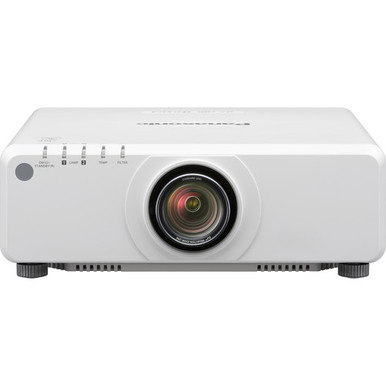
If your research begins with “Panasonic PT-DZ780WU vs PT-FRZ60WU7: Which Projector Should You Choose?”, start with two confirmed differences. The PT-DZ780WU has 7,000 lumens of stated brightness, while the PT-FRZ60WU7 has 6,000 lumens. Both list WUXGA resolution.
That makes brightness the clearest separator in the supplied specifications, but it does not settle the purchase. Churches, schools, conference rooms, and installed AV systems also depend on screen size, room light, projection distance, mounting conditions, signal connections, and control requirements. Those details need to be checked against the room design before ordering.
This comparison explains how to use the confirmed specifications, what your installer should verify, and how to judge deployment fit and price-to-performance without relying on unsupported assumptions. It also covers two Panasonic alternatives for projects that call for lower stated brightness, ultra-short-throw placement, or a used-equipment option.
Products at a Glance
- Option 1: Panasonic PT-DZ780WU WUXGA 1080p DLP Projector
- For installations where a documented room calculation…: Panasonic PT-FRZ60WU7 Projectors 6,000 Lumens
- For buyers who accept a used projector and have confi…: Panasonic PT-FRZ50BU7 5200 Lumen WUXGA Laser Projector for Golf Simulators [USED]
- For projects where ultra-short-throw placement is req…: Panasonic PT-CMZ50 WUXGA Ultra-Short Throw Laser Projector – Professional Golf Simulator Display
Quick Comparison Table
| Feature | Panasonic PT-DZ780WU WUXGA 1080p DLP Projector | Panasonic PT-FRZ60WU7 Projectors 6,000 Lumens | Panasonic PT-FRZ50BU7 5200 Lumen WUXGA Laser Projector for Golf Simulators [USED] | Panasonic PT-CMZ50 WUXGA Ultra-Short Throw Laser Projector – Professional Golf Simulator Display |
|---|---|---|---|---|
| Brightness | 7000 lumens | 6,000 Lumens | 5200 Lumen | 5200 lumens |
| Resolution | WUXGA | WUXGA | WUXGA | WUXGA |
| Best For | Projects whose documented projection calculation calls for the higher stated brightness option of the two compared projectors. | Installations where a documented room calculation confirms that 6,000 lumens meets the brightness target. | Buyers who accept a used projector and have confirmed that 5,200 lumens fits the room design. | Projects where ultra-short-throw placement is required and a projection calculation confirms that 5,200 lumens is suitable. |
| Throw Type | Ultra short throw | |||
| Recommended Buyer | Projects whose documented projection calculation calls for the higher stated brightness option of the two compared projectors. | Installations where a documented room calculation confirms that 6,000 lumens meets the brightness target. | Buyers who accept a used projector and have confirmed that 5,200 lumens fits the room design. | Projects where ultra-short-throw placement is required and a projection calculation confirms that 5,200 lumens is suitable. |
Product Images
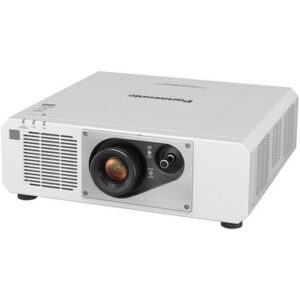
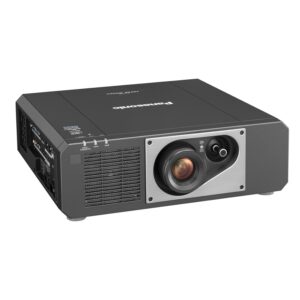

Projector Options from AudioVideoNation
1. Panasonic PT-DZ780WU WUXGA 1080p DLP Projector
Who should compare it: Projects whose documented projection calculation calls for the higher stated brightness option of the two compared projectors.
Why it belongs here: It is the higher-brightness product in the main comparison, with 7,000 lumens and WUXGA resolution.
SKU: PT-DZ780WU
Key Features
- 7,000-lumen stated brightness
- WUXGA resolution
- 1,000-lumen higher stated output than the PT-FRZ60WU7
Things to Consider
Confirm throw geometry, optical requirements, connections, controls, mounting, dimensions, ventilation, noise, power, and service access for the exact SKU before ordering.
2. Panasonic PT-FRZ60WU7 Projectors 6,000 Lumens
Who should compare it: Installations where a documented room calculation confirms that 6,000 lumens meets the brightness target.
Why it belongs here: It is the second main comparison product and pairs 6,000 lumens of stated brightness with WUXGA resolution.
SKU: PT-FRZ60WU7
Key Features
- 6,000-lumen stated brightness
- WUXGA resolution
- Same stated resolution class as the PT-DZ780WU
Things to Consider
Verify projection distance, image size, optical configuration, signal connections, control needs, mounting requirements, power, noise, and physical clearances against the project plan.
3. Panasonic PT-FRZ50BU7 5200 Lumen WUXGA Laser Projector for Golf Simulators [USED]
Who should compare it: Buyers who accept a used projector and have confirmed that 5,200 lumens fits the room design.
Why it belongs here: It adds a 5,200-lumen WUXGA alternative for projects that permit used equipment and do not require the brightness stated for the two main products.
SKU: PT-FRZ50BU7-USED
Key Features
- 5,200-lumen stated brightness
- WUXGA resolution
- Used condition identified in the product listing
Things to Consider
Review current condition details and confirm included items, required accessories, installation fit, and purchasing terms on the linked page before committing it to a project.
4. Panasonic PT-CMZ50 WUXGA Ultra-Short Throw Laser Projector – Professional Golf Simulator Display
Who should compare it: Projects where ultra-short-throw placement is required and a projection calculation confirms that 5,200 lumens is suitable.
Why it belongs here: It provides a distinct placement option with ultra-short-throw projection, 5,200 lumens, and WUXGA resolution.
SKU: PT-CMZ50U
Key Features
- 5,200-lumen stated brightness
- WUXGA resolution
- Ultra-short-throw classification
- Golf simulator use case identified in the product listing
Things to Consider
Ultra-short-throw installations need precise geometry. Confirm image size, placement distance, mounting, projection surface, connections, controls, and physical clearances for the exact SKU.
Panasonic PT-DZ780WU WUXGA 1080p DLP Projector vs Panasonic PT-FRZ60WU7 Projectors 6,000 Lumens: Main Differences
- Choose Panasonic PT-DZ780WU WUXGA 1080p DLP Projector if Projects whose documented projection calculation calls for the higher stated brightness option of the two compared projectors..
- Choose Panasonic PT-FRZ60WU7 Projectors 6,000 Lumens if Installations where a documented room calculation confirms that 6,000 lumens meets the brightness target..
- Choose Panasonic PT-FRZ50BU7 5200 Lumen WUXGA Laser Projector for Golf Simulators [USED] if Buyers who accept a used projector and have confirmed that 5,200 lumens fits the room design..
- Choose Panasonic PT-CMZ50 WUXGA Ultra-Short Throw Laser Projector – Professional Golf Simulator Display if Projects where ultra-short-throw placement is required and a projection calculation confirms that 5,200 lumens is suitable..
Panasonic PT-DZ780WU vs PT-FRZ60WU7 specifications
The PT-DZ780WU is the brighter projector on paper. Its stated output is 7,000 lumens, which is 1,000 lumens above the PT-FRZ60WU7’s 6,000-lumen figure. That difference gives an AV designer a clear starting point when a room calculation calls for the highest stated brightness of these two choices.
Resolution does not separate them. Both projectors list WUXGA, so a resolution requirement at that level can be met by either product based on the supplied facts. Your next decision should come from the room, installation plan, and current purchasing details.
Treat the lumen figures as design inputs. Screen dimensions, ambient light, surface characteristics, image content, and placement all affect the final result. A 7,000-lumen specification does not remove the need for a projection calculation, and a 6,000-lumen projector should not be rejected if it satisfies that calculation. Ask the installer to document the required brightness and image geometry before choosing between the two SKUs.
Deployment fit for churches, schools, and conference rooms
Start with the PT-DZ780WU when the projection design calls for the higher stated brightness option. That may matter in a sanctuary, lecture space, multipurpose room, or conference facility where the planned screen and room-light conditions place greater demand on the projector. The confirmed advantage is limited to its 7,000-lumen figure. Room suitability still needs to be calculated.
The PT-FRZ60WU7 is the logical comparison when 6,000 lumens meets the design target. Choosing it should follow the same process: define the screen, measure the throw distance, account for expected room light, and confirm how the projector will connect to the AV system. Its shared WUXGA resolution means you are not stepping away from the stated resolution class used by the PT-DZ780WU.
For schools, include teacher controls, source switching, mounting access, and shutdown procedures in the scope. Churches should map presentation, camera, and playback signal paths before installation. Conference room teams need to confirm how the projector will connect to room sources and control systems. These are project requirements, not confirmed capabilities of either product, so verify every item on the product page or with AudioVideoNation.
Installation checks before choosing either WUXGA projector
A lumen comparison is only the first pass. Confirm throw ratio, available image size at the measured distance, zoom or lens requirements, mounting position, and adjustment range for each projector. Do this from product documentation tied to the exact SKU. Product-family assumptions can create expensive placement errors.
Next, document the signal path. List the sources, switchers, extenders, control interfaces, and required content formats. Then verify the projector connections and supported signals against that list. If the installation uses centralized control, confirm the required commands and connection method before programming begins.
Physical planning matters too. Check dimensions, weight, mounting hardware, ventilation clearance, operating noise requirements, power needs, cable access, and service clearance. A projector that fits the brightness target can still be a poor match for a crowded ceiling location or restricted equipment area.
Lens compatibility deserves its own check. Do not select a Panasonic lens from its name or brand alone. Obtain written confirmation that the exact lens and projector SKU work together, then validate the calculated image size and distance. The same caution applies when replacing an existing projector while keeping an old mount, lens, cabling, or control program.
How to judge projector price-to-performance
Price-to-performance should compare the live acquisition total with the design requirements the projector actually satisfies. Open each linked product page for current commerce details, then compare those figures against the confirmed brightness and WUXGA resolution. Avoid paying for brightness that the room calculation does not require, but do not reduce the brightness target merely to lower the initial quote.
Include installation costs in the decision. A complete comparison can account for mounting hardware, optical components, cabling, signal extension, control programming, electrical work, lift access, and labor. Some of those items may be identical for both projectors. Others depend on product details that should be verified before the quote is approved.
The PT-DZ780WU’s confirmed case is its 7,000-lumen stated output. The PT-FRZ60WU7’s case begins with 6,000 lumens and the same stated WUXGA resolution. Neither can be declared the universal value winner from those facts alone. The better value is the projector that clears the documented design target with the lowest acceptable installed total and the fewest unresolved integration risks.
Stock and availability checks for project planning
For stock and availability, use the linked AudioVideoNation product pages and confirm procurement timing before scheduling installation labor. Keep the exact SKU on requests for quotes, purchase orders, and installer documents. PT-DZ780WU and PT-FRZ60WU7 are distinct identifiers, and a verbal reference to a product family is not precise enough for final ordering.
Ask about lead time, accessory timing, and the process for handling a proposed substitution. If the project has a fixed opening date, set a decision deadline that leaves time for delivery, inspection, configuration, and installation testing. Do not infer current supply from the presence of a product listing.
Any substitute should go through the original design checks. Match stated brightness and resolution first, then verify throw geometry, mounting, signal support, controls, and other project requirements. A nearby model number does not prove that an alternative will fit the same installation.
Panasonic alternatives for different placement needs
The Panasonic PT-FRZ50BU7 5200 Lumen WUXGA Laser Projector for Golf Simulators [USED] is an alternative for buyers who accept used equipment and whose design can work with 5,200 lumens. It also lists WUXGA resolution. Review the linked page for current condition details and confirm what is included before treating it as part of the same procurement comparison. A used listing should be evaluated on documented condition, required accessories, and project risk, not on assumed savings.
The Panasonic PT-CMZ50 WUXGA Ultra-Short Throw Laser Projector – Professional Golf Simulator Display also has 5,200 lumens and WUXGA resolution. Its confirmed ultra-short-throw classification makes it relevant where close-to-screen placement is a core design requirement. That changes the installation conversation. Verify the exact image size, placement distance, mounting method, and projection surface before selecting it.
Neither alternative is a direct substitute based on brightness alone. They sit 1,800 lumens below the PT-DZ780WU and 800 lumens below the PT-FRZ60WU7 in stated output. Use them only after a fresh room calculation and a full review of installation requirements.
A practical decision path for AV buyers
Choose the PT-DZ780WU if your documented projection calculation requires the higher 7,000-lumen specification and the remaining installation checks pass. Choose the PT-FRZ60WU7 if 6,000 lumens meets the same room target and its verified installation details align with the project. Both carry WUXGA resolution in the supplied specifications.
If projection distance is the dominant constraint, assess the PT-CMZ50 and its ultra-short-throw design separately. If a used projector is acceptable, the PT-FRZ50BU7-USED adds a 5,200-lumen WUXGA option, subject to a careful condition and scope review.
Before approval, put the decision in writing. Record the exact SKU, screen and room assumptions, required brightness, placement calculation, mounting plan, signal path, control needs, and current commerce details. That short record gives buyers and installers one shared basis for the order and reduces the chance of an unsuitable substitution.
Related AudioVideoNation Links
- Browse Projector at AudioVideoNation
- Panasonic PT-DZ780WU projector
- Panasonic PT-FRZ60WU7 projector
- Panasonic PT-FRZ50BU7-USED projector
- Panasonic PT-CMZ50 ultra-short-throw projector
Product Information Sources
- Panasonic PT-DZ780WU WUXGA 1080p DLP Projector product information
- Panasonic PT-FRZ60WU7 Projectors 6,000 Lumens product information
- Panasonic PT-FRZ50BU7 5200 Lumen WUXGA Laser Projector for Golf Simulators [USED] product information
- Panasonic PT-CMZ50 WUXGA Ultra-Short Throw Laser Projector – Professional Golf Simulator Display product information
FAQ
Which projector is brighter, the Panasonic PT-DZ780WU or PT-FRZ60WU7?
The Panasonic PT-DZ780WU has the higher stated brightness at 7,000 lumens, versus 6,000 lumens for the PT-FRZ60WU7. Use those figures in a room-specific projection calculation rather than treating the 1,000-lumen difference as proof of installation suitability.
Do the PT-DZ780WU and PT-FRZ60WU7 have the same resolution?
Yes, both projectors list WUXGA resolution. Resolution therefore does not distinguish them in the supplied specifications, so compare brightness, verified installation requirements, and live commerce details next.
Which Panasonic projector is better for a church, school, or conference room?
The better projector is the one whose stated brightness and verified installation requirements match the room design. Start with the PT-DZ780WU when the calculation calls for the higher 7,000-lumen specification, or assess the 6,000-lumen PT-FRZ60WU7 when that output meets the target.
Can I choose between these projectors based on throw distance?
Choose based on throw distance only after confirming the throw ratio and optical configuration for each exact SKU. Give the installer the measured projection distance and required image size, then validate the proposed configuration before ordering.
How should I compare PT-DZ780WU and PT-FRZ60WU7 price-to-performance?
Compare the live acquisition and installation totals against the documented brightness, resolution, and integration requirements each projector satisfies. The PT-DZ780WU has the higher stated brightness, while both list WUXGA, but a value decision also needs verified mounting, optical, signal, and control details.
How can I check current stock and availability?
Use each linked AudioVideoNation product page and confirm procurement timing before scheduling installation work. Reference the exact SKU when checking availability, accessories, lead time, and any proposed substitution.
Conclusion
Use this Panasonic PT-DZ780WU vs PT-FRZ60WU7: Which Projector Should You Choose? comparison to match documented specifications to the room and installation requirements. Review the linked product pages for current purchase details before ordering.
Products Used
| SKU | Product Name | URL |
|---|---|---|
| PT-DZ780WU | Panasonic PT-DZ780WU WUXGA 1080p DLP Projector | View product |
| PT-FRZ60WU7 | Panasonic PT-FRZ60WU7 Projectors 6,000 Lumens | View product |
| PT-FRZ50BU7-USED | Panasonic PT-FRZ50BU7 5200 Lumen WUXGA Laser Projector for Golf Simulators [USED] | View product |
| PT-CMZ50U | Panasonic PT-CMZ50 WUXGA Ultra-Short Throw Laser Projector – Professional Golf Simulator Display | View product |