

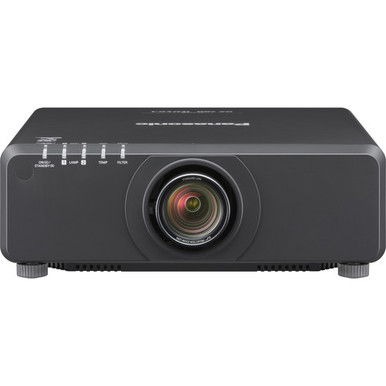
This Panasonic PT-DZ780BU Setup Guide and Buying Considerations article addresses a common buyer problem: a model can meet the headline requirement yet still be wrong for the room. The Panasonic PT-DZ780BU WUXGA 1080p DLP Projector is listed at 7,000 lumens with WUXGA resolution, but successful deployment also depends on measured placement, screen planning, signal routing, mounting, control, and support requirements. Churches, schools, conference room teams, and installers can use this guide to build that checklist before ordering. It also compares four Panasonic alternatives from the supplied product set, including a 7,300-lumen WUXGA option, three 5,200-lumen WUXGA choices, an ultra-short-throw model, and a listing identified as used. The goal is a defensible shortlist based on the actual installation rather than a single specification.
Products at a Glance
- Option 1: Panasonic PT-DZ780BU WUXGA 1080p DLP Projector
- For golf simulator buyers open to a used listing whos…: Panasonic PT-FRZ50BU7 5200 Lumen WUXGA Laser Projector for Golf Simulators [USED]
- For placement-constrained projects whose measured des…: Panasonic PT-CMZ50 WUXGA Ultra-Short Throw Laser Projector – Professional Golf Simulator Display
- For teams comparing WUXGA choices near the PT-DZ780BU…: Panasonic PT-VMZ72BU8 7,300 Lumens WUXGA Laser Golf Simulator Projector – High-Brightness, Vivid Green Mode
- For buyers considering a home theater category listin…: Panasonic PT-VMZ51 5200-Lumen WUXGA Laser 3LCD Projector
Quick Comparison Table
| Feature | Panasonic PT-DZ780BU WUXGA 1080p DLP Projector | Panasonic PT-FRZ50BU7 5200 Lumen WUXGA Laser Projector for Golf Simulators [USED] | Panasonic PT-CMZ50 WUXGA Ultra-Short Throw Laser Projector – Professional Golf Simulator Display | Panasonic PT-VMZ72BU8 7,300 Lumens WUXGA Laser Golf Simulator Projector – High-Brightness, Vivid Green Mode | Panasonic PT-VMZ51 5200-Lumen WUXGA Laser 3LCD Projector |
|---|---|---|---|---|---|
| Brightness | 7000 lumens | 5200 Lumen | 5200 lumens | 7,300 Lumens | 5200 lumens |
| Resolution | WUXGA | WUXGA | WUXGA | WUXGA | WUXGA |
| Best For | Teams already specifying PT-DZ780BU and prepared to validate room, placement, signal, mounting, and support requirements before purchase. | Golf simulator buyers open to a used listing whose site calculations support 5,200 lumens and WUXGA resolution. | Placement-constrained projects whose measured design calls for ultra-short-throw projection and supports the listed brightness. | Teams comparing WUXGA choices near the PT-DZ780BU's listed brightness and willing to complete a model-specific installation review. | Buyers considering a home theater category listing whose room design supports WUXGA resolution and the stated 5,200-lumen brightness. |
| Throw Type | Ultra short throw | ||||
| Recommended Buyer | Teams already specifying PT-DZ780BU and prepared to validate room, placement, signal, mounting, and support requirements before purchase. | Golf simulator buyers open to a used listing whose site calculations support 5,200 lumens and WUXGA resolution. | Placement-constrained projects whose measured design calls for ultra-short-throw projection and supports the listed brightness. | Teams comparing WUXGA choices near the PT-DZ780BU's listed brightness and willing to complete a model-specific installation review. | Buyers considering a home theater category listing whose room design supports WUXGA resolution and the stated 5,200-lumen brightness. |
Product Images

Projector Options from AudioVideoNation
1. Panasonic PT-DZ780BU WUXGA 1080p DLP Projector
Who should compare it: Teams already specifying PT-DZ780BU and prepared to validate room, placement, signal, mounting, and support requirements before purchase.
Why it belongs here: This is the guide's reference projector. The supplied product data lists 7,000 lumens and WUXGA resolution, giving buyers a clear starting point for site-specific planning.
SKU: PT-DZ780BU
Key Features
- 7,000-lumen brightness specification
- WUXGA resolution
- Exact PT-DZ780BU SKU for purchase and documentation checks
- Listed in multimedia projector, projector, and video categories
Things to Consider
Confirm throw calculations, mounting requirements, connection and control plans, included items, service terms, and live commerce details before final approval.
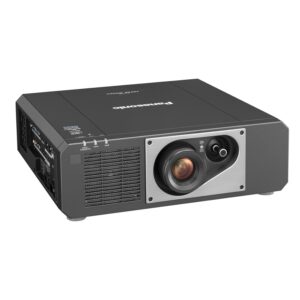
2. Panasonic PT-FRZ50BU7 5200 Lumen WUXGA Laser Projector for Golf Simulators [USED]
Who should compare it: Golf simulator buyers open to a used listing whose site calculations support 5,200 lumens and WUXGA resolution.
Why it belongs here: It adds a 5,200-lumen WUXGA comparison and a listing explicitly identified as used, allowing buyers to include condition and transaction scope in the decision.
SKU: PT-FRZ50BU7-USED
Key Features
- 5,200-lumen brightness specification
- WUXGA resolution
- Listing identifies the projector as used
- Categorized under golf simulator projectors
Things to Consider
Verify condition, operating history, included items, service coverage, placement requirements, and current transaction details with the seller.
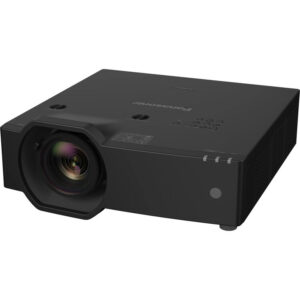
3. Panasonic PT-CMZ50 WUXGA Ultra-Short Throw Laser Projector – Professional Golf Simulator Display
Who should compare it: Placement-constrained projects whose measured design calls for ultra-short-throw projection and supports the listed brightness.
Why it belongs here: It is the only provided alternative identified as ultra short throw, while retaining WUXGA resolution and a listed brightness of 5,200 lumens.
SKU: PT-CMZ50U
Key Features
- 5,200-lumen brightness specification
- WUXGA resolution
- Ultra-short-throw design
- Listed in golf simulator and 5,000-lumen-plus installation projector categories
Things to Consider
Confirm exact image geometry, projection surface, mounting position, clearance, service access, and the full signal path before ordering.
4. Panasonic PT-VMZ72BU8 7,300 Lumens WUXGA Laser Golf Simulator Projector – High-Brightness, Vivid Green Mode
Who should compare it: Teams comparing WUXGA choices near the PT-DZ780BU's listed brightness and willing to complete a model-specific installation review.
Why it belongs here: Its supplied facts list 7,300 lumens and WUXGA, making it the closest provided brightness comparison to the 7,000-lumen PT-DZ780BU.
SKU: PT-VMZ72BU8
Key Features
- 7,300-lumen brightness specification
- WUXGA resolution
- Exact PT-VMZ72BU8 SKU for model checks
- Categorized under golf simulator projectors
Things to Consider
Do not let the 300-lumen difference decide the project alone. Verify throw, mounting, connections, control, room-light calculations, and live purchase details.
5. Panasonic PT-VMZ51 5200-Lumen WUXGA Laser 3LCD Projector
Who should compare it: Buyers considering a home theater category listing whose room design supports WUXGA resolution and the stated 5,200-lumen brightness.
Why it belongs here: It supplies another 5,200-lumen WUXGA reference and broadens the comparison with a product listed in the home theater projector category.
SKU: PT-VMZ51
Key Features
- 5,200-lumen brightness specification
- WUXGA resolution
- Exact PT-VMZ51 SKU for model confirmation
- Listed in the home theater projector category
Things to Consider
A category label does not establish room fit. Confirm image size, throw geometry, mounting, source compatibility, control, and current commerce details.
Panasonic PT-DZ780BU WUXGA 1080p DLP Projector vs Panasonic PT-FRZ50BU7 5200 Lumen WUXGA Laser Projector for Golf Simulators [USED]: Main Differences
- Choose Panasonic PT-DZ780BU WUXGA 1080p DLP Projector if Teams already specifying PT-DZ780BU and prepared to validate room, placement, signal, mounting, and support requirements before purchase..
- Choose Panasonic PT-FRZ50BU7 5200 Lumen WUXGA Laser Projector for Golf Simulators [USED] if Golf simulator buyers open to a used listing whose site calculations support 5,200 lumens and WUXGA resolution..
- Choose Panasonic PT-CMZ50 WUXGA Ultra-Short Throw Laser Projector – Professional Golf Simulator Display if Placement-constrained projects whose measured design calls for ultra-short-throw projection and supports the listed brightness..
- Choose Panasonic PT-VMZ72BU8 7,300 Lumens WUXGA Laser Golf Simulator Projector – High-Brightness, Vivid Green Mode if Teams comparing WUXGA choices near the PT-DZ780BU's listed brightness and willing to complete a model-specific installation review..
- Choose Panasonic PT-VMZ51 5200-Lumen WUXGA Laser 3LCD Projector if Buyers considering a home theater category listing whose room design supports WUXGA resolution and the stated 5,200-lumen brightness..
Panasonic PT-DZ780BU setup starts with deployment fit
The PT-DZ780BU provides two firm planning anchors: 7,000 lumens and WUXGA resolution. Start there. A church may need the image to work across several service-lighting states. A school may have multiple instructor sources and strict installation windows. A conference room team may care about table connectivity, control, and support handoff. Those are room requirements, not promises created by a lumen figure.
Define the intended image dimensions, viewing positions, lighting states, content, operating schedule, and possible projector location. Confirm that WUXGA matches the approved content and system design. Then validate throw geometry, mounting orientation, clearances, power, and connection requirements using documentation for the exact PT-DZ780BU SKU.
Deployment fit is broader than image output. The physical location must work, the signal path must be supportable, and staff must be able to operate the finished room. Keep the selection provisional until those points are documented.
Pre-installation site survey for a Panasonic projector
Survey the room before finalizing the projector or installation materials. Record measurements rather than relying on drawings alone, especially in renovated sanctuaries, older classrooms, and conference rooms with finished ceilings.
- Image area: Record the usable width and height, screen or projection surface, sightline obstructions, and acceptable image boundaries.
- Projector position: Measure possible mounting points, the path to the image surface, ceiling conditions, and access for installation and later service.
- Lighting: Document the lighting states used during presentations, classes, meetings, or services. Include windows, shades, and any lights that must remain on.
- Infrastructure: Locate power, source equipment, cable routes, switching equipment, control endpoints, and the planned audio path.
- Operations: Identify every source, who starts and shuts down the room, and who receives support calls.
Bring these findings into the bill of materials. Mounting hardware, cabling, signal equipment, access work, and labor can determine whether a proposed deployment remains practical.
Panasonic projector installation guide: a controlled setup sequence
Use a staged process so physical, signal, and operational problems are caught before final handoff.
1. Confirm the exact item. Match the delivered model and SKU to the order. Check included items and condition against the transaction documents.
2. Use current documentation. Verify approved mounting orientation, structural requirements, clearances, power needs, connection options, and adjustment procedures for the exact projector.
3. Test before permanent mounting. Connect a known source in a safe work area and confirm the planned basic signal path before the projector becomes difficult to reach.
4. Install the mounting system. Qualified personnel should secure it to a site-approved structure and follow applicable electrical, building, and safety requirements.
5. Route and label connections. Protect connectors from strain, document both cable ends, and keep the source-to-projector route easy to trace.
6. Establish the image. Begin with measured physical placement. Use only the image adjustments documented for the projector, and evaluate the result with representative content.
7. Validate the room. Test every source, lighting state, control routine, and audio route included in the project scope.
Do not conceal unresolved geometry or signal issues during finish work. Correct them while the mounting and cable paths remain accessible.
How to compare a 7,000-lumen WUXGA projector
The provided products create a useful brightness comparison. The PT-DZ780BU is listed at 7,000 lumens. The PT-VMZ72BU8 is listed at 7,300 lumens, while the PT-FRZ50BU7-USED, PT-CMZ50U, and PT-VMZ51 listings each specify 5,200 lumens. All five identify WUXGA resolution.
These numbers narrow the shortlist, but they do not predict the finished image by themselves. Image size, projection surface, room light, placement, and the approved operating setup belong in the design calculation. A 300-lumen difference between two listings should not decide the purchase without that context. The same applies to the gap between 7,000 and 5,200 lumens.
Have the installer or system designer document the brightness requirement for the actual room. Keep WUXGA consistent through the content and signal plan where the connected equipment supports it, and verify source compatibility rather than inferring it from the projector resolution.
Throw distance and the Panasonic ultra-short-throw option
The PT-CMZ50U is the only provided alternative identified as ultra short throw. That makes it relevant when the room plan specifically calls for a projector close to the image surface. Its listed facts are 5,200 lumens and WUXGA resolution.
Ultra-short-throw placement still requires exact measurements. Confirm image dimensions, mounting position, projection surface, service access, and the path between the projector and image. Small location changes can affect whether the planned geometry works.
For the PT-DZ780BU and the other alternatives, calculate placement from documentation for the exact SKU and required installation configuration. Do not assume two WUXGA projectors can occupy the same mounting point.
Signal, control, and audio planning
Build a source-to-screen signal map before purchase. List every computer, media player, camera feed, switcher, extender, wall plate, and control endpoint included in the project. Then confirm the available connections and supported signal formats against current documentation for each component.
Treat cable distance as a design input. Record the full route, including vertical runs and service loops, and specify any required signal transport equipment. Do the same for control. The operations team should know how the projector starts, selects a source, recovers from a failed input, and shuts down.
Plan audio separately. Identify where sound enters the system, how it is switched, and which equipment drives the room loudspeakers. Do not assume the projector will solve an undefined audio requirement. A one-page signal and control drawing gives installers a test plan and gives support staff a practical troubleshooting reference.
WUXGA projector buying guide: compare the alternatives
Use the PT-DZ780BU as the 7,000-lumen WUXGA reference, then compare each alternative against the room's non-negotiable requirements.
The PT-VMZ72BU8 provides the closest listed brightness comparison at 7,300 lumens and WUXGA. The PT-FRZ50BU7-USED is a 5,200-lumen WUXGA option categorized for golf simulator projects, and its listing explicitly identifies it as used. That condition changes the questions buyers should ask before approval.
The PT-CMZ50U combines a 5,200-lumen specification, WUXGA resolution, and the only stated ultra-short-throw design in this product set. The PT-VMZ51 also lists 5,200 lumens and WUXGA, with placement in the home theater projector category.
Category placement helps explain how each listing is organized, but it does not prove deployment fit. Shortlist by throw requirement, calculated brightness, resolution, condition, infrastructure, and installation scope. Confirm every remaining requirement on the linked product page and in current model documentation.
Stock and availability plus projector price-to-performance
Commerce details can change. Open the linked AudioVideoNation product page for current price, availability, condition, and transaction information before creating a purchase order. Confirm the exact SKU, included items, fulfillment timing, return terms, and applicable service or warranty coverage with the seller. This is especially important for the PT-FRZ50BU7-USED listing.
Measure projector price-to-performance against the complete installed proposal, not the projector line item alone. Include any required mounting and optical parts, cabling, signal transport, control integration, electrical work, access equipment, installation labor, and service provisions. A proposal has value when it meets the documented image, placement, signal, and operational requirements without leaving expensive gaps for the installer to solve later.
Compare bids using the same scope. If one quote excludes mounting, cable work, commissioning, or training, bring it to the same baseline before judging value. The strongest choice is the one whose requirements and responsibilities are written clearly.
Commissioning and handoff checklist
Commission the room under the conditions in which people will use it. Test every source and cable route, then inspect representative content under each planned lighting state. Confirm image focus, geometry, boundaries, control routines, and the complete audio path within the approved project scope.
Record the projector model and SKU, final settings, cable labels, equipment locations, and support contacts. Give designated staff a short operating procedure that covers startup, source selection, shutdown, and the first recovery steps for a missing signal. Store the current documentation where the support team can reach it.
Finish with an acceptance record signed against the original room requirements. Follow the manufacturer's current safety and maintenance instructions after handoff.
Related AudioVideoNation Links
- Browse Projector at AudioVideoNation
- View the Panasonic PT-DZ780BU product page
- View the Panasonic PT-FRZ50BU7 used product page
- View the Panasonic PT-CMZ50 product page
- View the Panasonic PT-VMZ72BU8 product page
Product Information Sources
- Panasonic PT-DZ780BU WUXGA 1080p DLP Projector product information
- Panasonic PT-FRZ50BU7 5200 Lumen WUXGA Laser Projector for Golf Simulators [USED] product information
- Panasonic PT-CMZ50 WUXGA Ultra-Short Throw Laser Projector – Professional Golf Simulator Display product information
- Panasonic PT-VMZ72BU8 7,300 Lumens WUXGA Laser Golf Simulator Projector – High-Brightness, Vivid Green Mode product information
- Panasonic PT-VMZ51 5200-Lumen WUXGA Laser 3LCD Projector product information
FAQ
What are the listed brightness and resolution of the Panasonic PT-DZ780BU?
The Panasonic PT-DZ780BU is listed at 7,000 lumens with WUXGA resolution. Use those figures as planning inputs, then validate image size, room light, placement, and the signal chain for the actual installation.
Is the PT-DZ780BU suitable for a church, school, or conference room?
The PT-DZ780BU is a candidate for churches, schools, and conference rooms only after a site survey confirms its brightness, resolution, placement, signal, and installation fit. The room's image size, lighting states, sources, mounting conditions, and operating needs should drive approval.
Which provided Panasonic projector is identified as ultra short throw?
The Panasonic PT-CMZ50, SKU PT-CMZ50U, is the only provided alternative identified as ultra short throw. It is listed at 5,200 lumens with WUXGA resolution, but its exact geometry still needs to be calculated for the room.
Is the Panasonic PT-FRZ50BU7 listing used?
Yes, the provided PT-FRZ50BU7-USED listing identifies the projector as used. Confirm its condition, operating history, included items, service coverage, and transaction terms before purchase.
How should buyers compare 7,000 lumens with 7,300 lumens?
Use 7,000 versus 7,300 lumens as one design input, not proof that one projector will produce a better result in the room. The PT-DZ780BU and PT-VMZ72BU8 are both listed as WUXGA, so placement, image size, ambient light, infrastructure, and total project scope should complete the comparison.
How can buyers check projector price, stock, and availability?
Open each linked AudioVideoNation product page for current pricing, availability, condition, and transaction details. Confirm the exact SKU, included items, fulfillment timing, and applicable service terms before issuing a purchase order.
Conclusion
Use this Panasonic PT-DZ780BU Setup Guide and Buying Considerations comparison to match documented specifications to the room and installation requirements. Review the linked product pages for current purchase details before ordering.
Products Used
| SKU | Product Name | URL |
|---|---|---|
| PT-DZ780BU | Panasonic PT-DZ780BU WUXGA 1080p DLP Projector | View product |
| PT-FRZ50BU7-USED | Panasonic PT-FRZ50BU7 5200 Lumen WUXGA Laser Projector for Golf Simulators [USED] | View product |
| PT-CMZ50U | Panasonic PT-CMZ50 WUXGA Ultra-Short Throw Laser Projector – Professional Golf Simulator Display | View product |
| PT-VMZ72BU8 | Panasonic PT-VMZ72BU8 7,300 Lumens WUXGA Laser Golf Simulator Projector – High-Brightness, Vivid Green Mode | View product |
| PT-VMZ51 | Panasonic PT-VMZ51 5200-Lumen WUXGA Laser 3LCD Projector | View product |