

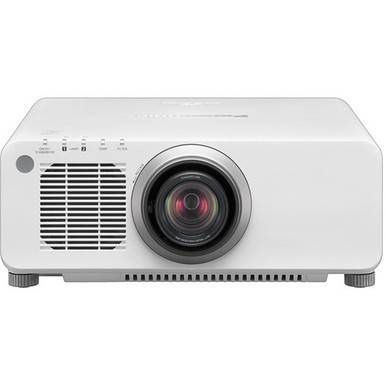
This Panasonic PT-DX100UW Setup Guide and Buying Considerations article addresses a common installation problem: a projector can meet a brightness target yet still be wrong for the screen, source equipment, mounting position, or content. The PT-DX100UW has a stated brightness of 10,000 lumens and XGA resolution. Those facts make it the brightest option in the provided group, but they do not settle every buying decision.
Churches, schools, conference room teams, and AV installers also need to confirm throw geometry, lens details, signal support, mounting requirements, and the intended image format. This guide organizes those checks and compares the PT-DX100UW with four Panasonic alternatives offering WUXGA resolution, lower brightness ratings, or ultra-short-throw placement. Use it to build a shortlist, then check the linked product pages and exact documentation before ordering equipment or drilling mounting points.
Products at a Glance
- Option 1: Panasonic PT-DX100UW 10,000-Lumen XGA DLP Projector with Lens (White)
- For short-distance installations and golf simulator p…: Panasonic PT-CMZ50 WUXGA Ultra-Short Throw Laser Projector – Professional Golf Simulator Display
- For buyers whose site and content plan calls for a 7,…: Panasonic PT-VMZ72BU8 7,300 Lumens WUXGA Laser Golf Simulator Projector – High-Brightness, Vivid Green Mode
- For projects whose completed room calculations and co…: Panasonic PT-VMZ51 5200-Lumen WUXGA Laser 3LCD Projector
- For buyers evaluating a 5,200-lumen WUXGA Panasonic o…: Panasonic PT-VMZ51S 5200-Lumen WUXGA Laser 3LCD Projector
Quick Comparison Table
| Feature | Panasonic PT-DX100UW 10,000-Lumen XGA DLP Projector with Lens (White) | Panasonic PT-CMZ50 WUXGA Ultra-Short Throw Laser Projector – Professional Golf Simulator Display | Panasonic PT-VMZ72BU8 7,300 Lumens WUXGA Laser Golf Simulator Projector – High-Brightness, Vivid Green Mode | Panasonic PT-VMZ51 5200-Lumen WUXGA Laser 3LCD Projector | Panasonic PT-VMZ51S 5200-Lumen WUXGA Laser 3LCD Projector |
|---|---|---|---|---|---|
| Brightness | 10,000 lumens | 5200 lumens | 7,300 Lumens | 5200 lumens | 5200 lumens |
| Resolution | XGA | WUXGA | WUXGA | WUXGA | WUXGA |
| Best For | Projects whose documented brief calls for a 10,000-lumen XGA projector, subject to lens, placement, signal, and mounting verification. | Short-distance installations and golf simulator projects that call for WUXGA and 5,200-lumen brightness after geometry is confirmed. | Buyers whose site and content plan calls for a 7,300-lumen WUXGA projector, including qualifying golf simulator projects. | Projects whose completed room calculations and content plan support a 5,200-lumen WUXGA projector. | Buyers evaluating a 5,200-lumen WUXGA Panasonic option and prepared to validate the SKU-specific installation details. |
| Throw Type | Ultra short throw | ||||
| Recommended Buyer | Projects whose documented brief calls for a 10,000-lumen XGA projector, subject to lens, placement, signal, and mounting verification. | Short-distance installations and golf simulator projects that call for WUXGA and 5,200-lumen brightness after geometry is confirmed. | Buyers whose site and content plan calls for a 7,300-lumen WUXGA projector, including qualifying golf simulator projects. | Projects whose completed room calculations and content plan support a 5,200-lumen WUXGA projector. | Buyers evaluating a 5,200-lumen WUXGA Panasonic option and prepared to validate the SKU-specific installation details. |
Product Images

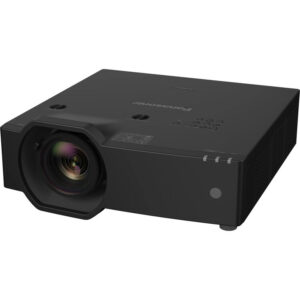
Projector Options from AudioVideoNation
1. Panasonic PT-DX100UW 10,000-Lumen XGA DLP Projector with Lens (White)
Who should compare it: Projects whose documented brief calls for a 10,000-lumen XGA projector, subject to lens, placement, signal, and mounting verification.
Why it belongs here: This is the focus of the guide and the only provided projector combining a stated 10,000-lumen brightness rating with XGA resolution.
SKU: PT-DX100UW
Key Features
- 10,000-lumen stated brightness
- XGA stated resolution
- Exact procurement reference: SKU PT-DX100UW
Things to Consider
Confirm the exact lens configuration, throw fit, supported signals, physical mounting requirements, and package contents before approving the installation.
2. Panasonic PT-CMZ50 WUXGA Ultra-Short Throw Laser Projector – Professional Golf Simulator Display
Who should compare it: Short-distance installations and golf simulator projects that call for WUXGA and 5,200-lumen brightness after geometry is confirmed.
Why it belongs here: It is the only provided alternative identified as ultra short throw, giving buyers a distinct placement option alongside WUXGA resolution and a 5,200-lumen rating.
SKU: PT-CMZ50U
Key Features
- 5,200-lumen stated brightness
- WUXGA stated resolution
- Ultra-short-throw placement type
- Exact procurement reference: SKU PT-CMZ50U
Things to Consider
Verify the permitted image size, exact projector-to-surface distance, mounting orientation, surface requirements, and source connections for the planned installation.
3. Panasonic PT-VMZ72BU8 7,300 Lumens WUXGA Laser Golf Simulator Projector – High-Brightness, Vivid Green Mode
Who should compare it: Buyers whose site and content plan calls for a 7,300-lumen WUXGA projector, including qualifying golf simulator projects.
Why it belongs here: Its 7,300-lumen WUXGA specification provides a clear comparison point between the PT-DX100UW and the 5,200-lumen alternatives.
SKU: PT-VMZ72BU8
Key Features
- 7,300-lumen stated brightness
- WUXGA stated resolution
- Exact procurement reference: SKU PT-VMZ72BU8
Things to Consider
Confirm throw geometry, lens details, mounting requirements, supported signals, and connection needs from documentation for this exact SKU.
4. Panasonic PT-VMZ51 5200-Lumen WUXGA Laser 3LCD Projector
Who should compare it: Projects whose completed room calculations and content plan support a 5,200-lumen WUXGA projector.
Why it belongs here: This separate Panasonic option lets buyers compare a 5,200-lumen WUXGA specification with the brighter PT-DX100UW and PT-VMZ72BU8.
SKU: PT-VMZ51
Key Features
- 5,200-lumen stated brightness
- WUXGA stated resolution
- Exact procurement reference: SKU PT-VMZ51
Things to Consider
Check the required throw, mounting position, lens configuration, supported signals, and installation accessories before comparing total project cost.
5. Panasonic PT-VMZ51S 5200-Lumen WUXGA Laser 3LCD Projector
Who should compare it: Buyers evaluating a 5,200-lumen WUXGA Panasonic option and prepared to validate the SKU-specific installation details.
Why it belongs here: It is a distinct SKU and product page with the same stated brightness and resolution as the PT-VMZ51, making exact configuration checks essential during procurement.
SKU: PT-VMZ51S
Key Features
- 5,200-lumen stated brightness
- WUXGA stated resolution
- Separate procurement reference: SKU PT-VMZ51S
Things to Consider
Do not assume interchangeability with the PT-VMZ51. Compare exact package contents, lens details, connections, dimensions, and mounting requirements before ordering.
Panasonic PT-DX100UW 10,000-Lumen XGA DLP Projector with Lens (White) vs Panasonic PT-CMZ50 WUXGA Ultra-Short Throw Laser Projector – Professional Golf Simulator Display: Main Differences
- Choose Panasonic PT-DX100UW 10,000-Lumen XGA DLP Projector with Lens (White) if Projects whose documented brief calls for a 10,000-lumen XGA projector, subject to lens, placement, signal, and mounting verification..
- Choose Panasonic PT-CMZ50 WUXGA Ultra-Short Throw Laser Projector – Professional Golf Simulator Display if Short-distance installations and golf simulator projects that call for WUXGA and 5,200-lumen brightness after geometry is confirmed..
- Choose Panasonic PT-VMZ72BU8 7,300 Lumens WUXGA Laser Golf Simulator Projector – High-Brightness, Vivid Green Mode if Buyers whose site and content plan calls for a 7,300-lumen WUXGA projector, including qualifying golf simulator projects..
- Choose Panasonic PT-VMZ51 5200-Lumen WUXGA Laser 3LCD Projector if Projects whose completed room calculations and content plan support a 5,200-lumen WUXGA projector..
- Choose Panasonic PT-VMZ51S 5200-Lumen WUXGA Laser 3LCD Projector if Buyers evaluating a 5,200-lumen WUXGA Panasonic option and prepared to validate the SKU-specific installation details..
Start with the 10,000-lumen XGA projector specifications
The PT-DX100UW has two confirmed image specifications in the provided data: 10,000-lumen brightness and XGA resolution. Treat them as separate buying criteria. Brightness helps you establish whether a candidate belongs on the shortlist for the room and planned image size. Resolution affects how the projector fits the content and source workflow.
The 10,000-lumen rating is higher than the stated ratings of every other projector in this guide. That numerical difference matters when a project brief already calls for that brightness class. It does not replace a site survey. Screen size, ambient light, viewing distance, surface characteristics, and content design all affect the finished image.
XGA also needs deliberate review because each alternative here is listed as WUXGA. Inventory every source and the content it will show. Presentation slides, video, dashboards, worship lyrics, classroom material, and conferencing layouts may place different demands on the image. Confirm the supported signal formats and scaling behavior from exact product documentation before treating the resolution label as a complete compatibility answer.
Projector installation checklist before mounting
Begin with measurements. Record the usable image area, planned screen dimensions, audience sightlines, permitted projector locations, and the unobstructed distance between the lens position and image surface. Mark doors, lighting fixtures, speakers, beams, sprinklers, and other objects that could constrain placement or block the image.
Next, map the environment. Note daylight sources, controllable lighting zones, the darkest realistic operating condition, and the most demanding content. A sanctuary used for daytime services presents a different deployment problem from a classroom with shades or a conference room used mainly for large text. The projector rating stays the same. The room does not.
Document the cable route and equipment location as well. Include every source, switcher, distribution stage, adapter, and control point planned for the system. Confirm cable-length limits and supported formats for the full chain. Before selecting a mount, verify the projector's dimensions, weight, approved orientation, attachment pattern, access clearances, and structural requirements from authoritative documentation. Use a qualified installer where overhead mounting or structural work is involved.
Panasonic PT-DX100UW setup: lens and placement checks
Do not finalize the projector location until the exact lens configuration is confirmed. Match the PT-DX100UW SKU to the specific package being purchased, identify the supplied or required lens, and obtain the applicable throw information. Then calculate whether the planned image size can be produced from the permitted location. Leave enough adjustment range to account for field conditions instead of designing around a single boundary value.
Set the projector square and level to the image surface during initial alignment. Physical alignment comes first. Use a grid or other suitable test pattern, check focus across the image, and inspect all four edges before tightening the mount. Only plan around optical or digital adjustment controls after confirming that the exact projector and lens provide them.
Temporary positioning is valuable before permanent work. It can expose blocked sightlines, an unsuitable image position, a cable-path problem, or a throw mismatch while changes are still manageable. Once alignment is stable, secure the installation according to the mount and projector instructions and retain safe service access.
Plan the XGA source and content workflow
Build a signal worksheet before installation day. For each source, list its intended output format, connection path, content type, and fallback plan. Confirm that the PT-DX100UW accepts the required signals and that every upstream component can carry them over the planned distance. The supplied product data does not establish those connection details, so verify them against documentation for the exact SKU.
Resolution deserves an end-to-end test. The projector is listed as XGA, while the other candidates in this guide are WUXGA. Check how existing computers, media players, cameras, and conferencing systems behave with the selected projector. Test small text, spreadsheets, presentation templates, video, captions, and multi-window layouts rather than relying on a startup screen.
Keep the content team involved. A readable slide template can matter as much as projector selection. Confirm font sizes, contrast, safe margins, and the layout used during real events. Save the approved source settings and record any scaling choices so another operator can restore the system after equipment changes.
Panasonic projector buying guide: compare the provided options
The PT-DX100UW is the reference choice when the project calls for its 10,000-lumen rating and XGA resolution. Its higher stated brightness separates it from this particular group. Choose it only after confirming that XGA fits the content plan and that the exact lens, placement, signal path, and mounting details work in the room.
The PT-VMZ72BU8 shifts the balance to 7,300 lumens and WUXGA. It gives buyers a middle brightness point between the PT-DX100UW and the 5,200-lumen alternatives. Compare it when WUXGA is part of the brief and the site survey supports its brightness class.
The PT-CMZ50U is the placement-specific option. It is listed at 5,200 lumens, WUXGA, and ultra short throw. That throw type may suit projects where the projector must be positioned close to the image surface, but the permitted image size and exact mounting geometry still need documentation-based confirmation.
The PT-VMZ51 and PT-VMZ51S are separate SKUs with the same stated 5,200-lumen brightness and WUXGA resolution in the supplied data. Do not assume they are interchangeable. Compare their individual product pages and exact technical documents for package contents, physical configuration, connections, lens details, and installation requirements before specifying either one.
Stock, availability, and price-to-performance
Check each linked product page for live stock, availability, and commerce details when the purchase is ready for approval. Those conditions can change, so tie quotes and procurement records to the exact product ID and SKU. If a project has a fixed installation date, confirm the sourcing timeline before scheduling labor or removing existing equipment.
Price-to-performance should reflect the installed system, not one headline specification. Start with the required brightness, resolution, and throw arrangement. Then account for the exact lens or package contents, mount, structural work, cabling, signal conversion, control equipment, and installation labor that the design requires. A lower purchase figure does not help if the projector cannot meet the documented placement or content requirement.
Compare only configurations that can complete the same job. The PT-DX100UW's 10,000-lumen XGA specification, the PT-VMZ72BU8's 7,300-lumen WUXGA combination, and the 5,200-lumen WUXGA choices solve different briefs. Use current product-page information to price the qualifying options after deployment fit is established.
Commissioning and handoff for churches, schools, and meeting rooms
Commission the projector with the full production signal chain, not a temporary laptop connected at the mount. Test every normal source and switching route. Run the system long enough to check operating behavior under the room's planned conditions, and inspect the image from the closest, farthest, and most obstructed audience positions.
Use representative content. A church should test lyrics, cameras, video, and announcement slides. A school can check lesson material, documents, and video from the instructor's normal sources. A conference room team should verify presentations, conferencing layouts, shared documents, and any room-control workflow. These tests do not create new projector capabilities. They confirm whether the specified system supports its real job.
Record the installed SKU, projector settings, source settings, cable path, mount position, and approved startup and shutdown steps. Provide operators with a short recovery procedure and escalation contact. Finish with an acceptance checklist signed against the original room, image, source, and control requirements.
Related AudioVideoNation Links
- Browse Projector at AudioVideoNation
- View the Panasonic PT-DX100UW product page
- Compare the Panasonic PT-CMZ50U
- Review the Panasonic PT-VMZ72BU8
- Review the Panasonic PT-VMZ51
Product Information Sources
- Panasonic PT-DX100UW 10,000-Lumen XGA DLP Projector with Lens (White) product information
- Panasonic PT-CMZ50 WUXGA Ultra-Short Throw Laser Projector – Professional Golf Simulator Display product information
- Panasonic PT-VMZ72BU8 7,300 Lumens WUXGA Laser Golf Simulator Projector – High-Brightness, Vivid Green Mode product information
- Panasonic PT-VMZ51 5200-Lumen WUXGA Laser 3LCD Projector product information
- Panasonic PT-VMZ51S 5200-Lumen WUXGA Laser 3LCD Projector product information
FAQ
What are the confirmed brightness and resolution of the Panasonic PT-DX100UW?
The Panasonic PT-DX100UW has a stated brightness of 10,000 lumens and XGA resolution. Confirm the remaining lens, signal, mounting, and physical specifications for the exact SKU before designing the installation.
Is the PT-DX100UW suitable for a church, school, or conference room?
The PT-DX100UW can be considered for churches, schools, and conference rooms whose site survey calls for its 10,000-lumen XGA specification. Final suitability depends on screen size, ambient light, content, source compatibility, throw geometry, and mounting constraints.
How should installers determine the mounting position for the PT-DX100UW?
Installers should calculate the mounting position from the planned image size and the verified throw data for the exact projector and lens configuration. Confirm structural support, service clearance, sightlines, cable routing, and physical alignment before drilling.
Which provided Panasonic projector is the ultra-short-throw alternative?
The Panasonic PT-CMZ50U is the provided ultra-short-throw alternative, with a stated brightness of 5,200 lumens and WUXGA resolution. Verify its exact image-size range and placement geometry against the planned surface.
How can buyers check PT-DX100UW stock, availability, and current commerce details?
Buyers should use the linked PT-DX100UW product page to check live stock, availability, and current commerce details. Reference product ID 17707 and SKU PT-DX100UW in procurement documents so the requested item stays unambiguous.
What should be tested during projector commissioning?
Commissioning should test every normal source, signal route, content type, control step, and planned viewing position with the complete installed system. Record the approved settings and operator procedure after the image and workflow meet the project's documented requirements.
Conclusion
Use this Panasonic PT-DX100UW Setup Guide and Buying Considerations comparison to match documented specifications to the room and installation requirements. Review the linked product pages for current purchase details before ordering.
Products Used
| SKU | Product Name | URL |
|---|---|---|
| PT-DX100UW | Panasonic PT-DX100UW 10,000-Lumen XGA DLP Projector with Lens (White) | View product |
| PT-CMZ50U | Panasonic PT-CMZ50 WUXGA Ultra-Short Throw Laser Projector – Professional Golf Simulator Display | View product |
| PT-VMZ72BU8 | Panasonic PT-VMZ72BU8 7,300 Lumens WUXGA Laser Golf Simulator Projector – High-Brightness, Vivid Green Mode | View product |
| PT-VMZ51 | Panasonic PT-VMZ51 5200-Lumen WUXGA Laser 3LCD Projector | View product |
| PT-VMZ51S | Panasonic PT-VMZ51S 5200-Lumen WUXGA Laser 3LCD Projector | View product |