

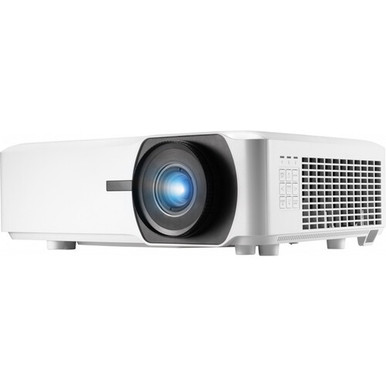
Searching for an Epson LS920WU Setup Guide and Buying Considerations reveals a naming issue that should be fixed before installation begins: the supplied LS920WU is a ViewSonic projector, not an Epson model. Its confirmed facts are 6,000 ANSI lumens and WUXGA resolution. Those details establish a useful starting point, but they do not settle throw distance, mounting, connectivity, control, or screen requirements.
The buyer’s real problem is broader. You need to confirm that the exact projector fits the room, signal chain, operating workflow, and project budget before approving it. This guide explains how to plan a ViewSonic LS920WU deployment and compare it with four supplied Epson alternatives: the PowerLite 875E, BrightLink 870Ei, BrightLink 780Ei, and LightScene EV-110. The Epson choices have different placement, resolution, or brightness profiles. Treat them as separate designs, not automatic substitutes. The goal is a defensible choice that installers, procurement teams, and end users can all verify.
Products at a Glance
- Option 1: ViewSonic LS920WU 6000-Lumen WUXGA Laser Projector
- For teams whose room plan calls for ultra short throw…: Epson PowerLite 875E 5 Ultra Short Throw Display with 4K Enhancement (V11HC04120)
- For projects that call for an Epson ultra short throw…: Epson BrightLink 870Ei Ultra Short Throw Interactive Display with 4K Enhancement (V11HC03020)
- For projects that explicitly call for SKU BL-780Ei wi…: Epson BrightLink 780Ei Ultra Short Throw Interactive Display with 4K Enhancement (V11HC10020)
- For projects deliberately designed around a 2,200-lum…: Epson LightScene EV-110 2200-Lumen WXGA Laser 3LCD Projector (V11HA22020)
Quick Comparison Table
| Feature | ViewSonic LS920WU 6000-Lumen WUXGA Laser Projector | Epson PowerLite 875E 5 Ultra Short Throw Display with 4K Enhancement (V11HC04120) | Epson BrightLink 870Ei Ultra Short Throw Interactive Display with 4K Enhancement (V11HC03020) | Epson BrightLink 780Ei Ultra Short Throw Interactive Display with 4K Enhancement (V11HC10020) | Epson LightScene EV-110 2200-Lumen WXGA Laser 3LCD Projector (V11HA22020) |
|---|---|---|---|---|---|
| Brightness | 6000 ANSI lumens | 2200 lumens | |||
| Resolution | WUXGA | 4K | 4K | 4K | WXGA |
| Best For | Projects explicitly specified for SKU LS920WU and planned around 6,000 ANSI lumens and WUXGA resolution. | Teams whose room plan calls for ultra short throw placement and can be validated against the PL-875E documentation. | Projects that call for an Epson ultra short throw interactive display and can be specified around SKU BL-870Ei. | Projects that explicitly call for SKU BL-780Ei within an Epson ultra short throw interactive-display design. | Projects deliberately designed around a 2,200-lumen brightness listing and WXGA resolution. |
| Throw Type | Ultra short throw | Ultra short throw | Ultra short throw | ||
| Recommended Buyer | Projects explicitly specified for SKU LS920WU and planned around 6,000 ANSI lumens and WUXGA resolution. | Teams whose room plan calls for ultra short throw placement and can be validated against the PL-875E documentation. | Projects that call for an Epson ultra short throw interactive display and can be specified around SKU BL-870Ei. | Projects that explicitly call for SKU BL-780Ei within an Epson ultra short throw interactive-display design. | Projects deliberately designed around a 2,200-lumen brightness listing and WXGA resolution. |
Product Images
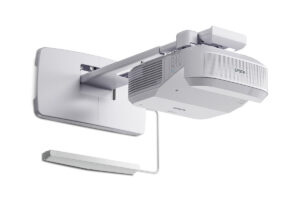
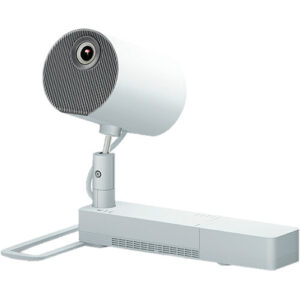
Projector Options from AudioVideoNation
1. ViewSonic LS920WU 6000-Lumen WUXGA Laser Projector
Who should compare it: Projects explicitly specified for SKU LS920WU and planned around 6,000 ANSI lumens and WUXGA resolution.
Why it belongs here: This is the product named by the LS920WU brief. The supplied facts provide two concrete design inputs: 6,000 ANSI lumens and WUXGA resolution.
SKU: LS920WU
Key Features
- 6,000 ANSI-lumen brightness listing
- WUXGA resolution
- Exact LS920WU SKU for design and procurement matching
Things to Consider
Verify throw geometry, supported image size, lens adjustments, mounting, connections, control, power, ventilation, and service clearance before finalizing the room design.
2. Epson PowerLite 875E 5 Ultra Short Throw Display with 4K Enhancement (V11HC04120)
Who should compare it: Teams whose room plan calls for ultra short throw placement and can be validated against the PL-875E documentation.
Why it belongs here: It gives buyers an Epson ultra short throw option from the supplied product set. The extracted facts record 4K, while the product name specifies 4K Enhancement.
SKU: PL-875E
Key Features
- Ultra short throw placement category
- 4K resolution listing with 4K Enhancement named in the product title
- PL-875E SKU for procurement matching
Things to Consider
Confirm brightness, imaging details, supported image sizes, projection-surface requirements, mounting, connections, control, and included components. Do not assume it shares the LS920WU installation geometry.
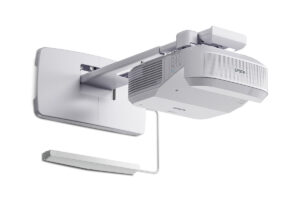
3. Epson BrightLink 870Ei Ultra Short Throw Interactive Display with 4K Enhancement (V11HC03020)
Who should compare it: Projects that call for an Epson ultra short throw interactive display and can be specified around SKU BL-870Ei.
Why it belongs here: This Epson candidate combines an ultra short throw listing with 4K in the supplied facts. Its product name also places it in the interactive-display category for projects that require that workflow.
SKU: BL-870Ei
Key Features
- Ultra short throw placement category
- 4K resolution listing with 4K Enhancement named in the product title
- BL-870Ei SKU for design and order matching
Things to Consider
Verify brightness, image-size limits, interaction workflow, required software, mounting, connections, and included components. Compare current documentation before treating it as interchangeable with the BL-780Ei.
4. Epson BrightLink 780Ei Ultra Short Throw Interactive Display with 4K Enhancement (V11HC10020)
Who should compare it: Projects that explicitly call for SKU BL-780Ei within an Epson ultra short throw interactive-display design.
Why it belongs here: It is a separate BrightLink procurement candidate with ultra short throw placement and 4K recorded in the supplied facts. Keeping it distinct prevents unsupported assumptions about the BL-870Ei.
SKU: BL-780Ei
Key Features
- Ultra short throw placement category
- 4K resolution listing with 4K Enhancement named in the product title
- BL-780Ei SKU for design and order matching
Things to Consider
Confirm brightness, supported image size, interaction details, mounting, connections, software requirements, and included components. Use documented differences before choosing between the two BrightLink SKUs.
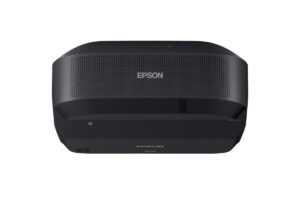
5. Epson LightScene EV-110 2200-Lumen WXGA Laser 3LCD Projector (V11HA22020)
Who should compare it: Projects deliberately designed around a 2,200-lumen brightness listing and WXGA resolution.
Why it belongs here: The EV-110 provides a clear specification contrast within the supplied Epson products. Its extracted facts list 2,200 lumens and WXGA resolution.
SKU: EV-110
Key Features
- 2,200-lumen brightness listing
- WXGA resolution
- EV-110 SKU for procurement matching
Things to Consider
Its 2,200-lumen WXGA profile differs from the LS920WU’s 6,000 ANSI-lumen WUXGA profile. Recheck room light, image size, content detail, throw geometry, mounting, and connectivity before changing the design.
ViewSonic LS920WU 6000-Lumen WUXGA Laser Projector vs Epson PowerLite 875E 5 Ultra Short Throw Display with 4K Enhancement (V11HC04120): Main Differences
- Choose ViewSonic LS920WU 6000-Lumen WUXGA Laser Projector if Projects explicitly specified for SKU LS920WU and planned around 6,000 ANSI lumens and WUXGA resolution..
- Choose Epson PowerLite 875E 5 Ultra Short Throw Display with 4K Enhancement (V11HC04120) if Teams whose room plan calls for ultra short throw placement and can be validated against the PL-875E documentation..
- Choose Epson BrightLink 870Ei Ultra Short Throw Interactive Display with 4K Enhancement (V11HC03020) if Projects that call for an Epson ultra short throw interactive display and can be specified around SKU BL-870Ei..
- Choose Epson BrightLink 780Ei Ultra Short Throw Interactive Display with 4K Enhancement (V11HC10020) if Projects that explicitly call for SKU BL-780Ei within an Epson ultra short throw interactive-display design..
- Choose Epson LightScene EV-110 2200-Lumen WXGA Laser 3LCD Projector (V11HA22020) if Projects deliberately designed around a 2,200-lumen brightness listing and WXGA resolution..
Start with the correct LS920WU product identity
Record the manufacturer, model, SKU, and linked product page in every design document. For this project, SKU LS920WU maps to the ViewSonic LS920WU 6000-Lumen WUXGA Laser Projector. Calling it an Epson LS920WU could send procurement staff toward the wrong documentation, accessories, or support path.
The supplied facts confirm 6,000 ANSI lumens and WUXGA resolution. Use those two values in the initial design brief. Then verify every other installation-critical detail through the linked product page and current product documentation. That includes throw geometry, supported image sizes, mounting options, connections, control methods, power requirements, service clearance, and operating orientation.
Keep the Epson products under their own SKUs. PL-875E, BL-870Ei, BL-780Ei, and EV-110 are distinct candidates. Specifications or installation instructions from one should never be transferred to another without documentation that supports the decision.
Deployment fit: match the projector to the room
Begin with the required image, not the projector mount. Document the screen or projection surface, target image size, viewing distance, room lighting, source content, and any fixed architectural limits. Churches may need readable lyrics and presentation material from distant seats. Schools may prioritize instructional content and repeatable operation. Conference rooms often depend on clear computer output and predictable source switching. Each brief produces a different acceptance test.
The LS920WU’s 6,000 ANSI-lumen listing is one input to that calculation. It is not a promise about the final image under every condition. Image size, ambient light, projection surface, and room geometry all affect the result. WUXGA establishes the listed resolution, but you should still validate the intended computers, media sources, switchers, and distribution equipment against the projector’s documented signal support.
Placement needs its own check. Confirm throw distance and lens position before approving a mount or cutting into a ceiling. If the room cannot accommodate the documented geometry, revisit the design. The PowerLite 875E, BrightLink 870Ei, and BrightLink 780Ei are listed as ultra short throw products, so they create a different placement path. That change can affect the projection surface, mounting location, cable route, service access, and installation labor. Recalculate the whole layout.
ViewSonic LS920WU setup workflow for installers
A reliable setup starts on paper. Create a commissioning sheet that identifies SKU LS920WU, the intended image size, every connected source, the control method, and the acceptance criteria. Do not rely on a model name copied from an email or an old quote.
1. Verify the design basis. Match the shipping and procurement records to LS920WU. Use current product documentation to confirm throw geometry, mounting, power, ventilation, and service requirements before physical work begins.
2. Validate the signal chain. List each source, switcher, extender, cable run, and endpoint. Confirm that the documented connections and supported signals cover the planned system. Check protected-content requirements where relevant.
3. Dry-fit the placement. Mark the projector and image locations before drilling or routing permanent cable. Confirm structure, access, power, airflow, and safe working clearances with the appropriate trades.
4. Establish mechanical alignment. Position the projector squarely to the projection surface using the documented adjustment range. Finish the physical alignment before relying on electronic correction controls.
5. Commission every operating path. Test each source with representative content. Verify startup, shutdown, source selection, control commands, and any external audio path. Repeat the tests from the user’s normal control position.
Save the final settings, cable labels, source map, and acceptance results with the project record. A school technician or conference room support team should be able to identify the installed SKU and reproduce the operating sequence without reconstructing the original design.
Compare the Epson ultra short throw alternatives
The supplied Epson products answer different design questions. The PowerLite 875E, BrightLink 870Ei, and BrightLink 780Ei are all identified as ultra short throw products with 4K in their extracted facts. Their product names specify 4K Enhancement, so confirm the full imaging specification rather than converting that wording into an unsupported native-resolution claim.
The BrightLink 870Ei and BrightLink 780Ei product names identify them as interactive displays. If interaction is central to the brief, confirm the supported workflow, required software, included components, mounting arrangement, and user-device requirements on the linked pages. The supplied facts do not establish a performance difference between those two BrightLink products. Keep both SKUs separate until current documentation gives you a reason to select one.
The LightScene EV-110 takes another path. Its supplied facts list 2,200 lumens and WXGA resolution. That differs substantially from the LS920WU’s 6,000 ANSI lumens and WUXGA resolution, so it should enter the shortlist only when the room and content plan are intentionally designed around its stated profile.
None of these Epson products is a drop-in LS920WU replacement based on the available facts. Use them to reopen the placement and use-case decision, then validate the selected SKU as a new design.
Stock and availability planning without schedule surprises
Check live commerce details before setting an installation date. A static buying guide cannot confirm current availability, order timing, or the exact commercial package that will be offered when purchasing. Open the linked AudioVideoNation product page, match the SKU, and confirm the current details with enough time for procurement and installation planning.
Build a decision point into the schedule. The design team should approve the exact SKU before mounts, screens, cable pathways, or control programming are finalized. If the specified projector cannot support the project timeline, do not substitute an Epson ultra short throw product or the EV-110 from the name alone. Recheck brightness, resolution, geometry, connectivity, mounting, and the intended workflow first.
Also confirm which required installation items are part of the projector order and which must be sourced separately. This prevents the projector’s arrival from being mistaken for a complete, installation-ready system.
Price-to-performance: compare the complete deployment
Price-to-performance starts with requirements. Write down the non-negotiable image, placement, resolution, source, control, and interaction needs before checking live commerce details. A lower purchase figure has little value if the projector forces a room redesign or misses a required workflow.
For the LS920WU, the supplied performance anchors are 6,000 ANSI lumens and WUXGA resolution. Compare its live product details against the real image size, room light, source content, and mounting plan. For the PowerLite and BrightLink candidates, decide whether ultra short throw placement and the listed 4K profile solve a documented need. For the EV-110, assess whether 2,200 lumens and WXGA meet the approved design rather than treating it as a like-for-like alternative.
Include the surrounding system in the evaluation. The projection surface, mount, cabling, signal distribution, control equipment, external audio, installation labor, and future service access can all shape project cost. Confirm required accessories and supported connections for the exact SKU before comparing proposals.
The strongest purchase decision is traceable. Each expense should connect to a requirement, and every claimed capability should connect to current product documentation. That approach gives AV buyers a useful comparison without depending on unsupported benchmarks or assumed specifications.
Related AudioVideoNation Links
- Browse Projector at AudioVideoNation
- ViewSonic LS920WU product page
- Epson PowerLite 875E product page
- Epson BrightLink 870Ei product page
- Epson BrightLink 780Ei product page
Product Information Sources
- ViewSonic LS920WU 6000-Lumen WUXGA Laser Projector product information
- Epson PowerLite 875E 5 Ultra Short Throw Display with 4K Enhancement (V11HC04120) product information
- Epson BrightLink 870Ei Ultra Short Throw Interactive Display with 4K Enhancement (V11HC03020) product information
- Epson BrightLink 780Ei Ultra Short Throw Interactive Display with 4K Enhancement (V11HC10020) product information
- Epson LightScene EV-110 2200-Lumen WXGA Laser 3LCD Projector (V11HA22020) product information
FAQ
Is the LS920WU an Epson projector?
No, the supplied catalog identifies SKU LS920WU as the ViewSonic LS920WU 6000-Lumen WUXGA Laser Projector. The Epson products in this guide are separate alternatives and should not be treated as LS920WU variants.
Which LS920WU specifications are confirmed?
The supplied facts confirm 6,000 ANSI lumens and WUXGA resolution for the LS920WU. Verify throw geometry, image-size support, connections, control, mounting, power, and other installation details through the linked product page and current documentation.
What should be confirmed before mounting the LS920WU?
Confirm the required image size, documented throw geometry, lens position, structural mounting point, power, cable route, ventilation, and service access before mounting the LS920WU. Dry-fit the location and validate the complete signal chain before making permanent changes.
Does 4K Enhancement establish native 4K resolution for the Epson alternatives?
No, the supplied data does not establish a native 4K claim for the Epson alternatives. Their product names specify 4K Enhancement while the extracted facts record 4K, so buyers should confirm the full imaging specification in current product documentation.
Can an Epson ultra short throw product replace the LS920WU?
An Epson ultra short throw product can replace the LS920WU in a design only after the room, image, mounting, signal, control, and workflow requirements are recalculated. The PowerLite 875E, BrightLink 870Ei, and BrightLink 780Ei use a different listed placement category and are not automatic substitutes.
How should buyers check LS920WU price and availability?
Buyers should use the linked AudioVideoNation product page to check live commerce details for SKU LS920WU. Confirm the exact SKU and required installation items before approving the purchase or scheduling installation.
Conclusion
Use this Epson LS920WU Setup Guide and Buying Considerations comparison to match documented specifications to the room and installation requirements. Review the linked product pages for current purchase details before ordering.
Products Used
| SKU | Product Name | URL |
|---|---|---|
| LS920WU | ViewSonic LS920WU 6000-Lumen WUXGA Laser Projector | View product |
| PL-875E | Epson PowerLite 875E 5 Ultra Short Throw Display with 4K Enhancement (V11HC04120) | View product |
| BL-870Ei | Epson BrightLink 870Ei Ultra Short Throw Interactive Display with 4K Enhancement (V11HC03020) | View product |
| BL-780Ei | Epson BrightLink 780Ei Ultra Short Throw Interactive Display with 4K Enhancement (V11HC10020) | View product |
| EV-110 | Epson LightScene EV-110 2200-Lumen WXGA Laser 3LCD Projector (V11HA22020) | View product |