

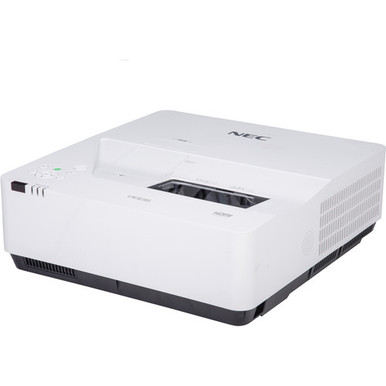
An ultra short throw projector can address a tight-room layout, yet the purchase only works when wall geometry, image size, mounting position, content, lighting, and signal paths are planned as one system. This NEC NP-UM383WL-WK Setup Guide and Buying Considerations article starts with the three facts provided for the projector: WXGA resolution, 3,800 lumens, and an ultra short throw design. Those details narrow the decision. They do not complete it.
Schools need repeatable operation and protected cabling. Churches may present lyrics, announcements, and video under changing light. Conference room teams need clear content and a predictable source path. Installers need exact placement data before drilling. The guide below turns those needs into a pre-purchase, setup, and commissioning workflow. It also explains two separate catalog paths: an LG UHD commercial display and an Optoma Wi-Fi and Bluetooth IFPD module. Neither is presented as a confirmed NEC accessory or direct substitute. Use them to frame the display-versus-projection and wired-versus-wireless decisions, then verify the chosen design on each linked product page.
Products at a Glance
- Option 1: NEC NP-UM383WL-WK WXGA LCD Projector With Speaker 3800 Lumens
- For teams comparing an ultra short throw projection d…: LG 86" 3840 x 2160 UHD Commercial Lite LED backlit LCD TV – Black
- For teams planning an IFPD deployment whose documenta…: Optoma Technology SI07B IFPD Wi-Fi and Bluetooth Module
Quick Comparison Table
| Feature | NEC NP-UM383WL-WK WXGA LCD Projector With Speaker 3800 Lumens | LG 86" 3840 x 2160 UHD Commercial Lite LED backlit LCD TV – Black | Optoma Technology SI07B IFPD Wi-Fi and Bluetooth Module |
|---|---|---|---|
| Brightness | 3800 Lumens | ||
| Resolution | WXGA | UHD | |
| Best For | Rooms whose verified design calls for ultra short throw placement, WXGA resolution, and a stated 3,800-lumen projector. | Teams comparing an ultra short throw projection design with a fixed UHD commercial display approach. | Teams planning an IFPD deployment whose documentation specifically supports the SI07B module. |
| Throw Type | Ultra short throw | ||
| Smart Features | Wi-Fi, Bluetooth | ||
| Recommended Buyer | Rooms whose verified design calls for ultra short throw placement, WXGA resolution, and a stated 3,800-lumen projector. | Teams comparing an ultra short throw projection design with a fixed UHD commercial display approach. | Teams planning an IFPD deployment whose documentation specifically supports the SI07B module. |
Product Images
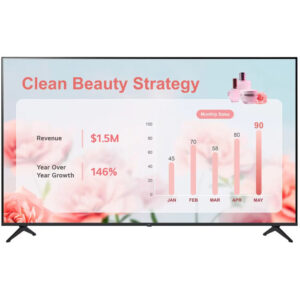
Projector Options from AudioVideoNation
1. NEC NP-UM383WL-WK WXGA LCD Projector With Speaker 3800 Lumens
Who should compare it: Rooms whose verified design calls for ultra short throw placement, WXGA resolution, and a stated 3,800-lumen projector.
Why it belongs here: This is the subject of the guide and the only projector in the supplied product set. Its provided facts give buyers three concrete planning anchors: 3,800 lumens, WXGA resolution, and ultra short throw placement.
SKU: NP-UM383WL-WK
Key Features
- 3,800-lumen stated brightness
- WXGA resolution
- Ultra short throw design
Things to Consider
Verify exact throw dimensions, mounting requirements, input and control connections, audio routing, included items, and live commerce details before approving the installation.
2. LG 86" 3840 x 2160 UHD Commercial Lite LED backlit LCD TV – Black
Who should compare it: Teams comparing an ultra short throw projection design with a fixed UHD commercial display approach.
Why it belongs here: This is the supplied commercial-display path for teams that decide projection geometry does not fit the room. UHD resolution is established in the provided product facts.
SKU: 86UR340C9UD
Key Features
- UHD resolution
- Commercial Smart Display category
- Separate display-based deployment path
Things to Consider
Verify connections, mounting requirements, viewing coverage, source support, and live commerce details. Do not treat it as a direct substitute for the NEC projector without a room-level design review.
3. Optoma Technology SI07B IFPD Wi-Fi and Bluetooth Module
Who should compare it: Teams planning an IFPD deployment whose documentation specifically supports the SI07B module.
Why it belongs here: This product illustrates a separate wireless-accessory path because Wi-Fi and Bluetooth are identified in the supplied facts. It helps buyers avoid assuming that wireless presentation is part of the NEC projector configuration.
SKU: SI07B
Key Features
- Wi-Fi
- Bluetooth
- Accessory for an IFPD deployment
Things to Consider
No provided fact confirms compatibility with the NEC NP-UM383WL-WK. Verify the exact host display, supported functions, installation requirements, and live commerce details before purchase.
NEC NP-UM383WL-WK WXGA LCD Projector With Speaker 3800 Lumens vs LG 86" 3840 x 2160 UHD Commercial Lite LED backlit LCD TV – Black: Main Differences
- Choose NEC NP-UM383WL-WK WXGA LCD Projector With Speaker 3800 Lumens if Rooms whose verified design calls for ultra short throw placement, WXGA resolution, and a stated 3,800-lumen projector..
- Choose LG 86" 3840 x 2160 UHD Commercial Lite LED backlit LCD TV – Black if Teams comparing an ultra short throw projection design with a fixed UHD commercial display approach..
- Choose Optoma Technology SI07B IFPD Wi-Fi and Bluetooth Module if Teams planning an IFPD deployment whose documentation specifically supports the SI07B module..
NEC NP-UM383WL-WK setup starts with deployment fit
Write the room brief before choosing mounting hardware. Record usable wall area, expected viewing positions, target image size, lighting that reaches the image surface, source locations, power locations, cable routes, audio plans, control plans, and access for maintenance. Mark which items are fixed and which can change.
The listed ultra short throw type means placement belongs close to the image surface, but the supplied facts do not give an exact throw distance or mounting offset. Get current installation dimensions for this exact SKU before approving the wall or mount. Never borrow measurements from a similar NEC product.
Deployment fit also depends on daily content. A classroom may prioritize quick instructor handoff. A church may need readable text from the rear seating area. A conference room may need legible spreadsheets and a reliable start-of-meeting routine. Test those real content types at the intended viewing distances. If the surface, mounting zone, or content cannot support the plan, revisit image size or compare a fixed display before purchasing.
Ultra short throw projector installation: measure before mounting
Ultra short throw geometry rewards precise preparation. Start with the intended image boundaries on the actual surface. Confirm the required distance and offset using documentation for NP-UM383WL-WK, then measure from the same reference points used in that documentation. Chassis edges and lens location are not interchangeable measurement points.
Check surface flatness before mounting. Small waves, seams, trim, whiteboards, frames, or wall hardware can affect the usable image area when projection comes from close range. Confirm that the mount can attach to the building structure and provide the adjustment called for by the documented placement method. Scope mounting hardware separately after checking what the current product listing includes.
Plan power, source cabling, control cabling, ventilation clearance, and service access before closing walls or ordering custom millwork. Confirm cable types and allowable lengths from the source through every adapter or extender. Bench-test the full signal chain first. During final alignment, position the projector mechanically according to verified dimensions before relying on digital image correction. Record the finished measurements for service teams.
WXGA projector buying guide: test the content path
WXGA is the stated resolution. That makes source and content testing central to the buying decision because the supplied data does not list supported input timings, connectors, aspect handling, or scaling behavior. Confirm each source can deliver a supported signal through the exact cable and adapter chain planned for the room.
Use representative files during testing: the smallest spreadsheet text, detailed classroom diagrams, worship lyrics, browser pages, and video clips the team expects to show. Check readability from the farthest intended seat. Revise layouts and font sizes where needed. A displayed signal can still be hard to use.
If UHD content presentation is a firm requirement, the provided LG commercial display is a separate UHD path to investigate. Its supplied facts establish UHD resolution, not equivalence to the NEC installation. Compare viewing distance, usable image size, room layout, mounting needs, and source support before changing display types.
Plan the 3,800-lumen projector around real room light
The projector's stated brightness is 3,800 lumens. Treat that number as a planning input, not a promise that every image size, surface, and lighting condition will look the same. Visibility changes with ambient light on the image area, image size, content contrast, surface condition, and operating configuration.
Map the room's real lighting states. Include daylight at the time the room is used, presentation lights, stage or platform lighting, and any fixtures aimed toward the wall. Decide which lights can be controlled without making the room unsafe or uncomfortable. Then review representative content under the hardest expected condition.
A side-by-side decision should keep image size and room conditions consistent. Do not compare a small demonstration image in a dark space with a larger planned image under active room lighting. If visual performance is critical, arrange a qualified demonstration or documented design review using the target surface and content. This is the sound way to judge whether a 3,800-lumen WXGA plan fits the room.
Verify sources, control, audio, and wireless needs
Build an interface schedule before ordering. For every source, list its output, required content resolution, cable route, adapter or extender, switching step, control method, and audio destination. Then confirm the projector's exact inputs, accepted signals, control connections, and audio connections in current product documentation.
Wireless presentation needs its own decision. The supplied facts for the Optoma Technology SI07B IFPD Wi-Fi and Bluetooth Module identify Wi-Fi and Bluetooth, but they do not establish compatibility with the NEC projector. It is described as an IFPD module. Treat it as a separate accessory path for a supported host, and verify that host relationship before purchase.
Plan audio around the room's actual requirement. Speech reinforcement, program audio, classroom sound, and conferencing can lead to different routing choices. Confirm whether the chosen system needs local playback, connection to an existing sound system, or audio handled by a conferencing platform. Do not infer a connection from the product name. Put every verified port, adapter, cable, and destination on the final drawing.
Classroom projector setup and conference room handoff
A good classroom projector setup or conference room installation ends with a written acceptance test. Keep it short enough that onsite staff will use it.
1. Inspect. Confirm the mount is secure, cables have strain relief, verified ventilation and service clearances are open, and the image surface is unobstructed.
2. Align. Check image boundaries, focus across the intended area, and geometry with test content. Save documented measurements and approved settings.
3. Exercise every source. Connect each assigned computer, media source, or room system through its normal path. Check startup, source selection, recovery after disconnect, and shutdown.
4. Review real content. Display slides, small text, motion video, and recurring templates under the room's planned lighting states. Have stakeholders assess them from their normal seats.
5. Verify audio and control. Test only the routes and commands included in the approved design. Label controls in words users recognize.
6. Hand off. Record the configuration, cable map, source instructions, support contact, and a simple fault-isolation sequence. Photograph final cable labels and mounting references for the project file.
For churches and schools, run the test with the people who prepare weekly or daily content. For conference rooms, include someone unfamiliar with the installation. Their first attempt can expose unclear labels or missing instructions without turning the result into a product performance claim.
Live stock, availability, and price-to-performance checks
Use the linked product page for live stock, availability, and commerce details when the quote is prepared, again before purchase approval, and once more before scheduling labor. A catalog snapshot can age. Do not base an installation date on this draft, and do not assume that an accessory or mount ships with the projector unless the current listing says so.
Price-to-performance starts with a pass-or-fail fit review. The NEC path should meet the verified image size, throw geometry, resolution, brightness, source, control, audio, mounting, and service requirements. Then compare current purchase terms and the full installed scope. Include mounting hardware, surface preparation, cabling, adapters, signal extension, control, external audio, labor, training, and approved spare items. A lower hardware total can lose its advantage if it creates extra installation work or misses a core requirement. That is procurement logic, not a claim about any listed product.
Document all assumptions beside the quote. If a required specification is still unverified, keep the decision pending. This discipline ties the comparison to deployable systems instead of incomplete product names.
Choose the right supplied product path
The NEC NP-UM383WL-WK is the only projector in the supplied product set. Its known decision points are clear: ultra short throw, WXGA, and 3,800 lumens. Keep it on the shortlist when those facts align with a verified room design and the remaining installation details check out.
The LG product follows a different route. It is a commercial display with UHD resolution, so consider it when the project team wants to evaluate a fixed-display design. The supplied facts do not support a claim that it matches the NEC on image size, brightness, connections, or room coverage.
The Optoma SI07B follows an accessory route. Its listed Wi-Fi and Bluetooth functions may matter inside a compatible IFPD design, but no supplied fact links it to the NEC. Do not bundle them by assumption.
Make the final choice at the system level. Approve the product only after room geometry, content, lighting, signal flow, audio, control, mounting, live commerce details, and support responsibilities are verified.
Related AudioVideoNation Links
- Browse Projector at AudioVideoNation
- View NEC NP-UM383WL-WK product details
- Review the LG UHD commercial display
- Review the Optoma SI07B Wi-Fi and Bluetooth module
Product Information Sources
- NEC NP-UM383WL-WK WXGA LCD Projector With Speaker 3800 Lumens product information
- LG 86" 3840 x 2160 UHD Commercial Lite LED backlit LCD TV – Black product information
- Optoma Technology SI07B IFPD Wi-Fi and Bluetooth Module product information
FAQ
Is the NEC NP-UM383WL-WK an ultra short throw projector?
Yes, the supplied product facts identify the NEC NP-UM383WL-WK as an ultra short throw projector. Exact placement distance and offset are not provided here, so confirm them for this SKU before choosing a mount or drilling.
What resolution and brightness does the NEC NP-UM383WL-WK have?
The provided product facts list WXGA resolution and 3,800 lumens for the NEC NP-UM383WL-WK. Judge deployment fit with actual content, intended image size, surface, and room lighting instead of using brightness alone.
Is 3,800 lumens enough for a classroom, church, or conference room?
The 3,800-lumen rating alone cannot determine whether the projector is sufficient for a classroom, church, or conference room. Image size, ambient light on the surface, content, viewing distance, and room configuration must be assessed together.
Does this guide confirm the projector's ports or wireless presentation functions?
No, the supplied NEC facts do not confirm connector types, accepted signals, control ports, or wireless presentation functions. Build a source schedule and verify every required connection in current product documentation before ordering cables or adapters.
How should buyers compare price-to-performance?
Compare price-to-performance only after each option passes the same room, content, signal, mounting, audio, control, and support requirements. Use each linked product page for current commerce details, then compare the full installed scope rather than hardware alone.
Can the Optoma SI07B be used with the NEC NP-UM383WL-WK?
The provided data does not establish compatibility between the Optoma SI07B and the NEC NP-UM383WL-WK. Treat SI07B as a separate IFPD accessory and purchase it only when documentation confirms support for the intended host.
Conclusion
Use this NEC NP-UM383WL-WK Setup Guide and Buying Considerations comparison to match documented specifications to the room and installation requirements. Review the linked product pages for current purchase details before ordering.
Products Used
| SKU | Product Name | URL |
|---|---|---|
| NP-UM383WL-WK | NEC NP-UM383WL-WK WXGA LCD Projector With Speaker 3800 Lumens | View product |
| 86UR340C9UD | LG 86" 3840 x 2160 UHD Commercial Lite LED backlit LCD TV – Black | View product |
| SI07B | Optoma Technology SI07B IFPD Wi-Fi and Bluetooth Module | View product |