

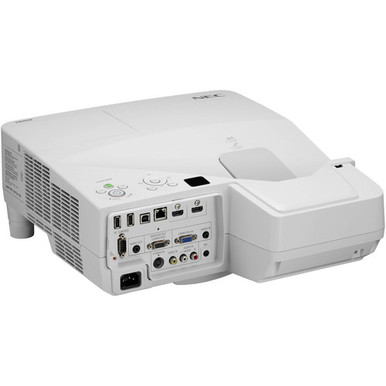
This NEC NP-UM330W Setup Guide and Buying Considerations article tackles a practical buyer problem: a projector can match a requirement on paper yet create avoidable work if placement, source resolution, mounting, and commissioning are left until installation day. The NEC NP-UM330W is a 3,300-lumen WXGA ultra-short-throw projector. Those three supplied facts shape the decision, but they don't settle it. Screen conditions, room light, content, cable paths, control needs, and support plans still matter.
This guide walks schools, churches, conference-room teams, and AV installers through a disciplined site survey, placement plan, signal check, and acceptance test. It also explains when the listed LG commercial display or Optoma IFPD connectivity module belongs in a separate design conversation. Use the product page for current commerce details, then validate the installation requirements against your room and approved project documents before committing.
Products at a Glance
- Option 1: NEC NP-UM330W WXGA 720p LCD Projector with Speaker
- For commercial-display projects that require UHD reso…: LG 86" 3840 x 2160 UHD Commercial Lite LED backlit LCD TV – Black
- For compatible IFPD projects that specifically call f…: Optoma Technology SI07B IFPD Wi-Fi and Bluetooth Module
Quick Comparison Table
| Feature | NEC NP-UM330W WXGA 720p LCD Projector with Speaker | LG 86" 3840 x 2160 UHD Commercial Lite LED backlit LCD TV – Black | Optoma Technology SI07B IFPD Wi-Fi and Bluetooth Module |
|---|---|---|---|
| Brightness | 3300 Lumen | ||
| Resolution | WXGA | UHD | |
| Best For | Projects that call for an ultra-short-throw WXGA projector and can validate the 3,300-lumen design against the actual room, content, and lighting. | Commercial-display projects that require UHD resolution and have been designed around a direct-view display format. | Compatible IFPD projects that specifically call for the SI07B module after exact host compatibility has been verified. |
| Throw Type | Ultra short throw | ||
| Smart Features | Wi-Fi, Bluetooth | ||
| Recommended Buyer | Projects that call for an ultra-short-throw WXGA projector and can validate the 3,300-lumen design against the actual room, content, and lighting. | Commercial-display projects that require UHD resolution and have been designed around a direct-view display format. | Compatible IFPD projects that specifically call for the SI07B module after exact host compatibility has been verified. |
Product Images
Projector Options from AudioVideoNation
1. NEC NP-UM330W WXGA 720p LCD Projector with Speaker
Who should compare it: Projects that call for an ultra-short-throw WXGA projector and can validate the 3,300-lumen design against the actual room, content, and lighting.
Why it belongs here: It is the subject of this setup guide and the only projector in the supplied product set. Its confirmed 3,300-lumen, WXGA, ultra-short-throw profile gives buyers a concrete starting point for room planning.
SKU: NP-UM330W
Key Features
- 3,300-lumen brightness rating
- WXGA resolution
- Ultra-short-throw design
Things to Consider
Confirm exact throw geometry, supported image dimensions, mounting requirements, connections, control options, power needs, audio behavior, and service clearances in current model documentation. Visit the linked page for live commerce details.
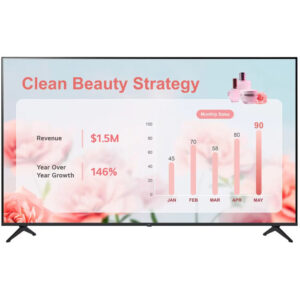
2. LG 86" 3840 x 2160 UHD Commercial Lite LED backlit LCD TV – Black
Who should compare it: Commercial-display projects that require UHD resolution and have been designed around a direct-view display format.
Why it belongs here: It provides a separate commercial-display path for projects that choose a direct-view format instead of ultra-short-throw projection. Its supplied resolution is UHD, allowing a resolution-led discussion without treating it as equivalent to the NEC projector.
SKU: 86UR340C9UD
Key Features
- UHD resolution
- Commercial Smart Display category
- Direct-view alternative to a projection-based room design
Things to Consider
This display is not a like-for-like replacement for the NEC projector. Reassess mounting, viewing distance, source and control connections, room layout, and support requirements before selecting it.
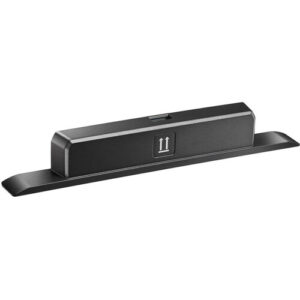
3. Optoma Technology SI07B IFPD Wi-Fi and Bluetooth Module
Who should compare it: Compatible IFPD projects that specifically call for the SI07B module after exact host compatibility has been verified.
Why it belongs here: It clarifies the difference between a projector purchase and an IFPD connectivity accessory. The supplied product facts identify Wi-Fi and Bluetooth capabilities.
SKU: SI07B
Key Features
- Wi-Fi capability
- Bluetooth capability
- IFPD accessory-module format
Things to Consider
No provided fact establishes compatibility with the NEC NP-UM330W. Do not purchase it as a projector adapter. Confirm the exact host display, required configuration, and current product documentation first.
NEC NP-UM330W WXGA 720p LCD Projector with Speaker vs LG 86" 3840 x 2160 UHD Commercial Lite LED backlit LCD TV – Black: Main Differences
- Choose NEC NP-UM330W WXGA 720p LCD Projector with Speaker if Projects that call for an ultra-short-throw WXGA projector and can validate the 3,300-lumen design against the actual room, content, and lighting..
- Choose LG 86" 3840 x 2160 UHD Commercial Lite LED backlit LCD TV – Black if Commercial-display projects that require UHD resolution and have been designed around a direct-view display format..
- Choose Optoma Technology SI07B IFPD Wi-Fi and Bluetooth Module if Compatible IFPD projects that specifically call for the SI07B module after exact host compatibility has been verified..
Projector deployment fit: define the room's job
Start with the room, not the model number. The confirmed NEC NP-UM330W facts provide three selection anchors: 3,300-lumen brightness, WXGA resolution, and an ultra-short-throw design. Your team still needs to decide whether those characteristics align with the content, viewing conditions, and installation plan.
Write a one-page room brief before requesting a quote or approving equipment. Include the intended image area, closest and farthest viewers, normal lighting scenes, primary source devices, content types, daily operating pattern, and who supports the system. Short text, detailed spreadsheets, presentation slides, and video do not place identical demands on an image.
Different teams should also document their own priorities:
- Schools: Record board use, student sightlines, teacher movement, source devices, and shutdown procedures.
- Churches: Review seating angles, lighting during services, presentation content, and the handoff to the room's audio system.
- Conference rooms: Map table positions, presentation sources, meeting workflows, and the steps users must follow to begin a session.
- Installers: Confirm structural support, cable routes, service access, control expectations, and acceptance criteria.
Treat each requirement as a pass-or-fail gate. If the project mandates a UHD-labeled commercial display, for example, the separately listed LG display belongs in that discussion. It should not be treated as a drop-in substitute for the NEC projector.
Ultra short throw projector setup starts with a site survey
An ultra-short-throw design places the projector close to the image surface, but the supplied facts do not establish an exact mounting distance, offset, or supported image size. Measure first. Use current dimensional documentation for the exact model before drilling, ordering a mount, or finalizing millwork.
Mark the desired image boundaries with removable tape. Inspect the full surface for trim, outlets, controls, speakers, uneven areas, or other obstructions. Then trace the likely projector location and check it against doors, ceiling elements, furniture, presenter paths, and service access. A clean drawing prevents late changes.
The survey should capture:
- Wall or screen dimensions and the required visible image area
- Mounting-surface construction and the available structural support
- Power and signal-cable routes
- Space needed for documented airflow and maintenance access
- Positions where people or furniture could contact the projector or mount
- Viewing conditions under every normal room-lighting scene
Do not derive the final mount point from a generic throw calculator. Confirm the values against documentation tied to SKU NP-UM330W. If the project allows a temporary test, place the projector on a stable, secured support and display representative content before committing to permanent holes. Check the image edges, focus, sightlines, and physical clearances from normal seating positions.
Mounting hardware is a separate verification item. Confirm its interface, load rating, adjustment range, fasteners, and suitability for the building surface. Never leave equipment unsecured or place an unapproved support over occupied space.
WXGA projector buying guide: map the full signal path
The NEC projector's supplied resolution is WXGA. Build the source plan around that fact, then test the actual content rather than assuming every laptop, adapter, or room system will negotiate the desired output without intervention.
Create a signal-path sheet for each use case. Follow the path from the source device through every dock, adapter, cable, wall plate, switcher, or control component to the projector. The supplied product details do not establish its connection set, so confirm the required interfaces in current model documentation before purchasing cables or converters.
For each path, record:
1. The source device and its planned output setting
2. Every adapter or dock between the source and projector
3. Cable type, route, and installed length
4. Any switching, distribution, or control equipment
5. The representative files or applications used during acceptance testing
Test small text, presentation graphics, video, and any protected media the room is expected to show. Look at the result from the farthest intended seat. If content was designed for another resolution, confirm that its scaled presentation remains readable and properly framed. Do not promise scaling quality without a real test.
Repeat the test after a cold start and after disconnecting and reconnecting each normal source. An installer laptop proving one input path is not enough. The system must work with the devices and workflow the room will use.
Plan brightness, screen conditions, and audio
Use the supplied 3,300-lumen rating as a planning input. It does not establish how the finished image will look in every room. Ambient light, image size, viewing distance, screen or wall characteristics, and content design all influence the result.
Create a room-light map. Note windows, blinds, direct light near the image, ceiling fixtures, presentation lighting, and any lighting scenes that cannot be changed. Test under the brightest normal condition as well as the condition expected during regular use. A demonstration performed only in a darkened room can hide problems that appear during a class, meeting, or service.
The image surface needs its own review. Confirm that the planned screen or wall is flat, clean, unobstructed, and appropriate for the installation. If a screen is part of the project, evaluate it with the intended image dimensions and room geometry. No screen characteristics are supplied with the projector data, so they must be specified separately.
Set readable content standards before commissioning. Choose representative font sizes, charts, interface screens, and video, then inspect them from critical seats. A lumen number cannot replace that acceptance test.
Plan audio as a separate signal path too. Document where source audio must go, how users control it, and whether an installed sound system is part of the room design. Confirm the projector's documented audio behavior and connections before relying on it for coverage or routing. For shared AV spaces, clear operating instructions matter as much as the connection diagram.
NEC NP-UM330W installation and commissioning sequence
A controlled installation sequence catches conflicts while they are still inexpensive to correct. Assign an owner to every step and keep approved drawings with the project record.
1. Freeze the room requirements. Approve the image area, primary content, lighting scenes, source list, user workflow, and acceptance tests.
2. Validate exact-model documentation. Use SKU NP-UM330W and product ID 12263 when checking throw geometry, mounting needs, connections, power requirements, clearances, and operating guidance. Similar model names are not enough.
3. Bench-test the planned path. Connect representative sources through the adapters and switching equipment specified for the room. Confirm that expected content appears and remains readable.
4. Establish the physical position. Transfer documented measurements to the room, verify the structure, and test alignment before permanent fastening. Keep power and signal routes clear of moving furniture and service areas.
5. Complete integration. Secure approved hardware, dress and label cables, restore required access panels, and verify that ventilation and service clearances match the documentation.
6. Run acceptance testing. Check startup, source reconnects, planned switching, image framing, focus across the image, visibility under normal lighting, the audio path, and any room-control workflow included in the design.
Record the final settings, cable labels, adapter models, and source-output choices. Photograph the installed cable routes and mounting position where site policy allows it. Give room staff a short operating guide covering startup, source selection, shutdown, and the support contact.
Finish with a user test. Ask someone who did not install the system to perform the normal workflow from the written instructions. Any point requiring verbal coaching belongs in the revised handoff document.
Projector price-to-performance, alternatives, and availability
Calculate projector price-to-performance from the total installed cost and the room outcome. The NEC projector's 3,300-lumen rating, WXGA resolution, and ultra-short-throw format only create value when they match the site requirements. Include the screen or prepared surface, mount, power work, cabling, adapters, signal distribution, control components, labor, training, and support plan in the comparison.
The other supplied products represent different design paths. The LG 86" 3840 x 2160 UHD Commercial Lite LED backlit LCD TV – Black is listed as a UHD commercial smart display. Evaluate it when the project calls for a direct-view commercial display, then perform a fresh review of mounting, viewing distance, connections, controls, and room layout. It is not a like-for-like NEC projector replacement.
The Optoma Technology SI07B IFPD Wi-Fi and Bluetooth Module is an accessory with supplied Wi-Fi and Bluetooth capabilities. It belongs only in a compatible IFPD design. No provided fact establishes compatibility with the NEC NP-UM330W, so do not treat the SI07B as a projector adapter or add-on.
Handle stock and availability as live procurement checks. Open the linked product page when preparing the quote and again before placing the order. If the installation has a fixed date, confirm the required quantity, expected timing, and substitution process with the seller. This guide does not freeze commerce details.
Define substitution rules before a schedule becomes urgent. Any replacement should undergo the same review for throw type, brightness, resolution, geometry, connections, mounting, and room workflow. A nearby model number or a different display category does not establish equivalence.
Related AudioVideoNation Links
- Browse Projector at AudioVideoNation
- View the NEC NP-UM330W product page
- Compare the LG UHD commercial display
- Review the Optoma SI07B IFPD module
Product Information Sources
- NEC NP-UM330W WXGA 720p LCD Projector with Speaker product information
- LG 86" 3840 x 2160 UHD Commercial Lite LED backlit LCD TV – Black product information
- Optoma Technology SI07B IFPD Wi-Fi and Bluetooth Module product information
FAQ
What are the confirmed NEC NP-UM330W projection specifications?
The confirmed projection specifications are 3,300-lumen brightness, WXGA resolution, and an ultra-short-throw design. Use exact-model documentation to verify throw geometry, connections, mounting needs, and other installation details before ordering.
How close should the NEC NP-UM330W be mounted to the screen?
The exact mounting distance cannot be determined from the supplied product facts. Use current NP-UM330W dimensional documentation and the required image size to establish the mounting point, then test alignment before drilling.
Is 3,300 lumens enough for a room with daylight?
The supplied 3,300-lumen rating alone cannot establish daylight readability. Test the planned image size and surface with representative content under the room's brightest normal lighting condition.
Is the NEC NP-UM330W suitable for schools, churches, and conference rooms?
The NEC NP-UM330W is a shortlist candidate for these spaces only when its ultra-short-throw layout, WXGA resolution, and 3,300-lumen rating pass a site-specific review. Confirm sightlines, lighting, content, signal paths, mounting, audio, and user workflow for each room.
Does the Optoma SI07B work with the NEC NP-UM330W?
No compatibility between the Optoma SI07B and NEC NP-UM330W is established by the supplied information. The SI07B is identified as an IFPD Wi-Fi and Bluetooth module, so verify its exact host compatibility and do not treat it as a NEC projector accessory.
How should buyers evaluate price and availability?
Buyers should check the linked product page for current commerce details and compare total installed cost against the room requirements. Include mounting, screen preparation, cabling, adapters, integration labor, training, and support planning in the price-to-performance review.
Conclusion
Use this NEC NP-UM330W Setup Guide and Buying Considerations comparison to match documented specifications to the room and installation requirements. Review the linked product pages for current purchase details before ordering.
Products Used
| SKU | Product Name | URL |
|---|---|---|
| NP-UM330W | NEC NP-UM330W WXGA 720p LCD Projector with Speaker | View product |
| 86UR340C9UD | LG 86" 3840 x 2160 UHD Commercial Lite LED backlit LCD TV – Black | View product |
| SI07B | Optoma Technology SI07B IFPD Wi-Fi and Bluetooth Module | View product |