

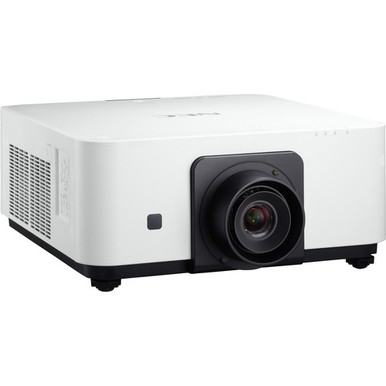
This NEC NP-PX602WL-WH Setup Guide and Buying Considerations resource starts with two confirmed facts: the projector has a listed brightness of 6,000 lumens and WXGA resolution. Those specifications narrow the search, but they cannot design the room. Buyers still need to match the projector to the screen, viewing distance, ambient light, content, mounting position, signal path, and an approved lens.
Lens choice deserves early attention. The supplied NP37ZL product name explicitly references the NP-PX602WL-WH, while the NP34ZL is another NEC zoom-lens listing whose compatibility with this projector is not established by the provided data. That distinction matters before anyone orders hardware or schedules installation labor.
Use this guide to turn the available product facts into a disciplined plan for a church, school, or conference room. It covers deployment fit, site surveying, lens verification, infrastructure, stock and availability checks, total project value, and commissioning. Open the linked product pages for live commerce details, and confirm unresolved technical requirements before purchase.
Products at a Glance
- Option 1: NEC NP-PX602WL-WH 3D WXGA 720p DLP Projector
- For installers assessing a lens for the NP-PX602WL-WH…: NEC NP37ZL Projector Lens for The NP-PX602WL-BK/PX602WL-WH/PX602UL-BK
- For installers building a lens inquiry list who will…: NEC NP34ZL Zoom Lens – 14.03mm-17.95mm – F/2.3-2.57
Quick Comparison Table
| Feature | NEC NP-PX602WL-WH 3D WXGA 720p DLP Projector | NEC NP37ZL Projector Lens for The NP-PX602WL-BK/PX602WL-WH/PX602UL-BK | NEC NP34ZL Zoom Lens – 14.03mm-17.95mm – F/2.3-2.57 |
|---|---|---|---|
| Brightness | 6000 Lumen | ||
| Resolution | WXGA | ||
| Best For | Churches, schools, and conference room teams evaluating a 6,000-lumen WXGA projector after verifying the room, lens, screen, mounting, and signal requirements. | Installers assessing a lens for the NP-PX602WL-WH who will confirm compatibility and calculate image geometry from measured room dimensions. | Installers building a lens inquiry list who will obtain written projector compatibility and room-geometry confirmation before ordering. |
| Recommended Buyer | Churches, schools, and conference room teams evaluating a 6,000-lumen WXGA projector after verifying the room, lens, screen, mounting, and signal requirements. | Installers assessing a lens for the NP-PX602WL-WH who will confirm compatibility and calculate image geometry from measured room dimensions. | Installers building a lens inquiry list who will obtain written projector compatibility and room-geometry confirmation before ordering. |
Product Images
Projector Options from AudioVideoNation
1. NEC NP-PX602WL-WH 3D WXGA 720p DLP Projector
Who should compare it: Churches, schools, and conference room teams evaluating a 6,000-lumen WXGA projector after verifying the room, lens, screen, mounting, and signal requirements.
Why it belongs here: This projector is the subject of the deployment plan and the only provided projector with confirmed 6,000-lumen brightness and WXGA resolution.
SKU: NP-PX602WL-WH
Key Features
- Listed brightness of 6,000 lumens
- Listed WXGA resolution
- Exact procurement SKU NP-PX602WL-WH
Things to Consider
Confirm lens requirements, throw geometry, connectors, control options, audio capabilities, mounting details, power needs, dimensions, and included accessories before purchase.
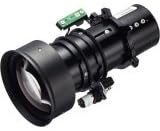
2. NEC NP37ZL Projector Lens for The NP-PX602WL-BK/PX602WL-WH/PX602UL-BK
Who should compare it: Installers assessing a lens for the NP-PX602WL-WH who will confirm compatibility and calculate image geometry from measured room dimensions.
Why it belongs here: It is the only provided lens listing whose supplied name explicitly references the NP-PX602WL-WH, making it relevant to the project's lens verification process.
SKU: NP37ZL
Key Features
- NEC lens SKU NP37ZL
- Cataloged in the Lenses category
- Supplied product name explicitly references NP-PX602WL-WH
Things to Consider
The supplied data does not provide throw or image-size calculations. Verify the required image width, lens-to-screen distance, adjustment range, installation orientation, and final compatibility.
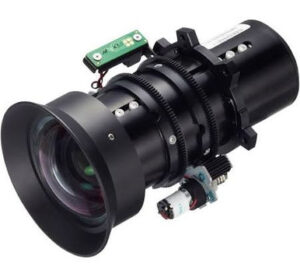
3. NEC NP34ZL Zoom Lens – 14.03mm-17.95mm – F/2.3-2.57
Who should compare it: Installers building a lens inquiry list who will obtain written projector compatibility and room-geometry confirmation before ordering.
Why it belongs here: This NEC zoom-lens listing gives installers another catalog item to investigate, but no supplied fact confirms that it fits the NP-PX602WL-WH.
SKU: NP34ZL
Key Features
- NEC lens SKU NP34ZL
- Cataloged under Accessories and Lenses
- Identified as a zoom lens in the supplied product name
Things to Consider
Do not assume compatibility with the NP-PX602WL-WH. Confirm the approved projector list, throw fit, image range, adjustment limits, and installation requirements first.
NEC NP-PX602WL-WH 3D WXGA 720p DLP Projector vs NEC NP37ZL Projector Lens for The NP-PX602WL-BK/PX602WL-WH/PX602UL-BK: Main Differences
- Choose NEC NP-PX602WL-WH 3D WXGA 720p DLP Projector if Churches, schools, and conference room teams evaluating a 6,000-lumen WXGA projector after verifying the room, lens, screen, mounting, and signal requirements..
- Choose NEC NP37ZL Projector Lens for The NP-PX602WL-BK/PX602WL-WH/PX602UL-BK if Installers assessing a lens for the NP-PX602WL-WH who will confirm compatibility and calculate image geometry from measured room dimensions..
- Choose NEC NP34ZL Zoom Lens – 14.03mm-17.95mm – F/2.3-2.57 if Installers building a lens inquiry list who will obtain written projector compatibility and room-geometry confirmation before ordering..
Deployment fit for a 6,000-lumen WXGA projector
The NEC NP-PX602WL-WH has a listed brightness of 6,000 lumens and WXGA resolution. Treat both figures as design inputs. Neither establishes the right screen size, viewing distance, lighting condition, or lens for a specific room.
Start with the material people must see. A church may need clear lyrics, presentation slides, and video from several seating areas. A school may display diagrams, browser pages, and text-heavy lessons. Conference room teams may care about spreadsheets and small interface labels. Test representative files at the planned image size instead of assuming WXGA will make every detail readable.
Brightness also needs room context. Screen dimensions, screen material, ambient light, and image content all affect the viewed result, so a 6,000-lumen listing cannot guarantee acceptable contrast or legibility by itself. Record the room under its real operating lights. Then define an acceptance target that installers can test before handoff.
Do not infer throw distance or mounting position from brightness and resolution. Those decisions depend on verified lens geometry and physical measurements.
NEC NP-PX602WL-WH installation survey before setup
A site survey should happen before lens approval, cable purchasing, or mount placement. Capture measurements and operating requirements in one shared document:
1. Screen area: Record the intended image width and height, content shape, wall limits, and any existing screen details.
2. Viewing area: Mark the nearest and farthest viewers, key seating zones, and known sightline obstructions.
3. Projector position: Measure the lens-to-screen distance available at each possible location. Note beams, lighting fixtures, ceiling obstructions, and service access.
4. Room light: Observe the space during actual use. Document windows, controllable lighting, and any light that falls directly on the screen.
5. Sources and pathways: List every source, equipment location, cable route, switching point, control requirement, and audio destination.
6. Procurement identifiers: Keep the exact projector SKU, NP-PX602WL-WH, beside the approved lens SKU and mounting selection.
Use the survey to obtain a documented lens calculation. The supplied facts do not establish throw type, projector dimensions, weight, mounting requirements, or adjustment ranges, so confirm those items from current technical documentation. Do not drill mounting points until image geometry, structural support, service clearance, and mount compatibility have been approved.
Projector lens selection: NP37ZL and other candidates
The lens is a system decision, not a last-minute accessory. It determines whether the planned projector position can create the required image size. A wrong assumption here can force a mount relocation or a screen change.
The supplied name for the NEC NP37ZL Projector Lens explicitly includes NP-PX602WL-WH. That puts NP37ZL on the verification list for this deployment, but the provided data does not supply its throw range or image-size calculations. Confirm both compatibility and room fit before ordering.
The NEC NP34ZL is identified as a zoom lens, yet the supplied facts do not connect it to the NP-PX602WL-WH. Treat it as an inquiry candidate only. Ask for written compatibility confirmation and a calculation based on the measured lens-to-screen distance and intended image width. The separate NP35ZL listing names the NEC-PX602UL rather than the target NP-PX602WL-WH, so this guide does not present it as an accessory for the planned system.
For any lens, verify the approved projector list, usable image range, adjustment limits, installation orientation, and focusing method. Similar family names are not proof of interchangeability.
Plan mounting, signal, power, control, and audio
The available product facts do not define connectors, control interfaces, audio capabilities, network functions, power requirements, mounting hardware, or included accessories. Close those gaps before specifying the supporting system.
For each source, record its output format, required resolution, equipment location, cable distance, and intended content. Compare that list with current projector documentation. Identify any switching, signal conversion, extension, or control equipment that the design needs. Do not assume the projector has wireless connectivity, built-in audio, or a particular control port.
Plan audio as its own path until the selected system design is confirmed. A conference room may route sound through room speakers, while a sanctuary or classroom may already have an audio system. Document where audio begins, how it is switched, and where users control volume.
The physical plan should cover a compatible mount, structural attachment, power location, cable support, ventilation clearance, and maintenance access. Assign responsibility for each item. That prevents the projector, lens, and room infrastructure from being purchased as disconnected pieces.
Validate the WXGA image with real content
Build an evaluation package from the material the room will display. Include presentation slides, small text, diagrams, spreadsheets, video, and any user interface that operators must read. The goal is simple: confirm that WXGA resolution works for the intended content at the planned image size and viewing distance.
Check every expected source. Confirm that its output can be mapped correctly to the projector using supported settings from current documentation. Look for cropped edges, unreadable labels, unexpected scaling, and content shapes that leave unused screen space. Do not assume image processing can recover detail that the selected resolution does not contain.
Run the same review under the room's real lighting conditions. The listed 6,000-lumen brightness supports planning, but screen size and ambient light still shape the viewed image. If the test package does not meet the agreed readability target, revisit the screen dimensions, lighting plan, lens geometry, or resolution requirement before committing to the installation.
Stock, availability, and price-to-performance planning
Stock and availability should be checked for the complete system, not the projector alone. Build a bill of materials that includes the NP-PX602WL-WH, the verified lens, mounting hardware, signal equipment, cables, control components, electrical work, and any screen changes. A chassis without the correct lens does not create an installable package.
Use the linked product pages for current purchasing details, then confirm the exact SKUs and required quantities with the seller. Check again before scheduling installers. If a proposed lens changes, repeat the compatibility and throw review instead of treating another NEC lens as an automatic substitute.
Price-to-performance should reflect total installed value. Compare the full project cost against measurable requirements such as image size, room lighting, content readability, mounting location, and operator workflow. Include design time, installation labor, infrastructure changes, commissioning, training, and any required accessories. A lower hardware total offers poor value if it causes a mount relocation or fails the content test.
Keep the decision accountable. Separate requirements from preferences, record which supplied facts support the choice, and flag every item that still needs confirmation. That approach gives buyers a useful value comparison without relying on unsupported benchmarks or a temporary commerce snapshot.
Commissioning and handoff checklist
Verify labels before installation begins. The projector should match SKU NP-PX602WL-WH, and the lens should match the documented approval for both compatibility and image geometry. Recheck the screen measurement and lens-to-screen distance against the final room position.
During commissioning, test every intended source with the actual cable path, switching equipment, control method, and audio route. Use the prepared content package under normal room lighting. Inspect image fill, focus, geometry, cropping, small-text readability, and source changes. Test the agreed startup and shutdown process, then record settings that operators may need after service.
Handoff should include the approved equipment list, lens calculation, room diagram, cable labels, operating steps, and an escalation contact. Train users on source selection and the normal power sequence. Keep unverified capabilities out of the instructions.
Close the project against the acceptance targets established during the survey. If a target is missed, document the gap and resolve it before sign-off. A measured handoff protects the buyer, installer, and daily operator.
Related AudioVideoNation Links
- Browse Projector at AudioVideoNation
- NEC NP-PX602WL-WH projector
- NEC NP37ZL projector lens
- NEC NP34ZL zoom lens
Product Information Sources
- NEC NP-PX602WL-WH 3D WXGA 720p DLP Projector product information
- NEC NP37ZL Projector Lens for The NP-PX602WL-BK/PX602WL-WH/PX602UL-BK product information
- NEC NP34ZL Zoom Lens – 14.03mm-17.95mm – F/2.3-2.57 product information
FAQ
What projector specifications are confirmed for the NEC NP-PX602WL-WH?
The supplied data confirms a 6,000-lumen brightness rating and WXGA resolution for the NEC NP-PX602WL-WH. Lens geometry, connectors, control, audio, mounting, and power details should be verified from current technical documentation.
Does the NEC NP-PX602WL-WH include a lens?
The supplied data does not confirm whether a lens is included with the NEC NP-PX602WL-WH. Verify the package contents on the linked product page or with the seller before building the installation budget.
Is the NEC NP37ZL compatible with the NP-PX602WL-WH?
The NP37ZL product listing explicitly names the NP-PX602WL-WH, but final compatibility and throw fit still require confirmation for the planned room. Give the seller or installer the screen width and measured lens-to-screen distance so the lens can be checked against the design.
Can the NEC NP34ZL be used with the NP-PX602WL-WH?
The provided data does not confirm NP34ZL compatibility with the NP-PX602WL-WH. Treat it as a lens inquiry candidate and obtain written compatibility plus an image-geometry calculation before ordering.
Does a 6,000-lumen rating guarantee a readable image in a bright room?
No, a 6,000-lumen rating alone does not guarantee a readable image in a bright room. Screen size, screen material, ambient light, viewing distance, and content all affect the result, so test the design under real operating conditions.
How should buyers compare stock, availability, and price-to-performance?
Buyers should use the linked product pages for current commerce details and compare total installed cost against documented room requirements. Include the verified lens, mount, infrastructure, labor, commissioning, and training rather than comparing projector cost alone.
Conclusion
Use this NEC NP-PX602WL-WH Setup Guide and Buying Considerations comparison to match documented specifications to the room and installation requirements. Review the linked product pages for current purchase details before ordering.
Products Used
| SKU | Product Name | URL |
|---|---|---|
| NP-PX602WL-WH | NEC NP-PX602WL-WH 3D WXGA 720p DLP Projector | View product |
| NP37ZL | NEC NP37ZL Projector Lens for The NP-PX602WL-BK/PX602WL-WH/PX602UL-BK | View product |
| NP34ZL | NEC NP34ZL Zoom Lens – 14.03mm-17.95mm – F/2.3-2.57 | View product |