

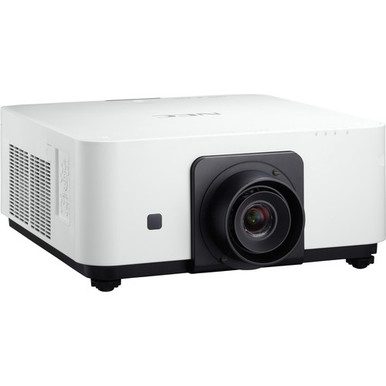
This NEC NP-PX602UL-WH Setup Guide and Buying Considerations resource is for AV buyers, installers, churches, schools, and conference room teams moving from a product listing to a workable deployment plan. A brightness and resolution match can put a projector on the shortlist. Lens choice, room geometry, signal design, scheduling, and total installed cost determine whether the purchase fits.
The NEC NP-PX602UL-WH is listed at 6,000 lumens with WUXGA resolution. The supplied products also include three NEC lens listings: NP35ZL, NP37ZL, and NP34ZL. This guide separates confirmed facts from required checks, then covers site planning, lens verification, setup, commissioning, stock and availability, and price-to-performance. Use it to build a clear purchase brief before checking live commerce details on each linked product page.
Products at a Glance
- Option 1: NEC NP-PX602UL-WH 3D WUXGA 1080p DLP Projector
- For buyers assessing a zoom lens whose product title…: NEC NP35ZL 1.23 1.521 Zoom Lens for NEC-PX602UL
- For installers already evaluating NP37ZL who can obta…: NEC NP37ZL Projector Lens for The NP-PX602WL-BK/PX602WL-WH/PX602UL-BK
- For installers comparing NEC lens options before fina…: NEC NP34ZL Zoom Lens – 14.03mm-17.95mm – F/2.3-2.57
Quick Comparison Table
| Feature | NEC NP-PX602UL-WH 3D WUXGA 1080p DLP Projector | NEC NP35ZL 1.23 1.521 Zoom Lens for NEC-PX602UL | NEC NP37ZL Projector Lens for The NP-PX602WL-BK/PX602WL-WH/PX602UL-BK | NEC NP34ZL Zoom Lens – 14.03mm-17.95mm – F/2.3-2.57 |
|---|---|---|---|---|
| Brightness | 6000 Lumen | |||
| Resolution | WUXGA | |||
| Best For | Installations that call for a 6,000-lumen WUXGA projector and have a verified lens, mounting plan, signal path, and room design. | Buyers assessing a zoom lens whose product title names NEC-PX602UL and who will complete a site-specific lens calculation. | Installers already evaluating NP37ZL who can obtain confirmation for the exact WH chassis and planned image geometry. | Installers comparing NEC lens options before finalizing the optical design and exact chassis compatibility. |
| Recommended Buyer | Installations that call for a 6,000-lumen WUXGA projector and have a verified lens, mounting plan, signal path, and room design. | Buyers assessing a zoom lens whose product title names NEC-PX602UL and who will complete a site-specific lens calculation. | Installers already evaluating NP37ZL who can obtain confirmation for the exact WH chassis and planned image geometry. | Installers comparing NEC lens options before finalizing the optical design and exact chassis compatibility. |
Product Images
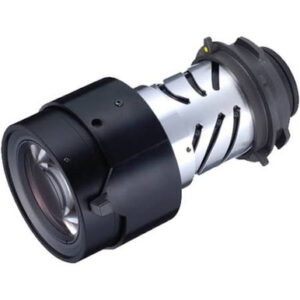
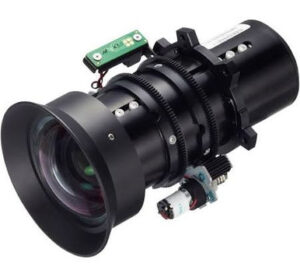
Projector Options from AudioVideoNation
1. NEC NP-PX602UL-WH 3D WUXGA 1080p DLP Projector
Who should compare it: Installations that call for a 6,000-lumen WUXGA projector and have a verified lens, mounting plan, signal path, and room design.
Why it belongs here: This projector is the center of the deployment plan because its confirmed 6,000-lumen brightness and WUXGA resolution define the main room-fit decision.
SKU: NP-PX602UL-WH
Key Features
- 6,000-lumen brightness listed in the supplied product facts
- WUXGA resolution
- Exact SKU NP-PX602UL-WH
- Cataloged under Multimedia Projectors, Projectors, and Video
Things to Consider
Confirm the required lens, projection geometry, connections, physical installation requirements, audio design, and any network or control needs before ordering. Use the linked page for current commerce details.
2. NEC NP35ZL 1.23 1.521 Zoom Lens for NEC-PX602UL
Who should compare it: Buyers assessing a zoom lens whose product title names NEC-PX602UL and who will complete a site-specific lens calculation.
Why it belongs here: Its supplied product title directly references NEC-PX602UL, making NP35ZL a relevant lens to verify during optical planning.
SKU: NP35ZL
Key Features
- NEC zoom lens listing
- Exact SKU NP35ZL
- Cataloged under Accessories and Lenses
- Product title references NEC-PX602UL
Things to Consider
A title match does not complete the lens design. Confirm compatibility with NP-PX602UL-WH, mechanical fit, required image size, measured projection distance, placement limits, and orientation before purchase.
3. NEC NP37ZL Projector Lens for The NP-PX602WL-BK/PX602WL-WH/PX602UL-BK
Who should compare it: Installers already evaluating NP37ZL who can obtain confirmation for the exact WH chassis and planned image geometry.
Why it belongs here: This NEC lens surfaces an important compatibility checkpoint because its title references PX602UL-BK while this guide covers NP-PX602UL-WH.
SKU: NP37ZL
Key Features
- NEC projector lens listing
- Exact SKU NP37ZL
- Cataloged under Lenses
- Product title references NP-PX602WL-BK, PX602WL-WH, and PX602UL-BK
Things to Consider
Do not infer compatibility between BK and WH suffixes. Confirm the exact projector pairing, physical fit, optical range, image size, and projection distance through current documentation before ordering.
4. NEC NP34ZL Zoom Lens – 14.03mm-17.95mm – F/2.3-2.57
Who should compare it: Installers comparing NEC lens options before finalizing the optical design and exact chassis compatibility.
Why it belongs here: This cataloged NEC zoom lens gives installers another specific part number to evaluate while building an approved lens shortlist.
SKU: NP34ZL
Key Features
- NEC zoom lens listing
- Exact SKU NP34ZL
- Cataloged under Accessories and Lenses
Things to Consider
The supplied title does not connect NP34ZL to NP-PX602UL-WH. Verify chassis compatibility, mechanical fit, projection geometry, and every placement requirement before treating it as a purchase option.
NEC NP-PX602UL-WH 3D WUXGA 1080p DLP Projector vs NEC NP35ZL 1.23 1.521 Zoom Lens for NEC-PX602UL: Main Differences
- Choose NEC NP-PX602UL-WH 3D WUXGA 1080p DLP Projector if Installations that call for a 6,000-lumen WUXGA projector and have a verified lens, mounting plan, signal path, and room design..
- Choose NEC NP35ZL 1.23 1.521 Zoom Lens for NEC-PX602UL if Buyers assessing a zoom lens whose product title names NEC-PX602UL and who will complete a site-specific lens calculation..
- Choose NEC NP37ZL Projector Lens for The NP-PX602WL-BK/PX602WL-WH/PX602UL-BK if Installers already evaluating NP37ZL who can obtain confirmation for the exact WH chassis and planned image geometry..
- Choose NEC NP34ZL Zoom Lens – 14.03mm-17.95mm – F/2.3-2.57 if Installers comparing NEC lens options before finalizing the optical design and exact chassis compatibility..
NEC NP-PX602UL-WH deployment fit at a glance
Start with the confirmed product record. The NEC NP-PX602UL-WH uses SKU NP-PX602UL-WH and product ID 12415. It is listed under Multimedia Projectors, Projectors, and Video. Its supplied facts identify 6,000-lumen brightness and WUXGA resolution. Those are the performance figures this guide treats as confirmed.
The projector belongs on a shortlist when the written brief calls for that brightness and resolution. It is not a complete system decision yet. Establish the required image size, viewing distances, ambient-light conditions, source formats, mounting position, cable path, control plan, and audio plan. Then validate the physical and connection details against current product documentation.
Keep the full WH suffix on quotes, purchase orders, installation drawings, and receiving records. Similar family names can conceal meaningful differences. The product page, chassis label, chosen lens, and project paperwork should all agree before installation begins.
Site survey before NEC NP-PX602UL-WH setup
Measure first. Record the usable image width and height, intended projector position, distance from the planned lens location to the image surface, ceiling or platform constraints, obstructions, ambient-light patterns, cable route, power location, and service access. Give the same measurements to the AV designer, installer, and purchasing team.
Treat 6,000 lumens as one planning input. Room conditions still need review, so document whether lights or windows can be controlled and which content must remain readable. A classroom displaying detailed instructional material may set a different image-size target than a church showing lyrics or a conference room sharing spreadsheets.
WUXGA is the confirmed resolution. Inventory every source and endpoint that must participate in the system, including computers, presentation equipment, conferencing systems, and any existing switching or extension hardware. Confirm that the planned signal path supports the intended format and cable distance. The provided product facts do not establish specific connectors, so check current documentation before choosing adapters, extenders, or switchers.
NEC PX602UL lens selection: verify before mounting
Choose the lens from measured geometry, not a familiar part number. The supplied catalog contains three NEC lens products, but their titles do not provide equal evidence for the target projector. The NP35ZL title directly references NEC-PX602UL. The NP37ZL title names PX602UL-BK rather than NP-PX602UL-WH. The NP34ZL is identified as an NEC zoom lens without a PX602UL reference in its title.
That makes NP35ZL the most direct title-based option to investigate, but a name match is not installation approval. Confirm the exact WH chassis, mechanical fit, supported image size at the measured distance, placement limits, orientation requirements, and every other optical constraint through current NEC or seller documentation. Request written compatibility confirmation when the title names a different suffix.
Do not assume BK and WH variants accept the same lens merely because they share a family number. Likewise, do not buy NP34ZL from its optical figures alone. A qualified installer should finish the lens calculation and record the approved lens SKU on the drawing and purchase order.
Projector installation checklist for a controlled handoff
Freeze the design before equipment reaches the site. The handoff package should identify product ID 12415, SKU NP-PX602UL-WH, the approved lens SKU, screen dimensions, measured projection distance, mounting coordinates, source list, signal route, power plan, control requirements, audio design, and acceptance criteria. Have the responsible installer verify structural support, mounting hardware, clearances, and electrical work against current instructions and local requirements.
At receiving, match the labels to the purchase order before the installation crew commits time. Check the projector and lens separately, retain their documentation, and stop if a suffix or part number differs from the approved design. Do not force a lens or mounting component that has not been confirmed for the exact chassis.
Follow the current manufacturer instructions for physical assembly and startup. Once the projector is securely positioned, align the image to the planned screen area and test with the sources people will actually use. Save the final configuration and cable labels in the room documentation so support staff can reproduce the intended setup after service or source changes.
Signal and content commissioning
Commission against a written pass-or-fail sheet. Confirm that the complete signal chain displays the intended WUXGA content, then test every source, switcher path, extender path, and planned control route. Use representative slides, small text, spreadsheets, still images, and moving video rather than relying on a single setup screen.
Inspect focus and geometry across the image, content framing, text readability from the required seats, source switching, and signal recovery after normal power or input changes. Test any planned audio, network, or room-control function only after confirming how it is implemented. The supplied projector facts do not establish those capabilities.
Record the source settings, installed cable labels, lens SKU, projector SKU, and final acceptance results. Short documentation pays off. A teacher, volunteer, meeting host, or support technician should be able to identify the correct input path without reconstructing the installation.
Deployment fit for churches, schools, and conference rooms
Church teams should define the largest required image, the farthest viewing position, lighting during services, and the mix of lyrics, presentations, and video. They also need an operating plan that volunteers can follow. The NP-PX602UL-WH provides a confirmed starting point of 6,000 lumens and WUXGA, but the room survey and lens calculation decide whether it fits the sanctuary.
Schools should test the material used in real lessons. Fine text, diagrams, slides, and video need to remain readable across the intended seating area. Document the teacher connection workflow and any existing classroom AV equipment, then confirm the projector can join that system through an approved signal design.
Conference room teams should map laptop handoffs, conferencing endpoints, shared documents, and room-control expectations. Fast meetings depend on a predictable connection path, so validate every source rather than assuming a connector or wireless function.
Installers carry the final coordination burden. They should reconcile the chassis, lens, mounting point, image geometry, power, signal transport, control, and acceptance test before procurement. For every audience, deployment fit means the complete design works on paper and passes commissioning. A lumen figure alone cannot make that decision.
Checking stock and availability without guesswork
Stock and availability are live purchasing questions. Check the linked AudioVideoNation page for the exact projector and chosen lens when you are ready to request a quote or place an order. This guide does not preserve a point-in-time inventory claim.
Match each page SKU to the purchasing document, then confirm quantity, lead time, fulfillment timing, and applicable order terms through current commerce details. Do this for every required component, not only the projector. Build the installation schedule around confirmed arrivals, and recheck the lens-to-chassis pairing if a substitution is proposed. Save the confirmation with the project record.
Price-to-performance and the final buying decision
Judge price-to-performance from the live product-page price and the total installed system, not the projector line item alone. Your worksheet should include the NP-PX602UL-WH, the confirmed lens, approved mounting work, cabling or signal conversion, control integration, installation labor, commissioning, and any support items required by the organization. Include only costs that apply to the finished design.
Next, compare that total with measurable requirements. The confirmed product anchors are 6,000 lumens and WUXGA resolution. Add a verified image size at the measured distance, an approved lens, a working signal path, an installation schedule, and room-specific acceptance criteria. A lower equipment total has little value if an incompatible lens or unplanned signal change triggers redesign.
The go-or-no-go rule is straightforward. Move forward when the brightness and resolution match the brief, the exact lens and chassis pairing is confirmed, the site plan passes review, and the complete project cost is approved. If one of those checks remains open, resolve it before ordering.
Related AudioVideoNation Links
- Browse Projector at AudioVideoNation
- NEC NP-PX602UL-WH projector product page
- NEC NP35ZL zoom lens product page
- NEC NP37ZL projector lens product page
- NEC NP34ZL zoom lens product page
Product Information Sources
- NEC NP-PX602UL-WH 3D WUXGA 1080p DLP Projector product information
- NEC NP35ZL 1.23 1.521 Zoom Lens for NEC-PX602UL product information
- NEC NP37ZL Projector Lens for The NP-PX602WL-BK/PX602WL-WH/PX602UL-BK product information
- NEC NP34ZL Zoom Lens – 14.03mm-17.95mm – F/2.3-2.57 product information
FAQ
What brightness and resolution are confirmed for the NEC NP-PX602UL-WH?
The supplied product facts list the NEC NP-PX602UL-WH at 6,000 lumens with WUXGA resolution. Use those figures as planning inputs, then validate lens geometry, room conditions, connections, and installation requirements separately.
Which lens should I choose for the NEC NP-PX602UL-WH?
Choose a lens only after matching the exact chassis to the required image size and measured projection distance. NP35ZL directly references NEC-PX602UL in its title, while NP37ZL and NP34ZL require especially careful compatibility review for this WH model.
Is the NEC NP35ZL confirmed for the NP-PX602UL-WH?
The NP35ZL product title references NEC-PX602UL, but compatibility with the exact NP-PX602UL-WH installation still requires confirmation. Have the installer validate physical fit, projection geometry, placement limits, and orientation through current documentation.
Can I assume the NEC NP37ZL fits the NP-PX602UL-WH?
No, you should not assume NP37ZL compatibility with NP-PX602UL-WH from the supplied title. The title names PX602UL-BK, so obtain confirmation for the WH chassis before ordering.
What should be verified before installing this projector?
Verify the screen dimensions, measured projection distance, approved lens, mounting plan, signal path, power, control, audio design, and acceptance tests before installation. Record the exact projector and lens SKUs on the drawing, purchase order, and commissioning sheet.
Where should buyers check the current price, stock, and availability?
Buyers should use each linked AudioVideoNation product page for live price, stock, and availability details. Confirm the exact SKU, required quantity, fulfillment timing, and lens compatibility at the time of purchase.
Conclusion
Use this NEC NP-PX602UL-WH Setup Guide and Buying Considerations comparison to match documented specifications to the room and installation requirements. Review the linked product pages for current purchase details before ordering.
Products Used
| SKU | Product Name | URL |
|---|---|---|
| NP-PX602UL-WH | NEC NP-PX602UL-WH 3D WUXGA 1080p DLP Projector | View product |
| NP35ZL | NEC NP35ZL 1.23 1.521 Zoom Lens for NEC-PX602UL | View product |
| NP37ZL | NEC NP37ZL Projector Lens for The NP-PX602WL-BK/PX602WL-WH/PX602UL-BK | View product |
| NP34ZL | NEC NP34ZL Zoom Lens – 14.03mm-17.95mm – F/2.3-2.57 | View product |