

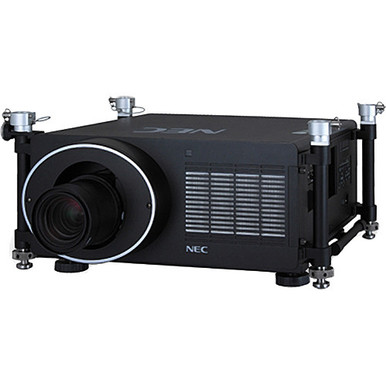
Choosing a high-output projector is only the first decision. This NEC NP-PH1000U-R Setup Guide and Buying Considerations article tackles the harder work: matching the projector, lens, room, infrastructure, and installation plan before an order is placed. The supplied product data positions the NEC NP-PH1000U-R at 11,000 lumens for large-venue use. That gives buyers a concrete starting point, but it doesn't settle screen size, native resolution, placement, signal design, or control needs.
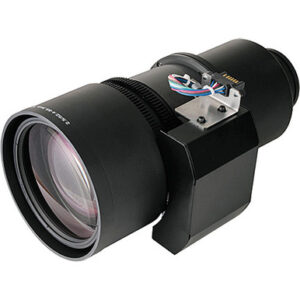
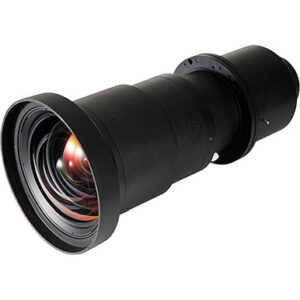
Lens choice deserves equal attention. The NEC NP29ZL, NP26ZL, and NP28ZL are listed as zoom lenses, while the NEC NP25FL is identified as a short-throw, wide-angle lens. The supplied facts do not confirm that any one of these lenses fits the NP-PH1000U-R, so compatibility and throw calculations must come before purchase. This guide gives AV buyers, installers, churches, schools, and conference room technology teams a practical path through deployment fit, site survey, setup, commissioning, price-to-performance, and live availability checks.
Products at a Glance
- Option 1: NEC NP-PH1000U-R 11000lm Large Venue Projector
- For projects comparing a zoom-lens candidate after pr…: NEC NP29ZL Zoom Lens
- For teams comparing exact NEC zoom-lens SKUs for a do…: NEC NP26ZL Zoom Lens
- For installers building a lens shortlist from measure…: NEC NP28ZL Zoom Lens
- For short-depth placement studies where a wide-angle,…: NEC NP25FL Wide-Angle Lens
Quick Comparison Table
| Feature | NEC NP-PH1000U-R 11000lm Large Venue Projector | NEC NP29ZL Zoom Lens | NEC NP26ZL Zoom Lens | NEC NP28ZL Zoom Lens | NEC NP25FL Wide-Angle Lens |
|---|---|---|---|---|---|
| Brightness | 11000lm | ||||
| Best For | AV teams evaluating an 11,000-lumen projector for a documented large-venue requirement. | Projects comparing a zoom-lens candidate after projector compatibility and throw geometry are verified. | Teams comparing exact NEC zoom-lens SKUs for a documented projector location and screen size. | Installers building a lens shortlist from measured throw distance, image size, and verified compatibility. | Short-depth placement studies where a wide-angle, short-throw lens is required and compatibility has been confirmed. |
| Throw Type | Short throw | ||||
| Recommended Buyer | AV teams evaluating an 11,000-lumen projector for a documented large-venue requirement. | Projects comparing a zoom-lens candidate after projector compatibility and throw geometry are verified. | Teams comparing exact NEC zoom-lens SKUs for a documented projector location and screen size. | Installers building a lens shortlist from measured throw distance, image size, and verified compatibility. | Short-depth placement studies where a wide-angle, short-throw lens is required and compatibility has been confirmed. |
Product Images
Projector Options from AudioVideoNation
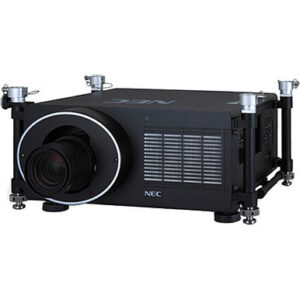
1. NEC NP-PH1000U-R 11000lm Large Venue Projector
Who should compare it: AV teams evaluating an 11,000-lumen projector for a documented large-venue requirement.
Why it belongs here: This projector anchors the guide and provides the confirmed 11,000-lumen specification around which the room, lens, and infrastructure plan must be built.
SKU: NP-PH1000U-R
Key Features
- 11,000-lumen brightness
- Large-venue projector designation
- NEC NP-PH1000U-R model
- Listed in Multimedia Projectors, Projectors, and Video categories
Things to Consider
Confirm native resolution, accepted signals, input and control connections, compatible lenses, throw geometry, mounting requirements, power, airflow, and service access through current product documentation before purchase.
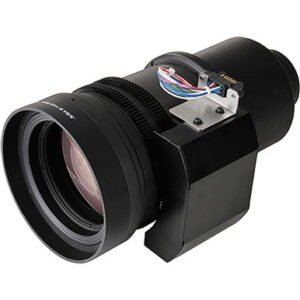
2. NEC NP29ZL Zoom Lens
Who should compare it: Projects comparing a zoom-lens candidate after projector compatibility and throw geometry are verified.
Why it belongs here: It gives buyers a named NEC zoom-lens option to include in a measured lens study. Its inclusion is a comparison starting point, not a compatibility claim.
SKU: NP29ZL
Key Features
- Zoom-lens product type
- NEC NP29ZL model designation
- Listed in Accessories and Lenses categories
Things to Consider
Verify projector compatibility, throw range, image-size coverage, placement requirements, and installation procedure before adding this lens to the equipment list.
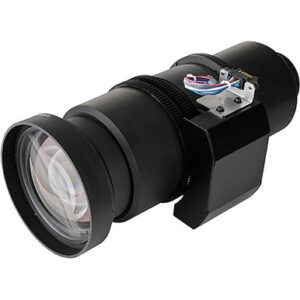
3. NEC NP26ZL Zoom Lens
Who should compare it: Teams comparing exact NEC zoom-lens SKUs for a documented projector location and screen size.
Why it belongs here: The NP26ZL expands the set of named NEC zoom lenses that an installer can evaluate against measured room geometry and current compatibility documentation.
SKU: NP26ZL
Key Features
- Zoom-lens product type
- NEC NP26ZL model designation
- Listed in Accessories and Lenses categories
Things to Consider
Do not infer its throw range or NP-PH1000U-R compatibility from the model name. Confirm both, then document the approved calculation before ordering.
4. NEC NP28ZL Zoom Lens
Who should compare it: Installers building a lens shortlist from measured throw distance, image size, and verified compatibility.
Why it belongs here: This NEC zoom lens is another specific SKU available for a formal lens comparison when the room survey and target image dimensions are complete.
SKU: NP28ZL
Key Features
- Zoom-lens product type
- NEC NP28ZL model designation
- Listed in Accessories and Lenses categories
Things to Consider
Confirm the exact compatible projector models, usable throw geometry, mounting position, and adjustment requirements in current documentation.
5. NEC NP25FL Wide-Angle Lens
Who should compare it: Short-depth placement studies where a wide-angle, short-throw lens is required and compatibility has been confirmed.
Why it belongs here: The supplied data identifies the NP25FL as the short-throw, wide-angle option in this product set, making it relevant to rooms with limited projector-to-screen depth.
SKU: NP25FL
Key Features
- Wide-angle lens designation
- Short-throw classification
- NEC NP25FL model designation
- Listed in Accessories and Lenses categories
Things to Consider
Verify NP-PH1000U-R compatibility, exact throw geometry, target image coverage, mounting position, and installation tolerances before specifying this lens.
NEC NP-PH1000U-R 11000lm Large Venue Projector vs NEC NP29ZL Zoom Lens: Main Differences
- Choose NEC NP-PH1000U-R 11000lm Large Venue Projector if AV teams evaluating an 11,000-lumen projector for a documented large-venue requirement..
- Choose NEC NP29ZL Zoom Lens if Projects comparing a zoom-lens candidate after projector compatibility and throw geometry are verified..
- Choose NEC NP26ZL Zoom Lens if Teams comparing exact NEC zoom-lens SKUs for a documented projector location and screen size..
- Choose NEC NP28ZL Zoom Lens if Installers building a lens shortlist from measured throw distance, image size, and verified compatibility..
- Choose NEC NP25FL Wide-Angle Lens if Short-depth placement studies where a wide-angle, short-throw lens is required and compatibility has been confirmed..
Deployment fit for an 11,000-lumen large venue projector
The 11,000-lumen listing is the confirmed performance specification that anchors this project. It does not determine deployment fit by itself. Start with the required image width and height, the closest and farthest viewers, room lighting during actual use, the screen surface, and the content people must read.
A church displaying lyrics, a school hall presenting detailed slides, and a conference space showing spreadsheets place different demands on an image. Define the job before selecting the optics. Your acceptance targets should cover image size, content resolution, planned lighting state, viewing positions, and readable detail from the intended seats. Then confirm the projector's native resolution and supported image formats through current product documentation.
Treat the large-venue designation as category guidance, not a finished system design. The room survey still has to prove that the projector can be placed safely, paired with a confirmed lens, connected to the planned sources, and serviced after installation. This prevents a bright projector from becoming the wrong projector for the room.
NEC projector lens selection starts with measurements
The lens determines whether the planned image can reach the screen from the available mounting point. Measure first. Record the screen width and height, desired aspect ratio, screen plane, proposed projector position, usable throw distance, and any ceiling or structural obstruction. Include the amount of vertical and horizontal placement flexibility the installation requires.
The NEC NP29ZL, NP26ZL, and NP28ZL are identified as zoom lenses. Their names alone do not establish their working throw ranges or compatibility with the NP-PH1000U-R. The NEC NP25FL is identified as a short-throw, wide-angle lens, so it deserves separate review where projector-to-screen depth is limited. Its exact geometry and compatibility still need verification.
Ask the installer or system designer for a written lens calculation that names the exact projector body and lens SKU. It should also state the measured throw distance, target image dimensions, aspect ratio, mounting location, and permitted adjustment range. Check that calculation against current manufacturer documentation and the final site measurements. Do not substitute NP25FL, NP26ZL, NP28ZL, or NP29ZL based on a similar name or product family. Each lens decision needs its own documented approval.
Large venue projector setup: site and infrastructure checks
Complete the site survey before finalizing the bill of materials. Measure ceiling height, screen position, structural attachment point, proposed projector location, and service approach. Trace separate paths for power, video, network, and control cabling. Photograph beams, lighting fixtures, ducts, sprinklers, and other objects that could affect placement or access.
Confirm the approved mounting method, operating orientation, power requirements, airflow clearances, and service space through the current installation documentation. If the projector will sit in an enclosure or booth, have the designer account for the environmental requirements stated by the manufacturer. The product's brightness figure cannot answer those questions.
Operational details matter too. Churches and schools may share rooms with other activities, while conference teams may support several source types and control workflows. Document who operates the system, where source equipment lives, when installation access is available, and how staff will reach the projector for service. Mark every unresolved item as a pre-purchase action. The final equipment list should name the projector and lens by exact SKU rather than relying on a generic description.
Installing and commissioning the NP-PH1000U-R
Commission the system in stages. Begin by checking the exact model and approved lens package against the design documents. If the verified design uses a separate lens, follow the manufacturer's installation procedure for that specific pairing. Inspect the projector, lens, mount, cables, and accessories before equipment is lifted into place.
Establish the physical mounting position and optical alignment before depending on electronic image correction. Confirm that the projected image reaches the intended screen boundaries and remains readable across the seating area. Run representative material from the actual source systems, including the smallest text and most detailed layouts expected in daily use. Test under the room-lighting conditions included in the acceptance plan.
Commissioning should also cover source switching, signal recovery after a source change, control commands, startup, shutdown, and any blank-screen workflow the operators need. Record the final projector settings, lens SKU, mounting measurements, cable routes, and control details. Finish with a signed acceptance check based on the requirements defined before purchase. That record gives installers and support teams a clear baseline if the room, sources, or operating workflow later changes.
Signal, control, and operator handoff
Confirm the NP-PH1000U-R's current input and control details before specifying the rest of the signal chain. Build a connection schedule that lists each source, its output format, the planned switcher or extender, cable length, destination connector, and control endpoint. Verify supported resolutions, refresh rates, content-protection requirements, connector types, and control methods in current documentation.
Test the complete path. A source connected directly during setup does not prove that the installed switcher, extender, wall plate, and cable run will behave the same way. Use the sources and signal routes intended for the finished room. Record the tested configuration so replacement equipment can be checked against it later.
The handoff should be short enough to use. Give operators clear steps for startup, source selection, normal shutdown, and reporting a fault. A church volunteer, teacher, or conference support technician should know which controls are approved and whom to contact when the normal sequence fails.
Projector price-to-performance: count the whole system
A useful projector price-to-performance review starts with the job the installed system must do. The projector body and lenses are separate catalog products, so comparing body-only commerce details can hide a large part of the deployment decision. Build one planning worksheet that includes the verified lens, mount, screen work, cabling, signal transport, control integration, labor, access equipment, commissioning, training, and project contingency.
Tie that system scope to measurable requirements. The confirmed 11,000-lumen specification belongs in the comparison, along with target image size, viewing conditions, placement limits, and the source formats that current documentation verifies. Do not assign value to an assumed resolution, connection, lens range, or compatibility claim.
Compare alternatives at the same scope. If one proposal omits the lens calculation or integration work, resolve those gaps before treating it as a lower-cost option. The strongest value case is the one that meets the documented room requirements with a verified optical and infrastructure plan. Check the linked product pages for live commerce details when completing the comparison.
Stock and availability: protect the deployment schedule
Treat stock and availability as a procurement checkpoint, not an evergreen editorial fact. Use each linked product page for current commerce details near the order date, and confirm the exact SKU required by the approved design. A projector order and its lens decision should be coordinated as one deployment package even when the products are purchased separately.
Ask the procurement team to align expected delivery timing with site access, installer scheduling, and acceptance testing. If timing forces a lens change, pause and rerun the compatibility check, throw calculation, and placement approval. Never substitute a lens solely because its name looks similar.
Plan a receiving inspection before installation day. Match delivered model numbers to the purchase documents and approved equipment list. This catches ordering discrepancies while the mounting schedule can still be adjusted.
Final NEC NP-PH1000U-R buying decision
Approve the purchase after five questions have written answers. Does the 11,000-lumen projector fit the measured room and image requirement? Which exact lens is compatible and proven by the throw calculation? Can the site support the approved mounting, power, airflow, cabling, and service plan? Has the complete signal and control path been verified against current documentation? Do the live commerce details and expected timing support the project schedule?
Any unanswered item becomes a pre-purchase action, not an assumption. Put the exact NP-PH1000U-R projector SKU and chosen lens SKU on the design, quote, order, receiving checklist, and handoff record. Once optics, infrastructure, integration, acceptance criteria, and procurement timing agree, the team has a defensible deployment plan.
Related AudioVideoNation Links
- Browse Projector at AudioVideoNation
- NEC NP-PH1000U-R 11000lm Large Venue Projector
- NEC NP29ZL Zoom Lens
- NEC NP26ZL Zoom Lens
- NEC NP28ZL Zoom Lens
Product Information Sources
- NEC NP-PH1000U-R 11000lm Large Venue Projector product information
- NEC NP29ZL Zoom Lens product information
- NEC NP26ZL Zoom Lens product information
- NEC NP28ZL Zoom Lens product information
- NEC NP25FL Wide-Angle Lens product information
FAQ
What is the NEC NP-PH1000U-R's listed brightness?
The NEC NP-PH1000U-R is listed at 11,000 lumens. Use that figure as one input alongside screen size, room lighting, viewing distance, content, and lens geometry.
Which listed lens should I use with the NEC NP-PH1000U-R?
The supplied facts do not confirm that any listed lens is compatible with the NEC NP-PH1000U-R. Verify the exact projector-and-lens pairing and obtain a documented throw calculation before choosing the NP29ZL, NP26ZL, NP28ZL, or NP25FL.
Is the NEC NP25FL a short-throw lens?
The supplied product data identifies the NEC NP25FL as a short-throw, wide-angle lens. Its compatibility with the NP-PH1000U-R and its exact fit for the measured room still require confirmation.
What NP-PH1000U-R specifications should I verify before purchase?
Confirm native resolution, supported signals, input and control connections, compatible lenses, mounting requirements, power, airflow, and service clearances before purchase. Use current product and installation documentation for the final system design.
How should I judge NP-PH1000U-R price-to-performance?
Judge price-to-performance at the installed-system level rather than from the projector body alone. Compare live commerce details alongside the verified lens, mounting, screen work, signal transport, control, labor, commissioning, and training required by the room.
How should I check stock and availability for the projector and lenses?
Use each linked product page to confirm current availability and other live commerce details near the purchase date. Coordinate the exact projector and approved lens SKUs with the installation schedule before committing to site work.
Conclusion
Use this NEC NP-PH1000U-R Setup Guide and Buying Considerations comparison to match documented specifications to the room and installation requirements. Review the linked product pages for current purchase details before ordering.
Products Used
| SKU | Product Name | URL |
|---|---|---|
| NP-PH1000U-R | NEC NP-PH1000U-R 11000lm Large Venue Projector | View product |
| NP29ZL | NEC NP29ZL Zoom Lens | View product |
| NP26ZL | NEC NP26ZL Zoom Lens | View product |
| NP28ZL | NEC NP28ZL Zoom Lens | View product |
| NP25FL | NEC NP25FL Wide-Angle Lens | View product |