

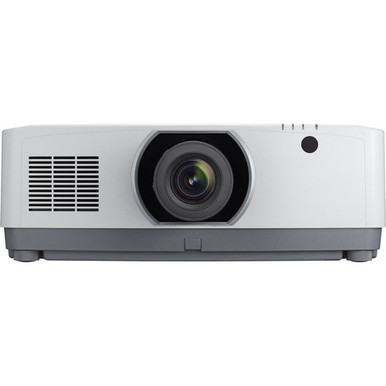
The NEC NP-PA703UL Setup Guide and Buying Considerations below address a common buyer problem: a brightness figure and resolution label cannot design the room for you. The NP-PA703UL is listed at 7,000 lumens and WUXGA resolution. Those facts can shape a shortlist, but installers still need to resolve screen fit, throw distance, mounting, source compatibility, cable paths, power, control, and room lighting.
This guide takes AV buyers, churches, schools, and conference room teams from site survey through commissioning. It also compares the NEC with the provided Epson PowerLite L270F, listed at 5,200 lumens and Full HD, without treating them as interchangeable. The Optoma SI07B appears only as a separate option for projects that also include an interactive display. No supplied information establishes it as an NEC accessory.
Use the linked product pages for current commerce details. Confirm every installation-critical requirement in approved product documentation before issuing a purchase order.
Products at a Glance
- Option 1: NEC NP-PA703UL 7000-Lumen WUXGA LCD Professional Installation Laser Projector with NP41ZL Lens
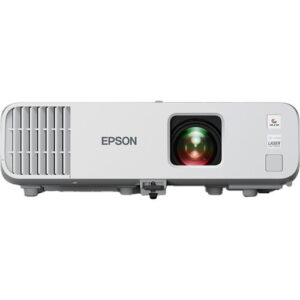
- For projects whose completed room plan can be met by…: Epson Powerlite L270F 5200-Lumen Full HD Laser 3LCD Projector (V11HC68020)
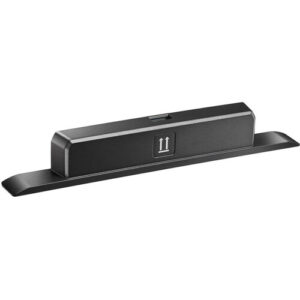
- For a separately specified IFPD installation after th…: Optoma Technology SI07B IFPD Wi-Fi and Bluetooth Module
Quick Comparison Table
| Feature | NEC NP-PA703UL 7000-Lumen WUXGA LCD Professional Installation Laser Projector with NP41ZL Lens | Epson Powerlite L270F 5200-Lumen Full HD Laser 3LCD Projector (V11HC68020) | Optoma Technology SI07B IFPD Wi-Fi and Bluetooth Module |
|---|---|---|---|
| Brightness | 7000 lumens | 5200 lumens | |
| Resolution | WUXGA | Full HD | |
| Best For | Installations whose documented design calls for a 7,000-lumen WUXGA projector and whose lens, placement, mounting, power, signal, and control requirements have been verified. | Projects whose completed room plan can be met by a projector listed at 5,200 lumens and Full HD, subject to separate verification of the full installation. | A separately specified IFPD installation after the buyer verifies the host display and approved module compatibility. |
| Smart Features | Wi-Fi, Bluetooth | ||
| Recommended Buyer | Installations whose documented design calls for a 7,000-lumen WUXGA projector and whose lens, placement, mounting, power, signal, and control requirements have been verified. | Projects whose completed room plan can be met by a projector listed at 5,200 lumens and Full HD, subject to separate verification of the full installation. | A separately specified IFPD installation after the buyer verifies the host display and approved module compatibility. |
Product Images
Projector Options from AudioVideoNation
1. NEC NP-PA703UL 7000-Lumen WUXGA LCD Professional Installation Laser Projector with NP41ZL Lens
Who should compare it: Installations whose documented design calls for a 7,000-lumen WUXGA projector and whose lens, placement, mounting, power, signal, and control requirements have been verified.
Why it belongs here: This is the projector covered by the guide. The provided facts list 7,000 lumens and WUXGA resolution, giving the project team two concrete values for its room-design review.
SKU: NP-PA703UL
Key Features
- 7,000 lumens in the supplied product data
- WUXGA resolution in the supplied product data
- NP-PA703UL SKU for procurement and documentation checks
- Product name identifies an NP41ZL lens configuration
Things to Consider
Confirm throw data, package contents, approved mounting details, dimensions, power, inputs, source formats, control, audio plan, and required accessories before ordering. The lumen figure cannot establish room suitability by itself.
2. Epson Powerlite L270F 5200-Lumen Full HD Laser 3LCD Projector (V11HC68020)
Who should compare it: Projects whose completed room plan can be met by a projector listed at 5,200 lumens and Full HD, subject to separate verification of the full installation.
Why it belongs here: The Epson gives buyers a second projector to assess with disclosed brightness and resolution facts. It supports a requirements-based comparison without implying that it can replace the NEC in the same design.
SKU: PL-L270F
Key Features
- 5,200 lumens in the supplied product data
- Full HD resolution in the supplied product data
- PL-L270F SKU for purchase-order matching
- Listed in the Projectors category
Things to Consider
Recheck throw fit, mounting, connections, power, control, package contents, and required accessories. Its brightness and resolution differ from the NEC, so substitution requires a fresh design review.
3. Optoma Technology SI07B IFPD Wi-Fi and Bluetooth Module
Who should compare it: A separately specified IFPD installation after the buyer verifies the host display and approved module compatibility.
Why it belongs here: The module helps mixed-display project teams separate interactive-display connectivity from the projector decision. Its supplied facts identify Wi-Fi and Bluetooth, but no relationship to either projector is established.
SKU: SI07B
Key Features
- Wi-Fi listed in the supplied product data
- Bluetooth listed in the supplied product data
- SI07B SKU for compatibility and procurement checks
- Listed in the Accessories category
Things to Consider
This is not a projector alternative, and the supplied information does not establish compatibility with the NEC NP-PA703UL or Epson PowerLite L270F. Do not order it as a projector accessory without manufacturer-approved confirmation.
NEC NP-PA703UL 7000-Lumen WUXGA LCD Professional Installation Laser Projector with NP41ZL Lens vs Epson Powerlite L270F 5200-Lumen Full HD Laser 3LCD Projector (V11HC68020): Main Differences
- Choose NEC NP-PA703UL 7000-Lumen WUXGA LCD Professional Installation Laser Projector with NP41ZL Lens if Installations whose documented design calls for a 7,000-lumen WUXGA projector and whose lens, placement, mounting, power, signal, and control requirements have been verified..
- Choose Epson Powerlite L270F 5200-Lumen Full HD Laser 3LCD Projector (V11HC68020) if Projects whose completed room plan can be met by a projector listed at 5,200 lumens and Full HD, subject to separate verification of the full installation..
- Choose Optoma Technology SI07B IFPD Wi-Fi and Bluetooth Module if A separately specified IFPD installation after the buyer verifies the host display and approved module compatibility..
Projector deployment planning starts in the room
Treat the NEC projector’s listed 7,000-lumen brightness as a screening value, not a final room verdict. Record the intended image size, viewing distance, normal lighting conditions, screen material, content types, and farthest viewing position. Survey the room during the lighting scenes people will actually use.
Deployment fit changes by audience. A church may prioritize readable lyrics and presentation content alongside stage lighting. A school may need text visibility during daytime lessons and dependable source changes between instructors. A conference room team may focus on small presentation text, shared content, and repeatable startup. These are design requirements. They are not implied projector capabilities.
Turn the survey into measurable acceptance criteria before comparing products. Define the image dimensions, planned source resolution, operating schedule, lighting condition, and viewing locations. An AV designer should then calculate expected light at the screen using the selected lens, throw distance, screen gain, image area, ambient light, and system losses. The projector’s lumen listing is one input to that calculation.
NEC NP-PA703UL setup and lens placement
The supplied product name identifies an NP41ZL lens. Confirm the exact package contents on the live product page and purchase documentation, then obtain approved throw data for the NP-PA703UL and that lens. The catalog title alone cannot establish placement.
Before mounting, verify:
- The required image size against the approved lens chart.
- The available throw distance and planned lens position.
- Documented offset, orientation, focus, and adjustment limits.
- Projector dimensions and weight against the selected mount and structure.
- Manufacturer-required ventilation and service clearances.
- A clear projection path without lights, speakers, signs, or architectural obstructions.
Mark the screen center and proposed lens location on the site plan. Compare those coordinates with the ceiling structure, cable route, and maintenance access. If the design depends on optical adjustment, demand a documented range for the exact projector-and-lens combination. Do not assume a control exists or that it can correct an otherwise unsuitable mount position.
Start alignment through correct physical placement. Apply only the image adjustments documented for the projector after the mount is secure.
Plan signal, power, control, and audio before mounting
Build an interface schedule for every source. List the source device, required output format, connector, cable length, routing path, adapter or extender, and final projector input. Then verify supported connectors, signal formats, content-protection requirements, control methods, network needs, and cable-distance limits in current documentation.
Long cable paths deserve early attention. Route planning can affect the cable type, extender choice, equipment location, power needs, and access for replacement. Do not buy a cable from connector shape alone. The complete signal path must support the planned content format.
Plan audio as its own system decision until the room’s needs and documented projector capabilities are confirmed. Churches, classrooms, and conference rooms often have different coverage, microphone, reinforcement, and conferencing requirements. Identify where audio is extracted, processed, amplified, and heard.
Coordinate electrical service with the approved power requirements. Avoid an installation plan that depends on an unverified circuit, power lead, network port, or control interface.
A practical installation and commissioning workflow
Use a written sequence so the installer and buyer test the same requirements.
1. Receiving check: Match SKU NP-PA703UL, the ordered configuration, lens identification, and purchase documents before equipment reaches the mounting point.
2. Mechanical check: Confirm the mount rating, attachment structure, orientation, clearances, projection path, and safe access. A qualified installer should handle overhead work and structural attachment.
3. Initial image check: Display an approved test pattern or known source. Establish physical alignment, focus, image boundaries, and geometry with the documented controls.
4. Source check: Test every planned source through its real cable path. Include the intended output formats, adapters, extenders, switching equipment, and content-protection workflow.
5. System check: Test external audio, control commands, network functions, and source recovery only where those elements are part of the documented design.
6. Room acceptance: Review text and video from representative seats under normal lighting scenes. Compare the result with the written acceptance criteria.
7. Handoff: Record settings, cable labels, equipment identifiers, support contacts, and the approved startup and shutdown process. Train the people who will operate the room.
Commissioning with real sources catches problems that a brief power-on check can miss. Keep the signed results with the system documentation.
NEC NP-PA703UL vs Epson PowerLite L270F
The disclosed comparison is narrow but useful. The NEC NP-PA703UL is listed at 7,000 lumens and WUXGA. The Epson PowerLite L270F is listed at 5,200 lumens and Full HD. The NEC has the higher listed brightness figure, and the two resolution labels differ.
Those facts do not settle the purchase. If the room design sets a brightness threshold above the Epson’s listed figure, the NEC may remain in consideration. If 5,200 lumens and Full HD satisfy the documented plan, the Epson merits a separate placement and system review. In either case, calculate the complete screen result instead of selecting by lumens alone.
Complete the comparison with approved documentation for lens and throw fit, mounting, source formats, connections, control, power, physical requirements, operating needs, and package contents. A substitute projector can change several parts of the design even when it belongs to the same broad category.
Projector price-to-performance, stock, and availability
Measure price-to-performance at the installed-system level. On the same date, use each linked product page for live commerce details, then compare the listed brightness and resolution with verified room fit and the full project scope.
Your worksheet should account for the projector, confirmed lens configuration, mount, screen, cabling, extenders, source adapters, control equipment, power work, installation access, labor, commissioning, documentation, training, and any separately specified audio equipment. This exposes cases where a projector choice changes costs elsewhere in the room. It also keeps the evaluation tied to requirements instead of one catalog figure.
Stock and availability can change. Check the live product page when budgeting and again before issuing the purchase order. Match the SKU and package description, confirm the expected fulfillment timeline with the seller, and document how substitutions will be reviewed. Never approve a substitute from brightness alone. Repeat the lens, placement, resolution, signal, power, mounting, and acceptance checks for the proposed replacement.
Keep the Optoma SI07B in a separate decision path
The Optoma Technology SI07B is listed as an IFPD Wi-Fi and Bluetooth module. It may be relevant when a broader room project includes a separately specified interactive flat-panel display.
No supplied information connects the SI07B to the NEC NP-PA703UL or Epson PowerLite L270F. Do not treat it as a projector wireless upgrade, a required accessory, or evidence that either projector supports Wi-Fi or Bluetooth. Confirm the exact host display, approved module compatibility, required functions, and installation instructions before adding it to the bill of materials.
Final buying and design approval checklist
Approve the NEC projector only after the project team can answer yes to each gate:
- The room survey and image acceptance criteria are documented.
- The NP-PA703UL and NP41ZL placement works from approved throw data.
- The structure, mount, clearances, power, and cable paths are verified.
- Every source, control path, and audio handoff has a tested plan.
- The commissioning procedure names the content, seats, and lighting scenes to test.
- The exact SKU, package contents, current commerce details, and substitution process are confirmed.
That record gives the buyer, installer, and operator one shared definition of a successful deployment. It also makes future troubleshooting and replacement decisions easier to manage.
Related AudioVideoNation Links
- Browse Projector at AudioVideoNation
- NEC NP-PA703UL projector with NP41ZL lens
- Epson PowerLite L270F projector
- Optoma Technology SI07B IFPD module
Product Information Sources
- NEC NP-PA703UL 7000-Lumen WUXGA LCD Professional Installation Laser Projector with NP41ZL Lens product information
- Epson Powerlite L270F 5200-Lumen Full HD Laser 3LCD Projector (V11HC68020) product information
- Optoma Technology SI07B IFPD Wi-Fi and Bluetooth Module product information
FAQ
What specifications are confirmed for the NEC NP-PA703UL?
The supplied data confirms that the NEC NP-PA703UL is listed at 7,000 lumens and WUXGA resolution. Verify all other installation requirements, including lens placement, mounting, power, connections, source formats, and control, in approved documentation.
Can 7,000 lumens determine whether the NP-PA703UL fits my room?
No, a 7,000-lumen listing alone cannot determine whether the NP-PA703UL fits a specific room. Image size, lens and throw, screen gain, ambient light, content, and viewing distance must be evaluated together.
Does the NEC NP-PA703UL product include an NP41ZL lens?
The supplied product name states that the NEC NP-PA703UL is offered with an NP41ZL lens. Confirm the exact package contents on the live product page and order documents before purchase.
How does the NEC NP-PA703UL compare with the Epson PowerLite L270F?
The provided facts list the NEC at 7,000 lumens and WUXGA and the Epson at 5,200 lumens and Full HD. Choose only after comparing those values with verified throw, screen, source, mounting, power, control, and installed-system requirements.
Is the Optoma SI07B compatible with the NEC NP-PA703UL?
Compatibility between the Optoma SI07B and NEC NP-PA703UL is not established by the supplied data. The SI07B is identified as an IFPD Wi-Fi and Bluetooth module, so verify its approved host display before ordering.
Where should I check NP-PA703UL stock, availability, and current price?
Check the linked AudioVideoNation product page for current NP-PA703UL commerce details. Review it again before issuing the purchase order, and confirm the exact SKU and package description with the seller.
Conclusion
Use this NEC NP-PA703UL Setup Guide and Buying Considerations comparison to match documented specifications to the room and installation requirements. Review the linked product pages for current purchase details before ordering.
Products Used
| SKU | Product Name | URL |
|---|---|---|
| NP-PA703UL | NEC NP-PA703UL 7000-Lumen WUXGA LCD Professional Installation Laser Projector with NP41ZL Lens | View product |
| PL-L270F | Epson Powerlite L270F 5200-Lumen Full HD Laser 3LCD Projector (V11HC68020) | View product |
| SI07B | Optoma Technology SI07B IFPD Wi-Fi and Bluetooth Module | View product |