

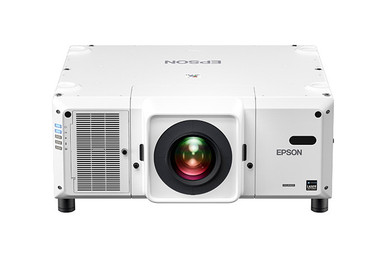
Planning an Epson L30002UNL installation starts with two documented facts: 30,000-lumen brightness and WUXGA resolution. Those numbers narrow the field, but they don't answer the hard questions. Room conditions, image size, mounting position, the signal path, service access, and the installation schedule still decide whether the design works. Use this Epson L30002UNL Setup Guide and Buying Considerations resource to organize those decisions before requesting a final quote.
The guide is built for AV buyers, installers, churches, schools, and conference room technology teams. It explains how to evaluate the L30002UNL, what to confirm before issuing a purchase order, and when one of the supplied Epson alternatives deserves attention. The alternatives span 4K ultra short throw products and a 2,200-lumen WXGA projector. They address different design requirements, so one headline specification should never drive the purchase by itself.
Products at a Glance
- Option 1: Epson Pro L30002UNL Laser WUXGA 3LCD Projector with 4K Enhancement
- For rooms whose approved design calls for ultra short…: Epson PowerLite 875E 5 Ultra Short Throw Display with 4K Enhancement (V11HC04120)
- For projects that require the BrightLink 870Ei by mod…: Epson BrightLink 870Ei Ultra Short Throw Interactive Display with 4K Enhancement (V11HC03020)
- For school or meeting-space plans written around the…: Epson BrightLink 780Ei Ultra Short Throw Interactive Display with 4K Enhancement (V11HC10020)
- For projects explicitly designed around 2,200 lumens…: Epson LightScene EV-110 2200-Lumen WXGA Laser 3LCD Projector (V11HA22020)
Quick Comparison Table
| Feature | Epson Pro L30002UNL Laser WUXGA 3LCD Projector with 4K Enhancement | Epson PowerLite 875E 5 Ultra Short Throw Display with 4K Enhancement (V11HC04120) | Epson BrightLink 870Ei Ultra Short Throw Interactive Display with 4K Enhancement (V11HC03020) | Epson BrightLink 780Ei Ultra Short Throw Interactive Display with 4K Enhancement (V11HC10020) | Epson LightScene EV-110 2200-Lumen WXGA Laser 3LCD Projector (V11HA22020) |
|---|---|---|---|---|---|
| Brightness | 30,000 lumens | 2200 lumens | |||
| Resolution | WUXGA | 4K | 4K | 4K | WXGA |
| Best For | Projects with a documented requirement for a 30,000-lumen WUXGA Epson projector and an installer-verified configuration. | Rooms whose approved design calls for ultra short throw geometry and 4K resolution. | Projects that require the BrightLink 870Ei by model and call for a 4K ultra short throw design. | School or meeting-space plans written around the BL-780Ei model, ultra short throw placement, and 4K resolution. | Projects explicitly designed around 2,200 lumens and WXGA after room-light, image-size, and viewing-distance calculations. |
| Throw Type | Ultra short throw | Ultra short throw | Ultra short throw | ||
| Recommended Buyer | Projects with a documented requirement for a 30,000-lumen WUXGA Epson projector and an installer-verified configuration. | Rooms whose approved design calls for ultra short throw geometry and 4K resolution. | Projects that require the BrightLink 870Ei by model and call for a 4K ultra short throw design. | School or meeting-space plans written around the BL-780Ei model, ultra short throw placement, and 4K resolution. | Projects explicitly designed around 2,200 lumens and WXGA after room-light, image-size, and viewing-distance calculations. |
Product Images
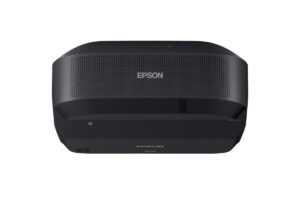
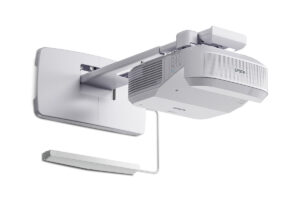
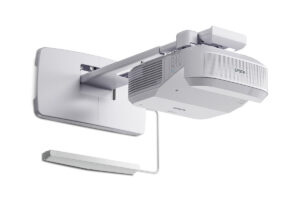
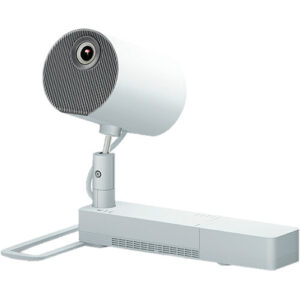
Projector Options from AudioVideoNation
1. Epson Pro L30002UNL Laser WUXGA 3LCD Projector with 4K Enhancement
Who should compare it: Projects with a documented requirement for a 30,000-lumen WUXGA Epson projector and an installer-verified configuration.
Why it belongs here: It is the projector addressed by this guide, and its documented 30,000-lumen brightness and WUXGA resolution define the primary deployment path.
SKU: L30002UNL
Key Features
- Documented 30,000-lumen brightness
- Documented WUXGA resolution
- Exact purchasing identifier L30002UNL
Things to Consider
Confirm throw geometry, lens requirements, mounting, power, ventilation, signal connections, control, service access, and included items before finalizing the design. Use the linked page for current commercial details.
2. Epson PowerLite 875E 5 Ultra Short Throw Display with 4K Enhancement (V11HC04120)
Who should compare it: Rooms whose approved design calls for ultra short throw geometry and 4K resolution.
Why it belongs here: It provides a 4K ultra short throw comparison for projects built around close-to-surface placement.
SKU: PL-875E
Key Features
- Ultra short throw geometry
- Documented 4K resolution
- Exact purchasing identifier PL-875E
Things to Consider
Confirm the required image size, brightness calculation, projection surface, mounting location, connections, control plan, and included configuration. Check the linked page for current commercial details.
3. Epson BrightLink 870Ei Ultra Short Throw Interactive Display with 4K Enhancement (V11HC03020)
Who should compare it: Projects that require the BrightLink 870Ei by model and call for a 4K ultra short throw design.
Why it belongs here: It gives education and collaboration teams a BrightLink comparison with documented 4K resolution and ultra short throw geometry.
SKU: BL-870Ei
Key Features
- Ultra short throw geometry
- Documented 4K resolution
- Exact purchasing identifier BL-870Ei
Things to Consider
Verify the complete interaction workflow, required accessories, software, source connections, mounting plan, image requirement, and projection surface for this exact SKU. Use the linked page for current commercial details.
4. Epson BrightLink 780Ei Ultra Short Throw Interactive Display with 4K Enhancement (V11HC10020)
Who should compare it: School or meeting-space plans written around the BL-780Ei model, ultra short throw placement, and 4K resolution.
Why it belongs here: It adds another BrightLink option for buyers comparing 4K ultra short throw designs by exact model and project scope.
SKU: BL-780Ei
Key Features
- Ultra short throw geometry
- Documented 4K resolution
- Exact purchasing identifier BL-780Ei
Things to Consider
Confirm interaction requirements, accessories, software, image size, brightness needs, mounting, projection surface, connections, and control details in writing. Check the linked page for current commercial details.
5. Epson LightScene EV-110 2200-Lumen WXGA Laser 3LCD Projector (V11HA22020)
Who should compare it: Projects explicitly designed around 2,200 lumens and WXGA after room-light, image-size, and viewing-distance calculations.
Why it belongs here: Its documented 2,200-lumen brightness and WXGA resolution provide a clearly different Epson design path for comparison.
SKU: EV-110
Key Features
- Documented 2,200-lumen brightness
- Documented WXGA resolution
- Exact purchasing identifier EV-110
Things to Consider
Do not substitute it into an L30002UNL design without new brightness, resolution, geometry, and infrastructure checks. Use the linked page for current commercial details.
Epson Pro L30002UNL Laser WUXGA 3LCD Projector with 4K Enhancement vs Epson PowerLite 875E 5 Ultra Short Throw Display with 4K Enhancement (V11HC04120): Main Differences
- Choose Epson Pro L30002UNL Laser WUXGA 3LCD Projector with 4K Enhancement if Projects with a documented requirement for a 30,000-lumen WUXGA Epson projector and an installer-verified configuration..
- Choose Epson PowerLite 875E 5 Ultra Short Throw Display with 4K Enhancement (V11HC04120) if Rooms whose approved design calls for ultra short throw geometry and 4K resolution..
- Choose Epson BrightLink 870Ei Ultra Short Throw Interactive Display with 4K Enhancement (V11HC03020) if Projects that require the BrightLink 870Ei by model and call for a 4K ultra short throw design..
- Choose Epson BrightLink 780Ei Ultra Short Throw Interactive Display with 4K Enhancement (V11HC10020) if School or meeting-space plans written around the BL-780Ei model, ultra short throw placement, and 4K resolution..
- Choose Epson LightScene EV-110 2200-Lumen WXGA Laser 3LCD Projector (V11HA22020) if Projects explicitly designed around 2,200 lumens and WXGA after room-light, image-size, and viewing-distance calculations..
Start with the documented Epson L30002UNL specifications
The supplied product data identifies the L30002UNL at 30,000 lumens with WUXGA resolution. Treat both specifications as design inputs. Brightness must be evaluated against the planned image size, ambient light, projection surface, content, and the acceptance standard chosen for the room. WUXGA resolution should be checked against source formats, viewing distance, and the amount of detail the audience needs to read.
Create a one-page basis of design before selecting installation hardware. Record the desired image dimensions, typical room-light conditions, closest and farthest viewers, content mix, mounting zone, operator workflow, and expected use schedule. Give that document to the installer, integrator, or seller so every party is working from the same assumptions.
Next, verify throw geometry, lens requirements, allowed orientation, mounting hardware, structural support, electrical needs, ventilation clearances, signal and control connections, cable distances, and service access against current documentation for SKU L30002UNL. Confirm exactly what the quoted configuration includes. These details can change the installed scope without changing the projector's stated brightness or resolution.
The full product name references 4K Enhancement, while the supplied resolution fact is WUXGA. Keep those terms distinct during planning. Ask the seller or installer to document the accepted source formats and expected displayed behavior before the system is approved.
Epson L30002UNL setup checklist before installation
A disciplined checklist catches expensive conflicts while the mounting location and infrastructure can still be changed.
1. Define the visible result. Write down the required image size, content types, audience positions, and room-light conditions. If the system will show small text, live video, presentation slides, or detailed graphics, test representative material rather than relying on a generic demo.
2. Calculate the image requirement. Use the documented 30,000-lumen figure as one input to a formal brightness calculation. Include the projection surface and expected ambient light. Set an acceptance target that the buyer and installer can measure during commissioning.
3. Resolve geometry before construction. Document the lens choice, throw distance, image position, mounting height, potential obstructions, and access route. Check the proposed image against the room's sightlines. Final mounting points should follow approved calculations and current L30002UNL documentation.
4. Coordinate structure and utilities. Have qualified professionals confirm structural support, power, ventilation, cable pathways, and service clearances. Map every source, switching component, control connection, and destination before cables are ordered. Verify distance limits and termination requirements for the selected signal system.
5. Plan daily operation. Decide who starts and shuts down the system, changes sources, handles unusual content, and reports faults. Record the required control functions. Place service access and operator access in the drawings instead of treating them as last-minute details.
6. Write the acceptance test early. Test the approved sources, text legibility, image placement, focus, source switching, control commands, and operation under the room lighting used for real events. Record the results. A punch list should identify the owner and completion date for every unresolved item.
Do not release the final installation solely from a product-page specification. The approved drawings, current technical documentation, and site survey should agree first.
Deployment fit for churches, schools, and conference rooms
Deployment fit begins with the room's job. The same projector specification can lead to different decisions across a sanctuary, auditorium, classroom, and corporate meeting space.
Churches. If services combine song text, presentation graphics, and video, test each content type at the planned viewing distances. Document normal lighting during worship rather than calculating for a dark, empty room. Coordinate the image position with architecture, seating, cameras, and stage elements. The L30002UNL's 30,000-lumen figure still needs a room-specific calculation.
Schools. Separate classroom needs from assembly spaces and multipurpose rooms. A school should review text size, staff workflow, mounting security, service access, and the range of source devices included in its project. The supplied 4K ultra short throw Epson alternatives create another design path for rooms where close-to-surface placement is part of the approved plan.
Conference room technology teams. Start with viewing distance, presentation detail, room lighting, and the organization's standard source and control system. A large lumen number does not establish suitability on its own. Confirm that WUXGA matches the content requirement and that the proposed installation can be operated and serviced within the team's normal process.
Installers and integrators. Turn each assumption into a drawing, calculation, or written responsibility. A site survey should resolve mounting, access, infrastructure, and room conflicts before equipment arrives. That documentation also gives the buyer a clear basis for comparing proposals.
Price-to-performance, stock, and availability checks
Price-to-performance should be measured across the installed system. Compare the projector configuration, required lens and mounting components, infrastructure work, signal distribution, control work, commissioning, training, and planned service. Use the same scope for every proposal. A lower hardware quote can describe a different project if key installation items sit outside it.
Build a simple evaluation matrix with five columns: image requirement, placement requirement, infrastructure impact, operating workflow, and total installed scope. Mark every statement that still depends on seller confirmation. This approach helps procurement teams compare the L30002UNL with the Epson alternatives without pretending that products with different brightness, resolution, and throw geometry are interchangeable.
Stock and availability also affect project risk, but they change. Use each linked AudioVideoNation product page for live commercial details, then have the seller confirm the exact SKU, quoted configuration, fulfillment timing, and quote validity. Align those dates with site readiness, installer availability, and the required commissioning date before committing the schedule.
Ask for current warranty, support, and service terms as part of the written proposal. Do not infer them from the brand name or a related Epson product. The approved order should name the exact product and every required accessory or service.
Compare the supplied Epson projector alternatives
The L30002UNL path begins with 30,000 lumens and WUXGA. It belongs on the shortlist when those documented values match the basis of design and the remaining installation details can be verified. Do not carry its assumptions into another Epson product simply because the brand is the same.
The PowerLite 875E, BrightLink 870Ei, and BrightLink 780Ei each have supplied facts identifying 4K resolution and ultra short throw geometry. That combination creates a distinct placement discussion. Have the installer verify image size, mounting position, projection surface, room brightness needs, and all connection requirements for the exact SKU. The BrightLink product names identify interactive displays, but the intended interaction workflow, included tools, software requirements, and accessories still need written confirmation.
The LightScene EV-110 has documented brightness of 2,200 lumens and WXGA resolution. Those values differ materially from the L30002UNL's 30,000-lumen WUXGA specification. It should be evaluated from a fresh room and content brief, not inserted into an L30002UNL design without recalculation.
Resolution labels also need context. Compare the actual source material, closest viewer, smallest text, image dimensions, and organizational content standards. Likewise, ultra short throw geometry can address a particular placement goal, but it does not settle brightness, surface, infrastructure, or workflow requirements.
Use the alternatives to identify the project's real decision fork: a 30,000-lumen WUXGA design, a 4K ultra short throw design, or a 2,200-lumen WXGA design. Once that path is clear, compare exact configurations and installation scopes within it.
Final AV deployment planning gate
Before approval, require a short go-or-hold review. The project can move forward when the image calculation supports the room goal, WUXGA matches the content plan, geometry and lens requirements are documented, infrastructure is coordinated, and commissioning criteria are written. The exact L30002UNL configuration should also appear consistently on the quote, drawings, and purchasing documents.
Place the project on hold if the image dimensions, mounting position, projection surface, signal design, electrical work, service access, or operating responsibility remains unresolved. These are design questions, not details to discover during installation.
Finish with a live commercial check on the linked product page and written confirmation from the seller. Match fulfillment timing to construction and installer schedules. If the L30002UNL passes both the technical and commercial gates, the team has a defensible basis for purchase. If it does not, return to the 4K ultra short throw or 2,200-lumen WXGA paths and repeat the same review with the exact alternative SKU.
Related AudioVideoNation Links
- Browse Projector at AudioVideoNation
- Epson Pro L30002UNL product page
- Epson PowerLite 875E product page
- Epson BrightLink 870Ei product page
- Epson BrightLink 780Ei product page
Product Information Sources
- Epson Pro L30002UNL Laser WUXGA 3LCD Projector with 4K Enhancement product information
- Epson PowerLite 875E 5 Ultra Short Throw Display with 4K Enhancement (V11HC04120) product information
- Epson BrightLink 870Ei Ultra Short Throw Interactive Display with 4K Enhancement (V11HC03020) product information
- Epson BrightLink 780Ei Ultra Short Throw Interactive Display with 4K Enhancement (V11HC10020) product information
- Epson LightScene EV-110 2200-Lumen WXGA Laser 3LCD Projector (V11HA22020) product information
FAQ
What brightness and resolution are confirmed for the Epson L30002UNL?
The supplied product data confirms 30,000-lumen brightness and WUXGA resolution for the Epson L30002UNL. Use both values as inputs to a room-specific design rather than as proof that the projector fits every image size or lighting condition.
What resolution should an installer use when planning the L30002UNL system?
An installer should use WUXGA as the confirmed L30002UNL resolution in the initial design. Because the full product name references 4K Enhancement, verify accepted source formats and displayed behavior in current technical documentation.
Is 30,000 lumens enough for a church, school, or conference space?
Brightness sufficiency cannot be decided from the 30,000-lumen figure alone. Calculate the requirement using image size, ambient light, projection surface, content, and the project's chosen acceptance standard.
What should be confirmed before installing an Epson L30002UNL?
Confirm throw geometry, lens selection, mounting, structural support, power, ventilation, signal and control connections, cable distances, service access, and included items before installation. Base the final design on current documentation for SKU L30002UNL and a completed site survey.
How do the supplied Epson alternatives differ from the L30002UNL?
The supplied alternatives include three 4K ultra short throw products and one 2,200-lumen WXGA projector, while the L30002UNL is documented at 30,000 lumens and WUXGA. Choose a design path from the room, content, placement, and workflow requirements, then verify the exact product configuration.
How should buyers check L30002UNL price and availability?
Buyers should use the linked AudioVideoNation product page and request written confirmation for current commercial details. Confirm the exact SKU, configuration, fulfillment timing, quote validity, and required accessories before aligning the purchase with the installation schedule.
Conclusion
Use this Epson L30002UNL Setup Guide and Buying Considerations comparison to match documented specifications to the room and installation requirements. Review the linked product pages for current purchase details before ordering.
Products Used
| SKU | Product Name | URL |
|---|---|---|
| L30002UNL | Epson Pro L30002UNL Laser WUXGA 3LCD Projector with 4K Enhancement | View product |
| PL-875E | Epson PowerLite 875E 5 Ultra Short Throw Display with 4K Enhancement (V11HC04120) | View product |
| BL-870Ei | Epson BrightLink 870Ei Ultra Short Throw Interactive Display with 4K Enhancement (V11HC03020) | View product |
| BL-780Ei | Epson BrightLink 780Ei Ultra Short Throw Interactive Display with 4K Enhancement (V11HC10020) | View product |
| EV-110 | Epson LightScene EV-110 2200-Lumen WXGA Laser 3LCD Projector (V11HA22020) | View product |