

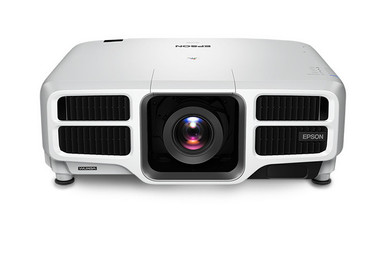
This Epson L1750UNL Setup Guide and Buying Considerations article helps AV teams turn a projector choice into a workable installation plan. The Epson Pro L1750UNL is identified as a WUXGA projector, but resolution alone cannot settle the purchase. Room geometry, screen size, mounting position, source equipment, lens selection, project timing, and installed cost all affect deployment fit.
The supplied product set also includes four Epson lens listings: the ELP-LM01, ELPLW08, ELPLW05, and ELPLU04. Treat them as planning candidates rather than confirmed matches. Exact compatibility with the L1750UNL must be verified before an order or mounting decision.
This guide explains what to measure, what to document, and what to confirm with the seller or current manufacturer materials. It also shows how churches, schools, conference room teams, and installers can compare price-to-performance without relying on unsupported specifications. Start with the room. Then build a complete, verified equipment list around it.
Products at a Glance
- Option 1: Epson Pro L1750UNL WUXGA 1080p 3LCD Projector
- For installers evaluating a catalog-labeled medium-th…: Epson V12H004M01 ELP-LM01 Medium-throw Zoom Lens 70.3mm-105.8mm F/2.0-2.7
- For installers comparing the ELPLW08 listing for a me…: Epson V12H004W08 Wide Throw #3 Zoom Lens ELPLW08
- For teams building a documentation-verified lens shor…: Epson V12H004W05 ELPLW05 Wide-Throw Zoom Lens for Select Projectors
- For rooms where measured geometry calls for a short-t…: Epson V12H004U04 ELPLU04 Short-Throw Zoom Lens for Select Projectors
Quick Comparison Table
| Feature | Epson Pro L1750UNL WUXGA 1080p 3LCD Projector | Epson V12H004M01 ELP-LM01 Medium-throw Zoom Lens 70.3mm-105.8mm F/2.0-2.7 | Epson V12H004W08 Wide Throw #3 Zoom Lens ELPLW08 | Epson V12H004W05 ELPLW05 Wide-Throw Zoom Lens for Select Projectors | Epson V12H004U04 ELPLU04 Short-Throw Zoom Lens for Select Projectors |
|---|---|---|---|---|---|
| Brightness | 12,000 lumen | ||||
| Resolution | WUXGA | ||||
| Best For | Churches, schools, conference rooms, and installed AV projects that require a documentation-verified WUXGA projector design. | Installers evaluating a catalog-labeled medium-throw lens after completing room geometry. | Installers comparing the ELPLW08 listing for a measured projector position and screen size. | Teams building a documentation-verified lens shortlist around fixed room geometry. | Rooms where measured geometry calls for a short-throw solution and current documentation confirms the application. |
| Throw Type | Short throw | Short throw | |||
| Recommended Buyer | Churches, schools, conference rooms, and installed AV projects that require a documentation-verified WUXGA projector design. | Installers evaluating a catalog-labeled medium-throw lens after completing room geometry. | Installers comparing the ELPLW08 listing for a measured projector position and screen size. | Teams building a documentation-verified lens shortlist around fixed room geometry. | Rooms where measured geometry calls for a short-throw solution and current documentation confirms the application. |
Product Images

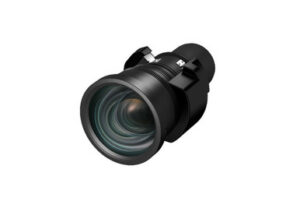


Projector Options from AudioVideoNation
1. Epson Pro L1750UNL WUXGA 1080p 3LCD Projector
Who should compare it: Churches, schools, conference rooms, and installed AV projects that require a documentation-verified WUXGA projector design.
Why it belongs here: This is the projector at the center of the deployment plan. Its confirmed WUXGA resolution gives AV teams a starting point for source-path and content planning while the remaining installation requirements are verified.
SKU: L1750UNL
Key Features
- WUXGA resolution identified in the supplied product facts
- Exact ordering SKU L1750UNL
- Epson Pro projector listing for installed AV consideration
Things to Consider
Confirm brightness, inputs, physical requirements, mounting details, package contents, and lens compatibility through current documentation before approving the design. Check the linked product page for live commerce details.
2. Epson V12H004M01 ELP-LM01 Medium-throw Zoom Lens 70.3mm-105.8mm F/2.0-2.7
Who should compare it: Installers evaluating a catalog-labeled medium-throw lens after completing room geometry.
Why it belongs here: The ELP-LM01 adds a medium-throw-labeled lens path to the planning shortlist. It can be evaluated after the room team measures image width and the available projector-to-screen distance.
SKU: V12H004M01
Key Features
- Cataloged as an Epson projector lens accessory
- Medium-throw zoom description in the supplied product name
- ELP-LM01 identifier paired with SKU V12H004M01
Things to Consider
The supplied facts do not confirm compatibility with the L1750UNL. Verify the exact projector match, official throw range, supported image sizes, orientation requirements, and placement limits before ordering.
3. Epson V12H004W08 Wide Throw #3 Zoom Lens ELPLW08
Who should compare it: Installers comparing the ELPLW08 listing for a measured projector position and screen size.
Why it belongs here: The ELPLW08 supplies another named lens path for geometry-led comparison. It belongs on the shortlist only when approved calculations and current compatibility documentation support its use.
SKU: V12H004W08
Key Features
- Wide Throw #3 zoom description in the supplied product name
- ELPLW08 product identifier
- Exact ordering SKU V12H004W08
Things to Consider
Confirm L1750UNL compatibility and obtain the official throw, image-size, orientation, and placement data. Do not approve the lens from its catalog label alone.
4. Epson V12H004W05 ELPLW05 Wide-Throw Zoom Lens for Select Projectors
Who should compare it: Teams building a documentation-verified lens shortlist around fixed room geometry.
Why it belongs here: The ELPLW05 gives procurement teams another Epson lens listing to assess for a specific room. Its supplied name limits the claim to select projectors, so documentation must settle the exact application.
SKU: V12H004W05
Key Features
- Epson lens accessory listed for select projectors
- ELPLW05 product identifier
- Exact ordering SKU V12H004W05
Things to Consider
Confirm the official throw classification before using this lens in geometry calculations. Exact L1750UNL compatibility, throw range, image-size limits, orientation, and placement requirements also need verification.
5. Epson V12H004U04 ELPLU04 Short-Throw Zoom Lens for Select Projectors
Who should compare it: Rooms where measured geometry calls for a short-throw solution and current documentation confirms the application.
Why it belongs here: The ELPLU04 adds a short-throw-labeled option for rooms with constrained projector placement. It remains a candidate until room calculations and current documentation confirm the complete projector-and-lens combination.
SKU: ELPLU04
Key Features
- Short-throw classification in the supplied product facts
- Zoom lens listing for select projectors
- Exact supplied SKU ELPLU04
Things to Consider
Verify compatibility with the L1750UNL, the official throw range, image-size limits, placement allowances, and package details. A short-throw label does not establish fit for a measured room.
Epson Pro L1750UNL WUXGA 1080p 3LCD Projector vs Epson V12H004M01 ELP-LM01 Medium-throw Zoom Lens 70.3mm-105.8mm F/2.0-2.7: Main Differences
- Choose Epson Pro L1750UNL WUXGA 1080p 3LCD Projector if Churches, schools, conference rooms, and installed AV projects that require a documentation-verified WUXGA projector design..
- Choose Epson V12H004M01 ELP-LM01 Medium-throw Zoom Lens 70.3mm-105.8mm F/2.0-2.7 if Installers evaluating a catalog-labeled medium-throw lens after completing room geometry..
- Choose Epson V12H004W08 Wide Throw #3 Zoom Lens ELPLW08 if Installers comparing the ELPLW08 listing for a measured projector position and screen size..
- Choose Epson V12H004W05 ELPLW05 Wide-Throw Zoom Lens for Select Projectors if Teams building a documentation-verified lens shortlist around fixed room geometry..
- Choose Epson V12H004U04 ELPLU04 Short-Throw Zoom Lens for Select Projectors if Rooms where measured geometry calls for a short-throw solution and current documentation confirms the application..
Begin the Epson L1750UNL setup with deployment fit
Define the room before approving equipment. Record the desired image dimensions, screen position, available projector location, audience sightlines, ambient-light conditions, cable route, source locations, and access for future service. Measure the usable projector-to-screen distance from the proposed lens position rather than from an arbitrary wall or ceiling point.
Each audience has a different risk. A church may need clear views around lighting, speakers, or architectural details. A school has to account for teacher devices, safe mounting, and support by staff who did not design the room. A conference room team may prioritize readable shared content, guest sources, and predictable operation. Write these needs as acceptance criteria before discussing lenses.
WUXGA is the confirmed resolution fact for the L1750UNL. Set separate requirements for brightness, physical dimensions, mounting, input connections, and control integration, then verify the projector against current official documentation. This keeps a familiar model number from becoming a substitute for a complete design review.
Complete a pre-installation survey before ordering
A useful survey produces a marked drawing, photographs, measurements, and an equipment-path diagram. Note screen width, screen height, ceiling height, the proposed lens centerline, obstructions, power location, cable distance, equipment-rack position, and every source that must reach the projector. Include tolerances. Real rooms rarely match an early sketch exactly.
Confirm what the exact L1750UNL order contains and whether a separate lens or mounting hardware is required. The supplied information does not establish package contents. It also does not provide the physical or electrical requirements needed to approve a mount, circuit, enclosure, or structural attachment. Qualified personnel should check those items against the current installation manual and applicable codes.
For replacement projects, avoid assuming the existing lens position, mount, cabling, or control programming can stay unchanged. Document each component and validate it against the proposed system. For new construction, freeze the projector position only after lens calculations, structural coordination, and cable-path planning agree. A few verified measurements can prevent expensive ceiling changes later.
Epson projector lens selection starts with geometry
The supplied catalog offers several lens paths. The ELP-LM01 listing is labeled as a medium-throw zoom lens. The ELPLW08 listing is labeled Wide Throw #3, while the ELPLW05 listing describes a wide-throw zoom lens for select projectors. The ELPLU04 is identified as a short-throw zoom lens for select projectors. Those labels organize a shortlist. They do not confirm that any lens fits the L1750UNL.
Use approved lens documentation or a manufacturer-authorized calculator to match image width and measured throw distance. Throw ratio is based on throw distance divided by image width, so use image width rather than screen diagonal. Check the full required zoom range instead of designing at an extreme endpoint. Also verify supported image-size limits, allowable orientation, focus range, and any placement adjustments permitted by the confirmed projector-and-lens combination.
Compatibility is a hard gate. Match the projector model, lens model, and ordering SKU in current documentation, then record the source and revision date in the project file. If the planned lens changes, rerun the geometry. A similar product name or a familiar lens family is not enough evidence for procurement.
Plan the WUXGA projector installation signal path
Map the signal path from each source to the screen. The L1750UNL is identified as WUXGA, so confirm that source computers, switchers, extenders, adapters, wall plates, and cabling can carry the intended WUXGA content through the complete chain. Do not infer connector types or transport capabilities from the projector name. Check current product documentation first.
Test with the content people will actually use. Fine presentation text, spreadsheets, worship graphics, recorded video, camera feeds, and guest laptops expose different problems. Run each planned source through the installed path and verify stable output, correct framing, readable detail, and acceptable switching behavior. Include any adapters that users will handle during normal operation.
Create a simple source list and label both ends of every cable. Record the chosen output setting for fixed computers. If guest devices are part of the plan, define a supported connection method and a fallback procedure. These steps reduce troubleshooting during a class, service, or meeting without assuming the projector has an unverified input or wireless function.
Install and commission against written acceptance criteria
Turn the approved design into a commissioning checklist. Keep the sequence tight:
1. Verify the shipment. Match the projector and every lens or accessory against the approved product IDs and SKUs. Confirm package contents before work begins.
2. Recheck room measurements. Compare actual screen width, lens position, throw distance, and obstructions with the final drawing. Stop if field conditions have changed.
3. Approve mounting and services. Qualified personnel should confirm structural support, mount suitability, power, ventilation clearances, and cable routing from current manuals and codes.
4. Set geometry mechanically. Position and align the projector according to the approved lens calculation and installation instructions before relying on electronic image correction.
5. Test the source chain. Run every required source through its normal switcher, extender, adapter, and cable path. Include the intended WUXGA workflow.
6. Review real content. Check focus across the image, framing, readable text, source transitions, and operation from normal audience positions.
7. Document the handoff. Save model and SKU records, configuration notes, cable labels, drawings, and the confirmed lens documentation. Give operators a short startup, source-selection, shutdown, and escalation guide.
The project is complete when the written room requirements pass, not when an image first appears.
Plan stock and availability around the project schedule
Availability is time-sensitive, so use each linked AudioVideoNation product page for live commerce details close to the ordering date. Confirm the exact SKU, expected fulfillment timing, and package contents with the seller when a construction deadline, event, school break, or room closure controls the schedule. A saved page or old quote should not replace a current check.
Treat the L1750UNL and each lens listing as separate procurement line items. Verify the projector and the selected lens independently, even if they are ordered together. The purchasing record should show the approved product ID, SKU, display name, quantity, and permalink. That discipline helps prevent a similarly named lens from being substituted without a fresh technical review.
Build time for delivery inspection, staging, compatibility confirmation, installation, and commissioning. If an alternate projector or lens is proposed, return to the room geometry and signal-path review. A substitution can change the design even when the category label sounds similar.
Evaluate projector price-to-performance by installed value
Judge price-to-performance against the complete installed system. Review current commerce details on the linked pages, then account for the confirmed lens, mounting and structural work, signal transport, cabling, control programming, installation labor, access equipment, staging, commissioning, and operator training. Include only the items your project needs, but do not compare a bare projector line item with a fully designed alternative.
Set must-pass requirements first: verified lens compatibility, workable throw geometry, required WUXGA source operation, safe installation, acceptable room performance, and delivery timing that fits the project. Compare commercial options only after those gates are satisfied. A lower equipment cost loses value if the design requires major relocation, replacement signal hardware, or repeated installation work.
Ask vendors to quote the same scope and identify exclusions. Keep model numbers and lens SKUs visible so the offers remain comparable. For churches and schools, include the staff time needed for routine operation. Conference room teams should include support for the actual guest and room sources. The strongest value is the option that meets the documented room requirements with a clear, supportable bill of materials.
Related AudioVideoNation Links
- Browse Projector at AudioVideoNation
- Epson Pro L1750UNL projector
- Epson ELP-LM01 medium-throw zoom lens
- Epson ELPLW08 zoom lens
- Epson ELPLW05 zoom lens
Product Information Sources
- Epson Pro L1750UNL WUXGA 1080p 3LCD Projector product information
- Epson V12H004M01 ELP-LM01 Medium-throw Zoom Lens 70.3mm-105.8mm F/2.0-2.7 product information
- Epson V12H004W08 Wide Throw #3 Zoom Lens ELPLW08 product information
- Epson V12H004W05 ELPLW05 Wide-Throw Zoom Lens for Select Projectors product information
- Epson V12H004U04 ELPLU04 Short-Throw Zoom Lens for Select Projectors product information
FAQ
Is the Epson L1750UNL a WUXGA projector?
Yes, the supplied product facts identify the Epson L1750UNL as a WUXGA projector. Confirm the planned source chain can carry the intended WUXGA content from each source through every switcher, extender, adapter, and cable.
Can I choose an L1750UNL lens from its product name alone?
No, a lens product name does not confirm compatibility with the Epson L1750UNL. Match the exact projector and lens identifiers in current documentation, then validate the official throw data against measured room geometry.
Does the Epson L1750UNL include a lens?
The supplied product facts do not confirm whether the Epson L1750UNL package includes a lens. Check the linked product page and confirm the exact package contents with the seller before building the bill of materials.
How should I check current stock and availability?
Use the linked AudioVideoNation product pages for current availability and other live commerce details. Confirm the projector and selected lens by exact SKU when the installation depends on a firm delivery schedule.
How should buyers compare L1750UNL price-to-performance?
Compare price-to-performance using total installed cost and verified deployment fit. Include the confirmed lens, mounting, signal transport, cabling, labor, commissioning, and training that the project requires, then consult the product pages for current commerce details.
What should be measured before an Epson L1750UNL installation?
Measure the desired image width, screen position, proposed lens location, projector-to-screen distance, ceiling height, obstructions, cable routes, and audience sightlines. Use those measurements with approved lens documentation before fixing the mount position or ordering a lens.
Conclusion
Use this Epson L1750UNL Setup Guide and Buying Considerations comparison to match documented specifications to the room and installation requirements. Review the linked product pages for current purchase details before ordering.
Products Used
| SKU | Product Name | URL |
|---|---|---|
| L1750UNL | Epson Pro L1750UNL WUXGA 1080p 3LCD Projector | View product |
| V12H004M01 | Epson V12H004M01 ELP-LM01 Medium-throw Zoom Lens 70.3mm-105.8mm F/2.0-2.7 | View product |
| V12H004W08 | Epson V12H004W08 Wide Throw #3 Zoom Lens ELPLW08 | View product |
| V12H004W05 | Epson V12H004W05 ELPLW05 Wide-Throw Zoom Lens for Select Projectors | View product |
| ELPLU04 | Epson V12H004U04 ELPLU04 Short-Throw Zoom Lens for Select Projectors | View product |