

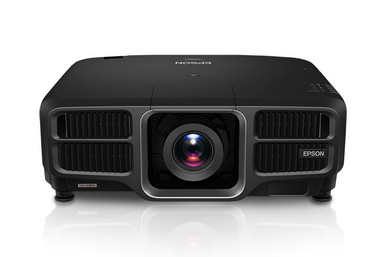
Use this AV PL-L1405UNL Setup Guide and Buying Considerations resource when the projector is only one piece of the installation. The Epson PowerLite Pro L1405UNL gives you a confirmed WUXGA starting point, but the supplied information does not establish every lens, brightness, signal, mounting, or connection requirement. Those decisions determine whether the planned system fits a sanctuary, classroom, auditorium, or conference room.
This guide turns that uncertainty into a purchase sequence. You will define room geometry and content needs first, evaluate the ELPLW08, ELPLW05, and ELPLU04 as lens candidates without assuming compatibility, plan installation checks, and compare total system value. Finish by confirming current purchasing details on each linked product page. The result should be a buildable bill of materials tied to exact SKUs, with clear checkpoints for the installer and procurement team.
Products at a Glance
- Option 1: Epson PowerLite Pro L1405UNL WUXGA 1080p 3LCD Projector
- For installers building a lens shortlist where curren…: Epson V12H004W08 Wide Throw #3 Zoom Lens ELPLW08
- For projects whose completed throw study and current…: Epson V12H004W05 ELPLW05 Wide-Throw Zoom Lens for Select Projectors
- For rooms where a verified short-throw design is requ…: Epson V12H004U04 ELPLU04 Short-Throw Zoom Lens for Select Projectors
Quick Comparison Table
| Feature | Epson PowerLite Pro L1405UNL WUXGA 1080p 3LCD Projector | Epson V12H004W08 Wide Throw #3 Zoom Lens ELPLW08 | Epson V12H004W05 ELPLW05 Wide-Throw Zoom Lens for Select Projectors | Epson V12H004U04 ELPLU04 Short-Throw Zoom Lens for Select Projectors |
|---|---|---|---|---|
| Brightness | 12,000 lumen | |||
| Resolution | WUXGA | |||
| Best For | Teams that have validated WUXGA as the required resolution and are ready to confirm lens, brightness, signal, and mounting details. | Installers building a lens shortlist where current documentation confirms this exact SKU for the selected projector and room geometry. | Projects whose completed throw study and current compatibility documentation call for V12H004W05. | Rooms where a verified short-throw design is required and current documentation confirms this exact lens-projector pairing. |
| Throw Type | Short throw | Short throw | ||
| Recommended Buyer | Teams that have validated WUXGA as the required resolution and are ready to confirm lens, brightness, signal, and mounting details. | Installers building a lens shortlist where current documentation confirms this exact SKU for the selected projector and room geometry. | Projects whose completed throw study and current compatibility documentation call for V12H004W05. | Rooms where a verified short-throw design is required and current documentation confirms this exact lens-projector pairing. |
Product Images


Projector Options from AudioVideoNation
1. Epson PowerLite Pro L1405UNL WUXGA 1080p 3LCD Projector
Who should compare it: Teams that have validated WUXGA as the required resolution and are ready to confirm lens, brightness, signal, and mounting details.
Why it belongs here: This projector is the core of the guide and the only supplied projector with a confirmed WUXGA resolution. It gives designers a precise SKU around which to validate the lens, room geometry, signal path, and installation plan.
SKU: PL-L1405UNL
Key Features
- WUXGA resolution
- Exact ordering reference: PL-L1405UNL
- Listed in the Multimedia Projectors, Projectors, and Video categories
Things to Consider
Confirm the required brightness, approved lens options, throw geometry, package contents, connections, mounting provisions, and control requirements from current documentation before specifying the system.
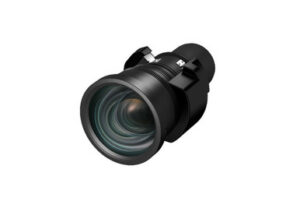
2. Epson V12H004W08 Wide Throw #3 Zoom Lens ELPLW08
Who should compare it: Installers building a lens shortlist where current documentation confirms this exact SKU for the selected projector and room geometry.
Why it belongs here: The ELPLW08 gives installers an Epson zoom-lens listing to evaluate during the geometry study. Its separate SKU also helps procurement distinguish it from the other lens candidates.
SKU: V12H004W08
Key Features
- Epson projector-lens accessory
- Zoom-lens format identified in the product name
- Exact ordering reference: V12H004W08
- ELPLW08 designation for cross-checking project documents
Things to Consider
Do not infer PL-L1405UNL compatibility from the Epson name. Verify the supported projector models, throw range, image-size limits, adjustment data, and required clearances before ordering.
3. Epson V12H004W05 ELPLW05 Wide-Throw Zoom Lens for Select Projectors
Who should compare it: Projects whose completed throw study and current compatibility documentation call for V12H004W05.
Why it belongs here: The ELPLW05 keeps another Epson zoom-lens listing visible during design review. It is useful as a documented candidate when the installer is comparing exact lens SKUs against the measured room.
SKU: V12H004W05
Key Features
- Epson zoom-lens listing
- Exact ordering reference: V12H004W05
- ELPLW05 designation for design and procurement records
- Listed across lens, projector, multimedia projector, and video categories
Things to Consider
Confirm the exact throw data and compatibility with PL-L1405UNL before selection. The product title is not a substitute for a room calculation or current compatibility documentation.
4. Epson V12H004U04 ELPLU04 Short-Throw Zoom Lens for Select Projectors
Who should compare it: Rooms where a verified short-throw design is required and current documentation confirms this exact lens-projector pairing.
Why it belongs here: The ELPLU04 is the supplied short-throw zoom-lens option, making it relevant to rooms investigating a closer projector position. It remains a candidate until its compatibility and calculated image geometry are verified.
SKU: ELPLU04
Key Features
- Short-throw format
- Zoom-lens format identified in the product name
- Exact ordering reference: ELPLU04
- Listed in lens, multimedia projector, projector, and video categories
Things to Consider
Short throw does not guarantee the needed image from a chosen position. Confirm PL-L1405UNL compatibility, throw calculations, adjustment limits, image size, and physical clearances before purchase.
Epson PowerLite Pro L1405UNL WUXGA 1080p 3LCD Projector vs Epson V12H004W08 Wide Throw #3 Zoom Lens ELPLW08: Main Differences
- Choose Epson PowerLite Pro L1405UNL WUXGA 1080p 3LCD Projector if Teams that have validated WUXGA as the required resolution and are ready to confirm lens, brightness, signal, and mounting details..
- Choose Epson V12H004W08 Wide Throw #3 Zoom Lens ELPLW08 if Installers building a lens shortlist where current documentation confirms this exact SKU for the selected projector and room geometry..
- Choose Epson V12H004W05 ELPLW05 Wide-Throw Zoom Lens for Select Projectors if Projects whose completed throw study and current compatibility documentation call for V12H004W05..
- Choose Epson V12H004U04 ELPLU04 Short-Throw Zoom Lens for Select Projectors if Rooms where a verified short-throw design is required and current documentation confirms this exact lens-projector pairing..
Deployment fit for churches, schools, and conference rooms
Start with a one-page deployment brief. Record the desired image size, screen location, possible projector positions, measured distance between the lens location and screen, ceiling or structural restrictions, and anything that could block the image path. Mark whether the measurement begins at the lens position or another reference point. That small detail prevents expensive geometry errors.
Then describe the room in operating terms. A church may need readable lyrics from rear seating and a clear view around lighting or architectural elements. A school may need legible instructional content with classroom lights on. A conference room team may care most about spreadsheets, presentations, and several planned source devices. These are different deployment conditions even when the projector SKU is identical.
WUXGA is the confirmed resolution for the PL-L1405UNL. Decide whether it matches the content and signal workflow, but do not treat resolution as proof of brightness or room suitability. Document ambient-light conditions, screen details, viewing distance, text size, and the hardest content the room will display. Use those requirements to verify the remaining projector specifications before approving the design.
Deployment fit is established when room measurements, image requirements, installation position, signal path, and an approved lens all agree. A product name alone cannot establish that fit.
Projector lens selection for the Epson PL-L1405UNL setup
Lens selection begins with measured geometry. It does not begin with an accessory name. The three lens listings in this guide give installers a focused shortlist, but the supplied product information does not confirm that any of them works with the PL-L1405UNL. Match the exact projector SKU and lens SKU against current official compatibility documentation before purchase.
The V12H004W08, also identified as ELPLW08, and the V12H004W05, identified as ELPLW05, are Epson zoom-lens listings to investigate during the throw study. The ELPLU04 is identified as a short-throw zoom lens. That makes it relevant when the planned projector position is closer to the screen, but short-throw classification alone does not prove that it will produce the required image from the available position.
For each candidate, obtain the documented throw range, supported image-size range, distance measurement reference, adjustment limits, physical clearances, and compatibility statement for PL-L1405UNL. Plot the nearest and farthest acceptable projector positions rather than working from one ideal point. Leave room for real installation tolerances and service access.
Keep the lens decision in writing. The approved document should contain the projector SKU, lens SKU, target image dimensions, measured distance, planned mounting point, and the source used to confirm compatibility. If any value changes during construction, rerun the lens calculation before moving the projector or ordering another lens.
WUXGA projector buying guide: content and signal checks
Treat WUXGA as a firm decision fact, not a complete image-quality verdict. Ask the content owner what the system will show: presentation slides, lyrics, teaching material, spreadsheets, video, or a mix. Collect sample files that include small text, fine lines, and the layouts used most often. This gives the commissioning team realistic material for evaluation.
Map every planned source from its output through any switcher, scaler, extender, wall plate, or control system to the projector. Confirm the required connections and supported signal formats from current documentation for each component. The supplied PL-L1405UNL facts do not support assumptions about inputs, processing, or control methods.
Brightness also needs a project-specific check. Record the screen, image size, ambient light, and viewing expectations, then confirm the projector's applicable brightness data before committing. Do not borrow a lumen figure from an accessory listing or a similar Epson projector.
For shared spaces, identify who changes sources, starts the system, and responds when an image is missing. A technically valid projector choice can still create operational friction if the source workflow is unclear. Include the intended control sequence in the design review.
Installation plan for church, school, and conference room teams
Build the installation plan around five checkpoints.
- Asset verification: Match the delivered projector and lens against the approved SKUs before work begins. Inspect the current product documentation and package contents rather than assuming they match a related Epson model.
- Physical plan: Confirm the mount location, structure, power position, ventilation clearances, cable route, image path, and service access. Use the exact projector and lens instructions for attachment and adjustment procedures.
- Signal preflight: Test the intended source chain with the planned cabling and intermediary equipment when the project allows. Confirm every required source, resolution, and control path.
- Image commissioning: Set image geometry and focus using the approved lens instructions. Test representative content from each viewing area. Avoid hiding a placement problem with extreme digital correction.
- Handoff: Record the installed projector and lens SKUs, final position, relevant settings, source-routing notes, and support contacts. Give operators a short startup, shutdown, and source-selection guide based on the completed system.
Schedule a final review with both the installer and room owner. The installer checks geometry and system operation. The room owner checks whether actual content is readable and the workflow makes sense. Capture any accepted changes in the project record so later service work starts from accurate information.
Price-to-performance at the system level
Judge price-to-performance against the complete installed design. The projector page is one cost input. A compatible lens, mount, signal transport, control equipment, cabling, installation labor, access equipment, and commissioning may also affect the project total. Which items apply depends on the room, so request comparable system scopes rather than comparing isolated product-page amounts.
Use three value tests. First, does WUXGA match the organization's real content requirement? Second, can an approved lens produce the desired image from a practical mounting position? Third, can the planned infrastructure carry and control the required sources without an unplanned redesign? A lower equipment subtotal has little value if geometry or signal assumptions force project changes later.
Ask each bidder or internal designer to state exclusions. Package contents, lens inclusion, mounting hardware, cable work, electrical work, programming, lift access, and training should be confirmed where relevant. Visit the linked product pages for current commerce details, then compare like-for-like totals and documented project outcomes.
Stock and availability planning
Treat stock and availability as a live procurement check. Product data used for design can become outdated, so confirm current purchasing details on the linked AudioVideoNation pages before setting an installation date. Use the exact product IDs and SKUs in requests, approvals, and purchase documents. Similar-looking lens names are not safe substitutes.
Sequence purchasing around confirmed compatibility. Approving a lens because it is available does not solve the project if its documented geometry or projector pairing is wrong. If the schedule requires an alternate lens, send that exact SKU back through the compatibility and throw-study steps before approval.
Coordinate the projector, approved lens, mount, signal components, and installer window as one deployment package. Do not promise the room to users until critical equipment has been confirmed and the installation team has reviewed the delivery plan. Recheck live product pages when procurement is released, because this guide does not state inventory status or price.
A practical purchase decision sequence
Use a gated decision instead of approving every component at once. Confirm that WUXGA meets the content requirement. Complete the room survey and choose a feasible projector position. Calculate the required lens geometry, then verify the exact lens-projector pairing in current documentation. Review mounting, power, signal, control, cooling, and service requirements for the completed configuration.
Next, build comparable installed-system totals and check current purchasing details for every approved SKU. Release the order only when the technical record and procurement record match. This sequence gives churches, schools, and conference room teams a clear reason for each choice and reduces the chance that a late lens assumption reshapes the project.
Related AudioVideoNation Links
- Browse Projector at AudioVideoNation
- Epson PL-L1405UNL projector product page
- Epson ELPLW08 lens product page
- Epson ELPLW05 lens product page
- Epson ELPLU04 lens product page
Product Information Sources
- Epson PowerLite Pro L1405UNL WUXGA 1080p 3LCD Projector product information
- Epson V12H004W08 Wide Throw #3 Zoom Lens ELPLW08 product information
- Epson V12H004W05 ELPLW05 Wide-Throw Zoom Lens for Select Projectors product information
- Epson V12H004U04 ELPLU04 Short-Throw Zoom Lens for Select Projectors product information
FAQ
Does the Epson PL-L1405UNL have WUXGA resolution?
Yes, the supplied specification identifies the PL-L1405UNL as a WUXGA projector. Confirm that this resolution matches the room's presentation, teaching, worship, or conference content before completing the design.
Are the listed Epson lenses confirmed to work with the PL-L1405UNL?
No compatibility claim can be made from the provided product data alone. Check the exact projector SKU and lens SKU against current official compatibility documentation before ordering or calculating the final mount position.
Which listed lens is identified as a short-throw option?
The ELPLU04 is identified as a short-throw zoom lens. Its throw classification does not confirm compatibility with the PL-L1405UNL, so the pairing and room geometry still need documented approval.
What should an installer measure before choosing a projector lens?
An installer should document the target image size, screen location, lens position, available throw distance, structural restrictions, service access, and image-path obstructions. The measurement reference must also match the method used in the approved lens documentation.
How should buyers compare the PL-L1405UNL on price-to-performance?
Buyers should compare total installed system value rather than the projector amount alone. Include every required lens, mount, signal component, cable, control item, installation task, and commissioning service, then use the linked pages for current commerce details.
How can buyers verify stock and availability?
Buyers should check each linked AudioVideoNation product page for current purchasing details before finalizing the schedule. Keep exact product IDs and SKUs in the bill of materials, and revalidate any substitute through the compatibility and geometry review.
Conclusion
Use this AV PL-L1405UNL Setup Guide and Buying Considerations comparison to match documented specifications to the room and installation requirements. Review the linked product pages for current purchase details before ordering.
Products Used
| SKU | Product Name | URL |
|---|---|---|
| PL-L1405UNL | Epson PowerLite Pro L1405UNL WUXGA 1080p 3LCD Projector | View product |
| V12H004W08 | Epson V12H004W08 Wide Throw #3 Zoom Lens ELPLW08 | View product |
| V12H004W05 | Epson V12H004W05 ELPLW05 Wide-Throw Zoom Lens for Select Projectors | View product |
| ELPLU04 | Epson V12H004U04 ELPLU04 Short-Throw Zoom Lens for Select Projectors | View product |