

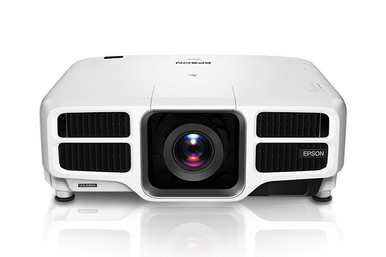
Use this AV PL-L1300UNL Setup Guide and Buying Considerations resource to solve the difficult part of projector procurement: matching the projector, lens, room geometry, and installation plan before approving an order. The Epson Power Lite Pro L1300UNL is identified as a WUXGA 3LCD projector. The supplied product choices also include wide-throw and short-throw Epson zoom lenses, but compatibility with the PL-L1300UNL must be verified before either lens is specified. This guide explains how to assess deployment fit, calculate placement needs, plan the supporting AV system, and compare the complete installed solution. It also covers procurement checks for churches, schools, and conference room teams without assuming unconfirmed capabilities.
Products at a Glance
- Option 1: Epson Power Lite Pro L1300UNL WUXGA 1080p 3LCD Projector
- For projects evaluating a wide-throw lens category af…: Epson V12H004W08 Wide Throw #3 Zoom Lens ELPLW08
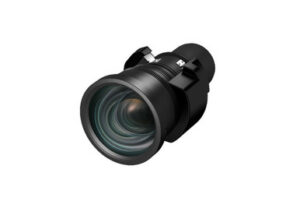
- For installations considering a shorter placement dis…: Epson V12H004U04 ELPLU04 Short-Throw Zoom Lens for Select Projectors
Quick Comparison Table
| Feature | Epson Power Lite Pro L1300UNL WUXGA 1080p 3LCD Projector | Epson V12H004W08 Wide Throw #3 Zoom Lens ELPLW08 | Epson V12H004U04 ELPLU04 Short-Throw Zoom Lens for Select Projectors |
|---|---|---|---|
| Brightness | 12,000 lumen | ||
| Resolution | WUXGA | ||
| Best For | Teams specifically sourcing the PL-L1300UNL and planning a WUXGA projector installation around verified room and lens requirements. | Projects evaluating a wide-throw lens category after confirming the exact projector pairing and completing room-specific throw calculations. | Installations considering a shorter placement distance, provided this exact lens is approved for the chosen projector and passes the image-size calculation. |
| Throw Type | Short throw | ||
| Recommended Buyer | Teams specifically sourcing the PL-L1300UNL and planning a WUXGA projector installation around verified room and lens requirements. | Projects evaluating a wide-throw lens category after confirming the exact projector pairing and completing room-specific throw calculations. | Installations considering a shorter placement distance, provided this exact lens is approved for the chosen projector and passes the image-size calculation. |
Product Images

Projector Options from AudioVideoNation
1. Epson Power Lite Pro L1300UNL WUXGA 1080p 3LCD Projector
Who should compare it: Teams specifically sourcing the PL-L1300UNL and planning a WUXGA projector installation around verified room and lens requirements.
Why it belongs here: It is the focal projector for this deployment guide, and its supplied product information identifies WUXGA resolution and 3LCD projection technology.
SKU: PL-L1300UNL
Key Features
- WUXGA resolution
- 3LCD projection technology
- 1080p designation in the product name
- Exact SKU: PL-L1300UNL
Things to Consider
Confirm required light output, package contents, lens compatibility, throw calculations, connections, control needs, audio routing, mounting requirements, and service access before approval.
2. Epson V12H004W08 Wide Throw #3 Zoom Lens ELPLW08
Who should compare it: Projects evaluating a wide-throw lens category after confirming the exact projector pairing and completing room-specific throw calculations.
Why it belongs here: It gives designers a named Epson wide-throw zoom lens to investigate when the planned mounting position is farther from the screen.
SKU: V12H004W08
Key Features
- Wide Throw #3 designation
- Zoom lens design
- ELPLW08 model designation
- Exact SKU: V12H004W08
Things to Consider
Do not infer PL-L1300UNL compatibility or usable placement from the product name. Confirm the approved projector list, lens mount, throw range, image-size limits, and package contents before selection.
3. Epson V12H004U04 ELPLU04 Short-Throw Zoom Lens for Select Projectors
Who should compare it: Installations considering a shorter placement distance, provided this exact lens is approved for the chosen projector and passes the image-size calculation.
Why it belongs here: It provides a clearly identified short-throw zoom lens candidate for rooms where available projector-to-screen depth shapes the design.
SKU: ELPLU04
Key Features
- Short-throw classification
- Zoom lens design
- ELPLU04 model designation
- Listed for select projectors
- Exact SKU: ELPLU04
Things to Consider
Compatibility with the PL-L1300UNL is not established by the supplied information. Verify the approved projector list, lens mount, throw data, image-size range, and physical placement before ordering.
Epson Power Lite Pro L1300UNL WUXGA 1080p 3LCD Projector vs Epson V12H004W08 Wide Throw #3 Zoom Lens ELPLW08: Main Differences
- Choose Epson Power Lite Pro L1300UNL WUXGA 1080p 3LCD Projector if Teams specifically sourcing the PL-L1300UNL and planning a WUXGA projector installation around verified room and lens requirements..
- Choose Epson V12H004W08 Wide Throw #3 Zoom Lens ELPLW08 if Projects evaluating a wide-throw lens category after confirming the exact projector pairing and completing room-specific throw calculations..
- Choose Epson V12H004U04 ELPLU04 Short-Throw Zoom Lens for Select Projectors if Installations considering a shorter placement distance, provided this exact lens is approved for the chosen projector and passes the image-size calculation..
Epson L1300UNL setup starts with deployment fit
Start with the room, content, and operating conditions. The PL-L1300UNL listing confirms WUXGA resolution and 3LCD projection technology. Use those facts as the baseline, then verify every other requirement against current product documentation before design approval.
Measure the screen or proposed image area. Record the viewing distance, room depth, mounting locations, ceiling height, and any physical obstructions. Observe the room under the lighting used during actual events or meetings. Your required light output should come from those conditions, the screen, and the intended image size rather than from the room label alone.
Content matters too. Document the resolutions and aspect ratios used by presentation computers, media systems, cameras, and signage sources. Confirm how each source will be presented on the WUXGA image area. Installation teams should also define acceptable text size at the farthest seat, operating hours, access for service, and who will control the system. These requirements turn a product search into a deployment plan.
PL-L1300UNL lens options: verify before specifying
Treat the projector and lens as separate design decisions until package contents and compatibility are confirmed. The Epson V12H004W08 is named as a Wide Throw #3 Zoom Lens ELPLW08. The Epson ELPLU04 is identified as a short-throw zoom lens for select projectors. Their names establish two different placement categories, but they do not establish that either lens works with the PL-L1300UNL.
Request an approved compatibility reference for the exact projector and lens SKU. Then obtain the throw-ratio range and supported image-size data for that pairing. Check the lens mount, available zoom range, focus limits, and any applicable image-position adjustments. A shared brand name is not enough evidence of fit.
Room geometry should drive the category you investigate. A short-throw design may be relevant where the available projector-to-screen depth is limited. A wide-throw design may suit a mounting point farther from the screen. Those are starting points, not completed calculations. Confirm that the chosen lens can produce the required image from the exact mounting position while leaving reasonable adjustment room for installation. If a lens substitution is proposed later, repeat the compatibility and geometry review.
Plan screen geometry and throw before mounting
Record the desired image width and height before locating the mount. Measure from the planned lens position to the screen plane, and account for structural beams, lighting, speakers, sprinklers, and other equipment along the projection path. A rough room-length estimate is not precise enough for installation approval.
Use the verified throw data for the exact projector-lens combination to calculate the permitted distance range. Check the proposed image size across the usable zoom range, then leave adjustment margin instead of designing against a hard limit. Confirm the vertical and horizontal relationship between the lens and screen as well. Any available position adjustment must be verified in the documentation rather than assumed.
Mark the proposed location during the site survey. Check sightlines from the front and back of the audience area, and look for shadows or blocked views. Approve the mount location only after the image geometry, lens choice, structure, service access, and cable route agree.
Signal, control, power, and audio requirements
Build a signal schedule for every source that will reach the projector. List each source resolution, output connection, cable distance, switching path, and control point. Confirm the projector's exact inputs and control interfaces before specifying adapters, extenders, switchers, or automation. This prevents a correct projector and lens choice from being undermined by an incomplete signal path.
Plan power and ventilation from the current installation instructions. The mounting location needs safe access for installation and later service. Keep the cable path clear of moving hardware and avoid positions that force technicians to disturb the screen alignment during routine work.
Handle audio as a separate system requirement until the complete room design is confirmed. Decide whether sound will come from a dedicated room system, conferencing equipment, or another source. Document where audio is extracted, switched, amplified, and controlled. Churches may need coordination with an existing sound system, while classrooms and conference rooms may depend on a simpler operator workflow. Verify each connection instead of assuming the projector will fill an unspecified audio role.
Projector deployment guide for churches, schools, and meeting rooms
A church projector installation should begin with sightlines, service lighting, presentation content, and operator workflow. Check the image from rear and side seating positions. List every source used during a service, then confirm that volunteers or staff can select and present those sources through the planned control system. Mount placement should also respect stage activity and the projection path.
For a school projector setup, document the teacher's source devices, room-control method, security needs, and maintenance access. Test instructional material at the farthest student position. If the projector will be shared across different teaching workflows, define how users change sources and recover from a disconnected device without altering installation settings.
Conference room projector planning should map the normal meeting sequence from connection through shutdown. Identify the room computer, guest devices, conferencing system, switcher, and control interface. Verify that the intended cable and signal path supports the room layout.
Commissioning criteria should be written before installation. Include image alignment, focus across the intended image, readability from the farthest planned seat, successful video from every approved source, control operation, and an operator handoff. A written acceptance list gives the installer and owner the same finish line.
Stock and availability planning
Treat stock and availability as a procurement checkpoint. Open each linked AudioVideoNation product page for live commerce details immediately before quoting or ordering. Match the purchase order to the exact product name and SKU, and confirm package contents, fulfillment timing, and any required lens separately.
Keep design approval tied to the validated projector-lens pairing. An available substitute is not automatically equivalent, even when its name sounds similar. A different lens can change throw calculations, mounting position, and image size. If procurement proposes a substitution, return it to the installer or designer for compatibility and geometry review before purchase. This short review can prevent a costly change at the installation site.
Projector price-to-performance: compare the installed system
Use the linked product pages for current commerce details, then compare the cost of the complete installed solution. Include the projector, verified lens, mount, signal transport, switching, control, cabling, installation labor, commissioning, and any separate audio equipment. Comparing the projector alone can hide the parts that make the room usable.
Give compatibility and throw geometry pass-or-fail status. A lower-cost lens has no practical value if it cannot create the required image from the available location. Then compare confirmed requirements such as resolution, placement, source support, room operation, and service access. WUXGA resolution and 3LCD technology are established points for the PL-L1300UNL. Verify the other criteria before scoring them.
Account for project risk as well. An unconfirmed lens pairing, unresolved cable path, or undefined control workflow can create redesign work. The stronger price-to-performance choice is the complete configuration that satisfies every required condition with clear documentation and few unresolved dependencies.
Pre-purchase approval checklist
Approve the order only after the room measurements, image size, mounting position, and lens-to-screen distance are recorded. Confirm the exact PL-L1300UNL SKU, package contents, compatible lens SKU, throw calculations, source connections, control plan, power requirements, audio path, structure, and service access.
Assign responsibility for installation, alignment, system programming, testing, and user training. Save the compatibility reference and design calculations with the project record. Finally, revisit each linked product page for live commerce details. If the projector, lens, or room plan changes, rerun the affected checks before releasing the purchase order.
Related AudioVideoNation Links
- Browse Projector at AudioVideoNation
- Epson Power Lite Pro L1300UNL WUXGA 1080p 3LCD Projector
- Epson ELPLW08 Wide Throw #3 Zoom Lens
- Epson ELPLU04 Short-Throw Zoom Lens
Product Information Sources
- Epson Power Lite Pro L1300UNL WUXGA 1080p 3LCD Projector product information
- Epson V12H004W08 Wide Throw #3 Zoom Lens ELPLW08 product information
- Epson V12H004U04 ELPLU04 Short-Throw Zoom Lens for Select Projectors product information
FAQ
What resolution is the Epson PL-L1300UNL?
The Epson PL-L1300UNL is identified as a WUXGA projector. Its product name also identifies 3LCD projection technology and includes a 1080p designation.
Does the Epson PL-L1300UNL include a lens?
Lens inclusion must be confirmed on the linked PL-L1300UNL product page before ordering. Match the confirmed package contents to the approved lens and installation plan.
Which listed lens works with the Epson PL-L1300UNL?
No lens in this guide should be treated as confirmed for the PL-L1300UNL until an approved compatibility reference verifies the exact pairing. Check the lens mount, projector list, throw range, and required image size before selection.
Is the Epson ELPLU04 a short-throw lens?
Yes, the Epson ELPLU04 is identified as a short-throw zoom lens for select projectors. That classification does not confirm compatibility with the PL-L1300UNL, so verify the exact pairing.
Is the PL-L1300UNL suitable for a church, school, or conference room?
The PL-L1300UNL's suitability depends on verified room conditions, image size, lens compatibility, source connections, and operating needs. Its WUXGA resolution and 3LCD technology are confirmed, but the complete design must be checked against the actual space.
How should buyers compare PL-L1300UNL price-to-performance?
Compare the complete installed configuration rather than the projector by itself. Use live product-page details and include the compatible lens, mount, signal path, controls, labor, commissioning, and any separate audio requirements.
Conclusion
Use this AV PL-L1300UNL Setup Guide and Buying Considerations comparison to match documented specifications to the room and installation requirements. Review the linked product pages for current purchase details before ordering.
Products Used
| SKU | Product Name | URL |
|---|---|---|
| PL-L1300UNL | Epson Power Lite Pro L1300UNL WUXGA 1080p 3LCD Projector | View product |
| V12H004W08 | Epson V12H004W08 Wide Throw #3 Zoom Lens ELPLW08 | View product |
| ELPLU04 | Epson V12H004U04 ELPLU04 Short-Throw Zoom Lens for Select Projectors | View product |