

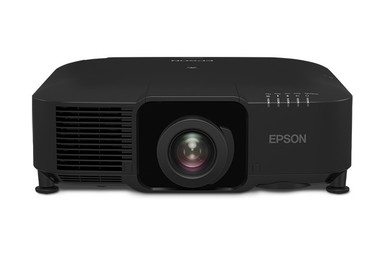
An Epson L1075UNL Setup Guide and Buying Considerations brief has to solve two problems: decide whether the WUXGA projector suits the room, then build a lens and installation plan that can be verified before purchase. The Epson Pro L1075UNL WUXGA 3LCD Laser Projector is the central product here. Three Epson zoom lenses are also available for evaluation, but the supplied data does not confirm that any specific lens works with the L1075UNL.
This guide turns that limited product information into a practical buying process for installers, churches, schools, and conference room teams. You’ll learn how to assess deployment fit, measure for projector lens selection, compare system-level value, and commission the finished installation. It also explains when the Epson PowerLite 875E ultra-short-throw display may deserve separate consideration. The goal is simple: reach the ordering stage with fewer unanswered questions and a documented design that installers can check.
Products at a Glance
- Option 1: Epson Pro L1075UNL WUXGA 3LCD Laser Projector
- For installers evaluating a wide-throw lens approach…: Epson V12H004W08 Wide Throw #3 Zoom Lens ELPLW08
- For buyers assessing lens choices for select Epson pr…: Epson V12H004W05 ELPLW05 Wide-Throw Zoom Lens for Select Projectors
- For installers exploring a short-throw layout for a s…: Epson V12H004U04 ELPLU04 Short-Throw Zoom Lens for Select Projectors
- For teams comparing the L1075UNL plan with an ultra-s…: Epson PowerLite 875E 5 Ultra Short Throw Display with 4K Enhancement (V11HC04120)
Quick Comparison Table
| Feature | Epson Pro L1075UNL WUXGA 3LCD Laser Projector | Epson V12H004W08 Wide Throw #3 Zoom Lens ELPLW08 | Epson V12H004W05 ELPLW05 Wide-Throw Zoom Lens for Select Projectors | Epson V12H004U04 ELPLU04 Short-Throw Zoom Lens for Select Projectors | Epson PowerLite 875E 5 Ultra Short Throw Display with 4K Enhancement (V11HC04120) |
|---|---|---|---|---|---|
| Brightness | 12,000 lumen | ||||
| Resolution | WUXGA | 4K | |||
| Best For | Teams specifying the L1075UNL for a measured, professionally planned WUXGA projection system. | Installers evaluating a wide-throw lens approach after measuring the screen and proposed projector position. | Buyers assessing lens choices for select Epson projectors and documenting alternative room layouts. | Installers exploring a short-throw layout for a select Epson projector after completing a room survey. | Teams comparing the L1075UNL plan with an ultra-short-throw Epson display architecture. |
| Throw Type | Short throw | Short throw | Ultra short throw | ||
| Recommended Buyer | Teams specifying the L1075UNL for a measured, professionally planned WUXGA projection system. | Installers evaluating a wide-throw lens approach after measuring the screen and proposed projector position. | Buyers assessing lens choices for select Epson projectors and documenting alternative room layouts. | Installers exploring a short-throw layout for a select Epson projector after completing a room survey. | Teams comparing the L1075UNL plan with an ultra-short-throw Epson display architecture. |
Product Images


Projector Options from AudioVideoNation
1. Epson Pro L1075UNL WUXGA 3LCD Laser Projector
Who should compare it: Teams specifying the L1075UNL for a measured, professionally planned WUXGA projection system.
Why it belongs here: This is the projector at the center of the installation plan. Its confirmed WUXGA resolution gives buyers a starting point for source, content, and image planning.
SKU: L1075UNL
Key Features
- WUXGA resolution
- L1075UNL SKU
- Epson Pro projector identity
Things to Consider
Confirm brightness, compatible lenses, throw geometry, inputs, mounting requirements, and installation clearances before approving the system.
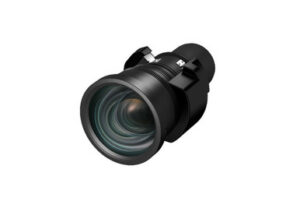
2. Epson V12H004W08 Wide Throw #3 Zoom Lens ELPLW08
Who should compare it: Installers evaluating a wide-throw lens approach after measuring the screen and proposed projector position.
Why it belongs here: This Epson zoom lens is a useful candidate for designs considering a wide-throw placement. Its exact part number makes compatibility and geometry checks easier to document.
SKU: V12H004W08
Key Features
- Epson projector lens accessory
- Wide Throw #3 label in the product name
- Zoom lens format
- V12H004W08 SKU
Things to Consider
Compatibility with the L1075UNL is not confirmed by the supplied data. Verify the approved projector list and throw calculations before purchase.
3. Epson V12H004W05 ELPLW05 Wide-Throw Zoom Lens for Select Projectors
Who should compare it: Buyers assessing lens choices for select Epson projectors and documenting alternative room layouts.
Why it belongs here: The ELPLW05 gives designers another Epson zoom lens to investigate while comparing possible projector positions.
SKU: V12H004W05
Key Features
- Epson lens for select projectors
- Wide-Throw label in the product name
- Zoom lens format
- V12H004W05 SKU
Things to Consider
Confirm the actual throw classification, calculated image range, and exact L1075UNL compatibility in current Epson documentation.
4. Epson V12H004U04 ELPLU04 Short-Throw Zoom Lens for Select Projectors
Who should compare it: Installers exploring a short-throw layout for a select Epson projector after completing a room survey.
Why it belongs here: This short-throw zoom lens supports evaluation of a closer projector position where the measured room geometry calls for one.
SKU: ELPLU04
Key Features
- Short-throw classification
- Zoom lens format
- Intended for select projectors
- ELPLU04 SKU
Things to Consider
The supplied data does not confirm an L1075UNL pairing. Check compatibility, throw range, positioning limits, and mounting space before specifying it.
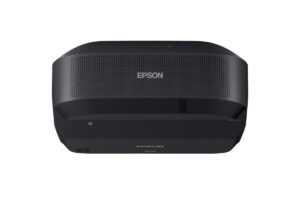
5. Epson PowerLite 875E 5 Ultra Short Throw Display with 4K Enhancement (V11HC04120)
Who should compare it: Teams comparing the L1075UNL plan with an ultra-short-throw Epson display architecture.
Why it belongs here: The PowerLite 875E offers a separate ultra-short-throw approach for buyers whose room geometry may favor placement close to the display surface.
SKU: PL-875E
Key Features
- Ultra short throw classification
- 4K resolution classification in the provided product facts
- 4K Enhancement stated in the product name
- PL-875E SKU
Things to Consider
Evaluate it as a separate display option, not as an L1075UNL accessory. Recheck image requirements, placement, sources, and the full system design.
Epson Pro L1075UNL WUXGA 3LCD Laser Projector vs Epson V12H004W08 Wide Throw #3 Zoom Lens ELPLW08: Main Differences
- Choose Epson Pro L1075UNL WUXGA 3LCD Laser Projector if Teams specifying the L1075UNL for a measured, professionally planned WUXGA projection system..
- Choose Epson V12H004W08 Wide Throw #3 Zoom Lens ELPLW08 if Installers evaluating a wide-throw lens approach after measuring the screen and proposed projector position..
- Choose Epson V12H004W05 ELPLW05 Wide-Throw Zoom Lens for Select Projectors if Buyers assessing lens choices for select Epson projectors and documenting alternative room layouts..
- Choose Epson V12H004U04 ELPLU04 Short-Throw Zoom Lens for Select Projectors if Installers exploring a short-throw layout for a select Epson projector after completing a room survey..
- Choose Epson PowerLite 875E 5 Ultra Short Throw Display with 4K Enhancement (V11HC04120) if Teams comparing the L1075UNL plan with an ultra-short-throw Epson display architecture..
What the Epson L1075UNL specifications establish
The strongest confirmed technical fact for the L1075UNL is its WUXGA resolution. That gives the design team a clear starting point for reviewing presentation layouts, source output, and the content that will appear on screen. It does not establish image size, ambient-light capability, or installation distance. Those decisions require additional product documentation and room measurements.
Keep SKU L1075UNL on every quote, drawing, and approval document. Similar product names can create costly ordering errors once lenses, mounts, and installation labor enter the project. Confirm the exact model again before releasing a purchase order.
Next, verify the specifications that control the physical design: rated brightness, supported lenses, throw-ratio ranges, available image-positioning adjustments, mounting orientations, electrical requirements, accepted input formats, and installation clearances. Use current Epson documentation and the linked AudioVideoNation product page for that check. Do not let the WUXGA label stand in for the rest of the system design.
Source planning matters too. List every computer, media player, conferencing endpoint, switcher, and control connection expected in the room. The proposed signal path should deliver a format the projector accepts across the installed cable distance. Confirm that requirement before walls close or ceiling access becomes difficult.
WUXGA projector deployment fit by room type
Start with the room, not the equipment list. Record the usable screen area, viewing distances, ceiling restrictions, ambient-light conditions, mounting locations, and any obstructions between the projector and screen. A measured drawing gives the installer something concrete to test against an approved lens calculation.
Church teams should map audience sightlines, platform lighting, camera positions, and hanging fixtures. The projector position and image path must avoid those conflicts. If services use presentations, video, and live camera feeds, document each source and its expected format before selecting the rest of the signal chain.
Schools need a repeatable setup that instructors can operate. Identify the teaching sources, control location, access restrictions, and maintenance path. Check whether the planned image remains usable under the room’s real lighting policy rather than evaluating it only with lights off. The supplied L1075UNL data does not include a brightness value, so a qualified designer should match the room requirement against Epson’s current rated specification.
Conference room teams should review laptop connections, conferencing hardware, content layouts, and the smallest text viewers must read. WUXGA is the confirmed resolution category, but resolution alone cannot guarantee legibility. Screen dimensions and the farthest seat still govern the result.
Write the acceptance conditions before ordering. Include target image dimensions, approved sources, normal lighting conditions, visible image boundaries, focus expectations, and control behavior. These requirements make deployment fit testable instead of subjective.
Projector lens selection for the L1075UNL
Three supplied Epson lens records belong in the planning conversation. V12H004W08 is named as the Wide Throw #3 Zoom Lens ELPLW08. V12H004W05 carries the ELPLW05 Wide-Throw Zoom Lens name. ELPLU04 is identified as a short-throw zoom lens for select projectors. These labels point toward different placement approaches, but they do not confirm compatibility with the Epson L1075UNL.
Treat each lens as a candidate until Epson’s current compatibility documentation approves the exact pairing. Then calculate throw distance from the required image dimensions. Check that the intended projector position falls inside the approved range with installation tolerance left for field adjustment. A calculation that lands on the edge of a lens range gives the installer little room to handle measurement or mounting variation.
Placement affects the whole room. A longer projection path may encounter hanging lights, beams, people, or architectural features. A short-throw position can reduce that path, yet it may create mounting and access constraints near the screen. Measure both approaches instead of choosing from the lens label alone.
The lens review should also confirm any available zoom range, image-positioning adjustment, focus coverage, permitted orientation, and mounting implications. Record the approved lens SKU beside L1075UNL on the final equipment schedule. If a distributor quote substitutes another lens, pause the order and rerun the geometry. Similar names are not proof of equal fit.
Epson L1075UNL setup and commissioning workflow
Begin with a site survey. Photograph the proposed screen wall and mounting area, then record exact dimensions, structural conditions, cable routes, power locations, light sources, and service access. Mark potential obstructions on a scaled drawing. This work should happen before the projector and lens are ordered.
Freeze the image target next. Document the usable width and height, content format, normal room lighting, and critical sightlines. Use those values with Epson-approved planning information to select a compatible lens and projector position. Have the installer verify the calculation independently before approving the equipment list.
Coordinate the supporting system at the same time. Confirm mount selection, structural attachment, electrical work, signal transport, source switching, control, and cable pathways. Qualified trades should approve structural and electrical details. Follow the current Epson installation instructions for orientation, clearances, and handling rather than carrying assumptions from an older projector.
During installation, establish the mount position and physical alignment carefully. Center and square the optical path as closely as the approved design permits. If the confirmed configuration offers image-positioning or correction controls, use them only within the documented limits. Physical alignment should carry as much of the setup as possible.
Commission the complete room, not one test image. Test every approved source, switching path, control command, and operating mode under the normal lighting plan. Inspect the image boundaries, focus across the screen, content framing, and readability from key seats. Power-cycle the full system and repeat core tests. Finally, save the approved settings, record the projector and lens SKUs, and give the operating team a short recovery procedure for common source or control problems.
Price-to-performance and stock availability checks
Judge price-to-performance across the installed system. Build a worksheet that covers the Epson L1075UNL, an approved lens, mounting hardware, signal transport, switching or control equipment, cabling, installation labor, commissioning, and any room work required by the chosen position. This exposes design differences that a projector-only comparison can hide.
Separate requirements from preferences. WUXGA resolution and the exact L1075UNL identity are established here. Brightness, image size, lens pairing, throw distance, connectivity, and mounting details still need verification. Spending against an unverified assumption can erase any apparent equipment savings.
Compare the lens candidates only after room geometry is fixed. A lens that cannot produce the required image from the approved position has no practical value for that deployment. The same rule applies to the PowerLite 875E. Its ultra-short-throw layout may suit a different room plan, but it should be evaluated as a separate display approach rather than an accessory substitution.
For price, stock, and availability, use the linked AudioVideoNation product pages when the equipment list is ready. Confirm current commerce details, lead times, and the exact SKUs before scheduling installation labor. Availability should be checked for the complete approved package, including the lens, so one unresolved component does not hold the project.
Final AV installation planning checklist
Create one approval record before ordering. It should identify Epson L1075UNL by name and SKU, state the WUXGA resolution requirement, show the target image dimensions, and include a scaled room drawing. Add the measured projector position and the approved lens part number after compatibility and throw calculations are complete.
The same record should capture normal ambient-light conditions, source devices, signal paths, control needs, mount details, electrical coordination, cable routes, and service access. Attach the current manufacturer documents used for the design. That gives installers and reviewers a shared reference if a product or placement change is proposed.
Set a purchase gate. No order should pass it until the projector-lens pairing, throw calculation, installation orientation, structural plan, electrical plan, and source compatibility have named owners and written approval. Check the live product pages for current buying details at that point.
Finish with a commissioning sheet tied to the original requirements. Test the planned image size, every approved source, room controls, framing, focus, and readability under normal operating light. Record the final settings and exact installed SKUs. A signed result closes the gap between buying the right product and delivering a room that works as designed.
Related AudioVideoNation Links
- Browse Projector at AudioVideoNation
- Epson Pro L1075UNL WUXGA projector
- Epson ELPLW08 wide-throw zoom lens
- Epson ELPLW05 wide-throw zoom lens
- Epson ELPLU04 short-throw zoom lens
Product Information Sources
- Epson Pro L1075UNL WUXGA 3LCD Laser Projector product information
- Epson V12H004W08 Wide Throw #3 Zoom Lens ELPLW08 product information
- Epson V12H004W05 ELPLW05 Wide-Throw Zoom Lens for Select Projectors product information
- Epson V12H004U04 ELPLU04 Short-Throw Zoom Lens for Select Projectors product information
- Epson PowerLite 875E 5 Ultra Short Throw Display with 4K Enhancement (V11HC04120) product information
FAQ
What resolution does the Epson L1075UNL support?
The Epson L1075UNL is identified as a WUXGA projector in the provided product facts. Confirm accepted input formats and source settings in current Epson documentation before finalizing the signal chain.
Does the Epson L1075UNL include a lens?
The provided product data does not confirm whether the Epson L1075UNL includes a lens. Check the linked product page and exact order configuration, then place the approved projector and lens SKUs on the purchase order.
Which listed lens is compatible with the Epson L1075UNL?
No listed lens can be confirmed as compatible with the L1075UNL from the provided data alone. V12H004W08, V12H004W05, and ELPLU04 are planning candidates, but each pairing needs current Epson approval and a room-specific throw calculation.
When should an installer consider a short-throw lens?
An installer should consider a short-throw lens when measured room geometry requires a closer projector position and Epson confirms compatibility. Check screen dimensions, obstructions, mounting access, and the full adjustment range before choosing ELPLU04 or another lens.
Is the Epson PowerLite 875E an accessory for the L1075UNL?
The Epson PowerLite 875E is a separate ultra-short-throw display option, not a lens or accessory for the L1075UNL. Compare it as a different room design with its own placement, source, mounting, and commissioning requirements.
Where should buyers check current price and availability?
Buyers should use each linked AudioVideoNation product page for current price and availability details. Confirm the exact projector and lens SKUs before scheduling installation or approving the final order.
Conclusion
Use this Epson L1075UNL Setup Guide and Buying Considerations comparison to match documented specifications to the room and installation requirements. Review the linked product pages for current purchase details before ordering.
Products Used
| SKU | Product Name | URL |
|---|---|---|
| L1075UNL | Epson Pro L1075UNL WUXGA 3LCD Laser Projector | View product |
| V12H004W08 | Epson V12H004W08 Wide Throw #3 Zoom Lens ELPLW08 | View product |
| V12H004W05 | Epson V12H004W05 ELPLW05 Wide-Throw Zoom Lens for Select Projectors | View product |
| ELPLU04 | Epson V12H004U04 ELPLU04 Short-Throw Zoom Lens for Select Projectors | View product |
| PL-875E | Epson PowerLite 875E 5 Ultra Short Throw Display with 4K Enhancement (V11HC04120) | View product |