

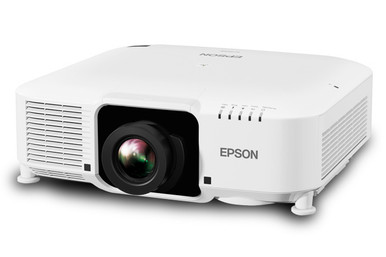
The Epson L1060W Setup Guide and Buying Considerations addresses a common planning gap: a projector can look right by headline specifications, yet the installation can still fail if the lens, image size, mount position, cabling, or package contents are not settled before purchase. The supplied data identifies two projector listings, the L1060W and L1060WNL, at 6,000 lumens, WXGA resolution, and 3LCD. It also includes wide-throw and short-throw Epson zoom lenses that may be relevant, but compatibility with either projector is not confirmed here. That distinction matters.
This guide turns the available facts into a buying and setup workflow for AV buyers, installers, churches, schools, and conference room teams. You’ll learn what the 6,000-lumen and WXGA labels establish, what they leave unanswered, how to survey the room, how to compare the two SKUs without guessing, and where lens verification belongs. Use the linked product pages for current commerce details, then confirm technical fit against approved documentation before committing to the installation.
Products at a Glance
- Option 1: Epson Pro L1060W WXGA 1080p 3LCD Projector 6000 Lumens White
- For teams comparing the L1060W and L1060WNL catalog l…: Epson Pro L1060WNL WXGA 1080p 3LCD Projector 6000 Lumens White
- For teams evaluating a wide-throw lens path and prepa…: Epson V12H004W08 Wide Throw #3 Zoom Lens ELPLW08
- For rooms requiring a short-throw layout after an app…: Epson V12H004U04 ELPLU04 Short-Throw Zoom Lens for Select Projectors
Quick Comparison Table
| Feature | Epson Pro L1060W WXGA 1080p 3LCD Projector 6000 Lumens White | Epson Pro L1060WNL WXGA 1080p 3LCD Projector 6000 Lumens White | Epson V12H004W08 Wide Throw #3 Zoom Lens ELPLW08 | Epson V12H004U04 ELPLU04 Short-Throw Zoom Lens for Select Projectors |
|---|---|---|---|---|
| Brightness | 6000 Lumens | 6000 Lumens | 12,000 lumen | |
| Resolution | WXGA | WXGA | ||
| Best For | Buyers planning around the L1060W SKU who will verify the required lens, package contents, connections, and installation details before purchase. | Teams comparing the L1060W and L1060WNL catalog listings and documenting the contents of each proposed package before ordering. | Teams evaluating a wide-throw lens path and prepared to verify compatibility and calculate placement from approved throw documentation. | Rooms requiring a short-throw layout after an approved compatibility list confirms this exact lens for the selected projector. |
| Throw Type | Short throw | |||
| Recommended Buyer | Buyers planning around the L1060W SKU who will verify the required lens, package contents, connections, and installation details before purchase. | Teams comparing the L1060W and L1060WNL catalog listings and documenting the contents of each proposed package before ordering. | Teams evaluating a wide-throw lens path and prepared to verify compatibility and calculate placement from approved throw documentation. | Rooms requiring a short-throw layout after an approved compatibility list confirms this exact lens for the selected projector. |
Product Images

Projector Options from AudioVideoNation
1. Epson Pro L1060W WXGA 1080p 3LCD Projector 6000 Lumens White
Who should compare it: Buyers planning around the L1060W SKU who will verify the required lens, package contents, connections, and installation details before purchase.
Why it belongs here: It is the exact L1060W listing at the center of this guide, with supplied facts for 6,000-lumen brightness, WXGA resolution, 3LCD imaging, and a white finish.
SKU: L1060W
Key Features
- 6,000-lumen brightness
- WXGA resolution
- 3LCD projector
- White finish
Things to Consider
The supplied data does not specify a compatible lens, throw range, inputs, dimensions, weight, mount, audio, or control options. Confirm each project requirement through the linked product page and approved documentation.
2. Epson Pro L1060WNL WXGA 1080p 3LCD Projector 6000 Lumens White
Who should compare it: Teams comparing the L1060W and L1060WNL catalog listings and documenting the contents of each proposed package before ordering.
Why it belongs here: It provides a second 6,000-lumen WXGA 3LCD listing with a distinct SKU, making it relevant for buyers comparing exact package and ordering details.
SKU: L1060WNL
Key Features
- 6,000-lumen brightness
- WXGA resolution
- 3LCD projector
- Distinct L1060WNL SKU
Things to Consider
The supplied data does not explain the L1060WNL suffix or confirm its included lens and accessories. Compare package contents directly and do not infer a difference from the SKU alone.
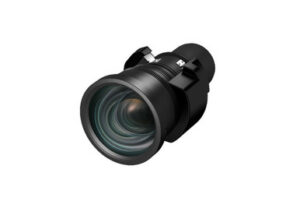
3. Epson V12H004W08 Wide Throw #3 Zoom Lens ELPLW08
Who should compare it: Teams evaluating a wide-throw lens path and prepared to verify compatibility and calculate placement from approved throw documentation.
Why it belongs here: It gives installers a wide-throw zoom lens option to investigate when the room design calls for a wide-throw layout, but the supplied data does not confirm L1060W compatibility.
SKU: V12H004W08
Key Features
- Identified as a wide-throw zoom lens
- ELPLW08 lens designation
- V12H004W08 SKU
- Listed in lens, projector, and accessory categories
Things to Consider
Do not order this lens for the L1060W or L1060WNL until the exact pairing, throw range, image-size limits, and mechanical fit have been confirmed.
4. Epson V12H004U04 ELPLU04 Short-Throw Zoom Lens for Select Projectors
Who should compare it: Rooms requiring a short-throw layout after an approved compatibility list confirms this exact lens for the selected projector.
Why it belongs here: It gives installers a short-throw zoom lens option to research for constrained placement, though compatibility with the L1060W and L1060WNL is not established by the supplied data.
SKU: ELPLU04
Key Features
- Short-throw lens classification
- Zoom lens design
- ELPLU04 lens designation
- Identified for select projectors
Things to Consider
Confirm compatibility and throw calculations before purchase. Use the linked page and exact supplied SKU ELPLU04 when ordering because the display name also contains V12H004U04.
Epson Pro L1060W WXGA 1080p 3LCD Projector 6000 Lumens White vs Epson Pro L1060WNL WXGA 1080p 3LCD Projector 6000 Lumens White: Main Differences
- Choose Epson Pro L1060W WXGA 1080p 3LCD Projector 6000 Lumens White if Buyers planning around the L1060W SKU who will verify the required lens, package contents, connections, and installation details before purchase..
- Choose Epson Pro L1060WNL WXGA 1080p 3LCD Projector 6000 Lumens White if Teams comparing the L1060W and L1060WNL catalog listings and documenting the contents of each proposed package before ordering..
- Choose Epson V12H004W08 Wide Throw #3 Zoom Lens ELPLW08 if Teams evaluating a wide-throw lens path and prepared to verify compatibility and calculate placement from approved throw documentation..
- Choose Epson V12H004U04 ELPLU04 Short-Throw Zoom Lens for Select Projectors if Rooms requiring a short-throw layout after an approved compatibility list confirms this exact lens for the selected projector..
Deployment fit for a 6,000-lumen WXGA projector
Both projector listings are specified at 6,000 lumens with WXGA resolution and 3LCD. Those facts give a design team a useful starting point, but they do not determine the final image by themselves. Brightness is one input. Screen dimensions and surface, ambient light, mounting distance, and the content being shown also affect the result.
Start with the room’s actual use. A church may need lyrics and presentation slides to remain readable from the rear seats. A school may alternate between video and small instructional text. A conference room team may care most about spreadsheets, diagrams, and remote meeting content. Test representative material at the intended image size rather than treating the lumen figure as a guarantee. If the room has windows or strong house lighting, document the light conditions that will exist during normal use.
WXGA is the supplied resolution for both projectors. Compare it with the intended sources and the amount of detail viewers must read. The available data does not define accepted signal formats, scaling behavior, or connection options, so verify those items before approving a source standard. Brightness and resolution also do not answer the lens question. Placement remains dependent on an approved lens and its documented throw range.
Epson L1060W setup starts with a room survey
Begin at the screen, not the projector. Record the intended image width and height, the screen location, and any existing frame or masking that limits the usable area. Mark the physical zone where a lens could sit without blocking sightlines or conflicting with lighting fixtures, ceiling structures, sprinklers, or other installed equipment. Measure from the planned lens position to the image surface. A measurement taken from the rear of a projector or from an unconfirmed mount point can shift the calculation.
Document the cable route, available power location, ceiling height, service access, and the path installers will use to lift and maintain the equipment. Identify every source, where switching occurs, and where the room’s audio and control systems live. The supplied product data does not list connectors, control interfaces, dimensions, weight, power requirements, or clearance rules. Make each one a verification gate instead of filling the gap with an assumption.
Before ordering or drilling, reconcile the exact projector SKU, approved lens, package contents, mounting hardware, and signal path. Once the equipment arrives, confirm the labels against the purchase record and test the intended source chain on a bench when practical. Permanent mounting should follow approved instructions and confirmed load limits. A product photo is not a mounting drawing, and a model-family reference is not a substitute for documentation tied to the exact SKU.
Projector lens selection and throw planning
Lens selection controls whether the planned image can be produced from the available mounting zone. The supplied products include the Epson V12H004W08 ELPLW08, identified as a wide-throw zoom lens, and the Epson V12H004U04 ELPLU04, identified as a short-throw zoom lens for select projectors. Neither listing confirms compatibility with the L1060W or L1060WNL. Treat them as options to investigate, not approved pairings.
Use the room survey to calculate the required throw ratio: divide lens-to-screen distance by image width, using the same unit for both measurements. If several mount positions are possible, calculate the range from the nearest to the farthest acceptable position. Compare that required range with official documentation for the exact projector-and-lens combination. No throw-ratio range is included in the supplied data, so a lens cannot be selected safely from its wide-throw or short-throw label alone.
Ask the seller or installer to confirm the supported-projector list, mechanical fit, throw-ratio range, allowable image sizes, and any placement or adjustment limits. Put the confirmed lens identifier on the quote and installation drawing. Do not assume that a lens approved for one related Epson projector is approved for another, or that the L1060W and L1060WNL accept identical lens packages. This check protects the project from discovering a placement conflict after the mount and cables are already installed.
Signal, power, mounting, and control checks
Draw the complete signal path before installation: source, switcher or presentation system, any extension equipment, wall plates, cabling, and projector. Confirm the required format and connection at every handoff against current product documentation. Cable distance and routing matter. If a long run needs signal extension, choose it from the measured path and required format rather than from a generic room label.
Plan sound separately. No audio specification is supplied for either projector, so the room design should not depend on assumed projector audio. Churches, classrooms, and meeting rooms may already have dedicated sound systems. Show that path on the same system drawing so video and audio routing remain coordinated.
For mounting, verify the projector’s documented weight and interface along with the weight of the confirmed lens and other attached parts. Check the mount rating, supporting structure, power location, ventilation clearances, and future service access. Control requirements deserve the same treatment. List the actions users need, such as power, source selection, and status monitoring, then verify that the chosen control method is supported. None of those interfaces is established by the supplied data.
L1060W vs L1060WNL: compare exact package details
The supplied facts show the L1060W and L1060WNL as 6,000-lumen, WXGA, 3LCD projectors in white. They have different SKUs, but the data does not explain what the suffix changes. Do not decode “NL” from convention or assume that either listing includes a particular lens or accessory.
Build a line-item comparison before choosing. Confirm the exact SKU, box contents, included lens if any, required accessories, documentation, and every part needed for mounting and connection. Ask for clarification when a listing does not settle one of those points. The answer should appear on the quote or purchase record, not remain an informal expectation.
This comparison also prevents substitutions from passing unnoticed. A proposal that says only “Epson L1060W” may not establish which catalog item will arrive. Record the full product name, SKU, selected lens, and linked page. If either package changes the number of separate components required, include that difference in the installation scope before evaluating value.
Price-to-performance, stock, and availability checks
Evaluate price-to-performance against the complete installed system. The comparison should include every lens, mount, signal extension component, cable, control part, and labor item required by the approved design. Some projects may already own part of that infrastructure. Others may need a full room build. Price without a defined scope is not a useful value measure.
Compare proposals against the same image size, mounting zone, room conditions, content needs, and operating requirements. A lower live product price can lose its advantage if the proposed package does not solve the verified throw requirement or requires unplanned supporting equipment. Conversely, do not pay for capabilities that have not been tied to a documented requirement. The available product facts support comparison of brightness, resolution, imaging technology, and product identity. Other capabilities need confirmation.
Stock and availability are live commerce details and can change. Check each linked AudioVideoNation product page for current information, then obtain a current quote or order confirmation for schedule-critical work. Record the quote date, exact SKU, package contents, confirmed lens, and expected timing. For a fixed opening, school term, service, or conference date, leave time for receiving, bench testing, installation, and correction of any ordering mismatch.
Commissioning and handoff for an Epson projector installation
Commissioning begins before the projector goes overhead. Confirm the received projector and lens identifiers against the purchase record, then connect the intended source chain and verify basic operation using approved instructions. This catches package, cabling, and source-format issues while the equipment remains accessible.
After mounting, use a suitable test pattern if one is available and work within the documented adjustment limits. Check image position, geometry, focus, edges, and readability with the room’s real content. Test every source, switching path, control action, and audio route included in the project. Repeat the viewing check under the lighting states users will encounter, including any window light that cannot be controlled.
Finish with a concise handoff record. Include the installed projector SKU, lens identifier, source-routing diagram, approved operating steps, and support contact. Train users on the controls they actually need. The final acceptance test should trace back to the original room requirements, not merely confirm that an image appears. That keeps the 6,000-lumen WXGA specification connected to a working deployment.
Related AudioVideoNation Links
- Browse Projector at AudioVideoNation
- Epson Pro L1060W projector product page
- Epson Pro L1060WNL projector product page
- Epson ELPLW08 wide-throw zoom lens
- Epson ELPLU04 short-throw zoom lens
Product Information Sources
- Epson Pro L1060W WXGA 1080p 3LCD Projector 6000 Lumens White product information
- Epson Pro L1060WNL WXGA 1080p 3LCD Projector 6000 Lumens White product information
- Epson V12H004W08 Wide Throw #3 Zoom Lens ELPLW08 product information
- Epson V12H004U04 ELPLU04 Short-Throw Zoom Lens for Select Projectors product information
FAQ
What brightness and resolution does the Epson L1060W have?
The supplied product data lists the Epson Pro L1060W at 6,000 lumens with WXGA resolution. It is also identified as a 3LCD projector, but final deployment fit still depends on the screen, room lighting, image size, and verified lens.
Is a projection lens included with the L1060W or L1060WNL?
The provided product data does not confirm that a lens is included with either projector. Verify the exact package contents on the linked product page or quote before ordering, and record the required lens separately if it is not included.
Can I use the ELPLW08 or ELPLU04 lens with the L1060W?
Compatibility between the L1060W and either the ELPLW08 or ELPLU04 is not confirmed by the supplied data. Check an approved compatibility list and verify the throw range, image-size limits, and mechanical fit before purchasing a lens.
How should I calculate placement for an Epson L1060W installation?
Measure the planned lens-to-screen distance and image width, then divide distance by width to find the required throw ratio. Compare that result with approved documentation for the exact projector-and-lens pairing before fixing the mount location.
What is the difference between the L1060W and L1060WNL?
The supplied data does not document the package difference between the L1060W and L1060WNL. Both listings identify 6,000-lumen WXGA 3LCD projectors, so buyers should compare exact contents and required accessories without inferring the meaning of the suffix.
How should buyers compare price-to-performance and availability?
Buyers should compare the complete installed system and check the linked product pages for live commerce details. Include every required lens, mount, cable, signal component, control part, and installation task so proposals are measured against the same deployment scope.
Conclusion
Use this Epson L1060W Setup Guide and Buying Considerations comparison to match documented specifications to the room and installation requirements. Review the linked product pages for current purchase details before ordering.
Products Used
| SKU | Product Name | URL |
|---|---|---|
| L1060W | Epson Pro L1060W WXGA 1080p 3LCD Projector 6000 Lumens White | View product |
| L1060WNL | Epson Pro L1060WNL WXGA 1080p 3LCD Projector 6000 Lumens White | View product |
| V12H004W08 | Epson V12H004W08 Wide Throw #3 Zoom Lens ELPLW08 | View product |
| ELPLU04 | Epson V12H004U04 ELPLU04 Short-Throw Zoom Lens for Select Projectors | View product |