

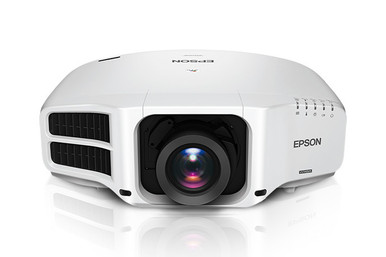
Use this AV PL-G7200WNL Setup Guide and Buying Considerations resource to plan the complete installation around the room, content, and optical path. The Epson PowerLite Pro G7200WNL is documented here with WXGA resolution. Two separate lens listings, the V12H004W05 ELPLW05 and ELPLU04, also warrant attention during system design. Lens compatibility, throw calculations, mounting geometry, signal handling, and current commerce details all need confirmation before an order becomes an installation schedule.
That discipline matters in churches, schools, and conference rooms. Each setting presents different content, sightlines, operating routines, and procurement constraints. This guide separates confirmed product facts from the questions your AV team should resolve, helping you assess deployment fit and total installed value without relying on unsupported assumptions.
Products at a Glance
- Option 1: Epson PowerLite Pro G7200WNL WXGA 720p 3LCD Projector
- For installations whose verified Epson compatibility…: Epson V12H004W05 ELPLW05 Wide-Throw Zoom Lens for Select Projectors
- For rooms with constrained projector placement where…: Epson V12H004U04 ELPLU04 Short-Throw Zoom Lens for Select Projectors
Quick Comparison Table
| Feature | Epson PowerLite Pro G7200WNL WXGA 720p 3LCD Projector | Epson V12H004W05 ELPLW05 Wide-Throw Zoom Lens for Select Projectors | Epson V12H004U04 ELPLU04 Short-Throw Zoom Lens for Select Projectors |
|---|---|---|---|
| Resolution | WXGA | ||
| Best For | Teams evaluating a WXGA projector for a measured, documented installation after confirming the room, optical, brightness, connectivity, and mounting requirements. | Installations whose verified Epson compatibility information and completed throw calculation specifically call for SKU V12H004W05. | Rooms with constrained projector placement where a validated throw calculation and current compatibility documentation call for this exact lens. |
| Throw Type | Short throw | Short throw | |
| Recommended Buyer | Teams evaluating a WXGA projector for a measured, documented installation after confirming the room, optical, brightness, connectivity, and mounting requirements. | Installations whose verified Epson compatibility information and completed throw calculation specifically call for SKU V12H004W05. | Rooms with constrained projector placement where a validated throw calculation and current compatibility documentation call for this exact lens. |
Product Images


Projector Options from AudioVideoNation
1. Epson PowerLite Pro G7200WNL WXGA 720p 3LCD Projector
Who should compare it: Teams evaluating a WXGA projector for a measured, documented installation after confirming the room, optical, brightness, connectivity, and mounting requirements.
Why it belongs here: This is the exact projector at the center of the buying and setup decision. Its supplied WXGA resolution gives teams a confirmed starting point for content and signal-path testing.
SKU: PL-G7200WNL
Key Features
- WXGA is the supplied resolution specification.
- SKU PL-G7200WNL provides an exact procurement reference.
- The listing is categorized under Multimedia Projectors, Projectors, and Video.
- Its dedicated product page is the source for current commerce details.
Things to Consider
Confirm brightness, lens requirements and compatibility, throw geometry, connections, mounting needs, environmental limits, and included components before approving the system. Do not assume either supplied lens is compatible from the brand name alone.
2. Epson V12H004W05 ELPLW05 Wide-Throw Zoom Lens for Select Projectors
Who should compare it: Installations whose verified Epson compatibility information and completed throw calculation specifically call for SKU V12H004W05.
Why it belongs here: This separate Epson lens listing gives designers a specific SKU to evaluate while resolving projector position and image geometry.
SKU: V12H004W05
Key Features
- Exact procurement SKU: V12H004W05.
- The product is listed as an Epson lens for select projectors.
- It appears in Lenses and Multimedia Projectors categories.
- A dedicated permalink supports SKU-level commerce checks.
Things to Consider
The provided data does not confirm PL-G7200WNL compatibility or the optical values needed for a throw calculation. Verify both before specifying this lens, and confirm what the quoted configuration includes.
3. Epson V12H004U04 ELPLU04 Short-Throw Zoom Lens for Select Projectors
Who should compare it: Rooms with constrained projector placement where a validated throw calculation and current compatibility documentation call for this exact lens.
Why it belongs here: The supplied facts identify ELPLU04 as a short-throw lens, making it relevant to designs that are considering a shorter projection path.
SKU: ELPLU04
Key Features
- The supplied throw-type fact identifies it as short throw.
- Exact procurement SKU: ELPLU04.
- The listing limits its application to select projectors.
- It is categorized under Lenses, Multimedia Projectors, Projectors, and Video.
Things to Consider
Short-throw identification does not prove that the lens fits the PL-G7200WNL or produces the required image from your proposed position. Confirm compatibility, throw data, image range, and installation limits before ordering.
Epson PowerLite Pro G7200WNL WXGA 720p 3LCD Projector vs Epson V12H004W05 ELPLW05 Wide-Throw Zoom Lens for Select Projectors: Main Differences
- Choose Epson PowerLite Pro G7200WNL WXGA 720p 3LCD Projector if Teams evaluating a WXGA projector for a measured, documented installation after confirming the room, optical, brightness, connectivity, and mounting requirements..
- Choose Epson V12H004W05 ELPLW05 Wide-Throw Zoom Lens for Select Projectors if Installations whose verified Epson compatibility information and completed throw calculation specifically call for SKU V12H004W05..
- Choose Epson V12H004U04 ELPLU04 Short-Throw Zoom Lens for Select Projectors if Rooms with constrained projector placement where a validated throw calculation and current compatibility documentation call for this exact lens..
Start the Epson G7200WNL setup with deployment fit
Define the viewing job before selecting hardware. A church may prioritize readable lyrics and presentation slides from varied seating positions. A school may alternate between instructional material, video, and detailed computer screens. A conference room team may need clear spreadsheets, diagrams, and remote-meeting content. Those examples do not prove that one projector fits every room. They define the material you should use during evaluation.
Record the intended image dimensions, longest viewing distance, ambient-light conditions, operating hours, and the content sources that will feed the system. The supplied product data confirms WXGA resolution for the PL-G7200WNL, but it does not establish brightness, optical range, input capabilities, or environmental limits. Confirm those points against the actual room and approved product documentation.
Also identify who will operate the system. A fixed installation used by rotating volunteers or teachers needs a clear startup process, labeled inputs, and repeatable settings. An installation managed by an AV technician can support a more involved control workflow. That operational fit belongs in the buying decision.
Plan a WXGA projector installation around real content
WXGA is the confirmed resolution detail for the Epson PowerLite Pro G7200WNL. Use it as the starting point for source and content testing, not as a complete prediction of image quality. Connect the computers, presentation systems, media sources, or switching equipment planned for the room and verify how their output appears through the full signal chain.
Test representative material. Small spreadsheet text, hymn lyrics, maps, diagrams, and presentation templates reveal different issues than a promotional video. Check legibility from the farthest expected seat and inspect how the system handles content whose layout differs from the projector's configured image area. If the organization has required source formats, confirm that every component between the source and projector supports them.
Do not infer brightness or room-light performance from the model name. Establish the needed light output from image size, screen conditions, ambient light, and viewing requirements, then verify the projector's documented value before approving the design.
Epson projector lens selection and room geometry
Lens selection starts with measured geometry. Record the proposed projector position, lens-to-screen distance, target image dimensions, ceiling height, structural mounting point, and any obstructions. Then use verified throw data to determine whether a candidate lens can produce the required image from that location.
The supplied products include the Epson V12H004W05 ELPLW05 Wide-Throw Zoom Lens for Select Projectors and the Epson V12H004U04 ELPLU04 Short-Throw Zoom Lens for Select Projectors. The provided facts identify the ELPLU04 as short throw. They do not establish that either lens works with the PL-G7200WNL. Shared branding and overlapping catalog categories are not compatibility evidence.
Confirm the exact projector-and-lens pairing in current Epson documentation or through AudioVideoNation before ordering. Verify the supported throw range, image-size range, mounting orientation, available physical adjustment, clearances, and any installation limits that affect the chosen position. For the V12H004W05, confirm its throw data directly rather than treating catalog naming as a completed optical calculation.
Leave room for service access. A mathematically valid position can still be impractical if ceiling elements block installation, adjustment, or future maintenance.
PL-G7200WNL pre-installation and commissioning workflow
A short design record prevents expensive guesswork later. Use this sequence before the projector reaches its final mounting point:
1. Survey the room. Measure the screen area, planned lens position, viewing distances, ceiling conditions, and obstructions. Record measurements instead of relying on plans alone.
2. Freeze the image target. Agree on the displayed image dimensions and placement with the room owner. A lens calculation has little value while the target keeps changing.
3. Validate the optical design. Confirm the exact lens SKU, PL-G7200WNL compatibility, and calculated throw range using approved documentation. Include adjustment and service clearances.
4. Check the signal path. Test the intended sources, switchers, extenders, cabling, and adapters together. Confirm the required formats and cable distances through documentation and an actual system test.
5. Resolve mounting and infrastructure. Verify structural support, power placement, cable routes, ventilation clearances, and access. If network or control integration is planned, confirm the projector's supported connections and commands first.
6. Bench-test the assembled system. Test the projector, selected lens, primary sources, switching, and control workflow before lifting equipment into place.
7. Commission with real content. Physically align the installation within its documented adjustment range, then inspect representative slides, text, video, and computer output from key seats. Save approved settings and document the final configuration.
Keep the measured geometry, selected SKUs, source settings, cable labels, and commissioning results with the room records. That information speeds troubleshooting and future changes.
Stock and availability checks before scheduling
Treat availability as an order-time verification, not a planning assumption. Use each linked AudioVideoNation product page for current commerce details, then obtain confirmation for the required quantity and delivery timing before booking installers, lifts, or room closures.
The PL-G7200WNL, V12H004W05, and ELPLU04 are separate product listings with separate identifiers. Make the approved equipment list equally specific. A quote should show the exact projector SKU, the exact lens SKU selected by the optical design, and every other required system component. Confirm what each quoted line includes rather than assuming the projector and lens are packaged together.
Build schedule margin around procurement and validation. Equipment arriving on site is not the first suitable moment to discover that a lens calculation, compatibility check, mount position, or source requirement was never approved. If timing is fixed, ask AudioVideoNation to reconfirm the complete configuration before dependent work begins.
Judge price-to-performance by total installed value
Assess price-to-performance across the installed system. Review current commerce details on the linked product pages, then add the lens, mount, cabling, signal distribution, control equipment, installation labor, access equipment, and commissioning effort required by the design. This produces a useful comparison without reducing the decision to one hardware line.
Fit drives value. The PL-G7200WNL's documented WXGA resolution should match the organization's content and viewing requirements. The selected lens must support the measured geometry and be confirmed for the exact projector. The signal path must carry the required source output. A configuration that misses any of those checks can create redesign work, schedule changes, or added components.
Compare candidate systems using the same scope. Include every item needed to produce the approved image and operating workflow. Also note which requirements remain unverified. A lower initial equipment total offers little advantage if the design depends on an assumed lens pairing or an untested signal path.
PL-G7200WNL buying decision checklist
Move forward with the PL-G7200WNL only after WXGA has been tested against representative content and the remaining room requirements have been verified. Select ELPLU04 only when short-throw geometry is needed and current documentation confirms both compatibility and calculated image placement. Select V12H004W05 only when its verified optical data and compatibility match the installation.
Before approval, the design file should contain the target image dimensions, measured projection distance, confirmed lens pairing, mounting location, brightness requirement and verified product value, source formats, cable plan, control needs, procurement confirmation, and complete installed-cost comparison. Stop the purchase if a critical field still rests on an assumption.
These three listings fill different roles in the planning process. The PL-G7200WNL is the projector under review, while the other products are lens candidates that require project-specific validation. Keeping those roles clear helps buyers avoid treating a catalog shortlist as a finished AV design.
Related AudioVideoNation Links
- Browse Projector at AudioVideoNation
- View the Epson PowerLite Pro G7200WNL projector
- Review the Epson V12H004W05 ELPLW05 lens
- Review the Epson ELPLU04 short-throw lens
Product Information Sources
- Epson PowerLite Pro G7200WNL WXGA 720p 3LCD Projector product information
- Epson V12H004W05 ELPLW05 Wide-Throw Zoom Lens for Select Projectors product information
- Epson V12H004U04 ELPLU04 Short-Throw Zoom Lens for Select Projectors product information
FAQ
Is the Epson PL-G7200WNL a WXGA projector?
Yes, the supplied product data identifies the Epson PL-G7200WNL as a WXGA projector. Test that resolution class with the organization's actual slides, text, video, and computer sources before approving the installation.
Which supplied lens is compatible with the PL-G7200WNL?
The provided data does not establish that either supplied lens is compatible with the PL-G7200WNL. Confirm the exact projector-and-lens pairing in current Epson documentation or with AudioVideoNation, then complete a throw calculation using measured room geometry.
Is the ELPLU04 a short-throw lens?
Yes, the supplied facts identify the ELPLU04 as a short-throw lens for select projectors. That classification does not replace compatibility confirmation or a project-specific calculation of distance and image size.
What brightness does the PL-G7200WNL provide?
The provided product data does not state a brightness value, so verify it before approving the projector for a room. Determine the deployment's requirement from image size, screen conditions, ambient light, and viewing needs, then compare it with current product documentation.
How should buyers check stock and availability?
Buyers should review the linked AudioVideoNation product page and obtain order-time confirmation for quantity and delivery timing. Reconfirm the complete projector, lens, and accessory configuration before scheduling installation work.
How should teams evaluate PL-G7200WNL price-to-performance?
Teams should compare the total installed system cost against confirmed image, room, signal, and operating requirements. Include the validated lens, mounting, cabling, signal equipment, control components, labor, and commissioning scope while using product pages for current commerce details.
Conclusion
Use this AV PL-G7200WNL Setup Guide and Buying Considerations comparison to match documented specifications to the room and installation requirements. Review the linked product pages for current purchase details before ordering.
Products Used
| SKU | Product Name | URL |
|---|---|---|
| PL-G7200WNL | Epson PowerLite Pro G7200WNL WXGA 720p 3LCD Projector | View product |
| V12H004W05 | Epson V12H004W05 ELPLW05 Wide-Throw Zoom Lens for Select Projectors | View product |
| ELPLU04 | Epson V12H004U04 ELPLU04 Short-Throw Zoom Lens for Select Projectors | View product |