

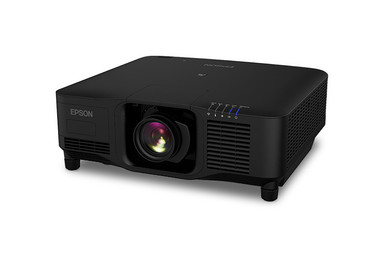
This Epson EB-PU2220B Setup Guide and Buying Considerations article starts with the buyer problem that matters most: the projector has to fit the room and the full AV system before it fits the purchase order. The supplied facts identify 4K resolution, while the catalog name positions the Epson EB-PU2220B for large-venue use. That is useful direction, but it does not settle lens selection, throw geometry, mounting, power, signal transport, control, or installation access.
Churches may need clear sightlines across a deep room. Schools may need a repeatable operating plan. Conference technology teams may care most about source switching, control, and support. Installers have to make all those requirements meet at one documented configuration. This guide turns that work into a practical sequence: define deployment fit, survey the site, verify the exact configuration, map the signal and control paths, check live price and availability, and commission the result. It also places four Epson alternatives beside the EB-PU2220B so you can spot when an ultra-short-throw 4K model or a 2200-lumen WXGA model matches the brief more closely. Use the linked product pages for current commerce details and confirm every project-critical specification before ordering.
Products at a Glance
- Option 1: Epson EB-PU2220B 20,000-Lumen 3LCD Large Venue Laser Projector with 4K Enhancement
- For rooms where an ultra-short-throw 4K approach matc…: Epson PowerLite 875E 5 Ultra Short Throw Display with 4K Enhancement (V11HC04120)
- For schools, meeting spaces, and AV teams comparing a…: Epson BrightLink 870Ei Ultra Short Throw Interactive Display with 4K Enhancement (V11HC03020)
- For procurement and installation teams comparing the…: Epson BrightLink 780Ei Ultra Short Throw Interactive Display with 4K Enhancement (V11HC10020)
- For projects whose measured room conditions, image si…: Epson LightScene EV-110 2200-Lumen WXGA Laser 3LCD Projector (V11HA22020)
Quick Comparison Table
| Feature | Epson EB-PU2220B 20,000-Lumen 3LCD Large Venue Laser Projector with 4K Enhancement | Epson PowerLite 875E 5 Ultra Short Throw Display with 4K Enhancement (V11HC04120) | Epson BrightLink 870Ei Ultra Short Throw Interactive Display with 4K Enhancement (V11HC03020) | Epson BrightLink 780Ei Ultra Short Throw Interactive Display with 4K Enhancement (V11HC10020) | Epson LightScene EV-110 2200-Lumen WXGA Laser 3LCD Projector (V11HA22020) |
|---|---|---|---|---|---|
| Brightness | 2200 lumens | ||||
| Resolution | 4K | 4K | 4K | 4K | WXGA |
| Best For | AV teams evaluating the EB-PU2220B for a planned large-venue installation with documented geometry, infrastructure, and operating requirements. | Rooms where an ultra-short-throw 4K approach matches the measured image geometry and installation plan. | Schools, meeting spaces, and AV teams comparing a BrightLink ultra-short-throw 4K deployment. | Procurement and installation teams comparing the BrightLink 780Ei and 870Ei as separate ultra-short-throw 4K options. | Projects whose measured room conditions, image size, and content needs are satisfied by 2200 lumens and WXGA. |
| Throw Type | Ultra short throw | Ultra short throw | Ultra short throw | ||
| Recommended Buyer | AV teams evaluating the EB-PU2220B for a planned large-venue installation with documented geometry, infrastructure, and operating requirements. | Rooms where an ultra-short-throw 4K approach matches the measured image geometry and installation plan. | Schools, meeting spaces, and AV teams comparing a BrightLink ultra-short-throw 4K deployment. | Procurement and installation teams comparing the BrightLink 780Ei and 870Ei as separate ultra-short-throw 4K options. | Projects whose measured room conditions, image size, and content needs are satisfied by 2200 lumens and WXGA. |
Product Images
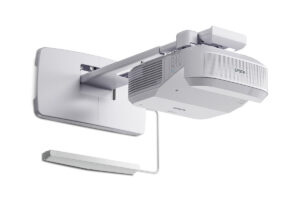
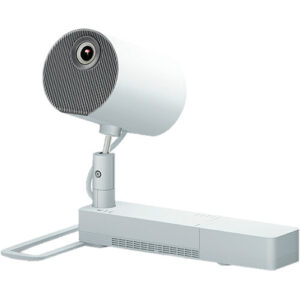
Projector Options from AudioVideoNation
1. Epson EB-PU2220B 20,000-Lumen 3LCD Large Venue Laser Projector with 4K Enhancement
Who should compare it: AV teams evaluating the EB-PU2220B for a planned large-venue installation with documented geometry, infrastructure, and operating requirements.
Why it belongs here: This is the exact SKU at the center of the guide. Its supplied facts list 4K resolution, and its catalog name frames it for large-venue evaluation.
SKU: EB-PU2220B
Key Features
- Exact Epson model and SKU: EB-PU2220B
- 4K resolution listed in the supplied product facts
- Large-venue positioning stated in the supplied product name
- Listed in the Projectors category
Things to Consider
Confirm the exact optics and throw plan, power and signal requirements, control path, mounting details, physical clearances, and included items through current documentation and the linked product page.
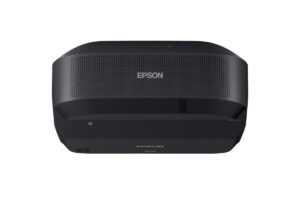
2. Epson PowerLite 875E 5 Ultra Short Throw Display with 4K Enhancement (V11HC04120)
Who should compare it: Rooms where an ultra-short-throw 4K approach matches the measured image geometry and installation plan.
Why it belongs here: Its supplied facts identify ultra-short-throw placement and 4K resolution, giving buyers a distinct room-layout alternative to evaluate.
SKU: PL-875E
Key Features
- Ultra short throw listed in the supplied product facts
- 4K resolution listed in the supplied product facts
- PowerLite 875E identity with SKU PL-875E
- Listed in the Projectors category
Things to Consider
Verify the supported image size and placement geometry, image-surface requirements, mounting plan, signal formats, control interfaces, physical details, and included items before purchase.
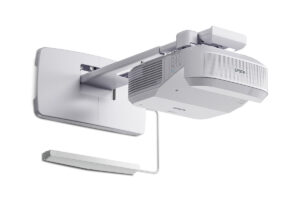
3. Epson BrightLink 870Ei Ultra Short Throw Interactive Display with 4K Enhancement (V11HC03020)
Who should compare it: Schools, meeting spaces, and AV teams comparing a BrightLink ultra-short-throw 4K deployment.
Why it belongs here: The supplied facts list ultra-short-throw placement and 4K resolution, while the distinct BrightLink SKU gives teams another workflow to examine.
SKU: BL-870Ei
Key Features
- Ultra short throw listed in the supplied product facts
- 4K resolution listed in the supplied product facts
- BrightLink 870Ei identity with SKU BL-870Ei
- Listed in the Projectors category
Things to Consider
Verify the interaction workflow, required accessories, image geometry, signal inputs, control plan, mounting requirements, and included items for the exact SKU.
4. Epson BrightLink 780Ei Ultra Short Throw Interactive Display with 4K Enhancement (V11HC10020)
Who should compare it: Procurement and installation teams comparing the BrightLink 780Ei and 870Ei as separate ultra-short-throw 4K options.
Why it belongs here: It adds a second BrightLink model with supplied ultra-short-throw and 4K facts, allowing a documented SKU-level comparison with the 870Ei.
SKU: BL-780Ei
Key Features
- Ultra short throw listed in the supplied product facts
- 4K resolution listed in the supplied product facts
- BrightLink 780Ei identity with SKU BL-780Ei
- Listed in the Projectors category
Things to Consider
Do not assume the 780Ei and 870Ei are interchangeable. Compare current documentation for interaction requirements, accessories, geometry, signals, control, mounting, and included items.
5. Epson LightScene EV-110 2200-Lumen WXGA Laser 3LCD Projector (V11HA22020)
Who should compare it: Projects whose measured room conditions, image size, and content needs are satisfied by 2200 lumens and WXGA.
Why it belongs here: It adds a factually different comparison branch with 2200 lumens and WXGA, helping buyers test whether their brief requires the 4K alternatives.
SKU: EV-110
Key Features
- 2200-lumen brightness listed in the supplied product facts
- WXGA resolution listed in the supplied product facts
- LightScene EV-110 identity with SKU EV-110
- Listed in the Projectors category
Things to Consider
Its 2200-lumen WXGA profile differs from the 4K options. Validate brightness using the planned image size, representative ambient light, and actual content before choosing it.
Epson EB-PU2220B 20,000-Lumen 3LCD Large Venue Laser Projector with 4K Enhancement vs Epson PowerLite 875E 5 Ultra Short Throw Display with 4K Enhancement (V11HC04120): Main Differences
- Choose Epson EB-PU2220B 20,000-Lumen 3LCD Large Venue Laser Projector with 4K Enhancement if AV teams evaluating the EB-PU2220B for a planned large-venue installation with documented geometry, infrastructure, and operating requirements..
- Choose Epson PowerLite 875E 5 Ultra Short Throw Display with 4K Enhancement (V11HC04120) if Rooms where an ultra-short-throw 4K approach matches the measured image geometry and installation plan..
- Choose Epson BrightLink 870Ei Ultra Short Throw Interactive Display with 4K Enhancement (V11HC03020) if Schools, meeting spaces, and AV teams comparing a BrightLink ultra-short-throw 4K deployment..
- Choose Epson BrightLink 780Ei Ultra Short Throw Interactive Display with 4K Enhancement (V11HC10020) if Procurement and installation teams comparing the BrightLink 780Ei and 870Ei as separate ultra-short-throw 4K options..
- Choose Epson LightScene EV-110 2200-Lumen WXGA Laser 3LCD Projector (V11HA22020) if Projects whose measured room conditions, image size, and content needs are satisfied by 2200 lumens and WXGA..
Define the Right Deployment Fit First
Start by writing a one-page deployment brief. Name the room, audience size, farthest viewing position, desired image dimensions, ambient-light conditions, content types, operating hours, installation date, and system operator. Separate fixed requirements from preferences. This keeps the listed 4K resolution in context. Resolution matters, but it cannot tell you whether text will be readable, whether the image surface fits the wall, or whether the projector can be installed and serviced safely.
For the EB-PU2220B, use its large-venue positioning as a reason to perform deeper site planning. A church may prioritize unobstructed views and a straightforward volunteer workflow. A school may prioritize room turnover and support procedures. A conference technology team may need documented source and control behavior. Record the actual requirement behind each goal.
Turn those requirements into pass-or-fail criteria. Mark every unresolved item for confirmation in current documentation or with the seller. Pause the buying decision whenever a must-have remains unverified.
Epson EB-PU2220B Setup Starts With a Site Survey
Measure twice. Record the site in a form that installers, buyers, and designers can all review. A useful survey captures:
- Desired visible image width, height, and aspect ratio
- Distances between the image surface and possible projector positions
- Audience sightlines, ceiling conditions, and physical obstructions
- Ambient-light sources and any available light control
- Structure at the proposed installation point
- Power, source, network, and control locations required by the design
- Cable routes, estimated lengths, and access points
- Space needed for installation and later service
Photograph each route and note the measurement points. Small ambiguities become expensive once equipment and labor are scheduled.
Treat optics and throw selection as open design items until current documentation confirms them. Use the measured image width and projector distance to establish the required throw relationship. Then verify the exact supported configuration, placement limits, orientation, physical clearances, and load information. A scaled drawing gives the installer and approving stakeholder one shared reference.
Confirm the Exact Projection Configuration
Lock the bill of materials before approving the purchase. Put EB-PU2220B on the quote and require every related line to use an exact manufacturer identifier where one is available. The list may include optical components, mounting or rigging hardware, interface plates, signal transport, control hardware, adapters, and cables, depending on the design.
Confirm what the quoted configuration includes. Never infer that an optical component, mount, or accessory is bundled because another projector family handles it that way. Check each item against the measured geometry and installation method.
The supplied facts list 4K resolution for the EB-PU2220B. That single entry does not establish every accepted signal format. Verify source resolution, frame rate, color format, content-protection requirements, connectors, and processing behavior through current official documentation.
Create a sign-off table with four columns: requirement, verified value, source, and owner. This simple record prevents assumptions from passing silently between purchasing, integration, and installation teams.
Map Signal, Control, and Content Before Installation
Draw the complete signal path. Begin with each intended source, such as a presentation computer, media player, signage system, or camera feed. Continue through any switching, processing, conversion, or transport equipment. End at the projector. Record cable types and route lengths without assuming that a link proven at a desk will behave the same across the installed path.
A 4K label at the projector does not prove end-to-end compatibility. Every device and connection in the path must support the chosen format. Check the actual content too. Fine presentation text, worship lyrics, detailed spreadsheets, video, and digital signage place different demands on layout and viewing distance.
Define the control workflow next. List the power, source-selection, image-blanking, status, and shutdown actions the operator needs. Then confirm the interfaces and commands documented for the exact configuration. Prepare a local test source and a fallback operating procedure. Keep it simple. A system that operators understand is easier to support.
Installation and Commissioning Checklist
Before installation, confirm the load path, mounting hardware rating, electrical plan, work access, and venue safety requirements with the qualified parties responsible for each area. Follow the manufacturer's current orientation, clearance, and operating-environment instructions. Preserve access for inspection and service.
Commission against the deployment brief rather than a single demonstration image. The acceptance process should cover:
- Physical alignment, focus, and geometry across the planned image surface
- Every intended source and signal route
- Representative content under the room lighting expected during use
- Control commands and operator procedures
- Startup, shutdown, fallback, and fault-reporting steps
- Final labeling, configuration records, and approved-setting documentation
Use the farthest planned viewing position during content checks. A slide that looks crisp near the projector can still fail the audience. Record each result and assign unresolved issues to an owner. Finish with an operator handoff that covers daily use, approved adjustments, escalation contacts, and the location of the system documentation.
Assess Price-to-Performance Across the Full System
Compare value with a requirements matrix, not one headline specification. Start with the current project quote. Add every applicable element needed to produce an installed result: optics, mounting, signal transport, control, electrical or structural work, installation labor, commissioning, and support effort. Then place the verified requirement solved by each cost beside it.
For the EB-PU2220B, the listed 4K resolution is one part of that calculation. Correct geometry, compatible signals, workable control, safe installation, and service access also determine whether the purchase performs its assigned job. A hardware quote can look attractive until missing site work or accessories enter the project.
Use the alternatives as requirement checks. An ultra-short-throw 4K option deserves evaluation if close placement is central to the room design. The EV-110 creates a separate 2200-lumen WXGA branch for projects whose measured needs fit those facts. These comparisons do not establish interchangeability. Check the linked product pages for live commerce details, and judge each complete installed proposal against the same must-have list.
Stock and Availability Planning
Check the linked product page for live commerce details close to the ordering date. Then confirm the exact SKU, quantity, configuration, shipment timing, and included items before scheduling labor. If optics, mounting hardware, signal equipment, or control components are separate project lines, verify their timing at the same checkpoint. One delayed dependency can move commissioning even when another item is ready.
Assign an owner and date to each procurement check. Reconfirm before issuing the order and again before mobilizing installers. If a substitute is proposed, rerun the geometry, signal, control, power, mounting, and image requirements. A similar model name is not an engineering approval.
Compare the Epson Projector Alternatives
Use these products as decision branches rather than a single ranked list. They address different room plans and content requirements.
- Epson EB-PU2220B: Keep it under consideration when the project brief calls for this exact large-venue model and its listed 4K resolution. Complete the site survey and configuration review before committing.
- Epson PowerLite 875E: Its supplied facts identify ultra-short-throw placement and 4K resolution. Evaluate it when the measured room plan calls for projection close to the image surface.
- Epson BrightLink 870Ei and 780Ei: Both supplied fact sets identify ultra-short-throw and 4K. Treat them as separate SKUs. Verify the capabilities, accessories, interaction workflow, and installation requirements that distinguish them.
- Epson LightScene EV-110: Its supplied facts list 2200 lumens and WXGA. Compare it only where that brightness and resolution match the measured environment, desired image, and source content.
Choose the EB-PU2220B when its documented configuration clears every required gate, including geometry, infrastructure, signal, control, schedule, and budget. Move to an alternative when its verified characteristics solve the deployment brief more directly. Open questions belong on the sign-off sheet, not in the installer's assumptions.
Related AudioVideoNation Links
- Browse Projector at AudioVideoNation
- Epson EB-PU2220B product details
- Epson PowerLite 875E product details
- Epson BrightLink 870Ei product details
- Epson BrightLink 780Ei product details
Product Information Sources
- Epson EB-PU2220B 20,000-Lumen 3LCD Large Venue Laser Projector with 4K Enhancement product information
- Epson PowerLite 875E 5 Ultra Short Throw Display with 4K Enhancement (V11HC04120) product information
- Epson BrightLink 870Ei Ultra Short Throw Interactive Display with 4K Enhancement (V11HC03020) product information
- Epson BrightLink 780Ei Ultra Short Throw Interactive Display with 4K Enhancement (V11HC10020) product information
- Epson LightScene EV-110 2200-Lumen WXGA Laser 3LCD Projector (V11HA22020) product information
FAQ
What should I verify before buying the Epson EB-PU2220B?
Verify the image geometry, exact projection configuration, mounting plan, power, signal path, control workflow, physical clearances, service access, and included items before buying the Epson EB-PU2220B. Base each decision on measured site conditions and current documentation for the exact SKU.
What resolution does the supplied Epson EB-PU2220B data identify?
The supplied product facts identify the Epson EB-PU2220B resolution as 4K. The full product name references 4K Enhancement, so confirm accepted input formats and image-processing details in current official documentation before designing the signal chain.
How should I choose a throw configuration for the EB-PU2220B?
Choose the throw configuration by matching measured image width and projector distance to current official EB-PU2220B optical documentation. Confirm the exact quoted components, placement limits, orientation, clearances, and mounting plan before ordering.
Which supplied Epson alternatives use ultra-short-throw placement?
The Epson PowerLite 875E, BrightLink 870Ei, and BrightLink 780Ei are the supplied alternatives with ultra-short-throw and 4K facts. Compare their exact SKUs and current documentation against the room, image surface, workflow, signal path, and control plan.
How should buyers assess EB-PU2220B price-to-performance?
Assess price-to-performance by comparing the live total installed quote with the requirements the documented configuration actually satisfies. Include optics, mounting, signal transport, control, site work, installation, commissioning, and support effort wherever they apply.
How should a project team check stock and availability?
Check current stock and availability on the linked product page, then confirm the exact SKU, quantity, configuration, included items, and timing before scheduling installation. Reconfirm every dependent project component at the same procurement checkpoint.
Conclusion
Use this Epson EB-PU2220B Setup Guide and Buying Considerations comparison to match documented specifications to the room and installation requirements. Review the linked product pages for current purchase details before ordering.
Products Used
| SKU | Product Name | URL |
|---|---|---|
| EB-PU2220B | Epson EB-PU2220B 20,000-Lumen 3LCD Large Venue Laser Projector with 4K Enhancement | View product |
| PL-875E | Epson PowerLite 875E 5 Ultra Short Throw Display with 4K Enhancement (V11HC04120) | View product |
| BL-870Ei | Epson BrightLink 870Ei Ultra Short Throw Interactive Display with 4K Enhancement (V11HC03020) | View product |
| BL-780Ei | Epson BrightLink 780Ei Ultra Short Throw Interactive Display with 4K Enhancement (V11HC10020) | View product |
| EV-110 | Epson LightScene EV-110 2200-Lumen WXGA Laser 3LCD Projector (V11HA22020) | View product |