

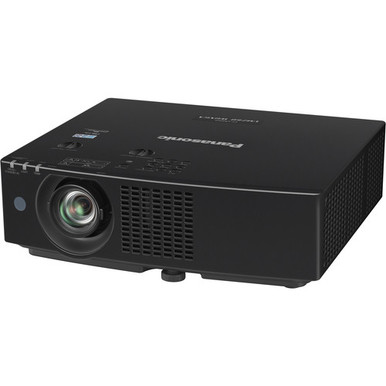
Buyers searching “Panasonic PT-VMZ60BU vs PT-VMZ60U: Which Projector Should You Choose?” face a close comparison. Both projectors list 6000 lumens and WUXGA resolution, while their product names identify different cabinet colors: black for the PT-VMZ60BU and white for the PT-VMZ60U. Those shared headline specifications make cabinet color the clearest documented distinction, but color alone should not settle an installation decision.
Your room, mounting plan, screen, signal path, control requirements, budget, and purchasing schedule still matter. This guide separates the confirmed similarities from the choices your AV team must validate before ordering. It also covers two Panasonic alternatives for projects that require ultra-short-throw or short-throw placement. Use the comparison to narrow your shortlist, then visit the linked product pages for current commerce details and configuration information.
Products at a Glance
- Option 1: Panasonic PT-VMZ60BU 6000-Lumen WUXGA 3LCD Laser Projector (Black)
- For aV installations that require the documented 6000…: Panasonic PT-VMZ60U 6000-Lumen WUXGA 3LCD Laser Projector (White)
- For layouts that specifically require a 5200-lumen WU…: Panasonic PT-CMZ50 WUXGA Ultra-Short Throw Laser Projector – Professional Golf Simulator Display
- For projects prioritizing a documented 8,000-lumen WU…: Panasonic PT-VMZ6STBU8 8,000 Lumens WUXGA Laser Golf Simulator Projector – Short Throw, 4K Input, Black
Quick Comparison Table
| Feature | Panasonic PT-VMZ60BU 6000-Lumen WUXGA 3LCD Laser Projector (Black) | Panasonic PT-VMZ60U 6000-Lumen WUXGA 3LCD Laser Projector (White) | Panasonic PT-CMZ50 WUXGA Ultra-Short Throw Laser Projector – Professional Golf Simulator Display | Panasonic PT-VMZ6STBU8 8,000 Lumens WUXGA Laser Golf Simulator Projector – Short Throw, 4K Input, Black |
|---|---|---|---|---|
| Brightness | 6000 lumens | 6000 lumens | 5200 lumens | 8,000 Lumens |
| Resolution | WUXGA | WUXGA | WUXGA | WUXGA |
| Best For | AV installations that require the documented 6000-lumen WUXGA specification and prefer a black projector cabinet. | AV installations that require the documented 6000-lumen WUXGA specification and prefer a white projector cabinet. | Layouts that specifically require a 5200-lumen WUXGA projector with ultra-short-throw geometry. | Projects prioritizing a documented 8,000-lumen WUXGA specification and short-throw placement. |
| Throw Type | Ultra short throw | Short throw | ||
| Recommended Buyer | AV installations that require the documented 6000-lumen WUXGA specification and prefer a black projector cabinet. | AV installations that require the documented 6000-lumen WUXGA specification and prefer a white projector cabinet. | Layouts that specifically require a 5200-lumen WUXGA projector with ultra-short-throw geometry. | Projects prioritizing a documented 8,000-lumen WUXGA specification and short-throw placement. |
Product Images

Projector Options from AudioVideoNation
1. Panasonic PT-VMZ60BU 6000-Lumen WUXGA 3LCD Laser Projector (Black)
Who should compare it: AV installations that require the documented 6000-lumen WUXGA specification and prefer a black projector cabinet.
Why it belongs here: The PT-VMZ60BU is one of the two directly compared projectors. It lists 6000 lumens and WUXGA resolution, and its product name identifies a black cabinet.
SKU: PT-VMZ60BU
Key Features
- 6000 lumens
- WUXGA resolution
- Black cabinet designation
Things to Consider
Confirm throw requirements, mounting, connections, control integration, dimensions, and included components for this exact SKU before completing the room design.
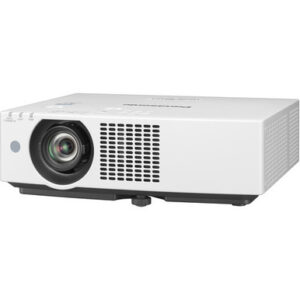
2. Panasonic PT-VMZ60U 6000-Lumen WUXGA 3LCD Laser Projector (White)
Who should compare it: AV installations that require the documented 6000-lumen WUXGA specification and prefer a white projector cabinet.
Why it belongs here: The PT-VMZ60U is the white-cabinet product in the direct comparison. Its supplied facts match the PT-VMZ60BU at 6000 lumens and WUXGA resolution.
SKU: PT-VMZ60U
Key Features
- 6000 lumens
- WUXGA resolution
- White cabinet designation
Things to Consider
Matching brightness and resolution do not confirm that every specification is identical. Validate the exact SKU against the installation and integration plan.
3. Panasonic PT-CMZ50 WUXGA Ultra-Short Throw Laser Projector – Professional Golf Simulator Display
Who should compare it: Layouts that specifically require a 5200-lumen WUXGA projector with ultra-short-throw geometry.
Why it belongs here: The PT-CMZ50U gives buyers a Panasonic option with documented ultra-short-throw placement when the room geometry differs from a conventional installation plan.
SKU: PT-CMZ50U
Key Features
- 5200 lumens
- WUXGA resolution
- Ultra-short-throw design
Things to Consider
Its listed brightness is lower than the 6000-lumen figures of the PT-VMZ60BU and PT-VMZ60U. Validate screen size, ambient light, placement, and system requirements before choosing it.
4. Panasonic PT-VMZ6STBU8 8,000 Lumens WUXGA Laser Golf Simulator Projector – Short Throw, 4K Input, Black
Who should compare it: Projects prioritizing a documented 8,000-lumen WUXGA specification and short-throw placement.
Why it belongs here: This projector supplies an 8,000-lumen WUXGA short-throw option for projects whose written requirements differ from the two 6000-lumen projectors.
SKU: PT-VMZ82BU8
Key Features
- 8,000 lumens
- WUXGA resolution
- Short-throw design
Things to Consider
Confirm the exact configuration before quoting or ordering because the supplied SKU is PT-VMZ82BU8 while the supplied product name begins with PT-VMZ6STBU8.
Panasonic PT-VMZ60BU 6000-Lumen WUXGA 3LCD Laser Projector (Black) vs Panasonic PT-VMZ60U 6000-Lumen WUXGA 3LCD Laser Projector (White): Main Differences
- Choose Panasonic PT-VMZ60BU 6000-Lumen WUXGA 3LCD Laser Projector (Black) if AV installations that require the documented 6000-lumen WUXGA specification and prefer a black projector cabinet..
- Choose Panasonic PT-VMZ60U 6000-Lumen WUXGA 3LCD Laser Projector (White) if AV installations that require the documented 6000-lumen WUXGA specification and prefer a white projector cabinet..
- Choose Panasonic PT-CMZ50 WUXGA Ultra-Short Throw Laser Projector – Professional Golf Simulator Display if Layouts that specifically require a 5200-lumen WUXGA projector with ultra-short-throw geometry..
- Choose Panasonic PT-VMZ6STBU8 8,000 Lumens WUXGA Laser Golf Simulator Projector – Short Throw, 4K Input, Black if Projects prioritizing a documented 8,000-lumen WUXGA specification and short-throw placement..
PT-VMZ60BU vs PT-VMZ60U at a Glance
The supplied product facts put these Panasonic projectors even on two central specifications. Each lists 6000 lumens and WUXGA resolution. Neither has a documented brightness or resolution advantage over the other.
Their product names identify the most visible difference. The PT-VMZ60BU has a black cabinet designation, while the PT-VMZ60U has a white cabinet designation. That distinction can matter in finished rooms where the projector remains visible to an audience, congregation, class, or meeting participants.
Do not treat matching brightness and resolution as proof that every purchase-critical detail is identical. Build a two-column checklist tied to the exact SKUs. Confirm placement, throw requirements, connections, control integration, physical dimensions, mounting needs, and included components before approving either projector. If both pass that review, cabinet color becomes a straightforward and defensible tiebreaker.
What the 6,000-Lumen WUXGA Projector Specs Tell You
A listed brightness of 6000 lumens gives buyers a useful starting point. It does not determine the final image by itself. Screen size, screen material, ambient light, viewing distance, source content, and room layout all affect the result. Ask the installer to evaluate those conditions against the planned image rather than selecting from the lumen figure alone.
Both projectors also list WUXGA resolution, so the supplied facts do not create a resolution-based reason to favor one. Your team should still verify the complete content path. That includes presentation computers, media sources, switching equipment, distribution hardware, and the intended screen format.
Define the requirement before requesting a quote. Record the desired image size, normal room lighting, mounting location, primary content, and longest viewing distance. This turns “6000 lumens and WUXGA” into part of a real system design instead of an isolated specification.
Black vs White Projector Cabinets and Deployment Fit
Cabinet color has no documented effect on the two projectors’ listed brightness or resolution. It can still affect how the installation looks.
A black PT-VMZ60BU may suit a dark ceiling, exposed black structure, stage environment, or installation where the AV team wants the projector to draw less visual attention. A white PT-VMZ60U may coordinate with a light ceiling, classroom, conference room, or worship space finished in pale colors. These are design preferences, not performance claims.
Review the projector from the audience’s normal sightlines. A ceiling-mounted projector that looks unobtrusive on a reflected ceiling plan can be much more noticeable from the front row. Churches may also need to consider stage lighting and camera compositions. Schools may prioritize consistency across several rooms. Corporate teams may want the cabinet to match other ceiling-mounted equipment.
Choose the finish during design, then keep the exact SKU on drawings, quotes, and purchase orders. That small discipline reduces the risk of approving one color and ordering the other.
Installation Checks for Churches, Schools, and Conference Rooms
Start with geometry. Confirm the available throw distance, mounting position, screen location, desired image size, and any obstructions. The supplied facts do not assign a throw type to either compared projector, so the installation plan must be checked against the exact product documentation before a mount location is finalized.
Next, map the signal and control path. List every source, the required switching or distribution equipment, cable routes, and the control system that operators will use. Verify the necessary connections and control options for each exact SKU. Do the same for mounting hardware, electrical placement, service access, and ventilation clearances.
Different spaces add different pressures. A church may need clear sightlines around lighting and rigging. A school may need repeatable controls that staff can use across classrooms. A conference room team may care about fast source changes and a clean ceiling plan. Those needs should appear in the project brief before the projector is selected.
Finish with a configuration review. Ask the seller or installer to match the quote, cut sheet, mounting plan, and purchase order to PT-VMZ60BU or PT-VMZ60U by SKU. Similar names are easy to confuse during procurement.
Price-to-Performance Without Guesswork
Price-to-performance starts with a current quote and a defined room requirement. Since both compared projectors list 6000 lumens and WUXGA resolution, those two specifications do not justify paying a premium for one over the other. Look for a documented project benefit.
Compare the complete installed cost. Include validated mounting hardware, signal distribution, control work, cabling, screen requirements, labor, and any other approved system components. A projector quote that looks lower in isolation can lead to a different total after the room plan is complete.
If both projectors satisfy the same verified requirements, compare the current quotes and choose the cabinet color that fits the room. If the quotes differ, ask what documented configuration or project benefit accounts for the gap. Avoid paying for an assumed difference that does not appear in the approved specification set.
For multiroom projects, consistency also has value. Using the same verified projector and control approach across comparable rooms can simplify documentation and operator training. Confirm that decision against the needs of every room rather than forcing one design into spaces with different geometry.
Stock and Availability Checks Before Purchase
Use the linked AudioVideoNation product pages for live commerce details. Check them when the quote is prepared and again before the purchase order is released, since purchasing conditions can change during a project.
If the schedule is firm, ask the sales team to confirm the expected fulfillment timeline for the exact SKU and cabinet color. Keep that confirmation connected to the project record. Do not substitute PT-VMZ60BU for PT-VMZ60U, or the reverse, solely because both list 6000 lumens and WUXGA. The installer should approve any substitution against the complete design.
For phased deployments, review each phase before ordering. A configuration chosen months earlier may need a fresh commerce and documentation check when the next group of rooms is ready.
Panasonic Alternatives for Different Throw Requirements
The Panasonic PT-CMZ50U changes the placement conversation. Its supplied facts list 5200 lumens, WUXGA resolution, and an ultra-short-throw design. Consider it when the room specifically calls for ultra-short-throw geometry. Its brightness figure is lower than the 6000-lumen figures listed for the two primary projectors, so evaluate it against the actual screen and lighting plan.
The Panasonic PT-VMZ82BU8 supplies a different baseline: 8,000 lumens, WUXGA resolution, and short-throw placement. It deserves review when the written design calls for that higher brightness figure and short-throw geometry. Confirm the exact configuration carefully because the supplied SKU is PT-VMZ82BU8 while the supplied product name begins with PT-VMZ6STBU8.
Neither alternative is an automatic replacement for the PT-VMZ60BU or PT-VMZ60U. Ultra-short-throw, short-throw, and an unspecified throw arrangement produce different room-planning questions. Select among them only after the installer has validated geometry, screen requirements, mounting, and system integration.
Final Choice: PT-VMZ60BU or PT-VMZ60U
Choose the PT-VMZ60BU when the verified system requirements call for its documented 6000-lumen WUXGA specification and a black cabinet fits the room. Choose the PT-VMZ60U when the same documented brightness and resolution meet the design and a white cabinet is preferred.
The supplied facts do not establish a technical winner. Make the decision through exact-SKU validation, room geometry, system requirements, total installed cost, purchasing schedule, and cabinet color. If placement calls for ultra-short-throw or short-throw projection, review the PT-CMZ50U or PT-VMZ82BU8 instead of forcing either primary projector into the wrong layout.
Related AudioVideoNation Links
- Browse Projector at AudioVideoNation
- View the Panasonic PT-VMZ60BU
- View the Panasonic PT-VMZ60U
- Explore the Panasonic PT-CMZ50U
- Explore the Panasonic PT-VMZ82BU8
Product Information Sources
- Panasonic PT-VMZ60BU 6000-Lumen WUXGA 3LCD Laser Projector (Black) product information
- Panasonic PT-VMZ60U 6000-Lumen WUXGA 3LCD Laser Projector (White) product information
- Panasonic PT-CMZ50 WUXGA Ultra-Short Throw Laser Projector – Professional Golf Simulator Display product information
- Panasonic PT-VMZ6STBU8 8,000 Lumens WUXGA Laser Golf Simulator Projector – Short Throw, 4K Input, Black product information
FAQ
Is the Panasonic PT-VMZ60BU brighter than the PT-VMZ60U?
No, both projectors list 6000 lumens. The supplied brightness facts do not give either projector an advantage.
Do the PT-VMZ60BU and PT-VMZ60U both have WUXGA resolution?
Yes, both projectors list WUXGA resolution. Buyers should still verify the complete source, switching, distribution, and display workflow for the planned installation.
What is the clearest documented difference between the PT-VMZ60BU and PT-VMZ60U?
Cabinet color is the clearest documented difference: the PT-VMZ60BU product name identifies black, while the PT-VMZ60U product name identifies white. Choose the finish that fits the room after both exact SKUs pass installation review.
Are the PT-VMZ60BU and PT-VMZ60U identical apart from color?
Do not assume the two projectors are identical apart from color. Their supplied facts match for brightness and resolution, but purchase-critical details should be verified for each exact SKU.
Which projector is better for a church, school, or conference room?
Neither projector is documented as technically better for those spaces based on the supplied brightness and resolution facts. Choose between them through room geometry, system requirements, installed cost, schedule, and the preferred black or white cabinet.
How should buyers compare current price and availability?
Use each linked AudioVideoNation product page and confirm the exact SKU with the sales team before ordering. Compare current quotes as part of the complete installed system rather than judging the projector cost alone.
Conclusion
Use this Panasonic PT-VMZ60BU vs PT-VMZ60U: Which Projector Should You Choose? comparison to match documented specifications to the room and installation requirements. Review the linked product pages for current purchase details before ordering.
Products Used
| SKU | Product Name | URL |
|---|---|---|
| PT-VMZ60BU | Panasonic PT-VMZ60BU 6000-Lumen WUXGA 3LCD Laser Projector (Black) | View product |
| PT-VMZ60U | Panasonic PT-VMZ60U 6000-Lumen WUXGA 3LCD Laser Projector (White) | View product |
| PT-CMZ50U | Panasonic PT-CMZ50 WUXGA Ultra-Short Throw Laser Projector – Professional Golf Simulator Display | View product |
| PT-VMZ82BU8 | Panasonic PT-VMZ6STBU8 8,000 Lumens WUXGA Laser Golf Simulator Projector – Short Throw, 4K Input, Black | View product |