

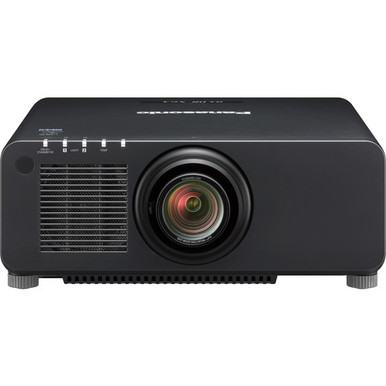
Panasonic PT-RX110BU vs PT-RZ120BU is a resolution-led choice, but resolution alone cannot close an AV specification. The PT-RX110BU is listed at XGA, while the PT-RZ120BU is listed at WUXGA. That difference matters for slide detail, spreadsheets, small text, and the resolution of the sources feeding the room. It does not establish brightness, image size, lens fit, connection support, or installation cost.
This guide helps churches, schools, conference room teams, AV buyers, and installers turn those known facts into a defensible shortlist. You’ll see where each projector fits, which installation questions remain open, and how to handle price and availability without guessing. Two other Panasonic projectors and a short-throw lens are included as paths to investigate when room geometry changes the brief. Confirm every unresolved technical point and live commerce detail on the linked product page before approval.
Products at a Glance
- Option 1: Panasonic PT-RZ120BU WUXGA DLP Projector 12,000-Lumen
- For projects that intentionally specify XGA and can c…: Panasonic PT-RX110BU XGA DLP Projector
- For installers evaluating short-throw lens options af…: Panasonic ET-D75LE95 75mm Fixed Ultra-Short-Throw Projector Lens
- For installations that call for 5,200 lumens, WUXGA r…: Panasonic PT-CMZ50 WUXGA Ultra-Short Throw Laser Projector – Professional Golf Simulator Display
- For installations that call for 8,000 Lumens, WUXGA r…: Panasonic PT-VMZ6STBU8 8,000 Lumens WUXGA Laser Golf Simulator Projector – Short Throw, 4K Input, Black
Quick Comparison Table
| Feature | Panasonic PT-RZ120BU WUXGA DLP Projector 12,000-Lumen | Panasonic PT-RX110BU XGA DLP Projector | Panasonic ET-D75LE95 75mm Fixed Ultra-Short-Throw Projector Lens | Panasonic PT-CMZ50 WUXGA Ultra-Short Throw Laser Projector – Professional Golf Simulator Display | Panasonic PT-VMZ6STBU8 8,000 Lumens WUXGA Laser Golf Simulator Projector – Short Throw, 4K Input, Black |
|---|---|---|---|---|---|
| Brightness | 5200 lumens | 8,000 Lumens | |||
| Resolution | WUXGA | XGA | WUXGA | WUXGA | |
| Best For | AV scopes that name WUXGA as the required projector resolution, subject to a complete installation review. | Projects that intentionally specify XGA and can confirm the remaining room, signal, and installation requirements. | Installers evaluating short-throw lens options after exact projector compatibility has been confirmed. | Installations that call for 5,200 lumens, WUXGA resolution, and an ultra-short-throw configuration. | Installations that call for 8,000 Lumens, WUXGA resolution, and a short-throw configuration. |
| Throw Type | Short throw | Ultra short throw | Short throw | ||
| Recommended Buyer | AV scopes that name WUXGA as the required projector resolution, subject to a complete installation review. | Projects that intentionally specify XGA and can confirm the remaining room, signal, and installation requirements. | Installers evaluating short-throw lens options after exact projector compatibility has been confirmed. | Installations that call for 5,200 lumens, WUXGA resolution, and an ultra-short-throw configuration. | Installations that call for 8,000 Lumens, WUXGA resolution, and a short-throw configuration. |
Product Images


Projector Options from AudioVideoNation
1. Panasonic PT-RZ120BU WUXGA DLP Projector 12,000-Lumen
Who should compare it: AV scopes that name WUXGA as the required projector resolution, subject to a complete installation review.
Why it belongs here: It is one of the two projectors in the comparison and provides the WUXGA resolution option. That makes it relevant wherever the AV scope calls for a denser presentation canvas.
SKU: PT-RZ120BU
Key Features
- WUXGA resolution
- Panasonic model PT-RZ120BU
- Listed in the Multimedia Projectors, Projectors, and Video categories
Things to Consider
Verify brightness, lens requirements, projection geometry, signal connections, mounting, control, ventilation, and included items before specifying it. Check the linked page for current commerce details.
2. Panasonic PT-RX110BU XGA DLP Projector
Who should compare it: Projects that intentionally specify XGA and can confirm the remaining room, signal, and installation requirements.
Why it belongs here: It is the XGA projector in the head-to-head comparison. It gives buyers a path to assess when XGA matches an established content and signal standard.
SKU: PT-RX110BU
Key Features
- XGA resolution
- Panasonic model PT-RX110BU
- Listed in the Multimedia Projectors, Projectors, and Video categories
Things to Consider
Confirm brightness, lens requirements, image geometry, signal support, mounting, control, ventilation, and included items. Use the linked page for current commerce details.
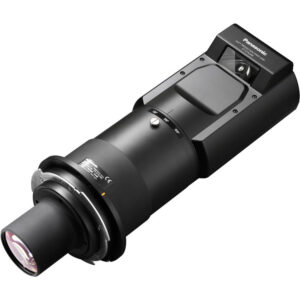
3. Panasonic ET-D75LE95 75mm Fixed Ultra-Short-Throw Projector Lens
Who should compare it: Installers evaluating short-throw lens options after exact projector compatibility has been confirmed.
Why it belongs here: It adds a short-throw lens path to the installation discussion, which is useful when mounting distance or room obstructions shape the design.
SKU: ET-D75LE95
Key Features
- Short-throw classification in the supplied facts
- Panasonic model ET-D75LE95
- Listed in the Lenses category
Things to Consider
Compatibility with the PT-RX110BU and PT-RZ120BU is not established by the supplied data. Verify the exact projector pairing and projection geometry before quoting this lens.
4. Panasonic PT-CMZ50 WUXGA Ultra-Short Throw Laser Projector – Professional Golf Simulator Display
Who should compare it: Installations that call for 5,200 lumens, WUXGA resolution, and an ultra-short-throw configuration.
Why it belongs here: It provides a defined alternative for projects where ultra-short-throw placement changes the shortlist. The supplied facts also identify 5,200 lumens and WUXGA resolution.
SKU: PT-CMZ50U
Key Features
- 5,200-lumen brightness listing
- WUXGA resolution
- Ultra-short-throw configuration
Things to Consider
Treat it as an alternative to investigate, not a direct substitute. Verify image geometry, signal support, mounting, control, room conditions, and other required specifications on the linked page.
5. Panasonic PT-VMZ6STBU8 8,000 Lumens WUXGA Laser Golf Simulator Projector – Short Throw, 4K Input, Black
Who should compare it: Installations that call for 8,000 Lumens, WUXGA resolution, and a short-throw configuration.
Why it belongs here: It broadens the shortlist when the project requires a short-throw configuration. Its supplied facts identify 8,000 Lumens and WUXGA resolution.
SKU: PT-VMZ82BU8
Key Features
- 8,000-Lumen brightness listing
- WUXGA resolution
- Short-throw configuration
Things to Consider
Confirm the exact model identity and all installation-critical details on the linked page before specifying it. Do not assume it shares geometry, connections, mounting, or accessories with either comparison projector.
Panasonic PT-RZ120BU WUXGA DLP Projector 12,000-Lumen vs Panasonic PT-RX110BU XGA DLP Projector: Main Differences
- Choose Panasonic PT-RZ120BU WUXGA DLP Projector 12,000-Lumen if AV scopes that name WUXGA as the required projector resolution, subject to a complete installation review..
- Choose Panasonic PT-RX110BU XGA DLP Projector if Projects that intentionally specify XGA and can confirm the remaining room, signal, and installation requirements..
- Choose Panasonic ET-D75LE95 75mm Fixed Ultra-Short-Throw Projector Lens if Installers evaluating short-throw lens options after exact projector compatibility has been confirmed..
- Choose Panasonic PT-CMZ50 WUXGA Ultra-Short Throw Laser Projector – Professional Golf Simulator Display if Installations that call for 5,200 lumens, WUXGA resolution, and an ultra-short-throw configuration..
- Choose Panasonic PT-VMZ6STBU8 8,000 Lumens WUXGA Laser Golf Simulator Projector – Short Throw, 4K Input, Black if Installations that call for 8,000 Lumens, WUXGA resolution, and a short-throw configuration..
Quick answer: PT-RX110BU vs PT-RZ120BU
Choose the PT-RZ120BU when WUXGA is a documented requirement and the rest of its installation details pass review. Choose the PT-RX110BU when XGA matches the established signal path, content, and room standard. Neither choice should rest on the resolution label alone.
Start with the content. Detailed spreadsheets, fine interface text, diagrams, and higher-resolution presentation sources can make WUXGA the clearer specification target. An XGA workflow may still be appropriate when the organization has standardized sources and presentation material around that format. Changing resolution can also affect switchers, extenders, scaling, and user expectations, so check the complete path from source to screen.
Brightness and projection geometry remain open questions in the supplied facts for both projectors. Verify the required image size, viewing distance, ambient light, screen, mounting position, lens arrangement, and signal connections before selecting either model. Those checks can reverse a decision that looked simple on paper.
Panasonic WUXGA projector or XGA projector?
The confirmed head-to-head difference is resolution. The PT-RZ120BU is listed as WUXGA, while the PT-RX110BU is listed as XGA. WUXGA provides a denser image canvas than XGA, which can preserve more visible detail when the source, signal chain, image size, and viewing distance support it.
That makes the PT-RZ120BU the logical model to investigate for rooms displaying dense presentation material, detailed dashboards, multiple content windows, or small text. It is still necessary to test legibility from the farthest seat. Resolution cannot compensate for text that is too small, weak contrast in the room, or an undersized image.
The PT-RX110BU deserves consideration where XGA is intentional. A school, church, or organization may have an established content library and AV system built around that resolution. In that case, matching the existing workflow can reduce unnecessary changes. Confirm source behavior and scaling with representative content rather than assuming every laptop or media system will behave the same way.
If the project brief does not name a required resolution, ask who creates the content, what applications they use, and how much fine detail viewers must read. The answers are more useful than choosing by model number.
Deployment fit for churches, schools, and conference rooms
Church teams should review lyrics, sermon slides, announcement graphics, and any camera or media feeds used during services. WUXGA may fit content with detailed graphics or several visual elements on one screen. XGA may align with a simpler, established presentation workflow. In either case, test the largest and smallest fonts from normal seating positions and confirm that every production source fits the planned signal path.
Schools need to account for teacher laptops, document content, learning applications, and room-to-room consistency. A WUXGA specification can support denser educational material, while XGA may match an existing classroom standard. The right choice depends on the district’s actual sources and support plan. Standardizing on a resolution that technicians can test and maintain may matter as much as the projector itself.
Conference rooms often display spreadsheets, dashboards, documents, and shared application windows. Those uses can make WUXGA attractive because fine information is common. Yet a higher resolution label will not fix poor sightlines or content designed with tiny type. Check the farthest participant’s view and the platform used for local and remote presentations.
Large venues add another layer. Ambient light, screen characteristics, throw distance, and mounting constraints can dominate the decision. The supplied PT-RX110BU and PT-RZ120BU facts do not resolve those requirements, so an installer should verify them before either projector enters the final bill of materials.
Installation questions to answer before specifying either projector
Begin with image geometry. Record the screen dimensions, projector position, throw distance, mounting limits, and any obstruction in the light path. Then verify the appropriate lens information and adjustment ranges using current product documentation. Do not calculate placement from a similar Panasonic model or an unconfirmed lens.
The Panasonic ET-D75LE95 appears in the product set as a short-throw lens option, but the supplied data does not establish compatibility with the PT-RX110BU or PT-RZ120BU. A shared brand is not proof of fit. Confirm the exact projector-and-lens pairing, supported image geometry, and installation requirements before adding it to a quote.
Next, map the signal path. List source resolutions, switchers, extenders, converters, cabling, wall plates, and control equipment. Verify the needed inputs, accepted signal formats, control connections, and cable-distance requirements for the exact projector. None of those details should be inferred from the resolution name.
Finish with the physical and operational review. Confirm mounting hardware, orientation, electrical needs, ventilation clearances, environmental limits, operating noise expectations, service access, and included items. If the projector will replace an installed model, measure the existing position instead of assuming the new chassis, lens center, or mounting pattern will line up.
Price-to-performance, stock, and availability checks
Price-to-performance starts with a compliant design, not the lowest equipment quote. Compare the current price of each exact SKU only after both candidates have passed the resolution, geometry, brightness, signal, mounting, and control requirements. A projector that forces a lens change, signal conversion, mount relocation, or cabling revision can change the project total.
Build a simple cost worksheet for the projector, verified lens, mounting hardware, signal transport, control integration, electrical work, installation labor, commissioning, and any required accessories. Ask for current warranty and service terms because those details are not supplied here. This creates a fair comparison without inventing a performance score or treating resolution as the only source of value.
Stock and availability can change. Use each linked AudioVideoNation product page for live commerce details, then confirm the exact SKU, expected fulfillment timing, and included items before issuing a purchase order. If the project has a fixed installation date, ask whether every required component can arrive within the same schedule. A projector without its confirmed lens or mounting parts does not complete the system.
Keep alternates in the design file, but do not substitute by brightness or resolution alone. Any alternate needs a fresh review of geometry, signals, mounting, control, power, ventilation, and accessories.
Short-throw Panasonic alternatives to investigate
Room geometry may point beyond the PT-RX110BU and PT-RZ120BU. The PT-CMZ50U is listed at 5,200 lumens with WUXGA resolution and an ultra-short-throw configuration. It is worth investigating when the brief calls for those three characteristics. Its full installation requirements still need verification.
The PT-VMZ82BU8 is listed at 8,000 Lumens with WUXGA resolution and a short-throw configuration. It gives buyers another defined combination to evaluate when a short throw is part of the room plan. Confirm the exact model identity, geometry, connections, mounting requirements, and other project-critical details on its linked page.
The ET-D75LE95 is a lens rather than a substitute projector. Its supplied facts identify it as short throw, which can make it relevant during geometry planning. Compatibility is unresolved, so it belongs on a verification list rather than an approved equipment list.
These alternatives are not direct replacements based on the provided data. They show how brightness, resolution, and throw requirements can reshape the shortlist once the room has been measured.
Final projector buying checklist
Freeze the content requirement first. Record whether XGA or WUXGA is required, which sources will feed the system, and what viewers must read from the farthest seat. Use real slides, dashboards, graphics, and documents during evaluation.
Next, complete the room survey. Verify image size, throw geometry, lens compatibility, screen details, ambient light, mounting, ventilation, power, inputs, control, and service access. Resolve each item with current documentation for the exact SKU.
Then compare total installed cost. Include every verified accessory and the labor created by changes to the existing room. Check the linked product pages for current price and availability, and confirm timing before ordering.
The decision is straightforward once those checks are complete. Select the PT-RZ120BU if WUXGA is required and the verified installation works. Select the PT-RX110BU if XGA matches the project and it passes the same review. If throw geometry drives the design, investigate the supplied short-throw alternatives without assuming interchangeability.
Related AudioVideoNation Links
- Browse Projector at AudioVideoNation
- Panasonic PT-RZ120BU projector
- Panasonic PT-RX110BU projector
- Panasonic ET-D75LE95 projector lens
- Panasonic PT-CMZ50U projector
Product Information Sources
- Panasonic PT-RZ120BU WUXGA DLP Projector 12,000-Lumen product information
- Panasonic PT-RX110BU XGA DLP Projector product information
- Panasonic ET-D75LE95 75mm Fixed Ultra-Short-Throw Projector Lens product information
- Panasonic PT-CMZ50 WUXGA Ultra-Short Throw Laser Projector – Professional Golf Simulator Display product information
- Panasonic PT-VMZ6STBU8 8,000 Lumens WUXGA Laser Golf Simulator Projector – Short Throw, 4K Input, Black product information
FAQ
Which projector has the higher listed resolution, the PT-RX110BU or PT-RZ120BU?
The PT-RZ120BU has the higher listed resolution at WUXGA, compared with XGA for the PT-RX110BU. Choose between them based on the required content detail, source system, viewing conditions, and verified installation needs.
Is the PT-RZ120BU automatically the better projector for conference rooms?
No, the PT-RZ120BU is not automatically the better conference room choice solely because it is WUXGA. WUXGA can suit detailed documents and spreadsheets, but brightness, image size, sightlines, sources, geometry, connections, and total installed cost also need verification.
Can the brightness of the PT-RX110BU and PT-RZ120BU be compared from this data?
No reliable brightness comparison can be made from the supplied extracted specifications. Confirm current technical documentation for both exact SKUs before assessing ambient-light performance, screen size, or room suitability.
Is the ET-D75LE95 lens compatible with either comparison projector?
Compatibility between the ET-D75LE95 and either the PT-RX110BU or PT-RZ120BU cannot be confirmed from the supplied data. Verify the exact projector-and-lens pairing and calculated image geometry before adding the lens to a system design.
How should buyers compare price-to-performance without listed prices?
Buyers should compare current quotes only after each projector has passed the same technical and installation checklist. Include the verified lens, mount, signal transport, control work, electrical work, accessories, labor, and commissioning in the project total.
How can I check current stock and availability?
Use the linked AudioVideoNation product page for current commerce details, then confirm the exact SKU and fulfillment timing before ordering. Check every required lens, mount, and accessory against the project schedule as well.
Conclusion
Use this Panasonic PT-RX110BU vs PT-RZ120BU comparison to match documented specifications to the room and installation requirements. Review the linked product pages for current purchase details before ordering.
Products Used
| SKU | Product Name | URL |
|---|---|---|
| PT-RZ120BU | Panasonic PT-RZ120BU WUXGA DLP Projector 12,000-Lumen | View product |
| PT-RX110BU | Panasonic PT-RX110BU XGA DLP Projector | View product |
| ET-D75LE95 | Panasonic ET-D75LE95 75mm Fixed Ultra-Short-Throw Projector Lens | View product |
| PT-CMZ50U | Panasonic PT-CMZ50 WUXGA Ultra-Short Throw Laser Projector – Professional Golf Simulator Display | View product |
| PT-VMZ82BU8 | Panasonic PT-VMZ6STBU8 8,000 Lumens WUXGA Laser Golf Simulator Projector – Short Throw, 4K Input, Black | View product |