

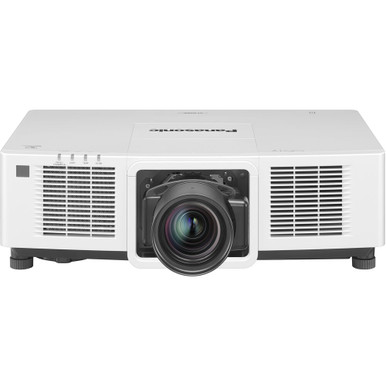
Panasonic PT-MZ14KLWU7 vs PT-MZ17KLBU7: Which Projector Should You Choose? The answer starts with your required light output. The PT-MZ14KLWU7 is listed at 14,000 lumens, while the PT-MZ17KLBU7 raises that figure to 16,500 lumens. Both are WUXGA projectors, so resolution does not separate them. The real buying problem is deciding whether your screen, room conditions, and design target justify another 2,500 listed lumens. That decision affects churches dealing with sanctuary lighting, schools planning large instructional displays, and conference teams building around sizable screens. This comparison uses the documented product facts, identifies the specifications your installer still needs to verify, and gives you a practical path for comparing deployment fit, current purchasing details, and price-to-performance.
Products at a Glance
- Option 1: Panasonic PT-MZ14KLWU7 LCD WUXGA Install Projector 14000 Lumens White
- For projects that require the higher 16,500-lumen lis…: Panasonic PT-MZ17KLBU7 16,500-Lumen WUXGA Laser LCD Projector
- For professional golf simulator display projects and…: Panasonic PT-CMZ50 WUXGA Ultra-Short Throw Laser Projector – Professional Golf Simulator Display
Quick Comparison Table
| Feature | Panasonic PT-MZ14KLWU7 LCD WUXGA Install Projector 14000 Lumens White | Panasonic PT-MZ17KLBU7 16,500-Lumen WUXGA Laser LCD Projector | Panasonic PT-CMZ50 WUXGA Ultra-Short Throw Laser Projector – Professional Golf Simulator Display |
|---|---|---|---|
| Brightness | 14000 Lumens | 16,500 lumens | 5200 lumens |
| Resolution | WUXGA | WUXGA | WUXGA |
| Best For | Installations whose documented projection design is satisfied by 14,000 listed lumens at WUXGA resolution. | Projects that require the higher 16,500-lumen listing after screen size and room conditions have been evaluated. | Professional golf simulator display projects and layouts that call for a 5,200-lumen WUXGA ultra-short-throw projector. |
| Throw Type | Ultra short throw | ||
| Recommended Buyer | Installations whose documented projection design is satisfied by 14,000 listed lumens at WUXGA resolution. | Projects that require the higher 16,500-lumen listing after screen size and room conditions have been evaluated. | Professional golf simulator display projects and layouts that call for a 5,200-lumen WUXGA ultra-short-throw projector. |
Product Images
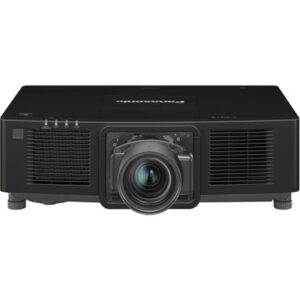

Projector Options from AudioVideoNation
1. Panasonic PT-MZ14KLWU7 LCD WUXGA Install Projector 14000 Lumens White
Who should compare it: Installations whose documented projection design is satisfied by 14,000 listed lumens at WUXGA resolution.
Why it belongs here: It is one of the two projectors under comparison and pairs a 14,000-lumen listing with WUXGA resolution.
SKU: PT-MZ14KLWU7
Key Features
- 14,000-lumen listed brightness
- WUXGA resolution
- 2,500 fewer listed lumens than PT-MZ17KLBU7
Things to Consider
Verify throw geometry, lens support, connectivity, control, mounting, power, and other installation requirements for this exact SKU. Compare live commerce details on the product page.
2. Panasonic PT-MZ17KLBU7 16,500-Lumen WUXGA Laser LCD Projector
Who should compare it: Projects that require the higher 16,500-lumen listing after screen size and room conditions have been evaluated.
Why it belongs here: It is the higher-output projector in the comparison, with a documented 16,500-lumen rating and WUXGA resolution.
SKU: PT-MZ17KLBU7
Key Features
- 16,500-lumen listed brightness
- WUXGA resolution
- 2,500 more listed lumens than PT-MZ14KLWU7
Things to Consider
The supplied facts do not establish throw geometry, lens support, connectivity, control, or physical installation needs. Confirm them for PT-MZ17KLBU7 and review live commerce details on its product page.
3. Panasonic PT-CMZ50 WUXGA Ultra-Short Throw Laser Projector – Professional Golf Simulator Display
Who should compare it: Professional golf simulator display projects and layouts that call for a 5,200-lumen WUXGA ultra-short-throw projector.
Why it belongs here: It gives Panasonic buyers a placement-led alternative when ultra-short-throw geometry matters more than matching the 14,000- or 16,500-lumen class.
SKU: PT-CMZ50U
Key Features
- 5,200-lumen listed brightness
- WUXGA resolution
- Ultra-short-throw placement category
- Positioned for professional golf simulator displays
Things to Consider
Its 5,200-lumen listing is far below the two main projectors, so recalculate the brightness requirement before treating it as an alternative. Confirm all placement and system requirements for PT-CMZ50U.
Panasonic PT-MZ14KLWU7 LCD WUXGA Install Projector 14000 Lumens White vs Panasonic PT-MZ17KLBU7 16,500-Lumen WUXGA Laser LCD Projector: Main Differences
- Choose Panasonic PT-MZ14KLWU7 LCD WUXGA Install Projector 14000 Lumens White if Installations whose documented projection design is satisfied by 14,000 listed lumens at WUXGA resolution..
- Choose Panasonic PT-MZ17KLBU7 16,500-Lumen WUXGA Laser LCD Projector if Projects that require the higher 16,500-lumen listing after screen size and room conditions have been evaluated..
- Choose Panasonic PT-CMZ50 WUXGA Ultra-Short Throw Laser Projector – Professional Golf Simulator Display if Professional golf simulator display projects and layouts that call for a 5,200-lumen WUXGA ultra-short-throw projector..
Quick verdict: 14,000 or 16,500 lumens?
Choose the PT-MZ17KLBU7 when the approved AV design calls for the higher 16,500-lumen rating. Choose the PT-MZ14KLWU7 when 14,000 lumens meets the calculated requirement and the added 2,500 lumens would not solve a defined problem. Short answer, clear split.
Both projectors are listed at WUXGA resolution. That makes brightness the main documented performance difference in the supplied data, but it does not make either projector a universal winner. A room survey and projection design should decide the output requirement. Screen dimensions, room light, image position, and intended content all affect that calculation. If those inputs have not been documented, get them before approving either exact SKU.
Panasonic projector comparison: the documented specs
The PT-MZ14KLWU7 is listed at 14,000 lumens with WUXGA resolution. The PT-MZ17KLBU7 is listed at 16,500 lumens with the same WUXGA resolution. Subtracting the two ratings gives the PT-MZ17KLBU7 a 2,500-lumen advantage on the supplied product data.
That difference can provide extra design headroom when a project has a higher output target. It does not predict the finished image by itself. Screen size, screen material, room lighting, throw geometry, and setup choices all influence what viewers see. Treat the lumen figures as inputs to the design, not substitutes for it.
The supplied facts do not document other performance distinctions between these exact products. Avoid assuming differences in contrast, color, connectivity, lens options, operating sound, or control support. Ask for the relevant documentation tied to PT-MZ14KLWU7 or PT-MZ17KLBU7 before using any of those points in a purchase decision.
Projector deployment fit for churches, schools, and conference rooms
Churches should begin with the largest planned image and the lighting conditions during services. If the room must keep substantial lighting on and the projection design calls for the higher listed output, the PT-MZ17KLBU7 is the closer match. If the sanctuary design is satisfied at 14,000 lumens, the PT-MZ14KLWU7 stays aligned with that requirement. Stage lighting, windows, and screen placement should be measured rather than guessed.
Schools need the same discipline. A large assembly space has different needs from a controlled lecture room, even if both display WUXGA content. Record the screen size, viewing distance, room-light plan, and expected material. Then compare the resulting output target with the two listed brightness figures.
Conference room teams should consider how often the display will compete with room lighting and whether fine text is central to meetings. Both products carry the same WUXGA label, so the higher-lumen option should be selected for a documented brightness need, not as a shortcut for evaluating every part of image quality. Installers can then validate placement and system requirements around the chosen exact SKU.
What the shared WUXGA resolution means
Both compared projectors are listed at WUXGA resolution. That gives buyers a common resolution category for presentations, dashboards, worship material, and educational content. It also removes resolution as the deciding line in this comparison.
A shared resolution label does not prove that every visual characteristic is identical. The provided data does not establish contrast, color performance, lens behavior, processing, or input capabilities. Confirm those items if they matter to the application. Your source equipment, switching system, and content workflow also need to support the selected display format. For this decision, use WUXGA as a confirmed common point and keep unsupported image-quality assumptions out of the comparison.
Installation planning before choosing either projector
The supplied facts do not establish throw type or lens details for either compared projector. Your installer should verify the required throw geometry, supported lens choices, image size, and mounting distance for the exact SKU. Do not assume that two Panasonic projectors with WUXGA resolution accept the same lens or occupy the same position.
Confirm the rest of the installation as well: mounting structure, signal path, control requirements, electrical provision, ventilation, service access, and the physical route for cables. These checks can expose a constraint that matters more than the 2,500-lumen difference.
Keep the complete identifiers on drawings, quotes, and purchase documents. PT-MZ14KLWU7 and PT-MZ17KLBU7 contain configuration-specific suffixes, so shortened family names are not precise enough for final procurement. Match the quoted projector, planned accessories, and installation documents before equipment is ordered.
Price-to-performance without guessing at price
Neither projector can be declared the price-to-performance leader from the supplied data because current pricing is not included. Check each linked product page for live commerce details, then compare the actual difference against the 2,500-lumen increase offered by the PT-MZ17KLBU7.
The right calculation goes beyond the projector line item. Build a total installed figure that includes the verified lens, mount, signal equipment, cabling, control work, electrical work, and labor required by your design. If the supporting system changes between the two choices, include that change too.
Then ask one direct question: does the project need the PT-MZ17KLBU7's additional listed output? If yes, its higher brightness figure has a defined job. If no, paying for output the design does not require weakens the value case. Use current quotes and engineering requirements rather than assuming the 14,000-lumen projector costs less.
Stock and availability: check the exact SKU
Purchasing details can change, so confirm them on the linked AudioVideoNation product page for the exact projector. Use PT-MZ14KLWU7 or PT-MZ17KLBU7 in quote requests, approval records, and project schedules.
Do not plan around a shortened model-family reference. Ask the seller to confirm the exact configuration and any purchasing details that affect the installation timeline. This keeps procurement aligned with the projector used in the AV design without relying on stale availability information.
Final decision checklist for AV buyers and installers
Use a short, evidence-based process before signing off:
1. Document the screen size, room-light conditions, viewing needs, and content.
2. Set the required brightness target through the projection design.
3. Select PT-MZ14KLWU7 if the 14,000-lumen listing meets that target, or PT-MZ17KLBU7 if the design requires its 16,500-lumen listing.
4. Verify throw geometry, lens support, mounting, signals, control, electrical needs, and service access for the exact SKU.
5. Compare current total installed costs and confirm live purchasing details through the linked product pages.
The choice should be straightforward once those checks are complete. Both projectors give you a documented WUXGA starting point. The PT-MZ17KLBU7 supplies 2,500 more listed lumens, while the PT-MZ14KLWU7 fits a design whose requirement is met at 14,000 lumens. Let the room and system plan decide whether that extra output earns its place.
Related AudioVideoNation Links
- Browse Projector at AudioVideoNation
- Panasonic PT-MZ14KLWU7 14,000-lumen WUXGA projector
- Panasonic PT-MZ17KLBU7 16,500-lumen WUXGA projector
- Panasonic PT-CMZ50 WUXGA ultra-short-throw projector
Product Information Sources
- Panasonic PT-MZ14KLWU7 LCD WUXGA Install Projector 14000 Lumens White product information
- Panasonic PT-MZ17KLBU7 16,500-Lumen WUXGA Laser LCD Projector product information
- Panasonic PT-CMZ50 WUXGA Ultra-Short Throw Laser Projector – Professional Golf Simulator Display product information
FAQ
What is the main difference between the Panasonic PT-MZ14KLWU7 and PT-MZ17KLBU7?
The main documented difference is brightness: the PT-MZ14KLWU7 is listed at 14,000 lumens, while the PT-MZ17KLBU7 is listed at 16,500 lumens. Both projectors are listed at WUXGA resolution, leaving a 2,500-lumen difference for buyers to evaluate against the room design.
Which projector is better for a church, school, or conference room?
The PT-MZ17KLBU7 fits projects that require its higher 16,500-lumen rating, while the PT-MZ14KLWU7 fits designs whose requirement is met at 14,000 lumens. Measure the screen, room light, and viewing needs before choosing because the venue type alone cannot determine the correct output.
Do both Panasonic projectors have the same resolution?
Yes, both the PT-MZ14KLWU7 and PT-MZ17KLBU7 are listed at WUXGA resolution. The supplied facts do not document enough additional image specifications to claim that their complete picture performance is identical.
Can the PT-MZ14KLWU7 and PT-MZ17KLBU7 use the same projector lens?
The provided product facts do not confirm that the two projectors use the same lens, so do not assume lens interchangeability. Verify the approved lens options and throw calculations for the exact SKU before purchasing a projector or lens.
Which model has better price-to-performance?
Neither projector has a provable price-to-performance lead from the supplied data because current pricing is not included. Compare live product-page details and total installed costs, then decide whether the PT-MZ17KLBU7's additional 2,500 listed lumens meet a documented need.
How should buyers confirm stock and availability?
Buyers should check the linked AudioVideoNation product page for the exact SKU to confirm current purchasing details. Use PT-MZ14KLWU7 or PT-MZ17KLBU7 in quote requests so the seller and installer are working from the same configuration.
Conclusion
Use this Panasonic PT-MZ14KLWU7 vs PT-MZ17KLBU7: Which Projector Should You Choose? comparison to match documented specifications to the room and installation requirements. Review the linked product pages for current purchase details before ordering.
Products Used
| SKU | Product Name | URL |
|---|---|---|
| PT-MZ14KLWU7 | Panasonic PT-MZ14KLWU7 LCD WUXGA Install Projector 14000 Lumens White | View product |
| PT-MZ17KLBU7 | Panasonic PT-MZ17KLBU7 16,500-Lumen WUXGA Laser LCD Projector | View product |
| PT-CMZ50U | Panasonic PT-CMZ50 WUXGA Ultra-Short Throw Laser Projector – Professional Golf Simulator Display | View product |